Leservice client et l'emballage des commandes sur votre téléphone - découvrez l'application PrestaShop Pocket 📦








- Blog SEO sur votre boutique PrestaShop
- Augmentez la valeur SEO de votre boutique
- Editeur de contenu moderne
- Placez des produits n'importe où dans vos articles
- Des articles intéressants qui vous dirigent vers des produits
- Moteur de recherche pour les articles du blog
- Le blog a fière allure sur les appareils mobiles
- Fonctionnalités des médias sociaux
- Un blog sur PrestaShop est mieux que WordPress
- Facilités pour les développeurs
- PrestaShop Multistore
- Traduction automatique du blog
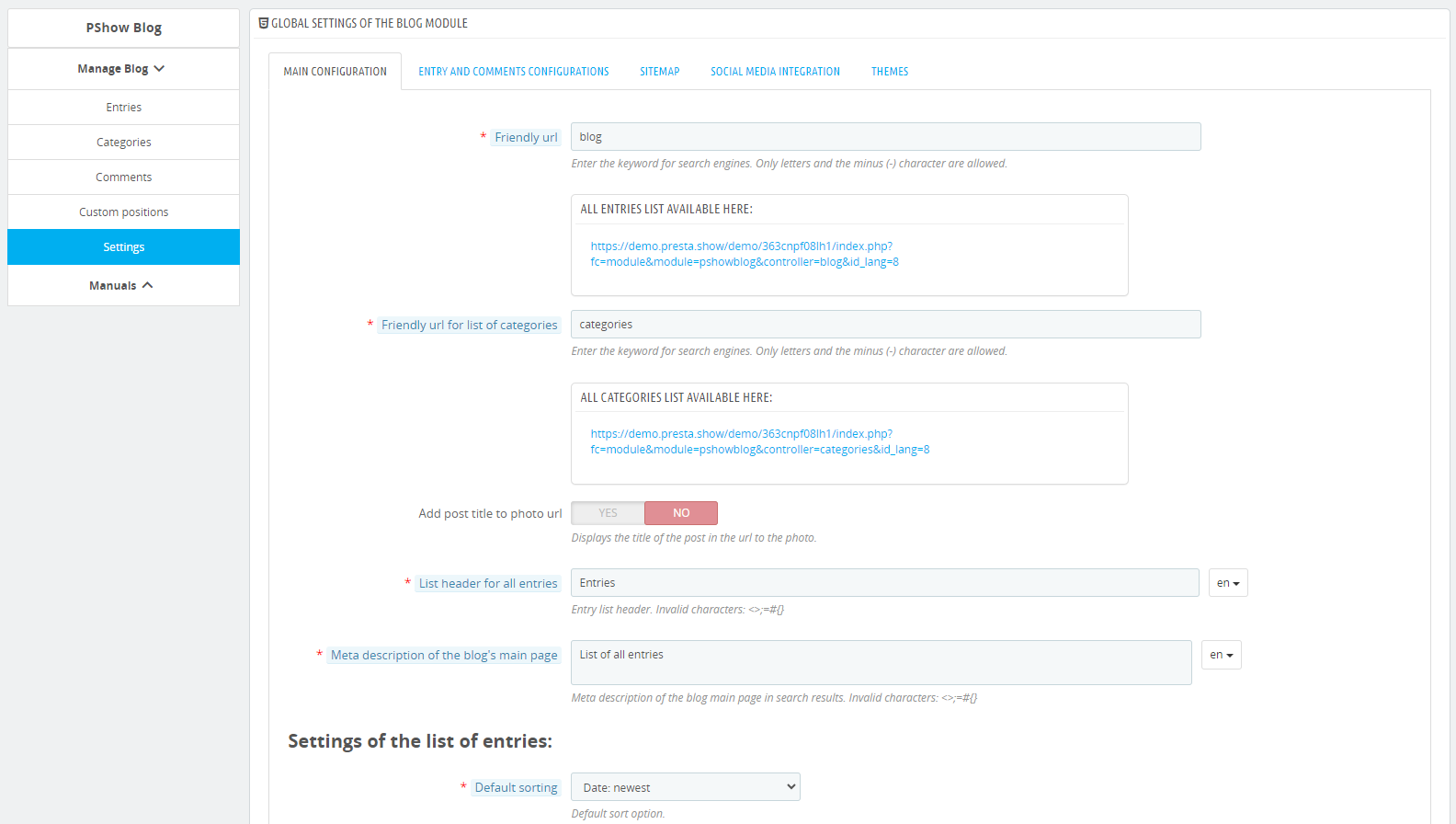
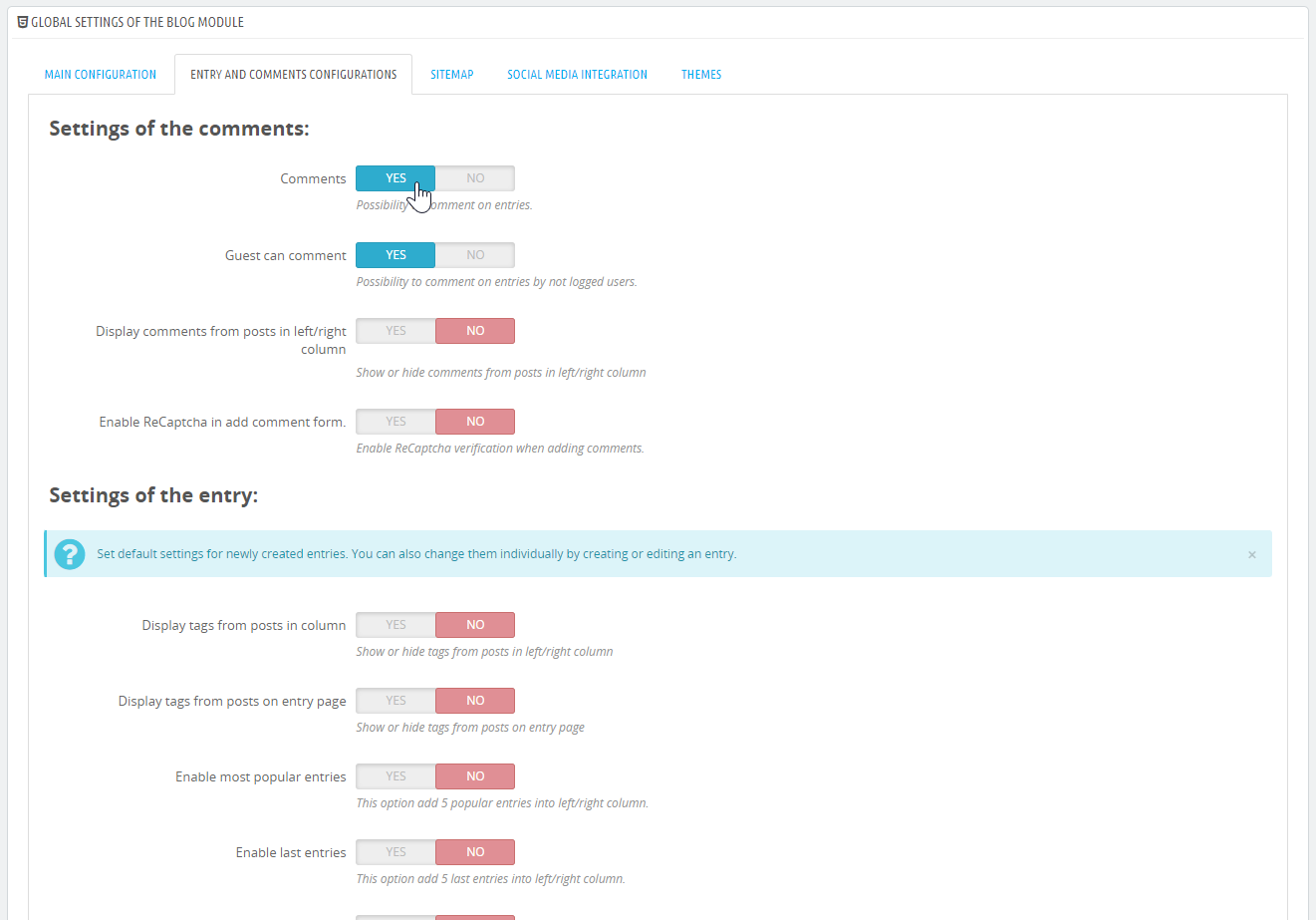
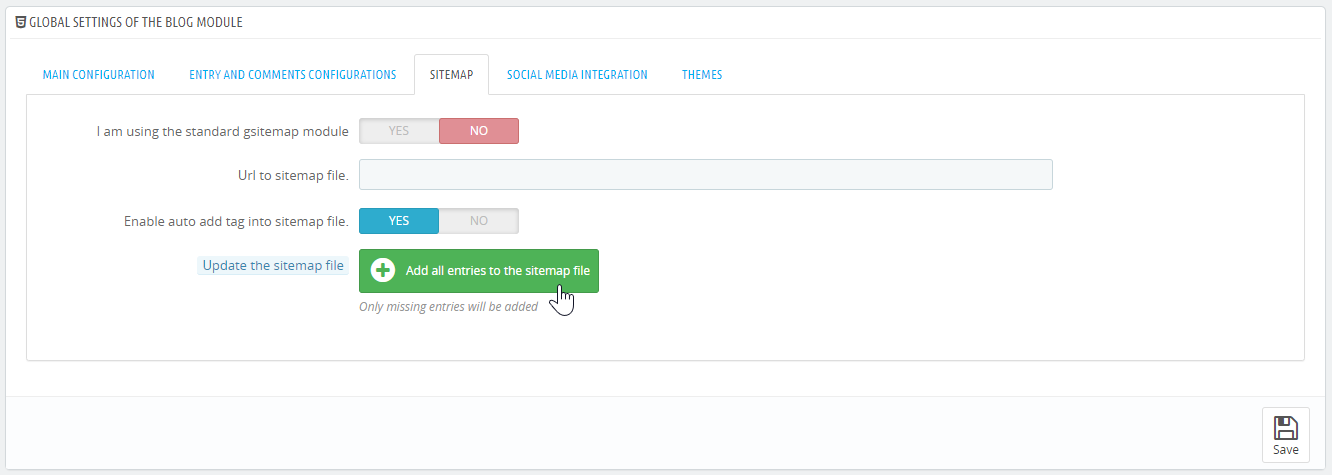
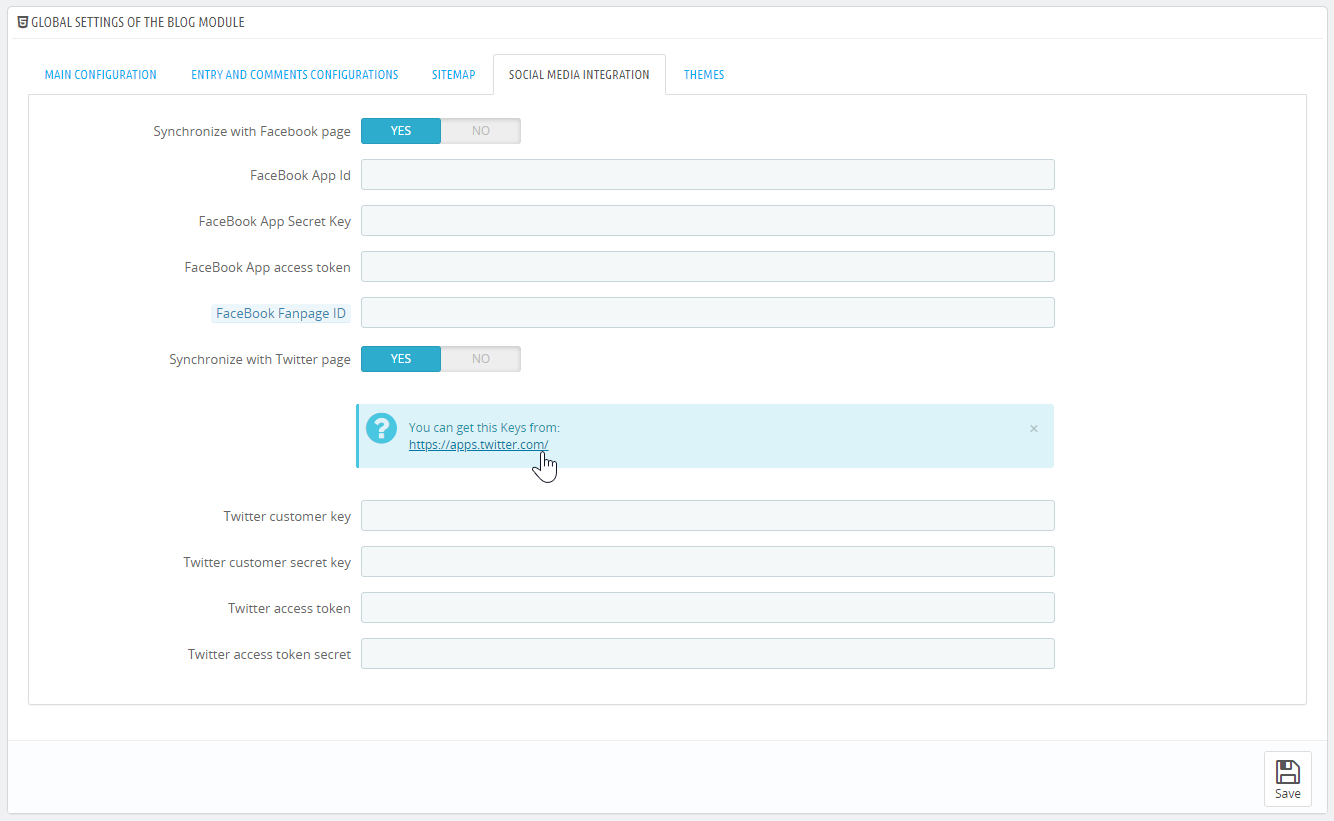
Description détaillée
Un système de blog dédié au eCommerce
Le module de blog pour votre boutique PrestaShop vous permettra de créer un blog interactif et des articles de vente à haute valeur SEO. Avec notre module, vous interagirez avec vos clients d'une nouvelle manière et commencerez à vendre plus.
Intégrez vos articles de blog à votre catalogue de produits
Vous pouvez inclure des produits de votre boutique dans le contenu de vos articles de la manière que vous souhaitez.
Les articles du blog renvoient automatiquement aux pages de catégories et de produits de votre boutique.
Éditeur moderne et réactif
L'éditeur de contenu en bloc vous permet de créer des articles avec des mises en page intéressantes. Les articles s'adaptent automatiquement aux ordinateurs de bureau et aux téléphones portables.

Augmentez la valeur SEO de votre boutique
Un modèle léger et une prise en charge complète des balises SEO pour les entrées et les catégories ouvriront la porte à de nouveaux résultats de recherche et à des clients potentiels.
Les paramètres d'analyse de votre boutique s'amélioreront : temps moyen passé sur la page, nombre de sessions et de clics, etc.
s'intègre aux médias sociaux
Vous pouvez insérer des messages sur votre page Facebook. Il suffit d'un clic.
Facile à entretenir
Dans le module, vous trouverez des modèles de blog prêts à l'emploi (looks) que vous pouvez modifier librement.
La configuration complète du module, les instructions et la documentation ne sont qu'une sélection des améliorations qui vous aideront à gérer un bon blog dans PrestaShop.
Le module a été conçu en conformité avec les directives de bonnes pratiques de Google pour les weblogs.
Si vous utilisez toutes les options SEO disponibles dans le module, votre boutique apparaîtra dans plus de résultats de recherche.
- JSON-LD pour tous les éléments du blog : liste des entrées, page d'entrée et images (modèle SEO-BLOG uniquement).
- URL conviviale et métabalises pour la liste d'entrée, la page d'entrée et les images.
- Possibilité de lier les pages de produits et de catégories aux entrées du blog en utilisant les balises PrestaShop.
- Code optimisé et compression des images.

Le module SEO Blog a un éditeur de contenu moderne intégré - complètement gratuit !
L'éditeur moderne vous permettra de créer du contenu multimédia mélangé avec des produits. Observez l'effet final dès la création. Les articles sont entièrement réactifs - ils seront sensationnels sur les ordinateurs et les appareils mobiles.

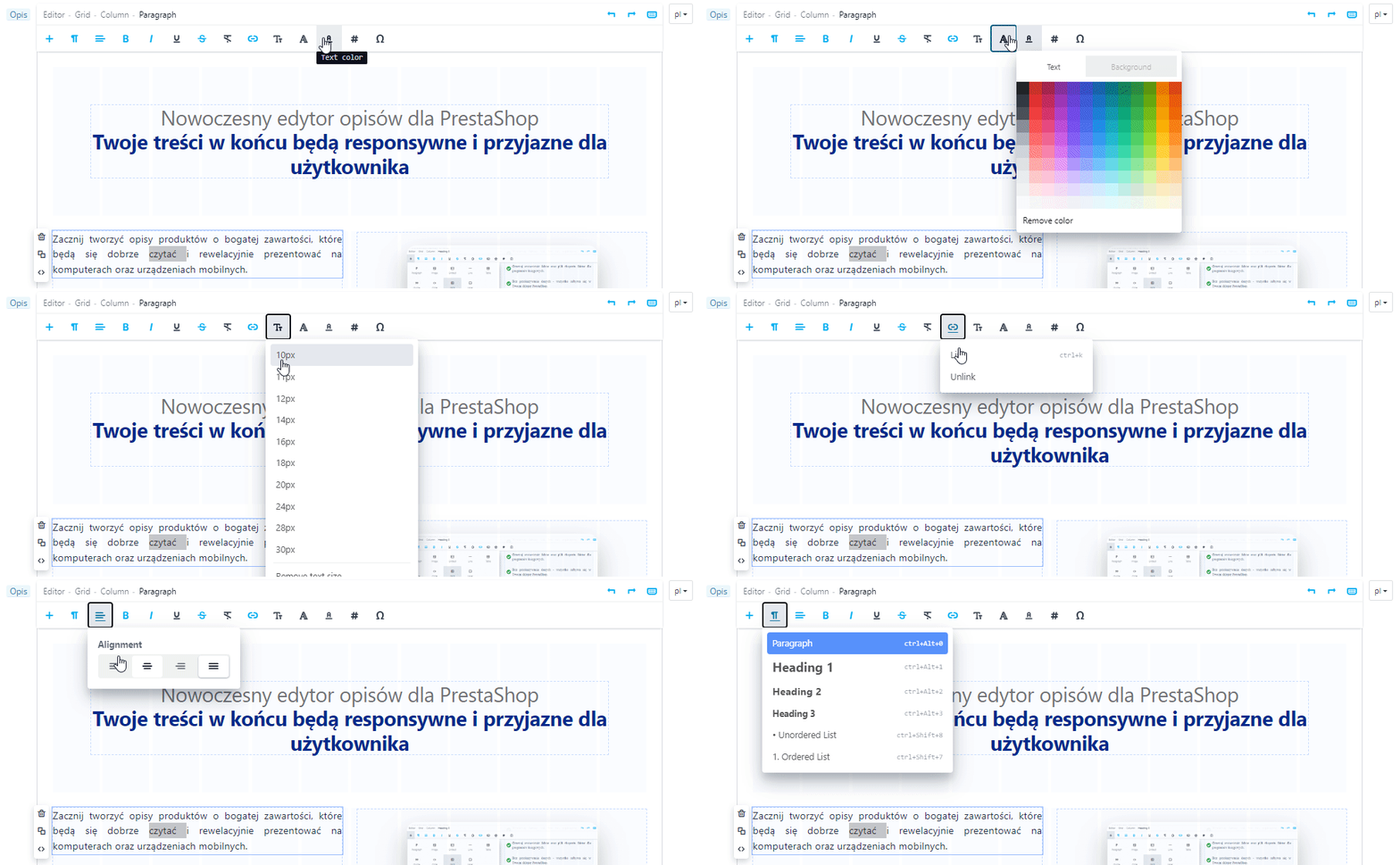
Vous pouvez placer des produits de votre boutique dans vos articles - librement et dans n'importe quelle position.
- Collez {Smart-Tag} dans l'article avec l'ID du produit pour afficher les produits dans l'article.
- L'apparence des produits dans l'entrée sera la même que dans la liste des produits de votre boutique. En modifiant les fichiers .tpl et .css, vous pouvez changer l'apparence du produit dans le contenu de l'article de blog.


Vous pouvez activer un moteur de recherche pour les articles du blog, qui apparaîtra au-dessus de la liste des articles.
Il est possible d'intégrer le blog au moteur de recherche de la boutique - voici un exemple. L'intégration avec le moteur de recherche de la boutique nécessite le travail d'un programmeur et est facturée en supplément - renseignez-vous sur l'intégration en ouvrant un ticket sur HelpDesk.


Tous les éléments du blog s'adaptent à la taille de l'écran.
Lors de la conception de l'apparence du module, nous nous sommes inspirés des meilleurs blogs sur Internet. Le look moderne du blog correspond à la plupart des modèles PrestaShop et est très facile à modifier.
Partager des articles sur Facebook

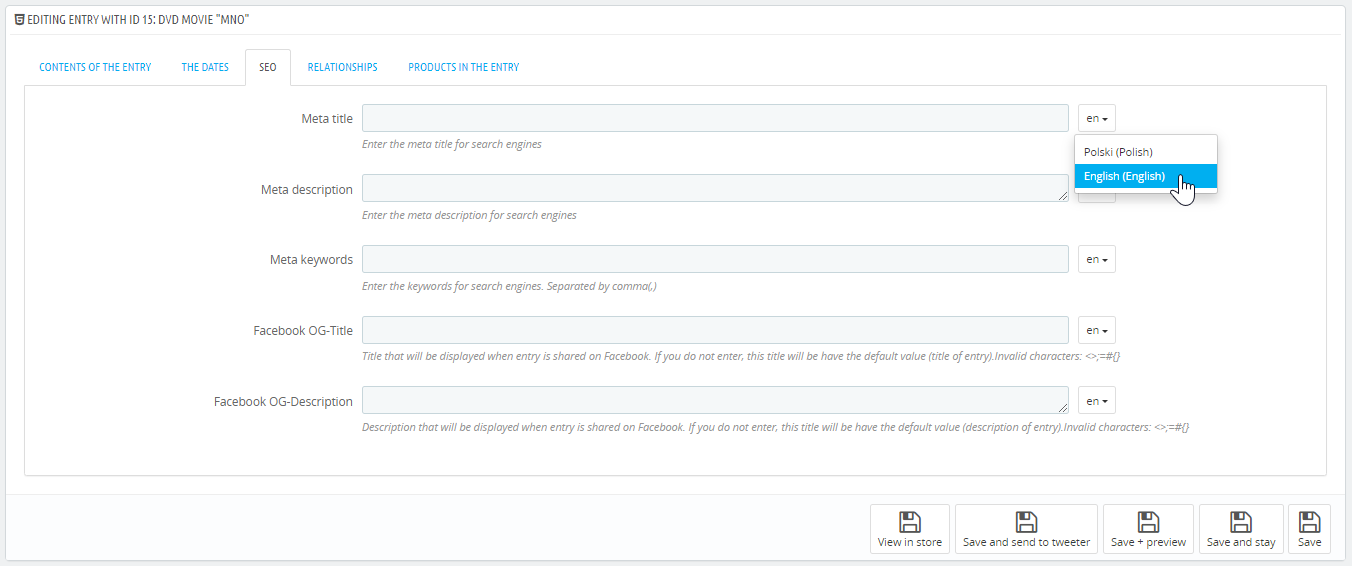
Utiliser les balises og:title et og:description pour décrire chaque article et chaque catégorie.
- Préparez des descriptions pour les médias sociaux.
- Les entrées que vous partagez auront un design esthétiquement agréable, par exemple en fonction de la limite de caractères.
- Partagez vos articles sur vos pages Facebook en un seul clic.
- Sur demande, nous pouvons intégrer le partage des articles avec d'autres portails de médias sociaux.

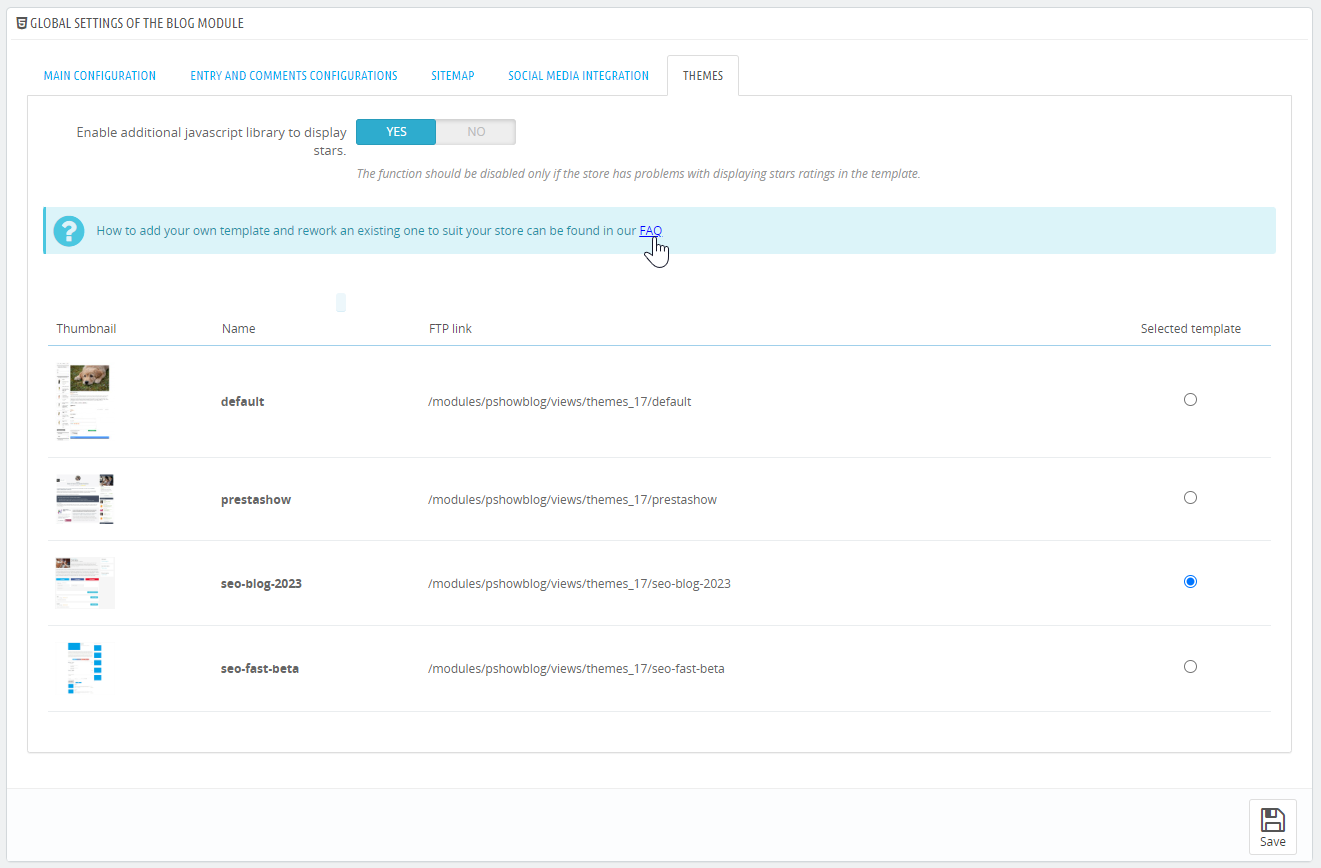
Le nouveau modèle "SEO-BLOG-2023" est réactif, léger et rapide, ce qui le rend très convivial pour les moteurs de recherche. Vous voulez créer votre propre template ? Clonez notre template et modifiez-le librement.

JSON-LD
Google recommande l'utilisation de JSONLD pour les données structurées, car il est optimal dans la mise en œuvre et facile à maintenir. Le module dispose d'un fichier JSON-LD dans lequel vous pouvez gérer vos données structurées.

Intégration avec Sitemap.xml
Les entrées de blog et les catégories sont automatiquement ajoutées au fichier sitemap.xml de votre boutique PrestaShop.

Planification de la publication des entrées
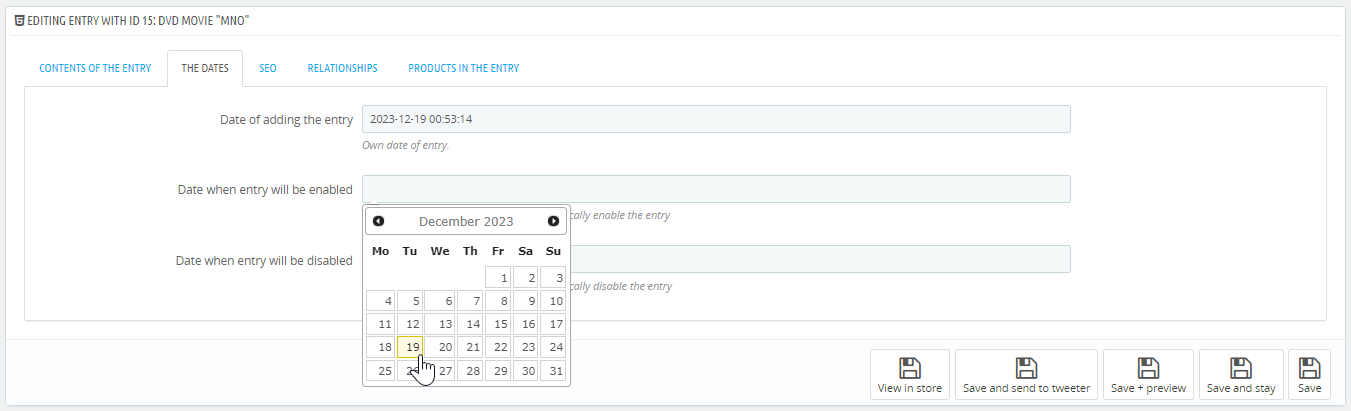
Créez des entrées et planifiez leur publication - définissez une date pour activer et désactiver automatiquement les articles.
Modèles et paramètres multiples
Pour vous.
Vous trouverez 4 modèles dans le module. Vous pouvez modifier chaque modèle dans les fichiers .css et .tpl pour l'adapter à l'apparence de votre boutique - dans la configuration du module, activez les fonctionnalités du blog que vous souhaitez utiliser : articles récents, commentaires, moteur de recherche, gestion des tags et plus encore....
Pour le développeur...
L'implémentation d'un modèle personnalisé est possible et nécessite le même travail que la création d'un modèle de boutique.


Entrées récentes, similaires, populaires
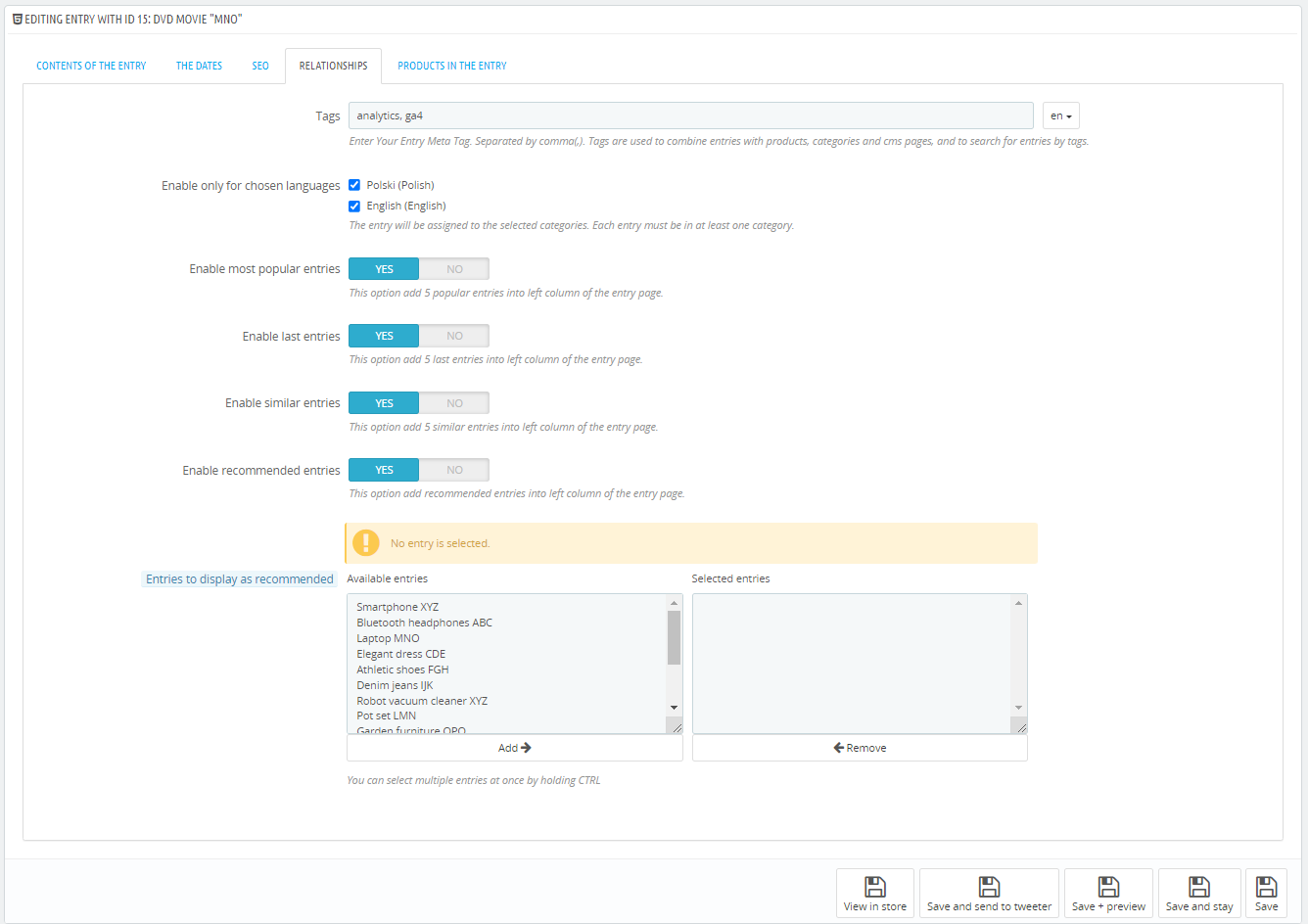
Vous pouvez afficher du contenu connexe sur les pages d'entrée afin d'encourager les clients à rester plus longtemps sur votre site.

Assistant de placement
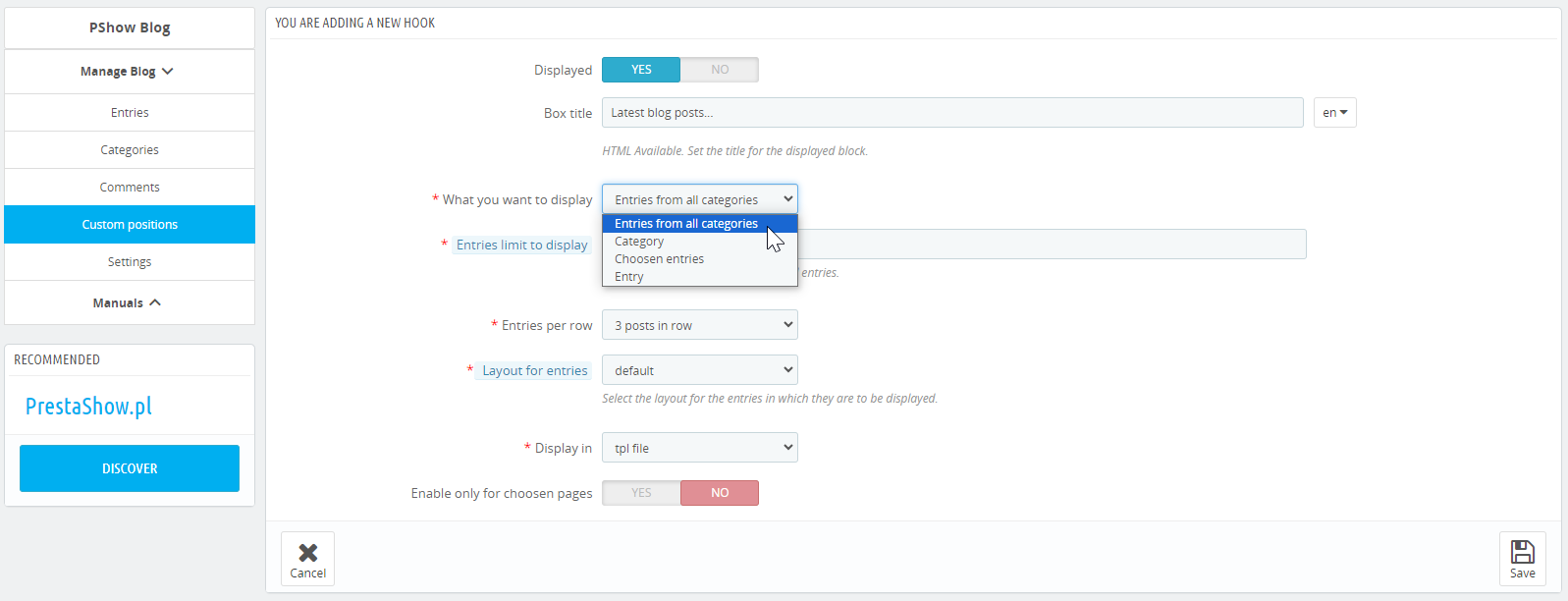
Dans le module, vous trouverez un assistant vous permettant d'afficher les entrées et les catégories à différents endroits de votre boutique - à l'aide de {Smart-Tag}.
Vous pouvez créer, par exemple, la dernière entrée dans la colonne de droite, les 3 dernières entrées sur la page de contact ou les 5 entrées les plus récentes sur la page d'accueil.

Prise en charge des schémas et des snippets riches
Le module dispose de modèles qui prennent toujours en charge les données structurées classiques Schema et Rich Snippets. Il vous appartient d'utiliser un modèle avec JSON-LD ou Schema Rich Snippets.
Facilités pour les développeurs
- Pour chaque entrée et pour chaque catégorie d'entrée, le module génère un {Smart-Tag} unique, que vous pouvez coller dans les fichiers .tpl de votre modèle de boutique.
- Grâce aux {étiquettes de mention}, vous pouvez facilement placer vos entrées n'importe où dans votre boutique et votre modèle.
- Les instructions sur la façon d'utiliser {Smart-Tags} peuvent être trouvées dans la documentation du module.
PrestaShop Multistore
- Le blog fonctionne avec PrestaShop Multistore. Vous pouvez utiliser le module pour maintenir un blog commun pour les boutiques dans le Multistore ou plusieurs blogs pour chaque boutique.
- Le support Multistore pour ce module est à un coût supplémentaire.

Traduction automatique du blog
PrestaShop Translator - traduira aussi automatiquement les articles de blog.
Vous pouvez profiter de la traduction automatique des articles de blog en utilisant le module PrestaShop Translator. Le module PrestaShop Translator doit être acheté séparément. Une fois installé, les deux modules fonctionnent ensemble.

Changelog (v1.99)
## v1.99.9 - 2026-10-02
### Added
- Option to override the left and right column templates in a layout or blog theme
## v1.99.8 - 2026-09-29
### Fixed
- Fixed losing selected products when saving a post
## v1.99.7 - 2026-09-29
### Fixed
- Fixed displaying blog blocks in multistore and saving posts with invalid field values
## v1.99.6 - 2026-09-22
### Fixed
- The author box on an author's own page no longer shows the "All posts by this author" button, which linked back to that same page. On blog post pages the button is unchanged.
## v1.99.5 - 2026-09-05
### Added
- Images inside a blog post's content now open enlarged in a lightbox when clicked, like product description images. It can be turned off with the new "Zoom entry content images on click" setting.
## v1.99.4 - 2026-08-31
### Added
- Blog list pages (home, category, tag, search) can now be sorted by "Recently updated" (orders entries by their last modification date). Enable it under the module's sort-options setting.
- Comments on a blog post now sort, paginate and change page size dynamically (AJAX), without reloading the whole page. Reloading the comment block no longer counts as an extra post view.
## v1.99.3 - 2026-08-28
### Fixed
- Language switcher and `hreflang` alternates on blog pages now point at the target language's own friendly URL. They previously reused the slug of the language being viewed (`/en/blog/43/`), which the blog answered with a 301 to the correct address, so every language version was linked through a redirect and Search Console reported the duplicated addresses
## v1.99.2 - 2026-08-27
### Fixed
- Heading levels 4 and 5 are now available in the content editor's block-format dropdown, which previously stopped at heading 3, and the built-in blog themes style them on the post page. Heading 3 got a matching size as well, so the whole scale steps down evenly, and headings placed inside a quote stay white on the dark quote background.
## v1.99.1 - 2026-08-26
### Fixed
- The recommended-posts stylesheet (`related-posts.css`) is now loaded after the list layout's own stylesheet, so its baseline rules reliably win the cascade instead of being overridden by same-specificity selectors a layout may define.
- Comment dates now use a semantic `` element carrying an ISO 8601 machine-readable value (the human-readable format stays as visible text) for better schema.org compliance, across all comment templates including the legacy theme system.
- The compatibility problem with prestashop 1.6
## v1.99.0 - 2026-08-25
### Fixed
- Improved the appearance of the recommended posts list on the blog post page.
## v1.98.0 - 2026-08-21
### Added
- Table of contents as a layout tag: block layouts can now place the entry's table of contents with a `[% toc %]` merge-tag.
### Changed
- The single-post "related posts" slot (`[% related_posts %]`) now renders the recommended entries as the blog LIST layout's tiles, so they match the entry list 1:1 instead of the legacy widget.
## v1.97.0 - 2026-08-20
### Added
- Block layouts can now ship an optional `custom.js` (in the layout's `views/themes//` folder, next to `style.css`). When present it is loaded automatically by the module on every front page that renders that layout
## v1.96.0 - 2026-08-19
### Added
- Optional "unify blog breadcrumb with the site breadcrumb" setting: the blog hands its full path (Blog / Category / Entry / ...) to the site breadcrumb (handled by PShow Modern Breadcrumb when installed, otherwise the shop's default breadcrumb) instead of drawing its own, so every blog page shows one consistent trail. Off by default; auto-detects the breadcrumb module.
## v1.95.0 - 2026-08-13
### Added
- Blog post authors: manage authors (avatar, name, short/long bio, email, LinkedIn) in a new "Authors" admin tab, pick a managed author on an entry, show an author box on the post (new `author_box` layout slot, added below the content in the built-in starters) and a per-author "all posts" page
## v1.94.0 - 2026-08-11
### Added
- Integration with the pshowfaq module
## v1.93.23 - 2026-08-10
### Fixed
- Trimmed dead CSS from the prestashow single-post layout starter
## v1.93.22 - 2026-08-07
### Fixed
- The comment form now falls back to the text captcha when reCAPTCHA is enabled but the site key is empty (was showing an empty, non-working reCAPTCHA widget)
## v1.93.21 - 2026-08-06
### Fixed
- The problem with recaptcha validation when send a comment
## v1.93.20 - 2026-08-05
### Fixed
- The problem with add images in the entry content
## v1.93.19 - 2026-07-30
### Fixed
- The problem with update the module
## v1.93.18 - 2026-07-27
### Added
- The layout editor and front-end rendering.
- Blog entries now store an estimated reading time (in minutes), computed automatically from the content per language and recomputed whenever an entry is saved.
## v1.93.17 - 2026-07-24
### Fixed
- Special characters typed in the blog search box are now shown back correctly in the search field.
## v1.93.16 - 2026-07-16
### Added
- Optional table of contents on a blog entry page, with a per-entry toggle. When the pshowtoc module is installed and enabled and the entry has the option turned on, the entry shows a table of contents above its content.
## v1.93.15 - 2026-07-14
### Fixed
- Old blog entry/category slugs (URL no longer matching the current `link_rewrite`) now redirect with the status the shop's own "Redirect to the canonical URL" setting (PS_CANONICAL_REDIRECT) asks for: 301 (Moved Permanently) when set to 301, 302 (Moved) when set to 302, and no forced redirect when set to "no redirection" - mirroring core `FrontController::canonicalRedirection()`. Previously the redirect went through core `Tools::redirectLink()`, which sends no explicit status and defaults to 302 regardless of that setting; an interim fix then hardcoded an unconditional 301 instead, which was equally wrong because it ignored the setting in the other direction. The 404 (not-found) branch is unaffected.
## v1.93.14 - 2026-07-13
### Fixed
- Blog listing and category pages no longer have a duplicate (and conflicting) canonical tag. The module's body templates (post-list.tpl) emitted a `` without pagination parameters alongside the correct paginated canonical already present in `` (via hookDisplayHeader / PS core). Removed the canonical from all listing templates across all themes; canonical for listing pages is now handled exclusively by PS core in ``.
- Single blog post pages no longer have a duplicate canonical tag. The single-post.tpl templates emitted a canonical in the body in addition to the one already in `` via hookDisplayHeader. Removed the redundant canonical from all single-post templates; the one in `` (set via the `blog_canonical` Smarty variable) is now the sole canonical. The og:url, og:title, og:description and og:image meta tags in single-post.tpl are unchanged.
## v1.93.13 - 2026-07-10
### Fixed
- Saving a custom position (hook) with the "Category" type no longer fails with "The id_entry field is invalid." on PrestaShop 8.x. The unused entry/category fields are now cleared before validation, so a category position (which has no entry) validates correctly. PrestaShop 9 was unaffected.
## v1.93.12 - 2026-07-02
### Fixed
- The blog tag page (/tag) no longer throws a fatal error on PHP 8. The page total was computed with count() over values that are already integers, which PHP 8 rejects with "count(): Argument #1 must be of type Countable|array, int given"; pagination now uses a dedicated helper that works on the scalars directly.
- Tags shown under an article and on the blog category page now read with spaces again instead of underscores (for example "ojciec chrzestny" rather than "ojciec_chrzestny"). The underscore form is kept only where it belongs - inside the tag URL.
## v1.93.11 - 2026-07-02
### Fixed
- The compatibility problem with prestashop 8+
## v1.93.10 - 2026-06-30
### Fixed
- The Back Office entry form ("Products in the entry" tab) no longer shows a saved product as "undefined ( ref: undefined)". A product attached to an entry that had no cover image (or was inactive/hidden) was dropped by the product query and rendered as a blank "undefined" row; it now falls back to the product's name and reference so it stays visible and removable in the form.
## v1.93.9 - 2026-06-16
### Changed
- Faster "latest entries" blocks: the homepage/sidebar lists now load their comment counts and ratings in a couple of queries instead of one per post, and the blog comments table gained an index - noticeably less database load on shops with many posts.
### Fixed
- "Latest entries" are now ordered by publication date rather than the order posts were created, so re-dated or back-dated posts appear in the right place.
- Latest-entries lists requested without a shop context no longer skip the active/visibility filter (they could show hidden posts).
## v1.93.8 - 2026-06-16
### Fixed
- The content editor no longer fires a redundant background product request for every page element that carries a product id (for example the "lowest price in 30 days" badge). Only real product blocks placed with the editor now load product data, which removes a large volume of needless requests that were overloading the server, especially under crawler traffic.
- The editor's storefront script now refreshes right after a module update, even behind a CDN cache such as Cloudflare, so fixes take effect immediately.
### Security
- The editor's product-data endpoint is now excluded from search-engine indexing and only answers same-origin requests.
## v1.93.7 - 2026-06-16
### Fixed
- Replacing or removing a blog entry image now deletes every version of the file on disk, so the new cover shows on the storefront instead of an old leftover copy
- Blog images now refresh on the storefront right after they are changed, even behind a CDN cache like Cloudflare
## v1.93.6 - 2026-06-16
### Security
- Hardened the comment form against automated submissions that could bypass the CAPTCHA
- Hardened blog data handling against malicious input
- Image uploads now reject files that are not real images
### Changed
- Blog entry start/end dates are now stored as empty instead of a placeholder date, fixing save errors on newer databases (MySQL 8)
- Expired entries are now deactivated by the cron task (with a throttled fallback) instead of on every page render, for faster pages
### Removed
- Removed the outdated, unmaintained automatic publishing to Facebook/Twitter (the article "share" buttons on the storefront stay)
### Fixed
- Uninstall now removes all of the module's tables and settings, leaving no leftovers
## v1.93.5 - 2026-05-14
### Fixed
- Guarded the star-rating script on the storefront so it no longer errors when the rating feature is disabled
## v1.93.4 - 2026-05-13
### Fixed
- Translations in admin panel
## v1.93.2 - 2026-04-21
### Fixed
- The problem with SEO
## v1.93.1 - 2026-04-13
### Fixed
- Link for the very first post listing page in pagination
## v1.93.0 - 2026-03-26
### Fixed
- Blog theme thumbnail in module settings
- Post list view in prestashow theme
- Single post view in prestashow theme
- Comments per page
- Entries sorting
- Go to page on post list
### Added
- Demo images
- seo-fast-beta blog theme as deprecated
## v1.92.31 - 2026-03-10
### Fixed
- The problem with the entry list performance
## v1.92.30 - 2026-02-03
### Fixed
- Improved SEO for the post listing page
## v1.92.29 - 2026-01-09
### Fixed
- The problem with update the module
## v1.92.28 - 2026-01-09
### Fixed
- Error while trying to open blog entry on the front (missing file)
## v1.92.27 - 2025-11-27
### Fixed
- The problem with undefined variables
## v1.92.26 - 2025-11-13
### Fixed
- The compatibility problem with prestashop 8.2
## v1.92.25 - 2025-10-23
### Fixed
- The problem with entries comments
## v1.92.24 - 2025-10-22
### Added
- Compatibility with PrestaShop 9
## v1.92.22 - 2025-06-18
### Fixed
- Do not load block editor assets while pshoweditor installed
## v1.92.21 - 2025-06-16
### Fixed
- The compatibility problem with pshoweditor module
## v1.92.20 - 2024-11-07
### Added
- The ability to add entries to sitemap files in cron
## v1.92.19 - 2024-10-30
### Fixed
- The problem with duplicate entries in sitemap files
## v1.92.18 - 2024-08-30
### Fixed
- The problem with add entries to the sitemap
## v1.92.17 - 2024-08-18
### Fixed
- PL translations
## v1.92.16 - 2024-07-23
### Fixed
- The problem with urls to categories
## v1.92.15 - 2024-07-06
### Fixed
- The problem with styles on the page of entry
## v1.92.14 - 2024-07-04
### Fixed
- The problem with the buttons to go to the next/previous entry
## v1.92.13 - 2024-06-10
### Fixed
- The problem with add photo to blog category
## v1.92.12 - 2024-06-03
### Fixed
- The module optimization
## v1.92.11 - 2024-04-17
### Fixed
- The problem with display the block editor in multistore
## v1.92.10 - 2024-04-12
### Added
- The new version of the block editor
## v1.92.9 - 2024-04-03
### Fixed
- The problem with sorting entries
## v1.92.8 - 2024-02-24
### Fixed
- The problem with non-exist static function in module settings
## v1.92.7 - 2024-02-17
### Fixed
- The problem with save module settings
## v1.92.6 - 2024-01-15
### Fixed
- The problem with save module settings in the context of a single store in a multistore
## v1.92.5 - 2024-01-08
### Fixed
- Editor loading
## v1.92.4 - 2023-12-29
### Fixed
- The problem with save module settings in multistore
## v1.92.3 - 2023-12-13
### Fixed
- Demo content
## v1.92.2 - 2023-12-09
### Added
- The ability to enable/disable additional javascript libraries for displaying star ratings.
## v1.92.1 - 2023-12-05
### Fixed
- The compatibility problem with prestashop 1.6
## v1.92.0 - 2023-12-01
### Added
- Allow image uploading in the editor
### Fixed
- Updated block editor
## v1.91.28 - 2023-11-21
### Added
- Added missing translations for left-column section
### Fixed
- Updated thumb and screenshot images of the seo-blog-2023 template
- Updated background-color of the social media buttons for seo-blog-2023 template
- Block editor
## v1.91.27 - 2023-10-27
### Fixed
- The problem with invalid rewrite link when saving a entry
## v1.91.26 - 2023-10-20
### Fixed
- The problem with pagination and sorting in lists of entries
## v1.91.25 - 2023-10-18
### Fixed
- Changed label hint type from "hint" to "desc" (where possible) in module settings
- Fix block editor css
### Added
- Added missing translations for help blocks
- Added missing help block sections for those labels that did not have such sections
## v1.91.24 - 2023-10-16
### Fixed
- The problem with display entries in categories
## v1.91.23 - 2023-10-13
### Removed
- Removed google plus option in module settings
### Fixed
- Fixed grid layout of the entry elements (for entries when column in a row are set for more than 1 in entry list page)
- Fixed misleading label ('Entries per row') in 'Settings of the list of entries:' section of module settings
- Changed max-width and padding-top of the configuration fieldset wrapper in order to get rid of empty spaces around the wrapper
- Fixed visual problem with entry list in 'seo-blog-2023' when 4 or 3 entries are in row
- Added minor visual fixes for entry list of the seo-blog-2023 template
- Increased margin between elements on entry list page (for the right column between elements that are placed there. Also increased the bottom margin for elements in the entry list)
- The problem with save the meta description for entry
### Added
- Added 'desc' hint type of information in module settings. Replaced 'hint' cue by using 'desc' type of cue.
- Added dynamic column view - entries will stack appropriately one below the other in several columns without leaving blank spaces in case of, for example, missing photos or differences in the length of the article introduction
## v1.91.22 - 2023-09-14
### Fixed
- The problem with displaying the correct count of assigned entries to categories in the list of categories
- The problem with editing the content of the post after installing the "PShowEditor" module
### Added
- The button to go to the entry page in editing the entry
## v1.91.21 - 2023-07-04
### Fixed
- The problem with saving the hook with entries from the selected category
- The problem with displaying disabled entries as next/previous from a category
## v1.91.20 - 2023-05-24
### Fixed
- The problem with warnings in the module
## v1.91.19 - 2023-04-17
### Fixed
- The problem with missing phrase in module translation
## v1.91.18 - 2023-04-07
### Fixed
- The problem with right column in some templates
## v1.91.17 - 2023-04-06
### Fixed
- The problem with redirection to friendly link for the selected language
## v1.91.16 - 2023-03-03
### Fixed
- The problem with displaying breadcrumbs on blog pages
## v1.91.15 - 2023-02-28
### Fixed
- The problem with module installation
## v1.91.14 - 2023-02-14
### Added
- The missing css styles
## v1.91.13 - 2023-02-10
### Fixed
- The problem with displaying products in blog entries
## v1.91.12 - 2023-01-19
### Added
- The demo content
## v1.91.11 - 2023-01-13
### Fixed
- The problem with compatibility with some photo to webp converters
- The problem with deleting categories
## v1.91.10 - 2023-01-03
### Fixed
- The problem with displaying entries from categories in hooks
## v1.91.9 - 2022-12-29
### Fixed
- The problem with update module
## v1.91.8 - 2022-12-23
### Added
- Added a canonical link for the main page of the blog and category pages of entries
## v1.91.7 - 2022-12-06
### Fixed
- The problem with placing several hooks with products in blog entries
## v1.91.6 - 2022-11-21
### Fixed
- The problem with adding links in several languages to the sitemap
## v1.91.5 - 2022-09-26
### Fixed
- The problem with disabling the display of selected modules in hooks on blog pages
## v1.91.4 - 2022-07-21
### Fixed
- The problem with displaying category names in lists of entries in hooks.
## v1.91.3 - 2022-07-20
### Fixed
- The problem with version of module.
## v1.91.2 - 2022-07-19
### Added
- The ability to edit the date of adding the entry.
### Fixed
- The problem with displaying incorrect date of adding an entry in the lists of entries in hooks.
## v1.91.1 - 2022-07-04
### Fixed
- The problem with duplicate entries in the recommended entries list.
## v1.91.0 - 2022-04-12
### Removed
- Rich snippets from hooks
- Rich snippets with product listings in the entries
## v1.90.0 - 2022-03-29
### Fixed
- Fix duplicating entries in the multi-store mode
- Fix displaying the list of categories in the edit of entry
- Fix disappearing titles and descriptions of entries in the multi-store mode
v1.89 - 14.02.2022
* ADD Multistore support
* FIX Compatibility with prestashop 1.7.8.3
v1.88 - 11.12.2021
* FIX Problem with adding your own layouts
v1.87 - 01.12.2021
* in the entry settings, the option to enable displaying only products with an stocks status greater than zero in the entry has been added
v1.86 - 22.11.2021
* the problem with displaying related posts by tags has been fixed
v1.85 - 15.09.2021
* the font problem in the blog template has been fixed
v1.84 - 06.09.2021
* pagination problem has been fixed
v1.83 - 23.08.2021
* Gallery option has been removed. If you are User of gallery option check our new module PrestaShop Albums & Galleries:
https://prestashow.pl/4-.html
* the problem with a template for entries grid has been fixed
v1.82 - 11.08.2021
* the problem with pagination in the list of entries has been fixed
v1.81 - 05.08.2021
* problem with urls for entries has been fixed
v1.80 - 19.07.2021
* fixed a problem with header
v1.79 - 19.07.2021
* fixed issue with displaying associated entries
v1.78 - 17.07.2021
* album duplicate issue in the backoffice has been fixed
* fixed an issue with incomplete urls to entries
* the problem with saving the selected template has been fixed
v1.77 - 26.05.2021
* fixed a problem with expanding and collapsing tabs in the module side menu
* problem with displaying descriptions has been fixed
v1.76 - 21.01.2021
*fixed module installation problems
*the module has been adapted to newer php versions
*fixed module performance issues
v1.75 - 29.12.2020
*added the ability to display post titles in photo urls
*added the ability to select the main category for the post
*problems with translations has been fixed
v1.74 - 23.12.2020
*a new blog template has been added
*added box title display in hook list
*added the ability to override tpl files for left / right columns by adding these files to template
v1.73 - 09.12.2020
*SEO improvement in H1 blog post tags
*changed the variable "description" to "articleBody" in the schema data on post pages
v1.72 - 23.11.2020
*the file structure in templates has been changed to a simpler one
*bugs in module settings have been fixed
*fixed issue with generating thumbnails
*added the ability to add a meta description for the main blog page in the module settings
v1.71 - 27.08.2020
*NEW! notifications about new comments are now available in back office dashboard
*fixed problems with added first entry
*fixed problems compatibility with latest prestashop version
v1.70 - 23.05.2020
*fixed problems with similar entries
*fixed problems with hooks
v1.69 - 05.03.2020
*hooks management in module has been improved
v1.68 - 30.01.2020
*added the ability to place your own layouts of entries in the templates
*new template added
*fixed issues with related entries
v1.67 - 13.01.2020
*fixed problems with new template and images
v1.66 - 23.12.2019
*adding a new template
*added option to set thumbnails size
v1.65 - 04.10.2019
*fixed design of module
v1.64 - 31.08.2019
*separation of categories and entries in the module
*fixed problem with sorting entries
v1.63 - 23.08.2019
*added the option to choose a template for the page of entry and list of entries
*fixed problems with save entry
v1.62 - 31.07.2019
*the ability to enable entry only for chosen languages
v1.61 - 22.05.2019
*the ability to change the size of thumbnails has been added in gallery
v1.60 - 24/04/2019
*fixed problem with performance
*the way of module upgrade to the newer version has been changed
*fixed problem with js when jquery files load at the end of the page
v1.59 - 09/04/2019
*a quick preview of the entry in its edition has been added
v1.58 - 28/03/2019
*changed the look of blog settings and the look of entry edit to more friendly
v1.57 - 12/02/2019
*added the ability to display page with list of categories from blog
v1.56 - 02/01/2019
*added the ability to set width of albums in row
v1.55 - 22/12/2018
*added gallery to blog
v1.54 - 17/12/2018
*added the ability to select sorting options to be available in the list of entries
*added the ability to show or hide the rating in entry
*added the ability to show or hide the public date in entry
*added the ability to show or hide the comments count in entry
*added the ability to show or hide the author in entry
*added translations to new texts
*fixed few bugs
v1.53 - 11/12/2018
*added the ability to show or hide comments from posts in column
*added the ability to show or hide tags from posts in column
v1.52 - 12/11/2018
*added thumbnails to images
v1.51 - 08/10/2018
*full compatibility with the right column has been added
*added the ability to display the category of entries in the column
v1.50 - 05/10/2018
*fixed problems with display products and hooks in content of entry
*fixed compatibility with prestashop 1.7
*fixed problems with empty meta data variables in prestashop 1.7
v1.49 - 04/10/2018
*fixed problems with products in entry
*added the ability to add hooks into content of entry
v1.48 - 20/09/2018
*improving the appearance for prestashop 1.7
v1.47 - 10/08/2018
*fixed problem with duplicate links
v1.46 - 13/07/2018
*fixed bugs with save of entry
*fixed problems with products in content of blog entry
v1.45 - 12/07/2018
*fixed bugs in prestashop version 1.7
v1.43 - 07/07/2018
*the better look of the blog on the front has been added
v1.42 - 18/06/2018
*fixed problems with add hooks
v1.41 - 13/06/2018
*added translations
*fixed problem with install
v1.40 - 09/05/2018
*added the ability to enabled associations blog entries with categories, products and cms pages by tags
*fixed problem with edit of tags in entries
v1.39 - 05/05/2018
*fixed a problems with add urls into sitemap file
*added the ability to display products from categories on entry page
*added the ability to add tags urls into sitemap file
v1.38 - 04/05/2018
*fixed a problems with comments in copies of entry
v1.37 - 01/05/2018
*added the ability to copy entry into another category in edit of entry
v1.36 - 28/04/2018
*fixed a problem with meta data in hooks
v1.35 - 26/04/2018
*fixed a problem with front pages
*added the ability to add own description and title of og tag for category page
v1.34 - 23/04/2018
*added the recommended entries in entry page
*fixed a problem with meta data
v1.33 - 10/04/2018
*added the comments on category page
*fixed a problem with schema objects
v1.32 - 09/04/2018
*added the ability to add image for category
*fixed problems with add category and entry
*fixed front page of entry
v1.31 - 06/04/2018
*fixed bugs
v1.30 - 04/04/2018
*added the ability to add description for category
*added the ability to add meta title, meta description and meta keywords for category and entry
*fixed bugs with add entry
*fixed bugs with frontend pages
v1.29 - 29/03/2018
*fixed bugs
v1.28 - 27/03/2018
*fixed problems in blog settings
v1.27 - 23/03/2018
*added reviews for comments
*fixed bugs
v1.26 - 19/03/2018
*fixed bug with changelog
v1.25 - 15/03/2018
*added auto send entry into facebook and twitter
*added og tags for entry page
*added buttons for shared entry to social media
*added the ability to choosen page for hook
*added the ability to display products on entry page
*added the ability to display choosen entries in hook
*added the ability to add own description and title of og tag for entry page
*added the ability to search entries by name and content
*added tags on entry page
*added similar, popular and last entries into left column
v1.24 - 24/01/2018
*added instruction for recaptcha to settings tab
v1.23 - 24/01/2018
*added recaptcha
v1.22 - 19/12/2017
*fixed problems with sql queries
v1.21 - 18/11/2017
*fixed bugs with sitemap file
v1.20 - 17/10/2017
*fixed bugs with sitemap file
*added info about path to sitemap file
v1.19 - 04/10/2017
*added info alerts
v1.18 - 18/08/2017
*fixed bugs
v1.17 - 18/08/2017
*added support for sitemap.xml files
v1.16 - 20/01/2017
*added compatibility with prestashop 1.7+
v1.15 - 05/01/2017
* fix a problem with too big photo
* fix a problem with added entry
* fix a problem with visibility entries
* fix a problem with uninstall module
* fix a problem with deleted categories
* back office fixes
v1.13 - 25/07/2016
* added optional title to hook management
v1.13 - 27/06/2016
* font view improvements
v1.12 - 21/06/2016
* back office improvements
v1.11 - 21/06/2016
* added 'active' option for categories
* improved seo
* fixed breadcrumb view
v1.10 - 09/03/2016
* added captcha for not logged users
v1.9 - 02/03/2016
* hooks manager - now displays entries from all categories
* back office improvements
v1.8 - 03/02/2016
* PrestaShop 1.5 front view compatibility
* small fixes for back office readability
* added comments management
* added option to disable comments for a single entry
* added sort entries
v1.7.8 - 21/01/2016
* reported bugs fixed
* front view fixes
* improved image management
* added 'active' option for entries
* added new settings
* added seo links for PrestaShop >= 1.5.6.0
* PrestaShop 1.5 backward compatibility
v1.7.6 - 20/01/2016
* reported bugs fixed
v1.7.5 - 14/01/2016
* bugs fixed
v1.7.4 - 14/01/2016
* bugs fixed
v1.7.3 - 07/01/2016
* pagination bug fixed
* front view updated
v1.7.2 - 07/01/2016
* system bug fixed
v1.7.1 - 07/01/2016
* bugs fixed
v1.7.0 - 07/01/2016
* added manual
* stats of entries views
* blog category list in left column
* added 'short content' to entry form
* fixed images upload & view
* comments count next to the date
* breadcrumb improved
* added meta data
* using hooks in the entry content
* categories list bug fixed
* no comment info
* reported bugs fixed
* other view fixes
v1.6.9 - 19/12/2015
* skeleton updated v2.2.2
v1.6.8 - 15/12/2015
* small fixes for PrestaShop 1.5 support
v1.6.7 - 15/12/2015
* skeleton updated
v1.6.6 - 14/12/2015
* system updated
v1.6.5 - 14/12/2015
* system updated
v1.6.4 - 10/12/2015
* fixed system bug
v1.6.3 - 10/12/2015
* fixed reported bugs
v1.6.2 - 03/12/15
* friendly urls
* breadcrumb fixes
v1.6.1 - 24/11/15
* small bugs fixed
v1.6.0 - 19/11/15
* comments with configuration
* entry image
* tinyMCE editor fixed
* entries count on categories list
v1.5.1 - 17/11/15
* skeleton updated
v1.5.0 - 16/11/15
* skeleton updated
v1.4.0 - 15/11/15
* new skeleton
* added tinymce editor
v1.1.1
* fixed small config bug
v1.1.0
* blog categories list in left column if in module front controller
* fixed database schema bug
v1.0.0
* manage categories and entries
* assign category/entry to any hook from PrestaShop
* call module from tpl files and CMS pages
### Added
- Option to override the left and right column templates in a layout or blog theme
## v1.99.8 - 2026-09-29
### Fixed
- Fixed losing selected products when saving a post
## v1.99.7 - 2026-09-29
### Fixed
- Fixed displaying blog blocks in multistore and saving posts with invalid field values
## v1.99.6 - 2026-09-22
### Fixed
- The author box on an author's own page no longer shows the "All posts by this author" button, which linked back to that same page. On blog post pages the button is unchanged.
## v1.99.5 - 2026-09-05
### Added
- Images inside a blog post's content now open enlarged in a lightbox when clicked, like product description images. It can be turned off with the new "Zoom entry content images on click" setting.
## v1.99.4 - 2026-08-31
### Added
- Blog list pages (home, category, tag, search) can now be sorted by "Recently updated" (orders entries by their last modification date). Enable it under the module's sort-options setting.
- Comments on a blog post now sort, paginate and change page size dynamically (AJAX), without reloading the whole page. Reloading the comment block no longer counts as an extra post view.
## v1.99.3 - 2026-08-28
### Fixed
- Language switcher and `hreflang` alternates on blog pages now point at the target language's own friendly URL. They previously reused the slug of the language being viewed (`/en/blog/43/`), which the blog answered with a 301 to the correct address, so every language version was linked through a redirect and Search Console reported the duplicated addresses
## v1.99.2 - 2026-08-27
### Fixed
- Heading levels 4 and 5 are now available in the content editor's block-format dropdown, which previously stopped at heading 3, and the built-in blog themes style them on the post page. Heading 3 got a matching size as well, so the whole scale steps down evenly, and headings placed inside a quote stay white on the dark quote background.
## v1.99.1 - 2026-08-26
### Fixed
- The recommended-posts stylesheet (`related-posts.css`) is now loaded after the list layout's own stylesheet, so its baseline rules reliably win the cascade instead of being overridden by same-specificity selectors a layout may define.
- Comment dates now use a semantic `` element carrying an ISO 8601 machine-readable value (the human-readable format stays as visible text) for better schema.org compliance, across all comment templates including the legacy theme system.
- The compatibility problem with prestashop 1.6
## v1.99.0 - 2026-08-25
### Fixed
- Improved the appearance of the recommended posts list on the blog post page.
## v1.98.0 - 2026-08-21
### Added
- Table of contents as a layout tag: block layouts can now place the entry's table of contents with a `[% toc %]` merge-tag.
### Changed
- The single-post "related posts" slot (`[% related_posts %]`) now renders the recommended entries as the blog LIST layout's tiles, so they match the entry list 1:1 instead of the legacy widget.
## v1.97.0 - 2026-08-20
### Added
- Block layouts can now ship an optional `custom.js` (in the layout's `views/themes//` folder, next to `style.css`). When present it is loaded automatically by the module on every front page that renders that layout
## v1.96.0 - 2026-08-19
### Added
- Optional "unify blog breadcrumb with the site breadcrumb" setting: the blog hands its full path (Blog / Category / Entry / ...) to the site breadcrumb (handled by PShow Modern Breadcrumb when installed, otherwise the shop's default breadcrumb) instead of drawing its own, so every blog page shows one consistent trail. Off by default; auto-detects the breadcrumb module.
## v1.95.0 - 2026-08-13
### Added
- Blog post authors: manage authors (avatar, name, short/long bio, email, LinkedIn) in a new "Authors" admin tab, pick a managed author on an entry, show an author box on the post (new `author_box` layout slot, added below the content in the built-in starters) and a per-author "all posts" page
## v1.94.0 - 2026-08-11
### Added
- Integration with the pshowfaq module
## v1.93.23 - 2026-08-10
### Fixed
- Trimmed dead CSS from the prestashow single-post layout starter
## v1.93.22 - 2026-08-07
### Fixed
- The comment form now falls back to the text captcha when reCAPTCHA is enabled but the site key is empty (was showing an empty, non-working reCAPTCHA widget)
## v1.93.21 - 2026-08-06
### Fixed
- The problem with recaptcha validation when send a comment
## v1.93.20 - 2026-08-05
### Fixed
- The problem with add images in the entry content
## v1.93.19 - 2026-07-30
### Fixed
- The problem with update the module
## v1.93.18 - 2026-07-27
### Added
- The layout editor and front-end rendering.
- Blog entries now store an estimated reading time (in minutes), computed automatically from the content per language and recomputed whenever an entry is saved.
## v1.93.17 - 2026-07-24
### Fixed
- Special characters typed in the blog search box are now shown back correctly in the search field.
## v1.93.16 - 2026-07-16
### Added
- Optional table of contents on a blog entry page, with a per-entry toggle. When the pshowtoc module is installed and enabled and the entry has the option turned on, the entry shows a table of contents above its content.
## v1.93.15 - 2026-07-14
### Fixed
- Old blog entry/category slugs (URL no longer matching the current `link_rewrite`) now redirect with the status the shop's own "Redirect to the canonical URL" setting (PS_CANONICAL_REDIRECT) asks for: 301 (Moved Permanently) when set to 301, 302 (Moved) when set to 302, and no forced redirect when set to "no redirection" - mirroring core `FrontController::canonicalRedirection()`. Previously the redirect went through core `Tools::redirectLink()`, which sends no explicit status and defaults to 302 regardless of that setting; an interim fix then hardcoded an unconditional 301 instead, which was equally wrong because it ignored the setting in the other direction. The 404 (not-found) branch is unaffected.
## v1.93.14 - 2026-07-13
### Fixed
- Blog listing and category pages no longer have a duplicate (and conflicting) canonical tag. The module's body templates (post-list.tpl) emitted a `` without pagination parameters alongside the correct paginated canonical already present in `` (via hookDisplayHeader / PS core). Removed the canonical from all listing templates across all themes; canonical for listing pages is now handled exclusively by PS core in ``.
- Single blog post pages no longer have a duplicate canonical tag. The single-post.tpl templates emitted a canonical in the body in addition to the one already in `` via hookDisplayHeader. Removed the redundant canonical from all single-post templates; the one in `` (set via the `blog_canonical` Smarty variable) is now the sole canonical. The og:url, og:title, og:description and og:image meta tags in single-post.tpl are unchanged.
## v1.93.13 - 2026-07-10
### Fixed
- Saving a custom position (hook) with the "Category" type no longer fails with "The id_entry field is invalid." on PrestaShop 8.x. The unused entry/category fields are now cleared before validation, so a category position (which has no entry) validates correctly. PrestaShop 9 was unaffected.
## v1.93.12 - 2026-07-02
### Fixed
- The blog tag page (/tag) no longer throws a fatal error on PHP 8. The page total was computed with count() over values that are already integers, which PHP 8 rejects with "count(): Argument #1 must be of type Countable|array, int given"; pagination now uses a dedicated helper that works on the scalars directly.
- Tags shown under an article and on the blog category page now read with spaces again instead of underscores (for example "ojciec chrzestny" rather than "ojciec_chrzestny"). The underscore form is kept only where it belongs - inside the tag URL.
## v1.93.11 - 2026-07-02
### Fixed
- The compatibility problem with prestashop 8+
## v1.93.10 - 2026-06-30
### Fixed
- The Back Office entry form ("Products in the entry" tab) no longer shows a saved product as "undefined ( ref: undefined)". A product attached to an entry that had no cover image (or was inactive/hidden) was dropped by the product query and rendered as a blank "undefined" row; it now falls back to the product's name and reference so it stays visible and removable in the form.
## v1.93.9 - 2026-06-16
### Changed
- Faster "latest entries" blocks: the homepage/sidebar lists now load their comment counts and ratings in a couple of queries instead of one per post, and the blog comments table gained an index - noticeably less database load on shops with many posts.
### Fixed
- "Latest entries" are now ordered by publication date rather than the order posts were created, so re-dated or back-dated posts appear in the right place.
- Latest-entries lists requested without a shop context no longer skip the active/visibility filter (they could show hidden posts).
## v1.93.8 - 2026-06-16
### Fixed
- The content editor no longer fires a redundant background product request for every page element that carries a product id (for example the "lowest price in 30 days" badge). Only real product blocks placed with the editor now load product data, which removes a large volume of needless requests that were overloading the server, especially under crawler traffic.
- The editor's storefront script now refreshes right after a module update, even behind a CDN cache such as Cloudflare, so fixes take effect immediately.
### Security
- The editor's product-data endpoint is now excluded from search-engine indexing and only answers same-origin requests.
## v1.93.7 - 2026-06-16
### Fixed
- Replacing or removing a blog entry image now deletes every version of the file on disk, so the new cover shows on the storefront instead of an old leftover copy
- Blog images now refresh on the storefront right after they are changed, even behind a CDN cache like Cloudflare
## v1.93.6 - 2026-06-16
### Security
- Hardened the comment form against automated submissions that could bypass the CAPTCHA
- Hardened blog data handling against malicious input
- Image uploads now reject files that are not real images
### Changed
- Blog entry start/end dates are now stored as empty instead of a placeholder date, fixing save errors on newer databases (MySQL 8)
- Expired entries are now deactivated by the cron task (with a throttled fallback) instead of on every page render, for faster pages
### Removed
- Removed the outdated, unmaintained automatic publishing to Facebook/Twitter (the article "share" buttons on the storefront stay)
### Fixed
- Uninstall now removes all of the module's tables and settings, leaving no leftovers
## v1.93.5 - 2026-05-14
### Fixed
- Guarded the star-rating script on the storefront so it no longer errors when the rating feature is disabled
## v1.93.4 - 2026-05-13
### Fixed
- Translations in admin panel
## v1.93.2 - 2026-04-21
### Fixed
- The problem with SEO
## v1.93.1 - 2026-04-13
### Fixed
- Link for the very first post listing page in pagination
## v1.93.0 - 2026-03-26
### Fixed
- Blog theme thumbnail in module settings
- Post list view in prestashow theme
- Single post view in prestashow theme
- Comments per page
- Entries sorting
- Go to page on post list
### Added
- Demo images
- seo-fast-beta blog theme as deprecated
## v1.92.31 - 2026-03-10
### Fixed
- The problem with the entry list performance
## v1.92.30 - 2026-02-03
### Fixed
- Improved SEO for the post listing page
## v1.92.29 - 2026-01-09
### Fixed
- The problem with update the module
## v1.92.28 - 2026-01-09
### Fixed
- Error while trying to open blog entry on the front (missing file)
## v1.92.27 - 2025-11-27
### Fixed
- The problem with undefined variables
## v1.92.26 - 2025-11-13
### Fixed
- The compatibility problem with prestashop 8.2
## v1.92.25 - 2025-10-23
### Fixed
- The problem with entries comments
## v1.92.24 - 2025-10-22
### Added
- Compatibility with PrestaShop 9
## v1.92.22 - 2025-06-18
### Fixed
- Do not load block editor assets while pshoweditor installed
## v1.92.21 - 2025-06-16
### Fixed
- The compatibility problem with pshoweditor module
## v1.92.20 - 2024-11-07
### Added
- The ability to add entries to sitemap files in cron
## v1.92.19 - 2024-10-30
### Fixed
- The problem with duplicate entries in sitemap files
## v1.92.18 - 2024-08-30
### Fixed
- The problem with add entries to the sitemap
## v1.92.17 - 2024-08-18
### Fixed
- PL translations
## v1.92.16 - 2024-07-23
### Fixed
- The problem with urls to categories
## v1.92.15 - 2024-07-06
### Fixed
- The problem with styles on the page of entry
## v1.92.14 - 2024-07-04
### Fixed
- The problem with the buttons to go to the next/previous entry
## v1.92.13 - 2024-06-10
### Fixed
- The problem with add photo to blog category
## v1.92.12 - 2024-06-03
### Fixed
- The module optimization
## v1.92.11 - 2024-04-17
### Fixed
- The problem with display the block editor in multistore
## v1.92.10 - 2024-04-12
### Added
- The new version of the block editor
## v1.92.9 - 2024-04-03
### Fixed
- The problem with sorting entries
## v1.92.8 - 2024-02-24
### Fixed
- The problem with non-exist static function in module settings
## v1.92.7 - 2024-02-17
### Fixed
- The problem with save module settings
## v1.92.6 - 2024-01-15
### Fixed
- The problem with save module settings in the context of a single store in a multistore
## v1.92.5 - 2024-01-08
### Fixed
- Editor loading
## v1.92.4 - 2023-12-29
### Fixed
- The problem with save module settings in multistore
## v1.92.3 - 2023-12-13
### Fixed
- Demo content
## v1.92.2 - 2023-12-09
### Added
- The ability to enable/disable additional javascript libraries for displaying star ratings.
## v1.92.1 - 2023-12-05
### Fixed
- The compatibility problem with prestashop 1.6
## v1.92.0 - 2023-12-01
### Added
- Allow image uploading in the editor
### Fixed
- Updated block editor
## v1.91.28 - 2023-11-21
### Added
- Added missing translations for left-column section
### Fixed
- Updated thumb and screenshot images of the seo-blog-2023 template
- Updated background-color of the social media buttons for seo-blog-2023 template
- Block editor
## v1.91.27 - 2023-10-27
### Fixed
- The problem with invalid rewrite link when saving a entry
## v1.91.26 - 2023-10-20
### Fixed
- The problem with pagination and sorting in lists of entries
## v1.91.25 - 2023-10-18
### Fixed
- Changed label hint type from "hint" to "desc" (where possible) in module settings
- Fix block editor css
### Added
- Added missing translations for help blocks
- Added missing help block sections for those labels that did not have such sections
## v1.91.24 - 2023-10-16
### Fixed
- The problem with display entries in categories
## v1.91.23 - 2023-10-13
### Removed
- Removed google plus option in module settings
### Fixed
- Fixed grid layout of the entry elements (for entries when column in a row are set for more than 1 in entry list page)
- Fixed misleading label ('Entries per row') in 'Settings of the list of entries:' section of module settings
- Changed max-width and padding-top of the configuration fieldset wrapper in order to get rid of empty spaces around the wrapper
- Fixed visual problem with entry list in 'seo-blog-2023' when 4 or 3 entries are in row
- Added minor visual fixes for entry list of the seo-blog-2023 template
- Increased margin between elements on entry list page (for the right column between elements that are placed there. Also increased the bottom margin for elements in the entry list)
- The problem with save the meta description for entry
### Added
- Added 'desc' hint type of information in module settings. Replaced 'hint' cue by using 'desc' type of cue.
- Added dynamic column view - entries will stack appropriately one below the other in several columns without leaving blank spaces in case of, for example, missing photos or differences in the length of the article introduction
## v1.91.22 - 2023-09-14
### Fixed
- The problem with displaying the correct count of assigned entries to categories in the list of categories
- The problem with editing the content of the post after installing the "PShowEditor" module
### Added
- The button to go to the entry page in editing the entry
## v1.91.21 - 2023-07-04
### Fixed
- The problem with saving the hook with entries from the selected category
- The problem with displaying disabled entries as next/previous from a category
## v1.91.20 - 2023-05-24
### Fixed
- The problem with warnings in the module
## v1.91.19 - 2023-04-17
### Fixed
- The problem with missing phrase in module translation
## v1.91.18 - 2023-04-07
### Fixed
- The problem with right column in some templates
## v1.91.17 - 2023-04-06
### Fixed
- The problem with redirection to friendly link for the selected language
## v1.91.16 - 2023-03-03
### Fixed
- The problem with displaying breadcrumbs on blog pages
## v1.91.15 - 2023-02-28
### Fixed
- The problem with module installation
## v1.91.14 - 2023-02-14
### Added
- The missing css styles
## v1.91.13 - 2023-02-10
### Fixed
- The problem with displaying products in blog entries
## v1.91.12 - 2023-01-19
### Added
- The demo content
## v1.91.11 - 2023-01-13
### Fixed
- The problem with compatibility with some photo to webp converters
- The problem with deleting categories
## v1.91.10 - 2023-01-03
### Fixed
- The problem with displaying entries from categories in hooks
## v1.91.9 - 2022-12-29
### Fixed
- The problem with update module
## v1.91.8 - 2022-12-23
### Added
- Added a canonical link for the main page of the blog and category pages of entries
## v1.91.7 - 2022-12-06
### Fixed
- The problem with placing several hooks with products in blog entries
## v1.91.6 - 2022-11-21
### Fixed
- The problem with adding links in several languages to the sitemap
## v1.91.5 - 2022-09-26
### Fixed
- The problem with disabling the display of selected modules in hooks on blog pages
## v1.91.4 - 2022-07-21
### Fixed
- The problem with displaying category names in lists of entries in hooks.
## v1.91.3 - 2022-07-20
### Fixed
- The problem with version of module.
## v1.91.2 - 2022-07-19
### Added
- The ability to edit the date of adding the entry.
### Fixed
- The problem with displaying incorrect date of adding an entry in the lists of entries in hooks.
## v1.91.1 - 2022-07-04
### Fixed
- The problem with duplicate entries in the recommended entries list.
## v1.91.0 - 2022-04-12
### Removed
- Rich snippets from hooks
- Rich snippets with product listings in the entries
## v1.90.0 - 2022-03-29
### Fixed
- Fix duplicating entries in the multi-store mode
- Fix displaying the list of categories in the edit of entry
- Fix disappearing titles and descriptions of entries in the multi-store mode
v1.89 - 14.02.2022
* ADD Multistore support
* FIX Compatibility with prestashop 1.7.8.3
v1.88 - 11.12.2021
* FIX Problem with adding your own layouts
v1.87 - 01.12.2021
* in the entry settings, the option to enable displaying only products with an stocks status greater than zero in the entry has been added
v1.86 - 22.11.2021
* the problem with displaying related posts by tags has been fixed
v1.85 - 15.09.2021
* the font problem in the blog template has been fixed
v1.84 - 06.09.2021
* pagination problem has been fixed
v1.83 - 23.08.2021
* Gallery option has been removed. If you are User of gallery option check our new module PrestaShop Albums & Galleries:
https://prestashow.pl/4-.html
* the problem with a template for entries grid has been fixed
v1.82 - 11.08.2021
* the problem with pagination in the list of entries has been fixed
v1.81 - 05.08.2021
* problem with urls for entries has been fixed
v1.80 - 19.07.2021
* fixed a problem with header
v1.79 - 19.07.2021
* fixed issue with displaying associated entries
v1.78 - 17.07.2021
* album duplicate issue in the backoffice has been fixed
* fixed an issue with incomplete urls to entries
* the problem with saving the selected template has been fixed
v1.77 - 26.05.2021
* fixed a problem with expanding and collapsing tabs in the module side menu
* problem with displaying descriptions has been fixed
v1.76 - 21.01.2021
*fixed module installation problems
*the module has been adapted to newer php versions
*fixed module performance issues
v1.75 - 29.12.2020
*added the ability to display post titles in photo urls
*added the ability to select the main category for the post
*problems with translations has been fixed
v1.74 - 23.12.2020
*a new blog template has been added
*added box title display in hook list
*added the ability to override tpl files for left / right columns by adding these files to template
v1.73 - 09.12.2020
*SEO improvement in H1 blog post tags
*changed the variable "description" to "articleBody" in the schema data on post pages
v1.72 - 23.11.2020
*the file structure in templates has been changed to a simpler one
*bugs in module settings have been fixed
*fixed issue with generating thumbnails
*added the ability to add a meta description for the main blog page in the module settings
v1.71 - 27.08.2020
*NEW! notifications about new comments are now available in back office dashboard
*fixed problems with added first entry
*fixed problems compatibility with latest prestashop version
v1.70 - 23.05.2020
*fixed problems with similar entries
*fixed problems with hooks
v1.69 - 05.03.2020
*hooks management in module has been improved
v1.68 - 30.01.2020
*added the ability to place your own layouts of entries in the templates
*new template added
*fixed issues with related entries
v1.67 - 13.01.2020
*fixed problems with new template and images
v1.66 - 23.12.2019
*adding a new template
*added option to set thumbnails size
v1.65 - 04.10.2019
*fixed design of module
v1.64 - 31.08.2019
*separation of categories and entries in the module
*fixed problem with sorting entries
v1.63 - 23.08.2019
*added the option to choose a template for the page of entry and list of entries
*fixed problems with save entry
v1.62 - 31.07.2019
*the ability to enable entry only for chosen languages
v1.61 - 22.05.2019
*the ability to change the size of thumbnails has been added in gallery
v1.60 - 24/04/2019
*fixed problem with performance
*the way of module upgrade to the newer version has been changed
*fixed problem with js when jquery files load at the end of the page
v1.59 - 09/04/2019
*a quick preview of the entry in its edition has been added
v1.58 - 28/03/2019
*changed the look of blog settings and the look of entry edit to more friendly
v1.57 - 12/02/2019
*added the ability to display page with list of categories from blog
v1.56 - 02/01/2019
*added the ability to set width of albums in row
v1.55 - 22/12/2018
*added gallery to blog
v1.54 - 17/12/2018
*added the ability to select sorting options to be available in the list of entries
*added the ability to show or hide the rating in entry
*added the ability to show or hide the public date in entry
*added the ability to show or hide the comments count in entry
*added the ability to show or hide the author in entry
*added translations to new texts
*fixed few bugs
v1.53 - 11/12/2018
*added the ability to show or hide comments from posts in column
*added the ability to show or hide tags from posts in column
v1.52 - 12/11/2018
*added thumbnails to images
v1.51 - 08/10/2018
*full compatibility with the right column has been added
*added the ability to display the category of entries in the column
v1.50 - 05/10/2018
*fixed problems with display products and hooks in content of entry
*fixed compatibility with prestashop 1.7
*fixed problems with empty meta data variables in prestashop 1.7
v1.49 - 04/10/2018
*fixed problems with products in entry
*added the ability to add hooks into content of entry
v1.48 - 20/09/2018
*improving the appearance for prestashop 1.7
v1.47 - 10/08/2018
*fixed problem with duplicate links
v1.46 - 13/07/2018
*fixed bugs with save of entry
*fixed problems with products in content of blog entry
v1.45 - 12/07/2018
*fixed bugs in prestashop version 1.7
v1.43 - 07/07/2018
*the better look of the blog on the front has been added
v1.42 - 18/06/2018
*fixed problems with add hooks
v1.41 - 13/06/2018
*added translations
*fixed problem with install
v1.40 - 09/05/2018
*added the ability to enabled associations blog entries with categories, products and cms pages by tags
*fixed problem with edit of tags in entries
v1.39 - 05/05/2018
*fixed a problems with add urls into sitemap file
*added the ability to display products from categories on entry page
*added the ability to add tags urls into sitemap file
v1.38 - 04/05/2018
*fixed a problems with comments in copies of entry
v1.37 - 01/05/2018
*added the ability to copy entry into another category in edit of entry
v1.36 - 28/04/2018
*fixed a problem with meta data in hooks
v1.35 - 26/04/2018
*fixed a problem with front pages
*added the ability to add own description and title of og tag for category page
v1.34 - 23/04/2018
*added the recommended entries in entry page
*fixed a problem with meta data
v1.33 - 10/04/2018
*added the comments on category page
*fixed a problem with schema objects
v1.32 - 09/04/2018
*added the ability to add image for category
*fixed problems with add category and entry
*fixed front page of entry
v1.31 - 06/04/2018
*fixed bugs
v1.30 - 04/04/2018
*added the ability to add description for category
*added the ability to add meta title, meta description and meta keywords for category and entry
*fixed bugs with add entry
*fixed bugs with frontend pages
v1.29 - 29/03/2018
*fixed bugs
v1.28 - 27/03/2018
*fixed problems in blog settings
v1.27 - 23/03/2018
*added reviews for comments
*fixed bugs
v1.26 - 19/03/2018
*fixed bug with changelog
v1.25 - 15/03/2018
*added auto send entry into facebook and twitter
*added og tags for entry page
*added buttons for shared entry to social media
*added the ability to choosen page for hook
*added the ability to display products on entry page
*added the ability to display choosen entries in hook
*added the ability to add own description and title of og tag for entry page
*added the ability to search entries by name and content
*added tags on entry page
*added similar, popular and last entries into left column
v1.24 - 24/01/2018
*added instruction for recaptcha to settings tab
v1.23 - 24/01/2018
*added recaptcha
v1.22 - 19/12/2017
*fixed problems with sql queries
v1.21 - 18/11/2017
*fixed bugs with sitemap file
v1.20 - 17/10/2017
*fixed bugs with sitemap file
*added info about path to sitemap file
v1.19 - 04/10/2017
*added info alerts
v1.18 - 18/08/2017
*fixed bugs
v1.17 - 18/08/2017
*added support for sitemap.xml files
v1.16 - 20/01/2017
*added compatibility with prestashop 1.7+
v1.15 - 05/01/2017
* fix a problem with too big photo
* fix a problem with added entry
* fix a problem with visibility entries
* fix a problem with uninstall module
* fix a problem with deleted categories
* back office fixes
v1.13 - 25/07/2016
* added optional title to hook management
v1.13 - 27/06/2016
* font view improvements
v1.12 - 21/06/2016
* back office improvements
v1.11 - 21/06/2016
* added 'active' option for categories
* improved seo
* fixed breadcrumb view
v1.10 - 09/03/2016
* added captcha for not logged users
v1.9 - 02/03/2016
* hooks manager - now displays entries from all categories
* back office improvements
v1.8 - 03/02/2016
* PrestaShop 1.5 front view compatibility
* small fixes for back office readability
* added comments management
* added option to disable comments for a single entry
* added sort entries
v1.7.8 - 21/01/2016
* reported bugs fixed
* front view fixes
* improved image management
* added 'active' option for entries
* added new settings
* added seo links for PrestaShop >= 1.5.6.0
* PrestaShop 1.5 backward compatibility
v1.7.6 - 20/01/2016
* reported bugs fixed
v1.7.5 - 14/01/2016
* bugs fixed
v1.7.4 - 14/01/2016
* bugs fixed
v1.7.3 - 07/01/2016
* pagination bug fixed
* front view updated
v1.7.2 - 07/01/2016
* system bug fixed
v1.7.1 - 07/01/2016
* bugs fixed
v1.7.0 - 07/01/2016
* added manual
* stats of entries views
* blog category list in left column
* added 'short content' to entry form
* fixed images upload & view
* comments count next to the date
* breadcrumb improved
* added meta data
* using hooks in the entry content
* categories list bug fixed
* no comment info
* reported bugs fixed
* other view fixes
v1.6.9 - 19/12/2015
* skeleton updated v2.2.2
v1.6.8 - 15/12/2015
* small fixes for PrestaShop 1.5 support
v1.6.7 - 15/12/2015
* skeleton updated
v1.6.6 - 14/12/2015
* system updated
v1.6.5 - 14/12/2015
* system updated
v1.6.4 - 10/12/2015
* fixed system bug
v1.6.3 - 10/12/2015
* fixed reported bugs
v1.6.2 - 03/12/15
* friendly urls
* breadcrumb fixes
v1.6.1 - 24/11/15
* small bugs fixed
v1.6.0 - 19/11/15
* comments with configuration
* entry image
* tinyMCE editor fixed
* entries count on categories list
v1.5.1 - 17/11/15
* skeleton updated
v1.5.0 - 16/11/15
* skeleton updated
v1.4.0 - 15/11/15
* new skeleton
* added tinymce editor
v1.1.1
* fixed small config bug
v1.1.0
* blog categories list in left column if in module front controller
* fixed database schema bug
v1.0.0
* manage categories and entries
* assign category/entry to any hook from PrestaShop
* call module from tpl files and CMS pages
Exigences techniques
Exigences techniques
- PHP 7.1 - 8.x
- Extension serveur ionCube Loader
- PrestaShop Importer uniquement : PHP libxml version > 2.9.3
- PrestaShop Facebook Integrator uniquement : PHP 7.2 ou supérieur
- PrestaShop VAT Validator uniquement : PHP SOAP
Plus d'informations sur les exigences techniques dans la base de connaissances
Support et mises à jour
Support = Mises à jour + HelpDesk
Vous bénéficiez d'un accès de 90 jours (3 mois) au support complet de PrestaShow.
Mises à jour des modules
Les modules vous informeront des mises à jour disponibles. Lisez le journal des modifications et effectuez une mise à jour du module en 1 clic directement depuis votre boutique.
Panneau HelpDesk
C'est le panneau où nous vous fournissons de l'aide. Sur le HelpDesk, vous pouvez signaler des problèmes, commander l'installation et la mise à jour gratuites de modules, ainsi que des modifications et des travaux de développement individuels.
Prolonger l'assistanc e
Une fois l'assistance expirée, vous pouvez utiliser le module sans aucune restriction. Vous pouvez prolonger votre accès à l'assistance à tout moment lorsque vous en avez besoin.
Base de connaissances et FAQ
Gratuit pour toujours
La base de connaissances est accessible à tous. Vous y trouverez la documentation du module ainsi que des instructions, des vidéos et des réponses aux questions fréquemment posées.
Licence
Licence à vie pour le module
- Vous pouvez utiliser le module sans limitation pour 1 magasin = 1 domaine.
- Vous pouvez utiliser un domaine supplémentaire, par exemple pour une copie de développeur.
- Pour une somme modique, vous pouvez changer vous-même le domaine du module.
Domaines supplémentaires pour Multistore
- Tous nos modules supportent PrestaShop Multistore.
- La prise en charge d'un nombre illimité de domaines pour PrestaShop Multistore nécessite l'achat du support multistore pour le module.
Modifier le code
- Le code du module relatif à l'intégration avec la boutique et la conception (.tpl, .css, .js) est open source et vous êtes libre de le modifier.
- Le code source du module (.php) est crypté avec ionCube et sa modification annule la garantie.
Aucune entrée pour le moment.
Jeśli CI zależy na typowych galeriach i albumach, to blog współpracuje z naszym modułem galerii: https://prestashow.pl/pl/moduly-prestashop/4-prestashop-galerie-i-zdjecia.html
Pozdrawiam
A macie moduł do usuwania z linków np. ID produktu / kategorii czy też dodatkowych opcji etc?
W między czasie PrestaShow dodali obługę galerii i całkowicie zmienili wygląd administracji blogiem - dodaje się wpisy o wiele szybciej i w ogóle jest przyjemniej. Polecamy!