Servizio clienti e confezionamento degli ordini sul tuo telefono: scopri l'app PrestaShop Pocket 📦





Descrizione dettagliata
PrestaShop + InPost Von Halsky
Un nuovo canale di vendita.
Meno lavoro nella gestione.
Vendi i prodotti del tuo negozio su InPost Von Halsky. Il modulo di integrazione con PrestaShop pubblica le offerte, sincronizza prezzi e disponibilità di magazzino e importa gli ordini. Tu ti occupi di far crescere le vendite. Il modulo si occupa delle attività ripetitive.
- Pubblica in blocco: sfrutta il catalogo che già possiedi.
- Risparmia tempo: automatizzagli aggiornamenti delle offerte.
- Lavora su PrestaShop: gestiscigli ordini nella tua interfaccia abituale.
01 / Offerte
Il tuo catalogo.
Pronto per InPost.
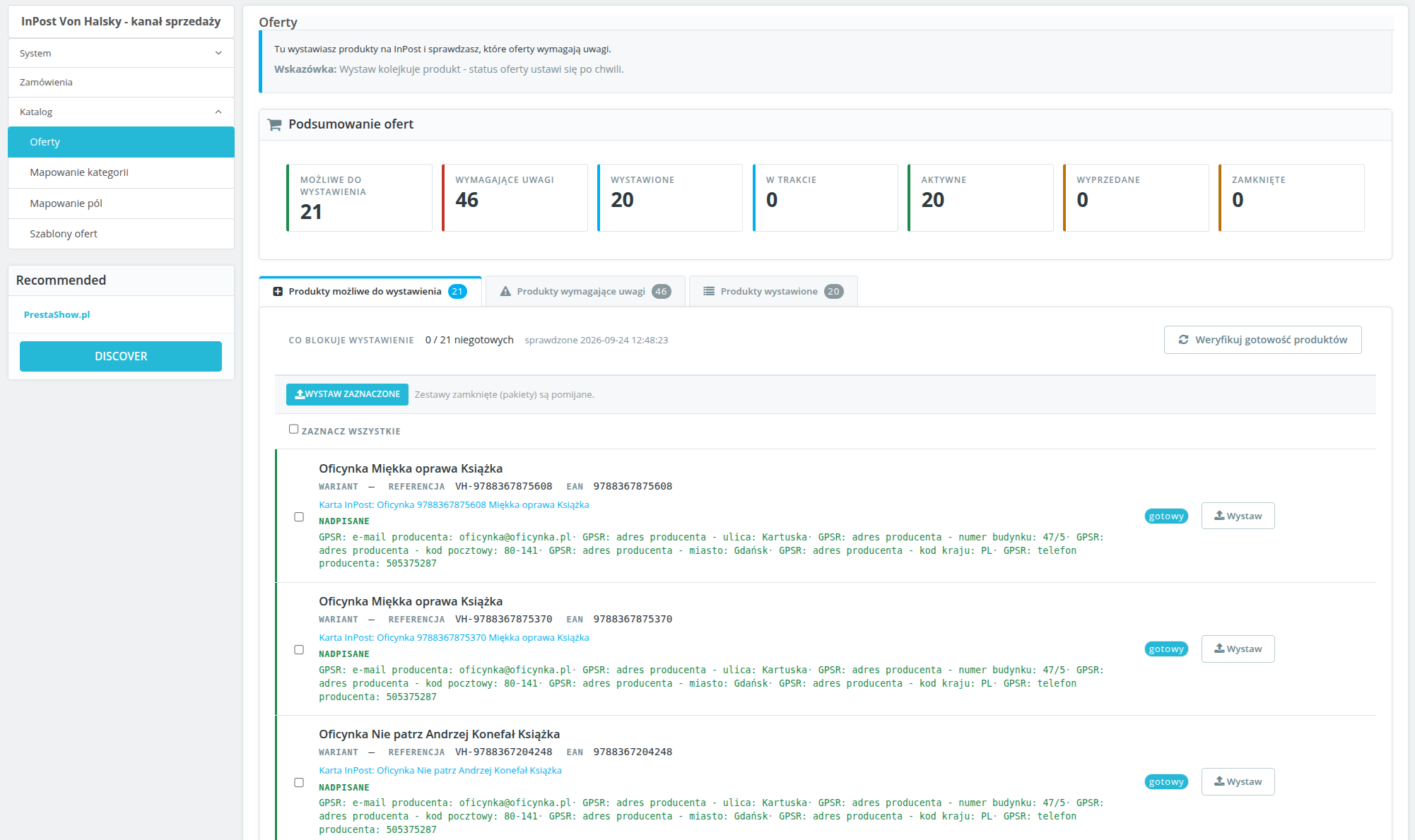
Manca l’EAN, la foto, la descrizione o la categoria assegnata? Sai subito cosa va corretto. Filtra i problemi, completa i dati e pubblica i prodotti singolarmente o in blocco.
Ogni variante può avere un'offerta separata con prezzo e disponibilità propri. Le modifiche apportate nella schermata di verifica riguardano l’offerta e non modificano il catalogo del negozio.
02 / Modelli di offerta
I tuoi prezzi.
Le tue regole.
Stabilisci un ricarico o uno sconto, in percentuale o in importo fisso. Puoi anche applicare i prezzi previsti per un determinato gruppo di clienti.
Crea titoli con variabili, scegli la fonte della descrizione e i tempi di spedizione. Assegna un modello a una categoria, invece di impostare ogni offerta da zero.
03 / Sincronizzazione di prezzi e giacenze
Apportate modifiche nel negozio.
Il modulo aggiorna le offerte.
Imposta una frequenza indipendente per la sincronizzazione di prezzi e giacenze. Le modifiche dal negozio vengono trasferite automaticamente sulla piattaforma. Puoi controllare lo stato di avanzamento delle attività nella coda.
Imposta una quantità minima di magazzino. Quando le scorte scendono al di sotto della soglia, il modulo chiuderà l’offerta. Riduci il rischio di vendere merce non disponibile.
04 / Ordini
Ordini con InPost.
Gestione in PrestaShop.
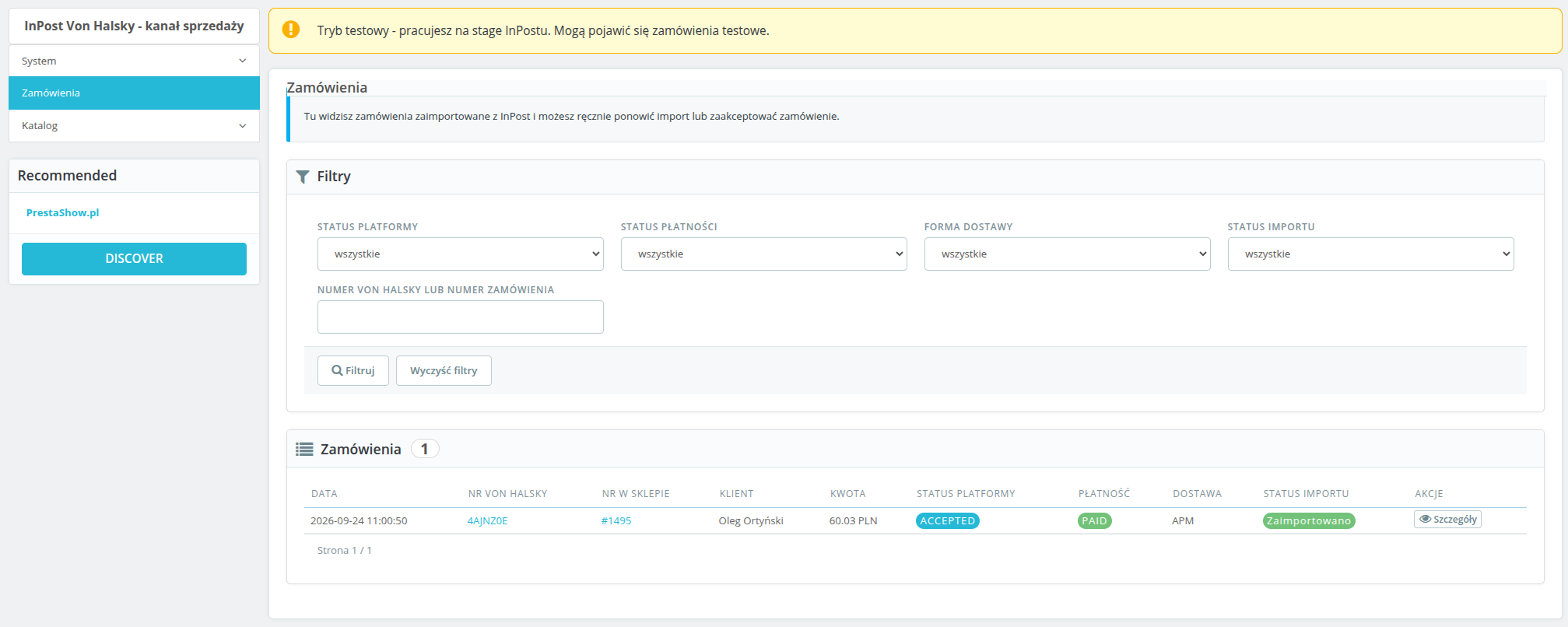
Senza bisogno di reinserire manualmente i dati. Gli ordini pagati e accettati vengono trasferiti al negozio con lo stato e il corriere assegnati — separatamente per la consegna presso un Paczkomat e tramite corriere.
Il numero d’ordine InPost, lo stato e la modalità di consegna sono disponibili nel pannello di controllo. Un nuovo ordine? Riceverai una notifica via e-mail.
Avvia l’integrazione
Configura. Pubblica. Vendi.
- Collega l’account InPost. Inseriscii dati API e autorizza la connessione.
- Personalizza le impostazioni: assegna categorie, stati e corrieri. Imposta il CRON.
- Pubblica i prodotti: verifica che il catalogo sia pronto e avvia la vendita.
È necessario: un account venditore InPost Von Halsky con accesso API e un'attività CRON eseguita ogni minuto. Ambiente: PrestaShop 1.7, 8.x e 9.x, PHP 7.4 o versioni successive e cURL.
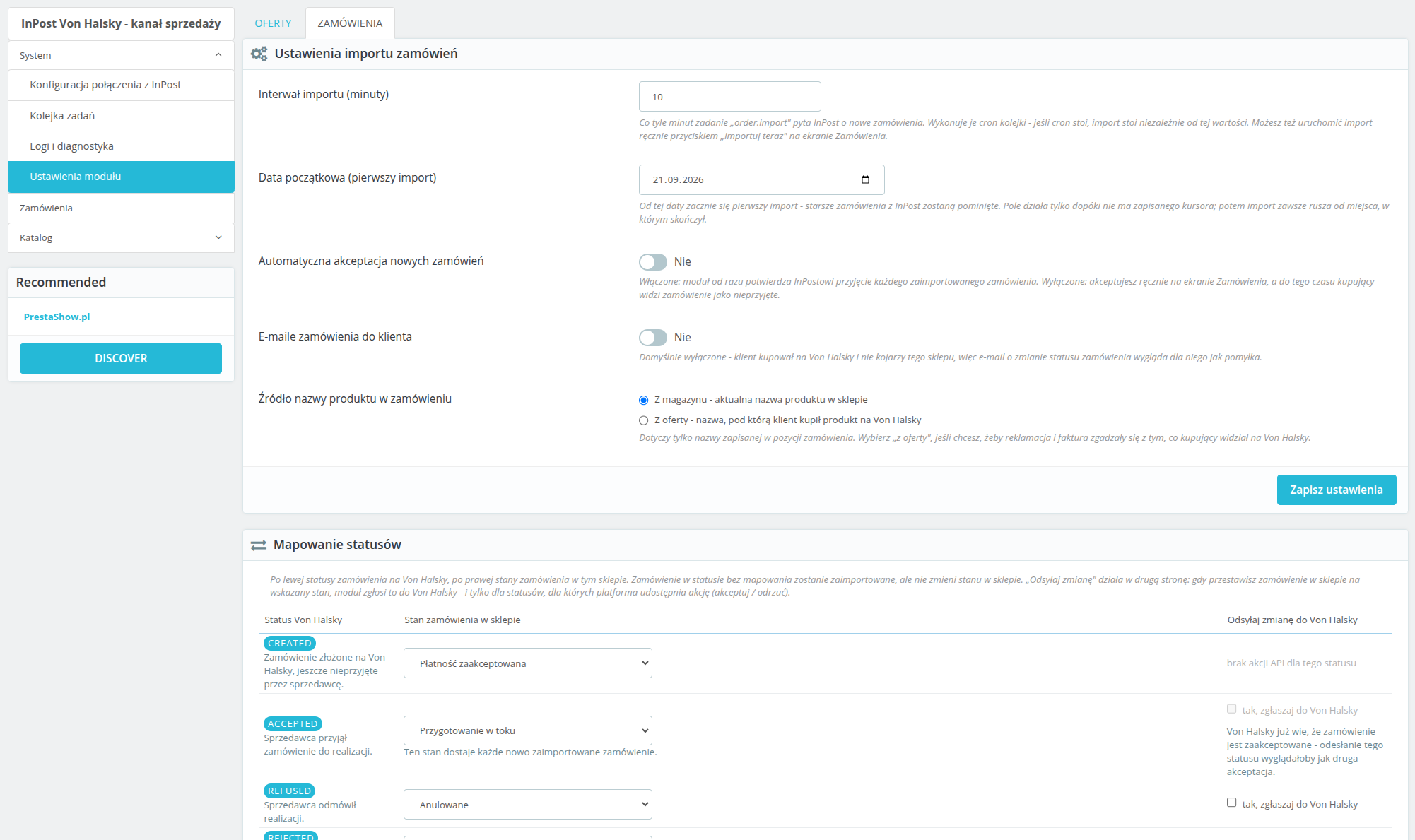
L'importazione viene avviata in base a una pianificazione o manualmente. Il modulo consente di impostare l'accettazione automatica degli ordini. Gli stati di InPost vengono associati agli stati del negozio; il rinvio delle modifiche comprende le azioni rese disponibili dall'API, tra cui l'accettazione e il rifiuto. L'assenza di un corriere assegnato genera un errore di importazione chiaramente identificabile. Sì. La configurazione, le offerte e gli ordini sono distinti per ogni negozio. Il modulo crittografa i dati di accesso e i token, utilizza OAuth2 con PKCE e supporta l'esportazione e la cancellazione dei dati dei clienti. I periodi di conservazione limitano l'archiviazione dei dati relativi agli ordini e ai log. Il pannello è in lingua polacca.InPost Von Halsky - Domande frequenti
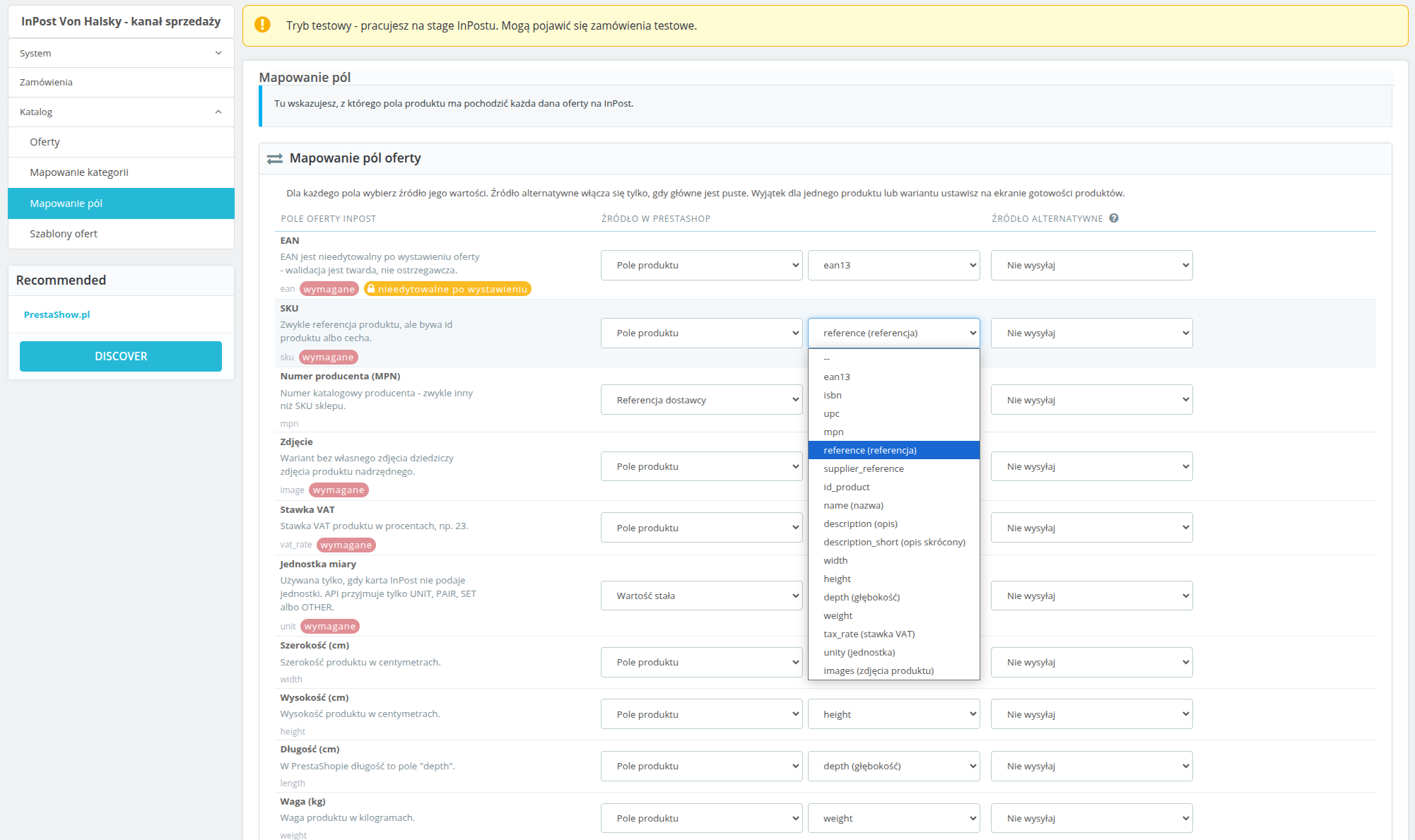
Come posso adattare i dati delle offerte, compresi i campi GPSR?
Come funzionano gli stati e l'importazione degli ordini?
Dove posso controllare le connessioni e le attività automatiche?
Il modulo supporta la gestione di più negozi e la protezione dei dati?
Changelog (v1.0)
## 1.0.0 - 2026-09-14
First real changelog entry for this module, reconstructed from `git log` and from
`TEST-REPORT.md`'s fix rounds, since the placeholder that shipped before this covered none of the
actual work. No `v1.0.0` tag has been cut yet.
### Added
* OAuth2 connection to InPost (Authorization Code + PKCE), with a back-office screen showing
connection health broken down into credentials, token, organization and token scope, each
checked live against the API rather than cached.
* Category mapping between PrestaShop and Von Halsky categories, including recursive mapping and
the category attribute tree pulled live from the API.
* Listing templates: title patterns, description source, price markup/discount, shipping days and
unit, with support for multiple templates and one required default.
* Offer publishing, both single-product (inline) and bulk (queued), with a readiness screen that
checks every product against InPost's requirements before publish is even offered.
* Price and stock synchronisation, on a configurable schedule and on demand, plus a minimum-stock
threshold that closes an offer instead of sending a low stock count.
* Offer close, reopen and unlink actions.
* Order import from the marketplace event stream, with manual product matching when an order line
can't be resolved automatically, and an "Importuj teraz" manual trigger.
* Status mapping and carrier mapping (parcel locker / courier) for order import, plus outbound
status pushes (accept/refuse) back to the platform when a PrestaShop order reaches a configured
state.
* The module's own async job queue and the `cron.php` entry point that drives it, including a
recurring category-data refresh job with a per-caller time budget.
* A diagnostics screen (health check tiles, API error log, CSV export) and a log/audit trail of
every API call and response.
* A first product published end to end against InPost stage, and the category mapping fixes that
made that possible.
### Changed
* Orders now materialise in PrestaShop only once the marketplace order reaches `ACCEPTED`, rather
than earlier in its lifecycle.
* Marketplace order confirmation mail is suppressed at the mail layer by default, since the buyer
address on these orders is a pseudonymous InPost relay address, not a real mailbox.
* Price and stock are recorded as synced only once the platform confirms the change, not as soon as
this module sends it - the two "sent" columns on the offers screen reflect what InPost actually
knows, not what was last transmitted.
* OAuth client secret and access/refresh tokens are encrypted at rest instead of stored in plain
text.
* The cron token is read from a request header first (`X-VH-Cron-Token` / `X-VH-Cron-Shop`) and
stripped from `$_GET`/`$_POST`/`$_REQUEST` before PrestaShop's own bootstrap runs, so it no
longer leaks into a redirect `Location` header and from there into access and proxy logs. The old
query-string form still works as a fallback.
* `ps_versions_compliancy.min` raised from `1.7` to `1.7.7` - the code already relies on the `mpn`
columns and `hookDisplayAdminOrderMain`, neither of which exists before 1.7.7, so the
declared floor now matches what the module actually needs. Part of a wider compatibility campaign
checking PHP 7.1-8.4 and PS 1.7.7-9.0; see `COMPAT-CAMPAIGN.md`.
### Fixed
* On PrestaShop 1.7.7 the `orders.note` column does not exist yet (it arrived in 1.7.8), so the
marketplace order comment was assigned to a property that was never saved. The write is now
guarded by the `Order` definition, so 1.7.8+ keeps the comment and 1.7.7 skips it instead of
silently losing it (found by the compatibility campaign, cell a).
* On PrestaShop 1.7.7 re-applying the same order state fires `actionOrderStatusPostUpdate` again
and queued a second `order.push_status` job for the same target status. The synchronizer now
checks for a pending or reserved push of that status before queueing (cell a, integration test
F18).
* Log CSV export passed no `$escape` argument to `fputcsv()`, which PHP 8.4 reports as deprecated
on every exported row (cell h). The argument is now explicit.
* A GPSR manufacturer phone number that wasn't already in E.164 format (the normal case, since the
back office's own fix-it form accepted anything) caused InPost to reject the entire offer. Phone
numbers are now normalised before sending, or omitted if they can't be, and the readiness check
flags a bad value before publish is attempted.
* InPost's field-level validation detail was parsed out of API error responses but never actually
shown anywhere - the back office and the stored error message both said only "Validation failed"
with no indication which field. The field and reason are now included in both places.
* An offer whose EAN was edited after listing was sent to the platform anyway and rejected outright
("Once assigned field cannot be changed"). Changed immutable fields are now dropped from the
outgoing update instead of being sent.
* An offer name, brand, SKU or attribute value longer than InPost's limit was silently truncated
with no warning; an EAN over its limit threw a plain exception that escaped the job handler as an
uncaught fatal instead of failing the offer cleanly. Both now surface as proper validation
warnings/errors before publish.
* Product images served from a URL InPost's fetcher couldn't reach caused every offer for that
product to be rejected with no visible reason in the back office. Image reachability is now
checked as part of readiness validation, bounded so a bad image host can't turn a bulk readiness
sweep into a multi-minute hang.
* An offer rejected by the platform after publish was only ever noticed if an event happened to
arrive for it; one that fell outside the event window could sit "W trakcie wystawiania"
indefinitely with no error shown anywhere. Offers stuck in that state for more than 20 minutes are
now re-checked directly.
* A cron job configured with a typo'd shop id received a silent redirect to the storefront instead
of an error, making a broken cron schedule look like it was working.
* Order import ran on a schedule from the moment the module was installed, even though status and
carrier mapping start out empty and nothing warned that orders couldn't be imported correctly
until the first real order failed to build. The diagnostics screen and the order list now warn
while either mapping is incomplete.
* The diagnostics/log screen scrolled the entire page sideways on narrower viewports instead of
scrolling just the log table, the way every other wide table in the module already did.
* Internal ticket references (`VH-09`, `VH-10`) were visible in order-settings headings shown to
shop operators; removed.
First real changelog entry for this module, reconstructed from `git log` and from
`TEST-REPORT.md`'s fix rounds, since the placeholder that shipped before this covered none of the
actual work. No `v1.0.0` tag has been cut yet.
### Added
* OAuth2 connection to InPost (Authorization Code + PKCE), with a back-office screen showing
connection health broken down into credentials, token, organization and token scope, each
checked live against the API rather than cached.
* Category mapping between PrestaShop and Von Halsky categories, including recursive mapping and
the category attribute tree pulled live from the API.
* Listing templates: title patterns, description source, price markup/discount, shipping days and
unit, with support for multiple templates and one required default.
* Offer publishing, both single-product (inline) and bulk (queued), with a readiness screen that
checks every product against InPost's requirements before publish is even offered.
* Price and stock synchronisation, on a configurable schedule and on demand, plus a minimum-stock
threshold that closes an offer instead of sending a low stock count.
* Offer close, reopen and unlink actions.
* Order import from the marketplace event stream, with manual product matching when an order line
can't be resolved automatically, and an "Importuj teraz" manual trigger.
* Status mapping and carrier mapping (parcel locker / courier) for order import, plus outbound
status pushes (accept/refuse) back to the platform when a PrestaShop order reaches a configured
state.
* The module's own async job queue and the `cron.php` entry point that drives it, including a
recurring category-data refresh job with a per-caller time budget.
* A diagnostics screen (health check tiles, API error log, CSV export) and a log/audit trail of
every API call and response.
* A first product published end to end against InPost stage, and the category mapping fixes that
made that possible.
### Changed
* Orders now materialise in PrestaShop only once the marketplace order reaches `ACCEPTED`, rather
than earlier in its lifecycle.
* Marketplace order confirmation mail is suppressed at the mail layer by default, since the buyer
address on these orders is a pseudonymous InPost relay address, not a real mailbox.
* Price and stock are recorded as synced only once the platform confirms the change, not as soon as
this module sends it - the two "sent" columns on the offers screen reflect what InPost actually
knows, not what was last transmitted.
* OAuth client secret and access/refresh tokens are encrypted at rest instead of stored in plain
text.
* The cron token is read from a request header first (`X-VH-Cron-Token` / `X-VH-Cron-Shop`) and
stripped from `$_GET`/`$_POST`/`$_REQUEST` before PrestaShop's own bootstrap runs, so it no
longer leaks into a redirect `Location` header and from there into access and proxy logs. The old
query-string form still works as a fallback.
* `ps_versions_compliancy.min` raised from `1.7` to `1.7.7` - the code already relies on the `mpn`
columns and `hookDisplayAdminOrderMain`, neither of which exists before 1.7.7, so the
declared floor now matches what the module actually needs. Part of a wider compatibility campaign
checking PHP 7.1-8.4 and PS 1.7.7-9.0; see `COMPAT-CAMPAIGN.md`.
### Fixed
* On PrestaShop 1.7.7 the `orders.note` column does not exist yet (it arrived in 1.7.8), so the
marketplace order comment was assigned to a property that was never saved. The write is now
guarded by the `Order` definition, so 1.7.8+ keeps the comment and 1.7.7 skips it instead of
silently losing it (found by the compatibility campaign, cell a).
* On PrestaShop 1.7.7 re-applying the same order state fires `actionOrderStatusPostUpdate` again
and queued a second `order.push_status` job for the same target status. The synchronizer now
checks for a pending or reserved push of that status before queueing (cell a, integration test
F18).
* Log CSV export passed no `$escape` argument to `fputcsv()`, which PHP 8.4 reports as deprecated
on every exported row (cell h). The argument is now explicit.
* A GPSR manufacturer phone number that wasn't already in E.164 format (the normal case, since the
back office's own fix-it form accepted anything) caused InPost to reject the entire offer. Phone
numbers are now normalised before sending, or omitted if they can't be, and the readiness check
flags a bad value before publish is attempted.
* InPost's field-level validation detail was parsed out of API error responses but never actually
shown anywhere - the back office and the stored error message both said only "Validation failed"
with no indication which field. The field and reason are now included in both places.
* An offer whose EAN was edited after listing was sent to the platform anyway and rejected outright
("Once assigned field cannot be changed"). Changed immutable fields are now dropped from the
outgoing update instead of being sent.
* An offer name, brand, SKU or attribute value longer than InPost's limit was silently truncated
with no warning; an EAN over its limit threw a plain exception that escaped the job handler as an
uncaught fatal instead of failing the offer cleanly. Both now surface as proper validation
warnings/errors before publish.
* Product images served from a URL InPost's fetcher couldn't reach caused every offer for that
product to be rejected with no visible reason in the back office. Image reachability is now
checked as part of readiness validation, bounded so a bad image host can't turn a bulk readiness
sweep into a multi-minute hang.
* An offer rejected by the platform after publish was only ever noticed if an event happened to
arrive for it; one that fell outside the event window could sit "W trakcie wystawiania"
indefinitely with no error shown anywhere. Offers stuck in that state for more than 20 minutes are
now re-checked directly.
* A cron job configured with a typo'd shop id received a silent redirect to the storefront instead
of an error, making a broken cron schedule look like it was working.
* Order import ran on a schedule from the moment the module was installed, even though status and
carrier mapping start out empty and nothing warned that orders couldn't be imported correctly
until the first real order failed to build. The diagnostics screen and the order list now warn
while either mapping is incomplete.
* The diagnostics/log screen scrolled the entire page sideways on narrower viewports instead of
scrolling just the log table, the way every other wide table in the module already did.
* Internal ticket references (`VH-09`, `VH-10`) were visible in order-settings headings shown to
shop operators; removed.
Requisiti tecnici
Requisiti tecnici
- PHP 7.1 - 8.x
- Estensione server ionCube Loader
- Solo PrestaShop Importer: PHP libxml versione > 2.9.3
- Solo PrestaShop Facebook Integrator: PHP 7.2 o superiore
- Validatore IVA PrestaShop solo: PHP SOAP
Ulteriori informazioni sui requisiti tecnici nella knowledge base
Assistenza e aggiornamenti
Supporto = Aggiornamenti + HelpDesk
Ottenete 90 giorni (3 mesi) di accesso al pacchetto di supporto completo di PrestaShow.
Aggiornamenti dei moduli
I moduli ti informano degli aggiornamenti disponibili. Leggete il changelog ed eseguite un aggiornamento del modulo con un solo clic direttamente dal vostro negozio.
Pannello HelpDesk
Questo è il pannello in cui vi forniamo assistenza. Nell'HelpDesk è possibile segnalare problemi, ordinare l'installazione e gli aggiornamenti gratuiti dei moduli, nonché modifiche e lavori di sviluppo individuali.
Estendere il support o
Una volta scaduto il supporto, è possibile utilizzare il modulo senza alcuna restrizione. È possibile estendere l'accesso al supporto in qualsiasi momento, quando se ne ha bisogno.
Base di conoscenze e FAQ
Gratis per sempre
La Knowledge Base è disponibile per tutti. Vi troverete la documentazione del modulo, nonché istruzioni, video e risposte alle domande più frequenti.
Licenza
Licenza a vita per il modulo
- È possibile utilizzare il modulo senza limitazioni per 1 negozio = 1 dominio.
- È possibile utilizzare un dominio aggiuntivo, ad esempio per una copia per sviluppatori.
- Con un piccolo sovrapprezzo è possibile cambiare il dominio del modulo.
Domini aggiuntivi per Multistore
- Tutti i nostri moduli supportano PrestaShop Multistore.
- Il supporto di un numero illimitato di domini per PrestaShop Multistore richiede l'acquisto del supporto multistore per il modulo.
Modifica del codice
- Il codice del modulo relativo all'integrazione con il negozio e al design (.tpl, .css, .js) è open source e siete liberi di modificarlo.
- Il codice sorgente del modulo (.php) è criptato con ionCube e la sua modifica invalida la garanzia.
Non ci sono ancora voci.
Per il momento non ci sono recensioni di clienti.