Customer service and order packaging on your phone 📦





Detailed description
PrestaShop + InPost by Halsky
A new sales channel.
Less work to manage.
Sell products from your store on InPost Von Halsky. The PrestaShop integration module lists products, synchronizes prices and inventory levels, and imports orders. You grow your sales. The module handles the repetitive work.
- List products in bulk—use the catalog you already have.
- Save time—automate product updates.
- Work in PrestaShop: Manage orders in the familiar admin panel.
01 / Listings
Your catalog.
Ready for InPost.
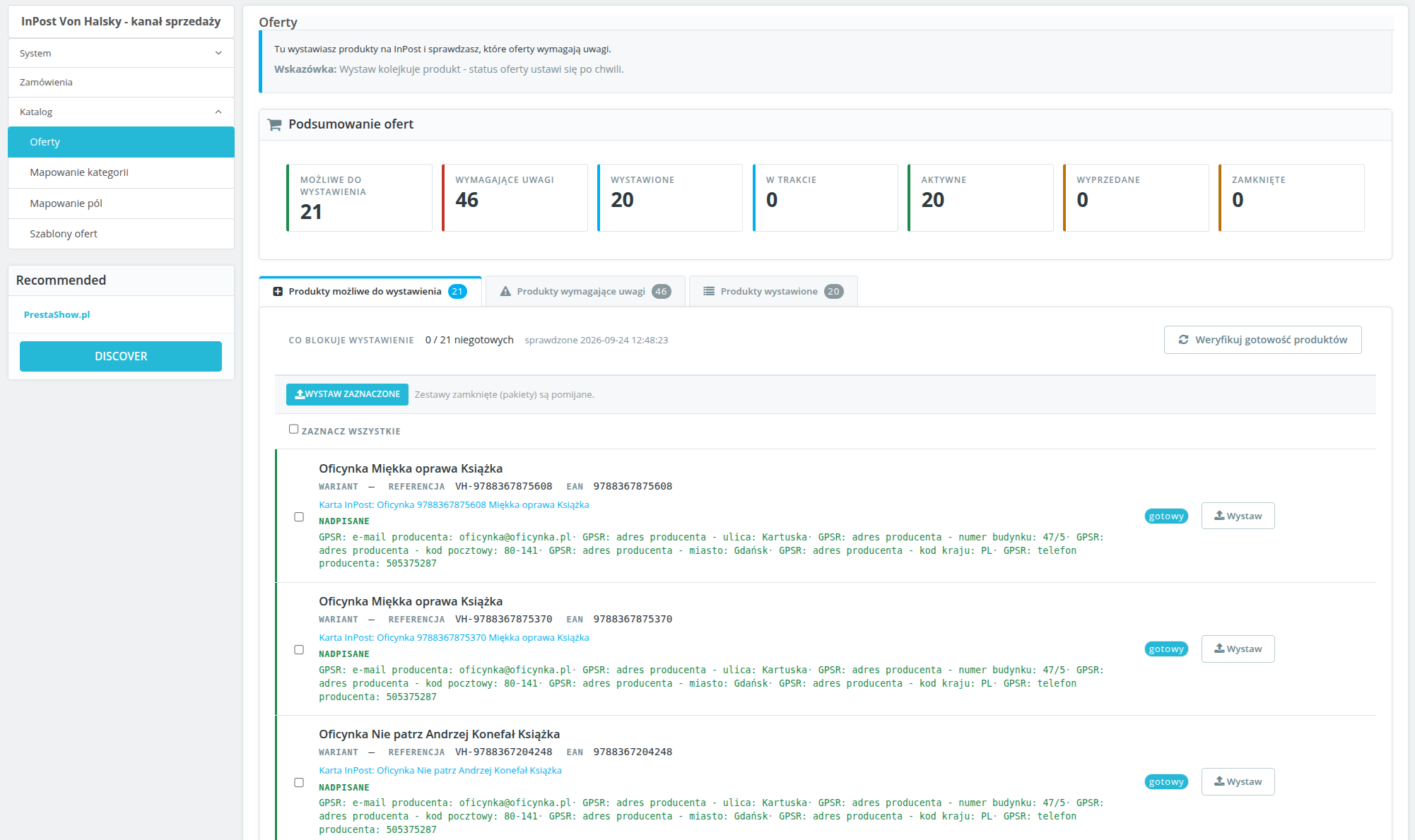
Missing an EAN, photo, description, or assigned category? You’ll know right away what needs to be fixed. Filter issues, fill in the missing information, and list products individually or in bulk.
Each variant can have its own listing with its own price and inventory status. Changes made on the readiness screen apply only to the listing—they do not alter the store’s catalog.
02 / Listing Templates
Your prices.
Your rules.
Set a markup or discount—as a percentage or a fixed amount. You can also use prices for a selected customer group.
Build titles from variables, select the description source, and set the shipping time. Assign a template to a category instead of setting up each offer from scratch.
03 / Price and Inventory Synchronization
Make changes in the store.
The module updates the offers.
Set a custom synchronization frequency for prices and inventory levels. Changes from the store are automatically synced to the platform. You can check the progress of tasks in the queue.
Set a minimum stock level. When stock falls below the threshold, the module will deactivate the listing. This reduces the risk of selling out-of-stock items.
04 / Orders
Orders via InPost.
Integration with PrestaShop.
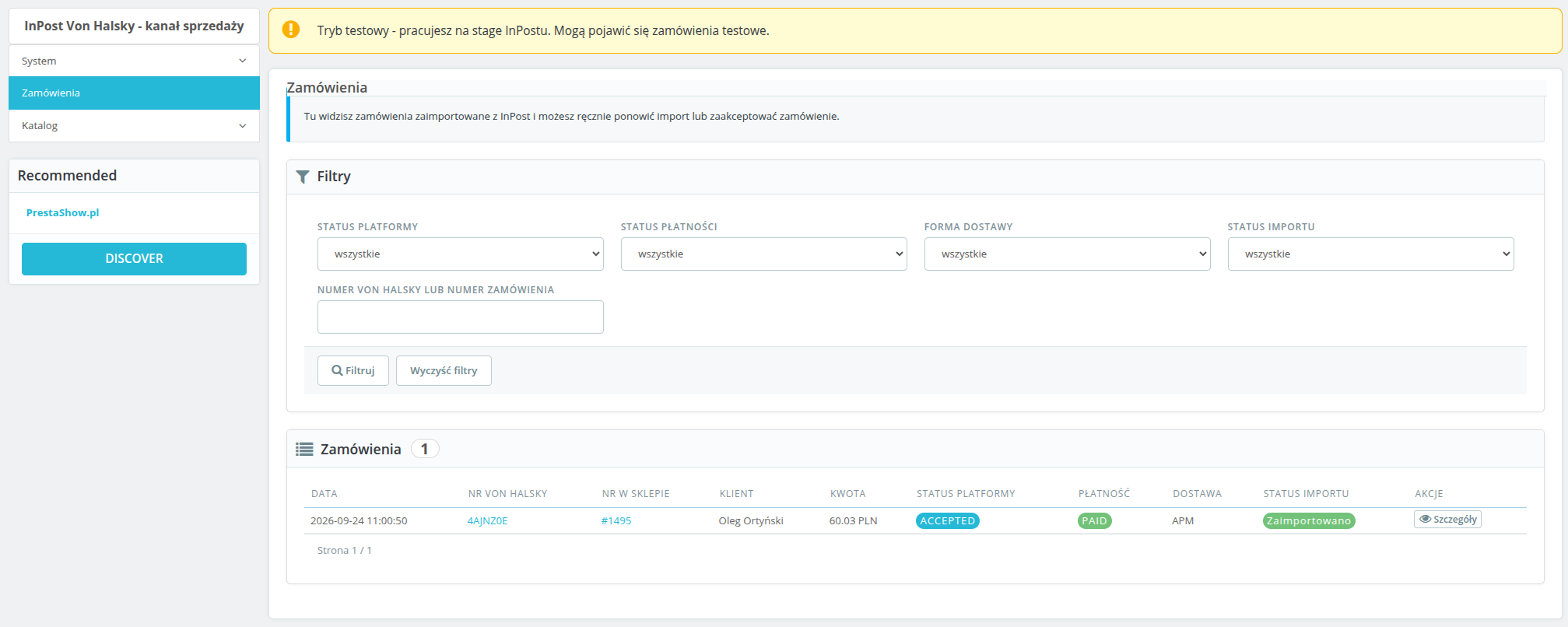
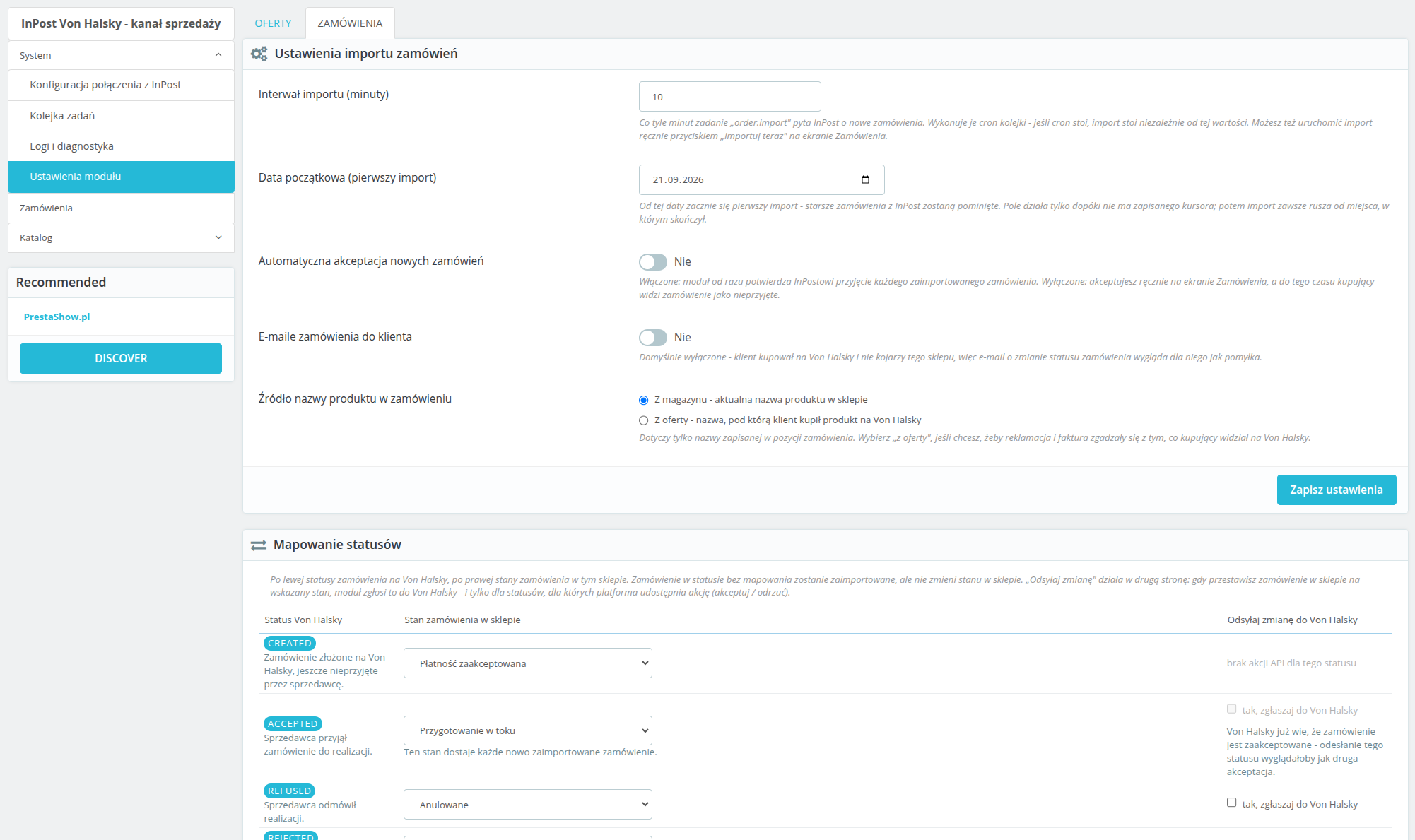
No manual data entry required. Paid and accepted orders are sent to the store with an assigned status and carrier—separately for delivery to a Paczkomat parcel locker and by courier.
You’ll find the InPost order number, status, and delivery method in the dashboard. New order? You’ll receive an email notification.
Start the integration
Set up. List. Sell.
- Connect your InPost account. Enterthe API credentials and authorize the connection.
- Customize settings: Assign categories, statuses, and carriers. Set up a CRON job.
- List products—Check that the catalog is ready and start selling.
You’ll need: an InPost Von Halsky merchant account with API access and a CRON job that runs every minute. Environment: PrestaShop 1.7, 8.x, and 9.x, PHP 7.4 or higher, and cURL.
Imports run on a schedule or manually. The module allows you to set up automatic order acceptance. You assign InPost statuses to store statuses; changes are synced via API actions, including acceptance and rejection. If no carrier is assigned, a clear import error is displayed. Yes. Configuration, offers, and orders are separate for each store. The module encrypts access data and tokens, uses OAuth2 with PKCE, and supports the export and deletion of customer data. Retention periods limit the storage of order data and logs. The dashboard is in Polish.InPost Von Halsky - Frequently Asked Questions
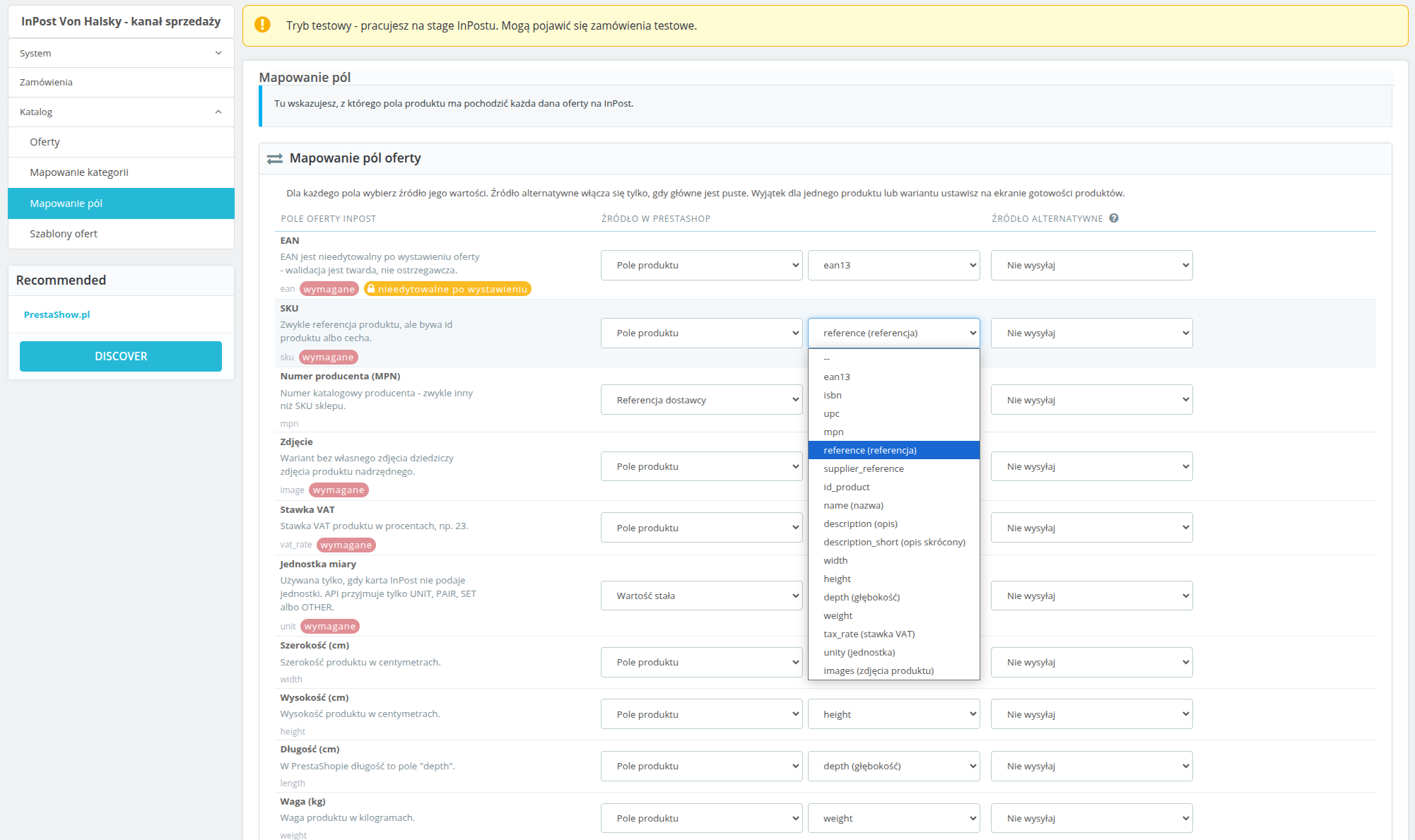
How do I adjust the offer data, including the GPSR fields?
How do order statuses and order imports work?
Where can I check my connections and automated tasks?
Does the module support multistore and data protection?
Changelog (v1.0)
## 1.0.0 - 2026-09-14
First real changelog entry for this module, reconstructed from `git log` and from
`TEST-REPORT.md`'s fix rounds, since the placeholder that shipped before this covered none of the
actual work. No `v1.0.0` tag has been cut yet.
### Added
* OAuth2 connection to InPost (Authorization Code + PKCE), with a back-office screen showing
connection health broken down into credentials, token, organization and token scope, each
checked live against the API rather than cached.
* Category mapping between PrestaShop and Von Halsky categories, including recursive mapping and
the category attribute tree pulled live from the API.
* Listing templates: title patterns, description source, price markup/discount, shipping days and
unit, with support for multiple templates and one required default.
* Offer publishing, both single-product (inline) and bulk (queued), with a readiness screen that
checks every product against InPost's requirements before publish is even offered.
* Price and stock synchronisation, on a configurable schedule and on demand, plus a minimum-stock
threshold that closes an offer instead of sending a low stock count.
* Offer close, reopen and unlink actions.
* Order import from the marketplace event stream, with manual product matching when an order line
can't be resolved automatically, and an "Importuj teraz" manual trigger.
* Status mapping and carrier mapping (parcel locker / courier) for order import, plus outbound
status pushes (accept/refuse) back to the platform when a PrestaShop order reaches a configured
state.
* The module's own async job queue and the `cron.php` entry point that drives it, including a
recurring category-data refresh job with a per-caller time budget.
* A diagnostics screen (health check tiles, API error log, CSV export) and a log/audit trail of
every API call and response.
* A first product published end to end against InPost stage, and the category mapping fixes that
made that possible.
### Changed
* Orders now materialise in PrestaShop only once the marketplace order reaches `ACCEPTED`, rather
than earlier in its lifecycle.
* Marketplace order confirmation mail is suppressed at the mail layer by default, since the buyer
address on these orders is a pseudonymous InPost relay address, not a real mailbox.
* Price and stock are recorded as synced only once the platform confirms the change, not as soon as
this module sends it - the two "sent" columns on the offers screen reflect what InPost actually
knows, not what was last transmitted.
* OAuth client secret and access/refresh tokens are encrypted at rest instead of stored in plain
text.
* The cron token is read from a request header first (`X-VH-Cron-Token` / `X-VH-Cron-Shop`) and
stripped from `$_GET`/`$_POST`/`$_REQUEST` before PrestaShop's own bootstrap runs, so it no
longer leaks into a redirect `Location` header and from there into access and proxy logs. The old
query-string form still works as a fallback.
* `ps_versions_compliancy.min` raised from `1.7` to `1.7.7` - the code already relies on the `mpn`
columns and `hookDisplayAdminOrderMain`, neither of which exists before 1.7.7, so the
declared floor now matches what the module actually needs. Part of a wider compatibility campaign
checking PHP 7.1-8.4 and PS 1.7.7-9.0; see `COMPAT-CAMPAIGN.md`.
### Fixed
* On PrestaShop 1.7.7 the `orders.note` column does not exist yet (it arrived in 1.7.8), so the
marketplace order comment was assigned to a property that was never saved. The write is now
guarded by the `Order` definition, so 1.7.8+ keeps the comment and 1.7.7 skips it instead of
silently losing it (found by the compatibility campaign, cell a).
* On PrestaShop 1.7.7 re-applying the same order state fires `actionOrderStatusPostUpdate` again
and queued a second `order.push_status` job for the same target status. The synchronizer now
checks for a pending or reserved push of that status before queueing (cell a, integration test
F18).
* Log CSV export passed no `$escape` argument to `fputcsv()`, which PHP 8.4 reports as deprecated
on every exported row (cell h). The argument is now explicit.
* A GPSR manufacturer phone number that wasn't already in E.164 format (the normal case, since the
back office's own fix-it form accepted anything) caused InPost to reject the entire offer. Phone
numbers are now normalised before sending, or omitted if they can't be, and the readiness check
flags a bad value before publish is attempted.
* InPost's field-level validation detail was parsed out of API error responses but never actually
shown anywhere - the back office and the stored error message both said only "Validation failed"
with no indication which field. The field and reason are now included in both places.
* An offer whose EAN was edited after listing was sent to the platform anyway and rejected outright
("Once assigned field cannot be changed"). Changed immutable fields are now dropped from the
outgoing update instead of being sent.
* An offer name, brand, SKU or attribute value longer than InPost's limit was silently truncated
with no warning; an EAN over its limit threw a plain exception that escaped the job handler as an
uncaught fatal instead of failing the offer cleanly. Both now surface as proper validation
warnings/errors before publish.
* Product images served from a URL InPost's fetcher couldn't reach caused every offer for that
product to be rejected with no visible reason in the back office. Image reachability is now
checked as part of readiness validation, bounded so a bad image host can't turn a bulk readiness
sweep into a multi-minute hang.
* An offer rejected by the platform after publish was only ever noticed if an event happened to
arrive for it; one that fell outside the event window could sit "W trakcie wystawiania"
indefinitely with no error shown anywhere. Offers stuck in that state for more than 20 minutes are
now re-checked directly.
* A cron job configured with a typo'd shop id received a silent redirect to the storefront instead
of an error, making a broken cron schedule look like it was working.
* Order import ran on a schedule from the moment the module was installed, even though status and
carrier mapping start out empty and nothing warned that orders couldn't be imported correctly
until the first real order failed to build. The diagnostics screen and the order list now warn
while either mapping is incomplete.
* The diagnostics/log screen scrolled the entire page sideways on narrower viewports instead of
scrolling just the log table, the way every other wide table in the module already did.
* Internal ticket references (`VH-09`, `VH-10`) were visible in order-settings headings shown to
shop operators; removed.
First real changelog entry for this module, reconstructed from `git log` and from
`TEST-REPORT.md`'s fix rounds, since the placeholder that shipped before this covered none of the
actual work. No `v1.0.0` tag has been cut yet.
### Added
* OAuth2 connection to InPost (Authorization Code + PKCE), with a back-office screen showing
connection health broken down into credentials, token, organization and token scope, each
checked live against the API rather than cached.
* Category mapping between PrestaShop and Von Halsky categories, including recursive mapping and
the category attribute tree pulled live from the API.
* Listing templates: title patterns, description source, price markup/discount, shipping days and
unit, with support for multiple templates and one required default.
* Offer publishing, both single-product (inline) and bulk (queued), with a readiness screen that
checks every product against InPost's requirements before publish is even offered.
* Price and stock synchronisation, on a configurable schedule and on demand, plus a minimum-stock
threshold that closes an offer instead of sending a low stock count.
* Offer close, reopen and unlink actions.
* Order import from the marketplace event stream, with manual product matching when an order line
can't be resolved automatically, and an "Importuj teraz" manual trigger.
* Status mapping and carrier mapping (parcel locker / courier) for order import, plus outbound
status pushes (accept/refuse) back to the platform when a PrestaShop order reaches a configured
state.
* The module's own async job queue and the `cron.php` entry point that drives it, including a
recurring category-data refresh job with a per-caller time budget.
* A diagnostics screen (health check tiles, API error log, CSV export) and a log/audit trail of
every API call and response.
* A first product published end to end against InPost stage, and the category mapping fixes that
made that possible.
### Changed
* Orders now materialise in PrestaShop only once the marketplace order reaches `ACCEPTED`, rather
than earlier in its lifecycle.
* Marketplace order confirmation mail is suppressed at the mail layer by default, since the buyer
address on these orders is a pseudonymous InPost relay address, not a real mailbox.
* Price and stock are recorded as synced only once the platform confirms the change, not as soon as
this module sends it - the two "sent" columns on the offers screen reflect what InPost actually
knows, not what was last transmitted.
* OAuth client secret and access/refresh tokens are encrypted at rest instead of stored in plain
text.
* The cron token is read from a request header first (`X-VH-Cron-Token` / `X-VH-Cron-Shop`) and
stripped from `$_GET`/`$_POST`/`$_REQUEST` before PrestaShop's own bootstrap runs, so it no
longer leaks into a redirect `Location` header and from there into access and proxy logs. The old
query-string form still works as a fallback.
* `ps_versions_compliancy.min` raised from `1.7` to `1.7.7` - the code already relies on the `mpn`
columns and `hookDisplayAdminOrderMain`, neither of which exists before 1.7.7, so the
declared floor now matches what the module actually needs. Part of a wider compatibility campaign
checking PHP 7.1-8.4 and PS 1.7.7-9.0; see `COMPAT-CAMPAIGN.md`.
### Fixed
* On PrestaShop 1.7.7 the `orders.note` column does not exist yet (it arrived in 1.7.8), so the
marketplace order comment was assigned to a property that was never saved. The write is now
guarded by the `Order` definition, so 1.7.8+ keeps the comment and 1.7.7 skips it instead of
silently losing it (found by the compatibility campaign, cell a).
* On PrestaShop 1.7.7 re-applying the same order state fires `actionOrderStatusPostUpdate` again
and queued a second `order.push_status` job for the same target status. The synchronizer now
checks for a pending or reserved push of that status before queueing (cell a, integration test
F18).
* Log CSV export passed no `$escape` argument to `fputcsv()`, which PHP 8.4 reports as deprecated
on every exported row (cell h). The argument is now explicit.
* A GPSR manufacturer phone number that wasn't already in E.164 format (the normal case, since the
back office's own fix-it form accepted anything) caused InPost to reject the entire offer. Phone
numbers are now normalised before sending, or omitted if they can't be, and the readiness check
flags a bad value before publish is attempted.
* InPost's field-level validation detail was parsed out of API error responses but never actually
shown anywhere - the back office and the stored error message both said only "Validation failed"
with no indication which field. The field and reason are now included in both places.
* An offer whose EAN was edited after listing was sent to the platform anyway and rejected outright
("Once assigned field cannot be changed"). Changed immutable fields are now dropped from the
outgoing update instead of being sent.
* An offer name, brand, SKU or attribute value longer than InPost's limit was silently truncated
with no warning; an EAN over its limit threw a plain exception that escaped the job handler as an
uncaught fatal instead of failing the offer cleanly. Both now surface as proper validation
warnings/errors before publish.
* Product images served from a URL InPost's fetcher couldn't reach caused every offer for that
product to be rejected with no visible reason in the back office. Image reachability is now
checked as part of readiness validation, bounded so a bad image host can't turn a bulk readiness
sweep into a multi-minute hang.
* An offer rejected by the platform after publish was only ever noticed if an event happened to
arrive for it; one that fell outside the event window could sit "W trakcie wystawiania"
indefinitely with no error shown anywhere. Offers stuck in that state for more than 20 minutes are
now re-checked directly.
* A cron job configured with a typo'd shop id received a silent redirect to the storefront instead
of an error, making a broken cron schedule look like it was working.
* Order import ran on a schedule from the moment the module was installed, even though status and
carrier mapping start out empty and nothing warned that orders couldn't be imported correctly
until the first real order failed to build. The diagnostics screen and the order list now warn
while either mapping is incomplete.
* The diagnostics/log screen scrolled the entire page sideways on narrower viewports instead of
scrolling just the log table, the way every other wide table in the module already did.
* Internal ticket references (`VH-09`, `VH-10`) were visible in order-settings headings shown to
shop operators; removed.
Technical requirements
Technical Requirements
- PHP 7.1 - 8.x
- Server extension ionCube Loader
- PrestaShop Importer only: PHP libxml version > 2.9.3
- PrestaShop Facebook Integrator only: PHP 7.2 or higher
- PrestaShop VAT Validator only: PHP SOAP
Support & Updates
Support = Updates + HelpDesk
You get 90 days (3 months) access to the complete PrestaShow support package.
Module updates
Modules will inform you about available updates. Read the changelog and perform a 1-click module update directly from your store.
HelpDesk panel
This is the panel where we will provide you with help. On HelpDesk you can report problems, order free module installation and updates, and order modifications and custom programming work.
Extend support
After support expires, you can use the module without any restrictions. You can extend your support access at any time you need it.
Knowledge Base & FAQ
Free forever
The knowledge base is available to everyone. You will find module documentation as well as instructions, videos and answers to frequently asked questions.
License
Lifetime license for the module
- You can use the module without limitation in 1 store = 1 domain.
- You can use an additional domain, e.g. for developer copy.
- For a small fee you can change the domain for the module yourself.
Additional domains for Multistore
- All our modules support PrestaShop Multistore.
- Supporting unlimited domains for PrestaShop Multistore requires purchasing multistore support for the module.
Modifying the code
- The module code related to the integration with the store and the design (.tpl, .css, .js) has open source code and you can modify it freely.
- The module's source code (.php) is encrypted with ionCube, and modifying it will void the warranty.
No entries yet.
No customer reviews for the moment.