Atención al cliente y empaquetado de pedidos en tu móvil: descubre la app PrestaShop Pocket 📦





Descripción detallada
PrestaShop + InPost Von Halsky
Un nuevo canal de venta.
Menos trabajo en la gestión.
Vende los productos de tu tienda en InPost Von Halsky. El módulo de integración con PrestaShop publica las ofertas, sincroniza los precios y las existencias, e importa los pedidos. Tú te encargas de aumentar las ventas. El módulo se ocupa del trabajo repetitivo.
- Publica ofertas de forma masiva. Aprovechael catálogo que ya tienes.
- Recupera tiempo: automatiza las actualizaciones de las ofertas.
- Trabaja en PrestaShop: gestiona los pedidos en el panel que ya conoces.
01 / Ofertas
Tu catálogo.
Listo para InPost.
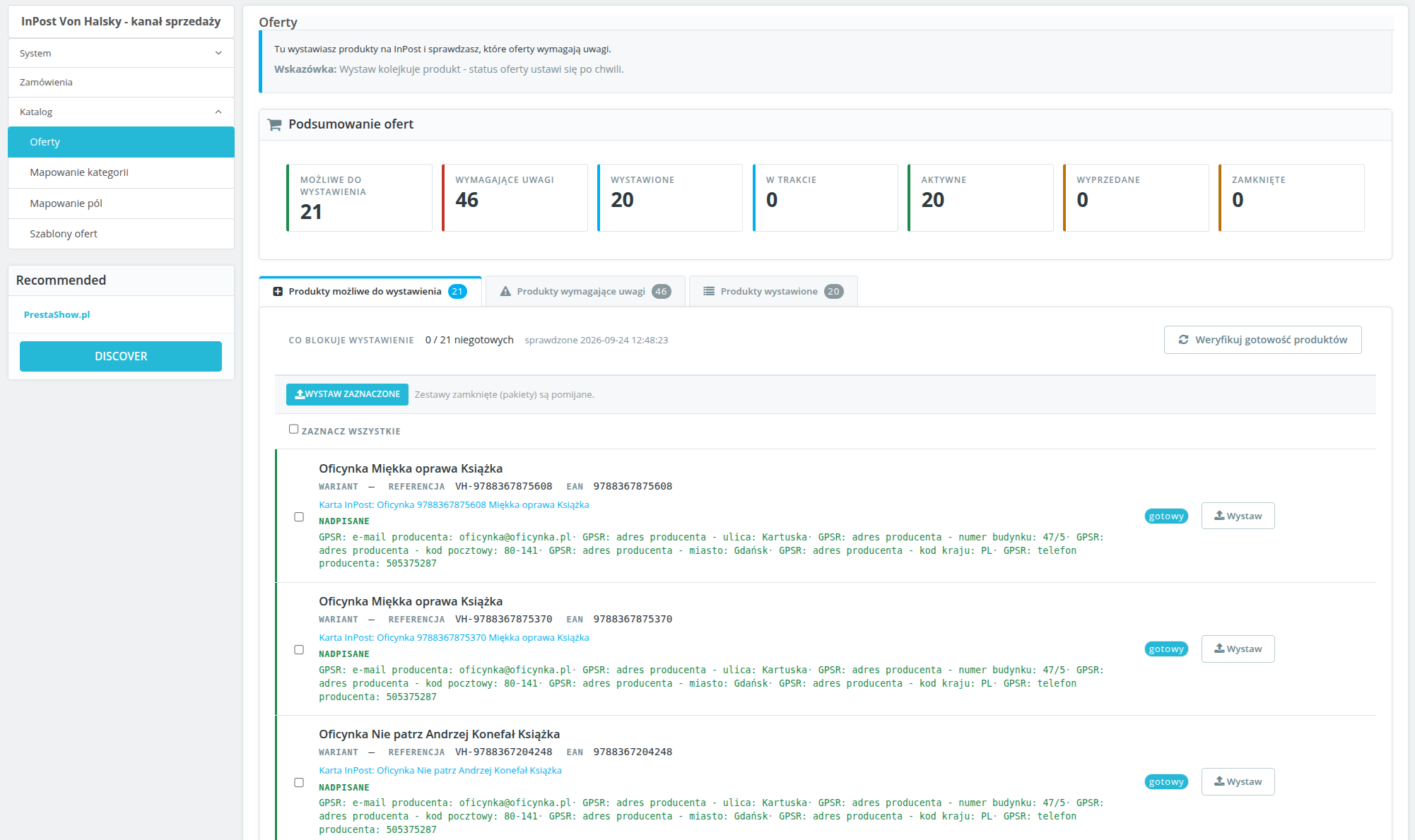
¿Falta el código EAN, la foto, la descripción o la categoría asignada? Sabrás al instante qué hay que corregir. Filtra los problemas, completa los datos y publica los productos de forma individual o en bloque.
Cada variante puede tener una oferta independiente con su propio precio y stock. Las modificaciones realizadas en la pantalla de preparación afectan a la oferta, pero no alteran el catálogo de la tienda.
02 / Plantillas de ofertas
Tus precios.
Tus reglas.
Establece un margen o un descuento, ya sea en porcentaje o en importe. También puedes utilizar los precios de un grupo de clientes seleccionado.
Crea títulos a partir de variables, elige la fuente de la descripción y la fecha de envío. Asigna una plantilla a una categoría, en lugar de configurar cada oferta desde cero.
03 / Sincronización de precios y existencias
Haces cambios en la tienda.
El módulo actualiza las ofertas.
Configura una frecuencia independiente para la sincronización de precios y existencias. Los cambios de la tienda se transfieren a la plataforma automáticamente. Puedes comprobar el progreso de las tareas en la cola.
Establece un nivel mínimo de existencias. Cuando las existencias bajen por debajo del umbral, el módulo cerrará la oferta. De este modo, reduces el riesgo de vender productos que no están disponibles.
04 / Pedidos
Pedidos con InPost.
Gestión en PrestaShop.
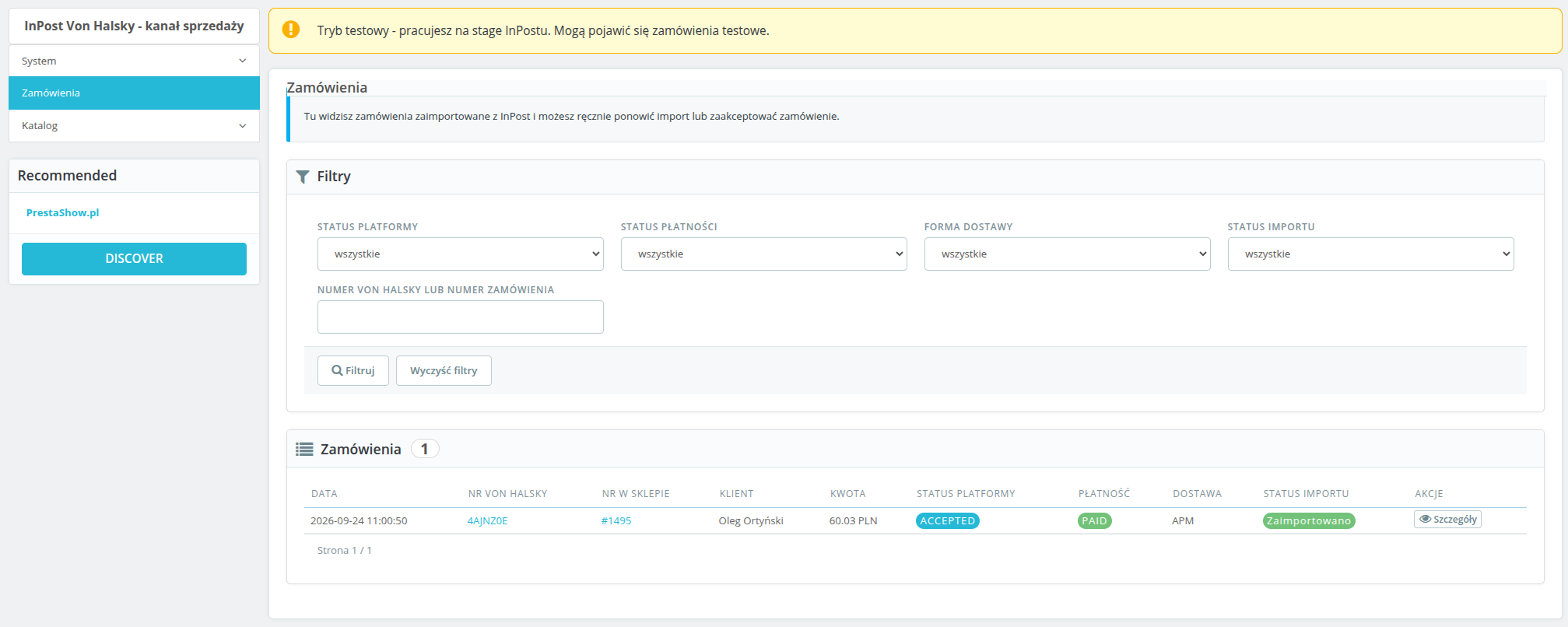
Sin necesidad de introducir los datos manualmente. Los pedidos pagados y aceptados llegan a la tienda con el estado y el transportista asignados, por separado para la entrega en un punto de recogida Paczkomat y por mensajería.
Encontrarás el número de pedido de InPost, el estado y la forma de entrega en el panel de control. ¿Un nuevo pedido? Recibirás una notificación por correo electrónico.
Inicio de la integración
Configura. Publica. Vende.
- Conecta tu cuentadeInPost. Introducelos datos de la API y autoriza la conexión.
- Ajusta la configuración: asigna categorías, estados y transportistas. Configura el CRON.
- Publica los productos: comprueba que el catálogo esté listo y pon en marcha las ventas.
Necesitas: una cuenta de vendedor de InPost Von Halsky con acceso a la API y una tarea CRON que se ejecute cada minuto. Entorno: PrestaShop 1.7, 8.x y 9.x, PHP 7.4 o superior y cURL.
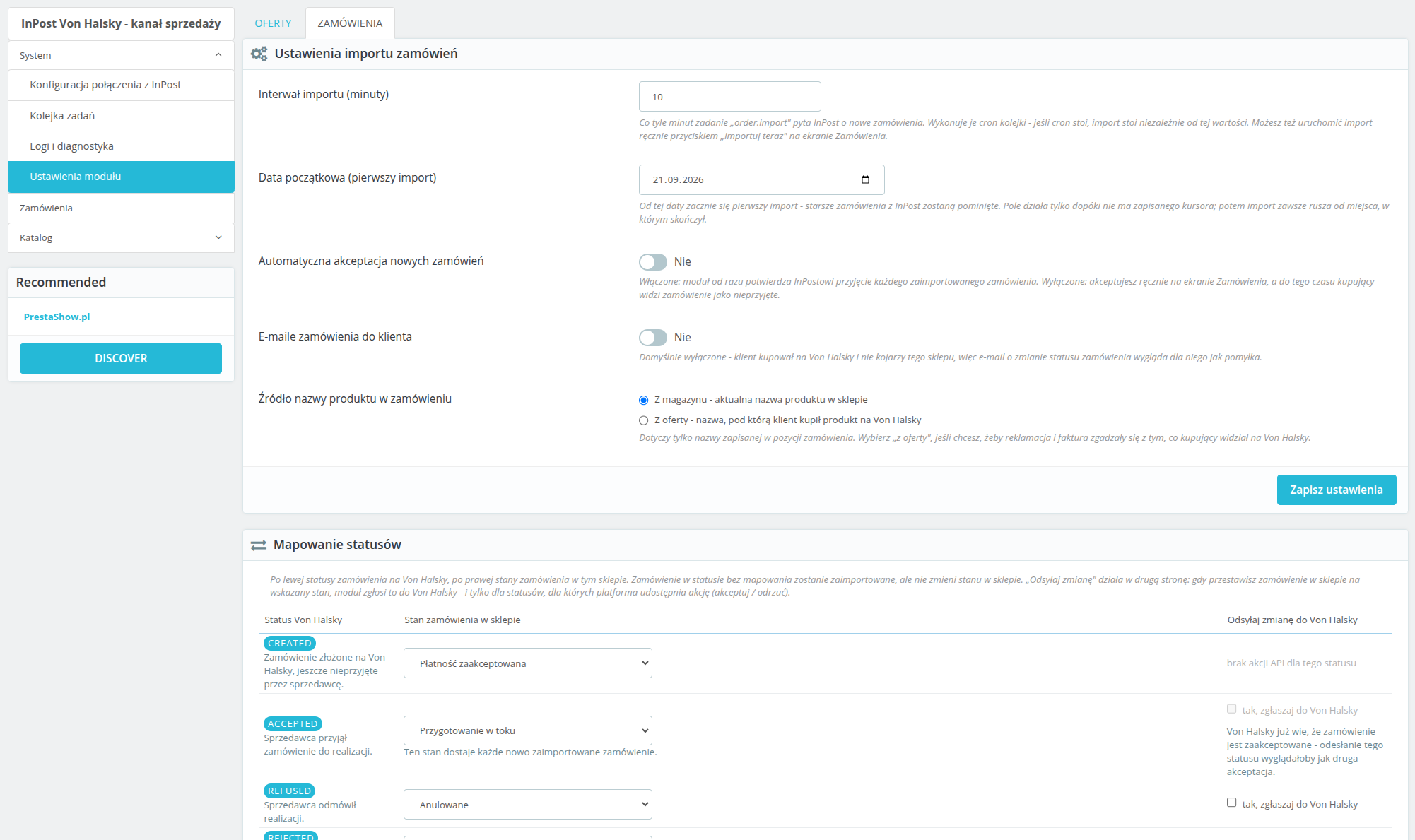
La importación se ejecuta según un calendario o de forma manual. El módulo permite configurar la aceptación automática de pedidos. Los estados de InPost se asignan a los estados de la tienda; el envío de cambios incluye las acciones disponibles a través de la API, entre otras, la aceptación y el rechazo. Si no se ha asignado ningún transportista, se muestra un error de importación claro. Sí. La configuración, las ofertas y los pedidos son independientes para cada tienda. El módulo cifra los datos de acceso y los tokens, utiliza OAuth2 con PKCE y permite exportar y eliminar los datos de los clientes. Los plazos de retención limitan el almacenamiento de los datos de los pedidos y los registros. El panel está en polaco.InPost Von Halsky: preguntas más frecuentes
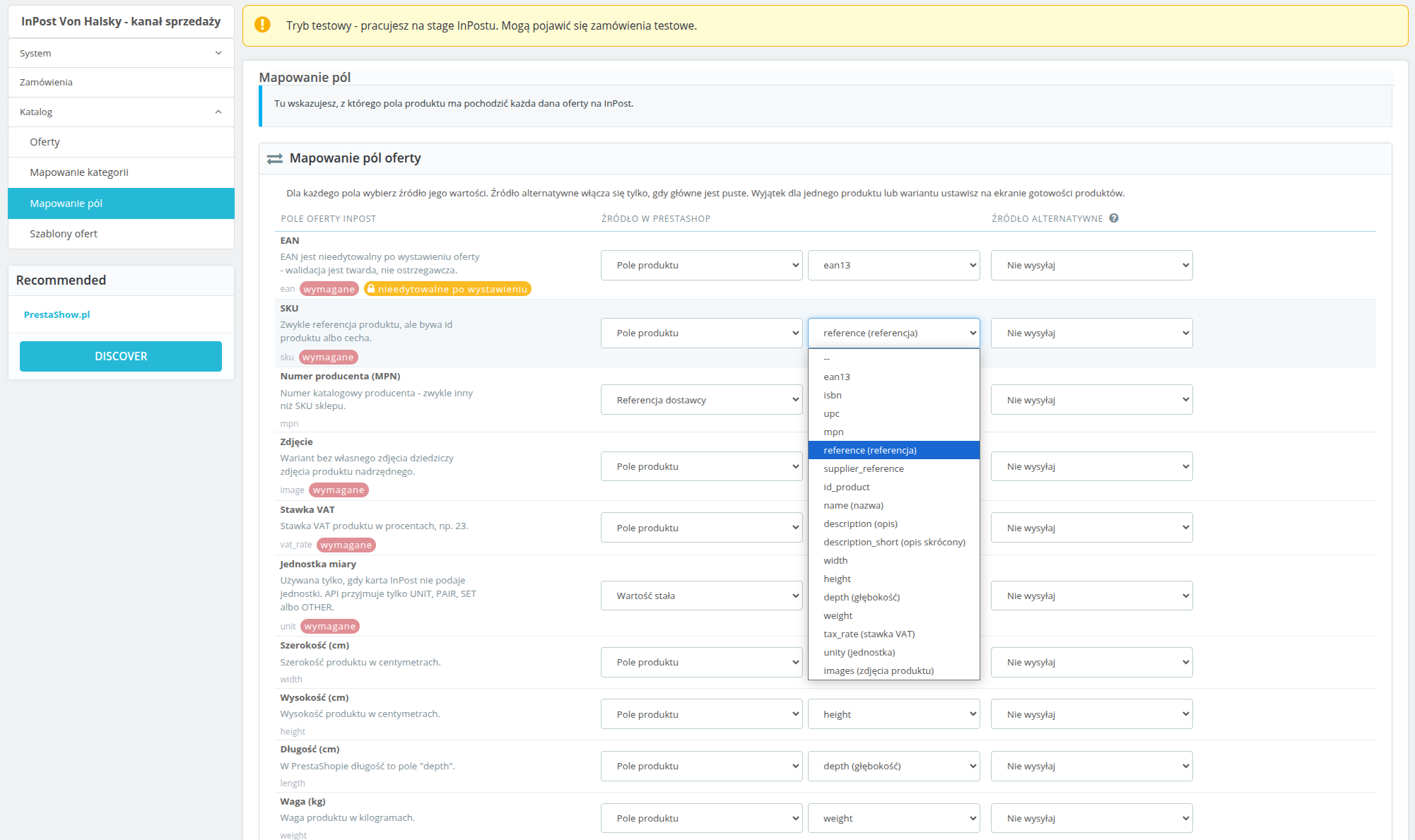
¿Cómo ajusto los datos de las ofertas, incluidos los campos GPSR?
¿Cómo funcionan los estados y la importación de pedidos?
¿Dónde puedo comprobar la conexión y las tareas automáticas?
¿Es compatible el módulo con la función multitienda y la protección de datos?
Changelog (v1.0)
## 1.0.0 - 2026-09-14
First real changelog entry for this module, reconstructed from `git log` and from
`TEST-REPORT.md`'s fix rounds, since the placeholder that shipped before this covered none of the
actual work. No `v1.0.0` tag has been cut yet.
### Added
* OAuth2 connection to InPost (Authorization Code + PKCE), with a back-office screen showing
connection health broken down into credentials, token, organization and token scope, each
checked live against the API rather than cached.
* Category mapping between PrestaShop and Von Halsky categories, including recursive mapping and
the category attribute tree pulled live from the API.
* Listing templates: title patterns, description source, price markup/discount, shipping days and
unit, with support for multiple templates and one required default.
* Offer publishing, both single-product (inline) and bulk (queued), with a readiness screen that
checks every product against InPost's requirements before publish is even offered.
* Price and stock synchronisation, on a configurable schedule and on demand, plus a minimum-stock
threshold that closes an offer instead of sending a low stock count.
* Offer close, reopen and unlink actions.
* Order import from the marketplace event stream, with manual product matching when an order line
can't be resolved automatically, and an "Importuj teraz" manual trigger.
* Status mapping and carrier mapping (parcel locker / courier) for order import, plus outbound
status pushes (accept/refuse) back to the platform when a PrestaShop order reaches a configured
state.
* The module's own async job queue and the `cron.php` entry point that drives it, including a
recurring category-data refresh job with a per-caller time budget.
* A diagnostics screen (health check tiles, API error log, CSV export) and a log/audit trail of
every API call and response.
* A first product published end to end against InPost stage, and the category mapping fixes that
made that possible.
### Changed
* Orders now materialise in PrestaShop only once the marketplace order reaches `ACCEPTED`, rather
than earlier in its lifecycle.
* Marketplace order confirmation mail is suppressed at the mail layer by default, since the buyer
address on these orders is a pseudonymous InPost relay address, not a real mailbox.
* Price and stock are recorded as synced only once the platform confirms the change, not as soon as
this module sends it - the two "sent" columns on the offers screen reflect what InPost actually
knows, not what was last transmitted.
* OAuth client secret and access/refresh tokens are encrypted at rest instead of stored in plain
text.
* The cron token is read from a request header first (`X-VH-Cron-Token` / `X-VH-Cron-Shop`) and
stripped from `$_GET`/`$_POST`/`$_REQUEST` before PrestaShop's own bootstrap runs, so it no
longer leaks into a redirect `Location` header and from there into access and proxy logs. The old
query-string form still works as a fallback.
* `ps_versions_compliancy.min` raised from `1.7` to `1.7.7` - the code already relies on the `mpn`
columns and `hookDisplayAdminOrderMain`, neither of which exists before 1.7.7, so the
declared floor now matches what the module actually needs. Part of a wider compatibility campaign
checking PHP 7.1-8.4 and PS 1.7.7-9.0; see `COMPAT-CAMPAIGN.md`.
### Fixed
* On PrestaShop 1.7.7 the `orders.note` column does not exist yet (it arrived in 1.7.8), so the
marketplace order comment was assigned to a property that was never saved. The write is now
guarded by the `Order` definition, so 1.7.8+ keeps the comment and 1.7.7 skips it instead of
silently losing it (found by the compatibility campaign, cell a).
* On PrestaShop 1.7.7 re-applying the same order state fires `actionOrderStatusPostUpdate` again
and queued a second `order.push_status` job for the same target status. The synchronizer now
checks for a pending or reserved push of that status before queueing (cell a, integration test
F18).
* Log CSV export passed no `$escape` argument to `fputcsv()`, which PHP 8.4 reports as deprecated
on every exported row (cell h). The argument is now explicit.
* A GPSR manufacturer phone number that wasn't already in E.164 format (the normal case, since the
back office's own fix-it form accepted anything) caused InPost to reject the entire offer. Phone
numbers are now normalised before sending, or omitted if they can't be, and the readiness check
flags a bad value before publish is attempted.
* InPost's field-level validation detail was parsed out of API error responses but never actually
shown anywhere - the back office and the stored error message both said only "Validation failed"
with no indication which field. The field and reason are now included in both places.
* An offer whose EAN was edited after listing was sent to the platform anyway and rejected outright
("Once assigned field cannot be changed"). Changed immutable fields are now dropped from the
outgoing update instead of being sent.
* An offer name, brand, SKU or attribute value longer than InPost's limit was silently truncated
with no warning; an EAN over its limit threw a plain exception that escaped the job handler as an
uncaught fatal instead of failing the offer cleanly. Both now surface as proper validation
warnings/errors before publish.
* Product images served from a URL InPost's fetcher couldn't reach caused every offer for that
product to be rejected with no visible reason in the back office. Image reachability is now
checked as part of readiness validation, bounded so a bad image host can't turn a bulk readiness
sweep into a multi-minute hang.
* An offer rejected by the platform after publish was only ever noticed if an event happened to
arrive for it; one that fell outside the event window could sit "W trakcie wystawiania"
indefinitely with no error shown anywhere. Offers stuck in that state for more than 20 minutes are
now re-checked directly.
* A cron job configured with a typo'd shop id received a silent redirect to the storefront instead
of an error, making a broken cron schedule look like it was working.
* Order import ran on a schedule from the moment the module was installed, even though status and
carrier mapping start out empty and nothing warned that orders couldn't be imported correctly
until the first real order failed to build. The diagnostics screen and the order list now warn
while either mapping is incomplete.
* The diagnostics/log screen scrolled the entire page sideways on narrower viewports instead of
scrolling just the log table, the way every other wide table in the module already did.
* Internal ticket references (`VH-09`, `VH-10`) were visible in order-settings headings shown to
shop operators; removed.
First real changelog entry for this module, reconstructed from `git log` and from
`TEST-REPORT.md`'s fix rounds, since the placeholder that shipped before this covered none of the
actual work. No `v1.0.0` tag has been cut yet.
### Added
* OAuth2 connection to InPost (Authorization Code + PKCE), with a back-office screen showing
connection health broken down into credentials, token, organization and token scope, each
checked live against the API rather than cached.
* Category mapping between PrestaShop and Von Halsky categories, including recursive mapping and
the category attribute tree pulled live from the API.
* Listing templates: title patterns, description source, price markup/discount, shipping days and
unit, with support for multiple templates and one required default.
* Offer publishing, both single-product (inline) and bulk (queued), with a readiness screen that
checks every product against InPost's requirements before publish is even offered.
* Price and stock synchronisation, on a configurable schedule and on demand, plus a minimum-stock
threshold that closes an offer instead of sending a low stock count.
* Offer close, reopen and unlink actions.
* Order import from the marketplace event stream, with manual product matching when an order line
can't be resolved automatically, and an "Importuj teraz" manual trigger.
* Status mapping and carrier mapping (parcel locker / courier) for order import, plus outbound
status pushes (accept/refuse) back to the platform when a PrestaShop order reaches a configured
state.
* The module's own async job queue and the `cron.php` entry point that drives it, including a
recurring category-data refresh job with a per-caller time budget.
* A diagnostics screen (health check tiles, API error log, CSV export) and a log/audit trail of
every API call and response.
* A first product published end to end against InPost stage, and the category mapping fixes that
made that possible.
### Changed
* Orders now materialise in PrestaShop only once the marketplace order reaches `ACCEPTED`, rather
than earlier in its lifecycle.
* Marketplace order confirmation mail is suppressed at the mail layer by default, since the buyer
address on these orders is a pseudonymous InPost relay address, not a real mailbox.
* Price and stock are recorded as synced only once the platform confirms the change, not as soon as
this module sends it - the two "sent" columns on the offers screen reflect what InPost actually
knows, not what was last transmitted.
* OAuth client secret and access/refresh tokens are encrypted at rest instead of stored in plain
text.
* The cron token is read from a request header first (`X-VH-Cron-Token` / `X-VH-Cron-Shop`) and
stripped from `$_GET`/`$_POST`/`$_REQUEST` before PrestaShop's own bootstrap runs, so it no
longer leaks into a redirect `Location` header and from there into access and proxy logs. The old
query-string form still works as a fallback.
* `ps_versions_compliancy.min` raised from `1.7` to `1.7.7` - the code already relies on the `mpn`
columns and `hookDisplayAdminOrderMain`, neither of which exists before 1.7.7, so the
declared floor now matches what the module actually needs. Part of a wider compatibility campaign
checking PHP 7.1-8.4 and PS 1.7.7-9.0; see `COMPAT-CAMPAIGN.md`.
### Fixed
* On PrestaShop 1.7.7 the `orders.note` column does not exist yet (it arrived in 1.7.8), so the
marketplace order comment was assigned to a property that was never saved. The write is now
guarded by the `Order` definition, so 1.7.8+ keeps the comment and 1.7.7 skips it instead of
silently losing it (found by the compatibility campaign, cell a).
* On PrestaShop 1.7.7 re-applying the same order state fires `actionOrderStatusPostUpdate` again
and queued a second `order.push_status` job for the same target status. The synchronizer now
checks for a pending or reserved push of that status before queueing (cell a, integration test
F18).
* Log CSV export passed no `$escape` argument to `fputcsv()`, which PHP 8.4 reports as deprecated
on every exported row (cell h). The argument is now explicit.
* A GPSR manufacturer phone number that wasn't already in E.164 format (the normal case, since the
back office's own fix-it form accepted anything) caused InPost to reject the entire offer. Phone
numbers are now normalised before sending, or omitted if they can't be, and the readiness check
flags a bad value before publish is attempted.
* InPost's field-level validation detail was parsed out of API error responses but never actually
shown anywhere - the back office and the stored error message both said only "Validation failed"
with no indication which field. The field and reason are now included in both places.
* An offer whose EAN was edited after listing was sent to the platform anyway and rejected outright
("Once assigned field cannot be changed"). Changed immutable fields are now dropped from the
outgoing update instead of being sent.
* An offer name, brand, SKU or attribute value longer than InPost's limit was silently truncated
with no warning; an EAN over its limit threw a plain exception that escaped the job handler as an
uncaught fatal instead of failing the offer cleanly. Both now surface as proper validation
warnings/errors before publish.
* Product images served from a URL InPost's fetcher couldn't reach caused every offer for that
product to be rejected with no visible reason in the back office. Image reachability is now
checked as part of readiness validation, bounded so a bad image host can't turn a bulk readiness
sweep into a multi-minute hang.
* An offer rejected by the platform after publish was only ever noticed if an event happened to
arrive for it; one that fell outside the event window could sit "W trakcie wystawiania"
indefinitely with no error shown anywhere. Offers stuck in that state for more than 20 minutes are
now re-checked directly.
* A cron job configured with a typo'd shop id received a silent redirect to the storefront instead
of an error, making a broken cron schedule look like it was working.
* Order import ran on a schedule from the moment the module was installed, even though status and
carrier mapping start out empty and nothing warned that orders couldn't be imported correctly
until the first real order failed to build. The diagnostics screen and the order list now warn
while either mapping is incomplete.
* The diagnostics/log screen scrolled the entire page sideways on narrower viewports instead of
scrolling just the log table, the way every other wide table in the module already did.
* Internal ticket references (`VH-09`, `VH-10`) were visible in order-settings headings shown to
shop operators; removed.
Requisitos técnicos
Requisitos técnicos
- PHP 7.1 - 8.x
- Extensión de servidor ionCube Loader
Más información sobre requisitos técnicos en la base de conocimientos
Asistencia y actualizaciones
Soporte = Actualizaciones + HelpDesk
Obtendrá 90 días (3 meses) de acceso al paquete completo de soporte de PrestaShow.
Actualizaciones de módulos
Los módulos le informarán de las actualizaciones disponibles. Lea el registro de cambios y realice una actualización del módulo con 1 clic directamente desde su tienda.
Panel HelpDesk
Este es el panel donde le proporcionamos ayuda. En el HelpDesk puede informar de problemas, solicitar la instalación gratuita de módulos y actualizaciones, y encargar modificaciones y trabajos de desarrollo individuales.
Ampliar el soport e
Una vez finalizado el soporte, puede utilizar el módulo sin restricciones. Puede ampliar su acceso al soporte en cualquier momento que lo necesite.
Base de conocimientos y FAQ
Gratis para siempre
La base de conocimientos está disponible para todo el mundo. Encontrará documentación sobre el módulo, así como instrucciones, vídeos y respuestas a las preguntas más frecuentes.
Licencia
Licencia de por vida para el módulo
- Puede utilizar el módulo sin limitación para 1 tienda = 1 dominio.
- Puede utilizar un dominio adicional, por ejemplo, para una copia de desarrollador.
- Por un módico precio puede cambiar usted mismo el dominio para el módulo.
Dominios adicionales para Multitienda
- Todos nuestros módulos son compatibles con PrestaShop Multitienda.
- El soporte para un número ilimitado de dominios para PrestaShop Multitienda requiere la compra del soporte multitienda para el módulo.
Modificación del código
- El código del módulo relacionado con la integración con la tienda y el diseño (.tpl, .css, .js) es de código abierto y puede modificarlo libremente.
- El código fuente del módulo (.php) está encriptado con ionCube y modificarlo anulará la garantía.
Todavía no hay entradas.
Por el momento, no hay comentarios de los clientes.