Customer service and order packaging on your phone 📦














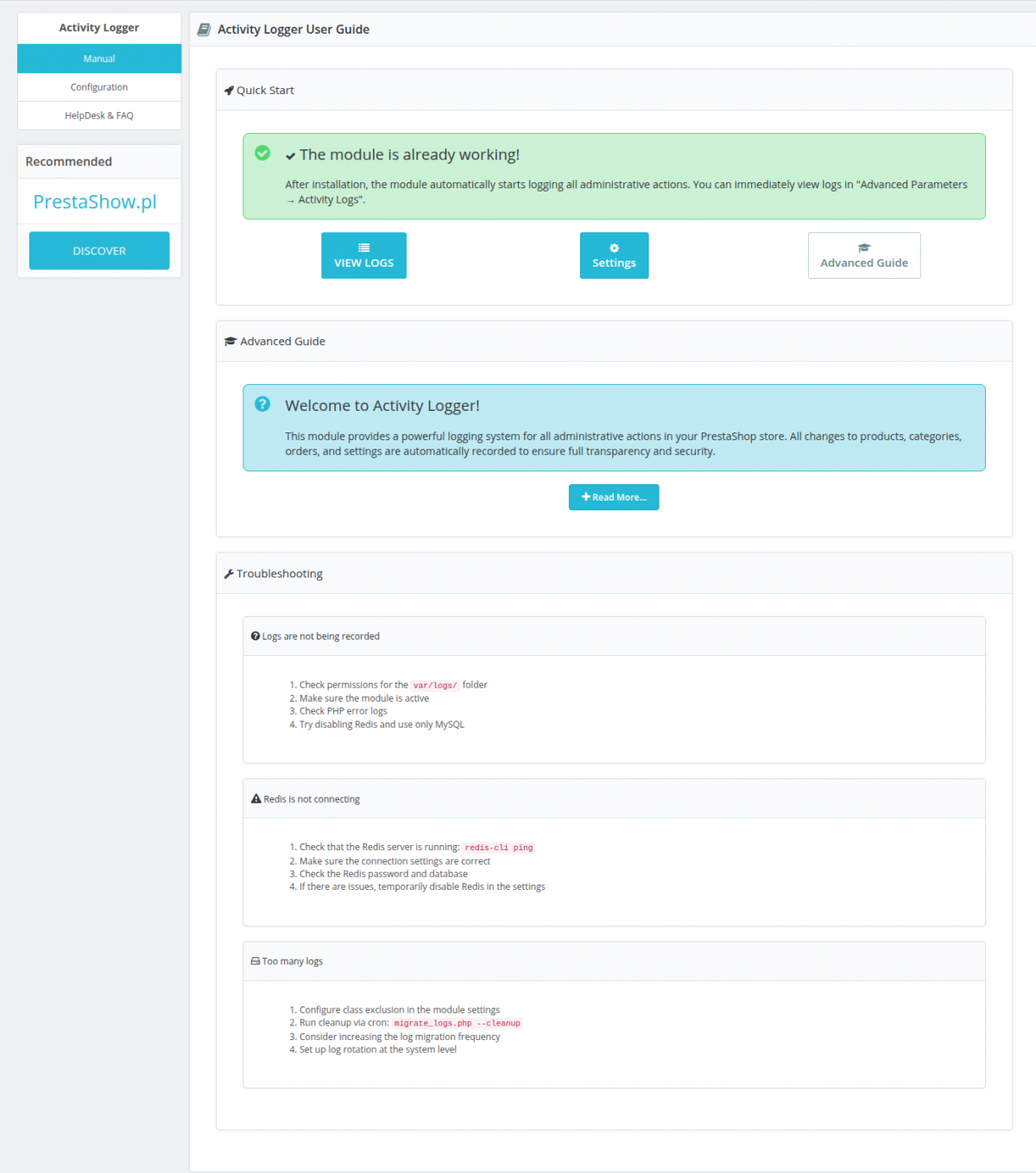
Detailed description
This module is designed for admins who want to have a complete view of the history of changes to all settings and fields in the PrestaShop store admin panel:
- Logging all changes in Back Office - handling all available fields in PrestaShop admin panel.
- Logging of all changes from API.
- Precise log of all performed actions.
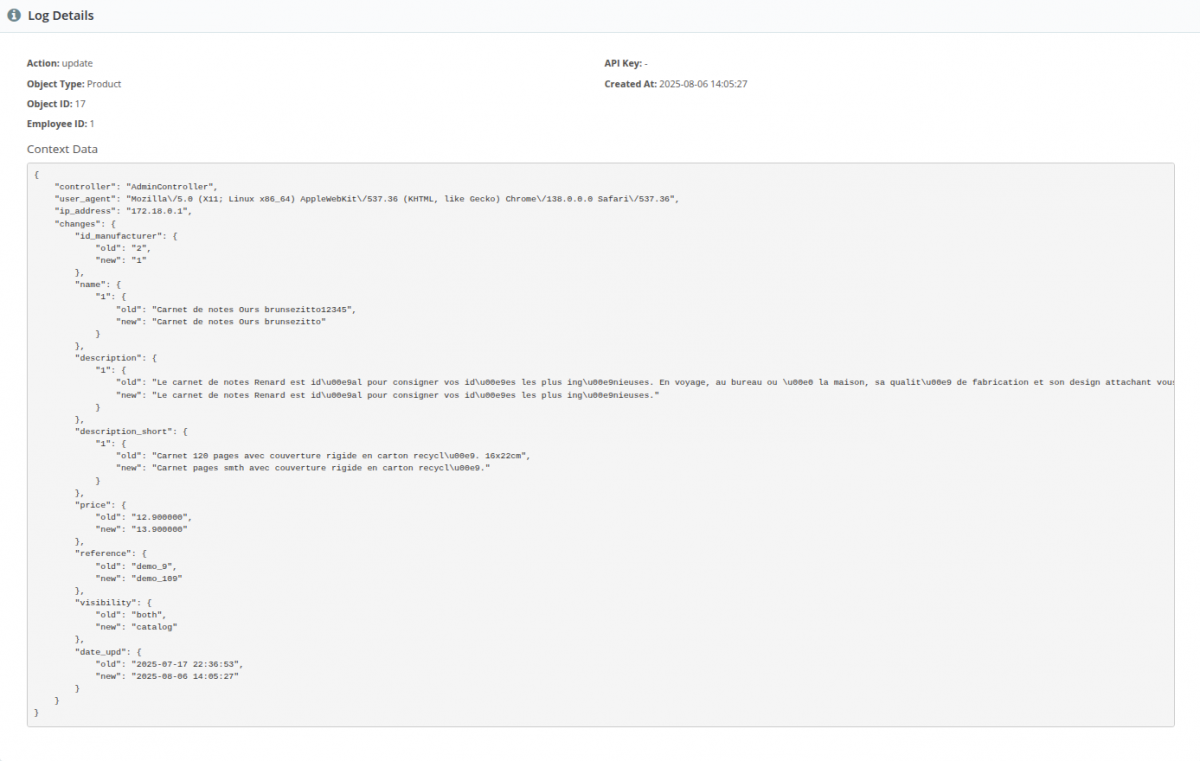
- Precise information about the values before and after saving the change.
- Modern architecture - does not affect the performance of the store.
Our module will give you the answer when you need to determine: who and what changed, broke, added or removed in your store - configurations, descriptions, prices, etc. It will give you this with high precision, including information on the values that were before the changes were made.
Logging of administrative actions
Logging of administrative actions: adding, editing, deleting objects and logging of actions from API: including identification of API keys.
Support for all fields and data in Back Office
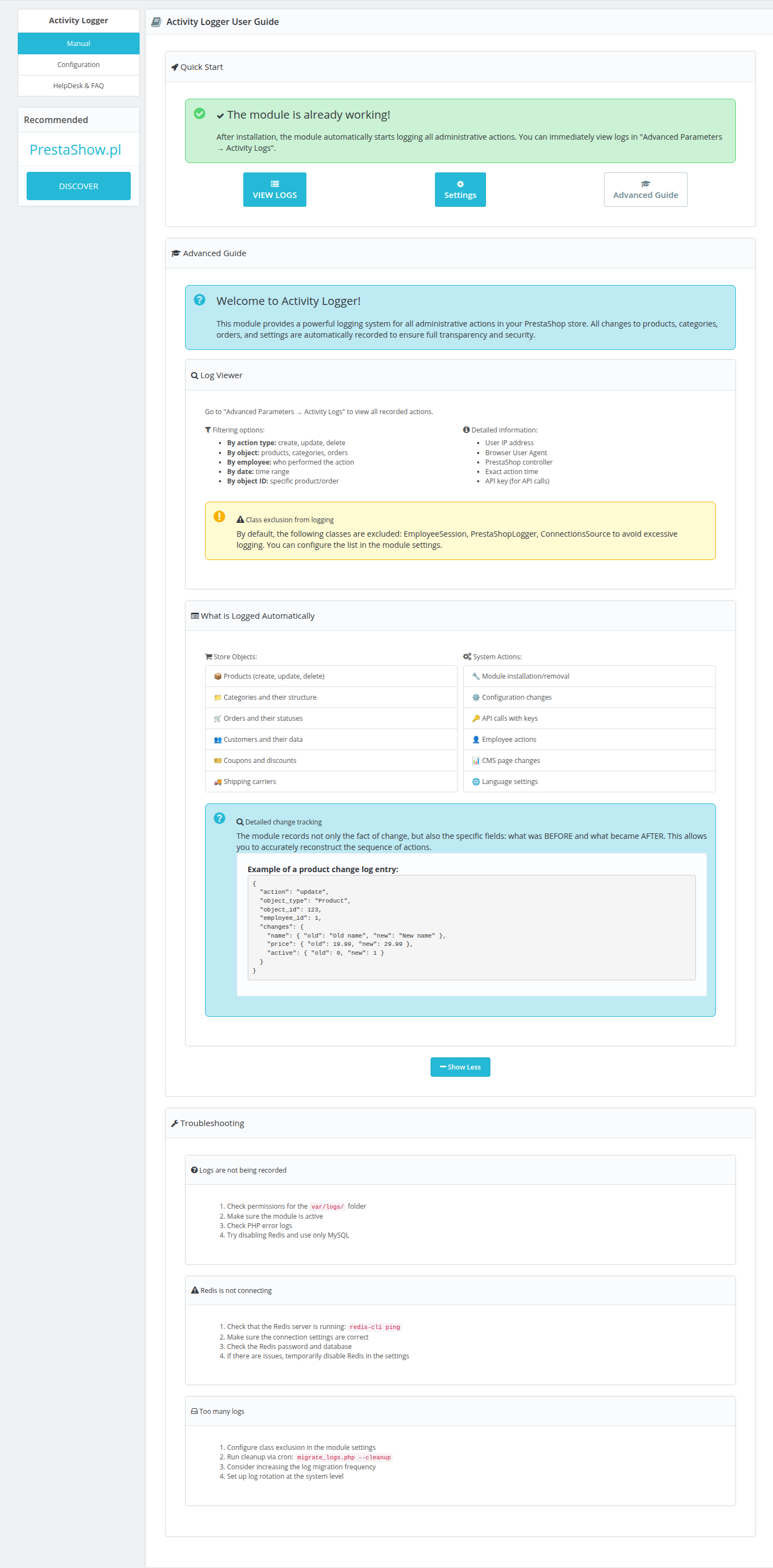
Objects: Product, Category, Order, Customer, etc.
Modules: installation/deinstallation
Configuration: changes to store settings
API: calls with key identification
Huge performance
Zero impact on store performance thanks to 4-level data system: Redis → Memory → RAM → File
{ "field_changes": { "name": { "from": "Old Product Name", "to": "New Product Name" }, "price": { "from": 19.99, "to": 29.99 }, "active": { "from": 0, "to": 1 } } }Filtering and searching
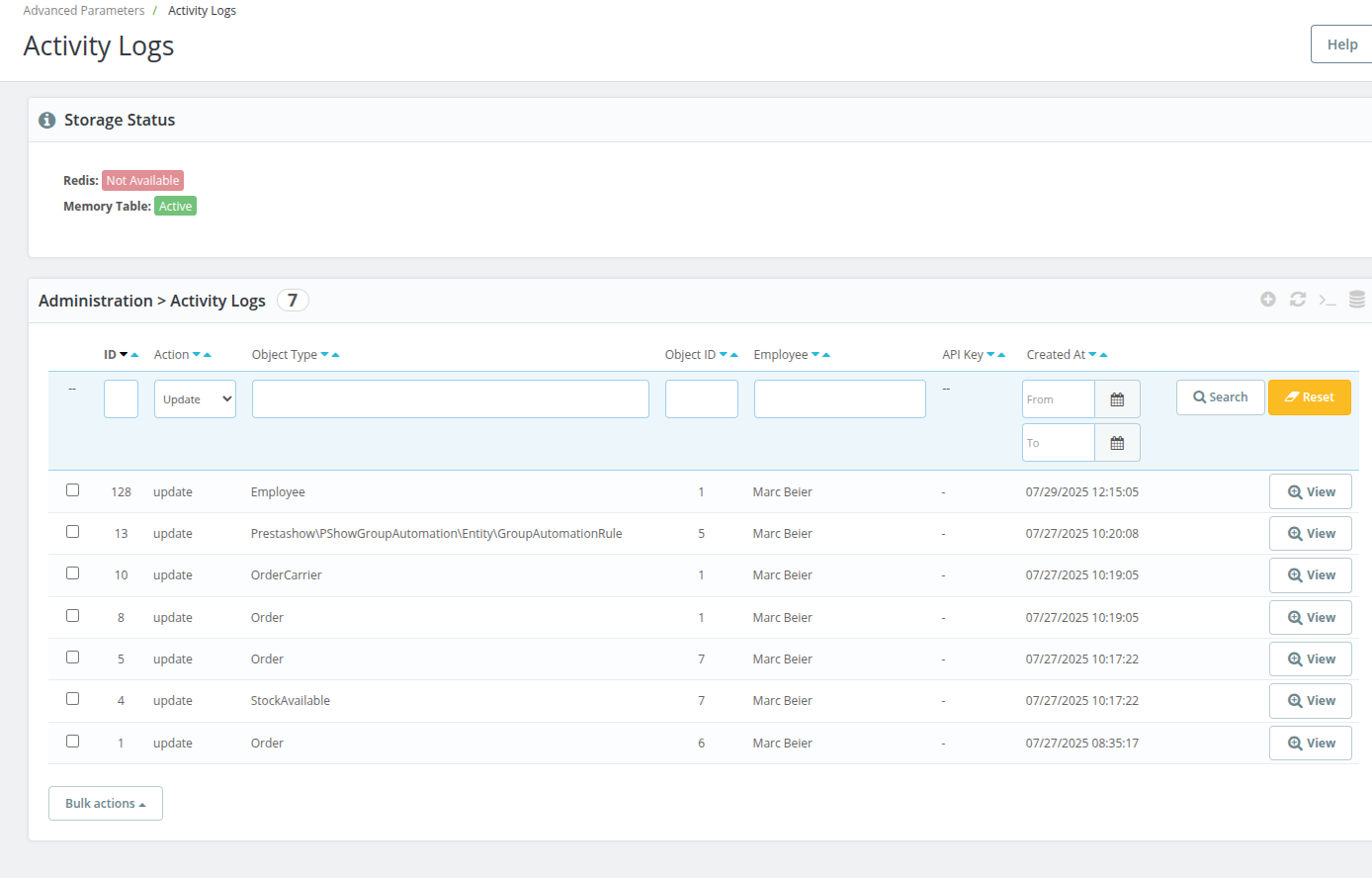
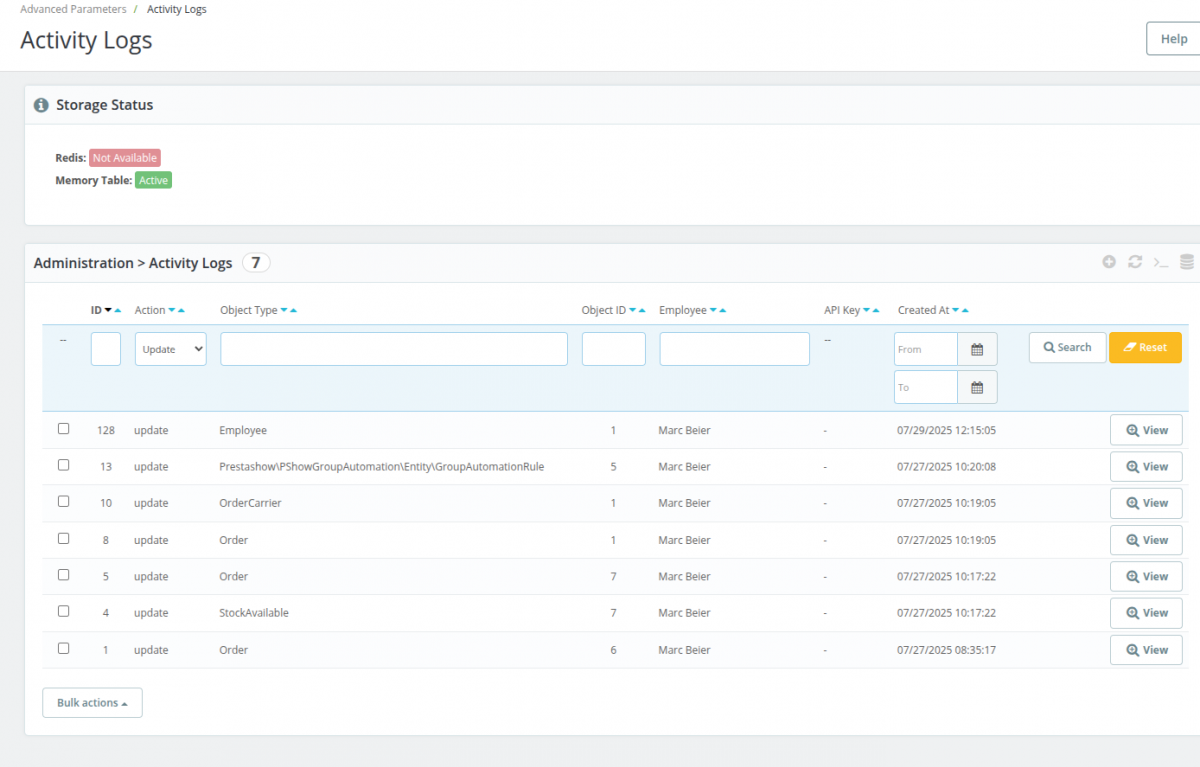
Filter by action, object type, employee, date, and object name and ID
Details
Details of the context of each log with date, source, author and values before and after change.
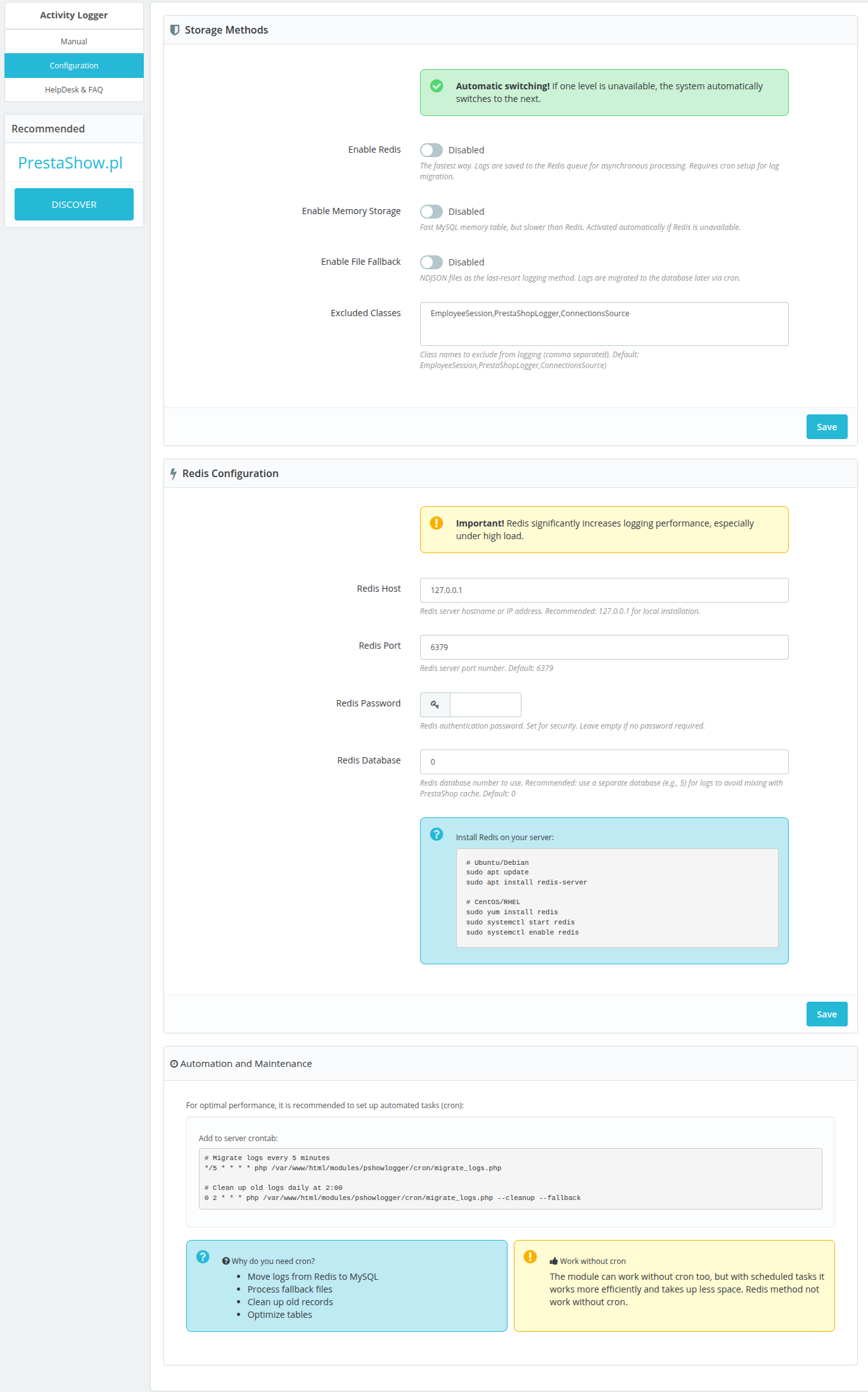
The module does not affect the performance of the store because it handles huge amounts of log writing in an efficient 4-tier fallback system
External Redis server → SQL → RAM → File:
1
Redis
RPUSH logs to activity_log queue + asynchronous processing by cron
2
MySQL Memory Table
Ps_activity_log_buffer table + Fast RAM operations
3
In-memory Buffer
PHP in-memory table throughout request + Flush at end of execution (shutdown)
1
NDJSON file
Write to var/logs/activity_fallback.ndjson + migration via cron to database
If any system is down or unavailable, the module will automatically jump to the next level.
Log system monitoring
- Status of storage systems in the administration panel
- Error logs in PHP
error_log - Performance metrics in CRON scripts
Changelog (v1.1)
## v1.1.4 - 2026-06-17
### Fixed
- Logging can no longer break the PrestaShop webservice (API) when creating, updating or deleting objects
## v1.1.3 - 2025-12-06
### Fixed
- Fixed translation method calls in admin controller
- Fixed Redis storage configuration checks
## v1.1.2 - 2025-08-14
### Added
- **Configuration Changes Logging**: Automatic logging of all PrestaShop configuration changes
- **Configuration Override**: Minimal override class for intercepting configuration updates
- **Enhanced Module Name Logging**: Improved module name logging in enable/disable operations
- **Sensitive Data Protection**: Hiding of sensitive configuration keys (passwords, API keys, etc.)
## v1.1.1 - 2025-07-27
### Added
- **Enhanced Change Tracking**: Improved before/after field comparison for object updates
- **Detailed Context Logging**: Better capture of form submissions and API calls
- **Advanced Fallback System**: 4-level fallback chain (Redis → Memory → RAM → File)
- **Symfony Form Integration**: Automatic logging of form submissions and validation results
- **API Key Detection**: Enhanced identification of API calls with authentication headers
- **Employee Session Tracking**: Automatic detection of employee actions and sessions
- **Multi-language Support**: Full internationalization support for all interface elements
### Fixed
- **Memory Leaks**: Resolved potential memory leaks in long-running processes
- **Duplicate Logging**: Prevented duplicate log entries for the same object changes
- **Redis Connection**: Fixed connection timeout and authentication issues
- **File Permissions**: Corrected file access rights for log directories
- **SQL Injection**: Enhanced security with proper parameter escaping
- **Class Exclusion**: Fixed issues with excluded classes configuration
- **Cron Job Reliability**: Improved error handling in automated migration tasks
## v1.1.0 - 2025-07-14
### Added
- **Redis Storage Support**: High-performance Redis-based logging system
- **Memory Table Fallback**: MySQL memory table for fast temporary storage
- **File Fallback System**: NDJSON file storage as ultimate fallback
- **Batch Processing**: Efficient batch operations for log migration
- **Storage Manager**: Intelligent storage selection and fallback management
- **Cron Integration**: Automated log migration and cleanup scripts
- **Admin Interface**: Complete admin panel for log viewing and management
- **Filtering System**: Advanced filtering and search capabilities
- **Export Functionality**: Log export in various formats
- **Real-time Status**: Storage system status monitoring
### Fixed
- **Installation Issues**: Resolved module installation problems
- **Database Schema**: Fixed table creation and indexing issues
- **Hook Registration**: Corrected hook registration and execution
- **Memory Usage**: Optimized memory consumption during logging
## v1.0.0 - 2025-07-09
### Added
- **Basic Logging System**: Core logging functionality for PrestaShop objects
- **Hook Integration**: Integration with PrestaShop action hooks
- **Database Storage**: MySQL-based log storage system
- **Object Tracking**: Tracking of create, update, and delete operations
- **Employee Tracking**: Automatic employee identification and tracking
- **Context Capture**: Basic context information capture
- **Module Installation**: Initial module installation and setup
- **Configuration System**: Basic configuration management
- **Admin Tab**: Basic admin interface tab
- **SQL Schema**: Database table creation and management
### Fixed
- Logging can no longer break the PrestaShop webservice (API) when creating, updating or deleting objects
## v1.1.3 - 2025-12-06
### Fixed
- Fixed translation method calls in admin controller
- Fixed Redis storage configuration checks
## v1.1.2 - 2025-08-14
### Added
- **Configuration Changes Logging**: Automatic logging of all PrestaShop configuration changes
- **Configuration Override**: Minimal override class for intercepting configuration updates
- **Enhanced Module Name Logging**: Improved module name logging in enable/disable operations
- **Sensitive Data Protection**: Hiding of sensitive configuration keys (passwords, API keys, etc.)
## v1.1.1 - 2025-07-27
### Added
- **Enhanced Change Tracking**: Improved before/after field comparison for object updates
- **Detailed Context Logging**: Better capture of form submissions and API calls
- **Advanced Fallback System**: 4-level fallback chain (Redis → Memory → RAM → File)
- **Symfony Form Integration**: Automatic logging of form submissions and validation results
- **API Key Detection**: Enhanced identification of API calls with authentication headers
- **Employee Session Tracking**: Automatic detection of employee actions and sessions
- **Multi-language Support**: Full internationalization support for all interface elements
### Fixed
- **Memory Leaks**: Resolved potential memory leaks in long-running processes
- **Duplicate Logging**: Prevented duplicate log entries for the same object changes
- **Redis Connection**: Fixed connection timeout and authentication issues
- **File Permissions**: Corrected file access rights for log directories
- **SQL Injection**: Enhanced security with proper parameter escaping
- **Class Exclusion**: Fixed issues with excluded classes configuration
- **Cron Job Reliability**: Improved error handling in automated migration tasks
## v1.1.0 - 2025-07-14
### Added
- **Redis Storage Support**: High-performance Redis-based logging system
- **Memory Table Fallback**: MySQL memory table for fast temporary storage
- **File Fallback System**: NDJSON file storage as ultimate fallback
- **Batch Processing**: Efficient batch operations for log migration
- **Storage Manager**: Intelligent storage selection and fallback management
- **Cron Integration**: Automated log migration and cleanup scripts
- **Admin Interface**: Complete admin panel for log viewing and management
- **Filtering System**: Advanced filtering and search capabilities
- **Export Functionality**: Log export in various formats
- **Real-time Status**: Storage system status monitoring
### Fixed
- **Installation Issues**: Resolved module installation problems
- **Database Schema**: Fixed table creation and indexing issues
- **Hook Registration**: Corrected hook registration and execution
- **Memory Usage**: Optimized memory consumption during logging
## v1.0.0 - 2025-07-09
### Added
- **Basic Logging System**: Core logging functionality for PrestaShop objects
- **Hook Integration**: Integration with PrestaShop action hooks
- **Database Storage**: MySQL-based log storage system
- **Object Tracking**: Tracking of create, update, and delete operations
- **Employee Tracking**: Automatic employee identification and tracking
- **Context Capture**: Basic context information capture
- **Module Installation**: Initial module installation and setup
- **Configuration System**: Basic configuration management
- **Admin Tab**: Basic admin interface tab
- **SQL Schema**: Database table creation and management
Komentarze ()
The reviews posted on our store are not sponsored in any way. We also verify that they were added by customers who have purchased from us or guests. If you want to learn more about this topic please read our Regulations.
Ciekawie narzędzie się szykuje. Brakowało mi szczegółowych informacji w jednym miejscu. Czy będzie się dało też np odczytać jakimi zapytaniami bombarduje nas przez API inny serwer?
Technical requirements
Technical Requirements
- PHP 7.1 - 8.x
- Server extension ionCube Loader
- PrestaShop Importer only: PHP libxml version > 2.9.3
- PrestaShop Facebook Integrator only: PHP 7.2 or higher
- PrestaShop VAT Validator only: PHP SOAP
Support & Updates
Support = Updates + HelpDesk
You get 90 days (3 months) access to the complete PrestaShow support package.
Module updates
Modules will inform you about available updates. Read the changelog and perform a 1-click module update directly from your store.
HelpDesk panel
This is the panel where we will provide you with help. On HelpDesk you can report problems, order free module installation and updates, and order modifications and custom programming work.
Extend support
After support expires, you can use the module without any restrictions. You can extend your support access at any time you need it.
Knowledge Base & FAQ
Free forever
The knowledge base is available to everyone. You will find module documentation as well as instructions, videos and answers to frequently asked questions.
License
Lifetime license for the module
- You can use the module without limitation in 1 store = 1 domain.
- You can use an additional domain, e.g. for developer copy.
- For a small fee you can change the domain for the module yourself.
Additional domains for Multistore
- All our modules support PrestaShop Multistore.
- Supporting unlimited domains for PrestaShop Multistore requires purchasing multistore support for the module.
Modifying the code
- The module code related to the integration with the store and the design (.tpl, .css, .js) has open source code and you can modify it freely.
- The module's source code (.php) is encrypted with ionCube, and modifying it will void the warranty.
No entries yet.