





A slow PrestaShop store means lost customers, poorer SEO results, and more difficult order processing. On the other hand, a “slow store” is a symptom, not a diagnosis —and there are over a dozen possible causes, with each store potentially facing a different set of issues.
This page shows how we determine which of these issues apply to you, how much the fix will cost, and when you really don’t need us.
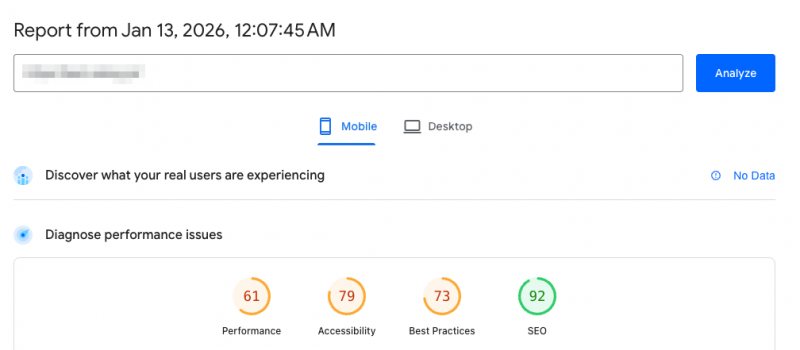
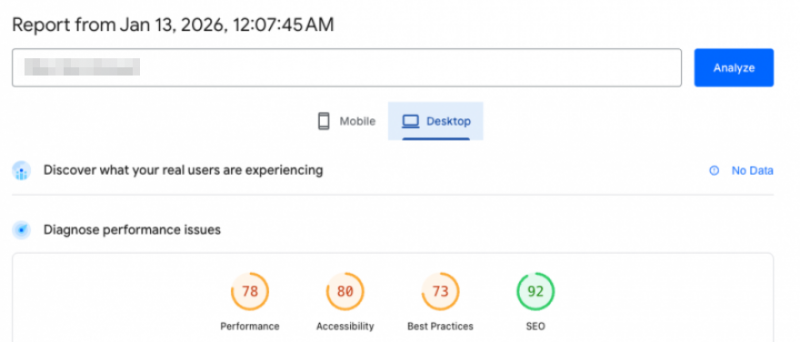
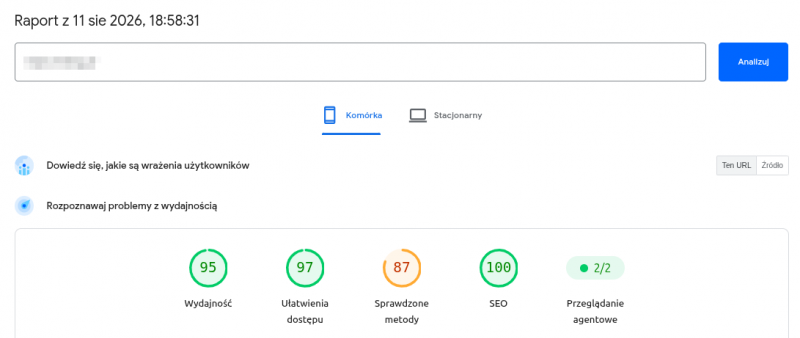
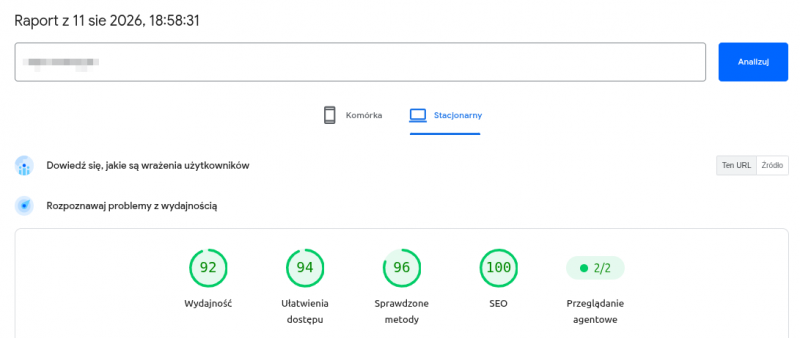
Let’s start with what brought you here
“My store is running slowly”
Loading takes over 3 seconds, poor PageSpeed, the admin panel is sluggish, and checkout is slow.
You’re in the right place
→ read more
“I don’t think it’s the server. Maybe bots?”
The store crashes under traffic, strange entries in the logs, something suspicious in the code, alerts from Google.
Go here
→ Scroll down to security
“I’m not getting any traffic from Google”
Competitors are ranking higher, Search Console shows errors, rankings dropped after migration, duplicate URLs.
This is a different area
→ SEO and visibility
These three issues may stem from the same root cause—a slow store hurts rankings, bots are attacking the server, and filters generating thousands of URLs are messing everything up at once. The problem originates from different places, so let’s first determine where its epicenter is.
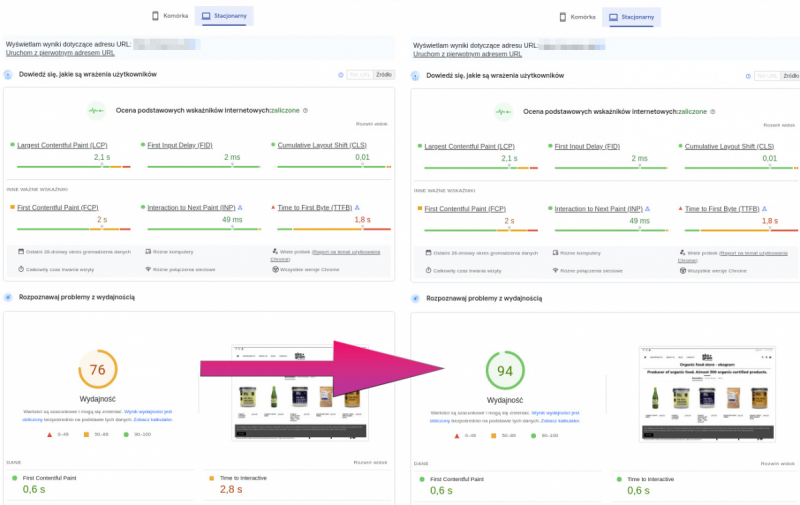
13 seconds → 0.9 seconds
That’s how long it took for the PrestaShop 8.1 store to load before and after our optimization. Not a simulation, not a test on a clean installation—a live store with a real product catalog and real modules.
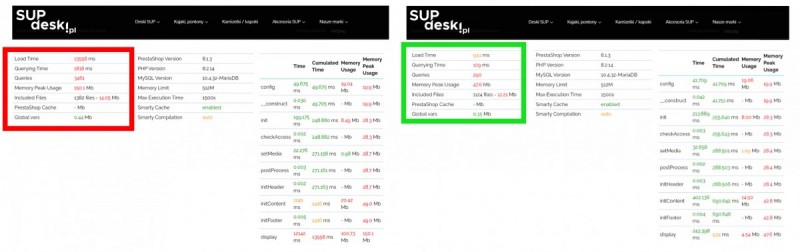

We don’t promise that your results will be the same—your store has a different product catalog, different modules, and a different server. But send us a link, and within 30 minutes we’ll tell you where to look and the scale of the task.
74
optimized stores
14.17 seconds
median reduction
18 years
in e-commerce
Who’s behind this?

PrestaShow is a Polish e-commerce agency specializing in PrestaShop —we develop our own modules, implement online stores, and manage them: maintenance, optimization, SEO, and development. We work with store owners, not with the system in isolation from the business.
We’re part of the PrestaShop Expert program—this is official recognition of our expertise from the system’s creators, not a badge you can buy. We have 78 of our own PrestaShop modules, used by stores in 18 countries—we know the PrestaShop engine from the code level, not just the admin panel.
’s Custom ModulesWe’ve been developing them for over a dozen years
Implementations: New Stores and Migrations
Store Support: Maintenance, Monitoring, and Development
Optimization: Speed, server, database, security
SEO and visibilityWe handle this too—using our own modules
We start with a preliminary analysis, not an audit
Not every project starts with a 4,920 zł audit. It starts with the question: what exactly is happening, since when, and with which store. Sometimes the answer is a 300 zł module and half an hour in the admin panel. Sometimes—it’s a three-week project. The preliminary analysis determines which scenario applies— we look into the store and the server, check security, traffic, the database, modules, and PHP. That’s 4–6 hours of work, 800 zł.
But before you even think about that— PrestaShop rarely slows down for just one reason; instead, the symptom usually points to the cause. Identify your problem; with some of them, you may find that you don’t need an analysis at all:
Click on a symptom—we'll tell you what usually causes it and where to start Development Imports or syncs are processed in the transaction window. Importing from a wholesale source (XML/CSV/API), synchronizing inventory with an ERP system, updating prices—if these processes occur too frequently, at the wrong times, or are poorly configured—the store and database are under constant strain when customers are making purchases. Where to start: by determining exactly when the system slows down and what’s happening at that time. Usually, it’s enough to reschedule the import window and reduce the frequency—these are working hours, not a project. development large Layered navigation with a large number of attributes and combinations. Each filter combination results in a separate database query and a separate URL. With a dozen or so attributes, the number of combinations runs into the thousands—overloading the database and cluttering Google’s index with duplicates. Where to start: This is the only issue that simultaneously impacts speed and SEO. It requires determining which filters should be indexed and which should not—and creating database indexes based on actual filtering patterns. Development Combinations are one of the most resource-intensive features of PrestaShop. 10 ,000 products, each available in 5 sizes and 6 colors, don’t equate to 10,000 records—they amount to 300,000. A store that looks average to a customer is actually large for the database. Where to start: with the catalog structure. Sometimes it’s cheaper to restructure the catalog than to buy a more powerful server—and that’s a conversation you need to have before spending money on infrastructure. each stage Usually, both sides are partly to blame—and neither has an interest in resolving the issue. The hosting provider sees the load but doesn’t see the code. The developer sees the code but doesn’t have access to the server. Where to start: with someone who looks at both sides at once. The audit covers the store, the modules, and the server, and the result is a document that specifies: this is on the hosting side, this is on the store side, and this is on the modules side. You can show it to the hosting provider. development large A server designed for average traffic, not peak traffic. A store that easily handles 300 people a day might crash if 300 people are on it at once. These are two different numbers and two different configurations. Where to start: with a load test to find out where the limit is—and then decide whether to raise that limit or rebuild the store. The best time for a development environment is when you’re testing; the worst time is for experiments on the production environment. development large PrestaShop is designed for a retail shopping cart—three or five items. With a wholesale order of several hundred line items, every shopping cart operation (calculating prices, tiered discounts, availability, and taxes) is multiplied by the number of items. On top of that, there are individual price lists per customer and minimum order quantities. Where to start: by determining which operation costs the most when dealing with a large shopping cart. This can usually be fixed by queuing calculations, caching price lists, or rewriting the code for adding items. This is specialized optimization and falls into a separate category. development large Multistore consists of a single installation, a single database, and a single server—for all stores at once. An import into one store puts a load on the database shared by all of them. A module written without multistore in mind can pull data from all stores just to display one. And a campaign on one store can overload the server for the others. Where to start: by determining which store is generating the load and whether the problem lies in the configuration or in the module. Multistore operates by its own rules—it’s a separate category, not just a variation of standard optimization. development Someone is scanning you. Scrapers gathering prices for competitors, bots trying to log in, junk traffic from server farms. For a store, these are normal requests—the database handles them, the server processes them, and PHP runs. The problem is that on the other end, nobody is actually buying anything. At higher volumes, this can consume half of the server’s resources. Where to start: by checking what percentage of the traffic is actually from real people. Then, use a CDN and blocking rules— this is usually cheaper than a more powerful server. every stage This is no longer a performance issue. It’s a hack. Your infected store is slow because something else is running on the same server alongside your store—a crypto miner, spam injection, or redirects hardcoded into the template. Slow loading is a side effect, not the problem. Where to start: immediately —and not with PageSpeed. Scan the site, find the backdoor, clean it up, patch the vulnerabilities, and change all passwords. Optimizing an infected store is like painting the grass. each stage A module written without regard for performance sends database queries every time a page is loaded. A single module like this can cost several hundred milliseconds—on every subpage, for every user. Where to start: with profiling, which shows how much time each module takes in milliseconds. Only then do you decide: whether to optimize, replace, or remove it. Each stage Usually in this order: images, JavaScript, no cache. In most online stores, images account for the majority of the score—and that’s the part you can fix yourself. Where to start: with images. Converting to WebP and using lazy loading are the cheapest measures with the biggest impact on performance. If PageSpeed is still screaming after that—then we’ll talk about JS and the template.What does your store do?
It slows down at certain times—at night or in the morning. During the day, it's fine.
The category page with filters takes a dozen or so seconds to load. The rest loads quickly.
I have 8,000 products, but there are 240,000 records in the database. Where did they come from?
The hosting provider says it's a store. The store says it's a hosting provider. Who's right?
Black Friday is six weeks away, and I know the store won't be able to handle it.
A wholesale customer adds 300 items to their cart, and the checkout process crashes.
I have a multistore, and one store can bring down all the others.
The store has slowed down, and I see thousands of visits from strange IP addresses in the logs.
The store has slowed down, and strange things are happening—redirects, unfamiliar links, and alerts from Google.
We added a few modules, and the store started running slower.
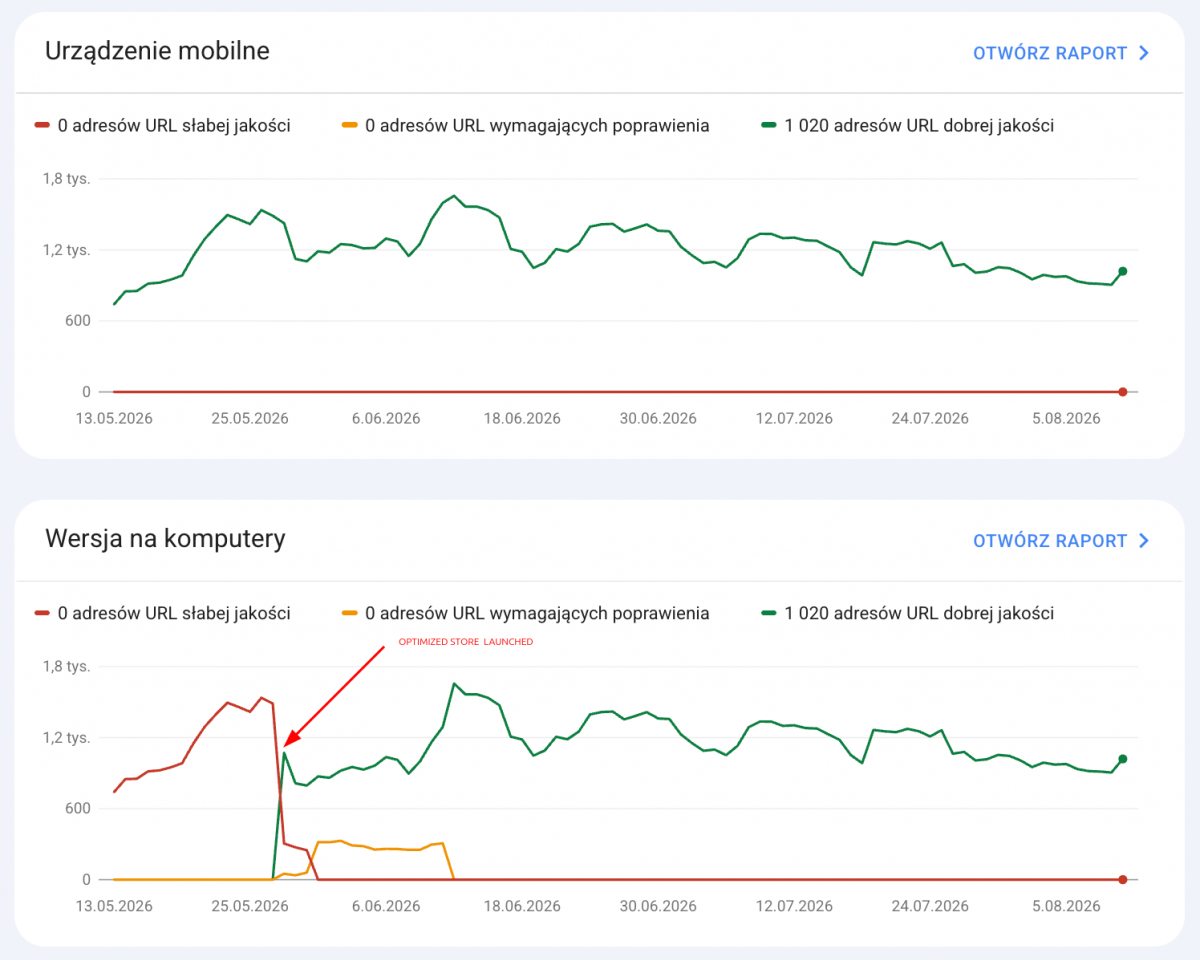
PageSpeed shows 28/100, and the SEO agency is telling me to fix it.
The stage your store is at changes everything
A store that’s just getting started is approached completely differently than one with fifty thousand product listings and five integrations. The same symptoms mean different things.
Stage 1
A store just getting started
up to ~2,000 products · no integrations
The database hasn’t had time to grow yet, there aren’t many product combinations, and filters aren’t an issue. Usually, lightweight images, caching, and decent hosting are enough.
Let’s be honest: a module for 300 zł and half an hour in the control panel. An audit would be overkill.
Stage 2
Store under development
thousands of products · product combinations · integrations
This is where the real work begins. Combinations multiply the size of the database, filters generate thousands of URLs, and imports run during peak shopping hours. There are usually several causes at once.
Let’s be honest: this is where an audit pays off the fastest—because without it, implementation is just guesswork.
Stage 3
Large / High-Traffic Store
100,000+ indexes · ERP · marketplace
PrestaShop’s default indexes are no longer sufficient. This is where composite indexes, in-memory caching, and well-thought-out server architecture come into play.
Let’s be honest: an audit is the bare minimum. In practice, this is a project, not just an item on a price list.
What usually slows a store down, even though no one writes about it
Tutorials focus on images and caching because that’s what shows up in PageSpeed. But for growing stores, the real bottlenecks lie elsewhere— and they all have one thing in common: they grow along with the business.
Product combinations—the store is bigger than it looks
This is one of PrestaShop’s most resource-intensive features and the one most often underestimated. A product available in 5 sizes and 6 colors isn’t just one database record—it’s 30. That’s why the question “how many products do you have?” is misleading. The right question is: how many combinations do you have? Sometimes it’s cheaper to restructure your catalog than to buy a more powerful server.
Filters—the only issue that affects both speed and Google rankings at the same time
Layered navigation is essential for a large catalog. But every combination of filters results in a separate database query and a separate URL. The database processes each click, and Google indexes thousands of nearly identical URLs. This is the point where optimization and SEO cease to be separate topics.
Import from the wholesale database—the store slows down at specific times
A telltale sign: the store slows down in the morning or at night, but runs normally during the day. This is often due to synchronization that occurs during the import window. The import puts exactly the same load on the database as customers do—only it doesn’t buy anything. Adjusting the schedule and optimizing the process can solve the problem without spending a single zloty on a server.
PrestaShop Statistics—Why Does the Admin Panel Lag Even Though the Front End Works?
By default, PrestaShop collects its own statistics. The `ps_connections`, `ps_guest`, and `ps_page_viewed` tables grow with every visit. This is the most common cause of a slow back office. If you use Google Analytics, you don’t need these statistics —you can disable and clear them.
B2B Shopping Cart—PrestaShop Was Not Designed for 300 Items
PrestaShop was designed for a retail shopping cart. Every operation on the shopping cart—recalculating prices, discounts, quantities, and taxes— is multiplied by the number of items. These issues are addressed by queuing calculations and caching price lists per customer. That’s a whole different ballgame.
Multistore—a whole different ballgame
Multistore isn’t just “PrestaShop, but more.” It’s a single installation, a single database, and a single server for multiple stores at once. A module not optimized for multistore pulls data from all stores just to display it in a single store. A campaign on one store can overload the server for the others.
Optimization Is More Than Just Speed
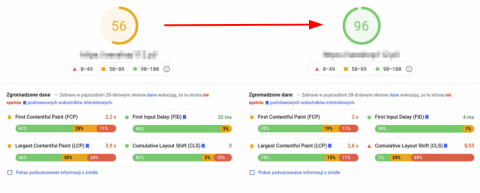
Half of the stores that come to us complaining that “it’s slow” have a problem that has little to do with performance. Slow loading is just what you see on the surface.
An infected store is always slow
Because something else is running on the same server as your store—a crypto miner, a spam-sending script, or a backdoor. That’s why every major support request starts with a scan: on several occasions, it turned out that the client was paying to speed up something that needed to be cleaned up first.
An outdated version of PrestaShop isn’t just a slower store
Every version you haven’t updated is a list of publicly known vulnerabilities. You don’t have to be a specific target— scanners roam the entire internet and check everything one by one.
Bots can eat up half your server’s resources
Price scrapers gathering data for competitors, bots logging in with stolen passwords, and junk traffic. We’ve seen stores where most of the traffic wasn’t from real people—the owner kept adding server capacity because “it’s slow,” and ended up paying to host other people’s bots.
No CDN—meaning everything comes from a single source
Without a CDN, every image, CSS file, and client uses your server. With a CDN, static content comes from a node closer to the client. This is usually the cheapest change with the biggest impact for stores that don’t have one yet.
Three ways to get started—choose the one that’s right for you
1
Do it yourself
Is the back office slow, but the front end working? It’s almost certainly the database—use Cleaner. Is PageSpeed flagging heavy images? Try WebP & Lazy Load. You don’t need us to use these modules.
Starting at 300 PLN
immediately
2
Preliminary review— send us a link to your store
30 minutes of our time. We’ll check from the outside: speed, version, configuration, bot traces, and basic security. If there’s anything to discuss, we’ll schedule a meeting.
0 PLN
30 minutes
3
Preliminary Analysis – This Is Where the Real Work Begins
We dive into the store and the server—where the details aren’t visible from the outside. Security scan, traffic, database, modules, PHP. By the end, you’ll know what the cause is, what can be done about it, and how much it will cost. That’s 4–6 hours of work—deliberately priced below our standard rate. We don’t recommend spending 4,920 PLN on an audit just to find out that a 400 PLN module is all you need.
800 PLN
4–6 h
4
The Full Picture – PrestaShop Audit
We conduct an audit when the preliminary analysis shows that there are several issues at once or that the store is incurring significant losses—the rate is high. A PDF report on the status of the store and server: a list of issues, recommendations, and a separate quote for each item. No obligation to have us implement the solutions.
1 230,00 EUR
up to 15 business days
Most cases are resolved at level 1 or 3
The preliminary analysis for 800 PLN is designed so you don’t have to guess or buy the full audit right away. Sometimes, after the analysis, we’ll say, “Buy the 400 PLN module and see if the problem goes away” —and that’s it. Sometimes, we come up with a list of recommendations that will take three weeks to implement. But in both cases , you know what you’re paying for before you pay.
When an audit is really needed—and when it isn’t
Not every optimization requires the same work. One store has a server issue, another has a database issue, a third has module issues, and a fourth has problems with data imports during peak traffic hours.
An audit makes sense when...
- there are several issues at once
- the store is growing and traffic is increasing
- you’re preparing for the peak season
- you’re upgrading to version 1.6
- you need a resolution to a dispute with your hosting provider
- You want a second opinion on your agency’s work
An audit doesn't make sense when...
- the store is just getting started
- the symptom clearly points to the cause (slow control panel = database)
- you have a specific, narrow task
- you already know what needs to be done—you need an implementer, not a diagnostician
An audit is a work plan for your store: a PDF detailing the current state of your store and server, a list of issues, opportunities, and recommendations— with a separate quote for each item. Completion within 15 business days.
Diagnosis is one thing. Implementation is a process
A preliminary analysis and an audit are self-contained: they have a beginning, an end, and a clear outcome. Implementing changes doesn’t work that way. Sometimes images, the cache, and the database can be addressed in a single step, and the issue is resolved within a week. But sometimes you have to break it down into stages, because a fix in one place might require work in another. In that case, we take one step, test it, and only then move on to the next.
We bill for these stages based on time spent—starting at 200 PLN per hour. Before each stage, we tell you how many hours we estimate it will take; once it’s done, you’ll see how many hours it actually took. Exception: when it’s an emergency —the store is down, there’s been a hack—we jump right in, charge more, and always set the price on a case-by-case basis. And conversely: sometimes the whole problem boils down to images weighing 4 MB each—in that case, a module, WebP, lazy load, and the issue is resolved for 300 PLN. Not every doctor’s visit ends in surgery.
A secure process that won’t disrupt your store’s operations
- We perform a thorough audit of your store, modules, and server.
- We set up the server and launch a copy of your store on it.
- We optimize the store copy —implementing the recommendations from the audit.
- We test the store and the server and make any necessary adjustments.
- Migrating the old store to the new one takes a few hours—this is the only downtime. We’ll schedule a time that works for you.
- You start working on the new store. All data is preserved 1:1.
- You receive a 3-month warranty on the optimization and an offer for ongoing support.
How much does PrestaShop optimization cost?
We don’t quote a single price, because two stores that look similar to the customer may have completely different technical situations. But we can tell you what factors determine the price.
| Scope of Work | Scope | Price |
| Preliminary Analysis | We take a look at the store and the server: security scan, traffic, database, modules, PHP, version. By the end, you’ll know what the problem is and how much the fix will cost. We calculate the price below our hourly rate—on purpose. | 800 PLN 4–6 hours |
| PrestaShop Audit | PDF: status of the store and server, issues, recommendations, and a breakdown of costs for each item. | 1 230,00 EUR |
| Implementation Work In phases, based on time | Billed by the hour. An estimate of hours is provided before each phase; billing is based on actual time spent afterward. Emergency mode is determined on a case-by-case basis. | from 200 PLN/h |
| PrestaShop + PHP Updates | 1.6.x, 1.7.x, up to 8.x, and up to PrestaShop 9. Modules, server components, PHP. | from 5,000 PLN |
| Profiling and Search Console: PageSpeed, Lighthouse, GTmetrix | Template, JavaScript, source code, modules, database. Fixing errors in Search Console. | Starting at 3,500 PLN |
| PRO Server | VPS/dedicated server with root access, Linux + Plesk + SSL + CloudFlare, backups, GIT. | 615,00 EUR |
| Development environment + Git | A 1:1 development environment so you don’t have to test on the production environment. | 615,00 EUR |
What Else Affects the Price
PHP and PrestaShop version · number of modifications and overrides · number of modules · number of product combinations · number and type of integrations (wholesale, ERP, marketplace) · server configuration · load testing results.
PrestaShop Optimization — Frequently Asked Questions We don’t have a single price, because two stores that look similar may have different technical conditions. We start with a preliminary analysis (800 PLN, 4–6 hours), which determines whether the project calls for a 300–400 PLN module, a one-time assignment, or an audit 1 230,00 EUR. We charge 200 PLN/hour for implementation work. Updates: starting at 2,000 PLN. Profiling and PageSpeed: starting at 3,500 PLN. No. We’re working on a 1:1 development copy; your store is operating as usual. The only downtime will be when we switch over from the old store to the new one—it takes a few hours, and we’ll schedule it for a time that works for you. It’s possible, but it’s a separate area of expertise. For an order of several hundred lines, each operation is multiplied by the number of items. Importantly, adding server power usually doesn’t help, because the problem lies in the number of operations. This is fixed by queuing calculations, caching price lists per customer, and changing the way items are added. See: B2B modules. Yes, and that’s one of the more common scenarios. A slow back-office is usually caused by an overloaded database—statistics, logs, abandoned shopping carts. The It helps, but it’s not enough on its own. Page speed and Core Web Vitals are one of the ranking signals—improving them removes a bottleneck, but they can’t replace content, URL structure, or backlinks. If your problem is “I’m not getting traffic from Google,” start with the SEO and visibility modules. Probably not. With a small directory and no integrations, nothing is usually broken yet. Set JPEG compression to 80, disable statistics collection (if you’re collecting data in GA4), enable caching, and get decent hosting. An image optimization plugin for 300 zł will do more than an audit. Come back if you notice any issues or if your directory grows. First, an audit, because it depends on the number of modifications and overrides. Sometimes it’s cheaper to perform an update along with optimization than to optimize version 1.6, which will need to be updated soon anyway. We perform updates from 1.6.x and 1.7.x to 8.x and to PrestaShop 9. We offer a 3-month guarantee on our optimization services. But a store is a living, breathing entity—you keep adding products, modules, and campaigns. That’s why we continuously monitor your store for 3 months, and we’ll reach out to you if anything starts to go wrong. After that, you can extend the monitoring as part of PrestaShow Care. It depends on the store, and the decision is based on risk, not our convenience. If multiple tasks don’t interfere with each other—images, cache, database—we handle them with a single, efficient task. But if the store has a lot of customizations and integrations, we break it down into stages. After completing each stage , you see the results and can stop whenever you decide it’s no longer worth continuing. Pricing is based on time spent, starting at 250 PLN per hour. Before each phase, we’ll tell you how many hours we estimate the task will take; once it’s completed, you’ll see exactly how much time was actually spent. We don’t come up with a flat rate off the top of our heads, because with this kind of work, estimates can easily go off track. We strive to work quickly and precisely, and only senior developers are involved in the projects. In that case, we put other things on hold and get right to work. The emergency service costs more , and we always agree on the details individually before we start anything —so there are no surprises on the invoice. Report the store via the contact form and indicate that the store is down—we’ll get back to you as a priority. That’s because we measure it continuously, not just once a quarter. Our proprietary monitoring system tracks response time, Core Web Vitals based on traffic, database size, 5xx errors, and server load during peak times and in real time. We can see not only that the site has slowed down, but also on which day it happened and what was going on at the time—what changes in the store contributed to it.The Questions We Get Asked Most Often
How much does PrestaShop optimization cost?
Will the store be taken offline during optimization?
I run a wholesale business—I have shopping carts with several hundred items, and the checkout process is slowing down. Is there anything I can do about it?
The panel is running slowly, but the front end is fine. Is that also optimization?
ps_connections table can exceed 200 MB. We start with Cleaner 100,00 EUR; if that’s not enough, we move on to database profiling.Will optimization improve my Google rankings?
I'm just getting started with my store—do I need to optimize it?
I have PrestaShop 1.6. Should I optimize it or update it right away?
What if the store slows down again after optimization?
Will you do everything at once, or will it drag on for months?
How do you bill for work—a flat rate or by the hour?
What if the store is already closed and I can't wait?
How will I know that the store is slowing down again—before customers notice it?
What are the benefits of PrestaShop optimization?
Technical benefits
- shorter page load times
- Better PageSpeed and Lighthouse scores
- Improved Core Web Vitals
- Faster admin panel
- More stable checkout
- lower server load
- A cleaner database
Business Results
- Better customer experience
- lower risk of cart abandonment
- better technical SEO
- Greater readiness for advertising campaigns
- More stable performance during high traffic
- easier future expansion of the store
Optimization is an event. Performance is a state.
After optimization, the store is fast. And that’s the only day when nobody messed anything up.
Then normal life begins. A video goes live on the homepage. Marketing wants a banner, then another one. A new wholesaler joins. Someone uploads a post with eight photos straight from their camera, and Search Console starts screaming. None of these things is a mistake—it’s the store’s growth. But each of these things costs milliseconds, and after half a year, the store is slow again. No one knows when, because no one was paying attention.
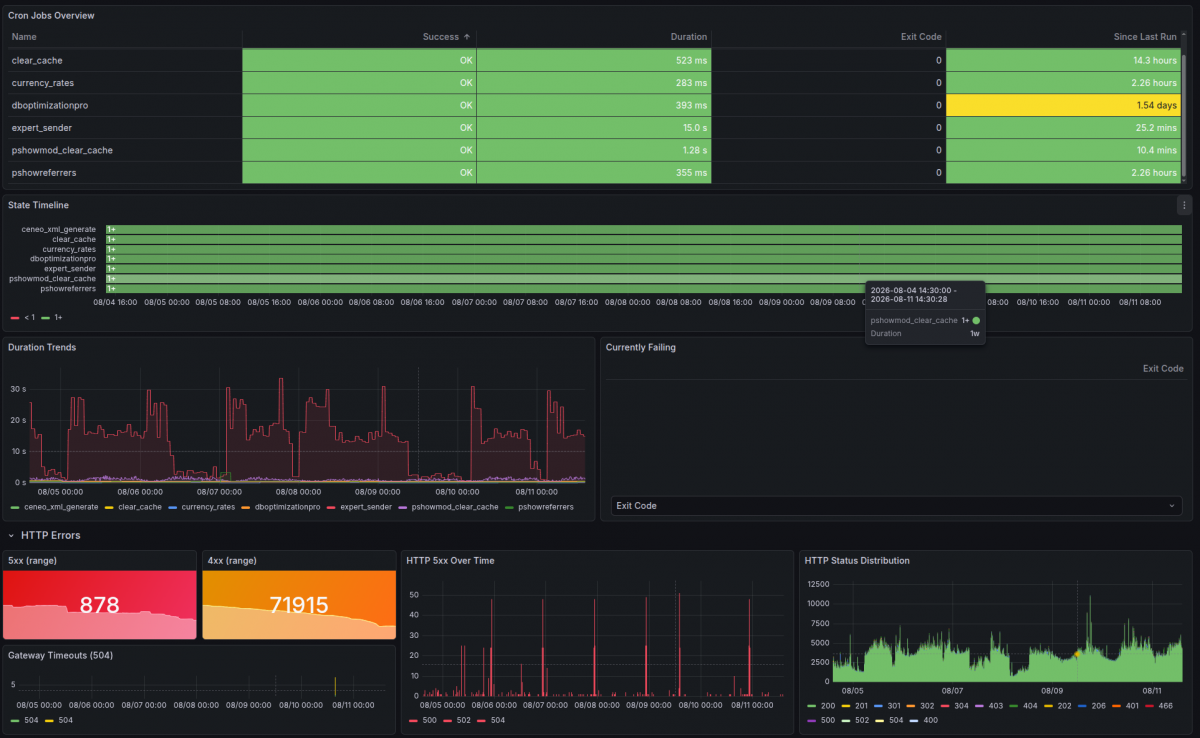
That’s why, for a store that’s constantly growing, optimization isn’t a task to check off a list. It’s a process. And we measure it constantly:
| What We Monitor | Why |
| Response and load times | You can see the day the store slowed down—and what happened then. |
| Core Web Vitals based on customer traffic, not bots | Not from a single test, but from what customers actually see. |
| Database size and growth rate | When cleaning up is no longer enough, and profiling becomes necessary. |
| Availability and 5xx errors | A store that goes down once a week at 3 a.m. won’t report itself. |
| Peak server load | To know where the limit is before the season starts—before you hit it. |
| Security and updates | An outdated PrestaShop isn’t just a slower store. |
3-month warranty
Monitoring is included in the optimization price
For three months after launching your optimized store, we monitor whether the results are sustained—and we’ll reach out to you if anything requires attention. After the warranty period, monitoring can be extended through PrestaShow Care.
They’ve trusted us
Stores for which we’ve provided optimization, server management, or security services over the past two years:








See our projects · Customer reviews
Not sure which service level you need?
Send us a link to your store—we’ll do a preliminary 30-minute review and get back to you with our findings. It’s free, and often that’s all it takes to understand what we’re talking about. And if there’s more to discuss, we’ll schedule a meeting.
We’ll respond within 2 business days · no obligation



Robert JAKUBOWSKI
Dzień dobry. Proszę o informacje czy dacie radę zoptymalizować sklep robik.radom.pl Zależy mi na podniesieniu szybkości na mobile. Pozdrawiam Robert Jakubowski
prestashow.pl
Dzięki za komentarz! :-)
Piotrek Kula
Byłbym zainteresowany usługą. Jakie serwery polecacie dla Presty i optymalizacji pod Prestę?
prestashow.pl
Piotrek, trochę czasu minęło, ale... dziś polecamy serwery dedykowane OVH lub rozwiązania chmurowe w Digital Ocean. Jeśli macie budżet może to być również Google Cloud.
Patrycja
Wczoraj otworzyłam zgłoszenie na helpdesk w sprawie nowego serwera. Kiedy uzyskamy odpowiedź?
prestashow.pl
Patrycja mamy Twoje zgłoszenie. Na wyceny dot. optymalizacji odpowiadamy w ciągu 5 dni. Damy znać :-)
Bronisław
Jakie dane trzeba przygotować abyście mogli wycenić optymalizację mojego sklepu?
prestashow.pl
Bronisław, admin sklepu, FTP i baza danych. Opcjonalnie SSH root.
Paweł
Przedstawię przepis na możliwie największy wynik w Google PageSpeed: - włączenie PHP 7.4 na serwerze - Prestashop - aktualizacja do najnowszej wersji - wykorzystanie technologii LiteSpeed na serwerze + wtyczki LiteSpeed w Prestashop