Atención al cliente y empaquetado de pedidos en tu móvil: descubre la app PrestaShop Pocket 📦







- Importación universal de XML, CSV y API en PrestaShop
- Mapeo de datos y control total sobre la importación
- Integración XML, CSV y API
- Integración con múltiples mayoristas al mismo tiempo
- Cómo funciona la integración mayorista en 5 pasos
- Informes, registros y control de las importaciones
- Fácil de usar y totalmente compatible con el catálogo de PrestaShop.
- Importación de datos y optimización del contenido
- Comparación de licencias Standard VS Professional
- Una solución de eficacia probada para las tiendas PrestaShop
- Módulo desarrollado junto con las necesidades de los comerciantes
- Integración PrestaShop con mayoristas - ¿por qué nuestra oferta?
- Integración de tienda web con mayoristas - FAQ

Descripción detallada
Integre su tienda PrestaShop sin límites
El módulo Importador de PrestaShop integra su tienda con mayoristas y fuentes de datos externas en formatos XML, CSV y API.
Importe y actualice productos en minutos
En 5 sencillos pasos, el módulo le permite importar y actualizar automáticamente toda la información de su catálogo de productos, incluidos productos, atributos, características, precios, existencias y descripciones, para que su tienda reciba la oferta más rápidamente y sin trabajo manual.
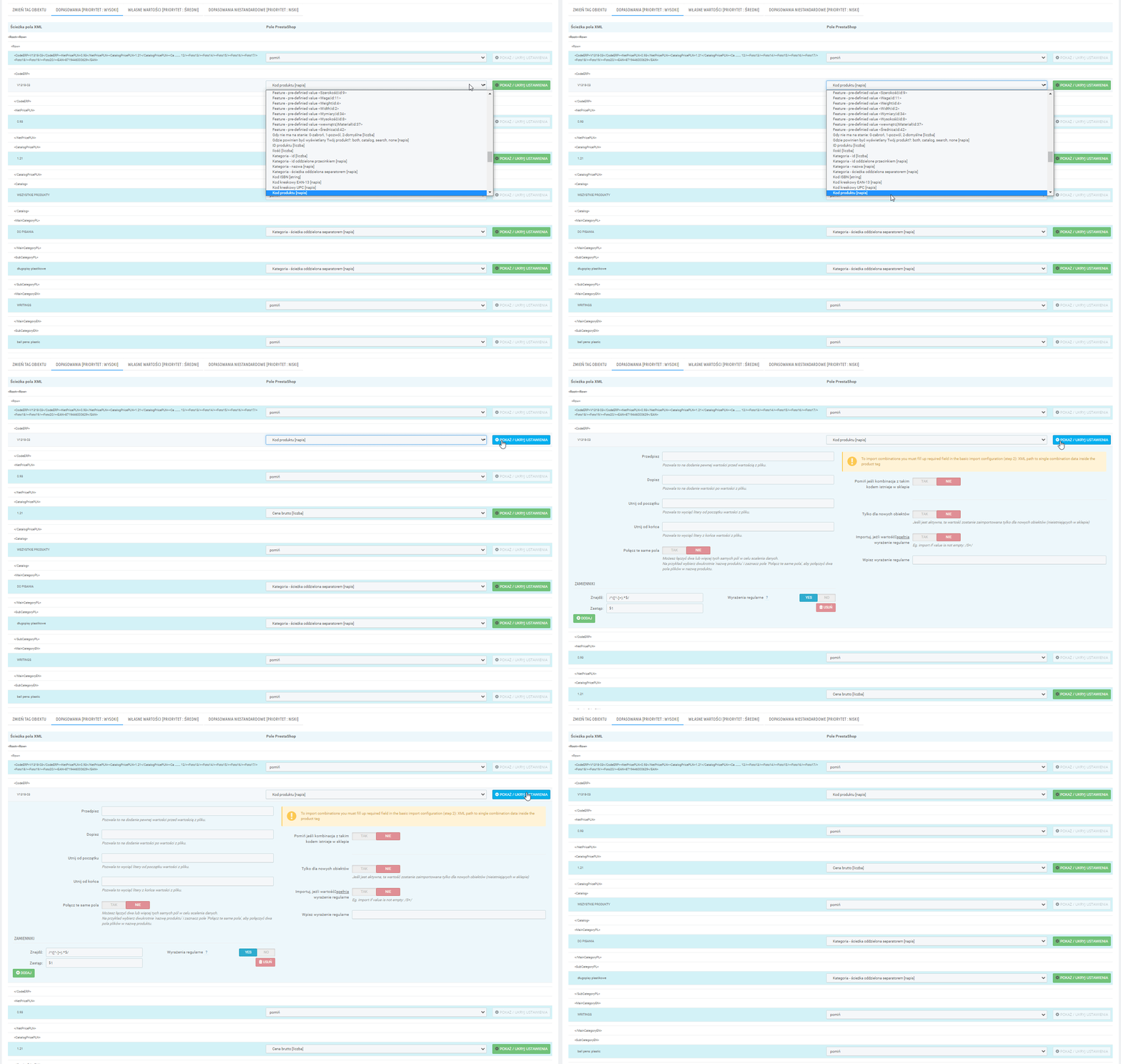
Gran flexibilidad en la configuración
El Importador le permite mapear campos de XML, CSV y API a campos de PrestaShop, para que pueda adaptar los datos del proveedor a las necesidades de su tienda. Usted mismo decide qué información añadir, cuál actualizar o modificar y cuál omitir, sin necesidad de conocimientos de programación.
Soporta todos los campos de PrestaShop
El módulo le permitirá añadir, omitir y actualizar toda la información de su catálogo PrestaShop. Tendrá un control total sobre el flujo de datos que entran en su tienda. Configure una vez y olvídese.
El módulo le permitirá personalizar la importación y actualización de su catálogo de productos sin conocimientos de programación.
Integraciones XML y CSV
El módulo es compatible con todos los feeds XML y archivos CSV, por lo que podrá integrar su tienda con cualquier mayorista, proveedor y sus propias fuentes de datos. El módulo le ofrece total flexibilidad de implementación y le permite hacer crecer su tienda sin cambiar la herramienta a medida que añade más integraciones.
Integraciones API
La integración mediante API requiere un script que inicie sesión en la API, recupere los datos de la API y los guarde en formato XML, que usted configura en el módulo como otros feeds. El script de la API puede prepararlo su programador o nuestro equipo. Prepare: la documentación de la API y los datos de inicio de sesión de la cuenta de la API y, a continuación, póngase en contacto con nosotros.
Hay docenas de integraciones API listas en nuestra base de datos.
Servicio de implementación de feeds o API
¿No tiene tiempo para configurar un módulo?
Prepare archivos o enlaces a XML / CSV o documentación, nombre de usuario y contraseña de la API con la que desea integrarse y, a continuación, póngase en contacto con nosotros. Nuestro equipo implementará de la A a la Z la integración del mayorista en su tienda utilizando el módulo Importador.

El módulo le permite integrar PrestaShop con múltiples mayoristas y fuentes de datos al mismo tiempo, para que pueda desarrollar su oferta sin tener que crear procesos separados para cada proveedor. Esto es importante para las tiendas que trabajan con un gran catálogo de productos y se integran con múltiples mayoristas y fuentes de datos en un modelo de dropshipping.
tEl MISMO PRODUCTO EN MUCHOS mayoristas
- El módulo ayuda a organizar las relaciones entre productos y fuentes de datos, sin conflictos ni sobrescrituras.
poner en cola múltiples integraciones
- Puede establecer el orden en que se ejecutarán las importaciones y actualizaciones múltiples utilizando la cola de integración. El módulo se encargará del proceso fluido de conexión con múltiples mayoristas - manteniendo su catálogo de productos totalmente seguro.
múltiples almacenes en prestashop
El estándar de PrestaShop tiene un campo 'Cantidad' para el producto y la combinación. Con el módulo de Gestión Avanzada de Almacenes, sus productos y combinaciones pueden estar en múltiples almacenes, y para cada almacén puede establecer diferentes prioridades, tiempo de envío y coste, y mostrar información sobre las múltiples existencias disponibles en la página del producto.

El módulo le guía a través del proceso de adición y configuración de un mayorista: desde la adición de una fuente de datos, la asignación de campos y la configuración, hasta la ejecución automática y la comprobación de los resultados. Esto mantiene todas las integraciones organizadas y funcionando sin problemas en segundo plano.
1
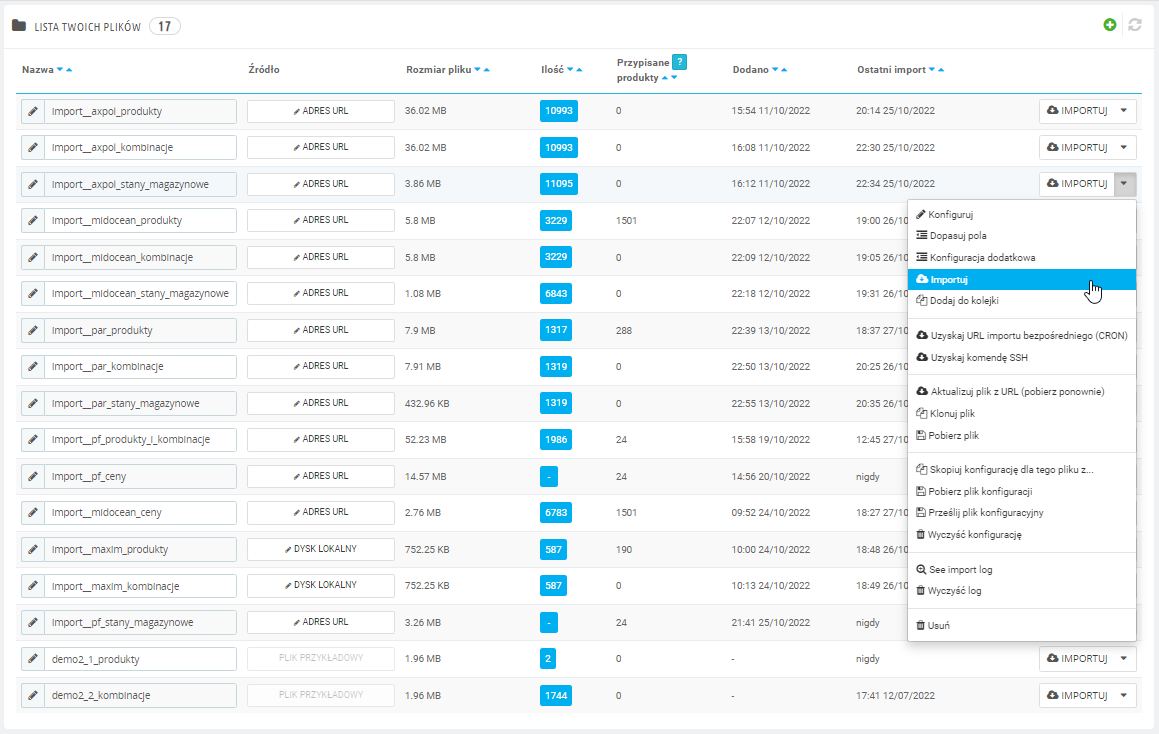
Añadir fuentes de datos - lista de integraciones
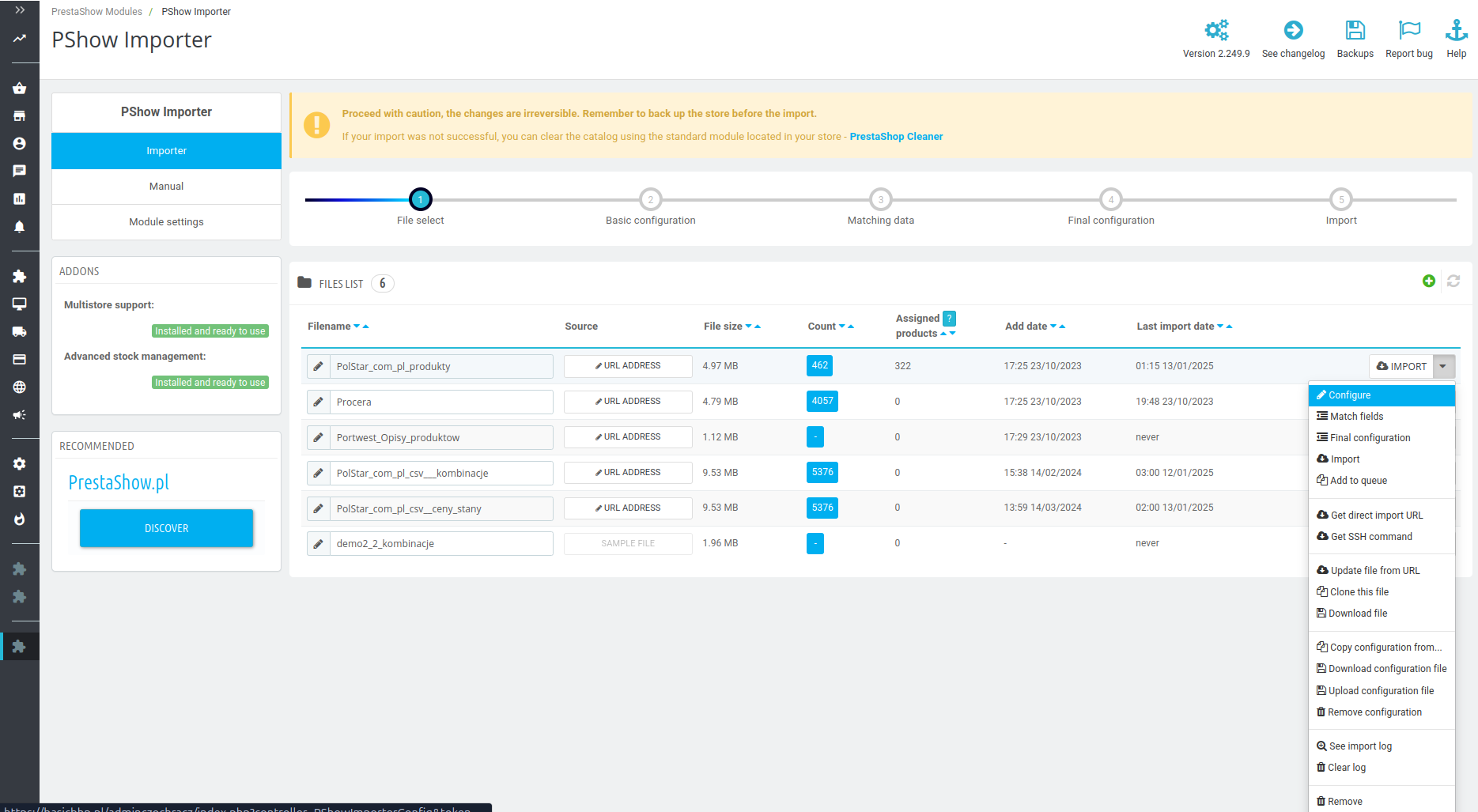
Cargue un archivo, proporcione un enlace a la fuente o configure un inicio de sesión en el servidor. En este paso, tendrá acceso a la información más importante, las estadísticas y el tiempo de actividad de cada integración.

2
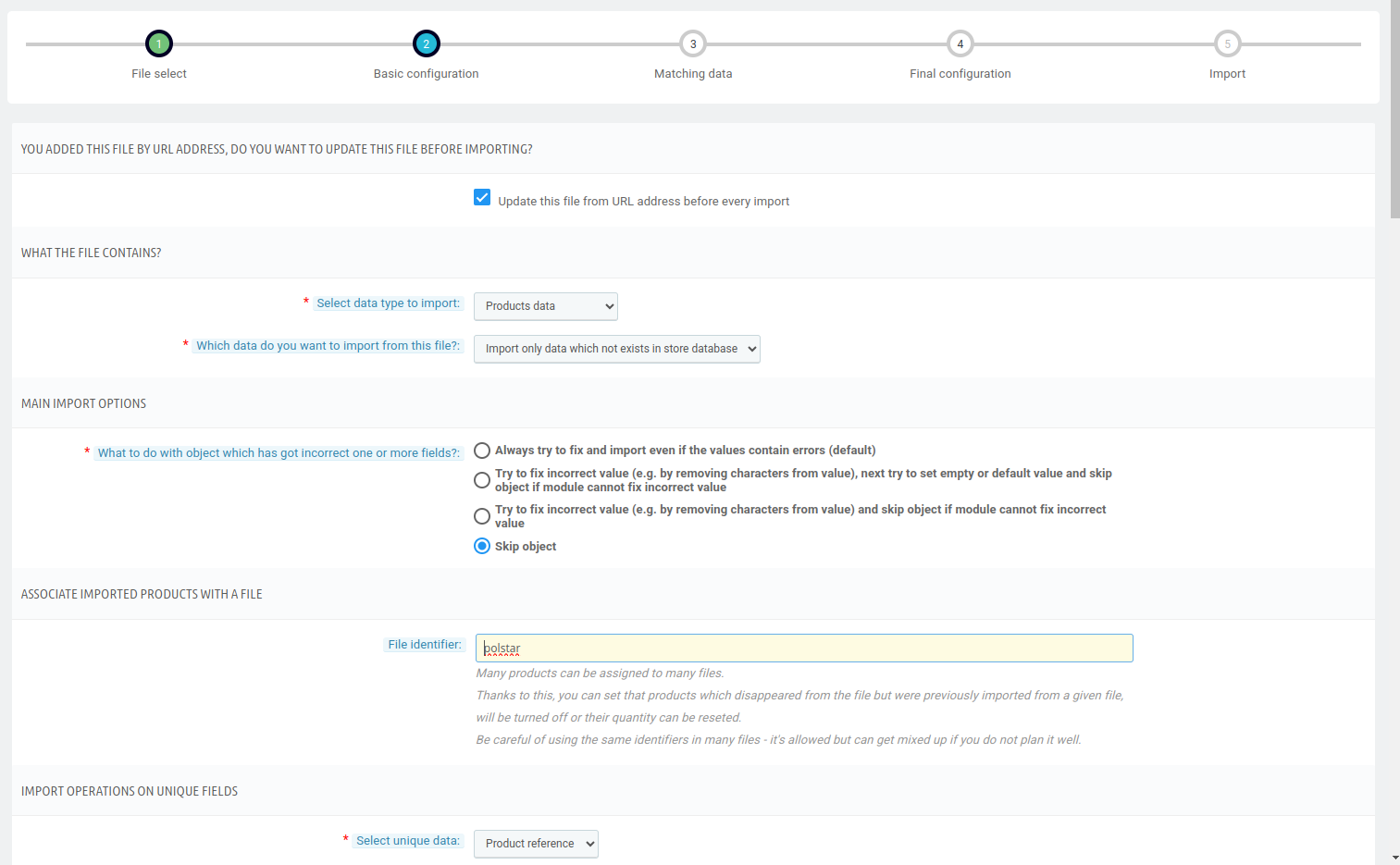
Indicar las tareas a realizar
Especifique y personalice las operaciones que debe realizar la integración: importar, actualizar, añadir nuevos productos o desactivar productos no disponibles.

3
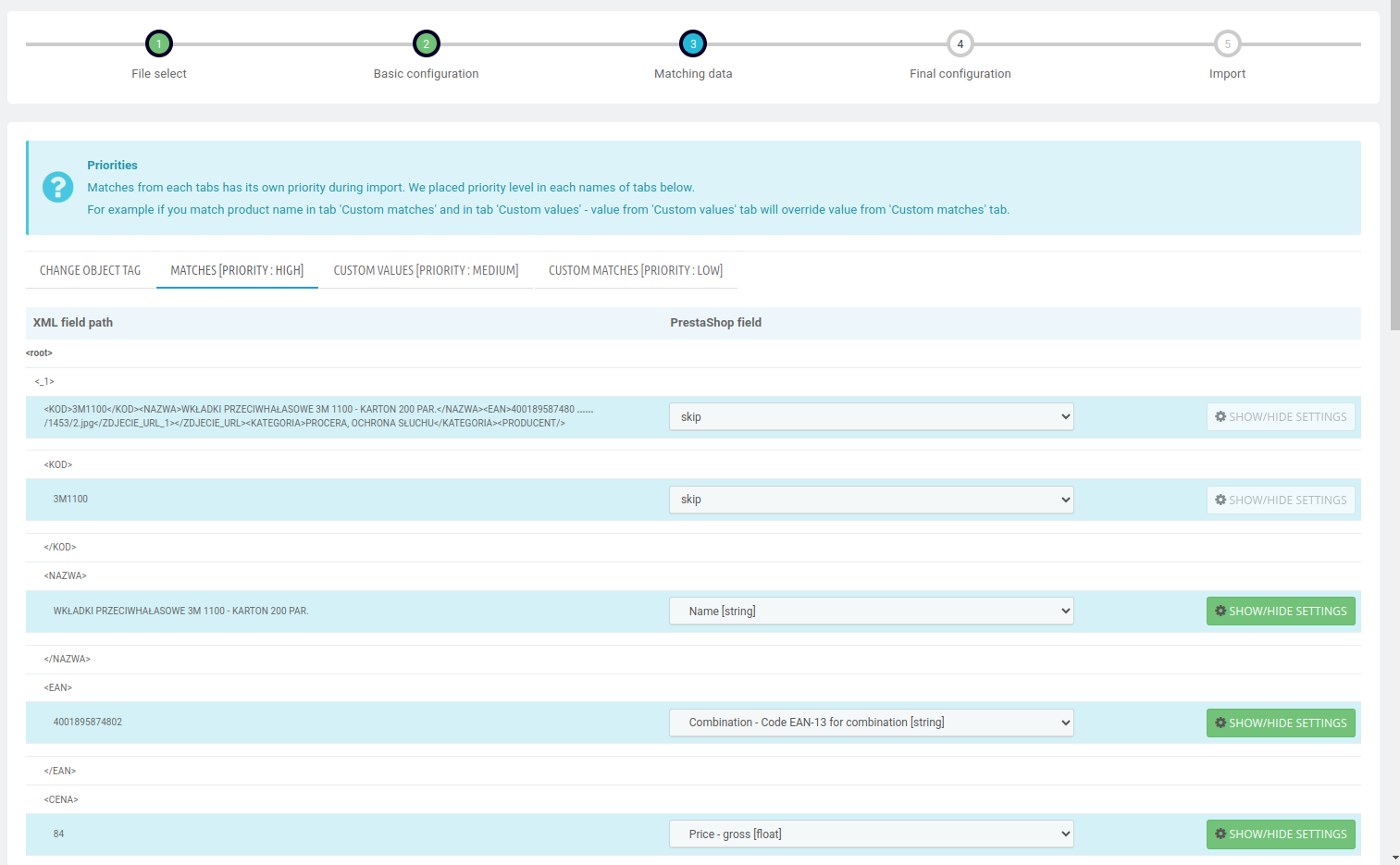
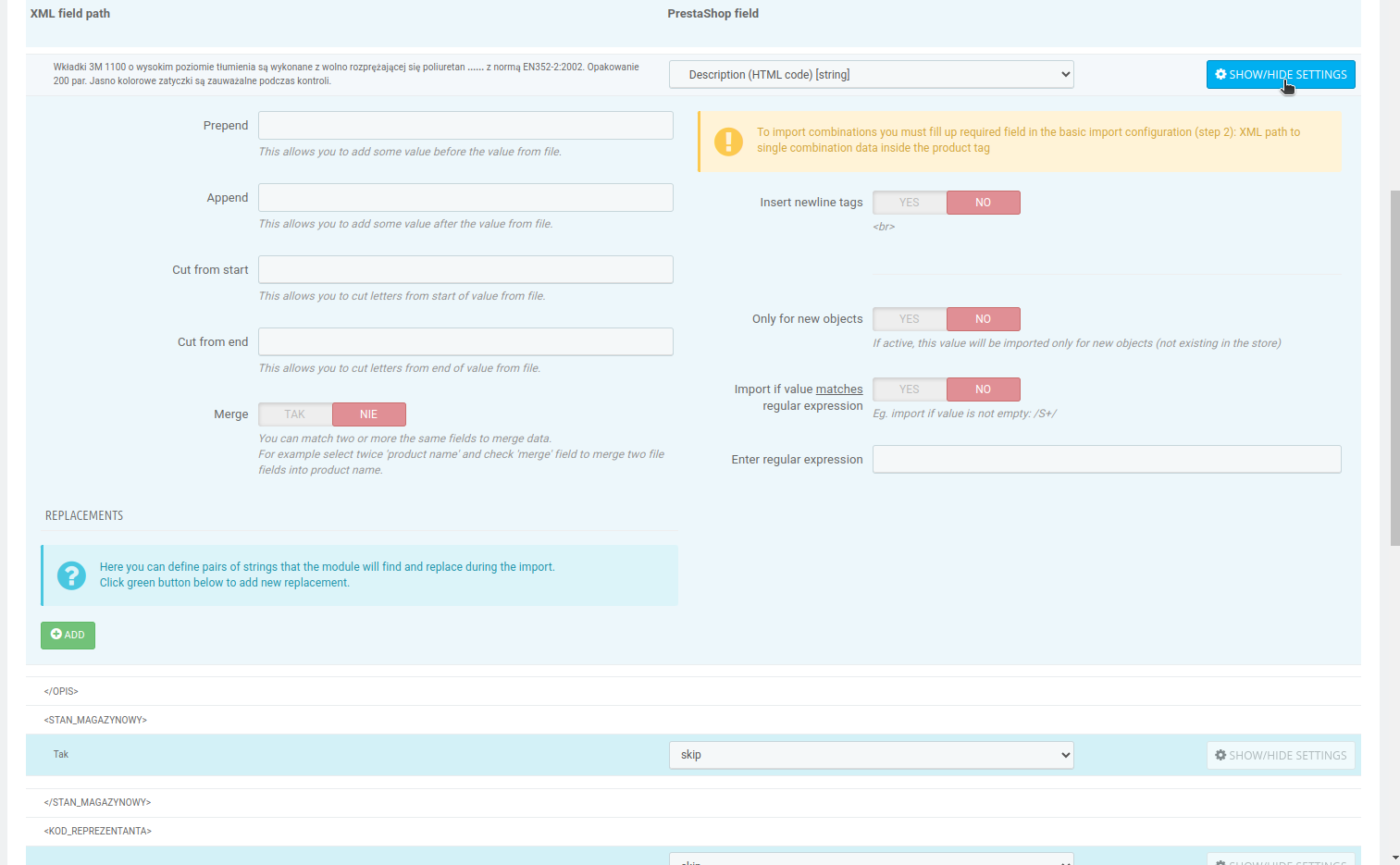
Asigne los datos: omitir o seleccionar y modificar.
A la izquierda, encontrará los datos en un archivo XML/CSV o API, y a la derecha los campos de PrestaShop. Vincule los datos y confíe en la automatización completa o personalice usted mismo cada campo.

4
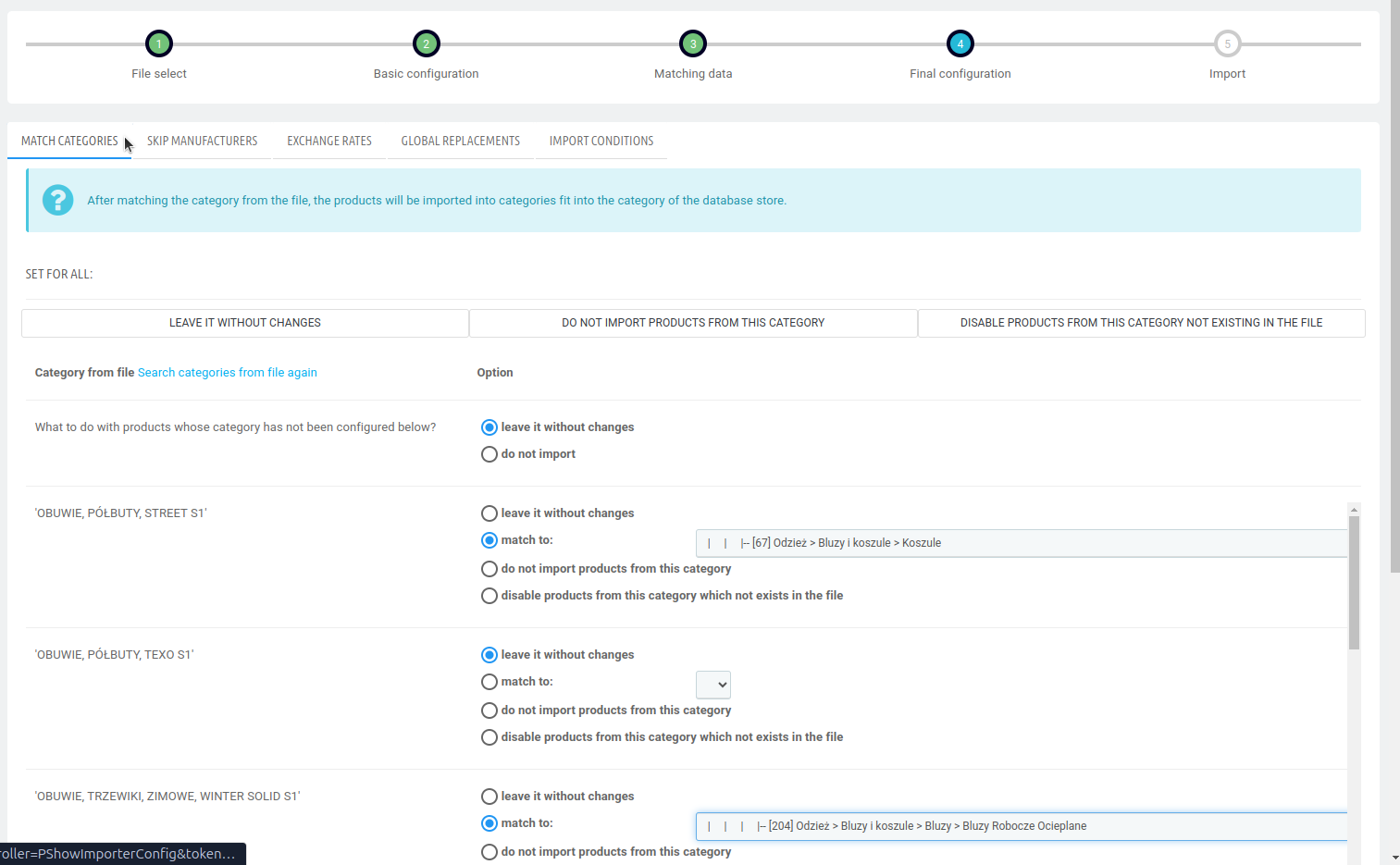
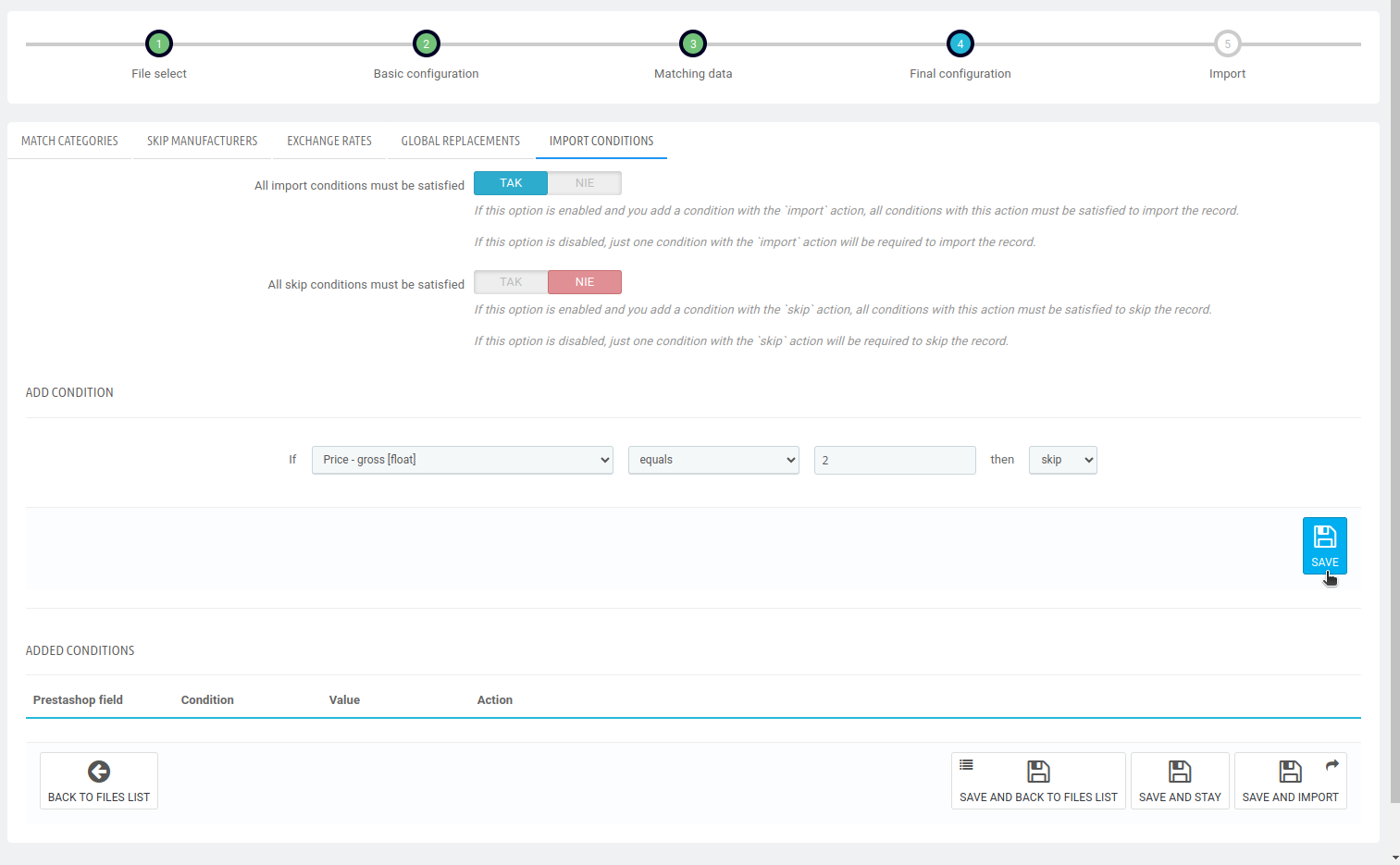
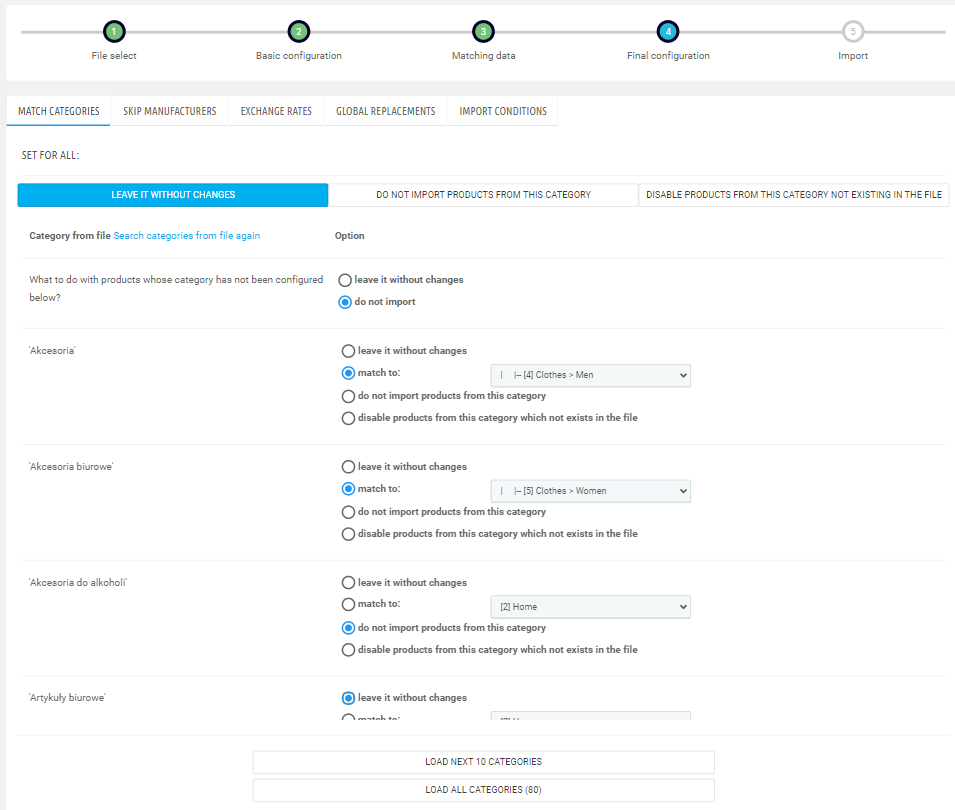
Personalizar la importación
En este paso tiene acceso a los ajustes para personalizar de forma masiva su integración:
- Saltar fabricantes
- Buscar e
intercambiar datos - Asignación
y omisión de categorías - Condiciones para omitir productos
- Tarifas Wal
- Recargo de precio
- Importación y actualización
SEO - Características, atributos
y generación de combinaciones - y mucho más
5
Ejecutar la importación - manual o automáticamente
Puede ejecutar la integración añadida con la hurotower a través de CRON, SSH o manualmente - pulsando un botón. Tendrás una visión en tiempo real de las estadísticas de rendimiento del importador.

El importador le ofrece una visión general de las operaciones realizadas, para que pueda comprobar el progreso de la importación, detectar errores y datos que faltan, y controlar qué cambios se han realizado en la tienda. Esto es importante cuando desea comprobar que los precios, las existencias y los productos se actualizan correctamente.
Informe de trabajo de importación
Puede activar la generación de informes para cada integración. El importador reporta el trabajo a ficheros de registro, donde encontrarás información sobre las operaciones realizadas:
📄 Informe con productos añadidos
📄 Informe con los productos desactivados
📄 Informe detallado de la importación y actualización de datos
Velocidad de importación
El módulo soporta archivos XML muy grandes y enormes volúmenes de productos. El módulo utiliza caché, RAM y servidores multiprocesador.
✅ En la configuración del módulo puede limitar la velocidad del módulo para conservar recursos cuando tenga un servidor lento.
El Importador ha sido diseñado para facilitar el trabajo diario con múltiples integraciones y una gran cantidad de datos de productos. El módulo es compatible con más de 300 campos del catálogo PrestaShop, incluyendo características, atributos, combinaciones y otros elementos necesarios para importar y actualizar correctamente el listado.
Hemos descrito los detalles en la Base de conocimientos.
Generación de características, atributos y combinaciones
Genere combinaciones basadas en los atributos del feed. El importador lo hará automáticamente. No es necesario utilizar módulos adicionales ni el generador de combinaciones para ello.
Rellene los datos que faltan
¿Faltan datos en sus feeds? Puede completar la importación o actualización con valores añadidos manualmente.
Por ejemplo, cree un campo con el contenido "SONY" y ajústelo como "Nombre del fabricante" o "Característica: Fabricante". El importador añadirá la información anterior a todos los productos como si estuviera en el feed importado.
Puede combinar varios campos en uno, por ejemplo Fabricante + Nombre + Característica = Nombre del producto.
Puede utilizar la opción "Buscar y reemplazar", que sustituirá las frases buscadas por otras que pueda utilizar mejor en su posicionamiento o marca.
Soporte de precios y promociones
Puede importar y actualizar precios netos, brutos, unitarios, específicos (con todos sus parámetros) y precio de compra. Para cada precio, puede establecer un margen de beneficio con rangos de precios, por ejemplo: para un precio neto de 10-15€ cargue un 10% y para 15-50€ cargue un 4% de margen de beneficio.
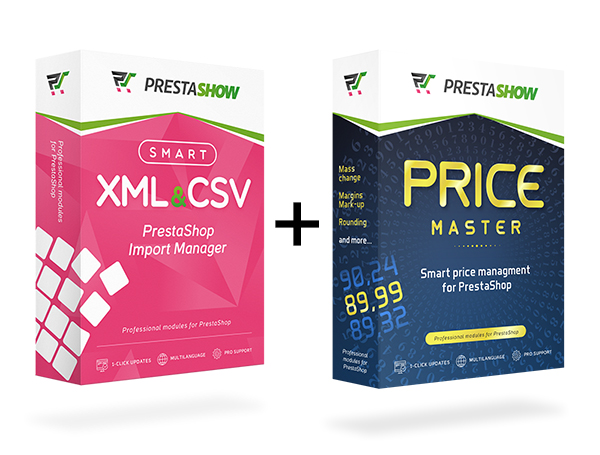
Para realizar operaciones más precisas sobre los precios, consulte nuestro módulo Price Master - gestión inteligente de precios.
Soporta múltiples proveedores
Importe y actualice el mismo artículo desde múltiples proveedores. Con Importer de PrestaShow aprovechará todas las posibilidades disponibles en PrestaShop.
Importe datos para ventas internacionales
Importa en múltiples idiomas y divisas con la posibilidad de utilizar un conversor de tipos de cambio y traducciones automáticas con el módulo PrestaShop Translator.
Multitienda PrestaShop
Utilice nuestro módulo para importar y actualizar productos en múltiples tiendas Multitienda. El importador le permitirá realizar operaciones en todas las tiendas o en las seleccionadas.
El soporte Multitienda a través del módulo Importador es opcional y tiene un coste adicional. Dependiendo de sus necesidades, puede comprar el Importador con soporte Multitienda o comprarlo más tarde.
Mejoras de la tienda PrestaShop - totalmente gratuitas
En la configuración del módulo, puede activar funciones adicionales que le ayudarán a integrarse cómodamente con cada mayorista y proveedor:
- El precio de la combinación es el precio total del producto (y no influye en el precio del producto)
- Campo adicional "Descripción de la combinación" - el cliente ve la descripción individual de la combinación después de modificarla.
- Campos adicionales "Dimensiones de la combinación: longitud, anchura, profundidad, peso".
- Mostrar fecha de actualización en la página del producto - utilizar la fecha para informar a los clientes de que el stock está actualizado
- Pausa técnica automática durante la importación
- Importación de marcadores adicionales en el módulo "Marcadores y secciones en la página del producto".
Vea más de cerca cómo está construido el módulo
Si la funcionalidad del módulo le parece complicada, la mayoría de las preguntas pueden responderse en nuestra base de conocimientos: https: //helpdesk.prestashow.pl...
Trabajar con el módulo PrestaShop AI Generator
El importador ayuda a alimentar la tienda con datos de productos, y si algunas de las descripciones o meta contenidos necesitan ser completados, el importador puede trabajar con nuestro módulo AI para la optimización de contenidos y SEO.
AI Generator es una potente herramienta con la que aumentará el valor SEO y las conversiones de su tienda.

Si quieres aprender más rápido los fundamentos del módulo, puedes consultar el vídeo que muestra paso a paso las operaciones más importantes:
Ambas licencias le permiten integrar su tienda con mayoristas y fuentes de datos externas. La versión Profesional amplía las capacidades del módulo con escenarios de trabajo más avanzados y un mayor número de integraciones soportadas simultáneamente.
| Estándar | Profesional | |
| Licencia | De por vida | De por vida |
| Integraciones CSV/XML/API funcionando simultáneamente | 4 | Sin límite |
| Integraciones en ejecución | CRON | Cola inteligente de integraciones múltiples |
| Compatibilidad con feeds | Enlace a un feed o carga de un archivo desde el disco | FTP, HTTP, autenticación Microsoft NTLM, conexión cifrada |
| Compatibilidad con el módulo de almacenamiento avanzado | ❌ | ✅ |
Las demás características del módulo y la compatibilidad son las mismas para las licencias estándar y profesional.
Trabajamos con usted
El importador se ha desarrollado a partir de las necesidades y experiencias de los comercios que trabajan con feeds XML, CSV y API. El módulo responde a necesidades generales de integración, pero también a problemas cotidianos relacionados con la actualización de ofertas, precios y existencias.
Implementación de necesidades individuales
Si el módulo no tiene una funcionalidad que es importante para usted - utilice la página de contacto o abra un ticket en el HelpDesk. Importador es un módulo muy flexible y podemos adaptarlo a cualquier escenario y necesidad

Integración PrestaShop con mayoristas - ¿por qué nuestra oferta?
Cuando eliges nuestro módulo de integración, tienes la seguridad de que estás trabajando con una extensión creada por un equipo especializado en PrestaShop desde hace años. Nuestros módulos funcionan de forma fiable, se desarrollan constantemente y se actualizan en un modelo de 1 clic.
Además del módulo en sí, proporcionamos un soporte completo de implementación y post-implementación. Detrás de las integraciones, hay un equipo de más de una docena de desarrolladores, devops, analistas y jefes de proyecto a su disposición.
El módulo también resultará útil para integraciones con mayoristas internacionales en diferentes idiomas y divisas. Gracias a su soporte multilingüe y multimercado, podrá extender sus ventas a otros países sin ningún problema.
Integración de tienda web con mayoristas - FAQ
- ¿Puedo integrar mi tienda online con mayoristas conectarme a varios proveedores al mismo tiempo?
Sí. El módulo admite cualquier número de mayoristas, su propio catálogo de productos y API. Las actualizaciones se realizan automáticamente y el sistema detecta los cambios en cada mayorista integrado. - ¿Qué ocurre si el mismo producto aparece en varios mayoristas?
Durante la configuración, vinculará el producto al mayorista seleccionado. El módulo evitará que se sobrescriban los datos y, con varios almacenes, podrá vender el producto desde la fuente más barata. - ¿Cómo funciona el calendario de actualización (CRON) en la integración de una tienda con un mayorista?
Puede configurar la integración para que se ejecute automáticamente para cada mayorista, por ejemplo, cada 30 minutos. También puede crear una cola de integraciones y lanzarlas con un único CRON. El módulo se encargará de lanzar todas las integraciones de la cola. - ¿Puedo decidir yo mismo qué datos entran en la tienda?
Sí. El módulo soporta más de 300 campos de PrestaShop. Puede seleccionar, omitir o modificar los datos antes de la importación y personalizar el proceso con las potentes funciones del módulo. - ¿El módulo admite ventas internacionales?
Sí. Puede importar datos en varios idiomas y divisas, utilizar conversores de tipos de cambio y traducciones automáticas mediante la integración con el módulo PrestaShop Translator.
Changelog (v2.249)
## v2.249.101 - 2026-10-28
### Fixed
- An import with a condition on a field that has no value in the file no longer stops with a fatal error.
## v2.249.100 - 2026-10-21
### Fixed
- Removing old product images during import works again on PrestaShop 9.
## v2.249.99 - 2026-09-25
### Added
- CSV files encoded in Western European (Windows-1252) can now be selected when adding a file, so French and other Western European accented letters such as è or à are imported correctly.
## v2.249.98 - 2026-09-20
### Fixed
- The last import configuration step now opens on shops running in debug mode before its settings have ever been saved, including for files that do not contain products such as combinations or price files, instead of failing with an HTTP 500 error.
## v2.249.97 - 2026-09-20
### Fixed
- A CSV file whose rows do not all contain the same number of columns no longer breaks the import on a shop running in debug mode.
## v2.249.96 - 2026-09-18
### Fixed
- The field settings panel in the import field matching step now opens on shops running in debug mode, instead of failing with an HTTP 500 error.
## v2.249.95 - 2026-09-17
### Fixed
- The message shown when a Standard licence runs out of import files now states the correct number of files that licence allows.
## v2.249.94 - 2026-06-19
### Fixed
- Fixed a fatal error on the storefront ("class not found") that could make pages return HTTP 500 when combination net price or content-type checks were involved.
## v2.249.93 - 2026-06-17
### Fixed
- Invalid-field rows are now skipped on every save path, not just the update step. Previously an invalid field caught during pre-save validation (`validateFields`) or while creating a new product still stopped the whole import. The skippable-error check now also works regardless of the validation message wording/locale (it relies on the exception type), so only genuine database failures (`PrestaShopDatabaseException`) stop the import.
- Fixed an AJAX "class not found" error on the product edit page (e.g. when adding related products or combinations) that could block saving.
## v2.249.92 - 2026-06-03
### Fixed
- Import no longer stops when a product fails ObjectModel field validation while saving (e.g. an invalid `name`). Such rows are now skipped and the import continues, generalising the previous `link_rewrite`-only skip to any invalid field.
## v2.249.91 - 2026-06-01
### Fixed
- Fixed an issue where the import process stopped when a product could not be saved due to an invalid link_rewrite value. Such products are now skipped instead of interrupting the import.
## v2.249.90 - 2026-05-19
### Fixed
- Images mapping: an invalid URL inside a separator-joined value no longer aborts the whole list; remaining URLs in the same cell are now processed (return -> continue in `images` field handler, aligning with the singular `image` handler).
## v2.249.89 - 2026-05-07
### Changed
- Increased the count of files limit from 2 to 4 for the standard license.
## v2.249.88 - 2026-05-04
### Fixed
- The problem with combination import in PrestaShop 8+.
## v2.249.87 - 2026-04-29
### Fixed
- The problem with warnings in the import configuration.
## v2.249.86 - 2026-04-26
### Fixed
- The compatibility problem with php 8.4
## v2.249.85 - 2026-04-25
### Fixed
- The compatibility problem with PrestaShop 9
## v2.249.84 - 2026-04-24
### Fixed
- The problem with duplicate products being created without names during import
## v2.249.83 - 2026-04-23
### Fixed
- The problem with save module settings
## v2.249.82 - 2026-04-08
### Fixed
- The problem with the carrier class override in PrestaShop 9
## v2.249.81 - 2026-03-09
### Fixed
- The compatibility problem with php 8.2
## v2.249.80 - 2026-02-25
### Added
- The ability to import attachment name
## v2.249.79 - 2026-02-18
### Fixed
- The compatibility problem with prestashop 9
## v2.249.78 - 2026-02-17
### Fixed
- The problem with delete previous images from the product during import
## v2.249.77 - 2026-01-09
### Fixed
- The problem with update the module
## v2.249.76 - 2025-12-23
### Fixed
- The compatibility problem with php 8.1+
## v2.249.75 - 2025-12-18
### Added
- Added two license versions: Standard and Professional.
- Standard version now includes a file limit (a clear message is shown when the limit is reached).
- Professional version offers unlimited file imports.
- You could upgrade standard license to professional in any time (go to your account at prestashow.pl)
## v2.249.74 - 2025-12-01
### Fixed
- The problem with add import conditions
## v2.249.73 - 2025-11-29
### Fixed
- The problem with import features without names
## v2.249.72 - 2025-11-24
### Fixed
- The compatibility problem with php 7.1
## v2.249.71 - 2025-11-21
### Fixed
- The problem with module installation
## v2.249.70 - 2025-11-21
### Fixed
- The problem with starting import in cron
## v2.249.69 - 2025-11-15
### Fixed
- The problem with importing gross prices
- The problem with importing attributes
## v2.249.68 - 2025-11-12
### Fixed
- The compatibility problem with prestashop 9.0.1
## v2.249.67 - 2025-10-20
### Fixed
- The problem with missing variable
## v2.249.66 - 2025-10-18
### Fixed
- The compatibility problem with prestashop 9
## v2.249.65 - 2025-09-05
### Fixed
- The problem with duplicate function name
## v2.249.64 - 2025-09-05
### Fixed
- The compatibility problem with prestashop 9
## v2.249.63 - 2025-08-25
### Fixed
- Category mapping issue
## v2.249.62 - 2025-08-08
### Added
- The ability to select a category to which all unmapped categories should be mapped
## v2.249.61 - 2025-08-05
### Fixed
- The compatibility problem with php 8.1+
## v2.249.60 - 2025-07-10
### Fixed
- The problem with importing attachments in Prestashop 8+
## v2.249.59 - 2025-06-27
### Fixed
- The problem with categories import
## v2.249.58 - 2025-04-25
### Fixed
- The problem with add additional replacements to an exists list
## v2.249.57 - 2025-04-23
### Fixed
- Automatically remove BOM encoding from CSV files
## v2.249.56 - 2025-03-27
### Fixed
- The problem with importing gross prices
## v2.249.55 - 2025-03-20
### Fixed
- The problem with error 500 after stop import
## v2.249.54 - 2025-03-01
### Added
- The ability to import attachments separated by a separator
## v2.249.53 - 2024-12-23
### Fixed
- The problem with import out_of_stock variable in prestashop 1.7.8
## v2.249.52 - 2024-12-19
### Fixed
- The problem with duplicate attachments
- The problem with additional logs
## v2.249.51 - 2024-11-02
### Fixed
- The problem with cron
## v2.249.50 - 2024-10-22
### Fixed
- The problem with attachment name
## v2.249.49 - 2024-10-19
### Fixed
- The problem with import attachments
## v2.249.48 - 2024-09-09
### Fixed
- The problem with duplicate logs
## v2.249.47 - 2024-09-06
### Changed
- The extended of additional logs
## v2.249.46 - 2024-08-23
### Added
- The ability to import additional shipping cost for product
## v2.249.45 - 2024-06-19
### Added
- The support for some custom new line characters when importing product descriptions
## v2.249.44 - 2024-06-14
### Fixed
- The problem with replacing newline characters in the description with an html tag
## v2.249.43 - 2024-05-17
### Fixed
- The problem with import of categories
## v2.249.42 - 2024-05-14
### Added
- The ability to set stocks to zero for combinations that do not exist in the file
## v2.249.41 - 2024-05-13
### Fixed
- fix typing for php 8.1
## v2.249.40 - 2024-05-07
### Fixed
- importing categories when category path is unique value
## v2.249.39 - 2024-05-02
### Fixed
- Category matching
## v2.249.38 - 2024-04-23
### Fixed
- Importing category path to a language other than the default
## v2.249.37 - 2024-04-20
### Fixed
- Importing categories
## v2.249.36 - 2024-04-14
### Added
- Import MPN product field
## v2.249.35 - 2024-04-11
### Added
- The ability to select a category path as a unique value when import a category
## v2.249.34 - 2024-03-20
### Fixed
- There was a problem importing categories with the defined path
## v2.249.33 - 2024-03-18
### Fixed
- When sorting the file list, the original file name was used instead of the one defined manually after uploading
## v2.249.32 - 2024-02-21
### Fixed
- Error: fclose: Argument #1 ($stream) must be of type resource, Monolog\Logger given [TypeError 0]
## v2.249.31 - 2024-01-26
### Added
- The missing functions for module settings
## v2.249.30 - 2024-01-24
### Fixed
- The problem with import stocks to warehouses in Prestashop 8.1
## v2.249.29 - 2024-01-24
### Fixed
- The problem with delete product combination images before import
## v2.249.28 - 2024-01-18
### Fixed
- Use user-agent while downloading file from URL
## v2.249.27 - 2024-01-18
### Fixed
- Missing ObjectModel field
## v2.249.26 - 2024-01-10
### Fixed
- The problem with resetting the id_shop variable in products during import in Prestashop 8.1
## v2.249.25 - 2024-01-09
### Fixed
- Missing variables after saving primary configuration of the import
## v2.249.24 - 2023-12-27
### Fixed
- The problem with importing tags
## v2.249.23 - 2023-12-22
### Added
- The visual fixes
- The missing translations
## v2.249.22 - 2023-12-13
### Fixed
- The problem with disabling and hiding products that do not exist in the file when product references contain "%" characters
## v2.249.21 - 2023-12-08
### Fixed
- The problem with compatibility with PHP 8.0
## v2.249.20 - 2023-12-05
### Fixed
- The problem with hiding products that do not exist in the file in prestashop 8+
## v2.249.19 - 2023-12-01
### Fixed
- The problem with importing categories in prestashop 8.1
## v2.249.18 - 2023-11-29
### Fixed
- Error reading '0' value from file - module had problems reading '0' (zero) value from tags and/or attributes from import data file
## v2.249.17 - 2023-11-27
### Fixed
- The problem with disabling products that do not exist in the file in prestashop 8+
- The problem with category mapping in prestashop 8+
## v2.249.16 - 2023-11-24
### Fixed
- The problem with importing features in prestashop 8.0
## v2.249.15 - 2023-11-20
### Fixed
- The problem with importing categories
## v2.249.14 - 2023-11-16
### Fixed
- The problem with deleting images before importing new images from file in prestashop 8+
## v2.249.13 - 2023-11-13
### Fixed
- The problem with importing promotional price in prestashop 8.1
## v2.249.12 - 2023-10-04
### Fixed
- The problem with checking field import conditions
## v2.249.11 - 2023-09-29
### Fixed
- The problem with importing features
## v2.249.10 - 2023-09-28
### Fixed
- The problem with importing combinations in Prestashop 8.1.1
## v2.249.9 - 2023-09-19
### Fixed
- The problem with import tabs to the pshowproducttabs module for a product
## v2.249.8 - 2023-08-24
### Fixed
- The problem with installation
## v2.249.7 - 2023-08-24
### Fixed
- The problem with missing guzzlehttp library in prestashop 1.6
## v2.249.6 - 2023-07-25
### Fixed
- The problem with import photos for combinations
## v2.249.5 - 2023-07-21
### Fixed
- The problem with downloading photos when the server has the ability to open photos only in a web browser
## v2.249.4 - 2023-07-17
### Fixed
- The problem with import abort when photo in webp format is invalid
## v2.249.3 - 2023-07-04
### Fixed
- The problem with compatibility with prestashop 8.0
## v2.249.2 - 2023-06-27
### Added
- The ability to import the "quantity in a package" variable from the pshowwholesale module for a combination when importing only combinations
## v2.249.1 - 2023-06-23
### Added
- The ability to import the "quantity in a package" variable from the pshowwholesale module for a combination
- The ability to import photos with the webp extension
### Fixed
- The problem with automatic deletion of logs with information about enabled / disabled products
## v2.249.0 - 2023-06-17
### Added
- The ability to import tabs to the pshowproducttabs module for a product
## v2.248.22 - 2023-06-09
### Fixed
- The problem with default combinations
## v2.248.21 - 2023-06-07
### Fixed
- The problem with importing combinations
## v2.248.20 - 2023-05-31
### Fixed
- The problem with duplicating attributes in the store when importing combinations
## v2.248.19 - 2023-05-30
### Fixed
- The problem with importing new categories
## v2.248.18 - 2023-05-24
### Fixed
- The problem with importing images for a combination when "Do not import images if product already has some" is checked
## v2.248.17 - 2023-05-13
### Added
- The ability to import mapped categories as parent categories for categories from a file.
## v2.248.16 - 2023-04-28
### Warning
- Before updating to PS 8.0, please install the module on the development version of your store and TEST your import first.
### Added
- Add support for Prestashop 8.0 and PHP 8.1
## v2.248.15 - 2023-04-18
### Fixed
- The problem with automatic set 'use in import' = 0 for products during import
## v2.248.14 - 2023-04-17
### Fixed
- The problem with logs
## v2.248.13 - 2023-04-11
### Fixed
- The problem with saving logs with the list of enabled/disabled products using the matched variable "Active[0/1]"
## v2.248.12 - 2023-04-06
### Fixed
- Small fix for missing class
## v2.248.11 - 2023-03-27
### Added
- Report log with enabled and disable product during import
- Now you can exclude product from import and update in product edit
## v2.248.10 - 2023-03-04
### Added
- The ability to import "delivery time" variable to products
## v2.248.9 - 2023-01-30
### Added
- The function in module settings to disable remove stocks without mvt when importing stocks.
## v2.248.8 - 2022-12-30
### Fixed
- The problem with toggle sidebar menu
## v2.248.7 - 2022-10-25
### Fixed
- The problem with import attachments
## v2.248.6 - 2022-10-19
### Fixed
- Fix support for PHP 7
## v2.248.5 - 2022-09-30
### Improved
- Improved support for latest PrestaShop 1.7.* versions
## v2.248.4 - 2022-09-17
### Fixed
- The problem with adding suppliers to the store during automatic import
## v2.248.3 - 2022-09-07
### Fixed
- The problem with importing supplier by id number
## v2.248.2 - 2022-08-24
### Fixed
- Fix features import when the id field is matched instead of the feature name
## v2.248.1 - 2022-07-11
### Added
- The possibility to set a overhead to the imported net unit price
## v2.248.0 - 2022-07-06
### Added
- The possibility to change the visibility of products that do not exist in the file to 'none'
### Fixed
- The problem with importing the default combination
## v2.247.0 - 2022-07-04
### Added
- The possibility of importing the net unit price of the product has been added
## v2.246.0 - 2022-06-08
### Fixed
- The problem with product visibility field import
## v2.245.0 - 2022-05-27
### Fixed
- The problem with duplicating products that have a different identifier than the one in the import configuration when importing new products
## v2.244.0 - 2022-04-20
### Changed
- The display of category paths from store when mapping them in step 4 to be more readable
v2.243 - 2022-02-28
---
* FIX Problem with importing empty values for features and attributes despite not meeting the import condition for a given value
v2.242 - 2022-02-14
---
* FIX Problem with going to step 3 during import setup
v2.241 - 2022-02-09
---
* FIX Problem with resetting the stocks of products that are not in the file
v2.240 - 2022-02-03
---
* Added the option not to import photos to combinations that already have photos
* Added the option not to import photos to combinations that exist in the store
* FIX Problem with disabling products that are skipped by import conditions
v2.239 - 2022-01-05
---
* FIX Problem with importing features with special characters
v2.238 - 2021-12-17
---
* FIX Problem with importing dates for a specific price
v2.237 - 2021-11-18
---
* The problem with importing photos with the 'Do not import images if product already has some' function enabled has been fixed
v2.236 - 2021-11-15
---
* the ability to import the visibility variable from the product has been added
* the ability to import multiple values of the same feature into a product in ps 1.7 has been added
v2.235 - 2021-08-10
---
* the problem with starting imports after updating the module has been fixed
v2.234 - 2021-08-06
---
* the problem with the list of related products in the product edition has been fixed
v2.233 - 2021-07-27
---
* added sorting of categories by name in the "match categories" tab from step 4 of the import configuration
* added the ability to import isbn code on prestashop 1.7
* added the option to select isbn and upc codes as a unique value on prestashop 1.7
* fixed a problem with importing prices in a currency other than the default one
v2.232 - 2021-02-26
-----
* added the ability to display the date of the last import on the product page
v2.231 - 2021-01-19
-----
* added the ability to skip rows when adding csv files
v2.230 - 2020-12-17
-----
* added the ability to enabled the conversion of grams to kilograms during import
* fixed cover import when there is only one photo in the file
v2.229 - 2020-09-03
-----
* added new security features to prevent incorrect
inventory resetting and disabling products and
combinations that are already missing from the source file
v2.228 - 2020-04-29
-----
* fixed bug in importing specific prices to multi store
* fixed bug in duplicated features on PS1.7
* fixed other bugs
v2.227 - 2020-04-07
-----
* improvement has been added due to the slow import of stocks of products
(added new option in the second configuration step: Recalculate product quantities using stock movements)
The problem only occurred when advanced stock management was enabled in the store.
v2.226 - 2020-03-24
-----
* allow to convert price using rates defined in the store
* fixed bug that could have caused incorrect field configuration reading
v2.225 - 2020-03-05
-----
* fixed bug in import of product attachments
* added support for libxml 2.9.9
* allow to import field: online only
v2.224 - 2019-12-11
-----
* allow to import category image
* fixed bug related to product features
* fixed overrides
* from now you can change the limit of features displayed in the import configuration (step 3)
v2.223 - 2019-10-22
-----
* allow to merge fields inside a single combination tag with fields from outside of this tag
* from now module won't import multiple times image from the same url for the same product id
v2.222 - 2019-10-16
-----
* fixed bugs
v2.221 - 2019-10-03
-----
* NEW! allow to import product attachments
* NEW! allow to import combination attributes by identifiers
* fixed bugs with combination import
v2.220 - 2019-09-19
-----
* import of the combination with the product data has been improved
(after the update, it is necessary to configure an additional
field in the basic import configuration to import combinations
with products; field: XML path to single combination data inside the product tag)
* allow to cancel import when unable to read invalid xml file
* reduced number of sql queries
v2.219 - 2019-08-02
-----
* fixed many bugs
v2.218 - 2019-06-05
-----
* added fixes to prevent timeout errors (max_execution_timeout)
v2.217 - 2019-05-16
-----
* fixed automatic resume of automatic import
v2.216 - 2019-04-08
-----
* NEW! ability to import position of the category
* NEW! ability to import position of the product
* fixes in file upload from URL
* fixed category matching
v2.215 - 2019-04-01
-----
* NEW! import 'minimal quantity'
* NEW! option in the configuration: Do not add products to other shops
* fixed bug in importing main photo of the product
* fixed bugs
v2.214 - 2019-02-19
-----
* NEW! from this version you can update existing and import missing categories and features
* fixed bug in the replacements of the values from file
* fixed bug in the regular expressions of the value import conditions
* fixed other small bugs
v2.213 - 2019-01-24
-----
* added new product fields: delivery_in_stock, delivery_out_stock [only PrestaShop >=1.7]
* fixed bugs
v2.212 - 2019-01-16
-----
* NEW! rotate image if width is larger than height
v2.211 - 2018-10-22
-----
* NEW! introduced GuzzleHttp to support:
Basic HTTP auth, Digest auth, Microsoft NTLM auth
* NEW! by default, the import status is retrieved using the long polling
method, but you can disable it in the module settings
* improved reading of XML files
* improved conversion of CSV to XML
* added many improvements
* fixed bugs
v2.210 - 2018-09-21
-----
* NEW! you can assign imported products to a file.
Thanks to this, you can set, for example, products that have disappeared
from the file but were previously imported from a given file, have been
turned off or their quantity can be reset. To assign products to a file,
you must enter a value in the second step of the file configuration that
will connect the product with the file.
* NEW! option in category matching: What to do with products whose category
has not been configured below?
* added many improvements
* fixed bugs
v2.209 - 2018-09-10
-----
* prevent exec timeout during automatic import
* fixed category skipping
* cut too long strings
* fixed bugs
v2.208 - 2018-09-07
-----
* fixed bugs
v2.207 - 2018-09-03
-----
* fixed bugs
v2.206 - 2018-08-27
-----
* improved import speed
* less consumption of data transfer (web browser server)
* fixed bugs
* NEW! module setting: set 'use in import' = 1 for all products
* NEW! import specific price for combination
* NEW! the ability to set the main object tag inside another tag
in this example:
```
...
...
...
...
...
...
...
...
```
you can set /xml/product/feature as main object tag
v2.205 - 2018-06-20
-----
* extended price margin
* improved XML parser
* added new sample files
* new unique product value: supplier reference (from now you can find & update existing products using this value)
* NEW! import product price discount by the amount from the file
v2.204 - 2018-05-14
-----
* NEW! specify the delay time in seconds between each imported object
* NEW! set margin price for combination product price impact
* NEW! import combination product price impact tax included
* NEW! added support to Latin 2 (ISO-8859-2) encoded CSV file
* fixed small bugs
v2.203 - 2018-03-21
-----
* NEW! skip product import if combination with code from file exists in the shop
* NEW! added support to UTF-16 and other encodings
* NEW! added support for special csv separator: broken pipe
v2.202 - 2018-02-12
-----
* fixed bug in importing category by ID
* fixed bug in importing 'When out of stock'
* fixed other small bugs
v2.201 - 2018-01-16
-----
* NEW! option for product promotional price: Import as product net price impact (find this option in fields matching - step 3)
* NEW! since this version you can choose: What to do with object which has got incorrect one or more fields? (find this option in the second import step)
v2.200 - 2018-01-05
-----
* NEW! option for product specific price: Remove old specific prices?
* NEW! option for product specific price: Tax included?
* NEW! option for product promotional price: Tax included?
* improved import logging
* improved category matching
v2.199 - 2017-12-22
-----
* NEW! since this version you can specify PHP location to be used during CRON and SSH import (find this in the module settings tab),
it's very useful when you are using hosting witl multiple php versions and you want to specify what version should be used for imports
* NEW! you can specify cpu usage limit for CRON and SSH import (find this in the module settings tab)
* improved images separated by delimiter
* fixed bug in combination import
v2.198 - 2017-11-25
-----
* NEW! you can import promotional price (as specific price) (see in fields matching)
* NEW! you can import specific price with full prestashop configuration (see in fields matching)
v2.197 - 2017-11-23
-----
* improved product import status
v2.196 - 2017-11-22
-----
* improved save additional configuration (step 4)
* NEW! you can choose if feature should be imported as customized or as pre-defined; find this option in fields matching (step 3) in feature value options
* NEW! since this version you can update combinations without product matching
v2.195 - 2017-11-08
-----
* NEW! option in primary configuration "Generate all possible combinations" - If enabled, module will generate all possible combinations from attributes of imported products.
v2.194 - 2017-11-07
-----
* NEW! clear the import log of the selected file in the list
* NEW! import product/combination quantity into warehouses
v2.193 - 2017-10-24
-----
* added new option to `feature value` in the data matching: feature name; check this in the third import step (matching data)
* improved importing
* NEW! now you can decide what you want to do with product/combination quantity from the file: set quantity in the shop or increase quantity in the shop
v2.192 - 2017-10-16
-----
* a major bug fix has been added to the object update import
v2.191 - 2017-10-13
-----
* NEW! since this version you can set to re-encode xml file with utf-8 to prevent encoding errors during import
* NEW! option in the fields matching: Only for new objects - If active, this value will be imported only for new objects (not existing in the store)
* NEW! since this version you can export/import file with all configuration of the file import; this may be usable for backup or migration to other store
* improved import of product quantity
v2.190 - 2017-09-28
-----
* NEW! since this version you can define import conditions in the fourth import step
v2.189 - 2017-09-27
-----
* NEW! since this version you can use regular expressions in the replacements in third and fourth import step
* improved custom matches in third import step
* improved importing quantity of the product combination
* improvement: force add every product to search index
v2.188 - 2017-09-15
-----
* NEW! since this version you can import new features during products import
* NEW! added new option to product description field: Insert newline tags (switch)
* improved XML reading
v2.187 - 2017-09-08
-----
* NEW! since this version you can define pairs of strings that the module will find and replace during the import, options available in third and fourth import step
v2.186 - 2017-09-06
-----
* improved import performance
* improved product quantity import
* NEW! since this version you can define custom exchange rates for prices from file, options available in fourth import step
v2.185 - 2017-09-04
-----
* improved import of the default product category
* improved category import
* improved merging fields from file
v2.184 - 2017-09-02
-----
* added improvements in combination import
* added option in category path import: ID of the parent category
v2.183 - 2017-08-22
-----
* NEW! option in file upload (for csv only): First row contains column headers
* NEW! option in product import: Skip product when net price with overhead in the file is higher than in the shop
* NEW! option in product import: Skip product when net price with overhead in the file is lower than in the shop
* NEW! option in module settings: Enable maintenance mode during import
* fixed typo in translations
* improved custom matchings
* improved selection of category in fourth import step
* improved third import step
* improved mod: combination sizes
v2.182 - 2017-08-16
-----
* NEW! added option: Skip product when gross price in the file is higher than in the shop
* NEW! added option: Skip product when net price in the file is higher than in the shop
* NEW! added option: Skip product when net price in the file is lower than in the shop
* improved importing to several shops
* improved copying configuration from other files
v2.181 - 2017-08-08
-----
* fixed bug in getting field options in the data matching
* fixed a typo in final configuration step
* fixed form in primary configuration
v2.180 - 2017-08-07
-----
* fixed bug in loading fields from file to match data
* fixed cache bug in fields matching
* improved product category import
* improved product image import
* fixed script which converts csv to xml before every import
* fixed other small bugs
v2.179 - 2017-08-03 [all files have to be reconfigured in this version]
-----
* NEW!
In version v2.179, most options were moved from step 2 (basic configuration) to step 3 (data matching).
As a result of these changes, all files have to be reconfigured.
From now every field from file has his own configuration.
For example, if you have two or more fields with image url, you can configure different image quality for each of these fields.
* fixed bug in downloading file before import
* fixed counters in the import page
* fixed bug in importing descriptions to many shops
* improved formatting url of the product's image
* fixed bug in converting csv into xml
v2.178 - 2017-07-19
-----
* added new modification in `Module settings` tab - from now combinations can have a dimensions (width, height, depth)
* added option in the primary configuration (step 2): skip import if price (net/gross) from file is lower than from shop
* introduced import priorities of matched values in third step - more info in file configuration in step 3. matching data
* fixed object tag in field matching
* fixed problem with white spaces in the image url
* fixed problem in importing image from ftp url
* fixed missing image legends; from now: image legend = product name
v2.177 - 2017-07-12
-----
* added possibility to remove old relations between product and categories
* fixed bug in file names
* automatically select object tag if file converted from csv
* fixed product image sizes
* fixed product image multistore
v2.176 - 2017-07-06
-----
* now you can update categories
* fixed bugs
v2.175 - 2017-07-05
-----
* added possibility to activate products only in selected shops
* fixed reported bugs
v2.174 - 2017-07-04
-----
* fixed import of lang fields
* fixed product update bug
* fixed backslash as category separator
* added possibility to skip product if manufacturer name not specified in the file
v2.173 - 2017-07-03
-----
* from now module imports only XML documents (csv files are converted to xml)
v2.172 - 2017-06-22
-----
* improved multistore
v2.171
* disabled sorting by id in category matching
v2.170 - 2017-06-13
-----
* updated sample files
* fixed bugs
v2.168 - 2017-05-23
-----
* added custom xml matching
v2.167 - 2017-05-23
-----
* fixed encoding of csv end of the line
* on product category update - unlink product from current categories before importing new
* improved ssh import
* improved logs
v2.165 - 2017-04-12
-----
* improved error handling
* skip import of a product based on its quantity
* new option: do not import product manufacturer - use matched field only for skipping
v2.164 - 2017-03-30
-----
* remove images added before import to associated product -> remove images added before import to associated product combinations
* added generating all available combinations for imported products
v2.163 - 2017-03-16
-----
* fixed combination import
* added to combination import: remove combinations added before import to associated product
* added to combination import: remove images added before import to associated product
v2.162 - 2017-03-09
-----
* improved manufacturer skipping
* fixed bug in xml fields matching
v2.161 - 2017-03-08
-----
* fixed product images removing
* added debug_backtrace compatibility with old PHP
v2.160 - 2017-03-06
-----
* fixed fields matching save
* fixed var_export typo
* fixed bug in option 'Do not add product to home category'
v2.159 - 2017-03-03
-----
* fixed category duplicates
* fixed: disable products not existing in the file
* fixed importing images if product already has some
* fixed counting rows in csv file
* added global module logs
* from now you must login to emergency update the module
* fixed direct import
v2.158 - 2017-03-01
-----
* fixed CSV import bugs
v2.157 - 2017-02-28
-----
* from now you can anytime change file source
* from now you can set to not add product to home category
* from now you can import tax id rule
* from now you can import categories id separated by comma
v2.156 - 2017-02-27
-----
* fixed missing method
v2.155 - 2017-02-24
-----
* fixed logging out during import
* added fixes in combination image import
* from now: exceptions will be saved to import log, import will be continued
* added many fixed in direct&ssh import
* fixed bug in `out of stock` import
v2.154 - 2017-02-20
-----
* fixed product description
* fixed CRON urls
* fixed price
* fixed CSV fields matching
* added other small fixes
v2.153 - 2017-02-17
-----
* bugs fixed
* translations updated
v2.152 - 2017-02-16
-----
* fixed error handler
* fixed multistore
* fixed overriding default category
* fixed xml matching
v2.151 - 2017-02-09
-----
* fixed category matching
v2.150 - 2017-02-09
-----
* overrides fixed
* from now png images are converted to jpg with white background
* files minifying disabled
v2.147 - 2017-02-06
-----
* from now module automatically minify & fix encoding in xml files
* improved polish translations
v2.146 - 2017-02-03
-----
* fixed png import
* fixed manufacturers skipping
* other small fixes
v2.145 - 2017-02-03
-----
* fixed xml matching
* fixed redirections in image url
* fixed adding product to parent categories
v2.144 - 2017-01-31
-----
* fixed translations
* fixed ssh import - missing class
* fixed images import
* fixed friendly urls
v2.143 - 2017-01-30
-----
* fixed url encoding
* module now supports PNG images
* fixed category matching
v2.142 - 2017-01-26
-----
* fixed product link rewrite
* from now you can add files into import queue
v2.141 - 2017-01-20
-----
* fixed image import
* fixed combination import
* fixed log messages
v2.140 - 2017-01-19
-----
* fixed categories structure
* fixed csv import
v2.139 - 2017-01-18
-----
* fixed csv import
v2.138 - 2017-01-17
-----
* fixed xml matching (html code)
* fixed url decoding from files
* fixed missing xml object tags #471817
* added translations: French, German, Czech
v2.137 - 2017-01-12
-----
* improved large xml files import
* fixed cron import
* fixed ssh import
* other small fixes
v2.136 - 2017-01-11
-----
* fixed xml matching
v2.135 - 2017-01-11
-----
* fixed fields merging
* improved xml fields matching
* fixed product carrier import
* added multistore importing
v2.134 - 2017-01-05
-----
* internal bug fixed
* fixed translations
* added product field: carrier
v2.133 - 2017-01-03
-----
* fixed bug in product skipping
* fixed bug in matching xml fields
* added option in category matching:
disable products from this category not existing in the file
* added polish translations
* added tab in xml fields matching: custom values
* fixed many small bugs
v2.132 - 2016-12-20
-----
* from now you can import attributes during combination import
* fixed files download from url
* fixed images with separator
* improved import log
v2.131 - 2016-12-19
-----
* import many images for combination
* fix for `update only once`
* added combination image url encoding
* improved files list cache
* added button: `remove sample files`
* added secure key for ssh/direct import
* fixed files download/update
v2.130 - 2016-12-15
-----
* fixed file download
* added chmod on files list
* increased file download timeout
v2.129 - 2016-12-14
-----
* fixed xml matching
* added other small fixes
v2.128 - 2016-12-09
-----
* fixed category matching
v2.127 - 2016-12-08
-----
* fixed product id import
* fixed quantity import
* added option: Do not import images if product already has some
* fixed product images import
* module repair category structure every import
v2.126 - 2016-12-07
-----
* from now you can update combinations
v2.125 - 2016-12-06
-----
* fixed xml category matching
v2.124 - 2016-11-30
-----
* added mod: combination description
* fixed primary configuration options
* added info when file is empty
v2.123 - 2016-11-28
-----
* fixed fields merging
* added bug fixes
v2.122 - 2016-11-25
-----
* fixed bugs
* added new fields in matching `merge` - it allows to merge the same fields into one value
v2.120 - 2016-11-22
-----
* fixed xml matching
* improved xml parser - now it fixes the most often file errors
* added xml validator in matching step
* improved cache system
v2.119 - 2016-11-22
-----
* added bug fixes
v2.118 - 2016-11-21
-----
* added bug fixes
v2.117 - 2016-11-17
-----
* improved module view
* improved php.ini configuration
* fixed bug in product update by reference
v2.116 - 2016-11-11
-----
* added fixes in primary config
v2.115 - 2016-11-10
-----
* from now you can import many attributes to one combination
* added many small fixes
v2.114 - 2016-11-09
-----
* fixed tags import
* fixed skipping by category and manufacturer
v2.113 - 2016-11-07
-----
* fixed matching xml
* added many small fixes
v2.112 - 2016-11-04
-----
* improved xml fields matching
* improved xml files importing
* improved module view
* module now uses cache for better performance
v2.110 - 2016-10-19
-----
* small config fix
v2.109 - 2016-10-10
-----
* fixed primary configuration
* import accessories by product id and reference
* many other fixes
v2.108 - 2016-10-03
-----
* fixed option 'add to parent categories'
* fixed missing vbeautify
* fixed file download from server with SSL3
v2.107 - 2016-09-28
-----
* fixed and improved category matching
* improved confguration buttons
v2.105 - 2016-09-19
-----
* fixed xml fields matching
v2.104 - 2016-09-16
-----
* fixed image import with redirections
v2.103 - 2016-09-15
-----
* fixed description import
* importer will skip formatting wrong xml structure
v2.102 - 2016-09-08
-----
* fixed categories matching
v2.101 - 2016-09-06
-----
* added new field: category parent name
v2.100 - 2016-09-05
-----
* fixed importing new lines i.e. in description
* category importing fixed
v2.99 - 2016-09-01
-----
* fixed default field values
* fixed images import
v2.98 - 2016-08-27
-----
* added import button: debug next object
* added new xml field matching method
v2.97 - 2016-08-24
-----
* added option: What to do with object which has got incorrect one or more fields? (Skip object / Import only correct fields of object)
* changed view in primary config page
* if combination from file exists in store, PShowImporter will remove old combination and add new one
* added small view fixes
v2.96 - 2016-08-23
-----
* fixed category matching
* fixed multiple images import from CSV file
* added new import field: When out of stock: 0-deny, 1-allow, 2-default
v2.95 - 2016-08-09
-----
* added module option for slow servers: Import one object for each query during import ajax
* added warning if `exec()` is disabled
v2.94 - 2016-08-06
-----
* improved view for xml fields matching
* improved view for csv fields matching
* now you can prepend/append csv field value
* now you can cut from start/end xml field value
* now you can cut from start/end csv field value
v2.93 - 2016-08-05
-----
* now you can prepend/append xml field value
v2.92 - 2016-08-03
-----
* skip products with specified net price
* import any quantity of images with different pathes from XMl file
* import wholesale price
v2.91 - 2016-07-22
-----
* added option: reverse category path
* added option: Set stock to zero for products non existing in the file
* fixed small bugs
v2.90 - 2016-07-18
-----
* fixed small bugs
* added field: category path in many places
v2.89 - 2016-07-12
-----
* fixed log view on import screen
v2.88 - 2016-07-11
-----
* fixed small xml matching bug
v2.87 - 2016-07-10
-----
* ssh script to continue import
* importing images from xml with the same xml path
v2.86 - 2016-07-09
-----
* big changes in xml matchings - REMATCH FIELDS FOR YOUR FILES AFTER MODULE UPDATE
v2.85 - 2016-07-05
-----
* php.ini fixes
* view fixes
v2.84 - 2016-07-02
-----
* added formatting values to import
* added big files optimization
* added memory_limit informations
* added module update cache
* fixed image import permissions
* added update check skipping during import
v2.83 - 2016-06-30
-----
* big files optimization
* matching xml fields - loader
v2.82 - 2016-06-27
-----
* fixed files upload
v2.80 - 2016-06-17
-----
* fixed files download
* added sample files for product features
v2.78 - 2016-06-08
-----
* added field to format product quantity
* fixed bugs
v2.77 - 2016-06-07
-----
* added translations
v2.76 - 2016-06-07
-----
* add improvements reported by clients
v2.75 - 2016-06-07
-----
* skip errors & warnings during import
v2.74 - 2016-06-07
-----
* fixed reported bugs
v2.73 - 2016-06-06
-----
* fixed directories bug
v2.71 - 2016-06-02
-----
* fixed missing directory
* improved catching import errors to log
v2.70 - 2016-06-01
-----
* fixed matching xml fields bug
* added improvements for lower php version compability
* added import log and filename on main import screen
* fixed other many bugs
v2.69 - 2016-05-30
-----
* fixed small reported bug
v2.68 - 2016-05-26
-----
* import data from object tag
v2.67 - 2016-05-25
-----
* fixed direct import bugs
* importing combination image
* fixed other reported bugs
v2.66 - 2016-05-23
-----
* import attribute texture img
* improved auto import
v2.65 - 2016-05-19
-----
* improved php support for older versions
* improved module configuration
v2.64 - 2016-05-17
-----
* fixed reported combination import bug
v2.63 - 2016-05-16
-----
* added info for slow servers
* fixed import view
v2.62 - 2016-05-11
-----
* added field for combination import
* first combination will be default
* fixed reported bugs
v2.61 - 2016-05-10
-----
* fixed reported bug combinations import
v2.60 - 2016-05-09
-----
* fixed combinations bug
* other small fixes added
v2.59 - 2016-05-05
-----
* fixed `final config` redirection bug
v2.58 - 2016-05-04
-----
* import text: available later
* import text: available now
* skip products where weight is greater than X
* now you can disable products not existing in the file
(working for reference & id)
v2.57 - 2016-04-30
-----
* now you can disable products not existing in the file
(working only for references)
v2.56 - 2016-04-30
-----
* fixed tooltip view
* fixed import large xml files
* fixed import combinations by product id
* automatic generating friendly url, meta title and meta description
* other improvements
v2.55 - 2016-04-29
-----
* fixed force import product's id
v2.54 - 2016-04-27
-----
* fixed csv file preview without delimiter
* checked & fixed reported bugs
v2.53 - 2016-04-25
-----
* view improvements
* file preview as floating window
* fixed import counter
* fixed import by product id
* now you can hide all tips
* added 'module settings' tab
* improved import speed
* other small fixes
v2.52 - 2016-04-24
-----
* added copying config & matches from other files
* small bugs fixed
v2.51 - 2016-04-21
-----
* fixed import for one lang only
v2.50 - 2016-04-21
-----
* fixed primary configuration
* fixed redirection to files list
* improved import view
* import combinations by product id
v2.49 - 2016-04-20
-----
* fixed category matching
* fixed matching own fields
* other small fixes
v2.47 - 2016-04-19
-----
* fixed reported bugs
* changes in import view
* added button: skip one object
* changed matching data view
v2.46 - 2016-04-18
-----
* view fixes
* import product - category id
* fixed chmod bug
v2.45 - 2016-04-14
-----
* fixed category import bug
* added skipping selected manufacturers during import
v2.44 - 2016-04-14
-----
* direct import - fixed & improved
* attributes import fixed
* other small fixes
v2.43 - 2016-04-13
-----
* added own matching for xml
v2.42 - 2016-04-11
-----
* improved categories search from file
* fixed 'import during' bug
* fixed php warnings
v2.41 - 2016-04-11
-----
* added option: do not import images for existing products
* fixed bugs
v2.40 - 2016-04-11
-----
* fixed product id bug
v2.39 - 2016-04-08
-----
* fixed bugs
v2.38 - 2016-04-08
-----
* fixed primary configuration js bug
* fixed category matching bug
v2.37 - 2016-04-08
-----
* added update fixes
v2.36 - 2016-04-08
-----
* fixed primary configuration bug
v2.35 - 2016-04-08
-----
* testing version
v2.34 - 2016-04-07
-----
* you can define attributes separator
* fixed unique product field bug
* added info on 'during import' alert - start & last update date
* view fixes
* fixed directory separator bug
* fixed configuration bug
* fixes for official Prestashop module validator
v2.33 - 2016-04-05
-----
* fixed update bug
* fixed configuration bug
* fixed autoload bug
v2.32 - 2016-04-04
-----
* fixed category matching bug
v2.31 - 2016-03-30
-----
* added sample CSV and XMl files with configuration
* many fixes
v2.30 - 2016-03-29
-----
* bugs fixed
* view changes
v2.29 - 2016-03-25
-----
* import product combinations
v2.28 - 2016-03-24
-----
* import product attributes
* many improvements & fixes
v2.27 - 2016-03-18
-----
* xml tag review
* images import improved
* other small fixes
v2.26 - 2016-03-16
-----
* categories import
* bugs fixed
v2.25 - 2016-03-06
-----
* added modifications and fixes
v2.24 - 2016-02-29
-----
* fixes added
v2.23 - 2016-02-15
-----
* remove configuration for file
* duplicate xml fields for matching
v2.22 - 2016-02-12
-----
* import product taxes
v2.21 - 2016-02-11
-----
* user can import product features
v2.19 - 2016-02-09
-----
* reported bugs fixed
v2.18 - 2016-02-09
-----
* ean13 as new unique product value
v2.17 - 2016-02-09
-----
* fixes for matching fields
v2.16 - 2016-02-08
-----
* reported bugs fixed
v2.15 - 2016-02-05
-----
* reported bugs fixed
v2.14 - 2016-02-05
-----
* fixed bug with auto importing
v2.13 - 2016-02-04
-----
* new format of xml data file, object tag:
* view improved
v2.12 - 2016-02-04
-----
* now you can set quantity of product when product will be disabled
* now you can set quantity of product when product will be enabled
v2.11 - 2016-02-02
-----
* many improvements
* reported bugs fixed
v2.10 - 2016-02-01
-----
* categories matching
* reported bugs fixed
v2.8.1 - 2016-01-26
-----
* reported bugs fixed
v2.8.0 - 2016-01-25
-----
* filename changing
* file cloning
* import steps
* disable product if out of stock
* product descriptions with HTML removing
* reported bug fixed
v2.7.12 - 2016-01-25
-----
* reported bugs fixed
v2.7.11 - 2016-01-22
-----
* reported bugs fixed
v2.7.9 - 2016-01-20
-----
* reported bugs fixed
v2.7.8 - 2016-01-18
-----
* import product accessories
* system updated
* reported bugs fixed
v2.7.6 - 2016-01-05
-----
* reported bugs fixed
* changed import page layout
* config view fixes
v2.7.5 - 2016-01-04
-----
* reported bugs fixed
v2.7.4 - 2015-12-30
-----
* file configuration rebuilded
v2.7.3 - 2015-12-29
-----
* improved objects counting in xml file
* added button 'cancel import'
* configuration improved
* added new matching field - urls to image in many places
* added product tags import
* now you can run import by direct URL
* now you can run fast import via SSH
* reported bugs fixed
v2.7.2 - 2015-12-28
-----
* added import logging
* added option to download file from URL before importing
* translations updated
* added button 'import first object again'
* reported bugs fixed
* other small fixes
v2.7.1 - 2015-12-23
-----
* fixes for xml matching
v2.7.0 - 2015-12-22
-----
* new 5 matching fields - single image
* new matching field - single main image
* new matching field - separated images
* user can change images quality
* user can choose - generate thumbnails during import or not
* improved import configuration page
* fixed missing small product image
* many view improvements
* fixed missing directories
* other reported bugs fixed
v2.6.3 - 2015-12-21
-----
* xml matching fixed
* refresh button fixed
v2.6.2 - 2015-12-19
-----
* skeleton updated v2.2.2
v2.6.1 - 2015-12-17
-----
* reported bug fixed
v2.6.0 - 2015-12-16
-----
* added button to start import from beginning
* added infos about data types - int, float etc.
* view fixes
* changed margin prices format - like this 1.00
* margin prices is now working with gross and net price
* other small fixes
v2.5.1 - 2015-12-15
-----
* skeleton updated
v2.5.0 - 2015-12-15
-----
* import category path with user defined separator
* system fixed
* controllers fixed
v2.4.0 - 2015-12-15
-----
* added prices margin in primary configuration
* added tax value in % in primary configuration
to calculate netto price from brutto price from file
v2.3.9 - 2015-12-14
-----
* system updated
v2.3.8 - 2015-12-14
-----
* system updated
v2.3.7 - 2015-12-11
-----
* fixed reported bugs
v2.3.6 - 2015-12-10
-----
* fixed reported bugs
v2.3.5 - 2015-12-09
-----
* fixes reported bugs
v2.3.4 - 2015-12-01
-----
* redirections fixed
v2.3.3 - 2015-12-01
-----
* fixed product image removing during import
v2.3.2 - 2015-12-01
-----
* missing controllers fixed
v2.3.1 - 2015-12-01
-----
* redirections fixed
v2.3.0 - 2015-11-26
-----
* new option - 'Remove old products images'
* small bugs fixed
v2.1.0 - 2015-11-24
-----
* skeleton updated
v2.0.0 - 2015-11-12
-----
* PHP < 5.4 compability
* new module system
* fixed bug - specific prices
v1.1.0
-----
* fixed import bugs
* fixed module installation bug
* added import estimation time
* improved ajax request
* changelog moved
* added 'One Reference update only once' option
v1.0.3
-----
* faster import using ajax requests
* added 'add only' option
v1.0.2
-----
* fixed small bugs
* added import-status directory
v1.0.1
-----
* added 'update only' option
* fixed product quantity bug
v1.0.0
-----
* file upload (xml/csv)
* download file from URL to server
* remove file from server
* download file from server
* choose import language
* [csv] select data delimiter
* [csv] select first line number
* choose whether to update product by ID or Reference
* match fields from file to columns from PrestaShop database
* import one row by clicking the button
* fast import using ajax requests
### Fixed
- An import with a condition on a field that has no value in the file no longer stops with a fatal error.
## v2.249.100 - 2026-10-21
### Fixed
- Removing old product images during import works again on PrestaShop 9.
## v2.249.99 - 2026-09-25
### Added
- CSV files encoded in Western European (Windows-1252) can now be selected when adding a file, so French and other Western European accented letters such as è or à are imported correctly.
## v2.249.98 - 2026-09-20
### Fixed
- The last import configuration step now opens on shops running in debug mode before its settings have ever been saved, including for files that do not contain products such as combinations or price files, instead of failing with an HTTP 500 error.
## v2.249.97 - 2026-09-20
### Fixed
- A CSV file whose rows do not all contain the same number of columns no longer breaks the import on a shop running in debug mode.
## v2.249.96 - 2026-09-18
### Fixed
- The field settings panel in the import field matching step now opens on shops running in debug mode, instead of failing with an HTTP 500 error.
## v2.249.95 - 2026-09-17
### Fixed
- The message shown when a Standard licence runs out of import files now states the correct number of files that licence allows.
## v2.249.94 - 2026-06-19
### Fixed
- Fixed a fatal error on the storefront ("class not found") that could make pages return HTTP 500 when combination net price or content-type checks were involved.
## v2.249.93 - 2026-06-17
### Fixed
- Invalid-field rows are now skipped on every save path, not just the update step. Previously an invalid field caught during pre-save validation (`validateFields`) or while creating a new product still stopped the whole import. The skippable-error check now also works regardless of the validation message wording/locale (it relies on the exception type), so only genuine database failures (`PrestaShopDatabaseException`) stop the import.
- Fixed an AJAX "class not found" error on the product edit page (e.g. when adding related products or combinations) that could block saving.
## v2.249.92 - 2026-06-03
### Fixed
- Import no longer stops when a product fails ObjectModel field validation while saving (e.g. an invalid `name`). Such rows are now skipped and the import continues, generalising the previous `link_rewrite`-only skip to any invalid field.
## v2.249.91 - 2026-06-01
### Fixed
- Fixed an issue where the import process stopped when a product could not be saved due to an invalid link_rewrite value. Such products are now skipped instead of interrupting the import.
## v2.249.90 - 2026-05-19
### Fixed
- Images mapping: an invalid URL inside a separator-joined value no longer aborts the whole list; remaining URLs in the same cell are now processed (return -> continue in `images` field handler, aligning with the singular `image` handler).
## v2.249.89 - 2026-05-07
### Changed
- Increased the count of files limit from 2 to 4 for the standard license.
## v2.249.88 - 2026-05-04
### Fixed
- The problem with combination import in PrestaShop 8+.
## v2.249.87 - 2026-04-29
### Fixed
- The problem with warnings in the import configuration.
## v2.249.86 - 2026-04-26
### Fixed
- The compatibility problem with php 8.4
## v2.249.85 - 2026-04-25
### Fixed
- The compatibility problem with PrestaShop 9
## v2.249.84 - 2026-04-24
### Fixed
- The problem with duplicate products being created without names during import
## v2.249.83 - 2026-04-23
### Fixed
- The problem with save module settings
## v2.249.82 - 2026-04-08
### Fixed
- The problem with the carrier class override in PrestaShop 9
## v2.249.81 - 2026-03-09
### Fixed
- The compatibility problem with php 8.2
## v2.249.80 - 2026-02-25
### Added
- The ability to import attachment name
## v2.249.79 - 2026-02-18
### Fixed
- The compatibility problem with prestashop 9
## v2.249.78 - 2026-02-17
### Fixed
- The problem with delete previous images from the product during import
## v2.249.77 - 2026-01-09
### Fixed
- The problem with update the module
## v2.249.76 - 2025-12-23
### Fixed
- The compatibility problem with php 8.1+
## v2.249.75 - 2025-12-18
### Added
- Added two license versions: Standard and Professional.
- Standard version now includes a file limit (a clear message is shown when the limit is reached).
- Professional version offers unlimited file imports.
- You could upgrade standard license to professional in any time (go to your account at prestashow.pl)
## v2.249.74 - 2025-12-01
### Fixed
- The problem with add import conditions
## v2.249.73 - 2025-11-29
### Fixed
- The problem with import features without names
## v2.249.72 - 2025-11-24
### Fixed
- The compatibility problem with php 7.1
## v2.249.71 - 2025-11-21
### Fixed
- The problem with module installation
## v2.249.70 - 2025-11-21
### Fixed
- The problem with starting import in cron
## v2.249.69 - 2025-11-15
### Fixed
- The problem with importing gross prices
- The problem with importing attributes
## v2.249.68 - 2025-11-12
### Fixed
- The compatibility problem with prestashop 9.0.1
## v2.249.67 - 2025-10-20
### Fixed
- The problem with missing variable
## v2.249.66 - 2025-10-18
### Fixed
- The compatibility problem with prestashop 9
## v2.249.65 - 2025-09-05
### Fixed
- The problem with duplicate function name
## v2.249.64 - 2025-09-05
### Fixed
- The compatibility problem with prestashop 9
## v2.249.63 - 2025-08-25
### Fixed
- Category mapping issue
## v2.249.62 - 2025-08-08
### Added
- The ability to select a category to which all unmapped categories should be mapped
## v2.249.61 - 2025-08-05
### Fixed
- The compatibility problem with php 8.1+
## v2.249.60 - 2025-07-10
### Fixed
- The problem with importing attachments in Prestashop 8+
## v2.249.59 - 2025-06-27
### Fixed
- The problem with categories import
## v2.249.58 - 2025-04-25
### Fixed
- The problem with add additional replacements to an exists list
## v2.249.57 - 2025-04-23
### Fixed
- Automatically remove BOM encoding from CSV files
## v2.249.56 - 2025-03-27
### Fixed
- The problem with importing gross prices
## v2.249.55 - 2025-03-20
### Fixed
- The problem with error 500 after stop import
## v2.249.54 - 2025-03-01
### Added
- The ability to import attachments separated by a separator
## v2.249.53 - 2024-12-23
### Fixed
- The problem with import out_of_stock variable in prestashop 1.7.8
## v2.249.52 - 2024-12-19
### Fixed
- The problem with duplicate attachments
- The problem with additional logs
## v2.249.51 - 2024-11-02
### Fixed
- The problem with cron
## v2.249.50 - 2024-10-22
### Fixed
- The problem with attachment name
## v2.249.49 - 2024-10-19
### Fixed
- The problem with import attachments
## v2.249.48 - 2024-09-09
### Fixed
- The problem with duplicate logs
## v2.249.47 - 2024-09-06
### Changed
- The extended of additional logs
## v2.249.46 - 2024-08-23
### Added
- The ability to import additional shipping cost for product
## v2.249.45 - 2024-06-19
### Added
- The support for some custom new line characters when importing product descriptions
## v2.249.44 - 2024-06-14
### Fixed
- The problem with replacing newline characters in the description with an html tag
## v2.249.43 - 2024-05-17
### Fixed
- The problem with import of categories
## v2.249.42 - 2024-05-14
### Added
- The ability to set stocks to zero for combinations that do not exist in the file
## v2.249.41 - 2024-05-13
### Fixed
- fix typing for php 8.1
## v2.249.40 - 2024-05-07
### Fixed
- importing categories when category path is unique value
## v2.249.39 - 2024-05-02
### Fixed
- Category matching
## v2.249.38 - 2024-04-23
### Fixed
- Importing category path to a language other than the default
## v2.249.37 - 2024-04-20
### Fixed
- Importing categories
## v2.249.36 - 2024-04-14
### Added
- Import MPN product field
## v2.249.35 - 2024-04-11
### Added
- The ability to select a category path as a unique value when import a category
## v2.249.34 - 2024-03-20
### Fixed
- There was a problem importing categories with the defined path
## v2.249.33 - 2024-03-18
### Fixed
- When sorting the file list, the original file name was used instead of the one defined manually after uploading
## v2.249.32 - 2024-02-21
### Fixed
- Error: fclose: Argument #1 ($stream) must be of type resource, Monolog\Logger given [TypeError 0]
## v2.249.31 - 2024-01-26
### Added
- The missing functions for module settings
## v2.249.30 - 2024-01-24
### Fixed
- The problem with import stocks to warehouses in Prestashop 8.1
## v2.249.29 - 2024-01-24
### Fixed
- The problem with delete product combination images before import
## v2.249.28 - 2024-01-18
### Fixed
- Use user-agent while downloading file from URL
## v2.249.27 - 2024-01-18
### Fixed
- Missing ObjectModel field
## v2.249.26 - 2024-01-10
### Fixed
- The problem with resetting the id_shop variable in products during import in Prestashop 8.1
## v2.249.25 - 2024-01-09
### Fixed
- Missing variables after saving primary configuration of the import
## v2.249.24 - 2023-12-27
### Fixed
- The problem with importing tags
## v2.249.23 - 2023-12-22
### Added
- The visual fixes
- The missing translations
## v2.249.22 - 2023-12-13
### Fixed
- The problem with disabling and hiding products that do not exist in the file when product references contain "%" characters
## v2.249.21 - 2023-12-08
### Fixed
- The problem with compatibility with PHP 8.0
## v2.249.20 - 2023-12-05
### Fixed
- The problem with hiding products that do not exist in the file in prestashop 8+
## v2.249.19 - 2023-12-01
### Fixed
- The problem with importing categories in prestashop 8.1
## v2.249.18 - 2023-11-29
### Fixed
- Error reading '0' value from file - module had problems reading '0' (zero) value from tags and/or attributes from import data file
## v2.249.17 - 2023-11-27
### Fixed
- The problem with disabling products that do not exist in the file in prestashop 8+
- The problem with category mapping in prestashop 8+
## v2.249.16 - 2023-11-24
### Fixed
- The problem with importing features in prestashop 8.0
## v2.249.15 - 2023-11-20
### Fixed
- The problem with importing categories
## v2.249.14 - 2023-11-16
### Fixed
- The problem with deleting images before importing new images from file in prestashop 8+
## v2.249.13 - 2023-11-13
### Fixed
- The problem with importing promotional price in prestashop 8.1
## v2.249.12 - 2023-10-04
### Fixed
- The problem with checking field import conditions
## v2.249.11 - 2023-09-29
### Fixed
- The problem with importing features
## v2.249.10 - 2023-09-28
### Fixed
- The problem with importing combinations in Prestashop 8.1.1
## v2.249.9 - 2023-09-19
### Fixed
- The problem with import tabs to the pshowproducttabs module for a product
## v2.249.8 - 2023-08-24
### Fixed
- The problem with installation
## v2.249.7 - 2023-08-24
### Fixed
- The problem with missing guzzlehttp library in prestashop 1.6
## v2.249.6 - 2023-07-25
### Fixed
- The problem with import photos for combinations
## v2.249.5 - 2023-07-21
### Fixed
- The problem with downloading photos when the server has the ability to open photos only in a web browser
## v2.249.4 - 2023-07-17
### Fixed
- The problem with import abort when photo in webp format is invalid
## v2.249.3 - 2023-07-04
### Fixed
- The problem with compatibility with prestashop 8.0
## v2.249.2 - 2023-06-27
### Added
- The ability to import the "quantity in a package" variable from the pshowwholesale module for a combination when importing only combinations
## v2.249.1 - 2023-06-23
### Added
- The ability to import the "quantity in a package" variable from the pshowwholesale module for a combination
- The ability to import photos with the webp extension
### Fixed
- The problem with automatic deletion of logs with information about enabled / disabled products
## v2.249.0 - 2023-06-17
### Added
- The ability to import tabs to the pshowproducttabs module for a product
## v2.248.22 - 2023-06-09
### Fixed
- The problem with default combinations
## v2.248.21 - 2023-06-07
### Fixed
- The problem with importing combinations
## v2.248.20 - 2023-05-31
### Fixed
- The problem with duplicating attributes in the store when importing combinations
## v2.248.19 - 2023-05-30
### Fixed
- The problem with importing new categories
## v2.248.18 - 2023-05-24
### Fixed
- The problem with importing images for a combination when "Do not import images if product already has some" is checked
## v2.248.17 - 2023-05-13
### Added
- The ability to import mapped categories as parent categories for categories from a file.
## v2.248.16 - 2023-04-28
### Warning
- Before updating to PS 8.0, please install the module on the development version of your store and TEST your import first.
### Added
- Add support for Prestashop 8.0 and PHP 8.1
## v2.248.15 - 2023-04-18
### Fixed
- The problem with automatic set 'use in import' = 0 for products during import
## v2.248.14 - 2023-04-17
### Fixed
- The problem with logs
## v2.248.13 - 2023-04-11
### Fixed
- The problem with saving logs with the list of enabled/disabled products using the matched variable "Active[0/1]"
## v2.248.12 - 2023-04-06
### Fixed
- Small fix for missing class
## v2.248.11 - 2023-03-27
### Added
- Report log with enabled and disable product during import
- Now you can exclude product from import and update in product edit
## v2.248.10 - 2023-03-04
### Added
- The ability to import "delivery time" variable to products
## v2.248.9 - 2023-01-30
### Added
- The function in module settings to disable remove stocks without mvt when importing stocks.
## v2.248.8 - 2022-12-30
### Fixed
- The problem with toggle sidebar menu
## v2.248.7 - 2022-10-25
### Fixed
- The problem with import attachments
## v2.248.6 - 2022-10-19
### Fixed
- Fix support for PHP 7
## v2.248.5 - 2022-09-30
### Improved
- Improved support for latest PrestaShop 1.7.* versions
## v2.248.4 - 2022-09-17
### Fixed
- The problem with adding suppliers to the store during automatic import
## v2.248.3 - 2022-09-07
### Fixed
- The problem with importing supplier by id number
## v2.248.2 - 2022-08-24
### Fixed
- Fix features import when the id field is matched instead of the feature name
## v2.248.1 - 2022-07-11
### Added
- The possibility to set a overhead to the imported net unit price
## v2.248.0 - 2022-07-06
### Added
- The possibility to change the visibility of products that do not exist in the file to 'none'
### Fixed
- The problem with importing the default combination
## v2.247.0 - 2022-07-04
### Added
- The possibility of importing the net unit price of the product has been added
## v2.246.0 - 2022-06-08
### Fixed
- The problem with product visibility field import
## v2.245.0 - 2022-05-27
### Fixed
- The problem with duplicating products that have a different identifier than the one in the import configuration when importing new products
## v2.244.0 - 2022-04-20
### Changed
- The display of category paths from store when mapping them in step 4 to be more readable
v2.243 - 2022-02-28
---
* FIX Problem with importing empty values for features and attributes despite not meeting the import condition for a given value
v2.242 - 2022-02-14
---
* FIX Problem with going to step 3 during import setup
v2.241 - 2022-02-09
---
* FIX Problem with resetting the stocks of products that are not in the file
v2.240 - 2022-02-03
---
* Added the option not to import photos to combinations that already have photos
* Added the option not to import photos to combinations that exist in the store
* FIX Problem with disabling products that are skipped by import conditions
v2.239 - 2022-01-05
---
* FIX Problem with importing features with special characters
v2.238 - 2021-12-17
---
* FIX Problem with importing dates for a specific price
v2.237 - 2021-11-18
---
* The problem with importing photos with the 'Do not import images if product already has some' function enabled has been fixed
v2.236 - 2021-11-15
---
* the ability to import the visibility variable from the product has been added
* the ability to import multiple values of the same feature into a product in ps 1.7 has been added
v2.235 - 2021-08-10
---
* the problem with starting imports after updating the module has been fixed
v2.234 - 2021-08-06
---
* the problem with the list of related products in the product edition has been fixed
v2.233 - 2021-07-27
---
* added sorting of categories by name in the "match categories" tab from step 4 of the import configuration
* added the ability to import isbn code on prestashop 1.7
* added the option to select isbn and upc codes as a unique value on prestashop 1.7
* fixed a problem with importing prices in a currency other than the default one
v2.232 - 2021-02-26
-----
* added the ability to display the date of the last import on the product page
v2.231 - 2021-01-19
-----
* added the ability to skip rows when adding csv files
v2.230 - 2020-12-17
-----
* added the ability to enabled the conversion of grams to kilograms during import
* fixed cover import when there is only one photo in the file
v2.229 - 2020-09-03
-----
* added new security features to prevent incorrect
inventory resetting and disabling products and
combinations that are already missing from the source file
v2.228 - 2020-04-29
-----
* fixed bug in importing specific prices to multi store
* fixed bug in duplicated features on PS1.7
* fixed other bugs
v2.227 - 2020-04-07
-----
* improvement has been added due to the slow import of stocks of products
(added new option in the second configuration step: Recalculate product quantities using stock movements)
The problem only occurred when advanced stock management was enabled in the store.
v2.226 - 2020-03-24
-----
* allow to convert price using rates defined in the store
* fixed bug that could have caused incorrect field configuration reading
v2.225 - 2020-03-05
-----
* fixed bug in import of product attachments
* added support for libxml 2.9.9
* allow to import field: online only
v2.224 - 2019-12-11
-----
* allow to import category image
* fixed bug related to product features
* fixed overrides
* from now you can change the limit of features displayed in the import configuration (step 3)
v2.223 - 2019-10-22
-----
* allow to merge fields inside a single combination tag with fields from outside of this tag
* from now module won't import multiple times image from the same url for the same product id
v2.222 - 2019-10-16
-----
* fixed bugs
v2.221 - 2019-10-03
-----
* NEW! allow to import product attachments
* NEW! allow to import combination attributes by identifiers
* fixed bugs with combination import
v2.220 - 2019-09-19
-----
* import of the combination with the product data has been improved
(after the update, it is necessary to configure an additional
field in the basic import configuration to import combinations
with products; field: XML path to single combination data inside the product tag)
* allow to cancel import when unable to read invalid xml file
* reduced number of sql queries
v2.219 - 2019-08-02
-----
* fixed many bugs
v2.218 - 2019-06-05
-----
* added fixes to prevent timeout errors (max_execution_timeout)
v2.217 - 2019-05-16
-----
* fixed automatic resume of automatic import
v2.216 - 2019-04-08
-----
* NEW! ability to import position of the category
* NEW! ability to import position of the product
* fixes in file upload from URL
* fixed category matching
v2.215 - 2019-04-01
-----
* NEW! import 'minimal quantity'
* NEW! option in the configuration: Do not add products to other shops
* fixed bug in importing main photo of the product
* fixed bugs
v2.214 - 2019-02-19
-----
* NEW! from this version you can update existing and import missing categories and features
* fixed bug in the replacements of the values from file
* fixed bug in the regular expressions of the value import conditions
* fixed other small bugs
v2.213 - 2019-01-24
-----
* added new product fields: delivery_in_stock, delivery_out_stock [only PrestaShop >=1.7]
* fixed bugs
v2.212 - 2019-01-16
-----
* NEW! rotate image if width is larger than height
v2.211 - 2018-10-22
-----
* NEW! introduced GuzzleHttp to support:
Basic HTTP auth, Digest auth, Microsoft NTLM auth
* NEW! by default, the import status is retrieved using the long polling
method, but you can disable it in the module settings
* improved reading of XML files
* improved conversion of CSV to XML
* added many improvements
* fixed bugs
v2.210 - 2018-09-21
-----
* NEW! you can assign imported products to a file.
Thanks to this, you can set, for example, products that have disappeared
from the file but were previously imported from a given file, have been
turned off or their quantity can be reset. To assign products to a file,
you must enter a value in the second step of the file configuration that
will connect the product with the file.
* NEW! option in category matching: What to do with products whose category
has not been configured below?
* added many improvements
* fixed bugs
v2.209 - 2018-09-10
-----
* prevent exec timeout during automatic import
* fixed category skipping
* cut too long strings
* fixed bugs
v2.208 - 2018-09-07
-----
* fixed bugs
v2.207 - 2018-09-03
-----
* fixed bugs
v2.206 - 2018-08-27
-----
* improved import speed
* less consumption of data transfer (web browser server)
* fixed bugs
* NEW! module setting: set 'use in import' = 1 for all products
* NEW! import specific price for combination
* NEW! the ability to set the main object tag inside another tag
in this example:
```
...
...
...
...
...
...
...
...
```
you can set /xml/product/feature as main object tag
v2.205 - 2018-06-20
-----
* extended price margin
* improved XML parser
* added new sample files
* new unique product value: supplier reference (from now you can find & update existing products using this value)
* NEW! import product price discount by the amount from the file
v2.204 - 2018-05-14
-----
* NEW! specify the delay time in seconds between each imported object
* NEW! set margin price for combination product price impact
* NEW! import combination product price impact tax included
* NEW! added support to Latin 2 (ISO-8859-2) encoded CSV file
* fixed small bugs
v2.203 - 2018-03-21
-----
* NEW! skip product import if combination with code from file exists in the shop
* NEW! added support to UTF-16 and other encodings
* NEW! added support for special csv separator: broken pipe
v2.202 - 2018-02-12
-----
* fixed bug in importing category by ID
* fixed bug in importing 'When out of stock'
* fixed other small bugs
v2.201 - 2018-01-16
-----
* NEW! option for product promotional price: Import as product net price impact (find this option in fields matching - step 3)
* NEW! since this version you can choose: What to do with object which has got incorrect one or more fields? (find this option in the second import step)
v2.200 - 2018-01-05
-----
* NEW! option for product specific price: Remove old specific prices?
* NEW! option for product specific price: Tax included?
* NEW! option for product promotional price: Tax included?
* improved import logging
* improved category matching
v2.199 - 2017-12-22
-----
* NEW! since this version you can specify PHP location to be used during CRON and SSH import (find this in the module settings tab),
it's very useful when you are using hosting witl multiple php versions and you want to specify what version should be used for imports
* NEW! you can specify cpu usage limit for CRON and SSH import (find this in the module settings tab)
* improved images separated by delimiter
* fixed bug in combination import
v2.198 - 2017-11-25
-----
* NEW! you can import promotional price (as specific price) (see in fields matching)
* NEW! you can import specific price with full prestashop configuration (see in fields matching)
v2.197 - 2017-11-23
-----
* improved product import status
v2.196 - 2017-11-22
-----
* improved save additional configuration (step 4)
* NEW! you can choose if feature should be imported as customized or as pre-defined; find this option in fields matching (step 3) in feature value options
* NEW! since this version you can update combinations without product matching
v2.195 - 2017-11-08
-----
* NEW! option in primary configuration "Generate all possible combinations" - If enabled, module will generate all possible combinations from attributes of imported products.
v2.194 - 2017-11-07
-----
* NEW! clear the import log of the selected file in the list
* NEW! import product/combination quantity into warehouses
v2.193 - 2017-10-24
-----
* added new option to `feature value` in the data matching: feature name; check this in the third import step (matching data)
* improved importing
* NEW! now you can decide what you want to do with product/combination quantity from the file: set quantity in the shop or increase quantity in the shop
v2.192 - 2017-10-16
-----
* a major bug fix has been added to the object update import
v2.191 - 2017-10-13
-----
* NEW! since this version you can set to re-encode xml file with utf-8 to prevent encoding errors during import
* NEW! option in the fields matching: Only for new objects - If active, this value will be imported only for new objects (not existing in the store)
* NEW! since this version you can export/import file with all configuration of the file import; this may be usable for backup or migration to other store
* improved import of product quantity
v2.190 - 2017-09-28
-----
* NEW! since this version you can define import conditions in the fourth import step
v2.189 - 2017-09-27
-----
* NEW! since this version you can use regular expressions in the replacements in third and fourth import step
* improved custom matches in third import step
* improved importing quantity of the product combination
* improvement: force add every product to search index
v2.188 - 2017-09-15
-----
* NEW! since this version you can import new features during products import
* NEW! added new option to product description field: Insert newline tags (switch)
* improved XML reading
v2.187 - 2017-09-08
-----
* NEW! since this version you can define pairs of strings that the module will find and replace during the import, options available in third and fourth import step
v2.186 - 2017-09-06
-----
* improved import performance
* improved product quantity import
* NEW! since this version you can define custom exchange rates for prices from file, options available in fourth import step
v2.185 - 2017-09-04
-----
* improved import of the default product category
* improved category import
* improved merging fields from file
v2.184 - 2017-09-02
-----
* added improvements in combination import
* added option in category path import: ID of the parent category
v2.183 - 2017-08-22
-----
* NEW! option in file upload (for csv only): First row contains column headers
* NEW! option in product import: Skip product when net price with overhead in the file is higher than in the shop
* NEW! option in product import: Skip product when net price with overhead in the file is lower than in the shop
* NEW! option in module settings: Enable maintenance mode during import
* fixed typo in translations
* improved custom matchings
* improved selection of category in fourth import step
* improved third import step
* improved mod: combination sizes
v2.182 - 2017-08-16
-----
* NEW! added option: Skip product when gross price in the file is higher than in the shop
* NEW! added option: Skip product when net price in the file is higher than in the shop
* NEW! added option: Skip product when net price in the file is lower than in the shop
* improved importing to several shops
* improved copying configuration from other files
v2.181 - 2017-08-08
-----
* fixed bug in getting field options in the data matching
* fixed a typo in final configuration step
* fixed form in primary configuration
v2.180 - 2017-08-07
-----
* fixed bug in loading fields from file to match data
* fixed cache bug in fields matching
* improved product category import
* improved product image import
* fixed script which converts csv to xml before every import
* fixed other small bugs
v2.179 - 2017-08-03 [all files have to be reconfigured in this version]
-----
* NEW!
In version v2.179, most options were moved from step 2 (basic configuration) to step 3 (data matching).
As a result of these changes, all files have to be reconfigured.
From now every field from file has his own configuration.
For example, if you have two or more fields with image url, you can configure different image quality for each of these fields.
* fixed bug in downloading file before import
* fixed counters in the import page
* fixed bug in importing descriptions to many shops
* improved formatting url of the product's image
* fixed bug in converting csv into xml
v2.178 - 2017-07-19
-----
* added new modification in `Module settings` tab - from now combinations can have a dimensions (width, height, depth)
* added option in the primary configuration (step 2): skip import if price (net/gross) from file is lower than from shop
* introduced import priorities of matched values in third step - more info in file configuration in step 3. matching data
* fixed object tag in field matching
* fixed problem with white spaces in the image url
* fixed problem in importing image from ftp url
* fixed missing image legends; from now: image legend = product name
v2.177 - 2017-07-12
-----
* added possibility to remove old relations between product and categories
* fixed bug in file names
* automatically select object tag if file converted from csv
* fixed product image sizes
* fixed product image multistore
v2.176 - 2017-07-06
-----
* now you can update categories
* fixed bugs
v2.175 - 2017-07-05
-----
* added possibility to activate products only in selected shops
* fixed reported bugs
v2.174 - 2017-07-04
-----
* fixed import of lang fields
* fixed product update bug
* fixed backslash as category separator
* added possibility to skip product if manufacturer name not specified in the file
v2.173 - 2017-07-03
-----
* from now module imports only XML documents (csv files are converted to xml)
v2.172 - 2017-06-22
-----
* improved multistore
v2.171
* disabled sorting by id in category matching
v2.170 - 2017-06-13
-----
* updated sample files
* fixed bugs
v2.168 - 2017-05-23
-----
* added custom xml matching
v2.167 - 2017-05-23
-----
* fixed encoding of csv end of the line
* on product category update - unlink product from current categories before importing new
* improved ssh import
* improved logs
v2.165 - 2017-04-12
-----
* improved error handling
* skip import of a product based on its quantity
* new option: do not import product manufacturer - use matched field only for skipping
v2.164 - 2017-03-30
-----
* remove images added before import to associated product -> remove images added before import to associated product combinations
* added generating all available combinations for imported products
v2.163 - 2017-03-16
-----
* fixed combination import
* added to combination import: remove combinations added before import to associated product
* added to combination import: remove images added before import to associated product
v2.162 - 2017-03-09
-----
* improved manufacturer skipping
* fixed bug in xml fields matching
v2.161 - 2017-03-08
-----
* fixed product images removing
* added debug_backtrace compatibility with old PHP
v2.160 - 2017-03-06
-----
* fixed fields matching save
* fixed var_export typo
* fixed bug in option 'Do not add product to home category'
v2.159 - 2017-03-03
-----
* fixed category duplicates
* fixed: disable products not existing in the file
* fixed importing images if product already has some
* fixed counting rows in csv file
* added global module logs
* from now you must login to emergency update the module
* fixed direct import
v2.158 - 2017-03-01
-----
* fixed CSV import bugs
v2.157 - 2017-02-28
-----
* from now you can anytime change file source
* from now you can set to not add product to home category
* from now you can import tax id rule
* from now you can import categories id separated by comma
v2.156 - 2017-02-27
-----
* fixed missing method
v2.155 - 2017-02-24
-----
* fixed logging out during import
* added fixes in combination image import
* from now: exceptions will be saved to import log, import will be continued
* added many fixed in direct&ssh import
* fixed bug in `out of stock` import
v2.154 - 2017-02-20
-----
* fixed product description
* fixed CRON urls
* fixed price
* fixed CSV fields matching
* added other small fixes
v2.153 - 2017-02-17
-----
* bugs fixed
* translations updated
v2.152 - 2017-02-16
-----
* fixed error handler
* fixed multistore
* fixed overriding default category
* fixed xml matching
v2.151 - 2017-02-09
-----
* fixed category matching
v2.150 - 2017-02-09
-----
* overrides fixed
* from now png images are converted to jpg with white background
* files minifying disabled
v2.147 - 2017-02-06
-----
* from now module automatically minify & fix encoding in xml files
* improved polish translations
v2.146 - 2017-02-03
-----
* fixed png import
* fixed manufacturers skipping
* other small fixes
v2.145 - 2017-02-03
-----
* fixed xml matching
* fixed redirections in image url
* fixed adding product to parent categories
v2.144 - 2017-01-31
-----
* fixed translations
* fixed ssh import - missing class
* fixed images import
* fixed friendly urls
v2.143 - 2017-01-30
-----
* fixed url encoding
* module now supports PNG images
* fixed category matching
v2.142 - 2017-01-26
-----
* fixed product link rewrite
* from now you can add files into import queue
v2.141 - 2017-01-20
-----
* fixed image import
* fixed combination import
* fixed log messages
v2.140 - 2017-01-19
-----
* fixed categories structure
* fixed csv import
v2.139 - 2017-01-18
-----
* fixed csv import
v2.138 - 2017-01-17
-----
* fixed xml matching (html code)
* fixed url decoding from files
* fixed missing xml object tags #471817
* added translations: French, German, Czech
v2.137 - 2017-01-12
-----
* improved large xml files import
* fixed cron import
* fixed ssh import
* other small fixes
v2.136 - 2017-01-11
-----
* fixed xml matching
v2.135 - 2017-01-11
-----
* fixed fields merging
* improved xml fields matching
* fixed product carrier import
* added multistore importing
v2.134 - 2017-01-05
-----
* internal bug fixed
* fixed translations
* added product field: carrier
v2.133 - 2017-01-03
-----
* fixed bug in product skipping
* fixed bug in matching xml fields
* added option in category matching:
disable products from this category not existing in the file
* added polish translations
* added tab in xml fields matching: custom values
* fixed many small bugs
v2.132 - 2016-12-20
-----
* from now you can import attributes during combination import
* fixed files download from url
* fixed images with separator
* improved import log
v2.131 - 2016-12-19
-----
* import many images for combination
* fix for `update only once`
* added combination image url encoding
* improved files list cache
* added button: `remove sample files`
* added secure key for ssh/direct import
* fixed files download/update
v2.130 - 2016-12-15
-----
* fixed file download
* added chmod on files list
* increased file download timeout
v2.129 - 2016-12-14
-----
* fixed xml matching
* added other small fixes
v2.128 - 2016-12-09
-----
* fixed category matching
v2.127 - 2016-12-08
-----
* fixed product id import
* fixed quantity import
* added option: Do not import images if product already has some
* fixed product images import
* module repair category structure every import
v2.126 - 2016-12-07
-----
* from now you can update combinations
v2.125 - 2016-12-06
-----
* fixed xml category matching
v2.124 - 2016-11-30
-----
* added mod: combination description
* fixed primary configuration options
* added info when file is empty
v2.123 - 2016-11-28
-----
* fixed fields merging
* added bug fixes
v2.122 - 2016-11-25
-----
* fixed bugs
* added new fields in matching `merge` - it allows to merge the same fields into one value
v2.120 - 2016-11-22
-----
* fixed xml matching
* improved xml parser - now it fixes the most often file errors
* added xml validator in matching step
* improved cache system
v2.119 - 2016-11-22
-----
* added bug fixes
v2.118 - 2016-11-21
-----
* added bug fixes
v2.117 - 2016-11-17
-----
* improved module view
* improved php.ini configuration
* fixed bug in product update by reference
v2.116 - 2016-11-11
-----
* added fixes in primary config
v2.115 - 2016-11-10
-----
* from now you can import many attributes to one combination
* added many small fixes
v2.114 - 2016-11-09
-----
* fixed tags import
* fixed skipping by category and manufacturer
v2.113 - 2016-11-07
-----
* fixed matching xml
* added many small fixes
v2.112 - 2016-11-04
-----
* improved xml fields matching
* improved xml files importing
* improved module view
* module now uses cache for better performance
v2.110 - 2016-10-19
-----
* small config fix
v2.109 - 2016-10-10
-----
* fixed primary configuration
* import accessories by product id and reference
* many other fixes
v2.108 - 2016-10-03
-----
* fixed option 'add to parent categories'
* fixed missing vbeautify
* fixed file download from server with SSL3
v2.107 - 2016-09-28
-----
* fixed and improved category matching
* improved confguration buttons
v2.105 - 2016-09-19
-----
* fixed xml fields matching
v2.104 - 2016-09-16
-----
* fixed image import with redirections
v2.103 - 2016-09-15
-----
* fixed description import
* importer will skip formatting wrong xml structure
v2.102 - 2016-09-08
-----
* fixed categories matching
v2.101 - 2016-09-06
-----
* added new field: category parent name
v2.100 - 2016-09-05
-----
* fixed importing new lines i.e. in description
* category importing fixed
v2.99 - 2016-09-01
-----
* fixed default field values
* fixed images import
v2.98 - 2016-08-27
-----
* added import button: debug next object
* added new xml field matching method
v2.97 - 2016-08-24
-----
* added option: What to do with object which has got incorrect one or more fields? (Skip object / Import only correct fields of object)
* changed view in primary config page
* if combination from file exists in store, PShowImporter will remove old combination and add new one
* added small view fixes
v2.96 - 2016-08-23
-----
* fixed category matching
* fixed multiple images import from CSV file
* added new import field: When out of stock: 0-deny, 1-allow, 2-default
v2.95 - 2016-08-09
-----
* added module option for slow servers: Import one object for each query during import ajax
* added warning if `exec()` is disabled
v2.94 - 2016-08-06
-----
* improved view for xml fields matching
* improved view for csv fields matching
* now you can prepend/append csv field value
* now you can cut from start/end xml field value
* now you can cut from start/end csv field value
v2.93 - 2016-08-05
-----
* now you can prepend/append xml field value
v2.92 - 2016-08-03
-----
* skip products with specified net price
* import any quantity of images with different pathes from XMl file
* import wholesale price
v2.91 - 2016-07-22
-----
* added option: reverse category path
* added option: Set stock to zero for products non existing in the file
* fixed small bugs
v2.90 - 2016-07-18
-----
* fixed small bugs
* added field: category path in many places
v2.89 - 2016-07-12
-----
* fixed log view on import screen
v2.88 - 2016-07-11
-----
* fixed small xml matching bug
v2.87 - 2016-07-10
-----
* ssh script to continue import
* importing images from xml with the same xml path
v2.86 - 2016-07-09
-----
* big changes in xml matchings - REMATCH FIELDS FOR YOUR FILES AFTER MODULE UPDATE
v2.85 - 2016-07-05
-----
* php.ini fixes
* view fixes
v2.84 - 2016-07-02
-----
* added formatting values to import
* added big files optimization
* added memory_limit informations
* added module update cache
* fixed image import permissions
* added update check skipping during import
v2.83 - 2016-06-30
-----
* big files optimization
* matching xml fields - loader
v2.82 - 2016-06-27
-----
* fixed files upload
v2.80 - 2016-06-17
-----
* fixed files download
* added sample files for product features
v2.78 - 2016-06-08
-----
* added field to format product quantity
* fixed bugs
v2.77 - 2016-06-07
-----
* added translations
v2.76 - 2016-06-07
-----
* add improvements reported by clients
v2.75 - 2016-06-07
-----
* skip errors & warnings during import
v2.74 - 2016-06-07
-----
* fixed reported bugs
v2.73 - 2016-06-06
-----
* fixed directories bug
v2.71 - 2016-06-02
-----
* fixed missing directory
* improved catching import errors to log
v2.70 - 2016-06-01
-----
* fixed matching xml fields bug
* added improvements for lower php version compability
* added import log and filename on main import screen
* fixed other many bugs
v2.69 - 2016-05-30
-----
* fixed small reported bug
v2.68 - 2016-05-26
-----
* import data from object tag
v2.67 - 2016-05-25
-----
* fixed direct import bugs
* importing combination image
* fixed other reported bugs
v2.66 - 2016-05-23
-----
* import attribute texture img
* improved auto import
v2.65 - 2016-05-19
-----
* improved php support for older versions
* improved module configuration
v2.64 - 2016-05-17
-----
* fixed reported combination import bug
v2.63 - 2016-05-16
-----
* added info for slow servers
* fixed import view
v2.62 - 2016-05-11
-----
* added field for combination import
* first combination will be default
* fixed reported bugs
v2.61 - 2016-05-10
-----
* fixed reported bug combinations import
v2.60 - 2016-05-09
-----
* fixed combinations bug
* other small fixes added
v2.59 - 2016-05-05
-----
* fixed `final config` redirection bug
v2.58 - 2016-05-04
-----
* import text: available later
* import text: available now
* skip products where weight is greater than X
* now you can disable products not existing in the file
(working for reference & id)
v2.57 - 2016-04-30
-----
* now you can disable products not existing in the file
(working only for references)
v2.56 - 2016-04-30
-----
* fixed tooltip view
* fixed import large xml files
* fixed import combinations by product id
* automatic generating friendly url, meta title and meta description
* other improvements
v2.55 - 2016-04-29
-----
* fixed force import product's id
v2.54 - 2016-04-27
-----
* fixed csv file preview without delimiter
* checked & fixed reported bugs
v2.53 - 2016-04-25
-----
* view improvements
* file preview as floating window
* fixed import counter
* fixed import by product id
* now you can hide all tips
* added 'module settings' tab
* improved import speed
* other small fixes
v2.52 - 2016-04-24
-----
* added copying config & matches from other files
* small bugs fixed
v2.51 - 2016-04-21
-----
* fixed import for one lang only
v2.50 - 2016-04-21
-----
* fixed primary configuration
* fixed redirection to files list
* improved import view
* import combinations by product id
v2.49 - 2016-04-20
-----
* fixed category matching
* fixed matching own fields
* other small fixes
v2.47 - 2016-04-19
-----
* fixed reported bugs
* changes in import view
* added button: skip one object
* changed matching data view
v2.46 - 2016-04-18
-----
* view fixes
* import product - category id
* fixed chmod bug
v2.45 - 2016-04-14
-----
* fixed category import bug
* added skipping selected manufacturers during import
v2.44 - 2016-04-14
-----
* direct import - fixed & improved
* attributes import fixed
* other small fixes
v2.43 - 2016-04-13
-----
* added own matching for xml
v2.42 - 2016-04-11
-----
* improved categories search from file
* fixed 'import during' bug
* fixed php warnings
v2.41 - 2016-04-11
-----
* added option: do not import images for existing products
* fixed bugs
v2.40 - 2016-04-11
-----
* fixed product id bug
v2.39 - 2016-04-08
-----
* fixed bugs
v2.38 - 2016-04-08
-----
* fixed primary configuration js bug
* fixed category matching bug
v2.37 - 2016-04-08
-----
* added update fixes
v2.36 - 2016-04-08
-----
* fixed primary configuration bug
v2.35 - 2016-04-08
-----
* testing version
v2.34 - 2016-04-07
-----
* you can define attributes separator
* fixed unique product field bug
* added info on 'during import' alert - start & last update date
* view fixes
* fixed directory separator bug
* fixed configuration bug
* fixes for official Prestashop module validator
v2.33 - 2016-04-05
-----
* fixed update bug
* fixed configuration bug
* fixed autoload bug
v2.32 - 2016-04-04
-----
* fixed category matching bug
v2.31 - 2016-03-30
-----
* added sample CSV and XMl files with configuration
* many fixes
v2.30 - 2016-03-29
-----
* bugs fixed
* view changes
v2.29 - 2016-03-25
-----
* import product combinations
v2.28 - 2016-03-24
-----
* import product attributes
* many improvements & fixes
v2.27 - 2016-03-18
-----
* xml tag review
* images import improved
* other small fixes
v2.26 - 2016-03-16
-----
* categories import
* bugs fixed
v2.25 - 2016-03-06
-----
* added modifications and fixes
v2.24 - 2016-02-29
-----
* fixes added
v2.23 - 2016-02-15
-----
* remove configuration for file
* duplicate xml fields for matching
v2.22 - 2016-02-12
-----
* import product taxes
v2.21 - 2016-02-11
-----
* user can import product features
v2.19 - 2016-02-09
-----
* reported bugs fixed
v2.18 - 2016-02-09
-----
* ean13 as new unique product value
v2.17 - 2016-02-09
-----
* fixes for matching fields
v2.16 - 2016-02-08
-----
* reported bugs fixed
v2.15 - 2016-02-05
-----
* reported bugs fixed
v2.14 - 2016-02-05
-----
* fixed bug with auto importing
v2.13 - 2016-02-04
-----
* new format of xml data file, object tag:
* view improved
v2.12 - 2016-02-04
-----
* now you can set quantity of product when product will be disabled
* now you can set quantity of product when product will be enabled
v2.11 - 2016-02-02
-----
* many improvements
* reported bugs fixed
v2.10 - 2016-02-01
-----
* categories matching
* reported bugs fixed
v2.8.1 - 2016-01-26
-----
* reported bugs fixed
v2.8.0 - 2016-01-25
-----
* filename changing
* file cloning
* import steps
* disable product if out of stock
* product descriptions with HTML removing
* reported bug fixed
v2.7.12 - 2016-01-25
-----
* reported bugs fixed
v2.7.11 - 2016-01-22
-----
* reported bugs fixed
v2.7.9 - 2016-01-20
-----
* reported bugs fixed
v2.7.8 - 2016-01-18
-----
* import product accessories
* system updated
* reported bugs fixed
v2.7.6 - 2016-01-05
-----
* reported bugs fixed
* changed import page layout
* config view fixes
v2.7.5 - 2016-01-04
-----
* reported bugs fixed
v2.7.4 - 2015-12-30
-----
* file configuration rebuilded
v2.7.3 - 2015-12-29
-----
* improved objects counting in xml file
* added button 'cancel import'
* configuration improved
* added new matching field - urls to image in many places
* added product tags import
* now you can run import by direct URL
* now you can run fast import via SSH
* reported bugs fixed
v2.7.2 - 2015-12-28
-----
* added import logging
* added option to download file from URL before importing
* translations updated
* added button 'import first object again'
* reported bugs fixed
* other small fixes
v2.7.1 - 2015-12-23
-----
* fixes for xml matching
v2.7.0 - 2015-12-22
-----
* new 5 matching fields - single image
* new matching field - single main image
* new matching field - separated images
* user can change images quality
* user can choose - generate thumbnails during import or not
* improved import configuration page
* fixed missing small product image
* many view improvements
* fixed missing directories
* other reported bugs fixed
v2.6.3 - 2015-12-21
-----
* xml matching fixed
* refresh button fixed
v2.6.2 - 2015-12-19
-----
* skeleton updated v2.2.2
v2.6.1 - 2015-12-17
-----
* reported bug fixed
v2.6.0 - 2015-12-16
-----
* added button to start import from beginning
* added infos about data types - int, float etc.
* view fixes
* changed margin prices format - like this 1.00
* margin prices is now working with gross and net price
* other small fixes
v2.5.1 - 2015-12-15
-----
* skeleton updated
v2.5.0 - 2015-12-15
-----
* import category path with user defined separator
* system fixed
* controllers fixed
v2.4.0 - 2015-12-15
-----
* added prices margin in primary configuration
* added tax value in % in primary configuration
to calculate netto price from brutto price from file
v2.3.9 - 2015-12-14
-----
* system updated
v2.3.8 - 2015-12-14
-----
* system updated
v2.3.7 - 2015-12-11
-----
* fixed reported bugs
v2.3.6 - 2015-12-10
-----
* fixed reported bugs
v2.3.5 - 2015-12-09
-----
* fixes reported bugs
v2.3.4 - 2015-12-01
-----
* redirections fixed
v2.3.3 - 2015-12-01
-----
* fixed product image removing during import
v2.3.2 - 2015-12-01
-----
* missing controllers fixed
v2.3.1 - 2015-12-01
-----
* redirections fixed
v2.3.0 - 2015-11-26
-----
* new option - 'Remove old products images'
* small bugs fixed
v2.1.0 - 2015-11-24
-----
* skeleton updated
v2.0.0 - 2015-11-12
-----
* PHP < 5.4 compability
* new module system
* fixed bug - specific prices
v1.1.0
-----
* fixed import bugs
* fixed module installation bug
* added import estimation time
* improved ajax request
* changelog moved
* added 'One Reference update only once' option
v1.0.3
-----
* faster import using ajax requests
* added 'add only' option
v1.0.2
-----
* fixed small bugs
* added import-status directory
v1.0.1
-----
* added 'update only' option
* fixed product quantity bug
v1.0.0
-----
* file upload (xml/csv)
* download file from URL to server
* remove file from server
* download file from server
* choose import language
* [csv] select data delimiter
* [csv] select first line number
* choose whether to update product by ID or Reference
* match fields from file to columns from PrestaShop database
* import one row by clicking the button
* fast import using ajax requests
Mayoristas
Lista de mayoristas que nuestros clientes han integrado utilizando el módulo PrestaShow Importer
Los usuarios de nuestro módulo han integrado a más de 600 mayoristas polacos y europeos y a casi dos mil mayoristas de EE.UU. y Asia.
Pulse CRTL + F para buscar en la lista.
Si su mayorista no está en la lista - no se preocupe - nuestro módulo se integra con todos los mayoristas.
¿Es usted propietario de un mayorista?
Si desea exponer su gama de productos al mundo, le ofrecemos nuestro software propietario para mayoristas, con el que dispondrá de una API segura y potente y de feeds XML y CSV con información sobre su catálogo de productos. Nuestro sistema API puede funcionar bidireccionalmente: usted comparte la información de los productos y puede recibir pedidos. Póngase en contacto con nosotros.
- 7Heaven
- Ab.pl
- ABAction
- ABC Koncept
- Abisal
- Action.pl
- Grupo Adams
- Aero Mind
- Agawa
- AGDPartner
- AKBA
- Akord
- Aldex.com.pl
- Alfabit
- Alizoo
- Alkam
- Alkam Seguridad
- Alstor
- Altavola Diseño
- Aluro
- Ambigante
- AMP
- Angre
- Annapol.com
- ANP
- AQUA PLANET
- Aquario
- Aren
- Art-Pol.pl
- ArtBHP
- ArtGeist/Bimago
- Artgum
- ArtTravel
- Ateneum
- Atreve
- AudioTech
- AW-tools
- AxerSport
- Axpol
- Azzardo
- B2Bike
- B2BTrade.eu
- B2M
- B3 / btrzy.pl
- Bebé
- BagExpress
- bagExpress
- Bakuła
- Barbaras
- BARDREBEL
- Bartscher
- Batna24
- BBTB
- Solución BC
- BDroppy
- Beauty Night
- Bello Giardino
- Ben Baby
- Bergamoe
- Beta
- Bicotone
- Centro de ropa interior
- BIG
- Bimago
- Bio Planeta
- Bio-Sklep24
- BioLinea
- BioPlanet
- BioU
- Blomus DJ
- Blomus
- Boma
- Boma24.eu
- BOSS
- BOXMARKET
- Boys Of Toys
- Brandenburg Couture
- Broos
- BTSWholesaler
- Bullshop
- Butoskshop
- BotasJana
- ByLoveMe
- Calivita
- Candellux
- Canis.cz
- Cannabis Spot
- Cuidado
- Carmotion.es
- Célula
- Célula
- Toy Central
- Centro de electrónica
- Chic Antique
- Chico Chica
- Chiodo
- Ciudad
- COCOMILO
- COMAD
- Concepto
- CoolTools.es
- Corsan
- Corsetti
- cosdlazdrowia
- Tiempo de zapatos
- DARYmex
- DaryNatur
- Datos
- Dawpol
- DBX Bushido
- Deante
- DEBIUT Plus
- DecoLovin
- DELTA
- Desseo
- DETAILING-casa
- Dictum
- Difin
- DMTrade
- DogPlus
- Dom
- DomBianco
- DomOgródiMi
- Donaco
- Dreamlove
- Dropshippers
- Dropshipping
- eWholesaler
- eCarla
- Ecarla
- EcarlaManilla
- Eco
- eco&más
- EcoLight
- EDAXO.pl
- EET
- Efecto
- Egen.biz
- EKOHURT
- eKOMSA
- EkoWital
- Eko-light.com
- Eldar
- ELÉCTRICO
- elem6
- Eltrox
- emaks
- EMIBIG
- Emiter.net.pl
- Entatech
- eoptimo
- EroMed
- EroPlace
- Erotizo.pl
- Eu-trade
- Eukasa
- Euro-Trade
- Europarts
- Todos los días
- E-Perfumeria
- F-Toys
- Precio de fábrica
- Moda
- FDM
- Febetrade
- Feeby
- felgeo.es
- FEN
- Fernity
- FIGL
- FineDine
- FineDine.es
- empresa relax
- Fissler
- Fjord Nansen
- FLHF
- Fobya
- FobyA
- FORCETOP
- ForceTop
- FOTO-Technika
- Hogar francés
- Furnitex
- Furnival
- FutbolSport
- G3
- Gadget
- Galarti
- Galería Deportiva
- GaleríaPlakat
- GARETT
- Gastro
- Gatito
- Gemre
- Gentle-man.es
- GentleMan
- GiftWorld
- Gimmik
- Globalo
- GLOBALTEX
- Globaltex Moda
- Goal Zero
- Gockowiak
- Godan
- GoDrive
- Gorteks
- Verde
- GreenCell
- GreenPort
- GREG
- Gregorio
- Grupo
- Grupo GTX
- Halmar
- Bolso
- Handosfera
- Happet
- Hasta
- Helion
- HELLUX
- Hempley
- Hendi
- Heo
- Hevea
- Hiendkitchen
- INICIO
- HOME PANTALLA
- Horn.eu
- Horst
- HURT
- Hurt-Oil
- hurtero
- hurton
- Venta al por mayor DBG
- Hurtowniak.pl
- HurtowniaKarm.pl
- MayoristaDeportes.eu
- Venta al por mayor sporting goods.net
- Mayorista Relojes Outlet
- Mayorista Juguetes
- IKONKA Ikonka.com.pl
- iMacs
- Impakt
- Importadores
- Incom
- InnPro
- InnPro / RCPro
- inSportLine
- inSPORTline
- InterCars
- Inversión
- Ivon
- J.R
- Jakomisiada
- JR-Wheels
- JS
- K2distribution
- Kaja Sport
- Kalimo
- Kamai
- Kaminski
- Kapelańczyk
- KATRUS
- KECJA
- Kesi
- REY
- KingHoff
- Kinghome.pl
- Kinguin.net
- Kiszelewska
- Kobisc.pl
- Kokiska
- Kolter
- Kontri.pl
- KrakSport
- KupButy
- L2distribution
- laBomba
- LAMA
- Lampex
- la'Aurora
- LEAN
- Lean Toys
- Lechpol
- LedLumen.pl
- Legrand
- Leker
- limonada
- Levenhuk
- Light Prestige
- ILUMINACIÓN
- Línea
- Liv Corsetti
- LivCo
- LUG
- LUKASENEKS
- Lumina Deco
- LUXMA
- L-Shop-Team
- M&Z
- Macrovita
- Mada
- Makanu
- Make Your Light
- Malfini
- Malomi Kids
- Malomikids
- Malowia
- MandM Direct
- Marba-Sport
- Marini
- MarkiHurt
- Markizeta
- MarkoBaby
- marti
- Maestro
- Colchones para ti
- Matterhorn
- Maxima
- MaxLight
- Maxton Design
- Maxy
- Małopolski
- MEBLE
- Meblecom.pl
- Comad.eu
- Med
- Mega Smyk
- MegaMarket.pl
- Merg
- Merlitz
- Ciudad de las bicicletas
- Milin
- Milo
- MilooHome
- Mixmedia
- ML Muebles
- MojeZapachy
- Molly
- Molos
- Más
- Motor
- Movano
- MPL Power
- MTSTechnik
- MTuning
- MultiOffice
- Multioffice
- MultiStore.pl
- MyAnimaly
- Naszedzieci
- Natcom
- Natura
- NATURAMED
- Inmediatamente.es
- Navitor
- Navo
- NavoOrbico
- Nefere
- Neneko
- Neo-Neo
- nexto
- Nife
- NIFE
- NOVA HURT Poltrade
- Nova Cosmetics
- Novamed
- NewGumy
- NovegumyXPartner
- Nowodvorski
- NTT
- Numoco
- Fences24eu
- Olek Motocykle
- Oleńka
- Ombero
- OMNIRES
- OnePress
- OneProject
- En línea
- óptico
- Orbico
- Orno
- Oxyd
- Paker.pl
- Pallero
- Panda
- PAPELES
- PAR
- SOCIO
- PartnerTele.com
- PartsEurope
- PARTyDeco
- PartyDeco
- PBS Polonia
- PBSPolska
- Perfumes-B2B
- PERFUMES-HURT
- Productos para mascotas
- PF
- PGN
- PH Saturno
- Pinocho
- CincoCambios
- Platinet
- Platón
- Sala de juegos
- Más
- Pluss
- PM
- Polcan
- Polonia
- Polstar
- PoofiShop
- Portwest
- PowerBike
- Primavera
- Primavera Parfum
- PERFUME PRIMAVERA
- PRIMO Hurt.es
- Pro-Wellness
- ProfitPlus
- Profix
- Progres-online
- prOman
- ProMediaPlus
- Prospot
- Proszynski
- Ptak Moda
- Quadre
- Calidad
- RacingFactory.pl
- RAGSY
- Ramiz
- Rawpol
- RCpro
- RECOVET
- Regnum
- Rekman
- Relax
- RenaLingerie
- Rendl
- Resto
- RestoQuality
- RM Motores
- RM_GASTRO
- Roco Fashion
- RODIUM
- Rodium
- ROLMAR
- Rovicky
- S-ka
- Salón
- Santini.com.pl
- Scandinavian Baby
- Scorpio-Polska
- Pantalla
- Seca
- Seguridad
- Sempler
- Sentiell
- Servicios
- SevenPolska
- Sexshop24
- Sharg
- Shima
- SEÑAL
- Silit.pl
- SilverAG
- Skandica
- Expedición 4x4
- SmartEAR
- SMEG
- SMJ Sport
- SMJsport
- Soda
- Sollux
- SOLLUX
- SolluxIluminación
- Solución
- Sonia
- Sosimply
- SoSimply
- Spectrum LED
- Spokey
- Deporte
- Sportbazar
- Sportech
- SportMasters
- Sport
- Stalgast
- Stamex
- Starfix.eu
- Staviori
- stema
- STEWIARNIA
- SunBaby
- SunTrack
- Super Juguetes
- Súper Siete
- Suprema
- Sistema
- TABU
- Tabu
- TAL-KOM
- TAYMA
- Tayma
- Tecnología
- TelePart
- TelForceOne
- Texet
- THI
- THI4Kraft
- TIM
- TOM-GAST
- TOMGAST
- TOMGAST
- ToolsBeast
- ToolsWorld
- TopeShop
- BolsosBomba
- BolsosHurt
- Toya24
- Juguetes
- JUGUETES
- Trendy Smyk
- TTpack
- Ultimar
- Unimet
- Uniquesports
- veikaliem.lv
- Veracomp
- VEROSTILO
- Verostilo
- Victoria
- VIVA
- VIVAB2B
- ViVio
- VMP
- VOOC
- V-TAC LED Europa
- Ver
- Wega
- WEGA
- Wetro.pl
- WIPMEB
- Woodpol
- XPartner.net.pl
- YAMO
- Yato
- YNS
- YOSOY
- Tu Nuevo Estilo
- TuNuevoEstilo
- Yukatel
- Juguetes Panda
- FraganciaDom
- Zoom-n-Joy
- Zuma
- Zumaline
- Zwegrodzki
Requisitos técnicos
Requisitos técnicos
- PHP 7.1 - 8.x
- Extensión de servidor ionCube Loader
Más información sobre requisitos técnicos en la base de conocimientos
Asistencia y actualizaciones
Soporte = Actualizaciones + HelpDesk
Obtendrá 90 días (3 meses) de acceso al paquete completo de soporte de PrestaShow.
Actualizaciones de módulos
Los módulos le informarán de las actualizaciones disponibles. Lea el registro de cambios y realice una actualización del módulo con 1 clic directamente desde su tienda.
Panel HelpDesk
Este es el panel donde le proporcionamos ayuda. En el HelpDesk puede informar de problemas, solicitar la instalación gratuita de módulos y actualizaciones, y encargar modificaciones y trabajos de desarrollo individuales.
Ampliar el soport e
Una vez finalizado el soporte, puede utilizar el módulo sin restricciones. Puede ampliar su acceso al soporte en cualquier momento que lo necesite.
Base de conocimientos y FAQ
Gratis para siempre
La base de conocimientos está disponible para todo el mundo. Encontrará documentación sobre el módulo, así como instrucciones, vídeos y respuestas a las preguntas más frecuentes.
Licencia
Licencia de por vida para el módulo
- Puede utilizar el módulo sin limitación para 1 tienda = 1 dominio.
- Puede utilizar un dominio adicional, por ejemplo, para una copia de desarrollador.
- Por un módico precio puede cambiar usted mismo el dominio para el módulo.
Dominios adicionales para Multitienda
- Todos nuestros módulos son compatibles con PrestaShop Multitienda.
- El soporte para un número ilimitado de dominios para PrestaShop Multitienda requiere la compra del soporte multitienda para el módulo.
Modificación del código
- El código del módulo relacionado con la integración con la tienda y el diseño (.tpl, .css, .js) es de código abierto y puede modificarlo libremente.
- El código fuente del módulo (.php) está encriptado con ionCube y modificarlo anulará la garantía.
Todavía no hay entradas.
Ale żeby nie ruszał atrybutów i cech, którymi bym zarządzał w Prestashop?
Pozdrawiam
Czy moduł ma już wsparcie Prestashop 8.x? Jeżeli nie to kiedy jest spodziewane wprowadzenie wsparcia bo chciałbym już przejść na najnowszą wersję.
Natomiast jeśli chcesz importować zdjęcia w tym formacie - napisz do nas na [email protected].
Moduły są ze sobą połączone: PriceMaster wykrywa zmiany w cenach produktów, jeśli te zostały zaktualizowane przez importer i natychmiastowo zmienia ceny wg Twoich ustawień: zaokrągla, dodaje narzut lub marżę, itd.
PriceMaster pozwoli Ci stworzyć wiele reguł modyfikacji cen: wg. producentów, dostawców, kategorii. Zarządzanie cenami z poziomu dodatkowego modułu jest wygodniejsze i szybsze.
Łukasz Malinowski - wyłączanie produktów, aby moduł je pomijał jest i działa w PrestaShop 1.6. Wystarczy odhaczyć "ptaszek" na liście produktów, aby importer pomijał dany produkt. W PS 1.7 nie ma tej opcji. Jeśli będziesz zainteresowany odezwij się na HelpDesk :-)
Gdzie to się wyłącza?
Akurat mi się trafiło..
Zachęcamy jednocześnie do sprawdzenia modułu PriceMaster. Daje on wiele możliwości manipulowania zaokrągleniami, marżami, narzutami i zmianami cen - globalnie, według wytycznych oraz indywidualnie - na liście produktów i w produkcie :-)
Np gdy baselinker pobiera mi wszystkie dane z presty z bazy danych to jakie ceny wtedy są pobierane?
--- ZAOKRĄGLANIE CEN w PriceMasterze może działać na dwa sposoby: zmiana ceny w bazie (jednorazowa operacja) lub na żywo. Wtedy zaokrąglenie są ceny na froncie sklepu, w koszyku i zamówieniu. Moduł wykorzystuje tu standardowe funkcje PrestaShop (PriceCalculation) do obliczania cen. Dzięki temu ceny produktów istniejących, regularnie aktualizowanych oraz nowych są również obejmowane ustawionym zaokrągleniem (oraz marżą - też jest w PriceMasterze). Ta sama funkcja wylicza cenę brutto na podstawie netto*vat. Sama cena brutto nigdy nie jest zapisywana w bazie danych. Dlatego nie należy się obawiać tej metody.
--- PONADTO w PriceMasterze możecie precyzować metody zaokrąglania oraz doliczania marż wg producentów, kategorii oraz niebawem indywidualnie w edycji samego produktu.
--- DLACZEGO TAK? Zaokrąglanie (i marże) wdrażaliśmy do importera, jednak szybko okazywało się, że potrzeby są większe: marża wg kategorii lub różny sposób zaokrąglania (w dół, w górę) dla produktów z inną marżą.
Takie operacje są dość złożone, dlatego upychanie ich do importera pominęliśmy, a rozbudowaliśmy moduł PriceMaster, który daje te i wiele innych możliwości.
--- ZAPRASZAMY do napisania na [email protected] lub napisania na czacie w dole strony. Coś zaproponujemy.
Po 2 w demo za nic w świecie nie można się z nim dogadać. Prawie nic nie działa.
Po 3 to jednak kolejny wydatek.
Po 4 2019-05-13 (czyli 2,5 miesiąca temu) była informacja, źe jest to w planach a tu cisza...
Thank you for understanding.
Can you add between imported fields?
Can you add between imported fields?
Importer obsługuej import atrybutów i kombinacji. Proszę pamiętać, że kombinacja powinna mieć swój unikatowy kod i powinna zawierać informacje o produkcie, do którego należy - kod, ID lub EAN13 produktu
aktualizuję tylko ceny (na kupionym już module) na prywatnym serwerze (nie parametry ani serwer nie są słabe), od początku do zakończenia operacji muszę czekać ponad 7 godzin.. to jest dramat przecież.
Co do helpdesku - 3 dni na rozwiązanie problemu nigdy mnie nie zaszczyciło. Changelog jest po ANG, nie rozumiem tego języka, w Polsce mieszkam
Jeśli moduł wykonuje wiele operacji na pliku, takich jak obróbka danych, import selektywny, mapowanie czy import zdjęć z generowaniem miniaturek, to operacje te spowalniają jego pracę, ponieważ zużywają one zasoby CPU i RAM. Jeśli testują Państwo moduł w naszym sklepie demo muszą Państwo wiedzieć, że na serwerach obsługujemy średnio 20 wygenerowanych sklepów demo dziennie, w których klienci importują swoje pliki. Pełnej prędkości modułu w sklepie demo mogą Państwo nie doświadczyć w każdej chwili.
Co do wsparcia - serwujemy je regularnie na helpdesk.prestashow.pl, na mailu [email protected] oraz na czacie na dole tej strony. Zachęcam do korzystania z tych form kontaktu, ponieważ większość problemów rozwiązujemy w przeciągu 1-3 dni i jest to niezmienny timing od dłuższego czasu.
Moduł importera został wydany w stabilnej wersji v2.201 pokrywającej 99% funkcjonalności PrestaShop. Stale pracujemy nad optymalizacją jego szybkości i ta też w wykresie czasu stale rośnie. Zachęcam do obserwacji changloga, w którym wszystkie zmiany i nowości skrupulatnie są opisywane. W razie pytań zapraszam do kontaktu bezpośredniego.
Dominik - Jeden zakup modułu = jedna licencja = możliwość wykorzystania modułu w 1 sklepie.
Jeśli wszystkie 6 sklepów używasz w ramach MULTISTORE wystarczy że dokupisz rozszerzenie MULTISTORE do importera.
Jeśli wszystkie 6 sklepów to oddzielne instalacje, to należy zakupić 6 modułów importera. Odezwij się do nas na maila, przy takiej ilości zaproponujemy rabat.
Moduł bez problemu pozwoli zaktualizować dowolne dane w Twoim sklepie - ceny, nowe produkty, ilości również..