Customer service and order packaging on your phone 📦










- Sales Invoicing in PrestaShop
- Support all types of invoices in your store
- Invoicing of domestic and international sales
- Issuing E-Paragraphs
- Convenient access to invoices
- Invoices for admin
- Invoices for customers
- Automatic invoicing
- Automatic invoicing
- Manual invoicing
- Edit data on invoices
- Custom invoice numbering
- Data security
- Export invoices
- Professional functions for eCommerce
- Multistore and multi-language support


Detailed description
With this module you will generate all kinds of invoices directly in your PrestaShop store.
Invoice orders automatically in the store and issue invoices manually.
You can invoice incoming orders from outside, such as from Allegro or BaseLinker.
With in-store invoicing you will free yourself from repetitive duties, save time and reduce costs.
- The module holds accounting and tax standards
- Issue invoices for domestic and foreign orders
- Issue vat, non-vat invoices, e-paragraphs, corrections, returns, duplicates and proformas.
- Generate invoice summary and invoice export file for accounting programs.
- No data transfer - everything is done in your PrestaShop store.
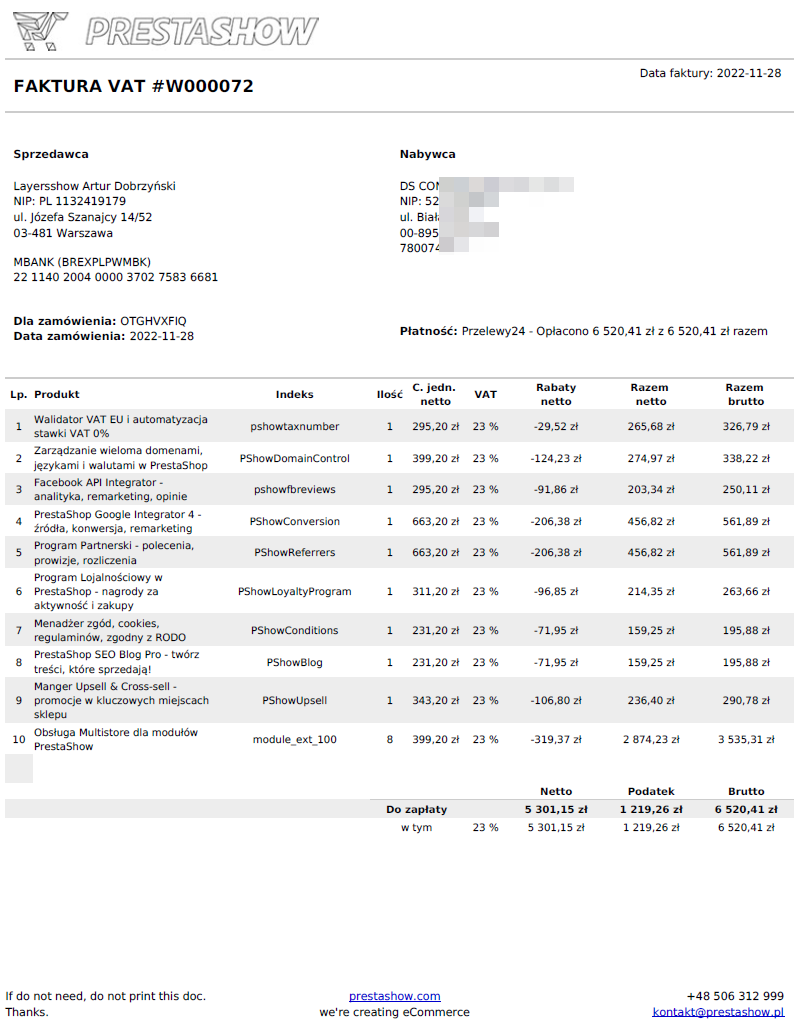
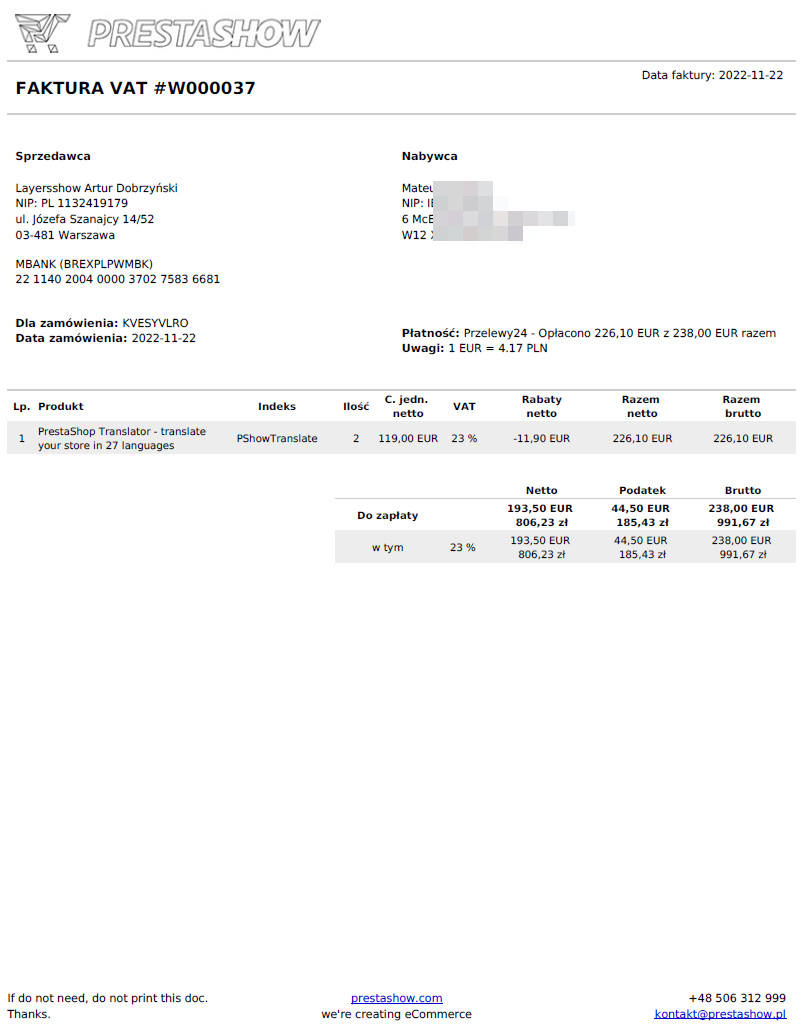
VAT invoice
The sales invoice for products and services has, among other things, a summary of VAT rates, discounts, delivery costs, currency conversions - if sold in a currency other than the default one, and other necessary or optional fields that you set in the module configuration.
Invoice without VAT
If you sell goods or services without VAT (you are a non-VAT), the module will allow you to disable VAT handling on invoices. All types of invoices will be issued with amounts to be paid - no division into net / vat / gross.
0% VAT invoice
If you sell abroad, you will issue 0% VAT invoices for companies with a valid EU VAT number.
E-Paragon
E-Paragon is an invoice issued to the buyer's data, without specifying the tax number (VAT, NIP). You can enable the module to display an additional field "E-paragon or invoice?" in the order.
We write about E-paragraphs later in the description.
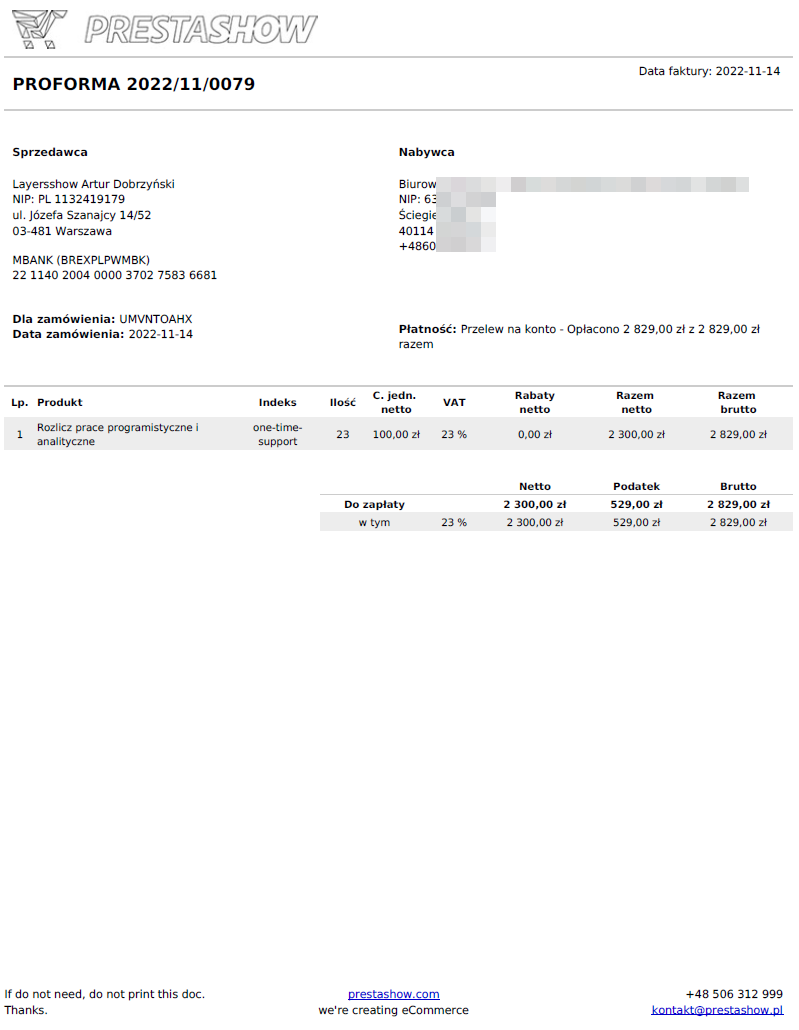
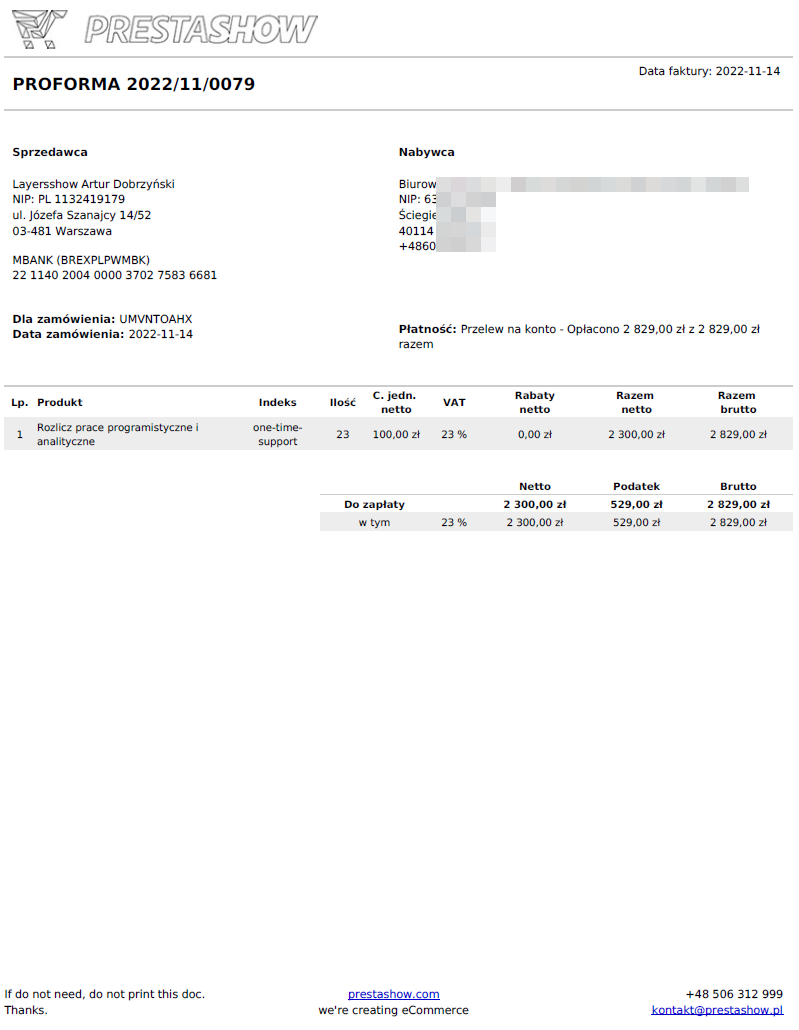
Proforma invoice
Invoice with the note "PROFORMA".Proforma will be issued automatically, for example, to orders with the selected payment method "Bank Transfer".
Duplicate invoice
Invoice with a note "DUPLIKAT" and with the date of issue of the duplicate. You can generate this invoice at the request of the customer.
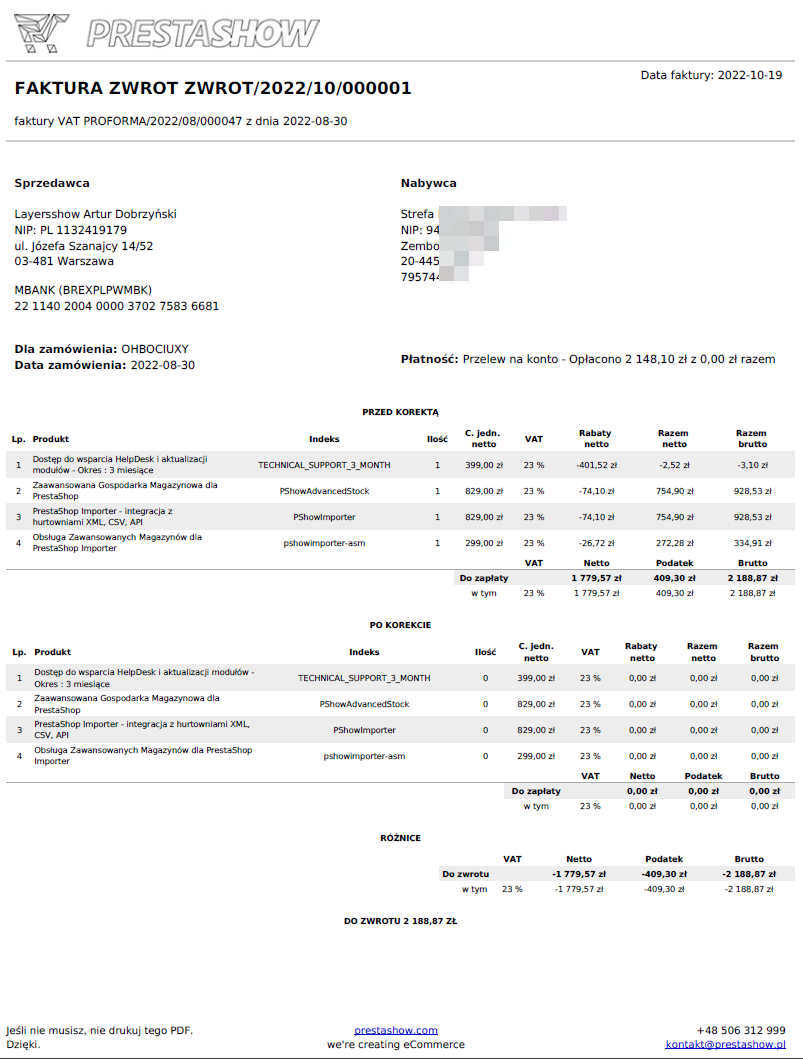
Invoice Correction
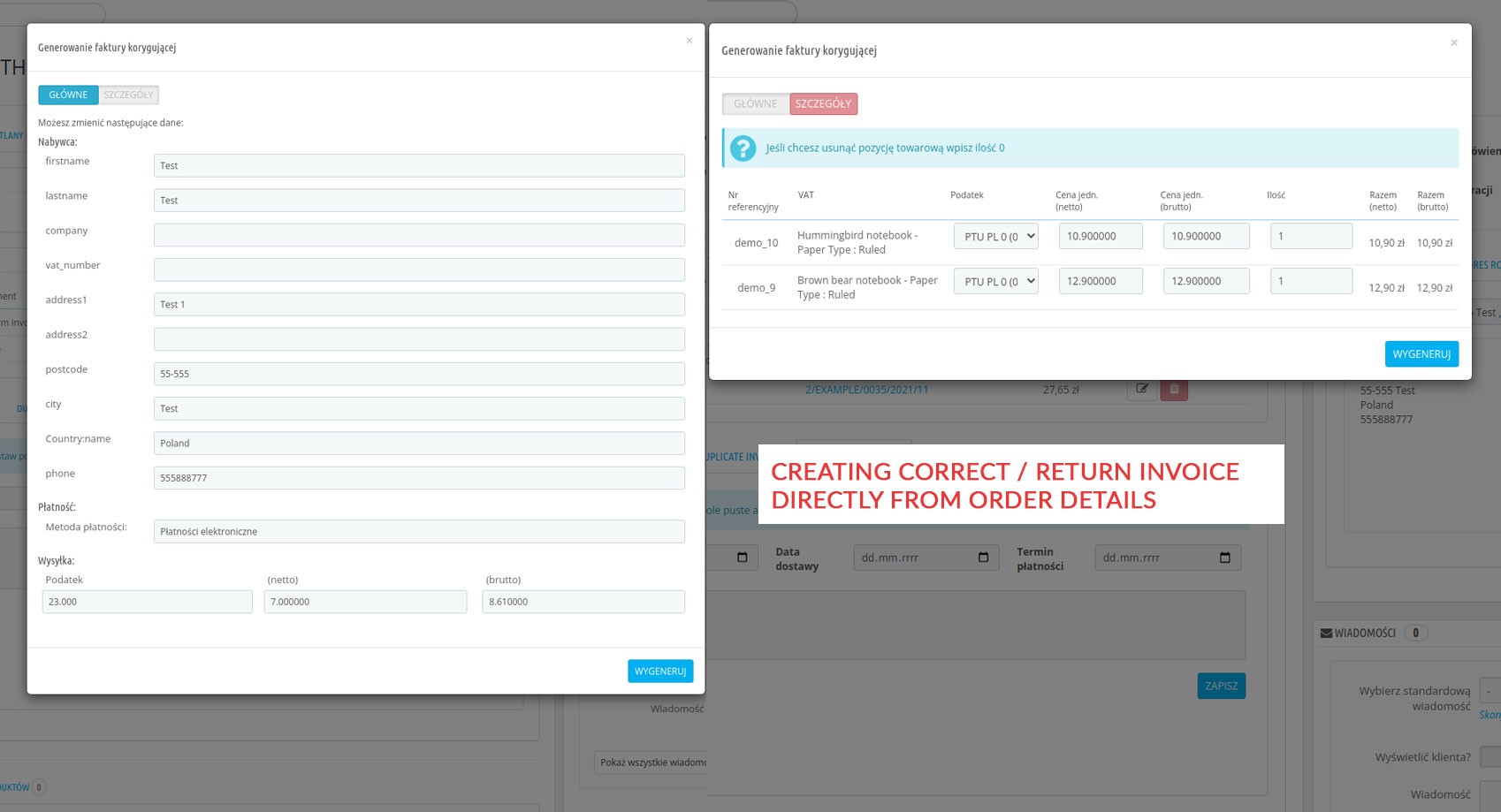
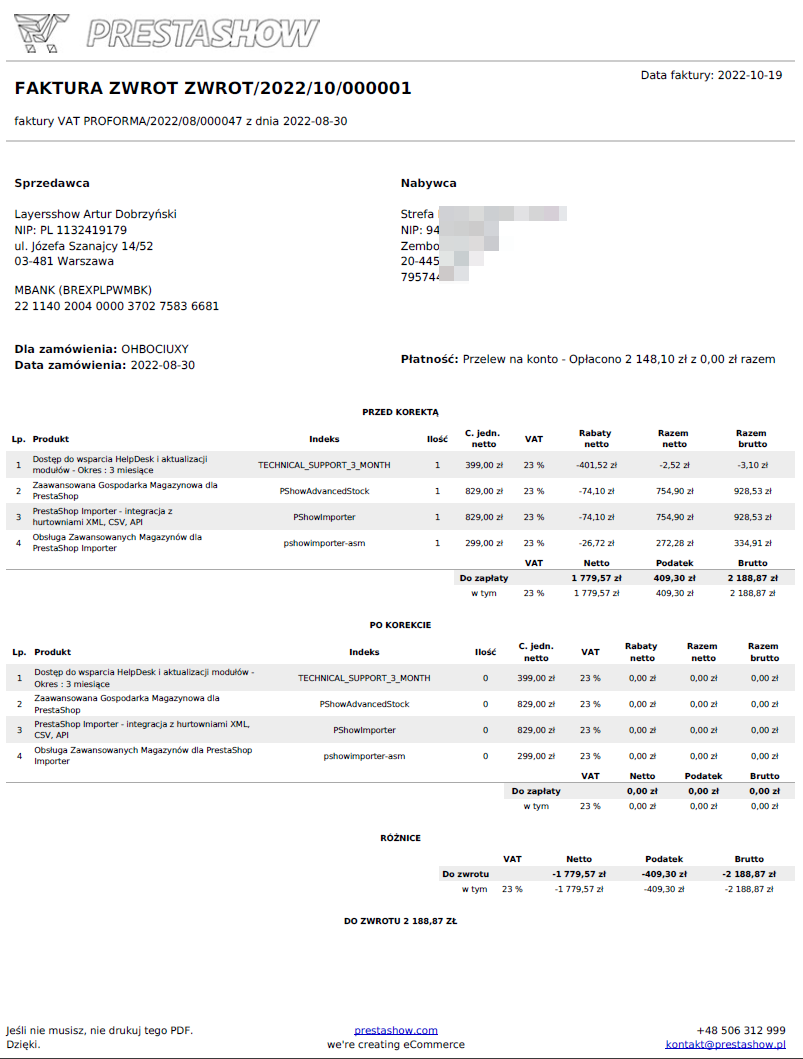
Correction invoice contains BEFORE and AFTER changes and allows you to change issuer and buyer data, addresses, dates, product list and prices. It takes into account delivery costs and discounts in an intelligent way. You can issue several adjustments for one order.
Invoice Return
Correction invoice with full return.
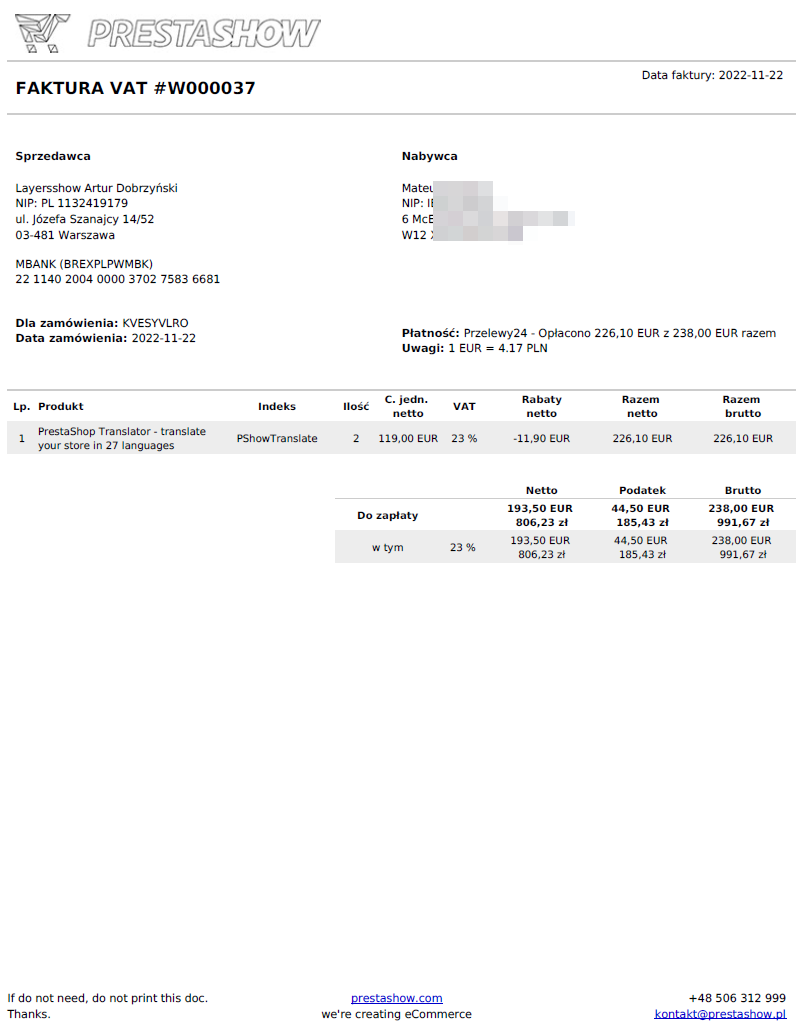
Set the default currency of your store in the module. If a customer makes a purchase in a different currency, the generated invoice will include a summary with the conversion of the purchase currency to the store's default currency, e.g. EUR>PLN, and the currency exchange rate.
- Module translations: PL, EN, DE, FR, ES, IT
- Invoice translations: EN and PL (you can modify the appearance and translations in .tpl files).
- On invoice currency conversion and exchange rate
Validation of tax numbers and 0% VAT rate
Orders, especially foreign orders, with incorrectly filled tax number (TIN, VAT, Company Number) can generate a loss through wrongly calculated tax to the order.
You can eliminate this problem by validating the domestic and foreign tax number already provided by the customer in the PrestaShop store.
The process of validating the tax number in systems such as VIES, GOV.UK, VatApp is handled by our Tax Number Validator module.
The Invoice and Tax Number Validator modules work together.
An E-Paragon is a VAT Invoice for B2C - issued in the name of the buyer.
If you enable the "E-Paragon" function, the module will generate invoices for orders without the specified tax number (VAT, NIP, etc.).
If you disable the "E-Paragon" function, the module will not generate documents for orders without the specified tax number.
- E-Paragon can be generated automatically or e-paragon generation can be disabled.
How to switch to
E-Paragon?
In this blog post we explain under what circumstances you can take advantage of the exemption from the obligation to record turnover with a fiscal cash register, that is, how to switch to E-Paragons in an online store.
Invoices for admin
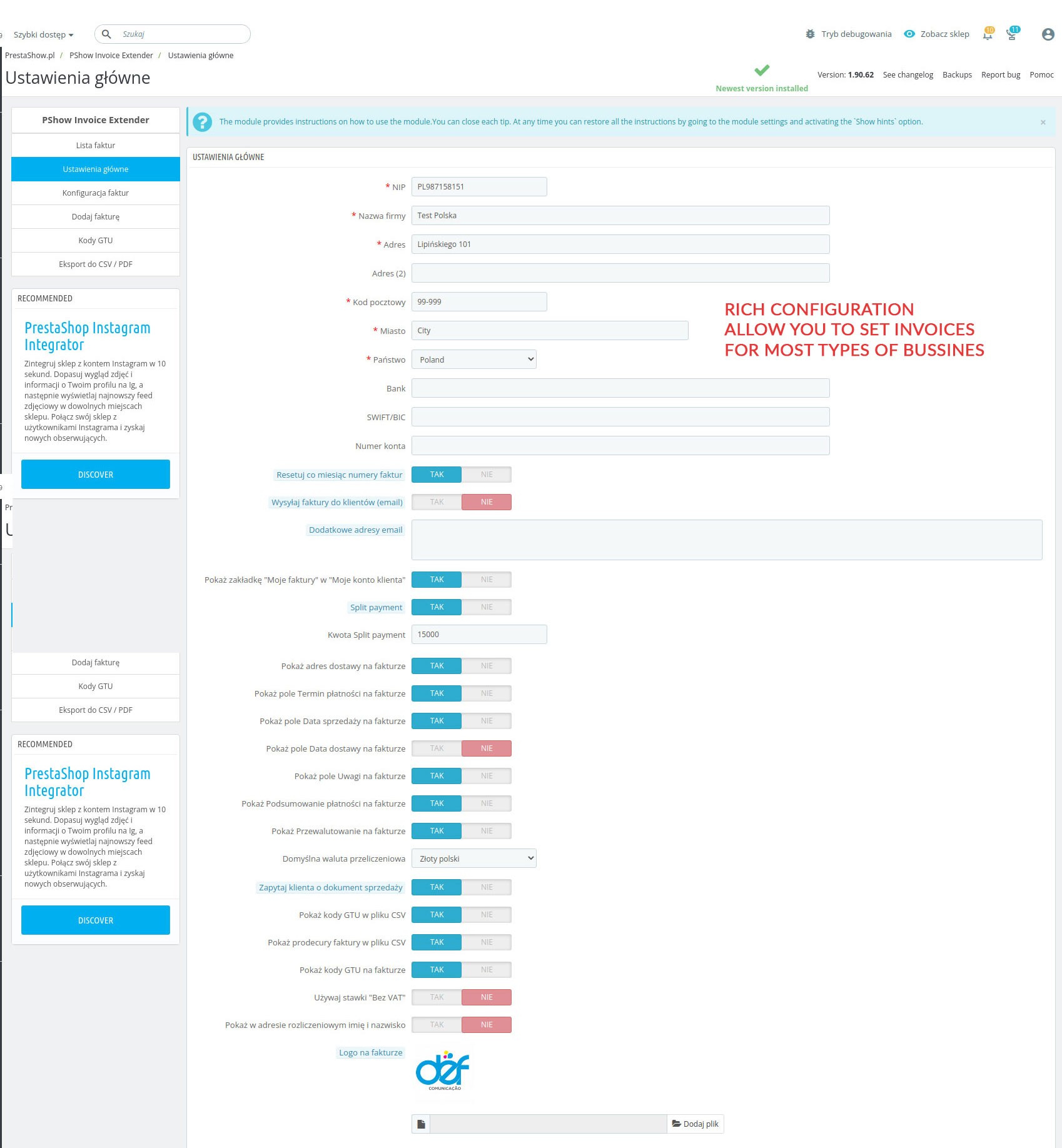
- In the main configuration of the module you will adjust the module's operation to your company's profile.
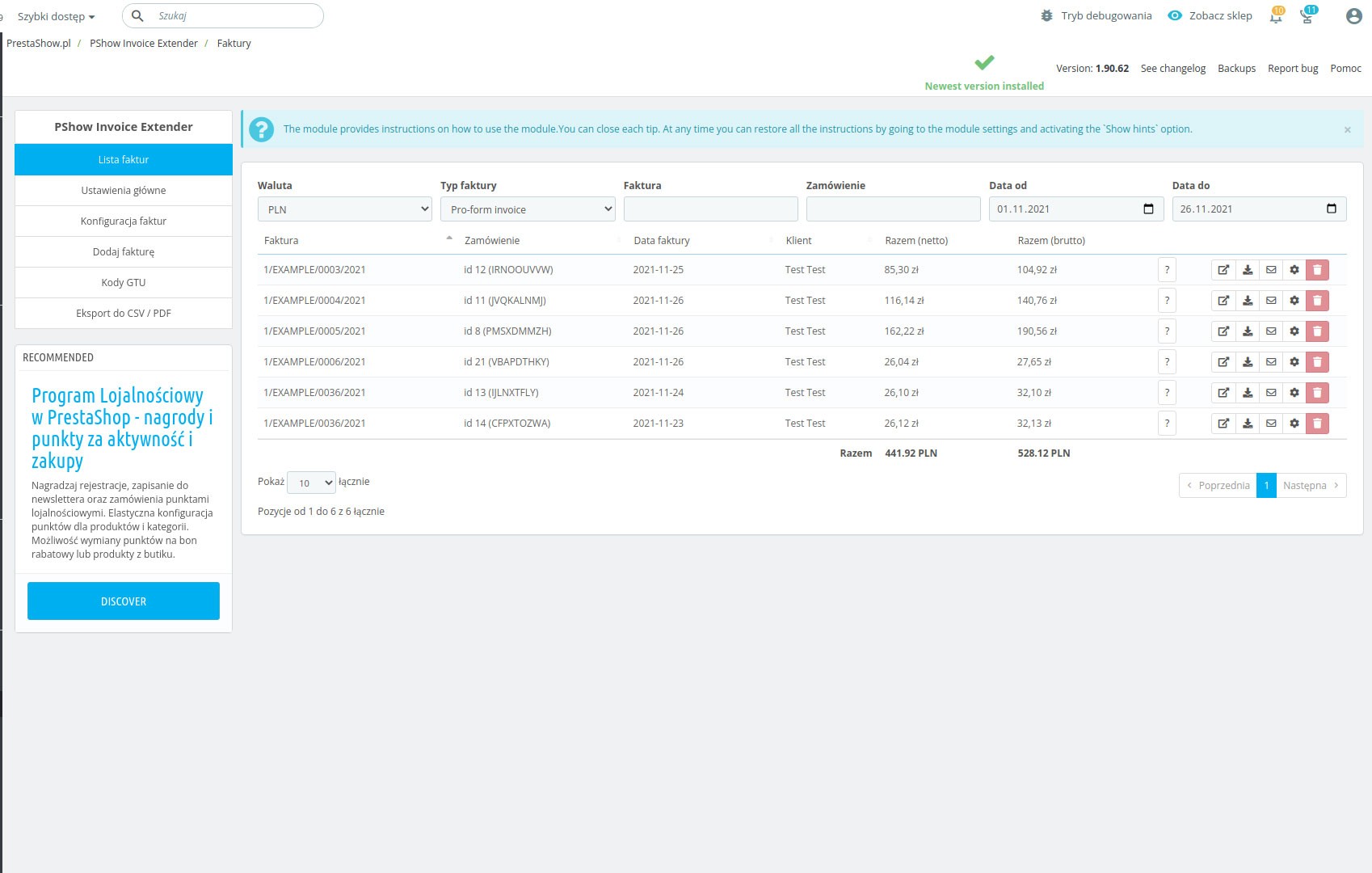
- In the module you will find a list of all generated invoices with the possibility of immediate searching and filtering
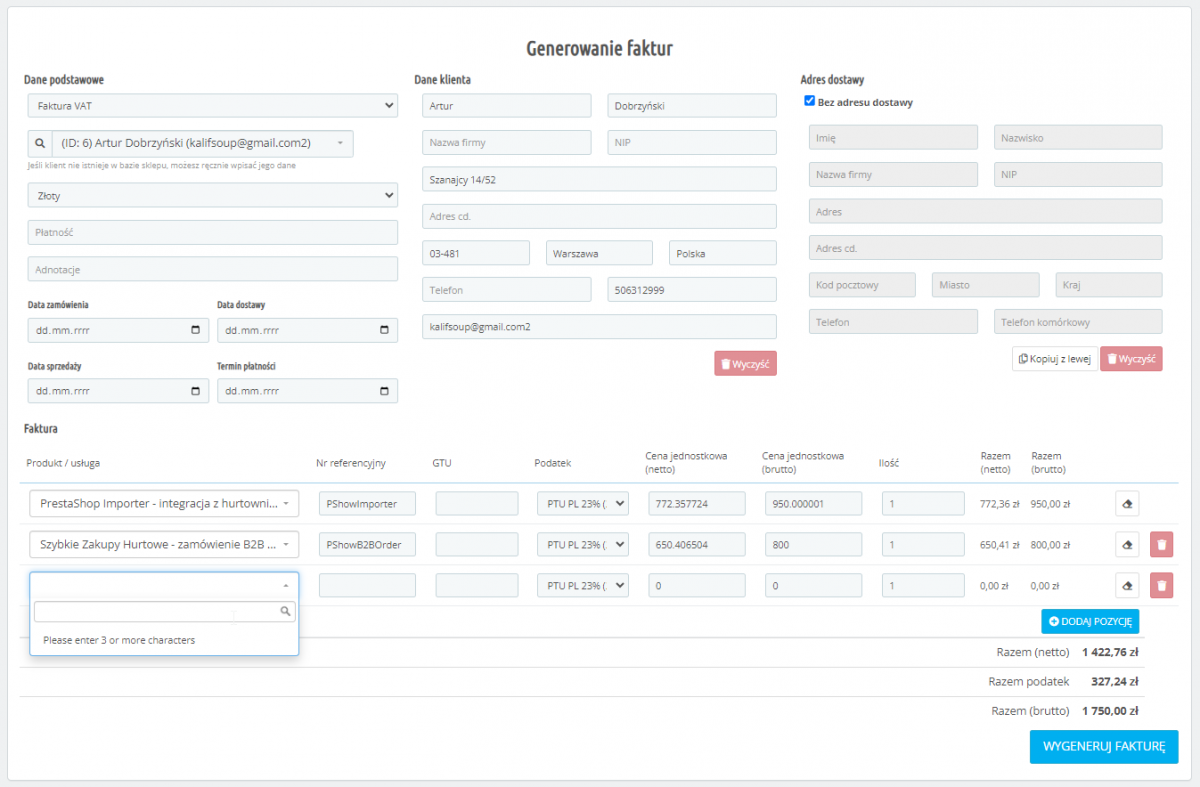
- In the module you will find a quick wizard for manual invoice generation
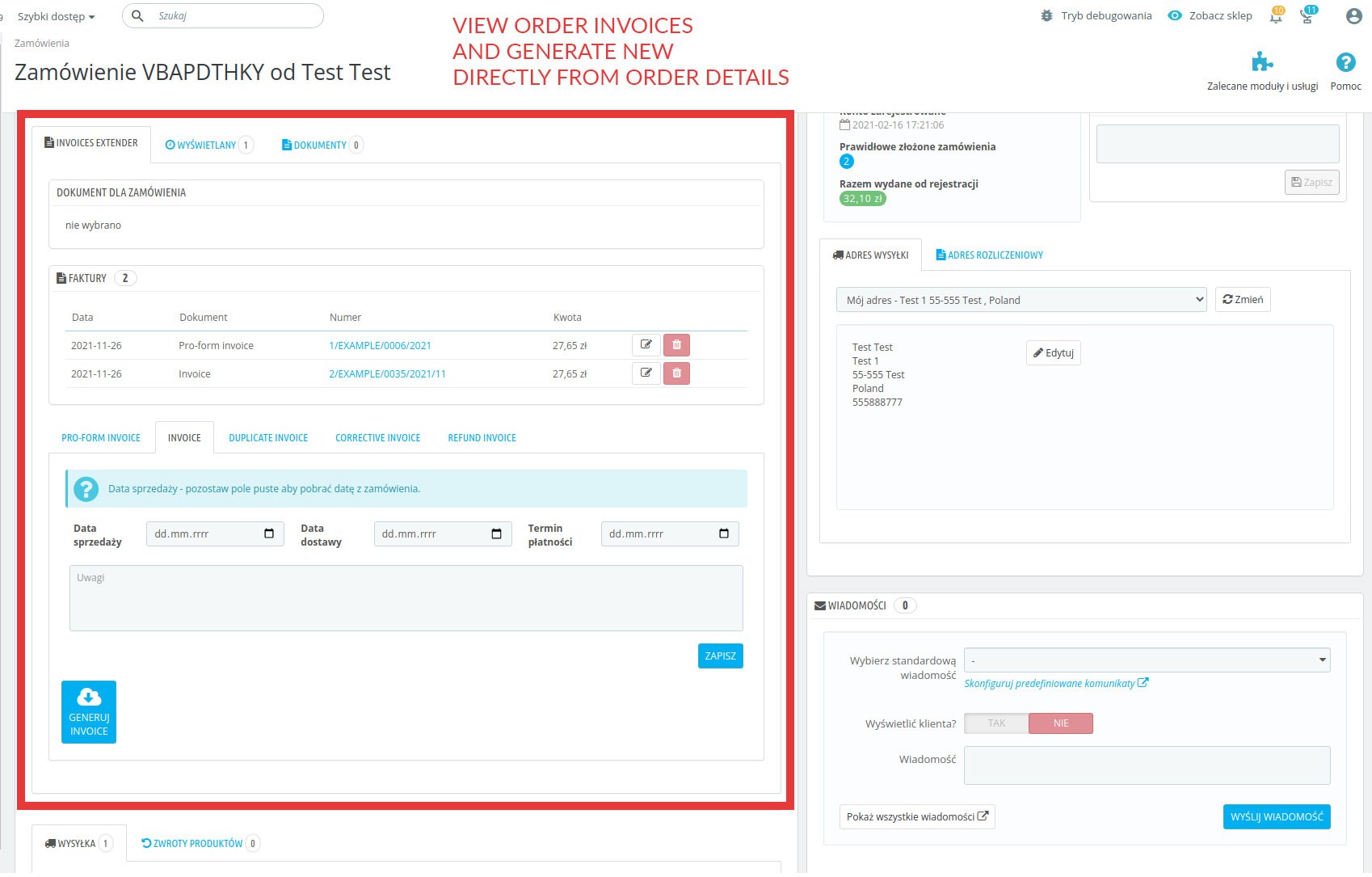
- In order editing, the module adds an "Invoices" section with the most important invoice operations.
Automatic invoicing
You can associate any type of invoice with order statuses. The module will automatically generate invoices if the order in the store gets the associated status with the invoice, such as:
- "Waiting for payment" - Proforma invoice.
- "Payment accepted" - VAT or Named invoice
- "Return" - Return invoice
You can generate invoices for orders made before installing this module.
Manual invoicing
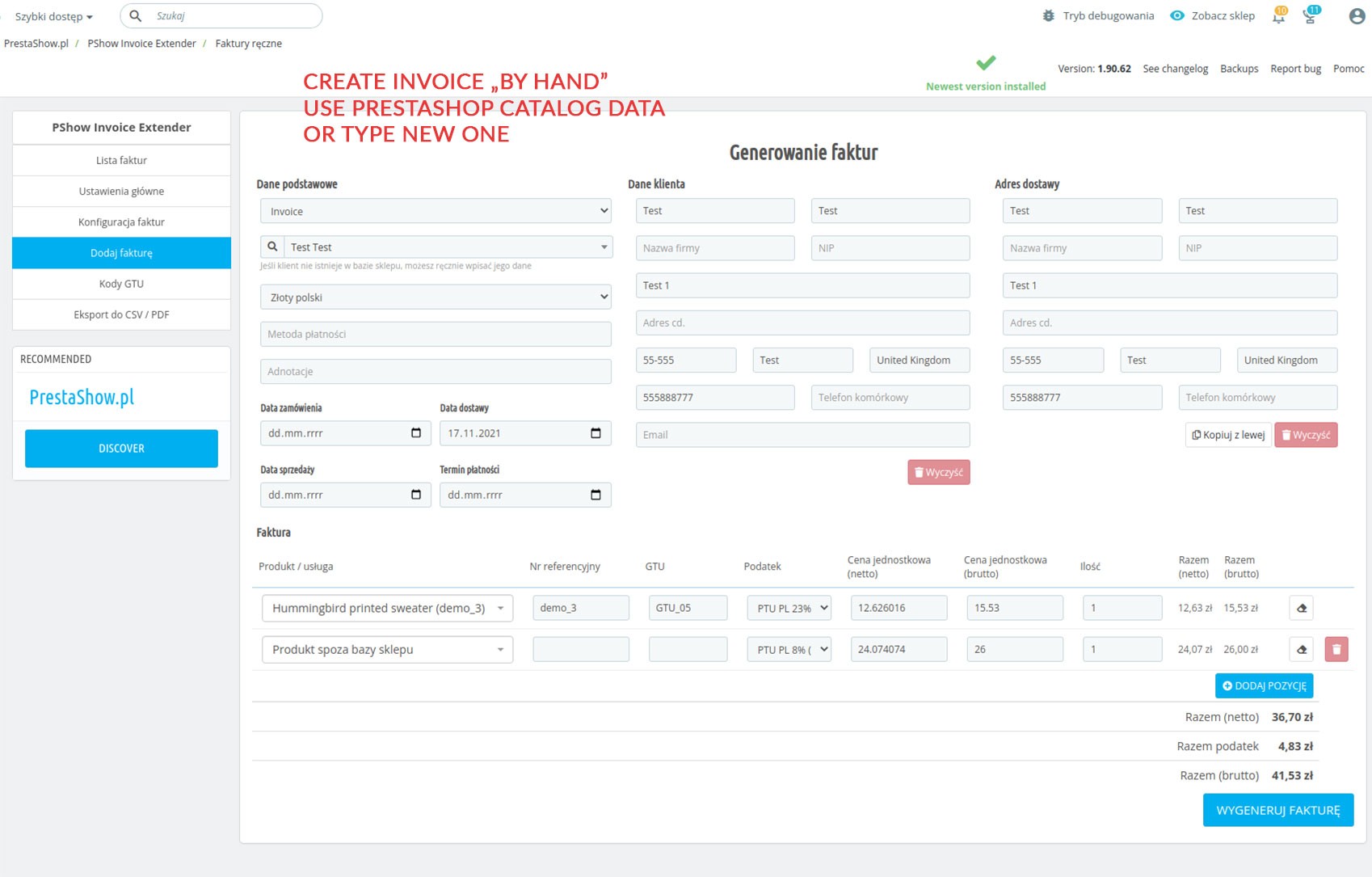
The module will allow you to invoice sales from sales channels, such as telephone, email and sales in the stationary store.
When issuing invoices manually, you can select recipients and products from your store or provide any data by completing the fields yourself.
Thanks to the autocomplete function, issuing an invoice manually can take a few seconds.
Edit data on invoices
If there are changes in the order, for example, in items, quantities or amounts - you can generate a correction invoice. The correction invoice takes into account the changes <before> and <after>.
Correction invoice can be generated on demand or automatically, according to the order status.
You can edit manually generated invoices without any restrictions.
You can delete the invoice and generate it again.
In the module's configuration you upload your logo, set the issuer's data and enable optional and additional fields on the invoice.
The.tpl file, on the basis of which PDF files are generated, isresponsible for the appearance of the invoices. You can freely edit the .tpl file.
In the module configuration, you can set your own numbering format for each type of invoice:
- Use interactive variables, such as:
{RRRR}/{MM}/FV_{%%%%}
will correspond to the number
2021/02/FV_0012 - Zeroing the invoice number - at the beginning of the month or continue numbering throughout the year.
- Initial number for the invoice - set from which number the numbering should start
- Invoices are issued on the basis of data in the PrestaShop order database and on the basis of the store configuration (e.g. taxes, currencies, etc.).
- The module does not interfere with the data of customers, products and orders in your store.
- You can export invoices at any time for backup purposes - in CSV and PDF formats.
- The data on the PDF invoice and in the CSV export contain a complete set of information necessary for correct posting and are in accordance with applicable tax law.

CSV and PDF export
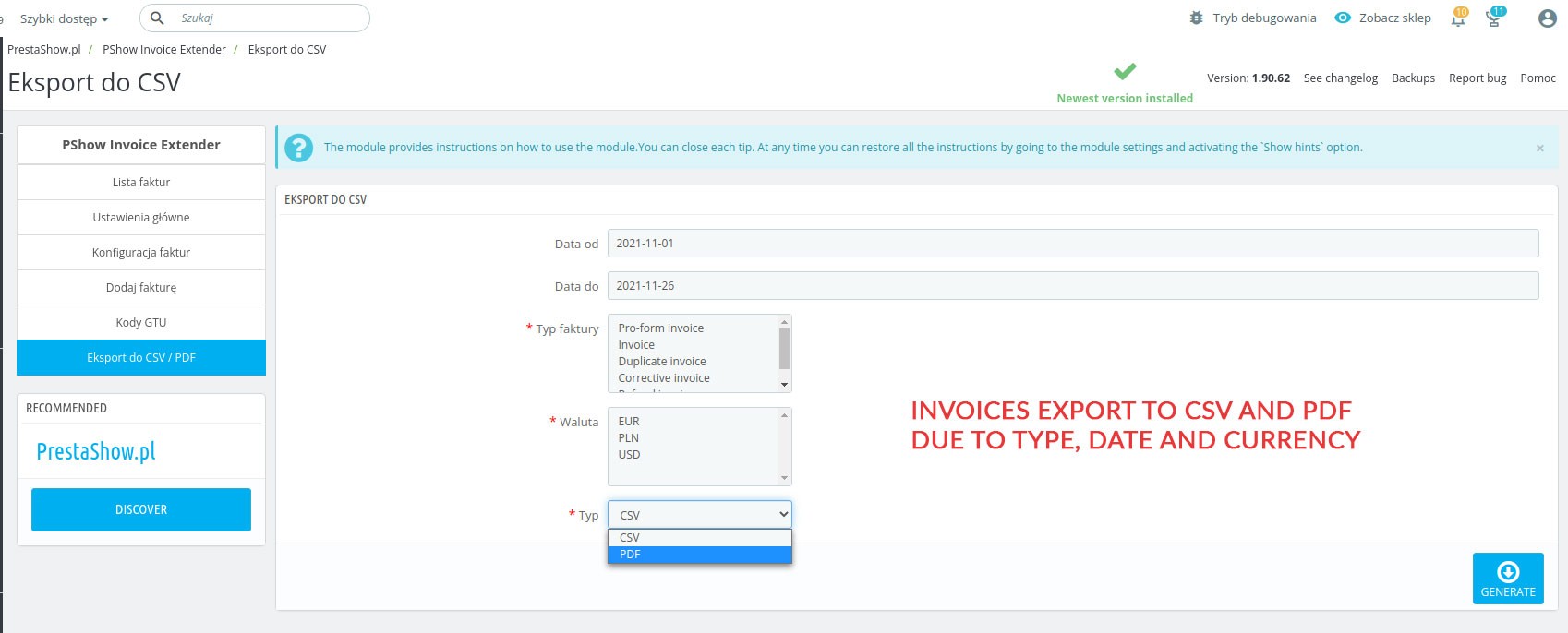
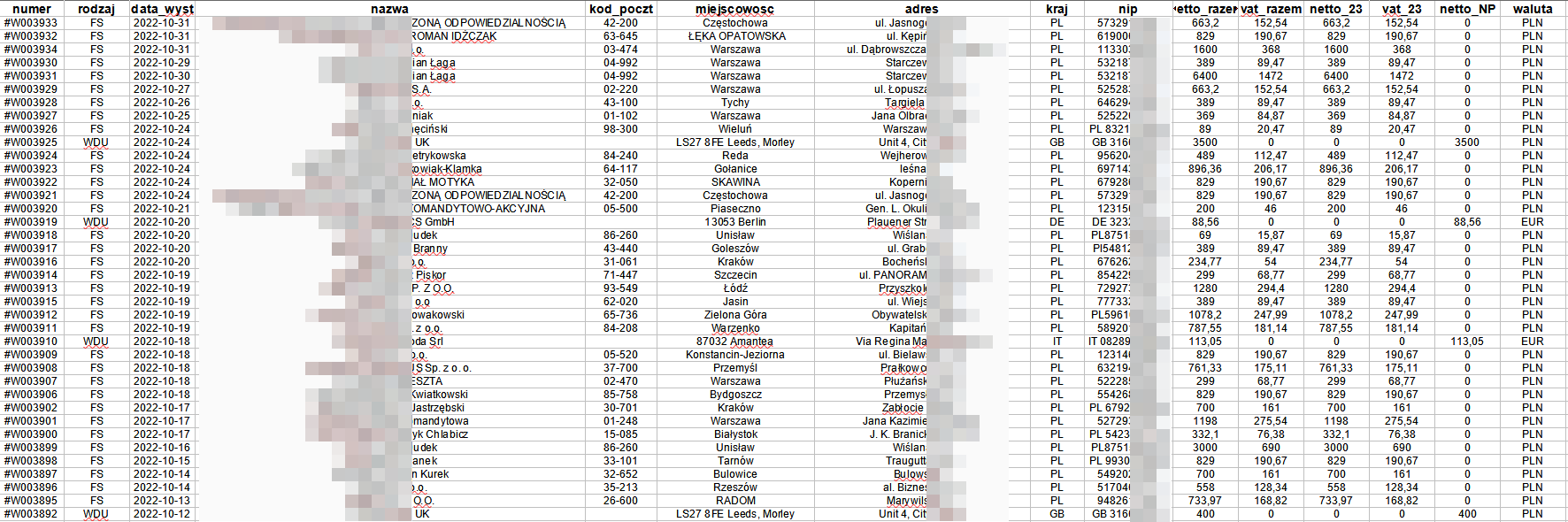
The module allows you to export sales summary and individual invoices. Indicate with filters which invoices you want to export and choose the format and press export.
Filtering
- Invoice type
- Currency
- Date range
Export
- CSV summary (Excel)
- ZIP package with PDF
Import for accounting and JPK
If your accounting office software supports CSV format - just upload the CSV file generated by our module to your accounting software.
CSV file is compatible with accounting converters. E.g. KT-Converter is a cheap and constantly updated program that allows you to convert our CSV file to many popular formats:
- JPK FA
- JPKV7
- Buchalter
- CDN Optima
- CRM Vision
- DGCS System
- Enova XML
- Finka FK and KPR
- InsERT EDI++
- Rewizor, Rachmistrz GT and NEXO
- Mała Księgowość RP
- RAKS.SQL
- Ramses
- Super Tax Ledger
- Symfonia FK
- Symfonia KPiR
- Wapro Fakir, Kaper
Smart discount handling
PrestaShop assigns discounts for the entire order. Our module makes sure that adjustments do not generate losses. Invoice discounts are broken down by rate and item so that the discount in the return will be included fairly, even when you issue multiple adjustment invoices for an order.
Sales statistics on Dashboard
After installing this module, you can disable the default PrestaShop invoices. The module integrates with all PrestaShop sales statistics modules that use data on invoices to generate statistics. With our module, charts and summaries on the dashboard are accurate to the penny :-)
Issue invoices at the turn of the month
Enable the function that aligns the order date with the payment date.
VAT for shipping and delivery
The module applies the VAT rate as assigned to the selected carrier when placing an order.
Multiple correction invoice
You can issue multiple adjustments for a single order. The adjustment always refers to the main document. Discount and delivery costs in the adjustments are included intelligently.
Tax, shipping and recipient addresses
You can display any of these three customer addresses on the invoice.
Invoice comments
Enter a comment manually or download a comment from the order
Split payment
If the customer pays the order in parts, the invoice will show the partial payment, e.g. "Paid £150 out of £300".
Reverse charge
Reverse charge - automatic note at 0% VAT invoice.
Split Payment
Enable this option to make the module add Split Payment information on the invoice. You can set the amount for SP in the module.
GTU codes
In the module you will be able to mark products with codes individually or in bulk, e.g. by category. GTU codes can be used in export to accounting programs and on invoices.
Procedures
If your industry requires it, you will be able to mark invoices with procedures. Procedures will be exported for accounting programs.
Additional emails
The module can send notifications from PDF to emails specified in the module configuration, such as to you and accounting.
You can configure invoices for each of the stores in Multistore. Multistore support for this module is an additional fee.
The module and invoices are translated in English and Polish.
You can translate the invoices yourself in any language - use the standard PrestaShop translation mechanism or edit the module's .tpl files responsible for generating the PDF (see HelpDesk for instructions).
Changelog (v1.107)
## v1.107.8 - 2026-07-29
### Fixed
- Invoice type edit form on PrestaShop 9 no longer loads without the back-office styles and scripts
- Invoice type edit form header now shows the invoice type name instead of a raw placeholder
## v1.107.7 - 2026-07-28
### Fixed
- Invoice PDF and its e-mail notification now use the order's language instead of the language of the staff member changing the order status
## v1.107.6 - 2026-07-28
### Fixed
- Saving the settings with an invoice logo no longer fails on PrestaShop 9
- Editing an invoice type no longer fails on PrestaShop 9
## v1.107.5 - 2026-07-09
### Added
- Option to skip automatic invoice generation for 0.00 orders
- Migration for the new zero-total order configuration option
### Changed
- Moved admin controller implementations to src/Controller, leaving thin PrestaShop controller bridges
- Unified selected admin translations under the module translation context for PS 1.6-9 compatibility
- Renamed the KSeF export remarks column to nr_zamowienia
### Fixed
- Regular CSV export no longer uses invoice notice data as remarks
- PDF currency conversion rate handling now matches the KSeF export behavior for allowed domains
## v1.107.4 - 2026-06-24
### Fixed
- Typos
## v1.107.3 - 2026-06-17
### Changed
- KSeF (PL) CSV export improvement
## v1.107.2 - 2026-05-05
### Added
- Reverse charge compatibility with PShowTaxNumber module
## v1.107.1 - 2026-04-30
### Added
- KSeF (PL) CSV export improvement
## v1.107.0 - 2026-04-20
### Added
- KSeF (PL) CSV export
## v1.106.8 - 2026-02-23
### Fixed
- Compatibility with PS 1.6
## v1.106.7 - 2026-02-19
### Fixed
- Compatibility with PS 1.6
## v1.106.6 - 2026-02-12
### Fixed
- the invoice logotype isn't shown
## v1.106.5 - 2025-12-03
### Fixed
- Compatibility with font libs
## v1.106.4 - 2025-11-06
### Changed
- Updated base module structure and common classes
## v1.106.3 - 2025-04-18
### Fixed
- Problem with order state changing
## v1.106.2 - 2025-06-17
### Added
- Pesel number field in export invoices
### Changed
- Removed legacy overrides; migrated all handling logic to PrestaShop hooks for improved compatibility and maintainability
## v1.106.1 - 2025-04-18
### Fixed
- Property show_deliver_address is invalid
## v1.106.0 - 2025-02-18
### Added
- possibility to exclude the delivery address on specific types of invoices
- ability to add default notes on specific types of invoices
- new option: reset invoices numbers yearly
## v1.105.9 - 2024-11-15
### Fixed
- Prestashop 8
## v1.105.8 - 2024-11-13
### Fixed
- Prestashop 8
## v1.105.7 - 2024-11-05
### Fixed
- Prestashop 8
## v1.105.6 - 2024-06-23
### Fixed
- Prestashop 8
## v1.105.5 - 2024-02-26
### Fixed
- discounts on correction invoices
- zip download
## v1.105.4 - 2024-02-13
### Fixed
- problem with disabled languages in main config
## v1.105.3 - 2023-10-17
### Fixed
- problem with export in prestashop 1.6
## v1.105.2 - 2023-06-19
### Fixed
- problem with removed discounts in prestashop 1.7.8
## v1.105.0 - 2023-03-15
### Performance
- improved customer search in the manual invoice form
## v1.104.0 - 2023-03-15
### Added
- the ability to add the reason for the correction and display it on documents
## v1.103.0 - 2022-11-01
### Added
- all tax rates are included in the file with exported invoices
## v1.102.0 - 2022-08-01
### Added
- support for reverse charge
## v1.101.0 - 2022-07-26
### Added
- new option to CSV export corrective invoices
## v1.100.0 - 2022-06-20
### Added
- full support for "Free shipping" voucher
## v1.99.0 - 2022-05-24
### Fixed
- elimination of potential error in override
## v1.98.0 - 2022-05-22
### Fixed
- discount calculcatoin for free product cart rule
**v1.97.0 - 13/05/2022**
* optimization of the calculation of discounts on invoice
* async search for products from the store in manual invoices (better performance)
**v1.96.0 - 23/03/2022**
* resolved problems with CSV file (corrective invoices)
**v1.95.0 - 08/02/2022**
* resolved problems with automatically sending corrective invoices to customers
**v1.94.0 - 07/02/2022**
* pdf export - improvements
**v1.93.0 - 02/02/2022**
* bug fixes - incorrect calculation of discounts
**v1.92.0 - 24/01/2022**
* new filtering option
**v1.91.0 - 13/01/2022**
* delivery address is not required on a manual invoice
* bug fixes
**v1.90.0 - 25/11/2021**
* proform numeration
**v1.89.0 - 03/11/2021**
* more options in invoices generated manually
**v1.88.0 - 25/10/2021**
* pdf export
* bug fixes
**v1.87.0 - 13/10/2021**
* improvements with invoice images
v1.86.0 - 11/10/2021
* bug fixes
v1.85.0 - 06/10/2021
* bug fixes
v1.84.0 - 15/09/2021
* bug fixes 1.6
v1.83.0 - 08/09/2021
* option to change tax rate in corrective invoice generated from order
v1.82.0 - 03/09/2021
* the problem with prestashop 1.6 compatibility has been fixed
v1.81.0 - 05/07/2021
* bug fixes
v1.80.0 - 15/06/2021
* refactoring, compatibility with external cron tasks
* improvements in xls export file (more filters, compatibility with spreadsheet functions)
* a new template for My Account block
* editing invoices generated from order
v1.79.0 - 24/05/2021
* visual fixes
v1.78.0 - 17/05/2021
* bug fixes
v1.77.0 - 05/05/2021
* bug fixes
v1.76.0 - 21/04/2021
* compatibility with Prestashop stats
v1.75.0 - 15/04/2021
* additional filtering in the invoice list
v1.74.0 - 14/04/2021
* improvements in export
v1.73.0 - 07/04/2021
* bug fixes
* option not to display first and last name in billing address (company name only)
v1.72.0 - 02/04/2021
* a fixed problem with differences in tax summary and total order value
v1.71.0 - 31/03/2021
* optimization in invoices list
v1.70.0 - 26/03/2021
* invoices without tax rate
v1.69.0 - 21/03/2021
* module optimization
v1.68.0 - 10/03/2021
* bug fixes
v1.67.0 - 16/02/2021
* breakdown of the global discount into individual items and tax rates
* automatic recalculation of the discount on the correcting invoice (removal / proportional reduction of discounts from the main invoice)
* improved tax rate summary
* new option: delivery date on invoice
* ordinal number of items on the invoice
v1.66.0 - 09/02/2021
* GTU codes on invoices (optional)
v1.65.0 - 23/01/2021
* bug fixes
v1.64.0 - 22/01/2021
* !NEW default invoice theme
* improvements in corrective & refund invoices
v1.63.0 - 05/01/2021
* adaptation to Prestashop 1.7.7.0
v1.62.0 - 18/12/2020
* bug fixes
v1.61.0 - 10/12/2020
* bug fixes
v1.60.0 - 03/12/2020
* GTU codes and invoice procedures
v1.59.0 - 25/11/2020
* improvements in correction of shipping costs
v1.58.0 - 23/11/2020
* bug fixes in refund invoices
v1.57.0 - 13/11/2020
* sending all generated invoices to an additional e-mail address (e.g. for an accountant)
v1.56.0 - 06/11/2020
* visual fixes
v1.55.0 - 02/11/2020
* bug fixes
v1.54.0 - 20/10/2020
* support for handling transport costs on correcting invoices
* ask customer about document type - fiscal receipt or invoice
v1.53.0 - 12/10/2020
* bug fixes in Prestashop 1.6
v1.52.0 - 13/09/2020
* the ability to define a currency other than the default one for the invoice conversion
v1.51.0 - 29/08/2020
* additional configurable fields have been added to invoices: payment term, sale date, comments
* the ability to display the sum of payments on the invoice
* the invoice handling interface in the administration panel has been rebuilt
* possibility to delete invoices from the level of the orders tab
* added the option to convert the invoice summary in a different currency to the default shop currency
v1.50.0 - 09/06/2020
* use of media server in the module
* the option of showing the Recipient's address on the invoice
v1.49.0 - 09/05/2020
* refactoring
v1.48.0 - 09/02/2019
* bug fixes
v1.47.0 - 15/01/2019
* bug fixes
v1.46.0 - 15/01/2019
* bug fixes
v1.45.0 - 14/01/2019
* bug fixes
* removed name and surname from invoice billing address (if company isset)
v1.44.0 - 31/12/2019
* delivery cost charged as the current value of the order (corrective invoice)
v1.43.0 - 08/12/2019
* improvements in invoices configuration
* bug fixed - invoices names (multilanguage)
v1.42.0 - 27/11/2019
* improvements in invoice themes
* bug fixed - monthly number reset
* missing translations
v1.41.0 - 18/11/2019
* split payment
v1.40.0 - 01/10/2019
* bug fixes
* improvements in multi language
* export invoices to CSV file (compatibility with the main accounting systems in Poland)
* improvements in invoice themes
* option to edit shipping cost in corrective invoice from the order view
v1.39.0 - 15/09/2019
* bug fixes
v1.38.0 - 14/09/2019
* bug fixes
v1.37.0 - 13/09/2019
* improvements in invoice themes
* separating transport costs in the invoice
v1.36.0 - 08/09/2019
* option to edit external invoice
* improvements in themes
v1.35.0 - 19/07/2019
* bug fixes
v1.34.0 - 08/07/2019
* responsive invoice tables
* improvements in monthly reset
* changing in mailing
* functionality for overrides update
v1.33.0 - 28/06/2019
* continuous development
v1.32.0 - 27/06/2019
* bug fixes
v1.31.0 - 24/06/2019
* improvements in invoice themes
v1.30.0 - 17/06/2019
* missing translations
v1.29.0 - 13/06/2019
* bug fixes
* changing in validation during invoice generating
* corrections in the invoice template
* adding shipping tax in taxes table
* corrections in the option to monthly reset the invoice number
v1.28.0 - 20/05/2019
* bug fixes
v1.27.0 - 13/05/2019
* optimization and refactoring
* security improvement
v1.26.0 - 07/05/2019
* bug fixes
v1.25.0 - 03/04/2019
* bug fixes
* setting default tax of product after selecting it from list (external invoice)
* sending invoice by email from invoices list
v1.24.0 - 01/04/2019
* sending invoices to customers (emails)
v1.23.0 - 27/03/2019
* info about discount in invoice theme
v1.22.0 - 25/03/2019
* fixed problem with generate external invoice on PS 1.7
* adding summary table with taxes to invoice
v1.21.0 - 19/03/2019
* bug fixes
* products from shop database in external invoices form
v1.20.0 - 18/03/2019
* bug fixes
v1.19.0 - 13/03/2019
* hotifx
v1.18.0 - 12/03/2019
* adding missing translations
* total sum of invoices in invoices list
v1.17.0 - 26/02/2019
* deleting invoices
v1.16.0 - 03/02/2019
* bug fixes
* change in tax rules
* support for PS 1.7
v1.15.0 - 29/01/2019
* add external invoices
v1.14.0 - 28/01/2019
* bug fixes
v1.13.0 - 25/01/2019
* bug fixes
v1.12.0 - 22/01/2019
* adding missing translations
* adding all invoice list
* adding "My Account" section with invoices to download for customer
v1.11.0 - 21/01/2019
* bug fixes
* adding missing translations
v1.1.0 - 12/12/2018
* first version of module
### Fixed
- Invoice type edit form on PrestaShop 9 no longer loads without the back-office styles and scripts
- Invoice type edit form header now shows the invoice type name instead of a raw placeholder
## v1.107.7 - 2026-07-28
### Fixed
- Invoice PDF and its e-mail notification now use the order's language instead of the language of the staff member changing the order status
## v1.107.6 - 2026-07-28
### Fixed
- Saving the settings with an invoice logo no longer fails on PrestaShop 9
- Editing an invoice type no longer fails on PrestaShop 9
## v1.107.5 - 2026-07-09
### Added
- Option to skip automatic invoice generation for 0.00 orders
- Migration for the new zero-total order configuration option
### Changed
- Moved admin controller implementations to src/Controller, leaving thin PrestaShop controller bridges
- Unified selected admin translations under the module translation context for PS 1.6-9 compatibility
- Renamed the KSeF export remarks column to nr_zamowienia
### Fixed
- Regular CSV export no longer uses invoice notice data as remarks
- PDF currency conversion rate handling now matches the KSeF export behavior for allowed domains
## v1.107.4 - 2026-06-24
### Fixed
- Typos
## v1.107.3 - 2026-06-17
### Changed
- KSeF (PL) CSV export improvement
## v1.107.2 - 2026-05-05
### Added
- Reverse charge compatibility with PShowTaxNumber module
## v1.107.1 - 2026-04-30
### Added
- KSeF (PL) CSV export improvement
## v1.107.0 - 2026-04-20
### Added
- KSeF (PL) CSV export
## v1.106.8 - 2026-02-23
### Fixed
- Compatibility with PS 1.6
## v1.106.7 - 2026-02-19
### Fixed
- Compatibility with PS 1.6
## v1.106.6 - 2026-02-12
### Fixed
- the invoice logotype isn't shown
## v1.106.5 - 2025-12-03
### Fixed
- Compatibility with font libs
## v1.106.4 - 2025-11-06
### Changed
- Updated base module structure and common classes
## v1.106.3 - 2025-04-18
### Fixed
- Problem with order state changing
## v1.106.2 - 2025-06-17
### Added
- Pesel number field in export invoices
### Changed
- Removed legacy overrides; migrated all handling logic to PrestaShop hooks for improved compatibility and maintainability
## v1.106.1 - 2025-04-18
### Fixed
- Property show_deliver_address is invalid
## v1.106.0 - 2025-02-18
### Added
- possibility to exclude the delivery address on specific types of invoices
- ability to add default notes on specific types of invoices
- new option: reset invoices numbers yearly
## v1.105.9 - 2024-11-15
### Fixed
- Prestashop 8
## v1.105.8 - 2024-11-13
### Fixed
- Prestashop 8
## v1.105.7 - 2024-11-05
### Fixed
- Prestashop 8
## v1.105.6 - 2024-06-23
### Fixed
- Prestashop 8
## v1.105.5 - 2024-02-26
### Fixed
- discounts on correction invoices
- zip download
## v1.105.4 - 2024-02-13
### Fixed
- problem with disabled languages in main config
## v1.105.3 - 2023-10-17
### Fixed
- problem with export in prestashop 1.6
## v1.105.2 - 2023-06-19
### Fixed
- problem with removed discounts in prestashop 1.7.8
## v1.105.0 - 2023-03-15
### Performance
- improved customer search in the manual invoice form
## v1.104.0 - 2023-03-15
### Added
- the ability to add the reason for the correction and display it on documents
## v1.103.0 - 2022-11-01
### Added
- all tax rates are included in the file with exported invoices
## v1.102.0 - 2022-08-01
### Added
- support for reverse charge
## v1.101.0 - 2022-07-26
### Added
- new option to CSV export corrective invoices
## v1.100.0 - 2022-06-20
### Added
- full support for "Free shipping" voucher
## v1.99.0 - 2022-05-24
### Fixed
- elimination of potential error in override
## v1.98.0 - 2022-05-22
### Fixed
- discount calculcatoin for free product cart rule
**v1.97.0 - 13/05/2022**
* optimization of the calculation of discounts on invoice
* async search for products from the store in manual invoices (better performance)
**v1.96.0 - 23/03/2022**
* resolved problems with CSV file (corrective invoices)
**v1.95.0 - 08/02/2022**
* resolved problems with automatically sending corrective invoices to customers
**v1.94.0 - 07/02/2022**
* pdf export - improvements
**v1.93.0 - 02/02/2022**
* bug fixes - incorrect calculation of discounts
**v1.92.0 - 24/01/2022**
* new filtering option
**v1.91.0 - 13/01/2022**
* delivery address is not required on a manual invoice
* bug fixes
**v1.90.0 - 25/11/2021**
* proform numeration
**v1.89.0 - 03/11/2021**
* more options in invoices generated manually
**v1.88.0 - 25/10/2021**
* pdf export
* bug fixes
**v1.87.0 - 13/10/2021**
* improvements with invoice images
v1.86.0 - 11/10/2021
* bug fixes
v1.85.0 - 06/10/2021
* bug fixes
v1.84.0 - 15/09/2021
* bug fixes 1.6
v1.83.0 - 08/09/2021
* option to change tax rate in corrective invoice generated from order
v1.82.0 - 03/09/2021
* the problem with prestashop 1.6 compatibility has been fixed
v1.81.0 - 05/07/2021
* bug fixes
v1.80.0 - 15/06/2021
* refactoring, compatibility with external cron tasks
* improvements in xls export file (more filters, compatibility with spreadsheet functions)
* a new template for My Account block
* editing invoices generated from order
v1.79.0 - 24/05/2021
* visual fixes
v1.78.0 - 17/05/2021
* bug fixes
v1.77.0 - 05/05/2021
* bug fixes
v1.76.0 - 21/04/2021
* compatibility with Prestashop stats
v1.75.0 - 15/04/2021
* additional filtering in the invoice list
v1.74.0 - 14/04/2021
* improvements in export
v1.73.0 - 07/04/2021
* bug fixes
* option not to display first and last name in billing address (company name only)
v1.72.0 - 02/04/2021
* a fixed problem with differences in tax summary and total order value
v1.71.0 - 31/03/2021
* optimization in invoices list
v1.70.0 - 26/03/2021
* invoices without tax rate
v1.69.0 - 21/03/2021
* module optimization
v1.68.0 - 10/03/2021
* bug fixes
v1.67.0 - 16/02/2021
* breakdown of the global discount into individual items and tax rates
* automatic recalculation of the discount on the correcting invoice (removal / proportional reduction of discounts from the main invoice)
* improved tax rate summary
* new option: delivery date on invoice
* ordinal number of items on the invoice
v1.66.0 - 09/02/2021
* GTU codes on invoices (optional)
v1.65.0 - 23/01/2021
* bug fixes
v1.64.0 - 22/01/2021
* !NEW default invoice theme
* improvements in corrective & refund invoices
v1.63.0 - 05/01/2021
* adaptation to Prestashop 1.7.7.0
v1.62.0 - 18/12/2020
* bug fixes
v1.61.0 - 10/12/2020
* bug fixes
v1.60.0 - 03/12/2020
* GTU codes and invoice procedures
v1.59.0 - 25/11/2020
* improvements in correction of shipping costs
v1.58.0 - 23/11/2020
* bug fixes in refund invoices
v1.57.0 - 13/11/2020
* sending all generated invoices to an additional e-mail address (e.g. for an accountant)
v1.56.0 - 06/11/2020
* visual fixes
v1.55.0 - 02/11/2020
* bug fixes
v1.54.0 - 20/10/2020
* support for handling transport costs on correcting invoices
* ask customer about document type - fiscal receipt or invoice
v1.53.0 - 12/10/2020
* bug fixes in Prestashop 1.6
v1.52.0 - 13/09/2020
* the ability to define a currency other than the default one for the invoice conversion
v1.51.0 - 29/08/2020
* additional configurable fields have been added to invoices: payment term, sale date, comments
* the ability to display the sum of payments on the invoice
* the invoice handling interface in the administration panel has been rebuilt
* possibility to delete invoices from the level of the orders tab
* added the option to convert the invoice summary in a different currency to the default shop currency
v1.50.0 - 09/06/2020
* use of media server in the module
* the option of showing the Recipient's address on the invoice
v1.49.0 - 09/05/2020
* refactoring
v1.48.0 - 09/02/2019
* bug fixes
v1.47.0 - 15/01/2019
* bug fixes
v1.46.0 - 15/01/2019
* bug fixes
v1.45.0 - 14/01/2019
* bug fixes
* removed name and surname from invoice billing address (if company isset)
v1.44.0 - 31/12/2019
* delivery cost charged as the current value of the order (corrective invoice)
v1.43.0 - 08/12/2019
* improvements in invoices configuration
* bug fixed - invoices names (multilanguage)
v1.42.0 - 27/11/2019
* improvements in invoice themes
* bug fixed - monthly number reset
* missing translations
v1.41.0 - 18/11/2019
* split payment
v1.40.0 - 01/10/2019
* bug fixes
* improvements in multi language
* export invoices to CSV file (compatibility with the main accounting systems in Poland)
* improvements in invoice themes
* option to edit shipping cost in corrective invoice from the order view
v1.39.0 - 15/09/2019
* bug fixes
v1.38.0 - 14/09/2019
* bug fixes
v1.37.0 - 13/09/2019
* improvements in invoice themes
* separating transport costs in the invoice
v1.36.0 - 08/09/2019
* option to edit external invoice
* improvements in themes
v1.35.0 - 19/07/2019
* bug fixes
v1.34.0 - 08/07/2019
* responsive invoice tables
* improvements in monthly reset
* changing in mailing
* functionality for overrides update
v1.33.0 - 28/06/2019
* continuous development
v1.32.0 - 27/06/2019
* bug fixes
v1.31.0 - 24/06/2019
* improvements in invoice themes
v1.30.0 - 17/06/2019
* missing translations
v1.29.0 - 13/06/2019
* bug fixes
* changing in validation during invoice generating
* corrections in the invoice template
* adding shipping tax in taxes table
* corrections in the option to monthly reset the invoice number
v1.28.0 - 20/05/2019
* bug fixes
v1.27.0 - 13/05/2019
* optimization and refactoring
* security improvement
v1.26.0 - 07/05/2019
* bug fixes
v1.25.0 - 03/04/2019
* bug fixes
* setting default tax of product after selecting it from list (external invoice)
* sending invoice by email from invoices list
v1.24.0 - 01/04/2019
* sending invoices to customers (emails)
v1.23.0 - 27/03/2019
* info about discount in invoice theme
v1.22.0 - 25/03/2019
* fixed problem with generate external invoice on PS 1.7
* adding summary table with taxes to invoice
v1.21.0 - 19/03/2019
* bug fixes
* products from shop database in external invoices form
v1.20.0 - 18/03/2019
* bug fixes
v1.19.0 - 13/03/2019
* hotifx
v1.18.0 - 12/03/2019
* adding missing translations
* total sum of invoices in invoices list
v1.17.0 - 26/02/2019
* deleting invoices
v1.16.0 - 03/02/2019
* bug fixes
* change in tax rules
* support for PS 1.7
v1.15.0 - 29/01/2019
* add external invoices
v1.14.0 - 28/01/2019
* bug fixes
v1.13.0 - 25/01/2019
* bug fixes
v1.12.0 - 22/01/2019
* adding missing translations
* adding all invoice list
* adding "My Account" section with invoices to download for customer
v1.11.0 - 21/01/2019
* bug fixes
* adding missing translations
v1.1.0 - 12/12/2018
* first version of module
Technical requirements
Technical Requirements
- PHP 7.1 - 8.x
- Server extension ionCube Loader
- PrestaShop Importer only: PHP libxml version > 2.9.3
- PrestaShop Facebook Integrator only: PHP 7.2 or higher
- PrestaShop VAT Validator only: PHP SOAP
Support & Updates
Support = Updates + HelpDesk
You get 90 days (3 months) access to the complete PrestaShow support package.
Module updates
Modules will inform you about available updates. Read the changelog and perform a 1-click module update directly from your store.
HelpDesk panel
This is the panel where we will provide you with help. On HelpDesk you can report problems, order free module installation and updates, and order modifications and custom programming work.
Extend support
After support expires, you can use the module without any restrictions. You can extend your support access at any time you need it.
Knowledge Base & FAQ
Free forever
The knowledge base is available to everyone. You will find module documentation as well as instructions, videos and answers to frequently asked questions.
License
Lifetime license for the module
- You can use the module without limitation in 1 store = 1 domain.
- You can use an additional domain, e.g. for developer copy.
- For a small fee you can change the domain for the module yourself.
Additional domains for Multistore
- All our modules support PrestaShop Multistore.
- Supporting unlimited domains for PrestaShop Multistore requires purchasing multistore support for the module.
Modifying the code
- The module code related to the integration with the store and the design (.tpl, .css, .js) has open source code and you can modify it freely.
- The module's source code (.php) is encrypted with ionCube, and modifying it will void the warranty.
Demo
Demo - test the module
- This module does not have a demo store
No entries yet.
- format ten zawiera wszystkie niezbędne informacje o fakturach potrzebne do wystawienia faktury w KSeF
- format ten jest zgodny z oprogramowaniem KT-KSeF oraz KT-Konwerter, które pozwalają w łatwy sposób wysłać sprzedaż do KSeF
Czy moduł uzyska obsługę KSEF?
Pozdrawiam
PDF invoices generated by our module are accepted by polish and EU law.
Using our module you could also export invoices into CSV (Excel).
We handle CSV export due to many changes that perform constantly in other formats.
CSV is universal format and it contain all necessary data from invoices and it could converted into any other format.
For example, on polish market there is 3rd part software like https://ktsoft.pl/oferta/rozwiazania-dla-ksiegowosci/kt-konwerter-ksiegowy
This software read data from CSV (our CSV also) and could simple convert it to many other formats - there is also possibility to convert CSV to XML standard accepted by polish government institutions. Please check similar solutions on your market.
--
Moduł fakturowania nieustannie rozwijamy - niebawem wydamy aktualizację dla PrestaShop 8.1 :-)
Grzegorz, Przy pomocy KT Konwertera Księgowego można konwertować CSV wygenerowany z naszego modułu do formatu JPK_V7M oraz V7K.
czy można eksportować faktury do pliku JPKV7M?
W komentarzach padła już informacja o planowanej integracji z KSEF. Mam dwa pytania:
1. Czy aktualizacja z planowaną integracją będzie bezpłatna dla obecnych posiadaczy licencji?
2. Czy mógłbym poprosić o kilka słów opisu jak będzie wyglądała integracja i synchronizacja danych?
Z góry dziękuję za odpowiedzi.
Opis biznesowy:
Klient zamawia 3 towary:
Towar 1 w ilości 3
Towar 2 w ilości 7
Towar 3 w ilości 2
Aktualnie dostępna jest tylko część towarów więc wystawiamy pierwszą fakturę na tę część:
Towar 1 w ilości 3
Towar 2 w ilości 4
Po jakimś czasie magazyn sklepu zostaje uzupełniony brakującymi towarami więc wystawiamy drugą fakturę do tego samego zamówienia
Towar 2 w ilości 3
Towar 3 w ilości 2
?
Czy istnieje szansa na integrację z Subiekt GT?
Pozdrawiam
Czy integracja Państwa modułu z programem Fakir wymaga korzystania z Konwertera. Czy chodzi tutaj o ten program?
https://www.konwerter.com.pl/products/13/asseco-wapro-fakir-ksiegowosc
Czy w ramach oferowanego przez Państwa wsparcia pozakupowego możemy liczyć na umożliwienie nam eksportu faktur do formatu XML zamiast XLSX oraz wybrania pól, które znajdą się w docelowym pliku? W pliku wygenerowanym w sklepie demo brakuje nam przykładowo informacji dla stawki VAT 19%.
Pozdrawiam.
Statystyki Dashboardu, o których piszesz nie są błędem powiązanym z naszym modułem. Moduł statystyk Presty dane pobiera nie z zamówień, a z danych faktur proforma (tych standardowych w Prescie) wystawionych do tych zamówień.
Pracujemy nad aktualizacją naszego modułu, która doda Override do modułu statystyk, tak aby ten pobierał dane z faktur wystawionych w naszym module PShowInvoiceExtender. Aktualizacja powinna pojawić się do końca tego miesiąca. Dzięki niej będzie można wyłączyć standardowe faktury PrestaShop i dalej cieszyć się statystykami Dashboardu :-)
PrestaShop nie widzi waszego modułu faktur, przez co cały dashboard nie zlicza sprzedaży, zamówienia, wartość koszyka, zysk netto itp...
Efektem tego z puntu widzenia panelu operatora (back office) brak informacji o jakich kol-wiek informacjach związanych ze sprzedażą.
Było by bardzo miło jak byście naprawili ten dość krytyczny błąd :)
Pozdrawiam
Patryk
ad. 1 Moduł obsługuje wielowalutowość i wielojęzyczność - faktury wystawiane są w języku polskim, a dla krajów innych niż Polska w języku w języku angielskim i walucie z zamówienia
ad. 2 Pobieranie kursów walut z NBP jest wdrożone i aktualizacje kolejno docierają do użytkowników.
ad. 3 Powiadomienia na wiele adresów email (wysyłka korzysta z ustawień i konta ustawionego w PrestaShop) również jest wdrożone i kolejno dociera do użytkowników.
ad. 4 Logo do faktury możesz wgrać z poziomu ustawień modułu - tam gdzie podajesz dane wystawcy faktury. Z podstawami HTML i CSS można samodzielnie edytować wygląd faktur PDF
ad. 5 Tak jak w ad. 1 - moduł do krajów z poza Polski generuje fakturę po angielsku z walutą zakupu. Na fakturach z inną walutą niż waluta kraju sklepu znajduje się przeliczenie waluty zakupu do waluty sklepu po kursie z NBP.
Robert
Funkcja eksportu faktur do CSV jest wdrożona i kolejno dociera do użytkowników z aktualizacją
1. Dwujęzyczności i dwuwalutowości, chyba że jest a nie ma w opisie
2. Przeliczenia innych walut na Kurs NBP i uwidocznienia tego na fakturze poza normalna walutą zakupu przez Klienta.
3. Powiadomienia email do dwóch różnych adresów np: od razu do biura księgowego oczywiście opcji faktury właściwej nie proforma.
4. Czy ta modyfikacja wyglądu faktur jest bezpieczna dla stabilności Modułu? Czy zmiana logo na fakturze nie zmienia logo w opcji szablonu Presty?
5. Jeszcze jedno czego brakuje to czy istniałaby możliwość wysyłania faktur z dopiskiem innym dla np: poszczególnych krajów sprzedaży, bo np: taki wymóg jest w DPD żeby na fakturze poza UE czyli Norwegia, Szwajcaria itp były inne opisy dla Agencji Celnej i zeby nie robić tego ręcznie za każdym razem to zeby można było ustawić ze do kraju x idzie inny wzór faktury a do kraju y inny a do Polski po polsku a do innych krajów obszaru wolnego handlu UE inny i wtedy dwuwalutowy i dwujezyczny z przeliczeniem na KUrs NBP