Servizio clienti e confezionamento degli ordini sul tuo telefono: scopri l'app PrestaShop Pocket 📦





Descrizione dettagliata
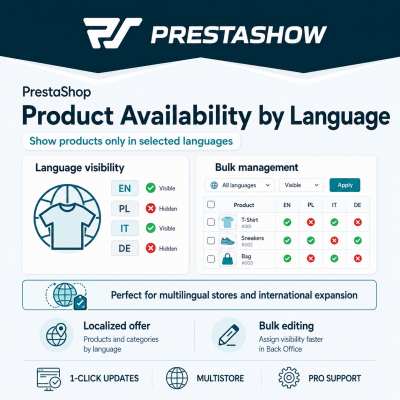
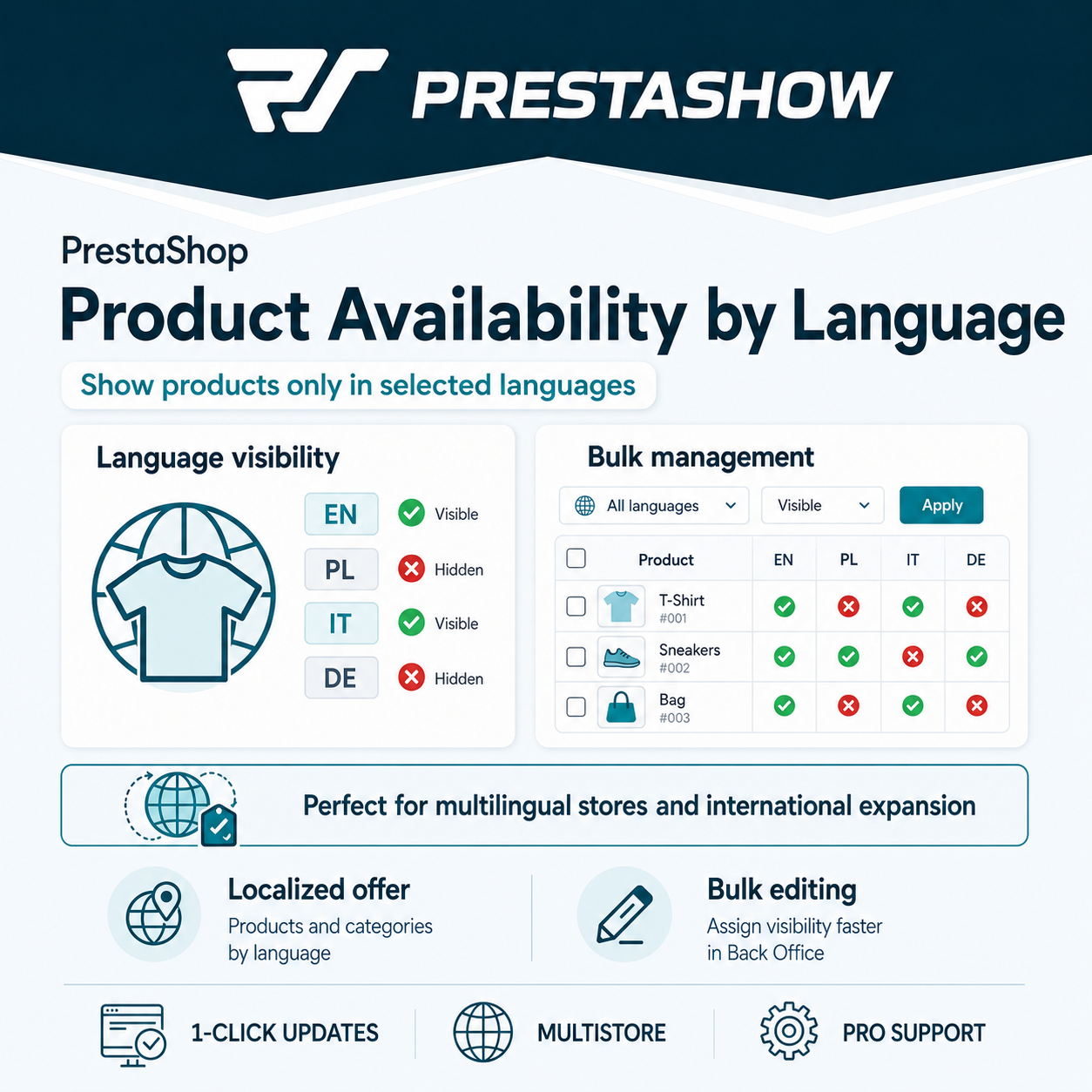
Collega i prodotti alle lingue abilitate nel tuo negozio
Tutti i prodotti del negozio sono disponibili di default in tutte le lingue abilitate in PrestaShop.
Quando si assegna un prodotto a una lingua, questo sarà disponibile solo per i clienti che utilizzano quella lingua.
Prodotti e categorie disponibili solo in alcune lingue
Se gestite il vostro negozio in diverse versioni linguistiche, con questo modulo preparerete un'offerta individuale per ciascuna delle lingue supportate.
Comodo collegamento dei prodotti alle lingue
Il campo per collegare i prodotti alle lingue si trova nella barra principale della modifica dei prodotti, nell'elenco dei prodotti del catalogo prodotti e nei filtri dei prodotti.

1
Installazione del modulo
Installare il modulo come gli altri moduli di PrestaShop.
2
Associare i prodotti alle lingue una per una
Nella modifica del prodotto, è possibile associare un prodotto alle lingue disponibili nel negozio.
3
Associare i prodotti alle lingue in blocco
Selezionate più prodotti o categorie nell'elenco dei prodotti e associateli in blocco alle lingue abilitate nel vostro negozio.
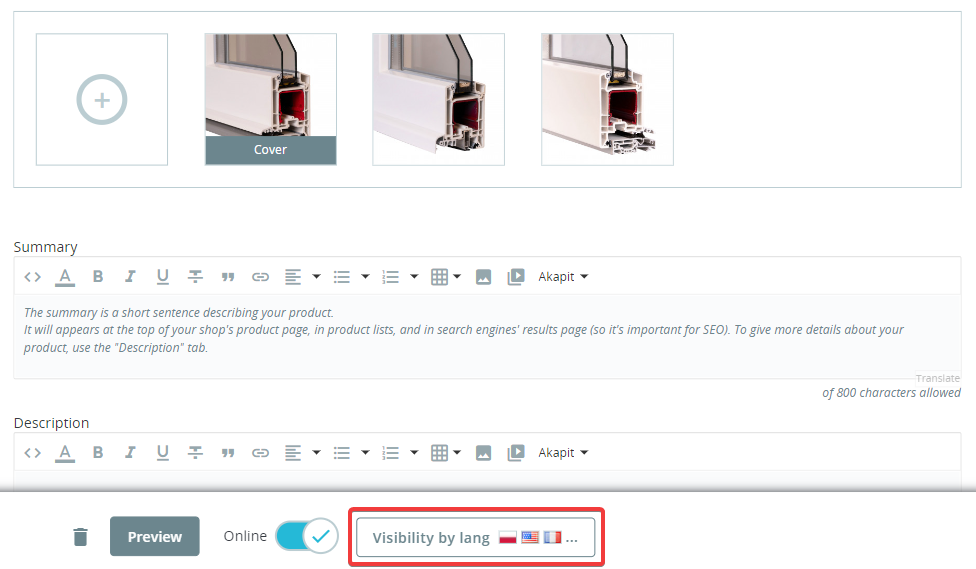
Associare in blocco i prodotti alle lingue abilitate nel negozio
Selezionate "Visibilità per lingua" e poi selezionate le lingue in cui volete che il prodotto sia visibile. La modifica non richiede il salvataggio del prodotto: il salvataggio avviene indipendentemente dalle altre modifiche del prodotto, velocizzando così il lavoro con i prodotti.
Quali prodotti sono collegati a quali lingue?
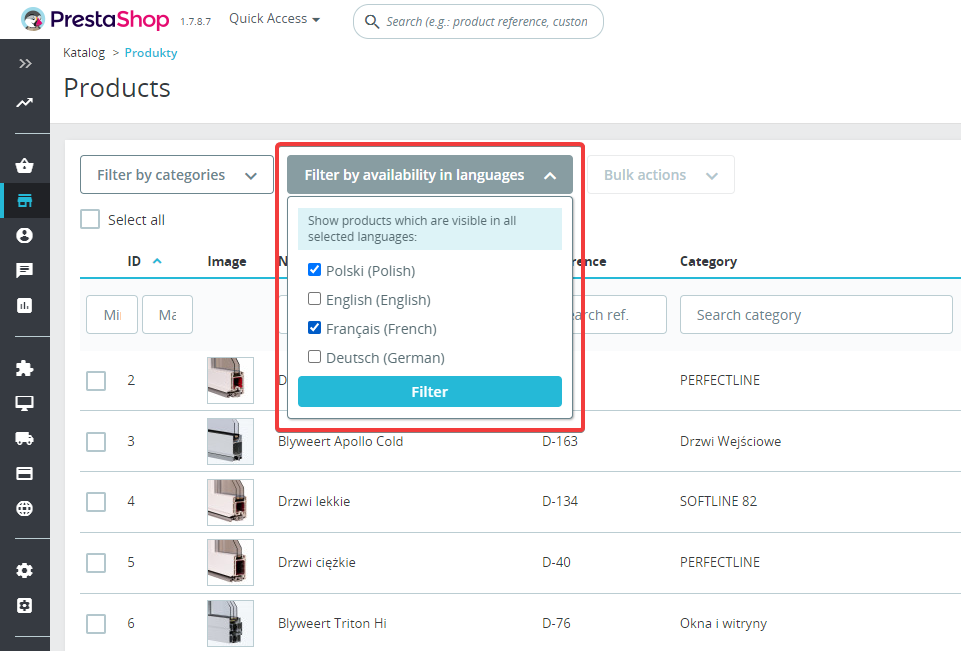
Per sfogliare in blocco i prodotti visibili nelle lingue in questione, utilizzate il campo di filtraggio disponibile sopra l'elenco dei prodotti nel vostro catalogo.
Utilizzate il campo di filtraggio per selezionare le lingue in cui desiderate visualizzare o modificare i prodotti.
Traduttore PrestaShop
PrestaShop Translator serve a tradurre automaticamente tutti i contenuti del tuo negozio PrestaShop. Traduci in massa o affidati alla traduzione automatica dei contenuti che stai modificando.
Gestore di domini PrestaShop
Domain Manager consente di collegare il vostro negozio PrestaShop a più domini, ad esempio domain.pl, domain.cz, domain.de. Collegate lingue e valute a domini aggiuntivi per apparire nei risultati di ricerca stranieri.

Avete bisogno di una personalizzazione?
Inviateci una richiesta per un audit individuale e l'ottimizzazione delle vostre vendite all'estero.
Changelog (v1.1)
## v1.1.10 - 2026-08-27
### Fixed
* Hidden-language redirect on shops that serve each language from its own domain (PShowDomainControl): the 301 now lands on the default language's **own domain**. PrestaShop builds a link as `Link::getBaseLink() . Link::getLangLink($idLang)`, and `getBaseLink()` takes no language argument — the host comes from the domain being requested — so the redirect kept the hidden language's domain, where the default language is not served; the domain module then switched the visitor to whatever language that domain does allow (a product hidden in German was left on the German/Czech domain and opened in Czech instead of going to the default-language domain). The redirect target is now built with the context already switched to the default language, so host, language prefix and slug all resolve for the language the visitor is actually sent to.
* The language buttons on the "not available in your language" (410) page had the same problem — every button pointed at the current domain, so a button for a language served elsewhere led to the wrong language. Each button is now built in its own language's context.
* The visitor's language cookie is no longer rewritten when the 301 crosses to another domain. A cookie only reaches the host that set it, so the write could not help the target page and instead changed the language the visitor saw the next time they opened the *source* domain.
* The "this page is not available in " notice now also appears after a redirect that changes domain. It used to travel in the visitor's cookie, which a browser only sends back to the host that set it, so on a language-per-domain shop it never reached the page the visitor landed on. The source language now travels in the URL fragment, which survives the redirect, is never sent to the server (so it cannot affect caching, canonical URLs or what search engines index) and is removed from the address bar once the notice is shown. No data is stored anywhere and no extra query is made.
### Added
* Front-office notices translated to English, German, French, Spanish and Italian (Polish was already present).
## v1.1.9 - 2026-08-17
### Fixed
* Hidden-language redirect: a product/category opened in a language where it is hidden now correctly renders in the shop default language after the 301, instead of showing the "not available in your language" (410) page on the default-language URL. The default-language target is a prefix-less friendly URL whose language PrestaShop resolves from the cookie; the cookie still held the visitor's hidden language, so the target was detected as hidden again and fell through to 410. The redirect now switches the visitor to the default language before issuing the 301. (Search-engine bots, which carry no cookie, were already redirected correctly.)
## v1.1.8 - 2026-07-22
### Changed
* The "not available in your language" (410) page is now rendered inside the shop theme — header, footer and layout intact — with the notice and language links in the content area, instead of the previous minimal standalone page. (This page is only reached when a product/category is hidden in the shop's default language too; the normal case is a 301 to the default language.)
## v1.1.7 - 2026-07-20
### Fixed
* The per-language hiding of product/category pages no longer depends on PrestaShop class overrides. On shops where overrides are disabled or not loaded, a product/category opened in a language where it is hidden previously still rendered normally; the hidden-language page redirect (301) / gone (410) now runs on the native `actionDispatcher` hook, so it works regardless of the shop's override configuration.
### Added
* Products hidden in the current language are now also filtered out of listings (category, search, manufacturer, supplier, etc.) via the native `filterProductSearch` hook, so the hiding works on shops without the class overrides too. Where the overrides are active, the existing Db-override filter still runs and this hook is a no-op.
### Notes
* Listing pagination on shops without overrides is best-effort: the count is adjusted for products removed on the current page, so cross-page totals may be slightly approximate. Category trees/menus and non-listing product blocks (e.g. related/cross-sell) are still only filtered where the class overrides are active.
## v1.1.6 - 2026-07-16
### Added
* SEO: a product or category opened in a language where it is hidden now returns a permanent redirect (301) to the same product/category in the shop default language instead of a 404 — the already-indexed hidden-language URL keeps its ranking on the default-language page, and the visitor lands on a working page. The destination page shows a one-time "not available in " notice.
* If the product/category is hidden in the default language too (nothing to redirect to), the page now returns 410 Gone with a "not available in your language" notice and buttons linking to the languages in which it does exist, instead of a bare 404.
* On the standard theme, the front-office language switcher no longer offers the languages in which the current product/category is hidden (best-effort, front-end only; the redirect above is what actually protects those URLs).
* The redirect behaviour can be turned off per shop with the `PSHOWOBL_REDIRECT_HIDDEN` configuration flag (enabled by default); when off, hidden-language pages return 410 with the notice.
### Fixed
* Category override: the language/shop passed to the `actionCategoryConstructorBefore` hook were undefined variables, so the hook never received the requested language.
## v1.1.5 - 2026-06-16
### Fixed
* SEO: a product or category hidden in a language no longer advertises an alternate (hreflang) link to that language in the page head, so search engines are not pointed at a missing page.
## v1.1.4 - 2026-06-16
### Fixed
* New (Symfony) product edit page: the per-language availability checkboxes now load the saved state and persist your changes when you save the product. Previously they always showed empty and the selection was not saved.
## v1.1.3 - 2026-06-15
### Fixed
* Product and category requests through the PrestaShop Webservice (e.g. `GET /api/products/{id}`) no longer fail with a 500 error.
## v1.1.2 - 2026-05-12
### Fixed
* Visibility-by-language selector now works on the new (Symfony) product edit page in PrestaShop 8 / 9 — added `actionProductFormBuilderModifier` and `actionAfterUpdate/CreateProductFormHandler` hooks; previously only the legacy AdminProducts page was supported.
## v1.1.1 - 2024-01-23
### Fixed
* Add sql alias 'ps' for some prestashop 1.7 versions
## v1.1.0 - 2023-09-07
### Added
* Set visibility of the category by language
## v1.0.2 - 2023-03-23
### Fixed
* Improve support for Prestashop versions 1.7.0-1.7.3 - backoffice detection and sql query overriding
## v1.0.1 - 2023-03-07
### Fixed
* Fix backofice product list filter - not all products were visible
## v1.0 .0- 2022-10-01
### Added
* Initial version of the module
### Fixed
* Hidden-language redirect on shops that serve each language from its own domain (PShowDomainControl): the 301 now lands on the default language's **own domain**. PrestaShop builds a link as `Link::getBaseLink() . Link::getLangLink($idLang)`, and `getBaseLink()` takes no language argument — the host comes from the domain being requested — so the redirect kept the hidden language's domain, where the default language is not served; the domain module then switched the visitor to whatever language that domain does allow (a product hidden in German was left on the German/Czech domain and opened in Czech instead of going to the default-language domain). The redirect target is now built with the context already switched to the default language, so host, language prefix and slug all resolve for the language the visitor is actually sent to.
* The language buttons on the "not available in your language" (410) page had the same problem — every button pointed at the current domain, so a button for a language served elsewhere led to the wrong language. Each button is now built in its own language's context.
* The visitor's language cookie is no longer rewritten when the 301 crosses to another domain. A cookie only reaches the host that set it, so the write could not help the target page and instead changed the language the visitor saw the next time they opened the *source* domain.
* The "this page is not available in " notice now also appears after a redirect that changes domain. It used to travel in the visitor's cookie, which a browser only sends back to the host that set it, so on a language-per-domain shop it never reached the page the visitor landed on. The source language now travels in the URL fragment, which survives the redirect, is never sent to the server (so it cannot affect caching, canonical URLs or what search engines index) and is removed from the address bar once the notice is shown. No data is stored anywhere and no extra query is made.
### Added
* Front-office notices translated to English, German, French, Spanish and Italian (Polish was already present).
## v1.1.9 - 2026-08-17
### Fixed
* Hidden-language redirect: a product/category opened in a language where it is hidden now correctly renders in the shop default language after the 301, instead of showing the "not available in your language" (410) page on the default-language URL. The default-language target is a prefix-less friendly URL whose language PrestaShop resolves from the cookie; the cookie still held the visitor's hidden language, so the target was detected as hidden again and fell through to 410. The redirect now switches the visitor to the default language before issuing the 301. (Search-engine bots, which carry no cookie, were already redirected correctly.)
## v1.1.8 - 2026-07-22
### Changed
* The "not available in your language" (410) page is now rendered inside the shop theme — header, footer and layout intact — with the notice and language links in the content area, instead of the previous minimal standalone page. (This page is only reached when a product/category is hidden in the shop's default language too; the normal case is a 301 to the default language.)
## v1.1.7 - 2026-07-20
### Fixed
* The per-language hiding of product/category pages no longer depends on PrestaShop class overrides. On shops where overrides are disabled or not loaded, a product/category opened in a language where it is hidden previously still rendered normally; the hidden-language page redirect (301) / gone (410) now runs on the native `actionDispatcher` hook, so it works regardless of the shop's override configuration.
### Added
* Products hidden in the current language are now also filtered out of listings (category, search, manufacturer, supplier, etc.) via the native `filterProductSearch` hook, so the hiding works on shops without the class overrides too. Where the overrides are active, the existing Db-override filter still runs and this hook is a no-op.
### Notes
* Listing pagination on shops without overrides is best-effort: the count is adjusted for products removed on the current page, so cross-page totals may be slightly approximate. Category trees/menus and non-listing product blocks (e.g. related/cross-sell) are still only filtered where the class overrides are active.
## v1.1.6 - 2026-07-16
### Added
* SEO: a product or category opened in a language where it is hidden now returns a permanent redirect (301) to the same product/category in the shop default language instead of a 404 — the already-indexed hidden-language URL keeps its ranking on the default-language page, and the visitor lands on a working page. The destination page shows a one-time "not available in " notice.
* If the product/category is hidden in the default language too (nothing to redirect to), the page now returns 410 Gone with a "not available in your language" notice and buttons linking to the languages in which it does exist, instead of a bare 404.
* On the standard theme, the front-office language switcher no longer offers the languages in which the current product/category is hidden (best-effort, front-end only; the redirect above is what actually protects those URLs).
* The redirect behaviour can be turned off per shop with the `PSHOWOBL_REDIRECT_HIDDEN` configuration flag (enabled by default); when off, hidden-language pages return 410 with the notice.
### Fixed
* Category override: the language/shop passed to the `actionCategoryConstructorBefore` hook were undefined variables, so the hook never received the requested language.
## v1.1.5 - 2026-06-16
### Fixed
* SEO: a product or category hidden in a language no longer advertises an alternate (hreflang) link to that language in the page head, so search engines are not pointed at a missing page.
## v1.1.4 - 2026-06-16
### Fixed
* New (Symfony) product edit page: the per-language availability checkboxes now load the saved state and persist your changes when you save the product. Previously they always showed empty and the selection was not saved.
## v1.1.3 - 2026-06-15
### Fixed
* Product and category requests through the PrestaShop Webservice (e.g. `GET /api/products/{id}`) no longer fail with a 500 error.
## v1.1.2 - 2026-05-12
### Fixed
* Visibility-by-language selector now works on the new (Symfony) product edit page in PrestaShop 8 / 9 — added `actionProductFormBuilderModifier` and `actionAfterUpdate/CreateProductFormHandler` hooks; previously only the legacy AdminProducts page was supported.
## v1.1.1 - 2024-01-23
### Fixed
* Add sql alias 'ps' for some prestashop 1.7 versions
## v1.1.0 - 2023-09-07
### Added
* Set visibility of the category by language
## v1.0.2 - 2023-03-23
### Fixed
* Improve support for Prestashop versions 1.7.0-1.7.3 - backoffice detection and sql query overriding
## v1.0.1 - 2023-03-07
### Fixed
* Fix backofice product list filter - not all products were visible
## v1.0 .0- 2022-10-01
### Added
* Initial version of the module
Komentarze ()
The reviews posted on our store are not sponsored in any way. We also verify that they were added by customers who have purchased from us or guests. If you want to learn more about this topic please read our Regulations.
Działa jak producent obiecuje :)
Requisiti tecnici
Requisiti tecnici
- PHP 7.1 - 8.x
- Estensione server ionCube Loader
- Solo PrestaShop Importer: PHP libxml versione > 2.9.3
- Solo PrestaShop Facebook Integrator: PHP 7.2 o superiore
- Validatore IVA PrestaShop solo: PHP SOAP
Ulteriori informazioni sui requisiti tecnici nella knowledge base
Assistenza e aggiornamenti
Supporto = Aggiornamenti + HelpDesk
Ottenete 90 giorni (3 mesi) di accesso al pacchetto di supporto completo di PrestaShow.
Aggiornamenti dei moduli
I moduli ti informano degli aggiornamenti disponibili. Leggete il changelog ed eseguite un aggiornamento del modulo con un solo clic direttamente dal vostro negozio.
Pannello HelpDesk
Questo è il pannello in cui vi forniamo assistenza. Nell'HelpDesk è possibile segnalare problemi, ordinare l'installazione e gli aggiornamenti gratuiti dei moduli, nonché modifiche e lavori di sviluppo individuali.
Estendere il support o
Una volta scaduto il supporto, è possibile utilizzare il modulo senza alcuna restrizione. È possibile estendere l'accesso al supporto in qualsiasi momento, quando se ne ha bisogno.
Base di conoscenze e FAQ
Gratis per sempre
La Knowledge Base è disponibile per tutti. Vi troverete la documentazione del modulo, nonché istruzioni, video e risposte alle domande più frequenti.
Licenza
Licenza a vita per il modulo
- È possibile utilizzare il modulo senza limitazioni per 1 negozio = 1 dominio.
- È possibile utilizzare un dominio aggiuntivo, ad esempio per una copia per sviluppatori.
- Con un piccolo sovrapprezzo è possibile cambiare il dominio del modulo.
Domini aggiuntivi per Multistore
- Tutti i nostri moduli supportano PrestaShop Multistore.
- Il supporto di un numero illimitato di domini per PrestaShop Multistore richiede l'acquisto del supporto multistore per il modulo.
Modifica del codice
- Il codice del modulo relativo all'integrazione con il negozio e al design (.tpl, .css, .js) è open source e siete liberi di modificarlo.
- Il codice sorgente del modulo (.php) è criptato con ionCube e la sua modifica invalida la garanzia.
Non ci sono ancora voci.