Atención al cliente y empaquetado de pedidos en tu móvil: descubre la app PrestaShop Pocket 📦





Descripción detallada
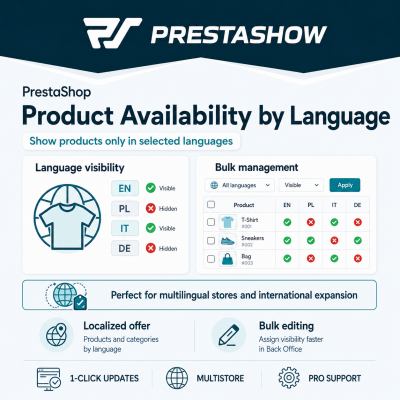
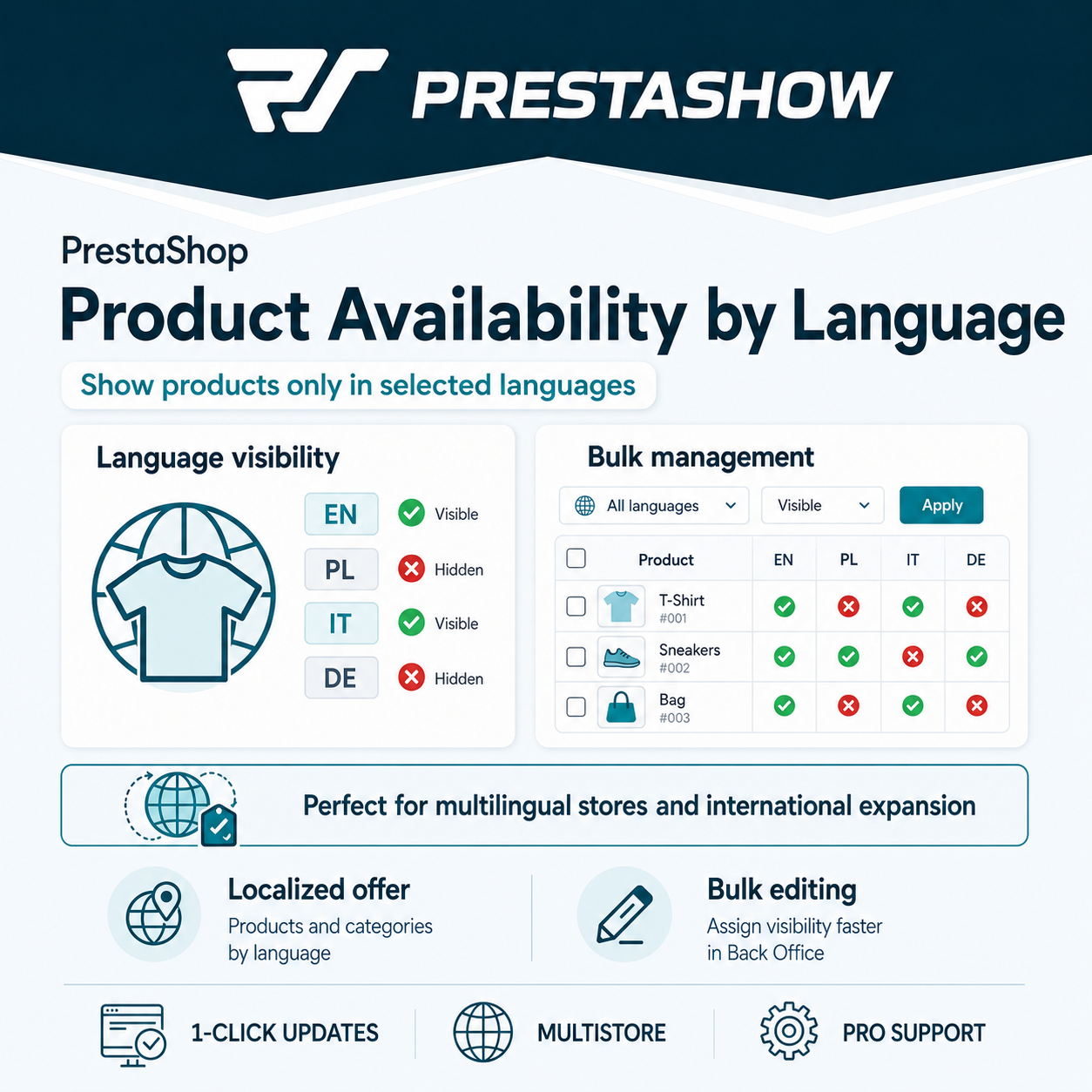
Vincular productos a idiomas habilitados en su tienda
Todos los productos de su tienda están disponibles por defecto en todos los idiomas habilitados en PrestaShop.
Cuando asigne un producto a un idioma, ese producto sólo estará disponible para los clientes que utilicen ese idioma.
Productos y categorías sólo disponibles en los idiomas seleccionados
Si gestiona su tienda en varios idiomas, con este módulo preparará una oferta individual para cada uno de los idiomas soportados.
Cómoda vinculación de productos a idiomas
El campo para vincular productos a idiomas se encuentra en la barra principal de edición de productos, en la lista de productos del catálogo de productos y en los filtros de productos.

1
Instalar el módulo
Instale el módulo de la misma manera que otros módulos de PrestaShop.
2
Asociar productos a idiomas uno a uno
En la edición de productos, puede asociar un producto a los idiomas disponibles en su tienda.
3
Vincule productos a idiomas de forma masiva
Selecciona varios productos o categorías en la lista de productos y vincúlalos en bloque a los idiomas habilitados en tu tienda.
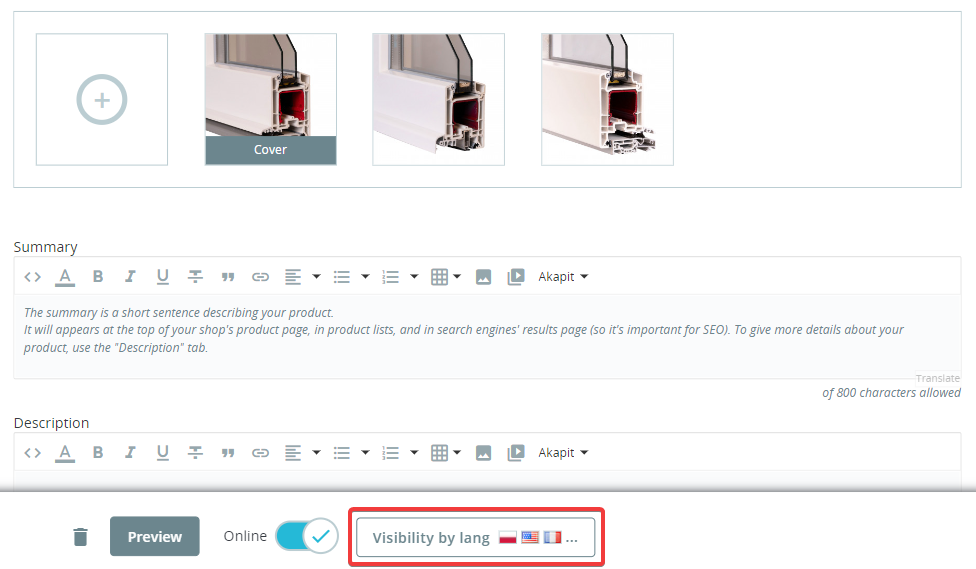
Vincular productos por lotes a los idiomas habilitados en su tienda
Seleccione "Visibilidad por idioma" y, a continuación, seleccione los idiomas en los que desea que el producto sea visible. El cambio no requiere guardar el producto - el guardado se realiza independientemente de otros cambios de producto, lo que agilizará su trabajo con los productos.
¿Qué productos están vinculados a qué idiomas?
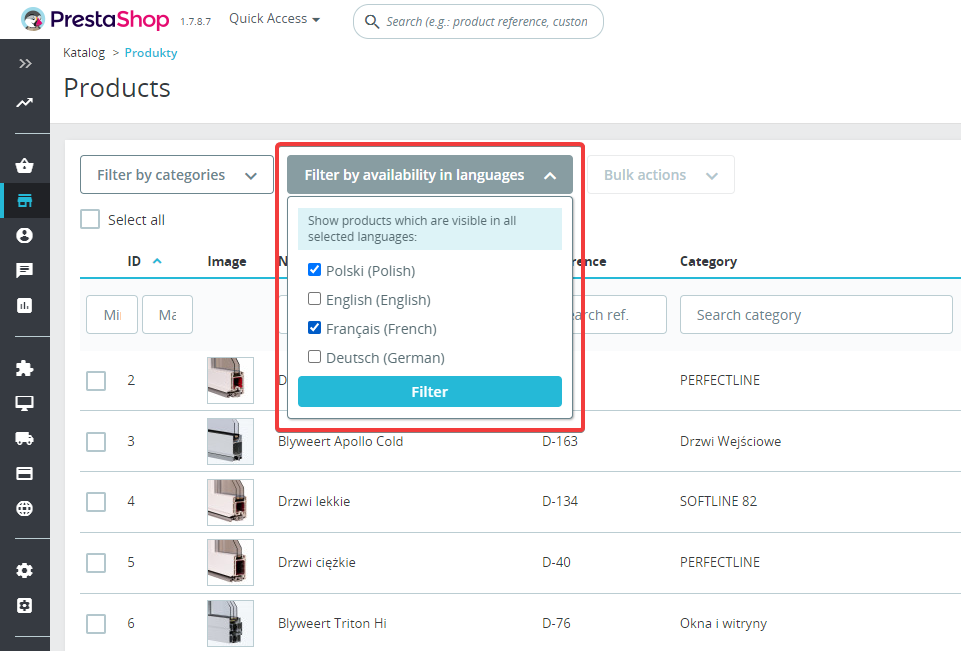
Para consultar de forma masiva los productos visibles en las lenguas en cuestión, utilice el campo de filtro disponible encima de la lista de productos de su catálogo.
Utilice el campo de filtro para seleccionar los idiomas en los que desea ver o editar los productos.
Traductor PrestaShop
PrestaShop Translator se utiliza para traducir automáticamente todo el contenido de su tienda PrestaShop. Traduzca en masa o confíe en la traducción automática del contenido que está editando en ese momento.
Gestor de dominios PrestaShop
El Administrador de dominios le permite vincular su tienda PrestaShop a varios dominios, por ejemplo, domain.pl, domain.cz, domain.de. Vincule idiomas y divisas a dominios adicionales para aparecer en los resultados de búsqueda extranjeros.

¿Necesita personalización?
Envíenos una solicitud para una auditoría individual y la optimización de sus ventas en el extranjero.
Changelog (v1.1)
## v1.1.10 - 2026-08-27
### Fixed
* Hidden-language redirect on shops that serve each language from its own domain (PShowDomainControl): the 301 now lands on the default language's **own domain**. PrestaShop builds a link as `Link::getBaseLink() . Link::getLangLink($idLang)`, and `getBaseLink()` takes no language argument — the host comes from the domain being requested — so the redirect kept the hidden language's domain, where the default language is not served; the domain module then switched the visitor to whatever language that domain does allow (a product hidden in German was left on the German/Czech domain and opened in Czech instead of going to the default-language domain). The redirect target is now built with the context already switched to the default language, so host, language prefix and slug all resolve for the language the visitor is actually sent to.
* The language buttons on the "not available in your language" (410) page had the same problem — every button pointed at the current domain, so a button for a language served elsewhere led to the wrong language. Each button is now built in its own language's context.
* The visitor's language cookie is no longer rewritten when the 301 crosses to another domain. A cookie only reaches the host that set it, so the write could not help the target page and instead changed the language the visitor saw the next time they opened the *source* domain.
* The "this page is not available in " notice now also appears after a redirect that changes domain. It used to travel in the visitor's cookie, which a browser only sends back to the host that set it, so on a language-per-domain shop it never reached the page the visitor landed on. The source language now travels in the URL fragment, which survives the redirect, is never sent to the server (so it cannot affect caching, canonical URLs or what search engines index) and is removed from the address bar once the notice is shown. No data is stored anywhere and no extra query is made.
### Added
* Front-office notices translated to English, German, French, Spanish and Italian (Polish was already present).
## v1.1.9 - 2026-08-17
### Fixed
* Hidden-language redirect: a product/category opened in a language where it is hidden now correctly renders in the shop default language after the 301, instead of showing the "not available in your language" (410) page on the default-language URL. The default-language target is a prefix-less friendly URL whose language PrestaShop resolves from the cookie; the cookie still held the visitor's hidden language, so the target was detected as hidden again and fell through to 410. The redirect now switches the visitor to the default language before issuing the 301. (Search-engine bots, which carry no cookie, were already redirected correctly.)
## v1.1.8 - 2026-07-22
### Changed
* The "not available in your language" (410) page is now rendered inside the shop theme — header, footer and layout intact — with the notice and language links in the content area, instead of the previous minimal standalone page. (This page is only reached when a product/category is hidden in the shop's default language too; the normal case is a 301 to the default language.)
## v1.1.7 - 2026-07-20
### Fixed
* The per-language hiding of product/category pages no longer depends on PrestaShop class overrides. On shops where overrides are disabled or not loaded, a product/category opened in a language where it is hidden previously still rendered normally; the hidden-language page redirect (301) / gone (410) now runs on the native `actionDispatcher` hook, so it works regardless of the shop's override configuration.
### Added
* Products hidden in the current language are now also filtered out of listings (category, search, manufacturer, supplier, etc.) via the native `filterProductSearch` hook, so the hiding works on shops without the class overrides too. Where the overrides are active, the existing Db-override filter still runs and this hook is a no-op.
### Notes
* Listing pagination on shops without overrides is best-effort: the count is adjusted for products removed on the current page, so cross-page totals may be slightly approximate. Category trees/menus and non-listing product blocks (e.g. related/cross-sell) are still only filtered where the class overrides are active.
## v1.1.6 - 2026-07-16
### Added
* SEO: a product or category opened in a language where it is hidden now returns a permanent redirect (301) to the same product/category in the shop default language instead of a 404 — the already-indexed hidden-language URL keeps its ranking on the default-language page, and the visitor lands on a working page. The destination page shows a one-time "not available in " notice.
* If the product/category is hidden in the default language too (nothing to redirect to), the page now returns 410 Gone with a "not available in your language" notice and buttons linking to the languages in which it does exist, instead of a bare 404.
* On the standard theme, the front-office language switcher no longer offers the languages in which the current product/category is hidden (best-effort, front-end only; the redirect above is what actually protects those URLs).
* The redirect behaviour can be turned off per shop with the `PSHOWOBL_REDIRECT_HIDDEN` configuration flag (enabled by default); when off, hidden-language pages return 410 with the notice.
### Fixed
* Category override: the language/shop passed to the `actionCategoryConstructorBefore` hook were undefined variables, so the hook never received the requested language.
## v1.1.5 - 2026-06-16
### Fixed
* SEO: a product or category hidden in a language no longer advertises an alternate (hreflang) link to that language in the page head, so search engines are not pointed at a missing page.
## v1.1.4 - 2026-06-16
### Fixed
* New (Symfony) product edit page: the per-language availability checkboxes now load the saved state and persist your changes when you save the product. Previously they always showed empty and the selection was not saved.
## v1.1.3 - 2026-06-15
### Fixed
* Product and category requests through the PrestaShop Webservice (e.g. `GET /api/products/{id}`) no longer fail with a 500 error.
## v1.1.2 - 2026-05-12
### Fixed
* Visibility-by-language selector now works on the new (Symfony) product edit page in PrestaShop 8 / 9 — added `actionProductFormBuilderModifier` and `actionAfterUpdate/CreateProductFormHandler` hooks; previously only the legacy AdminProducts page was supported.
## v1.1.1 - 2024-01-23
### Fixed
* Add sql alias 'ps' for some prestashop 1.7 versions
## v1.1.0 - 2023-09-07
### Added
* Set visibility of the category by language
## v1.0.2 - 2023-03-23
### Fixed
* Improve support for Prestashop versions 1.7.0-1.7.3 - backoffice detection and sql query overriding
## v1.0.1 - 2023-03-07
### Fixed
* Fix backofice product list filter - not all products were visible
## v1.0 .0- 2022-10-01
### Added
* Initial version of the module
### Fixed
* Hidden-language redirect on shops that serve each language from its own domain (PShowDomainControl): the 301 now lands on the default language's **own domain**. PrestaShop builds a link as `Link::getBaseLink() . Link::getLangLink($idLang)`, and `getBaseLink()` takes no language argument — the host comes from the domain being requested — so the redirect kept the hidden language's domain, where the default language is not served; the domain module then switched the visitor to whatever language that domain does allow (a product hidden in German was left on the German/Czech domain and opened in Czech instead of going to the default-language domain). The redirect target is now built with the context already switched to the default language, so host, language prefix and slug all resolve for the language the visitor is actually sent to.
* The language buttons on the "not available in your language" (410) page had the same problem — every button pointed at the current domain, so a button for a language served elsewhere led to the wrong language. Each button is now built in its own language's context.
* The visitor's language cookie is no longer rewritten when the 301 crosses to another domain. A cookie only reaches the host that set it, so the write could not help the target page and instead changed the language the visitor saw the next time they opened the *source* domain.
* The "this page is not available in " notice now also appears after a redirect that changes domain. It used to travel in the visitor's cookie, which a browser only sends back to the host that set it, so on a language-per-domain shop it never reached the page the visitor landed on. The source language now travels in the URL fragment, which survives the redirect, is never sent to the server (so it cannot affect caching, canonical URLs or what search engines index) and is removed from the address bar once the notice is shown. No data is stored anywhere and no extra query is made.
### Added
* Front-office notices translated to English, German, French, Spanish and Italian (Polish was already present).
## v1.1.9 - 2026-08-17
### Fixed
* Hidden-language redirect: a product/category opened in a language where it is hidden now correctly renders in the shop default language after the 301, instead of showing the "not available in your language" (410) page on the default-language URL. The default-language target is a prefix-less friendly URL whose language PrestaShop resolves from the cookie; the cookie still held the visitor's hidden language, so the target was detected as hidden again and fell through to 410. The redirect now switches the visitor to the default language before issuing the 301. (Search-engine bots, which carry no cookie, were already redirected correctly.)
## v1.1.8 - 2026-07-22
### Changed
* The "not available in your language" (410) page is now rendered inside the shop theme — header, footer and layout intact — with the notice and language links in the content area, instead of the previous minimal standalone page. (This page is only reached when a product/category is hidden in the shop's default language too; the normal case is a 301 to the default language.)
## v1.1.7 - 2026-07-20
### Fixed
* The per-language hiding of product/category pages no longer depends on PrestaShop class overrides. On shops where overrides are disabled or not loaded, a product/category opened in a language where it is hidden previously still rendered normally; the hidden-language page redirect (301) / gone (410) now runs on the native `actionDispatcher` hook, so it works regardless of the shop's override configuration.
### Added
* Products hidden in the current language are now also filtered out of listings (category, search, manufacturer, supplier, etc.) via the native `filterProductSearch` hook, so the hiding works on shops without the class overrides too. Where the overrides are active, the existing Db-override filter still runs and this hook is a no-op.
### Notes
* Listing pagination on shops without overrides is best-effort: the count is adjusted for products removed on the current page, so cross-page totals may be slightly approximate. Category trees/menus and non-listing product blocks (e.g. related/cross-sell) are still only filtered where the class overrides are active.
## v1.1.6 - 2026-07-16
### Added
* SEO: a product or category opened in a language where it is hidden now returns a permanent redirect (301) to the same product/category in the shop default language instead of a 404 — the already-indexed hidden-language URL keeps its ranking on the default-language page, and the visitor lands on a working page. The destination page shows a one-time "not available in " notice.
* If the product/category is hidden in the default language too (nothing to redirect to), the page now returns 410 Gone with a "not available in your language" notice and buttons linking to the languages in which it does exist, instead of a bare 404.
* On the standard theme, the front-office language switcher no longer offers the languages in which the current product/category is hidden (best-effort, front-end only; the redirect above is what actually protects those URLs).
* The redirect behaviour can be turned off per shop with the `PSHOWOBL_REDIRECT_HIDDEN` configuration flag (enabled by default); when off, hidden-language pages return 410 with the notice.
### Fixed
* Category override: the language/shop passed to the `actionCategoryConstructorBefore` hook were undefined variables, so the hook never received the requested language.
## v1.1.5 - 2026-06-16
### Fixed
* SEO: a product or category hidden in a language no longer advertises an alternate (hreflang) link to that language in the page head, so search engines are not pointed at a missing page.
## v1.1.4 - 2026-06-16
### Fixed
* New (Symfony) product edit page: the per-language availability checkboxes now load the saved state and persist your changes when you save the product. Previously they always showed empty and the selection was not saved.
## v1.1.3 - 2026-06-15
### Fixed
* Product and category requests through the PrestaShop Webservice (e.g. `GET /api/products/{id}`) no longer fail with a 500 error.
## v1.1.2 - 2026-05-12
### Fixed
* Visibility-by-language selector now works on the new (Symfony) product edit page in PrestaShop 8 / 9 — added `actionProductFormBuilderModifier` and `actionAfterUpdate/CreateProductFormHandler` hooks; previously only the legacy AdminProducts page was supported.
## v1.1.1 - 2024-01-23
### Fixed
* Add sql alias 'ps' for some prestashop 1.7 versions
## v1.1.0 - 2023-09-07
### Added
* Set visibility of the category by language
## v1.0.2 - 2023-03-23
### Fixed
* Improve support for Prestashop versions 1.7.0-1.7.3 - backoffice detection and sql query overriding
## v1.0.1 - 2023-03-07
### Fixed
* Fix backofice product list filter - not all products were visible
## v1.0 .0- 2022-10-01
### Added
* Initial version of the module
Komentarze ()
The reviews posted on our store are not sponsored in any way. We also verify that they were added by customers who have purchased from us or guests. If you want to learn more about this topic please read our Regulations.
Działa jak producent obiecuje :)
Requisitos técnicos
Requisitos técnicos
- PHP 7.1 - 8.x
- Extensión de servidor ionCube Loader
Más información sobre requisitos técnicos en la base de conocimientos
Asistencia y actualizaciones
Soporte = Actualizaciones + HelpDesk
Obtendrá 90 días (3 meses) de acceso al paquete completo de soporte de PrestaShow.
Actualizaciones de módulos
Los módulos le informarán de las actualizaciones disponibles. Lea el registro de cambios y realice una actualización del módulo con 1 clic directamente desde su tienda.
Panel HelpDesk
Este es el panel donde le proporcionamos ayuda. En el HelpDesk puede informar de problemas, solicitar la instalación gratuita de módulos y actualizaciones, y encargar modificaciones y trabajos de desarrollo individuales.
Ampliar el soport e
Una vez finalizado el soporte, puede utilizar el módulo sin restricciones. Puede ampliar su acceso al soporte en cualquier momento que lo necesite.
Base de conocimientos y FAQ
Gratis para siempre
La base de conocimientos está disponible para todo el mundo. Encontrará documentación sobre el módulo, así como instrucciones, vídeos y respuestas a las preguntas más frecuentes.
Licencia
Licencia de por vida para el módulo
- Puede utilizar el módulo sin limitación para 1 tienda = 1 dominio.
- Puede utilizar un dominio adicional, por ejemplo, para una copia de desarrollador.
- Por un módico precio puede cambiar usted mismo el dominio para el módulo.
Dominios adicionales para Multitienda
- Todos nuestros módulos son compatibles con PrestaShop Multitienda.
- El soporte para un número ilimitado de dominios para PrestaShop Multitienda requiere la compra del soporte multitienda para el módulo.
Modificación del código
- El código del módulo relacionado con la integración con la tienda y el diseño (.tpl, .css, .js) es de código abierto y puede modificarlo libremente.
- El código fuente del módulo (.php) está encriptado con ionCube y modificarlo anulará la garantía.
Todavía no hay entradas.