Atención al cliente y empaquetado de pedidos en tu móvil: descubre la app PrestaShop Pocket 📦






Descripción detallada
Diseños modernos y descripciones atractivas
Crea fácilmente descripciones con cualquier diseño y estilo. Combina el contenido con elementos multimedia. Utiliza plantillas prediseñadas o crea tus propias modificaciones.
Contenido variado 🔥
Diseña cualquier diseño: combina texto con fotos y vídeos, utiliza emojis, listas, tablas o inserta productos de la tienda... Esto y mucho más te ofrece el moderno editor para PrestaShop.
100 % responsivo
Todas las plantillas, diseños y elementos de las descripciones son adaptables y se ven perfectamente tanto en dispositivos móviles como en ordenadores de sobremesa.
SEO correcto
El editor genera un código ligero, limpio y optimizado para SEO, sin scripts, anidamientos pesados ni código inline.
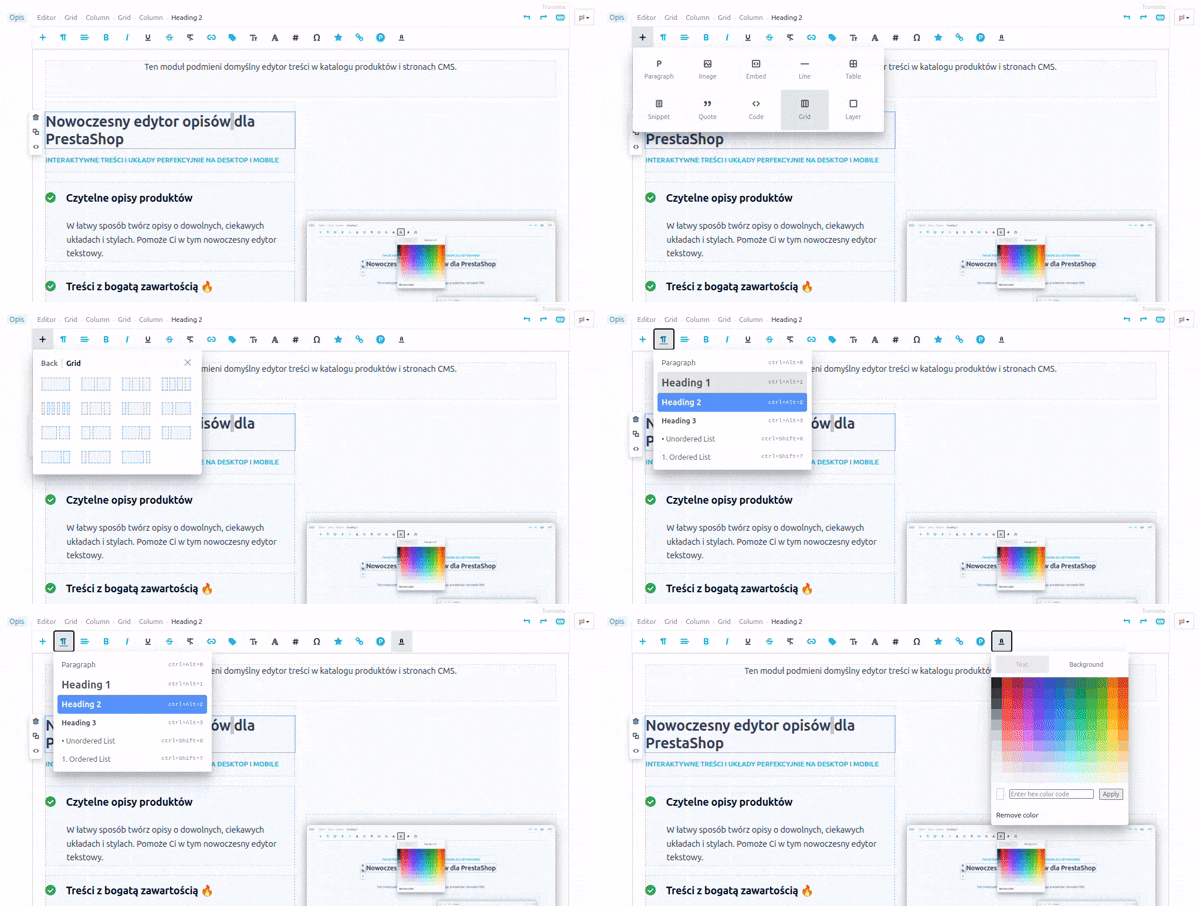
Descripciones
creadas
con el editor


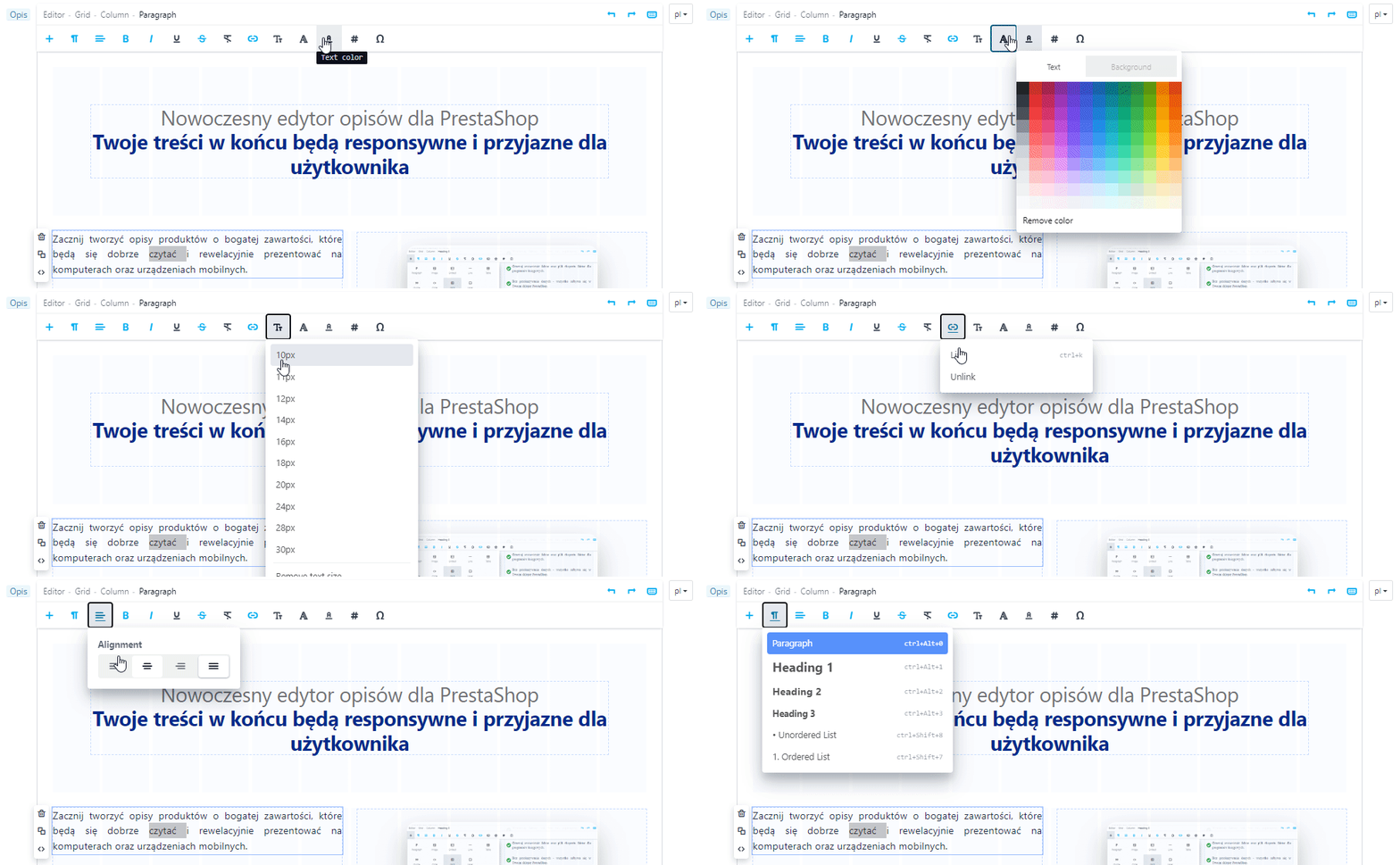
Menú principal
Haz clic en cualquier parte de la descripción para que aparezcan en el menú principal las herramientas de edición disponibles para ese lugar. Con el menú inteligente, tendrás más tiempo para crear, en lugar de perderlo buscando y comprobando.

Amplia selección de diseños
Las herramientas disponibles te permitirán crear de forma flexible diseños interesantes y descripciones enriquecidas con fotos, vídeos y otros elementos.
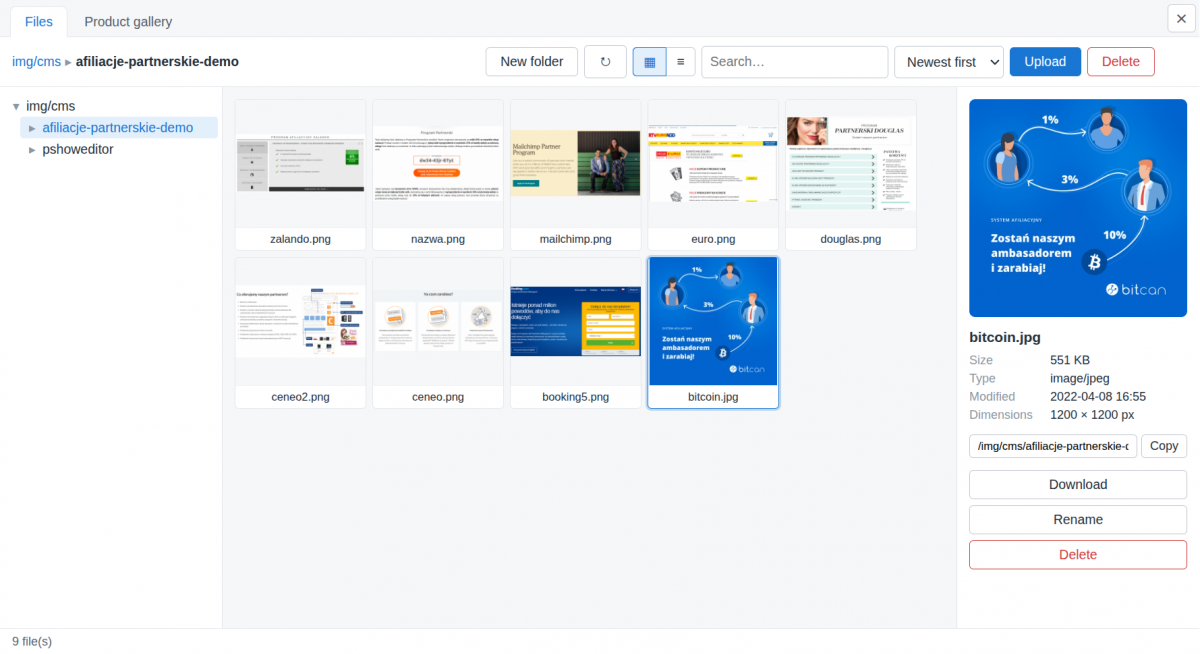
Gestor de archivos
Organiza y gestiona cómodamente los archivos que utilizas al crear las descripciones
Los archivos utilizados en las descripciones de los productos se etiquetan automáticamente con el producto correspondiente.
El gestor de archivos es compatible con los formatos más habituales de gráficos, fotos, documentos y archivos comprimidos.
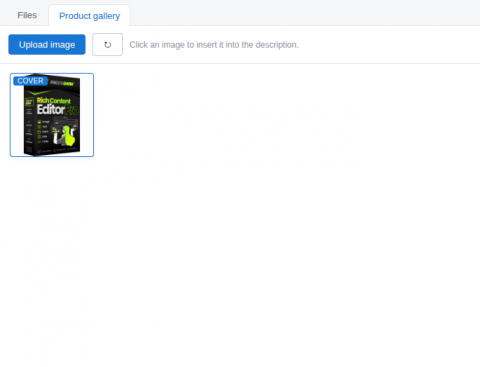
Sincronización de fotos con la galería del producto
Puedes seleccionar las fotos que quieras que aparezcan en la galería del producto
y utilizar las fotos que se encuentran en la galería del producto.
Las fotos utilizadas en la descripción del producto se pueden sincronizar con la galería de fotos del producto.
El editor incluye funciones de edición propias de las herramientas de creación de contenido más populares.
- Compatibilidad con atajos de teclado y deshacer cambios (Ctrl+Z).
- Compatibilidad con HTML y CSS propios.
- Mezcla y mueve bloques de texto y archivos multimedia en la descripción utilizando la función de arrastrar y soltar.
- Arrastra y suelta o pega (Ctrl+V) contenidos, fotos y gráficos directamente en la ventana del editor.
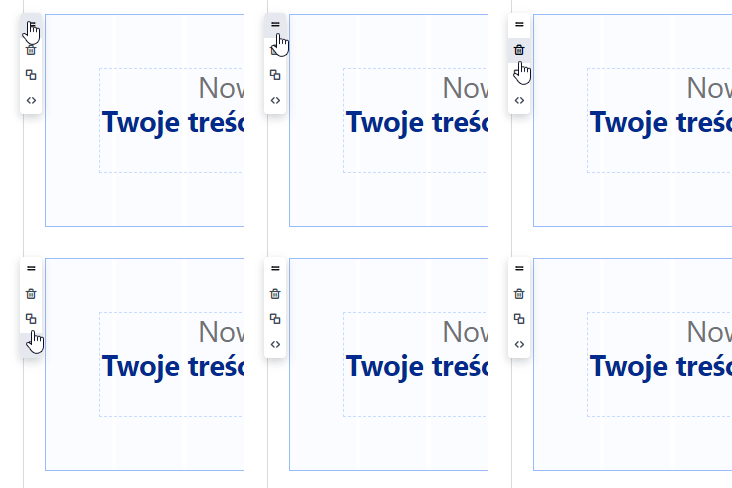
Menú de la sección y del elemento que estás editando
Cada sección y cada elemento de la descripción cuenta con un menú contextual: Mover mediante «arrastrar y soltar», Eliminar, Duplicar, Previsualizar y editar el código HTML y CSS del elemento seleccionado.
No alterará las descripciones que ya están en la tienda
El módulo detecta las descripciones existentes y no modifica su estructura ni su aspecto hasta que decidas editarlas para darles un nuevo diseño y formato.

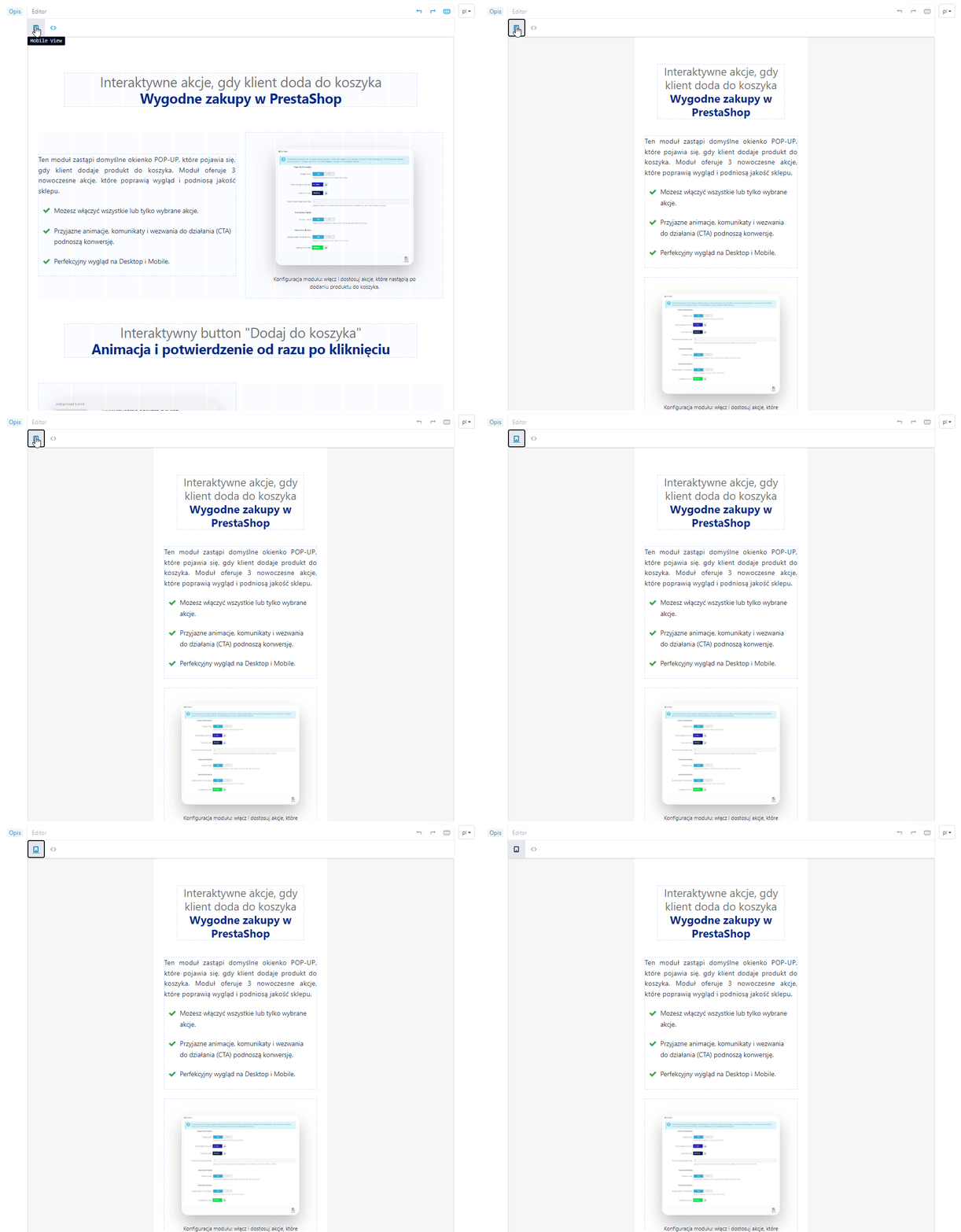
Vista previa en versión de escritorio y móvil
- ¡ya durante la creación!
Los contenidos creados se ven perfectamente tanto en pantallas grandes como en dispositivos móviles. Mientras creas una descripción, puedes alternar entre las vistas de escritorio y móvil.
Crea y utiliza tus propios estilos CSS
En la configuración del módulo encontrarás un editor en el que puedes crear tus propios estilos CSS. Mientras creas las descripciones, selecciona un elemento de la descripción y, a continuación, asígnale tu propio estilo: ¡rápido y cómodo!


Fácil de usar para los desarrolladores
El módulo genera código ligero, elimina bucles y suprime las etiquetas que no se utilizan. El código que se integra en la interfaz de tu tienda es ligero y está diseñado de acuerdo con las buenas prácticas de las Directrices de Google.
- Vista previa y edición de todo el código
- Vista previa y edición del código del elemento seleccionado.

🚀 Conversion Booster
Este módulo facilita la creación de descripciones que te permitirán desarrollar una narrativa atractiva sobre tus productos, servicios y el valor que aportas a tus clientes.


Generación de contenido con el generador de IA de PrestaShop
Con el generador de IA podrás crear rápidamente descripciones de productos con una alta tasa de conversión. Genera contenido a partir de los datos de tu tienda o encarga la búsqueda de información adicional en Internet.
Traducción a 27 idiomas con PrestaShop Translator
Traducción instantánea del contenido que acabas de editar o traducciones masivas de descripciones, nombres, categorías y plantillas. Las traducciones permanecerán en la base de datos de tu tienda y tendrán un impacto positivo en el SEO y en los resultados de búsqueda internacionales.

¡Más barato en conjunto!
Compra un pack de 2 o 3 módulos: Editor + Generador de IA + Traductor.
¡Utiliza el código EDITORCOMBO en la cesta para obtener un 25 % de descuento en el paquete de 2 o 3 módulos!
Barra de estado
En la parte superior del editor hay una barra con botones que cambian en función del elemento seleccionado. Aquí también encontrarás una ruta de navegación que indica el camino hasta el elemento en el que has hecho clic en la descripción.
Incrustación de vídeos y «shorts»
Inserción de mapas de Google, vídeos adaptativos de YouTube o cualquier otro código incrustado procedente de portales externos
Atajos deteclado
Los atajos de teclado integrados permiten realizar todas las operaciones de edición disponibles en el módulo.
Google Fonts integrado
El módulo es compatible con Google Fonts y con las fuentes clásicas de Windows/Apple.
Creación de tablas
Edición de tablas, parámetros de celdas y adición de filas.
Tu propio CSS
Los estilos se mantienen sin cambios gracias al uso de los estilos CSS de tu plantilla.
Imágenes: añádelas desde el disco o arrástralas
Arrastra y suelta las fotos directamente en el contenido que estás editando o insértalas mediante una URL.
Pegar y copiar
Control total sobre el texto pegado, con eliminación del código sobrante de MS Word.
Tus propios estilos CSS
Crea tus propios estilos CSS para utilizarlos en el editor. Tus estilos estarán disponibles y serán visibles tanto en el editor como en la página de la tienda.
Compatibilidad con emoticonos

¿Necesitas una personalización a medida?
Pregúntanos por un presupuesto para una implementación personalizada o para la generación mediante IA de nuevas descripciones en tu tienda.
Lleva un blog que impulse las ventas. Incluye productos en las entradas y coloca estas en cualquier sección de la tienda.

Traductor automático de contenidos. El módulo detecta el código HTML y CSS y traduce al instante los cambios que acabas de introducir en tu tienda.
Crea pestañas adicionales en las páginas de productos. Gestiona de forma masiva la información global sobre los productos o los datos que quieras mostrar en las páginas de productos.

Genera automáticamente un índice a partir de los encabezados H1-H6. Podrás utilizar este índice para descripciones largas de productos, páginas del CMS y entradas de blog.
Changelog (v1.8)
## 1.10.9 — 2026-08-19
- Fix: image sizes
## 1.10.8 — 2026-07-31
- Fix: compatibility with the pshowblog module
## 1.10.7 — 2026-07-16
- Fix: images inserted by the editor were not responsive — the sizes attribute was capped at a hardcoded 800px, so browsers never loaded srcset variants larger than 800w and upscaled (blurred) images on content columns wider than 800px. The editor library now caps sizes at the largest srcset candidate and generates additional variants up to 1920w, so full-width images stay sharp on wide desktop layouts. Also fixed the image resize handle producing a malformed sizes value when the image width was set as a percentage (e.g. 100%). Note: sizes is stored in the page HTML when an image is inserted, so images already present in existing content pick up the fix after re-inserting the image or adjusting its size in the editor.
## 1.10.6 — 2026-07-03
- Fix: the module now overrides PrestaShop's search indexer so that words in adjacent block-level elements (paragraphs, list items, headings) are separated by a space during indexing. Previously, strip_tags() merged adjacent blocks without spacing — for example a product description with <p> blocks and special characters such as ◆ resulted in words fusing into unsearchable tokens. On update from an older version the override is now registered automatically, not only on a fresh install.
## 1.10.5 — 2026-07-03
- Improvement: Custom CSS is now published to the storefront deterministically. The cache file name is derived from the CSS content itself, so clearing the shop cache no longer drops or duplicates it; the file is written when you save and is re-created automatically if it ever goes missing (for example after a deploy). If it cannot be written — e.g. the theme's cache folder is not writable — the back office now shows a clear warning explaining why the styles are not appearing on the storefront.
- Change: Custom CSS is now a single stylesheet applied to every shop (the same CSS shop-wide), instead of being stored per shop. On update, your existing Custom CSS is carried over automatically.
## 1.10.4 — 2026-07-03
- Fix: your own Custom CSS (Block Editor → Custom CSS) is now applied on the storefront on PrestaShop 1.7 and newer. The stylesheet was being attached with an old method that modern front-office themes no longer render, so the classes you defined only worked inside the editor and never took effect on the live pages. It is now loaded through the theme's asset manager (so it is also combined by "Smart cache for CSS"), with a high priority so your rules win over the theme's.
- Improvement: the Custom CSS screen now explains that these styles load on the whole storefront, recommends prefixing your own classes/IDs (e.g. `pse-`), and clarifies that this box is only for styling editor content — not general theme styles.
## 1.10.3 — 2026-07-02
- Fix: editor content (text blocks, product descriptions, home sections) is styled correctly on the storefront again — on PrestaShop 1.7 and newer the editor's front-office stylesheet was not being loaded, so blocks and their custom classes appeared unstyled.
## 1.10.2 — 2026-07-01
- Fix: the "Product gallery" tab now also appears on PrestaShop 1.7.8, where the product edit URL has no "/edit" suffix and was not recognised as a product page.
## 1.10.1 — 2026-07-01
- Feature: On product pages the editor's file manager now has a "Product gallery" tab — browse the product's own photos, click one to insert it into the description, or upload a new photo straight into the product gallery.
- Fix: the rich editor no longer silently falls back to the basic editor when its own assets get blocked by a regenerated vendor access rule — the module now restores access to its static assets automatically.
## 1.9.6 — 2026-06-16
- Fix: The editor no longer fires a redundant background product request for every page element that carries a product id (for example a "lowest price in 30 days" badge). Only real product blocks placed with the editor now load product data, which removes a large volume of needless requests that were overloading the server, especially under crawler traffic.
- Fix: The editor's storefront script now refreshes right after a module update, even behind a CDN cache such as Cloudflare, so fixes take effect immediately.
- Security: The editor's product-data endpoint is now excluded from search-engine indexing and only answers same-origin requests.
## 1.9.5 — 2026-06-02
- Fix: File manager no longer returns `PathGuard: outside root` when opening the `pshoweditor` folder (and could not list, rename or delete anything inside it). The old image location `img/pshoweditor` is mounted into the manager root via a backward-compat symlink (`img/cms/pshoweditor`), but `realpath()` resolves that symlink outside the root, so the path guard rejected it. The guard now validates resolved paths against an explicit allowlist of roots (the manager root plus the legacy location), keeping full traversal protection — symlinks to any other location are still refused.
## 1.9.4 — 2026-06-02
- Fix: Block editor on a multilingual `autoload_rte` field (e.g. cz_bannercmsblock's "Text block") no longer stays collapsed after switching to a non-default language. PrestaShop renders one editor per language with the non-default ones inside a hidden wrapper, so those editors initialised at 0 height; switching the language tab only toggles `display` and never told the editor to recompute, leaving the content clipped and unscrollable. A back-office watcher now re-runs the editor's own height calculation whenever a language tab becomes visible.
## 1.9.3 — 2026-05-21
- Fix: File manager listings no longer show auto-generated `.webp` and `.avif` companions next to a raster original (`.jpg`/`.jpeg`/`.png`/`.gif`). PS 8+/9 and similar tooling write these next to the upload automatically, so the listing was showing each photo two or three times — on a 12k-file shop folder this dropped from 5524 visible entries to 2170. Lone `.webp` / `.avif` uploads (no raster sibling) stay visible; `.gif` originals are never affected. The hidden variants remain on disk and continue to drive the editor's `srcset`.
## 1.9.2 — 2026-05-21
- Fix: File manager could time out when opening folders with thousands of images. The folder-listing manifest called `finfo_file()` on every entry (one disk read per file, ~10s on a 12k-file folder, much worse on shared hosting), and its on-disk cache invalidated itself on every read whenever the build took longer than one wall-clock second. MIME is now derived from the filename for known image types and cache freshness is keyed off the manifest file's own mtime, so big folders open in a fraction of a second on first load and instantly on repeat loads.
## 1.9.1 — 2026-05-20
- Fix: Register the new `PShowEditorFileManager` admin tab during upgrade, so shops updating from 1.8.x stop seeing "Page not found" when opening the file manager from the editor (fresh installs were unaffected).
## 1.9.0 — 2026-05-18
- Feature: New file manager replacing PrestaShop's RFM and the article-editor built-in picker. Paginated, virtual-scrolled, instant on folders of any size.
- Remove: `PSE_USE_FILE_MANAGER` setting (always on now).
## v1.8.11 - 2026-05-15
### Fixed
- Preserve `tel:` and `mailto:` links in product/CMS descriptions by explicitly whitelisting them in HTMLPurifier's allowed URI schemes.
## v1.8.10 - 2026-05-04
### Changed
- Increased character limit for custom CSS
## v1.8.9 - 2026-03-17
### Changed
- Monaco CSS editor now bundled locally via Webpack
## v1.8.8 - 2026-03-13
### Fixed
- Fixed Custom CSS saving so backslashes like \f00d are preserved correctly.
- Improved Custom CSS cache rebuild when cache file is missing.
- Updated block editor to sync when textarea is changed by external scripts via change or input.
## v1.8.5 - 2026-03-10
### Added
- Automatically generate multi-size thumbnails when uploading new images in editor
- Use srcset in `` if image has multi-size thumbnails
## v1.8.4 - 2026-02-27
### Added
- Image manager selection in module settings
## v1.8.3 - 2026-02-26
### Changed
- Custom CSS file moved to theme cache directory to avoid permission issues
## v1.8.2 - 2026-02-24
### Added
- backward compatibility for images uploaded via legacy image manager
## v1.8.1 - 2026-02-24
### Updated
- small fixes and polishing
## v1.8.0 - 2026-02-23
### Added
- Custom CSS editor tab with Monaco code editor (syntax highlighting, fullscreen mode)
- CSS class picker — apply custom CSS classes to blocks directly in the editor
### Changed
- Image management via standard PrestaShop File Manager (instead of custom upload)
- Custom CSS is now stored in the database (migrated automatically from theme file)
### Removed
- Custom image upload/list system (replaced by PrestaShop File Manager)
## v1.7.6 - 2026-02-17
### Updated
- small fixes and polishing
## v1.7.5 - 2026-02-13
### Updated
- Сomposer.lock file
## v1.7.4 - 2026-02-05
### Fixed
- Image upload and image list in back-office on PrestaShop 9
## v1.7.3 - 2025-11-12
### Fixed
- The compatibility problem with prestashop 1.6
## v1.7.2 - 2025-04-22
### Added
- Font color - custom hex text color input
## v1.7.1 - 2025-03-28
### Added
- Product block - display add to cart button
## v1.7.0 - 2025-03-26
### Added
- Product block - block with product information - product name, price, cover image, link to the product page
- Block link - whole block containing images and texts can be a link
## v1.6.1 - 2025-01-14
### Fixed
- PShowTranslate support
## v1.6.0 - 2025-01-09
### Added
- Icons
## v1.5.3 - 2024-12-20
### Fixed
- Editor was not working on some product edit pages in prestashop 8.1
## v1.5.2 - 2024-08-04
### Fixed
- Problem with non-editable div
## v1.5.1 - 2024-07-10
### Added
- Watch for changes made by jquery in the input fields
## v1.5.0 - 2024-07-10
### Added
- Support dynamically changed input value by other scripts
## v1.4.0 - 2024-03-11
### Added
- Font color
- Font size
- Font family
## v1.3.2 - 2024-01-02
### Fixed
- There was a problem with saving the entered content
## v1.3.0 - 2023-12-14
### Added
- Configuration switch: Enlarge image when clicked
### Fixed
- Image positioning
## v1.2.1 - 2023-12-07
### Added
- Show window with big image on click
## v1.2.0 - 2023-12-01
### Fixed
- Fix image uploading
- Fix sticky toolbar on prestashop 1.7
- Fix image resizing
## v1.1.4 - 2023-11-28
### Fixed
- Fix image uploading
## v1.1.3 - 2023-11-23
### Fixed
- Fix front CSS
## v1.1.1 - 2023-10-19
### Fixed
- Fix CSS
## v1.1.0 - 2023-07-04
### Added
- Add support for Prestashop 1.6
## v1.0.1 - 2023-06-21
### Added
- Add more function to editor: image resizing, image position, remove text formatting, special chars, character counter
### Fixed
- Prevent throwing exception when route is not found - module will show alert that you need to clear cache
### Added
- Module replaces the standard editor with the rich block editor
- Fix: image sizes
## 1.10.8 — 2026-07-31
- Fix: compatibility with the pshowblog module
## 1.10.7 — 2026-07-16
- Fix: images inserted by the editor were not responsive — the sizes attribute was capped at a hardcoded 800px, so browsers never loaded srcset variants larger than 800w and upscaled (blurred) images on content columns wider than 800px. The editor library now caps sizes at the largest srcset candidate and generates additional variants up to 1920w, so full-width images stay sharp on wide desktop layouts. Also fixed the image resize handle producing a malformed sizes value when the image width was set as a percentage (e.g. 100%). Note: sizes is stored in the page HTML when an image is inserted, so images already present in existing content pick up the fix after re-inserting the image or adjusting its size in the editor.
## 1.10.6 — 2026-07-03
- Fix: the module now overrides PrestaShop's search indexer so that words in adjacent block-level elements (paragraphs, list items, headings) are separated by a space during indexing. Previously, strip_tags() merged adjacent blocks without spacing — for example a product description with <p> blocks and special characters such as ◆ resulted in words fusing into unsearchable tokens. On update from an older version the override is now registered automatically, not only on a fresh install.
## 1.10.5 — 2026-07-03
- Improvement: Custom CSS is now published to the storefront deterministically. The cache file name is derived from the CSS content itself, so clearing the shop cache no longer drops or duplicates it; the file is written when you save and is re-created automatically if it ever goes missing (for example after a deploy). If it cannot be written — e.g. the theme's cache folder is not writable — the back office now shows a clear warning explaining why the styles are not appearing on the storefront.
- Change: Custom CSS is now a single stylesheet applied to every shop (the same CSS shop-wide), instead of being stored per shop. On update, your existing Custom CSS is carried over automatically.
## 1.10.4 — 2026-07-03
- Fix: your own Custom CSS (Block Editor → Custom CSS) is now applied on the storefront on PrestaShop 1.7 and newer. The stylesheet was being attached with an old method that modern front-office themes no longer render, so the classes you defined only worked inside the editor and never took effect on the live pages. It is now loaded through the theme's asset manager (so it is also combined by "Smart cache for CSS"), with a high priority so your rules win over the theme's.
- Improvement: the Custom CSS screen now explains that these styles load on the whole storefront, recommends prefixing your own classes/IDs (e.g. `pse-`), and clarifies that this box is only for styling editor content — not general theme styles.
## 1.10.3 — 2026-07-02
- Fix: editor content (text blocks, product descriptions, home sections) is styled correctly on the storefront again — on PrestaShop 1.7 and newer the editor's front-office stylesheet was not being loaded, so blocks and their custom classes appeared unstyled.
## 1.10.2 — 2026-07-01
- Fix: the "Product gallery" tab now also appears on PrestaShop 1.7.8, where the product edit URL has no "/edit" suffix and was not recognised as a product page.
## 1.10.1 — 2026-07-01
- Feature: On product pages the editor's file manager now has a "Product gallery" tab — browse the product's own photos, click one to insert it into the description, or upload a new photo straight into the product gallery.
- Fix: the rich editor no longer silently falls back to the basic editor when its own assets get blocked by a regenerated vendor access rule — the module now restores access to its static assets automatically.
## 1.9.6 — 2026-06-16
- Fix: The editor no longer fires a redundant background product request for every page element that carries a product id (for example a "lowest price in 30 days" badge). Only real product blocks placed with the editor now load product data, which removes a large volume of needless requests that were overloading the server, especially under crawler traffic.
- Fix: The editor's storefront script now refreshes right after a module update, even behind a CDN cache such as Cloudflare, so fixes take effect immediately.
- Security: The editor's product-data endpoint is now excluded from search-engine indexing and only answers same-origin requests.
## 1.9.5 — 2026-06-02
- Fix: File manager no longer returns `PathGuard: outside root` when opening the `pshoweditor` folder (and could not list, rename or delete anything inside it). The old image location `img/pshoweditor` is mounted into the manager root via a backward-compat symlink (`img/cms/pshoweditor`), but `realpath()` resolves that symlink outside the root, so the path guard rejected it. The guard now validates resolved paths against an explicit allowlist of roots (the manager root plus the legacy location), keeping full traversal protection — symlinks to any other location are still refused.
## 1.9.4 — 2026-06-02
- Fix: Block editor on a multilingual `autoload_rte` field (e.g. cz_bannercmsblock's "Text block") no longer stays collapsed after switching to a non-default language. PrestaShop renders one editor per language with the non-default ones inside a hidden wrapper, so those editors initialised at 0 height; switching the language tab only toggles `display` and never told the editor to recompute, leaving the content clipped and unscrollable. A back-office watcher now re-runs the editor's own height calculation whenever a language tab becomes visible.
## 1.9.3 — 2026-05-21
- Fix: File manager listings no longer show auto-generated `.webp` and `.avif` companions next to a raster original (`.jpg`/`.jpeg`/`.png`/`.gif`). PS 8+/9 and similar tooling write these next to the upload automatically, so the listing was showing each photo two or three times — on a 12k-file shop folder this dropped from 5524 visible entries to 2170. Lone `.webp` / `.avif` uploads (no raster sibling) stay visible; `.gif` originals are never affected. The hidden variants remain on disk and continue to drive the editor's `srcset`.
## 1.9.2 — 2026-05-21
- Fix: File manager could time out when opening folders with thousands of images. The folder-listing manifest called `finfo_file()` on every entry (one disk read per file, ~10s on a 12k-file folder, much worse on shared hosting), and its on-disk cache invalidated itself on every read whenever the build took longer than one wall-clock second. MIME is now derived from the filename for known image types and cache freshness is keyed off the manifest file's own mtime, so big folders open in a fraction of a second on first load and instantly on repeat loads.
## 1.9.1 — 2026-05-20
- Fix: Register the new `PShowEditorFileManager` admin tab during upgrade, so shops updating from 1.8.x stop seeing "Page not found" when opening the file manager from the editor (fresh installs were unaffected).
## 1.9.0 — 2026-05-18
- Feature: New file manager replacing PrestaShop's RFM and the article-editor built-in picker. Paginated, virtual-scrolled, instant on folders of any size.
- Remove: `PSE_USE_FILE_MANAGER` setting (always on now).
## v1.8.11 - 2026-05-15
### Fixed
- Preserve `tel:` and `mailto:` links in product/CMS descriptions by explicitly whitelisting them in HTMLPurifier's allowed URI schemes.
## v1.8.10 - 2026-05-04
### Changed
- Increased character limit for custom CSS
## v1.8.9 - 2026-03-17
### Changed
- Monaco CSS editor now bundled locally via Webpack
## v1.8.8 - 2026-03-13
### Fixed
- Fixed Custom CSS saving so backslashes like \f00d are preserved correctly.
- Improved Custom CSS cache rebuild when cache file is missing.
- Updated block editor to sync when textarea is changed by external scripts via change or input.
## v1.8.5 - 2026-03-10
### Added
- Automatically generate multi-size thumbnails when uploading new images in editor
- Use srcset in `` if image has multi-size thumbnails
## v1.8.4 - 2026-02-27
### Added
- Image manager selection in module settings
## v1.8.3 - 2026-02-26
### Changed
- Custom CSS file moved to theme cache directory to avoid permission issues
## v1.8.2 - 2026-02-24
### Added
- backward compatibility for images uploaded via legacy image manager
## v1.8.1 - 2026-02-24
### Updated
- small fixes and polishing
## v1.8.0 - 2026-02-23
### Added
- Custom CSS editor tab with Monaco code editor (syntax highlighting, fullscreen mode)
- CSS class picker — apply custom CSS classes to blocks directly in the editor
### Changed
- Image management via standard PrestaShop File Manager (instead of custom upload)
- Custom CSS is now stored in the database (migrated automatically from theme file)
### Removed
- Custom image upload/list system (replaced by PrestaShop File Manager)
## v1.7.6 - 2026-02-17
### Updated
- small fixes and polishing
## v1.7.5 - 2026-02-13
### Updated
- Сomposer.lock file
## v1.7.4 - 2026-02-05
### Fixed
- Image upload and image list in back-office on PrestaShop 9
## v1.7.3 - 2025-11-12
### Fixed
- The compatibility problem with prestashop 1.6
## v1.7.2 - 2025-04-22
### Added
- Font color - custom hex text color input
## v1.7.1 - 2025-03-28
### Added
- Product block - display add to cart button
## v1.7.0 - 2025-03-26
### Added
- Product block - block with product information - product name, price, cover image, link to the product page
- Block link - whole block containing images and texts can be a link
## v1.6.1 - 2025-01-14
### Fixed
- PShowTranslate support
## v1.6.0 - 2025-01-09
### Added
- Icons
## v1.5.3 - 2024-12-20
### Fixed
- Editor was not working on some product edit pages in prestashop 8.1
## v1.5.2 - 2024-08-04
### Fixed
- Problem with non-editable div
## v1.5.1 - 2024-07-10
### Added
- Watch for changes made by jquery in the input fields
## v1.5.0 - 2024-07-10
### Added
- Support dynamically changed input value by other scripts
## v1.4.0 - 2024-03-11
### Added
- Font color
- Font size
- Font family
## v1.3.2 - 2024-01-02
### Fixed
- There was a problem with saving the entered content
## v1.3.0 - 2023-12-14
### Added
- Configuration switch: Enlarge image when clicked
### Fixed
- Image positioning
## v1.2.1 - 2023-12-07
### Added
- Show window with big image on click
## v1.2.0 - 2023-12-01
### Fixed
- Fix image uploading
- Fix sticky toolbar on prestashop 1.7
- Fix image resizing
## v1.1.4 - 2023-11-28
### Fixed
- Fix image uploading
## v1.1.3 - 2023-11-23
### Fixed
- Fix front CSS
## v1.1.1 - 2023-10-19
### Fixed
- Fix CSS
## v1.1.0 - 2023-07-04
### Added
- Add support for Prestashop 1.6
## v1.0.1 - 2023-06-21
### Added
- Add more function to editor: image resizing, image position, remove text formatting, special chars, character counter
### Fixed
- Prevent throwing exception when route is not found - module will show alert that you need to clear cache
### Added
- Module replaces the standard editor with the rich block editor
Requisitos técnicos
Requisitos técnicos
- PHP 7.1 - 8.x
- Extensión de servidor ionCube Loader
Más información sobre requisitos técnicos en la base de conocimientos
Asistencia y actualizaciones
Soporte = Actualizaciones + HelpDesk
Obtendrá 90 días (3 meses) de acceso al paquete completo de soporte de PrestaShow.
Actualizaciones de módulos
Los módulos le informarán de las actualizaciones disponibles. Lea el registro de cambios y realice una actualización del módulo con 1 clic directamente desde su tienda.
Panel HelpDesk
Este es el panel donde le proporcionamos ayuda. En el HelpDesk puede informar de problemas, solicitar la instalación gratuita de módulos y actualizaciones, y encargar modificaciones y trabajos de desarrollo individuales.
Ampliar el soport e
Una vez finalizado el soporte, puede utilizar el módulo sin restricciones. Puede ampliar su acceso al soporte en cualquier momento que lo necesite.
Base de conocimientos y FAQ
Gratis para siempre
La base de conocimientos está disponible para todo el mundo. Encontrará documentación sobre el módulo, así como instrucciones, vídeos y respuestas a las preguntas más frecuentes.
Licencia
Licencia de por vida para el módulo
- Puede utilizar el módulo sin limitación para 1 tienda = 1 dominio.
- Puede utilizar un dominio adicional, por ejemplo, para una copia de desarrollador.
- Por un módico precio puede cambiar usted mismo el dominio para el módulo.
Dominios adicionales para Multitienda
- Todos nuestros módulos son compatibles con PrestaShop Multitienda.
- El soporte para un número ilimitado de dominios para PrestaShop Multitienda requiere la compra del soporte multitienda para el módulo.
Modificación del código
- El código del módulo relacionado con la integración con la tienda y el diseño (.tpl, .css, .js) es de código abierto y puede modificarlo libremente.
- El código fuente del módulo (.php) está encriptado con ionCube y modificarlo anulará la garantía.
Todavía no hay entradas.
ad. 1. oraz 2.: Moduł posiada system zapisania utworzonego opisu jako szablon. Tworząc opis w innym miejscu można użyć zapisanego szablonu.
ad. 3 Wszystkie pola PrestaShop, które posiadają edytor standardowy są obsługiwane przez nasz moduł - edytor jest podmieniany na nasz.
2. Czy można zapisać własny indywidualny układ opisu i używać go w kolejnych opisach aby stworzyć spójny układ i styl bez pamiętania co było w jakiej kolejności itd.
3. W których miejscach sklepu można korzystać z tego modułu oprócz opisów produktów ? Czy moduł działa wszędzie tam gdzie edytuję treść czy to w opisie produktu czy pole tekstowe zewnętrznego modułu ?
However, the approach to the customer is unfortunately already on a poor level. Support expires after 3 months and I FULLY understand that.
But developer demands 300 PLN from the customer just to answer a very simple question ‘Is such a change feasible / not feasible’. I want to pay you for the modification, but to pay 300 zloty for 5 min of work? PrestaShow, don't do business that way.
https://www.youtube.com/watch?v=BV-rDtXw_Ug