Customer service and order packaging on your phone 📦











Detailed description
Modern layouts, engaging descriptions
Easily create descriptions with any layout or style. Mix content with multimedia. Use ready-made templates or create your own customizations.
Rich content 🔥
Design any layout you want—mix text with photos and videos, use emojis, lists, tables, or insert products from your store... the modern PrestaShop editor offers you all this and much more.
100% Responsive
All templates, layouts, and elements in product descriptions are responsive and look perfect on both mobile and desktop.
SEO-Friendly
The editor generates lightweight, clean, and SEO-friendly code, free of scripts, heavy nesting, and inline code.
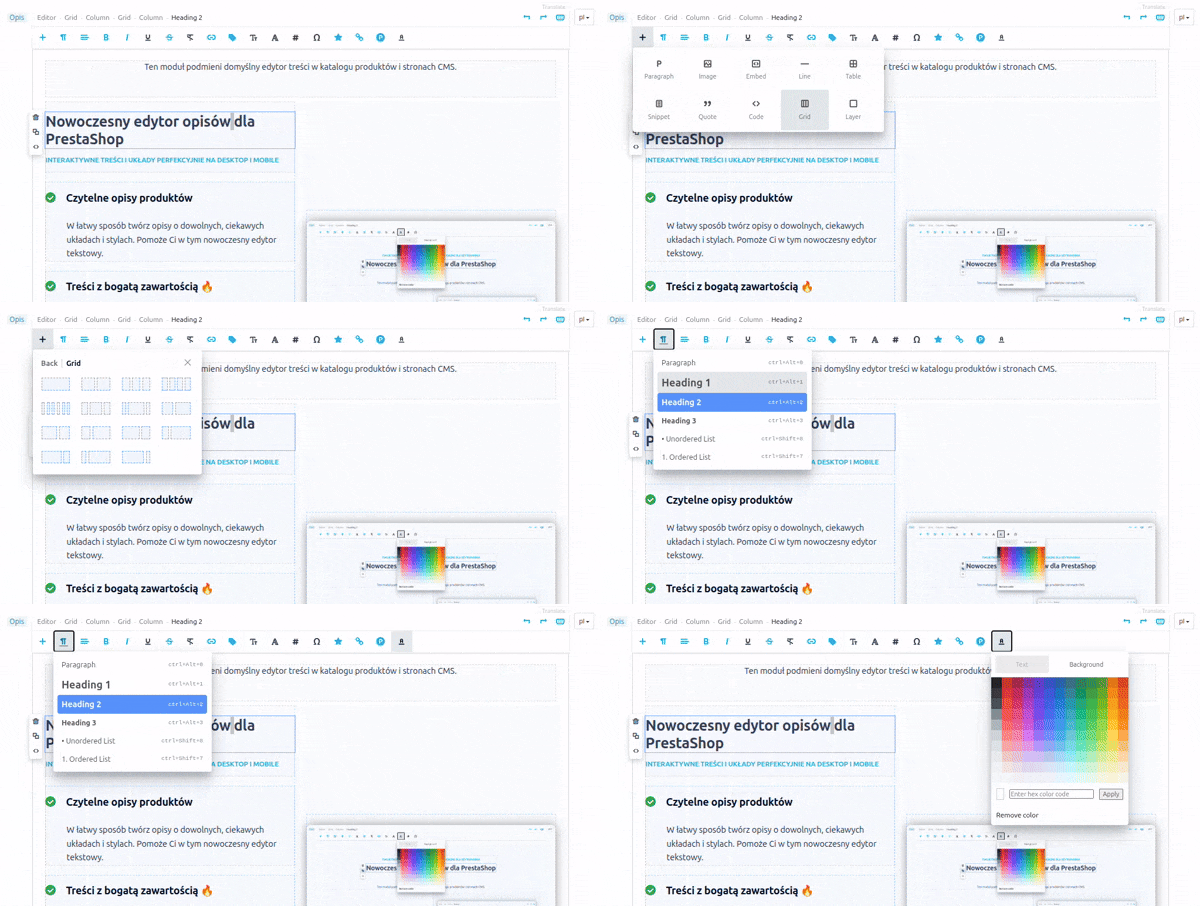
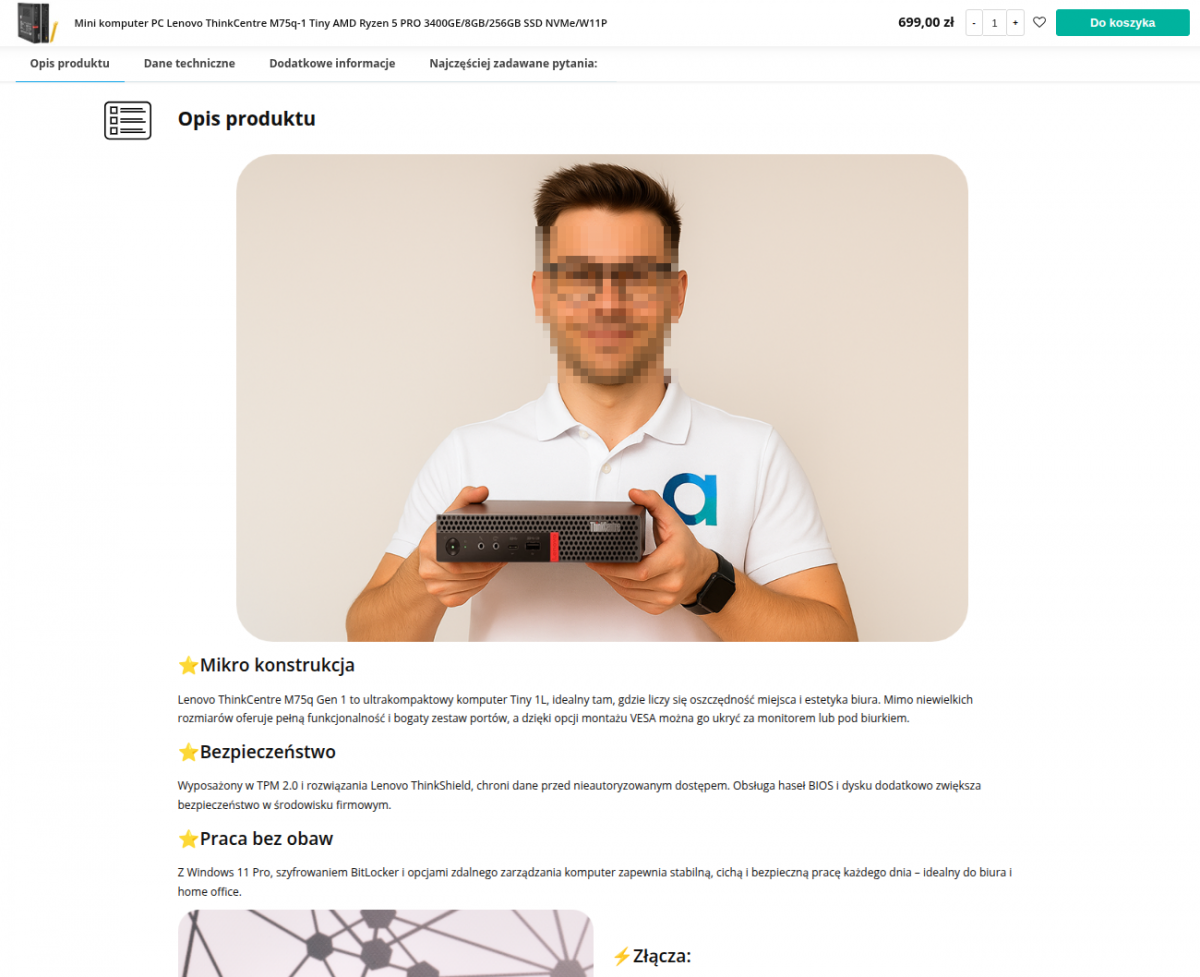
Descriptions
created
using the editor
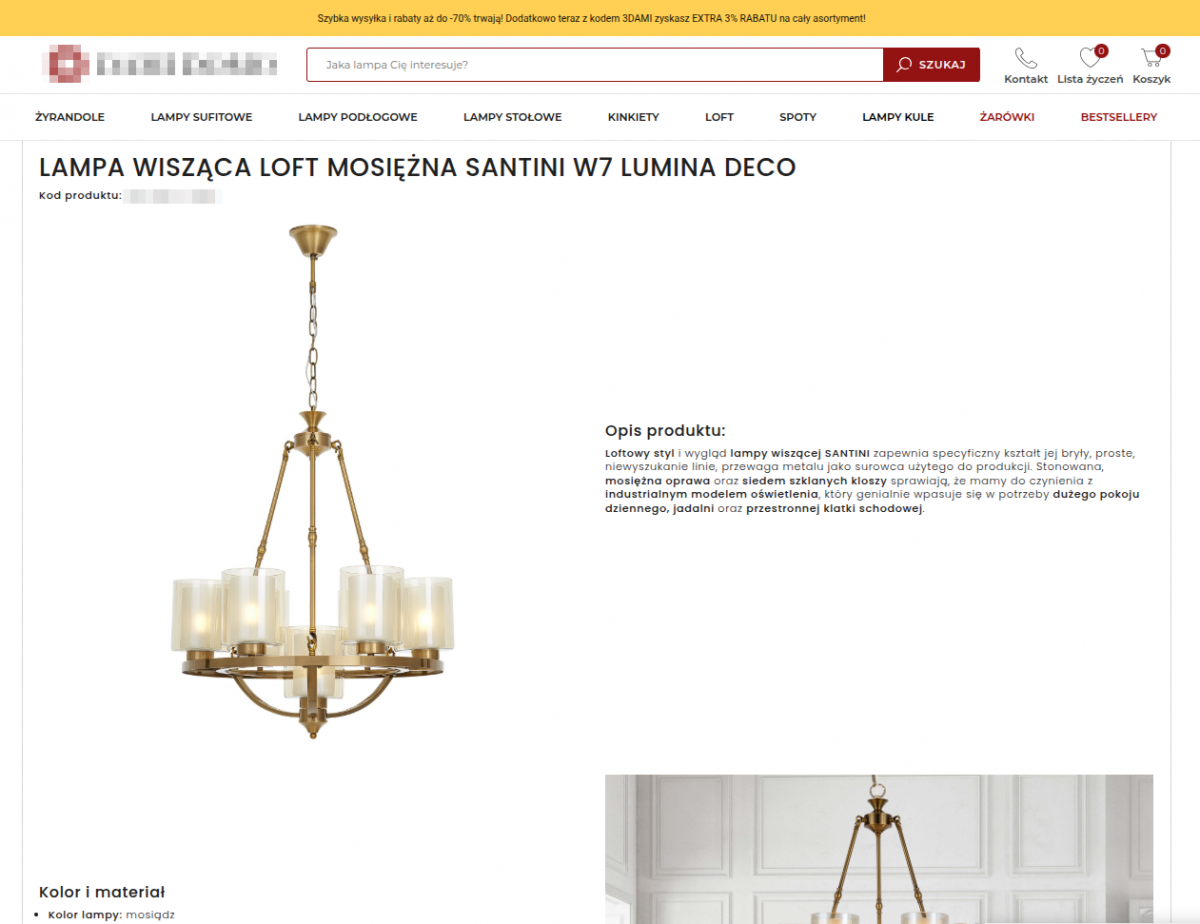

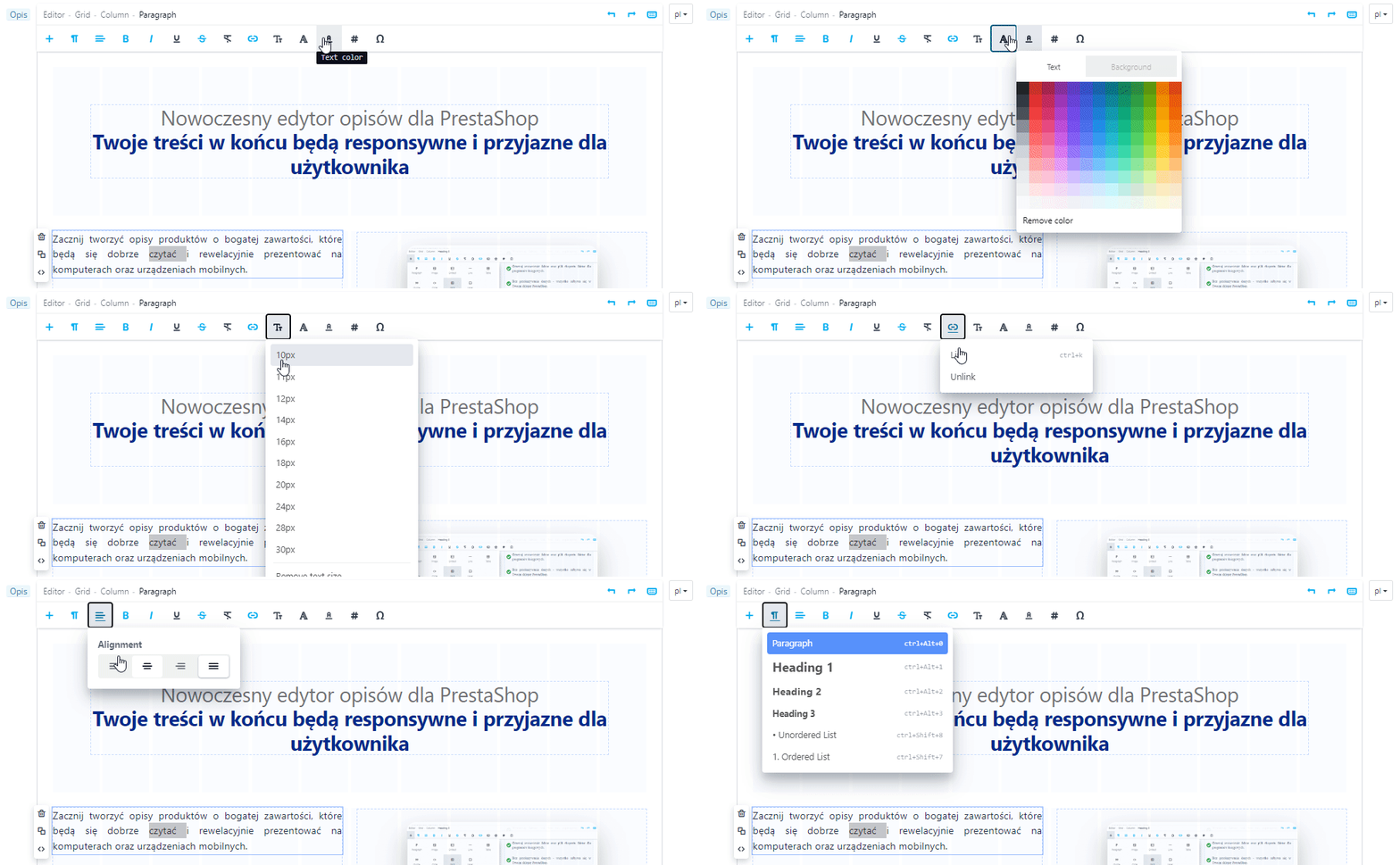
Main menu
Click anywhere in the description to display the editing tools available for that location in the main menu. With the smart menu, you have more time to create, not to search and check.
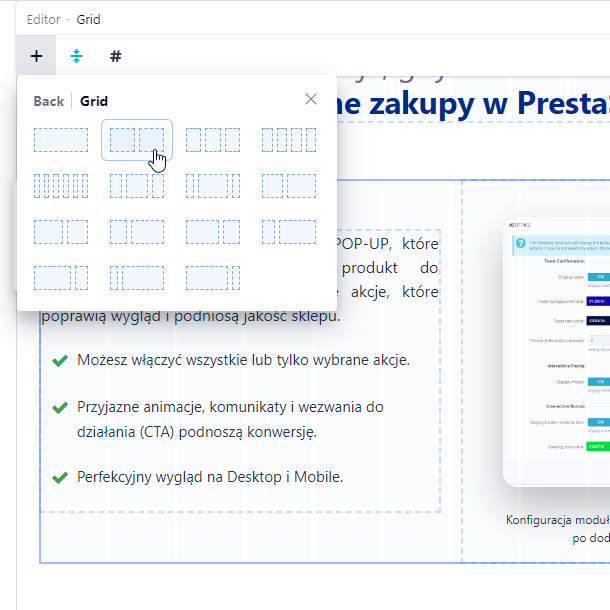
Wide selection of layouts
The available tools let you flexibly create interesting layouts and descriptions enriched with photos, videos, and other elements.
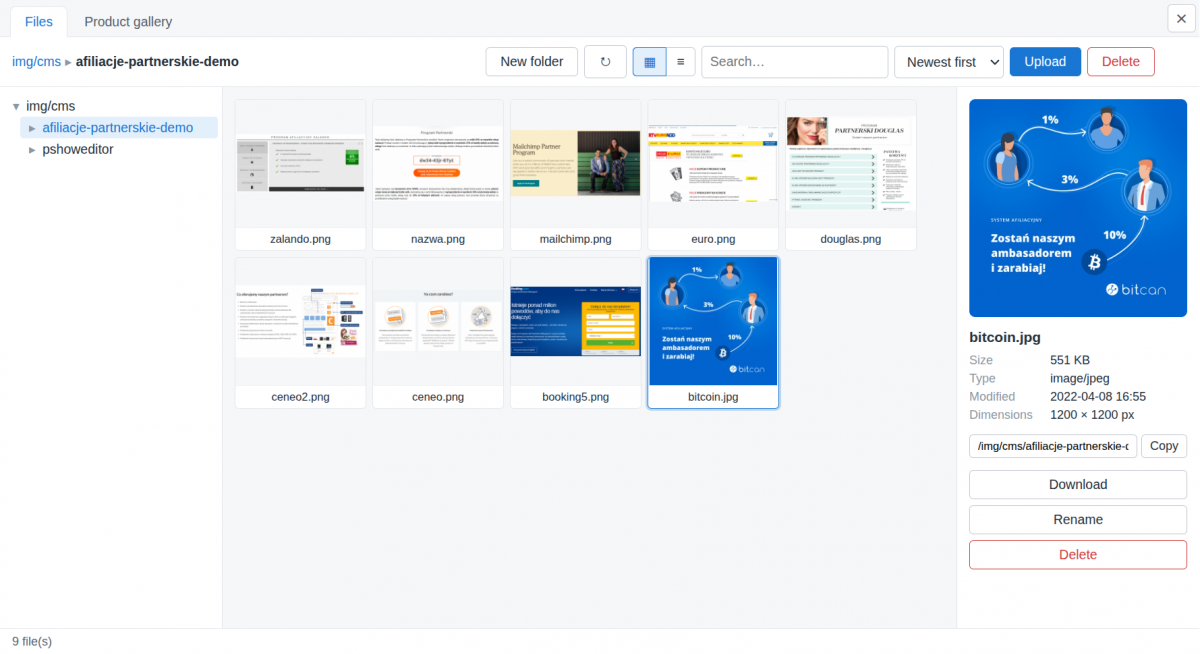
File Manager
Conveniently organize and manage the files you use when creating descriptions
Files used in product descriptions are automatically tagged with the product.
The file manager supports popular formats for graphics, photos, documents, and archives.
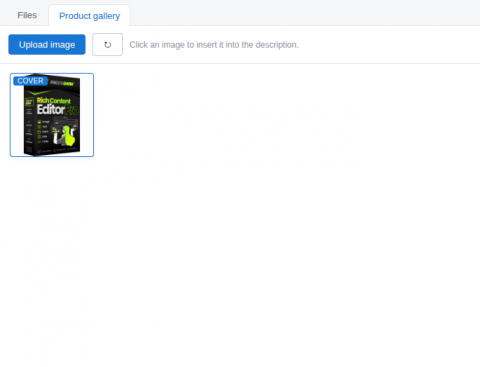
Synchronizing Photos with the Product Gallery
You can select the photos you want to appear in the product gallery
and use photos that are already in the product gallery.
Photos used in the product description can be synced with the product photo gallery.
The editor includes editing features found in the most popular content creation tools.
- Support for keyboard shortcuts and undo (Ctrl+Z).
- Support for custom HTML and CSS.
- Mix and move blocks of text and multimedia within the description using drag-and-drop.
- Drag and drop or paste (Ctrl+V) content, photos, and graphics directly into the editor window.
Section and element menus
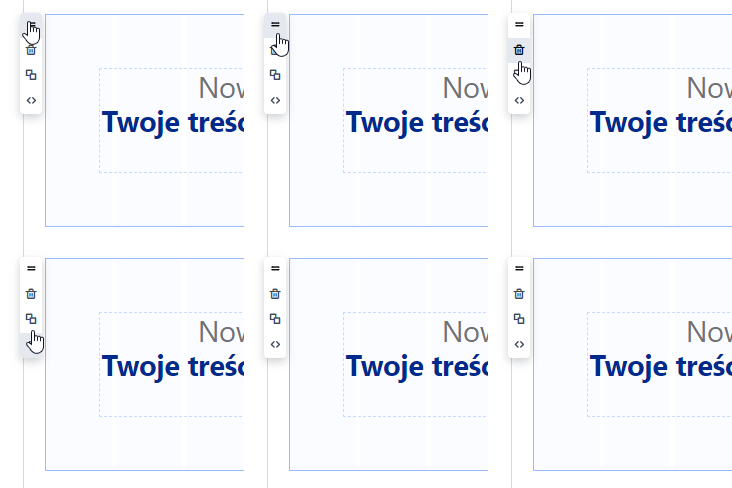
Each section and element in the description has a context menu: Move via Drag & Drop, Delete, Duplicate, Preview, and edit the HTML and CSS code of the selected element.
It won’t mess up the descriptions that are already in the store
The module recognizes existing descriptions and does not change their structure or appearance until you decide to edit them to give them a new layout and format.
Preview on desktop and mobile
—available even while you’re creating!
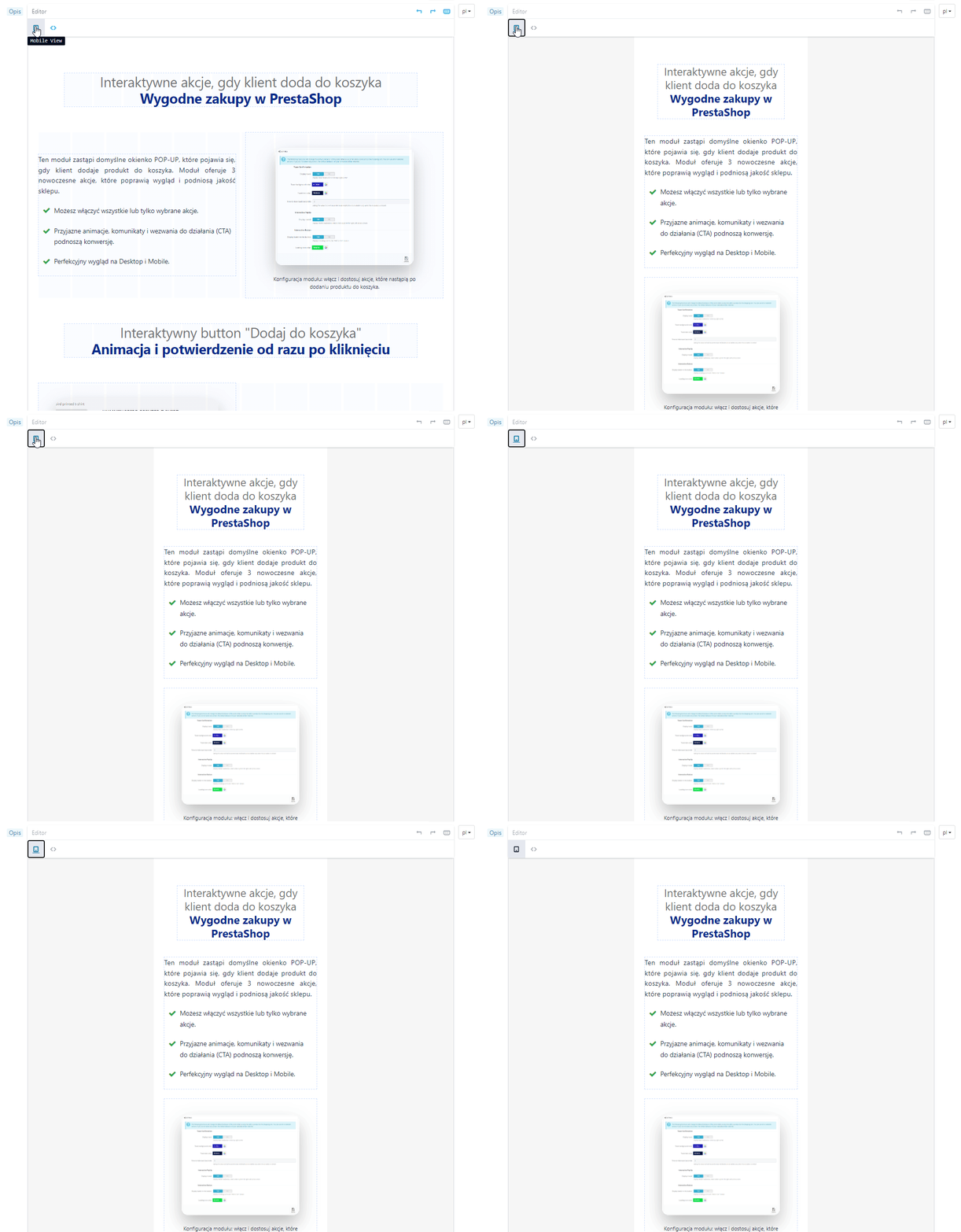
The content you create looks perfect on both large screens and mobile devices. While creating a description, you can switch between Desktop and Mobile views.
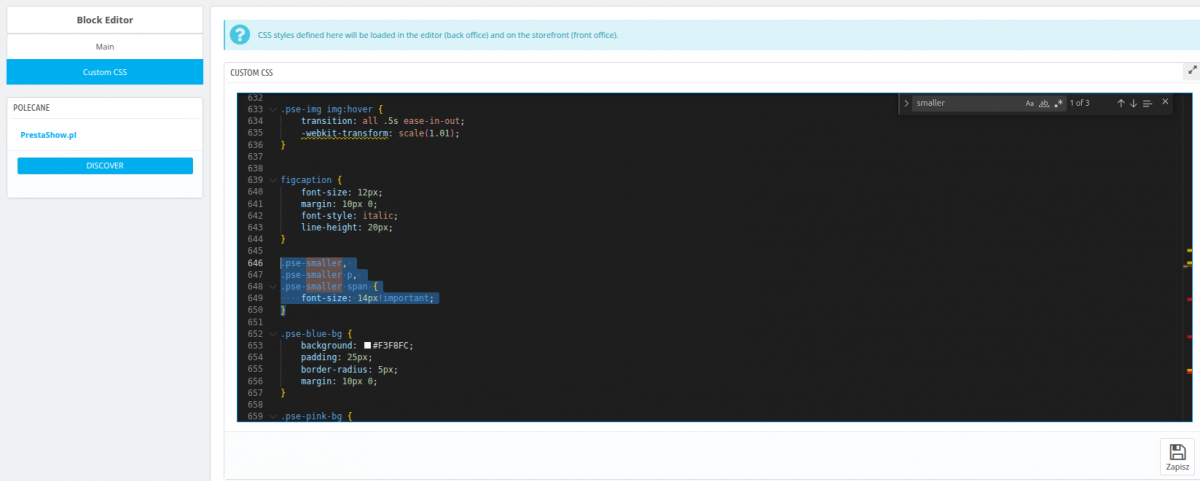
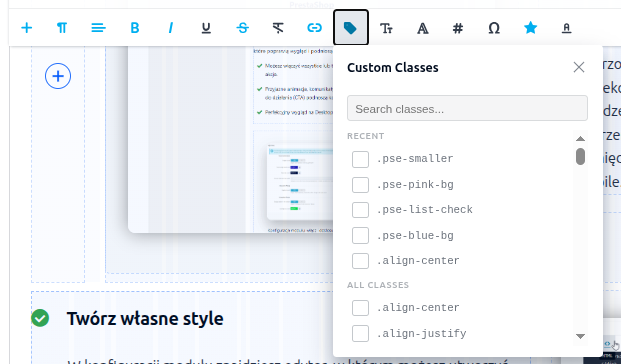
Create and use your own CSS styles
In the module’s settings, you’ll find an editor where you can create your own CSS styles. While creating descriptions, select a description element and then apply your own style to it—quickly and easily!
Developer-friendly
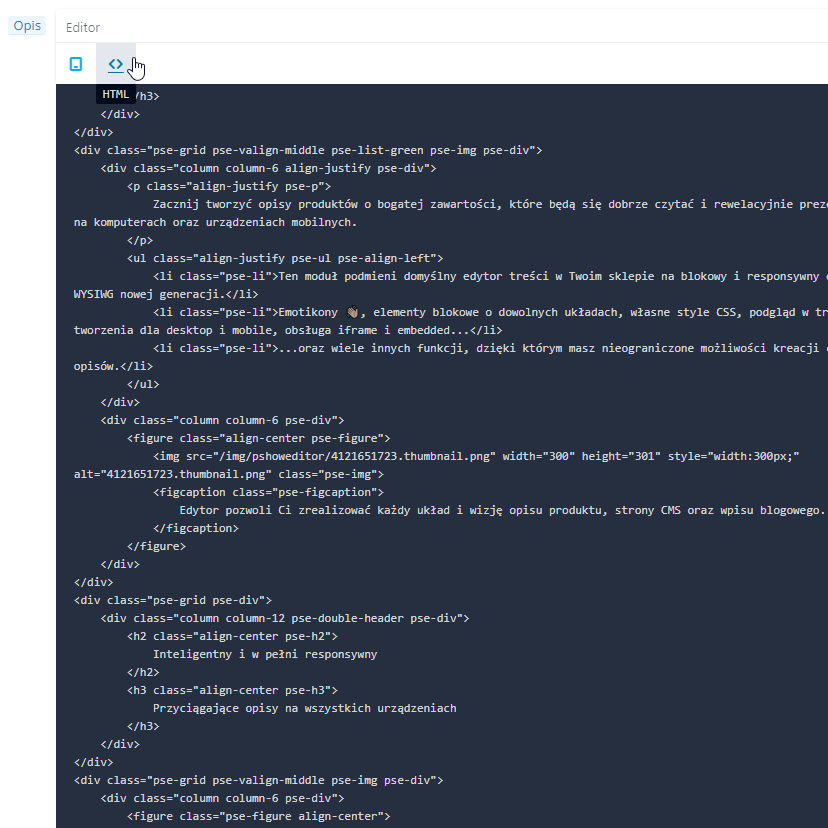
The module generates lightweight code, eliminates loops, and removes unused tags. The code that appears on your store’s front end is lightweight and designed in accordance with Google’s best practices.
- Preview and edit the entire code
- Preview and edit the code for a specific element.
🚀 Conversion Booster
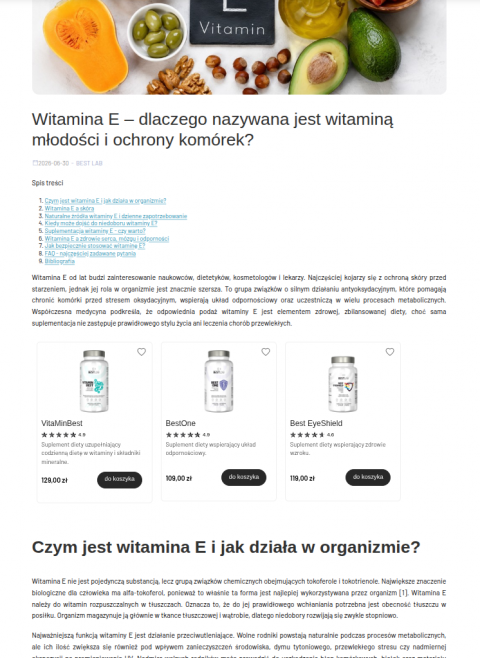
This module makes it easy to create descriptions that let you tell compelling stories about your products, services, and the value you deliver to your customers.


Content Generation with the PrestaShop AI Generator
With the AI Generator, you can quickly create high-converting product descriptions. Generate content based on data from your store or have it search for additional information online.
Translation into 27 languages with PrestaShop Translator
Instantly translate content you’ve just edited or perform bulk translations of descriptions, names, categories, and templates. The translations will remain in your store’s database and positively impact SEO and international search results.

% Save more when you buy a bundle!
Buy a set of 2 or 3 modules: Editor + AI Generator + Translator.
Use the code EDITORCOMBO in your cart to get a 25% discount on a set of 2 or 3 modules!
Status Bar
At the top of the editor, there’s a toolbar with buttons that change depending on the selected element. You’ll also find a breadcrumb trail showing the path to the element you clicked on in the description.
Embedding Videos and Shorts
Inserting Google Maps, responsive YouTube videos, or any other embedded code from external sites
Keyboard Shortcuts
Built-in keyboard shortcuts support all editing operations available in the module.
Built-in Google Fonts
The module supports Google Fonts as well as classic Windows/Apple fonts.
Creating tables
Editing tables, cell properties, and adding rows.
Your Own CSS
Styles remain unchanged thanks to the use of CSS styles from your template.
Photos—add from your drive or drag and drop
Drag and drop photos directly into the content you’re editing, or insert them using a URL.
Pasting and copying
Full control over pasted text, with excess code from MS Word removed.
Your own CSS styles
Create your own CSS styles to use in the editor. Your styles will be available and visible in the editor and on the storefront.
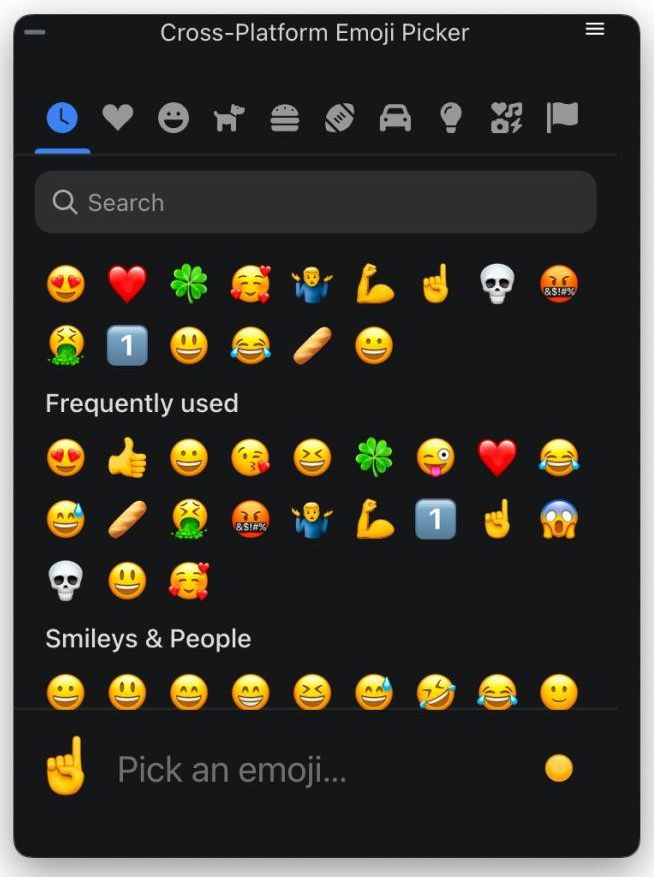
Emoji support
Need customization?
Ask us for a quote on a custom implementation or AI-generated descriptions for your store.
Run a blog that drives sales. Feature products in your posts, and place those posts anywhere in your store.

Automatic content translator. The module detects HTML and CSS code and translates changes you’ve just made to your store in real time.
Create additional tabs on product pages. Manage global product information or the information you want to display on product pages in bulk.

Automatically generate a table of contents from H1–H6 headings. You can use the table of contents for long product descriptions, CMS pages, and blog posts.
Changelog (v1.8)
## 1.10.9 — 2026-08-19
- Fix: image sizes
## 1.10.8 — 2026-07-31
- Fix: compatibility with the pshowblog module
## 1.10.7 — 2026-07-16
- Fix: images inserted by the editor were not responsive — the sizes attribute was capped at a hardcoded 800px, so browsers never loaded srcset variants larger than 800w and upscaled (blurred) images on content columns wider than 800px. The editor library now caps sizes at the largest srcset candidate and generates additional variants up to 1920w, so full-width images stay sharp on wide desktop layouts. Also fixed the image resize handle producing a malformed sizes value when the image width was set as a percentage (e.g. 100%). Note: sizes is stored in the page HTML when an image is inserted, so images already present in existing content pick up the fix after re-inserting the image or adjusting its size in the editor.
## 1.10.6 — 2026-07-03
- Fix: the module now overrides PrestaShop's search indexer so that words in adjacent block-level elements (paragraphs, list items, headings) are separated by a space during indexing. Previously, strip_tags() merged adjacent blocks without spacing — for example a product description with <p> blocks and special characters such as ◆ resulted in words fusing into unsearchable tokens. On update from an older version the override is now registered automatically, not only on a fresh install.
## 1.10.5 — 2026-07-03
- Improvement: Custom CSS is now published to the storefront deterministically. The cache file name is derived from the CSS content itself, so clearing the shop cache no longer drops or duplicates it; the file is written when you save and is re-created automatically if it ever goes missing (for example after a deploy). If it cannot be written — e.g. the theme's cache folder is not writable — the back office now shows a clear warning explaining why the styles are not appearing on the storefront.
- Change: Custom CSS is now a single stylesheet applied to every shop (the same CSS shop-wide), instead of being stored per shop. On update, your existing Custom CSS is carried over automatically.
## 1.10.4 — 2026-07-03
- Fix: your own Custom CSS (Block Editor → Custom CSS) is now applied on the storefront on PrestaShop 1.7 and newer. The stylesheet was being attached with an old method that modern front-office themes no longer render, so the classes you defined only worked inside the editor and never took effect on the live pages. It is now loaded through the theme's asset manager (so it is also combined by "Smart cache for CSS"), with a high priority so your rules win over the theme's.
- Improvement: the Custom CSS screen now explains that these styles load on the whole storefront, recommends prefixing your own classes/IDs (e.g. `pse-`), and clarifies that this box is only for styling editor content — not general theme styles.
## 1.10.3 — 2026-07-02
- Fix: editor content (text blocks, product descriptions, home sections) is styled correctly on the storefront again — on PrestaShop 1.7 and newer the editor's front-office stylesheet was not being loaded, so blocks and their custom classes appeared unstyled.
## 1.10.2 — 2026-07-01
- Fix: the "Product gallery" tab now also appears on PrestaShop 1.7.8, where the product edit URL has no "/edit" suffix and was not recognised as a product page.
## 1.10.1 — 2026-07-01
- Feature: On product pages the editor's file manager now has a "Product gallery" tab — browse the product's own photos, click one to insert it into the description, or upload a new photo straight into the product gallery.
- Fix: the rich editor no longer silently falls back to the basic editor when its own assets get blocked by a regenerated vendor access rule — the module now restores access to its static assets automatically.
## 1.9.6 — 2026-06-16
- Fix: The editor no longer fires a redundant background product request for every page element that carries a product id (for example a "lowest price in 30 days" badge). Only real product blocks placed with the editor now load product data, which removes a large volume of needless requests that were overloading the server, especially under crawler traffic.
- Fix: The editor's storefront script now refreshes right after a module update, even behind a CDN cache such as Cloudflare, so fixes take effect immediately.
- Security: The editor's product-data endpoint is now excluded from search-engine indexing and only answers same-origin requests.
## 1.9.5 — 2026-06-02
- Fix: File manager no longer returns `PathGuard: outside root` when opening the `pshoweditor` folder (and could not list, rename or delete anything inside it). The old image location `img/pshoweditor` is mounted into the manager root via a backward-compat symlink (`img/cms/pshoweditor`), but `realpath()` resolves that symlink outside the root, so the path guard rejected it. The guard now validates resolved paths against an explicit allowlist of roots (the manager root plus the legacy location), keeping full traversal protection — symlinks to any other location are still refused.
## 1.9.4 — 2026-06-02
- Fix: Block editor on a multilingual `autoload_rte` field (e.g. cz_bannercmsblock's "Text block") no longer stays collapsed after switching to a non-default language. PrestaShop renders one editor per language with the non-default ones inside a hidden wrapper, so those editors initialised at 0 height; switching the language tab only toggles `display` and never told the editor to recompute, leaving the content clipped and unscrollable. A back-office watcher now re-runs the editor's own height calculation whenever a language tab becomes visible.
## 1.9.3 — 2026-05-21
- Fix: File manager listings no longer show auto-generated `.webp` and `.avif` companions next to a raster original (`.jpg`/`.jpeg`/`.png`/`.gif`). PS 8+/9 and similar tooling write these next to the upload automatically, so the listing was showing each photo two or three times — on a 12k-file shop folder this dropped from 5524 visible entries to 2170. Lone `.webp` / `.avif` uploads (no raster sibling) stay visible; `.gif` originals are never affected. The hidden variants remain on disk and continue to drive the editor's `srcset`.
## 1.9.2 — 2026-05-21
- Fix: File manager could time out when opening folders with thousands of images. The folder-listing manifest called `finfo_file()` on every entry (one disk read per file, ~10s on a 12k-file folder, much worse on shared hosting), and its on-disk cache invalidated itself on every read whenever the build took longer than one wall-clock second. MIME is now derived from the filename for known image types and cache freshness is keyed off the manifest file's own mtime, so big folders open in a fraction of a second on first load and instantly on repeat loads.
## 1.9.1 — 2026-05-20
- Fix: Register the new `PShowEditorFileManager` admin tab during upgrade, so shops updating from 1.8.x stop seeing "Page not found" when opening the file manager from the editor (fresh installs were unaffected).
## 1.9.0 — 2026-05-18
- Feature: New file manager replacing PrestaShop's RFM and the article-editor built-in picker. Paginated, virtual-scrolled, instant on folders of any size.
- Remove: `PSE_USE_FILE_MANAGER` setting (always on now).
## v1.8.11 - 2026-05-15
### Fixed
- Preserve `tel:` and `mailto:` links in product/CMS descriptions by explicitly whitelisting them in HTMLPurifier's allowed URI schemes.
## v1.8.10 - 2026-05-04
### Changed
- Increased character limit for custom CSS
## v1.8.9 - 2026-03-17
### Changed
- Monaco CSS editor now bundled locally via Webpack
## v1.8.8 - 2026-03-13
### Fixed
- Fixed Custom CSS saving so backslashes like \f00d are preserved correctly.
- Improved Custom CSS cache rebuild when cache file is missing.
- Updated block editor to sync when textarea is changed by external scripts via change or input.
## v1.8.5 - 2026-03-10
### Added
- Automatically generate multi-size thumbnails when uploading new images in editor
- Use srcset in `` if image has multi-size thumbnails
## v1.8.4 - 2026-02-27
### Added
- Image manager selection in module settings
## v1.8.3 - 2026-02-26
### Changed
- Custom CSS file moved to theme cache directory to avoid permission issues
## v1.8.2 - 2026-02-24
### Added
- backward compatibility for images uploaded via legacy image manager
## v1.8.1 - 2026-02-24
### Updated
- small fixes and polishing
## v1.8.0 - 2026-02-23
### Added
- Custom CSS editor tab with Monaco code editor (syntax highlighting, fullscreen mode)
- CSS class picker — apply custom CSS classes to blocks directly in the editor
### Changed
- Image management via standard PrestaShop File Manager (instead of custom upload)
- Custom CSS is now stored in the database (migrated automatically from theme file)
### Removed
- Custom image upload/list system (replaced by PrestaShop File Manager)
## v1.7.6 - 2026-02-17
### Updated
- small fixes and polishing
## v1.7.5 - 2026-02-13
### Updated
- Сomposer.lock file
## v1.7.4 - 2026-02-05
### Fixed
- Image upload and image list in back-office on PrestaShop 9
## v1.7.3 - 2025-11-12
### Fixed
- The compatibility problem with prestashop 1.6
## v1.7.2 - 2025-04-22
### Added
- Font color - custom hex text color input
## v1.7.1 - 2025-03-28
### Added
- Product block - display add to cart button
## v1.7.0 - 2025-03-26
### Added
- Product block - block with product information - product name, price, cover image, link to the product page
- Block link - whole block containing images and texts can be a link
## v1.6.1 - 2025-01-14
### Fixed
- PShowTranslate support
## v1.6.0 - 2025-01-09
### Added
- Icons
## v1.5.3 - 2024-12-20
### Fixed
- Editor was not working on some product edit pages in prestashop 8.1
## v1.5.2 - 2024-08-04
### Fixed
- Problem with non-editable div
## v1.5.1 - 2024-07-10
### Added
- Watch for changes made by jquery in the input fields
## v1.5.0 - 2024-07-10
### Added
- Support dynamically changed input value by other scripts
## v1.4.0 - 2024-03-11
### Added
- Font color
- Font size
- Font family
## v1.3.2 - 2024-01-02
### Fixed
- There was a problem with saving the entered content
## v1.3.0 - 2023-12-14
### Added
- Configuration switch: Enlarge image when clicked
### Fixed
- Image positioning
## v1.2.1 - 2023-12-07
### Added
- Show window with big image on click
## v1.2.0 - 2023-12-01
### Fixed
- Fix image uploading
- Fix sticky toolbar on prestashop 1.7
- Fix image resizing
## v1.1.4 - 2023-11-28
### Fixed
- Fix image uploading
## v1.1.3 - 2023-11-23
### Fixed
- Fix front CSS
## v1.1.1 - 2023-10-19
### Fixed
- Fix CSS
## v1.1.0 - 2023-07-04
### Added
- Add support for Prestashop 1.6
## v1.0.1 - 2023-06-21
### Added
- Add more function to editor: image resizing, image position, remove text formatting, special chars, character counter
### Fixed
- Prevent throwing exception when route is not found - module will show alert that you need to clear cache
### Added
- Module replaces the standard editor with the rich block editor
- Fix: image sizes
## 1.10.8 — 2026-07-31
- Fix: compatibility with the pshowblog module
## 1.10.7 — 2026-07-16
- Fix: images inserted by the editor were not responsive — the sizes attribute was capped at a hardcoded 800px, so browsers never loaded srcset variants larger than 800w and upscaled (blurred) images on content columns wider than 800px. The editor library now caps sizes at the largest srcset candidate and generates additional variants up to 1920w, so full-width images stay sharp on wide desktop layouts. Also fixed the image resize handle producing a malformed sizes value when the image width was set as a percentage (e.g. 100%). Note: sizes is stored in the page HTML when an image is inserted, so images already present in existing content pick up the fix after re-inserting the image or adjusting its size in the editor.
## 1.10.6 — 2026-07-03
- Fix: the module now overrides PrestaShop's search indexer so that words in adjacent block-level elements (paragraphs, list items, headings) are separated by a space during indexing. Previously, strip_tags() merged adjacent blocks without spacing — for example a product description with <p> blocks and special characters such as ◆ resulted in words fusing into unsearchable tokens. On update from an older version the override is now registered automatically, not only on a fresh install.
## 1.10.5 — 2026-07-03
- Improvement: Custom CSS is now published to the storefront deterministically. The cache file name is derived from the CSS content itself, so clearing the shop cache no longer drops or duplicates it; the file is written when you save and is re-created automatically if it ever goes missing (for example after a deploy). If it cannot be written — e.g. the theme's cache folder is not writable — the back office now shows a clear warning explaining why the styles are not appearing on the storefront.
- Change: Custom CSS is now a single stylesheet applied to every shop (the same CSS shop-wide), instead of being stored per shop. On update, your existing Custom CSS is carried over automatically.
## 1.10.4 — 2026-07-03
- Fix: your own Custom CSS (Block Editor → Custom CSS) is now applied on the storefront on PrestaShop 1.7 and newer. The stylesheet was being attached with an old method that modern front-office themes no longer render, so the classes you defined only worked inside the editor and never took effect on the live pages. It is now loaded through the theme's asset manager (so it is also combined by "Smart cache for CSS"), with a high priority so your rules win over the theme's.
- Improvement: the Custom CSS screen now explains that these styles load on the whole storefront, recommends prefixing your own classes/IDs (e.g. `pse-`), and clarifies that this box is only for styling editor content — not general theme styles.
## 1.10.3 — 2026-07-02
- Fix: editor content (text blocks, product descriptions, home sections) is styled correctly on the storefront again — on PrestaShop 1.7 and newer the editor's front-office stylesheet was not being loaded, so blocks and their custom classes appeared unstyled.
## 1.10.2 — 2026-07-01
- Fix: the "Product gallery" tab now also appears on PrestaShop 1.7.8, where the product edit URL has no "/edit" suffix and was not recognised as a product page.
## 1.10.1 — 2026-07-01
- Feature: On product pages the editor's file manager now has a "Product gallery" tab — browse the product's own photos, click one to insert it into the description, or upload a new photo straight into the product gallery.
- Fix: the rich editor no longer silently falls back to the basic editor when its own assets get blocked by a regenerated vendor access rule — the module now restores access to its static assets automatically.
## 1.9.6 — 2026-06-16
- Fix: The editor no longer fires a redundant background product request for every page element that carries a product id (for example a "lowest price in 30 days" badge). Only real product blocks placed with the editor now load product data, which removes a large volume of needless requests that were overloading the server, especially under crawler traffic.
- Fix: The editor's storefront script now refreshes right after a module update, even behind a CDN cache such as Cloudflare, so fixes take effect immediately.
- Security: The editor's product-data endpoint is now excluded from search-engine indexing and only answers same-origin requests.
## 1.9.5 — 2026-06-02
- Fix: File manager no longer returns `PathGuard: outside root` when opening the `pshoweditor` folder (and could not list, rename or delete anything inside it). The old image location `img/pshoweditor` is mounted into the manager root via a backward-compat symlink (`img/cms/pshoweditor`), but `realpath()` resolves that symlink outside the root, so the path guard rejected it. The guard now validates resolved paths against an explicit allowlist of roots (the manager root plus the legacy location), keeping full traversal protection — symlinks to any other location are still refused.
## 1.9.4 — 2026-06-02
- Fix: Block editor on a multilingual `autoload_rte` field (e.g. cz_bannercmsblock's "Text block") no longer stays collapsed after switching to a non-default language. PrestaShop renders one editor per language with the non-default ones inside a hidden wrapper, so those editors initialised at 0 height; switching the language tab only toggles `display` and never told the editor to recompute, leaving the content clipped and unscrollable. A back-office watcher now re-runs the editor's own height calculation whenever a language tab becomes visible.
## 1.9.3 — 2026-05-21
- Fix: File manager listings no longer show auto-generated `.webp` and `.avif` companions next to a raster original (`.jpg`/`.jpeg`/`.png`/`.gif`). PS 8+/9 and similar tooling write these next to the upload automatically, so the listing was showing each photo two or three times — on a 12k-file shop folder this dropped from 5524 visible entries to 2170. Lone `.webp` / `.avif` uploads (no raster sibling) stay visible; `.gif` originals are never affected. The hidden variants remain on disk and continue to drive the editor's `srcset`.
## 1.9.2 — 2026-05-21
- Fix: File manager could time out when opening folders with thousands of images. The folder-listing manifest called `finfo_file()` on every entry (one disk read per file, ~10s on a 12k-file folder, much worse on shared hosting), and its on-disk cache invalidated itself on every read whenever the build took longer than one wall-clock second. MIME is now derived from the filename for known image types and cache freshness is keyed off the manifest file's own mtime, so big folders open in a fraction of a second on first load and instantly on repeat loads.
## 1.9.1 — 2026-05-20
- Fix: Register the new `PShowEditorFileManager` admin tab during upgrade, so shops updating from 1.8.x stop seeing "Page not found" when opening the file manager from the editor (fresh installs were unaffected).
## 1.9.0 — 2026-05-18
- Feature: New file manager replacing PrestaShop's RFM and the article-editor built-in picker. Paginated, virtual-scrolled, instant on folders of any size.
- Remove: `PSE_USE_FILE_MANAGER` setting (always on now).
## v1.8.11 - 2026-05-15
### Fixed
- Preserve `tel:` and `mailto:` links in product/CMS descriptions by explicitly whitelisting them in HTMLPurifier's allowed URI schemes.
## v1.8.10 - 2026-05-04
### Changed
- Increased character limit for custom CSS
## v1.8.9 - 2026-03-17
### Changed
- Monaco CSS editor now bundled locally via Webpack
## v1.8.8 - 2026-03-13
### Fixed
- Fixed Custom CSS saving so backslashes like \f00d are preserved correctly.
- Improved Custom CSS cache rebuild when cache file is missing.
- Updated block editor to sync when textarea is changed by external scripts via change or input.
## v1.8.5 - 2026-03-10
### Added
- Automatically generate multi-size thumbnails when uploading new images in editor
- Use srcset in `` if image has multi-size thumbnails
## v1.8.4 - 2026-02-27
### Added
- Image manager selection in module settings
## v1.8.3 - 2026-02-26
### Changed
- Custom CSS file moved to theme cache directory to avoid permission issues
## v1.8.2 - 2026-02-24
### Added
- backward compatibility for images uploaded via legacy image manager
## v1.8.1 - 2026-02-24
### Updated
- small fixes and polishing
## v1.8.0 - 2026-02-23
### Added
- Custom CSS editor tab with Monaco code editor (syntax highlighting, fullscreen mode)
- CSS class picker — apply custom CSS classes to blocks directly in the editor
### Changed
- Image management via standard PrestaShop File Manager (instead of custom upload)
- Custom CSS is now stored in the database (migrated automatically from theme file)
### Removed
- Custom image upload/list system (replaced by PrestaShop File Manager)
## v1.7.6 - 2026-02-17
### Updated
- small fixes and polishing
## v1.7.5 - 2026-02-13
### Updated
- Сomposer.lock file
## v1.7.4 - 2026-02-05
### Fixed
- Image upload and image list in back-office on PrestaShop 9
## v1.7.3 - 2025-11-12
### Fixed
- The compatibility problem with prestashop 1.6
## v1.7.2 - 2025-04-22
### Added
- Font color - custom hex text color input
## v1.7.1 - 2025-03-28
### Added
- Product block - display add to cart button
## v1.7.0 - 2025-03-26
### Added
- Product block - block with product information - product name, price, cover image, link to the product page
- Block link - whole block containing images and texts can be a link
## v1.6.1 - 2025-01-14
### Fixed
- PShowTranslate support
## v1.6.0 - 2025-01-09
### Added
- Icons
## v1.5.3 - 2024-12-20
### Fixed
- Editor was not working on some product edit pages in prestashop 8.1
## v1.5.2 - 2024-08-04
### Fixed
- Problem with non-editable div
## v1.5.1 - 2024-07-10
### Added
- Watch for changes made by jquery in the input fields
## v1.5.0 - 2024-07-10
### Added
- Support dynamically changed input value by other scripts
## v1.4.0 - 2024-03-11
### Added
- Font color
- Font size
- Font family
## v1.3.2 - 2024-01-02
### Fixed
- There was a problem with saving the entered content
## v1.3.0 - 2023-12-14
### Added
- Configuration switch: Enlarge image when clicked
### Fixed
- Image positioning
## v1.2.1 - 2023-12-07
### Added
- Show window with big image on click
## v1.2.0 - 2023-12-01
### Fixed
- Fix image uploading
- Fix sticky toolbar on prestashop 1.7
- Fix image resizing
## v1.1.4 - 2023-11-28
### Fixed
- Fix image uploading
## v1.1.3 - 2023-11-23
### Fixed
- Fix front CSS
## v1.1.1 - 2023-10-19
### Fixed
- Fix CSS
## v1.1.0 - 2023-07-04
### Added
- Add support for Prestashop 1.6
## v1.0.1 - 2023-06-21
### Added
- Add more function to editor: image resizing, image position, remove text formatting, special chars, character counter
### Fixed
- Prevent throwing exception when route is not found - module will show alert that you need to clear cache
### Added
- Module replaces the standard editor with the rich block editor
Technical requirements
Technical Requirements
- PHP 7.1 - 8.x
- Server extension ionCube Loader
- PrestaShop Importer only: PHP libxml version > 2.9.3
- PrestaShop Facebook Integrator only: PHP 7.2 or higher
- PrestaShop VAT Validator only: PHP SOAP
Support & Updates
Support = Updates + HelpDesk
You get 90 days (3 months) access to the complete PrestaShow support package.
Module updates
Modules will inform you about available updates. Read the changelog and perform a 1-click module update directly from your store.
HelpDesk panel
This is the panel where we will provide you with help. On HelpDesk you can report problems, order free module installation and updates, and order modifications and custom programming work.
Extend support
After support expires, you can use the module without any restrictions. You can extend your support access at any time you need it.
Knowledge Base & FAQ
Free forever
The knowledge base is available to everyone. You will find module documentation as well as instructions, videos and answers to frequently asked questions.
License
Lifetime license for the module
- You can use the module without limitation in 1 store = 1 domain.
- You can use an additional domain, e.g. for developer copy.
- For a small fee you can change the domain for the module yourself.
Additional domains for Multistore
- All our modules support PrestaShop Multistore.
- Supporting unlimited domains for PrestaShop Multistore requires purchasing multistore support for the module.
Modifying the code
- The module code related to the integration with the store and the design (.tpl, .css, .js) has open source code and you can modify it freely.
- The module's source code (.php) is encrypted with ionCube, and modifying it will void the warranty.
No entries yet.
ad. 1. oraz 2.: Moduł posiada system zapisania utworzonego opisu jako szablon. Tworząc opis w innym miejscu można użyć zapisanego szablonu.
ad. 3 Wszystkie pola PrestaShop, które posiadają edytor standardowy są obsługiwane przez nasz moduł - edytor jest podmieniany na nasz.
2. Czy można zapisać własny indywidualny układ opisu i używać go w kolejnych opisach aby stworzyć spójny układ i styl bez pamiętania co było w jakiej kolejności itd.
3. W których miejscach sklepu można korzystać z tego modułu oprócz opisów produktów ? Czy moduł działa wszędzie tam gdzie edytuję treść czy to w opisie produktu czy pole tekstowe zewnętrznego modułu ?
However, the approach to the customer is unfortunately already on a poor level. Support expires after 3 months and I FULLY understand that.
But developer demands 300 PLN from the customer just to answer a very simple question ‘Is such a change feasible / not feasible’. I want to pay you for the modification, but to pay 300 zloty for 5 min of work? PrestaShow, don't do business that way.
https://www.youtube.com/watch?v=BV-rDtXw_Ug