





YouTube integration
The module supports the most popular YouTube link formats, including watch, embed, shorts and youtu.be. Simply paste the video address to add it to the product gallery.
Vimeo integration
The module also supports Vimeo videos and automatically downloads the thumbnails needed to display them in the product gallery.
Automatic support
The module automatically generates thumbnails for your videos, embeds the video in the product gallery and allows you to conveniently present it next to your images.
Note!
The module works from PrestaShop 1.7.8 upwards and with any version of PS 8.x and 9.x!
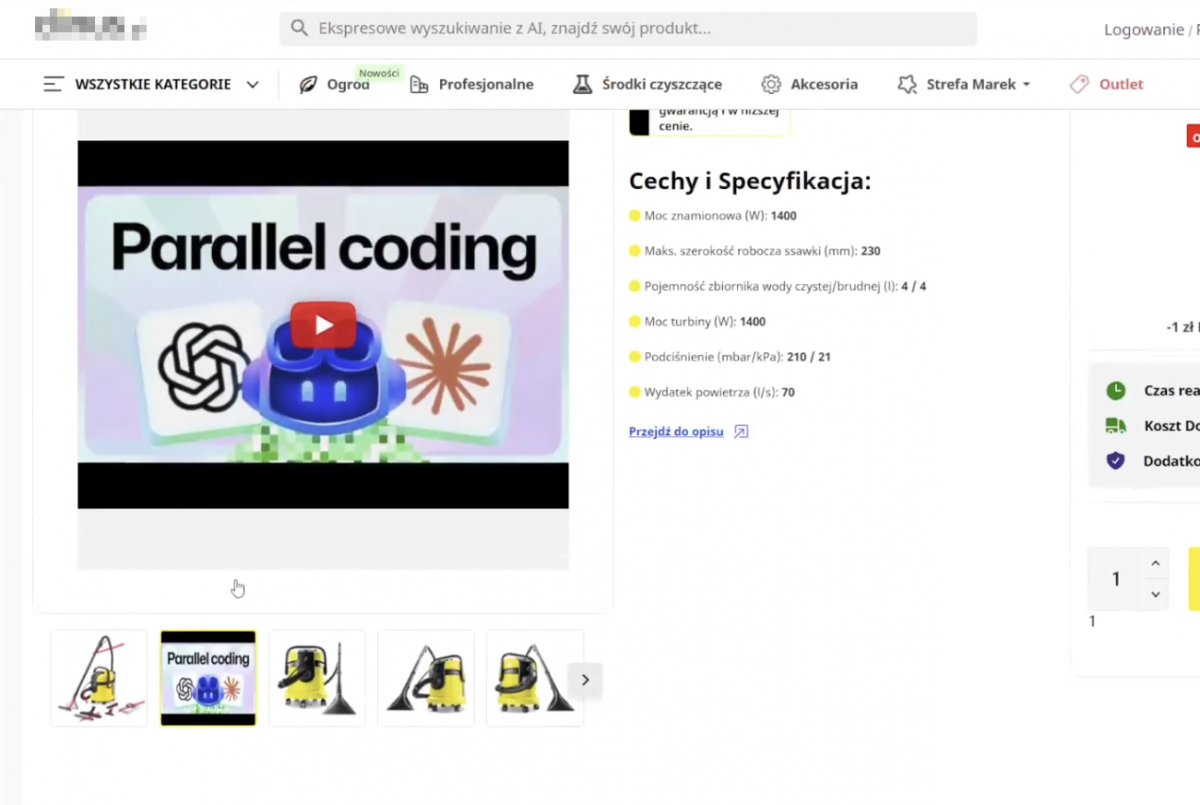
The module allows you to add YouTube and Vimeo videos directly to the product gallery in PrestaShop. This allows you to present instructions, demos, reviews and videos next to product images, and it's easier for customers to understand the features and how the offer works.
The videos display responsively, receive thumbnails and are conveniently managed from the product editing level.
1
Edit product
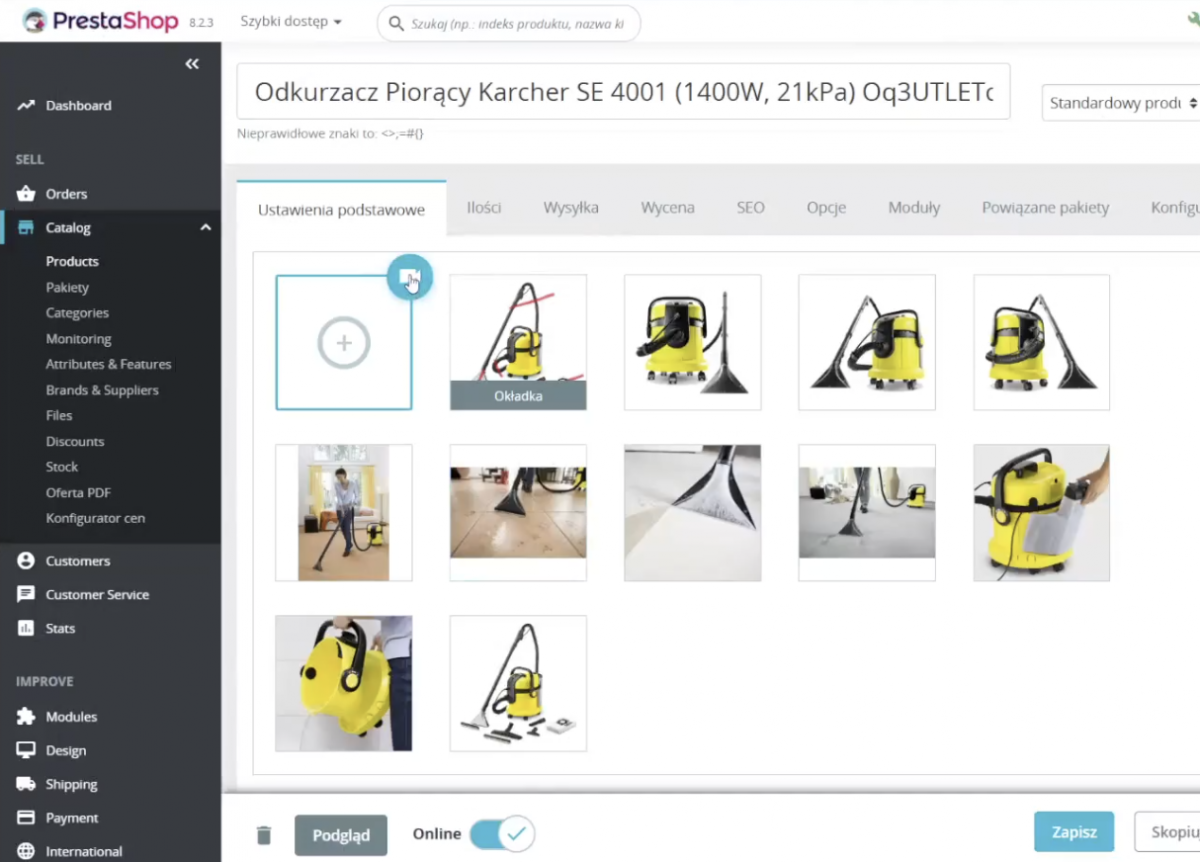
The module adds a "Video" button in the product image management section.
2
Add URL and description of the video
Paste a link to a video from YouTube or Vimeo. Optionally add a description to make the video easily recognizable in the panel.
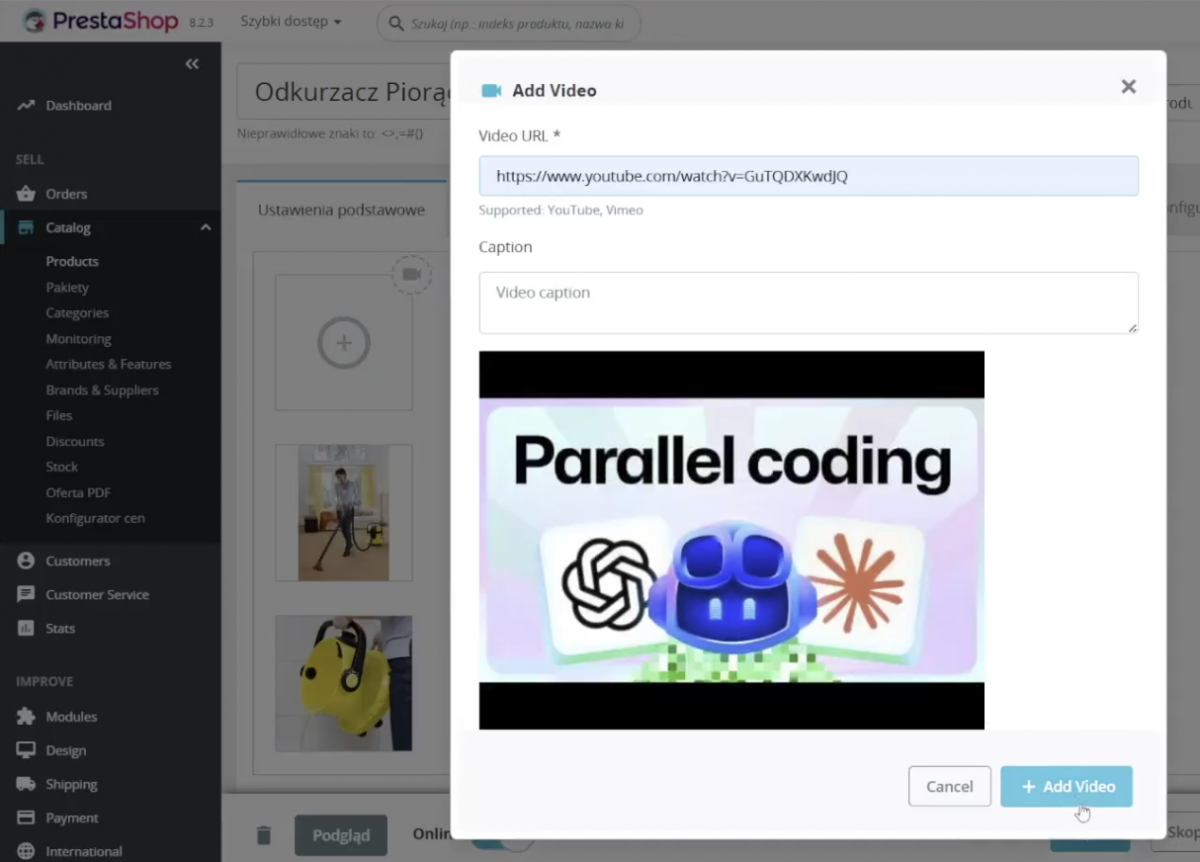
3
Done!
Once saved, the video will appear in the product gallery next to your photos. You can adjust its order to better support your offer presentation.
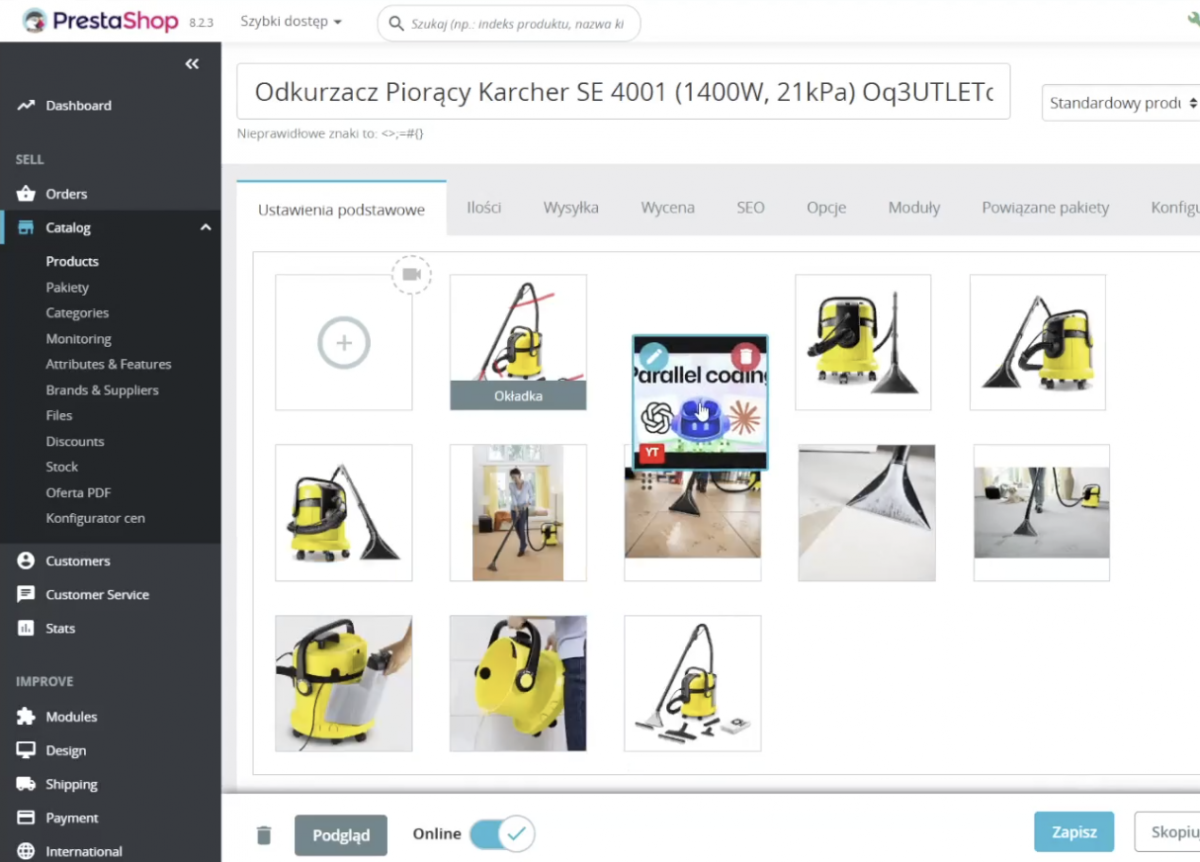
Managing videos in the PrestaShop back office
- Add, delete and reorder videos without refreshing the page
- Drag-and-drop arrangement of videos
- Preview videos with thumbnails while editing the product
- Film descriptions in multiple languages
- Support for multiple movies assigned to one product
Displaying movies on the product card
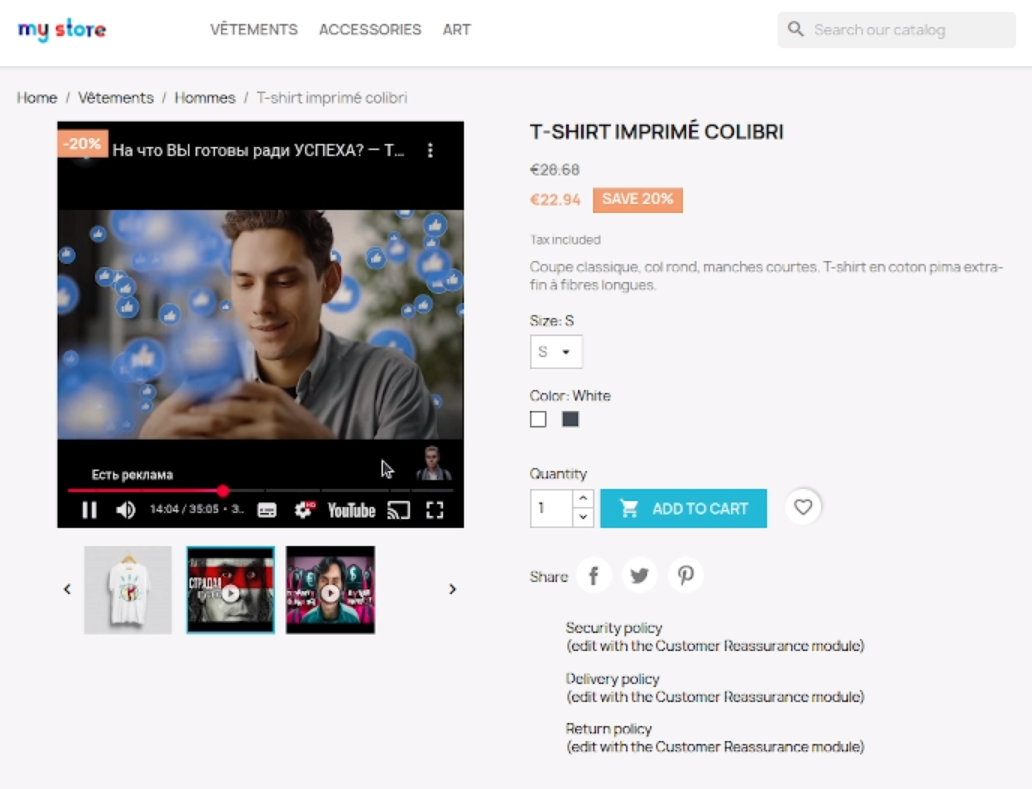
- Movies appear directly in the product gallery
- Display is adapted for computers, tablets and smartphones
- Movie thumbnails include clear playback markup
- Lazy loading supports product card performance
Personalization
- You can customize the style of the module to match your own store template
- The module allows you to extend the performance of frontend and administrative elements
- Developer can use hookups and template files for custom implementation
Generate thumbnails
Videos are presented in the gallery as thumbnails with a play icon, so the customer recognizes the video content right away.
Gallery navigation
Videos work with the product gallery navigation, so users can browse photos and videos in a single, consistent view.
Powerful, responsive interface
Videos display correctly on mobile devices, and lazy loading helps reduce unnecessary load on the product page.
Supported YouTube formats
The module supports the most popular YouTube and Vimeo link formats, including standard addresses, short links, embeds and shorts.
https://www.youtube.com/watch?v=VIDEO_ID
https://youtu.be/VIDEO_ID
https://www.youtube.com/embed/VIDEO_ID
https://www.youtube.com/v/VIDEO_ID
https://www.youtube.com/shorts/VIDEO_ID
Supported Vimeo formats
https://vimeo.com/VIDEO_ID
https://vimeo.com/video/VIDEO_ID
Explore other PrestaShow modules
module for reels
Are you also looking for reels and short videos in your store? Check out the PrestaShop Reels module for embedding reels from Instagram, Facebook and YouTube Shorts.
What is the Product's Gallery Videos module for PrestaShop?
This is a PrestaShop module that allows you to add YouTube and Vimeo videos directly to your product gallery. This allows you to present videos next to photos on the product card and better show how it works, details and advantages of the offer.
What is the YouTube and Vimeo module used for in the PrestaShop product gallery?
The module is used to embed product videos in the image gallery on the product page. You can use it for demos, instructions, reviews, unboxing or sales materials that help the customer get to know the product better before buying.
Does the module allow you to add a YouTube video to a product in PrestaShop?
Yes. The module supports the most popular YouTube link formats and allows you to add a video directly to the product gallery in PrestaShop. Just paste the URL of the video in the product edit.
Is it possible to add a Vimeo video to a product gallery in PrestaShop?
Yes. The module also supports Vimeo videos and allows you to display them in the product gallery next to your images. It's a convenient solution if you use Vimeo to present videos in your store.
How to add a video to a product in PrestaShop?
After installing the module, a video-related section or button appears in the product edition. All you need to do is paste the link to the video from YouTube or Vimeo, optionally add a description and save the changes, and the video will appear in the product gallery.
Does the video display in the product image gallery next to the images?
Yes. The module integrates videos with the product gallery, so the video can be presented together with the images. The customer views the product visuals in one place, without going to external services.
Does the module generate thumbnails of videos in the product gallery?
Yes. The module automatically handles video thumbnails, so video can be conveniently presented in the product gallery and look consistent with other visual materials.
Can videos be reordered and managed in the PrestaShop panel?
Yes. The module allows you to add, remove and change the order of videos assigned to a product. This allows you to decide where the video should appear in the gallery.
Do the videos in the product gallery also work on mobile devices?
Yes. The module is designed so that the videos are also displayed correctly on smartphones and tablets, making it easier to present the product to mobile users.
With which versions of PrestaShop does the Videos in product gallery module work?
According to the description, the module works from PrestaShop 1.7.8 and with versions 8.x and 9.x. Technical requirements include PHP 7.1 or later and ionCube.
Why add videos to product card in PrestaShop?
A video on a product card helps to show the operation, design and details of an offer better than photos alone. This is especially useful for tech products, home furnishings, cosmetics, toys, accessories and anywhere a customer wants to see the product in use before buying.
Technical requirements
Technical Requirements
- PHP 7.1 - 8.x
- Server extension ionCube Loader
- PrestaShop Importer only: PHP libxml version > 2.9.3
- PrestaShop Facebook Integrator only: PHP 7.2 or higher
- PrestaShop VAT Validator only: PHP SOAP
Support = Updates + HelpDesk
You get 90 days (3 months) access to the complete PrestaShow support package.
Module updates
Modules will inform you about available updates. Read the changelog and perform a 1-click module update directly from your store.
HelpDesk panel
This is the panel where we will provide you with help. On HelpDesk you can report problems, order free module installation and updates, and order modifications and custom programming work.
Extend support
After support expires, you can use the module without any restrictions. You can extend your support access at any time you need it.
Knowledge Base & FAQ
Free forever
The knowledge base is available to everyone. You will find module documentation as well as instructions, videos and answers to frequently asked questions.
Lifetime license for the module
- You can use the module without limitation in 1 store = 1 domain.
- You can use an additional domain, e.g. for developer copy.
- For a small fee you can change the domain for the module yourself.
Additional domains for Multistore
- All our modules support PrestaShop Multistore.
- Supporting unlimited domains for PrestaShop Multistore requires purchasing multistore support for the module.
Modifying the code
- The module code related to the integration with the store and the design (.tpl, .css, .js) has open source code and you can modify it freely.
- The module's source code (.php) is encrypted with ionCube, and modifying it will void the warranty.
Demo
Demo - test the module
- This module does not have a demo store
No entries yet.
No customer reviews for the moment.