Customer service and order packaging on your phone 📦





Detailed description
PDFs from the shopping cart and product page
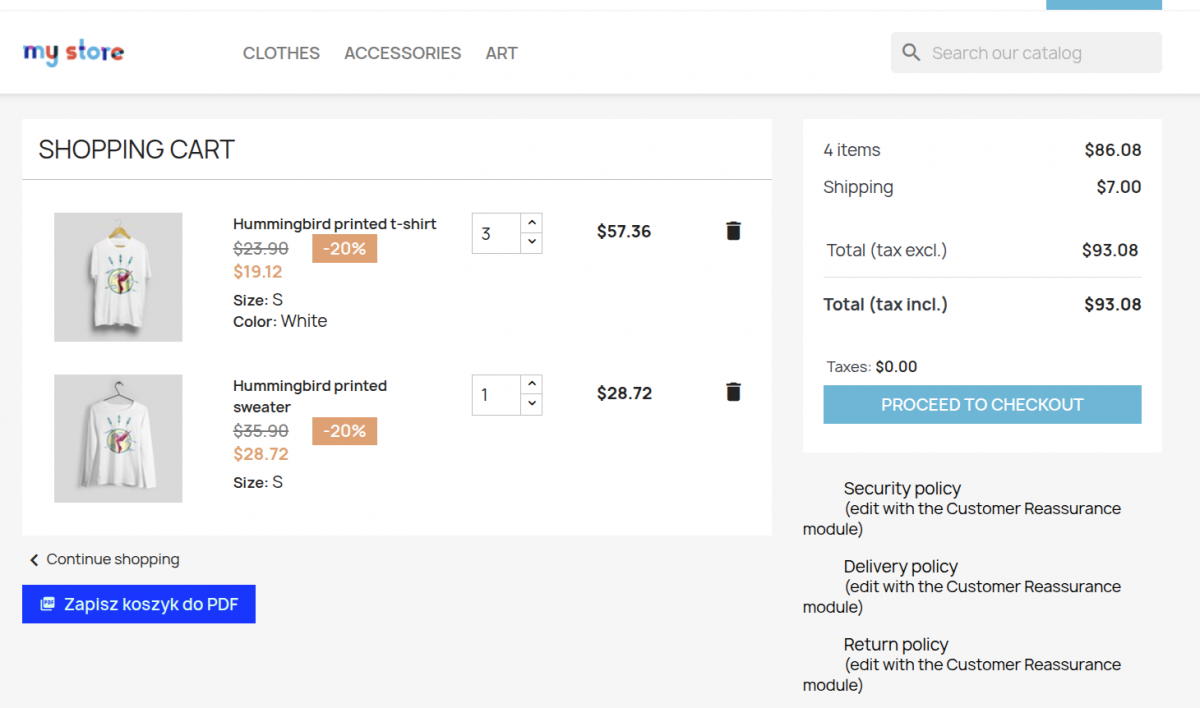
The PDF Generator module adds a PDF download button to the shopping cart and product pages. With a single click, the customer receives a ready-to-use document featuring the store’s logo and information, products, prices, and a summary.
Custom header and footer per language
Each store language can have its own header and footer in the PDF. Add legal disclaimers, contact information, or marketing content.
QR code in the PDF and full print configuration
An optional QR code in the PDF header links to the product page. In the module settings, you can select which elements should be included in the PDF.
Ideal for B2B and catalogs
A B2B customer sends the shopping cart PDF to the purchasing department before placing an order.
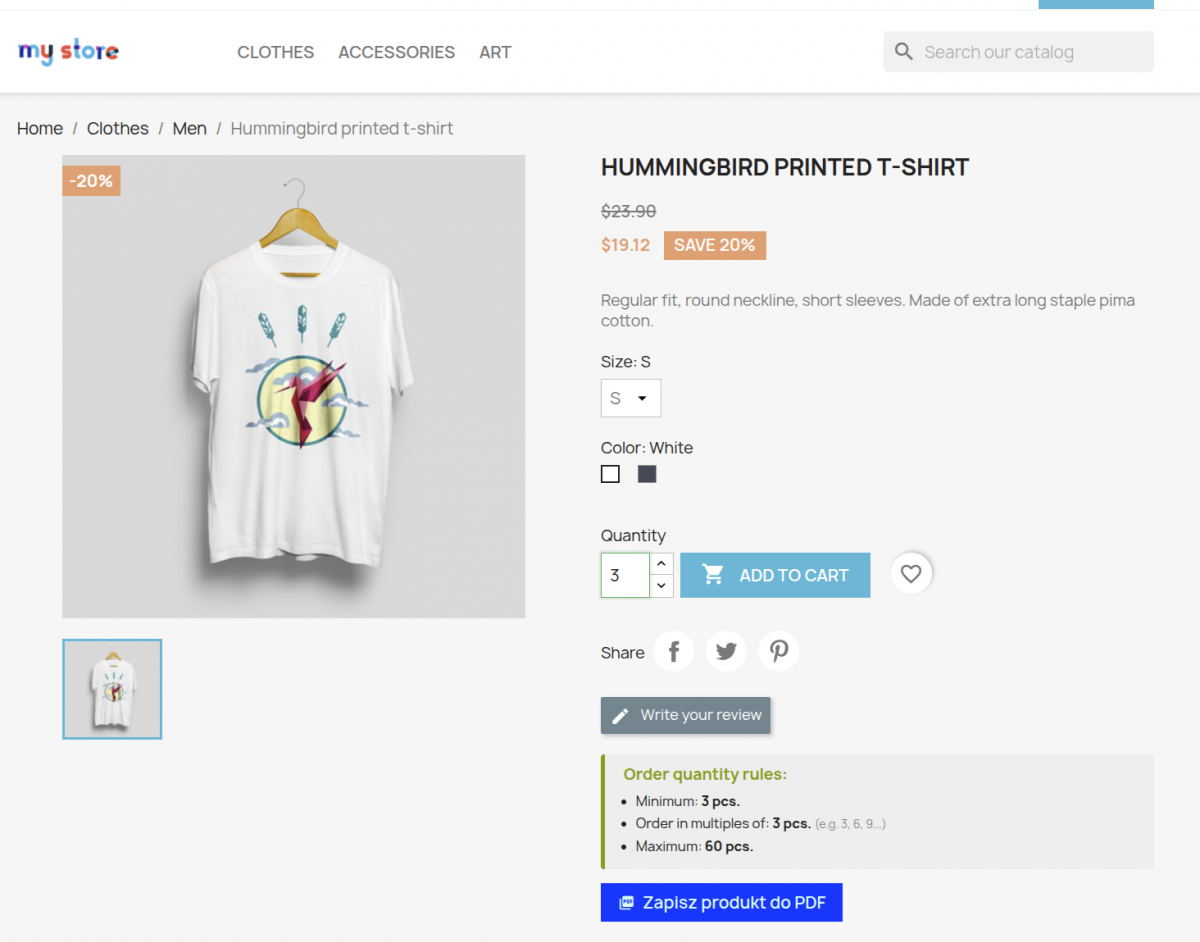
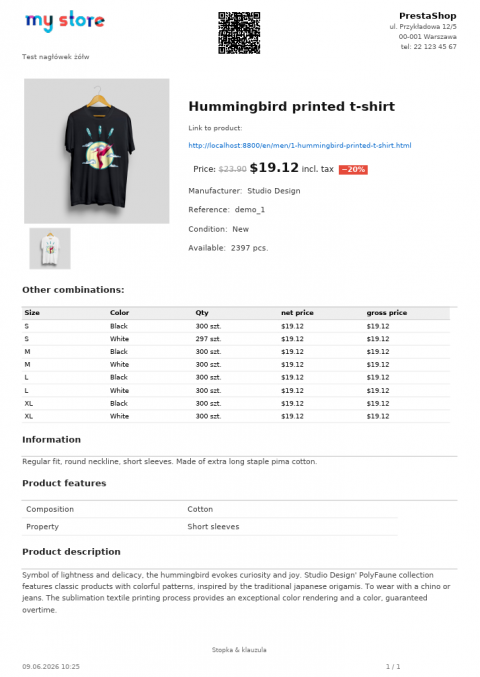
Product card with full specifications, combinations, and technical features—ready for printing or emailing.
PDF generated in the customer’s session language—header, footer, and button labels per language.
Full print configuration
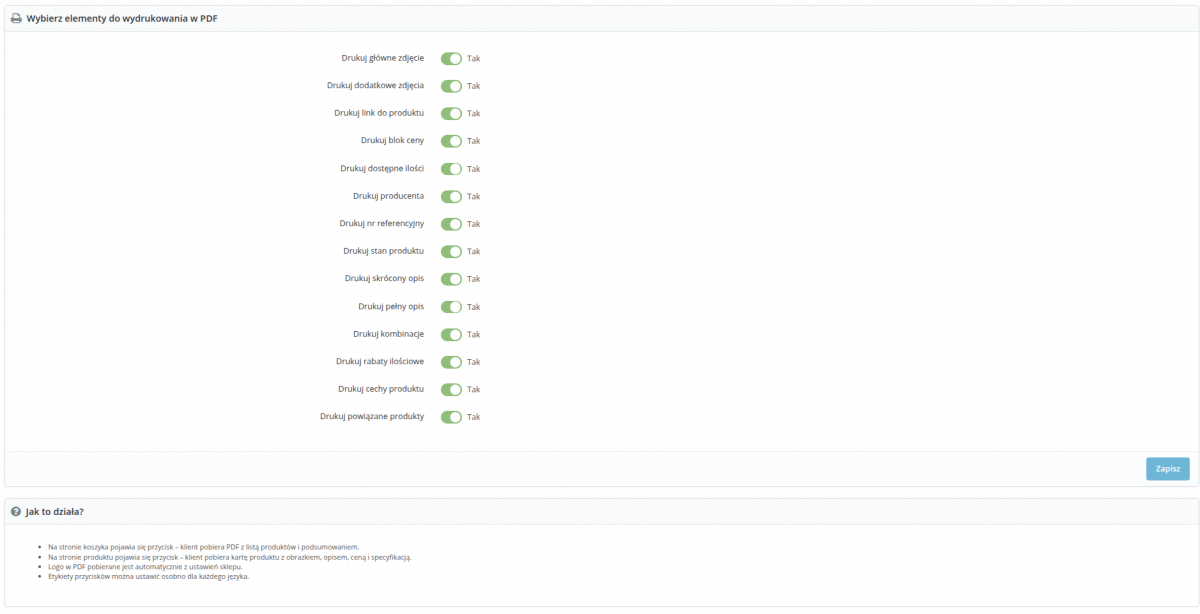
14 toggles: choose what to include in the PDF—main image, additional images, price, short description, full description, combinations, features, volume discounts, related products, and more.
You can enable the cart PDF and product PDF independently with a single toggle.
Simple installation and use
PDF buttons appear automatically after installation—no template editing required. You can set the button color and label in the admin panel, and configure text fields per language.
The PDF library and QR code generator are included with the module—no external dependencies.
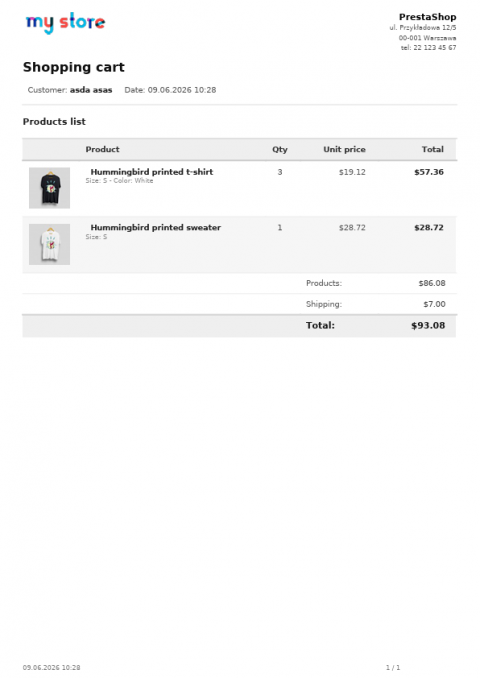
- A PDF button appears on the shopping cart page—the customer clicks it to download the finished file.
- The document includes product thumbnails, names, quantities, unit prices, and total prices.
- Summary showing product total, discount, shipping costs, and total amount due.
- The logged-in customer’s first and last name and the date the PDF was generated.
- Store logo and custom header/footer per language.
14 elements—choose what goes into the PDF.
- Main photo and additional photos (up to 6).
- Price with percentage discount information.
- Short description and full product description.
- Combinations and a table with variants, quantities, and net/gross prices.
- Product features and a table with technical specifications.
- Volume discounts and a price threshold table.
- Related products, manufacturer, reference number, status, and availability.
- Header and footer edited via TinyMCE—insert any HTML.
- Each store language has a separate header and footer—e.g., legal notices in PL and EN.
- QR code in the product PDF—automatically generated from the product page URL, displayed in the header.
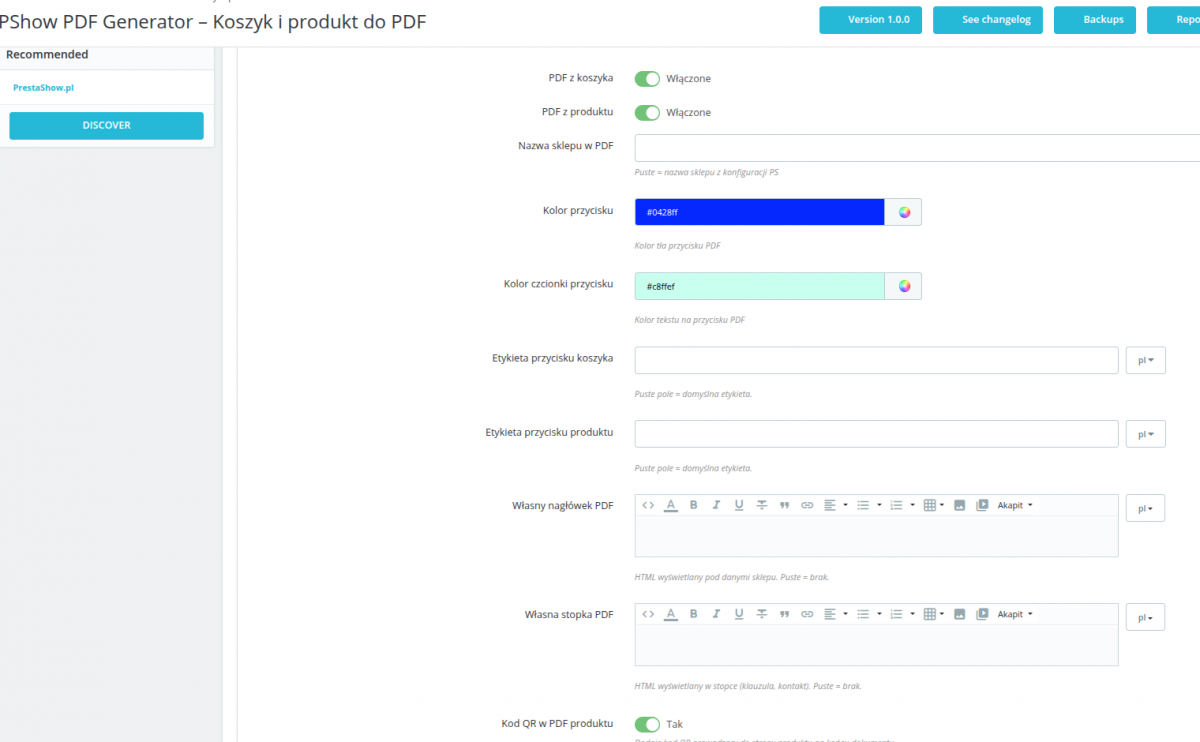
- Background color
- Font color
- Shopping cart button label
– e.g., “Pobierz PDF” (PL), “Download PDF” (EN). - Product button label
– a separate label for the button on the product page. - Store name in PDF
– Override the default name from the PrestaShop configuration or leave it blank.
Quick overview of features
- Shopping Cart PDF – download the shopping cart contents as a PDF: product thumbnails, quantities, unit prices, discount, shipping, and summary
- Product PDF – product page with main image, additional images (up to 6), description, price, variations, features, and related products
- Custom header per language – TinyMCE editor, any HTML: marketing header, company information, or legal notice
- Custom footer per language – TinyMCE editor, any HTML: legal disclaimer, contact information, terms and conditions
- QR code in the product PDF – a link back to the product page, displayed in the PDF header
- Store logo – automatically retrieved from PS configuration, no additional settings required
- PDF button background color – color picker in the admin panel, customize to match the store’s theme
- PDF button font color – color picker for button text, full control over contrast
- Button label per language – separate label text for each shopping cart and product language
- Selection of product card elements – toggles for: main image, additional images, link, price, quantity, manufacturer, reference number, status, short description, full description, combinations, quantity discounts, features, related products
- Multilingual support – header, footer, and button labels stored separately per language; PDF generated in the customer’s session language
- Independent activation – the shopping cart PDF and product PDF can be enabled or disabled separately
- Compatibility with PS 1.7, 8.x, and 9.x – tested on all supported PrestaShop versions
- PDF and QR libraries included —no external server-side dependencies required
Changelog (0)
# Changelog
## 1.1.2 – 2026-09-28
- Fixed: with a page cache (e.g. LiteSpeed Cache) the "logged-in customers only" restriction could be applied to everyone or to no one — the customer's login is now checked live on every visit
## 1.1.1 – 2026-09-28
- Changed: for products available to logged-in customers only, guests now see the PDF button and the attachment list; the button shows a "log in to download" window and the attachments show a login notice
## 1.1.0 – 2026-09-23
- New: product PDF sheet and attachments can be made available to logged-in customers only (per product, and per shop in a multistore setup)
- New: choose whether the restriction covers only the generated PDF sheet, only the attachments, or both
- New: downloads of restricted files are reported as messages in Customer Service (can be turned off in the module settings)
- New: download history on the customer page in the back office
- New: in a multistore setup, download reports only show downloads made in the shops the employee is working in
- New: "Recently downloaded sheets" dashboard widget and a full, filterable downloads list in the module
- Improved: user manual updated with the new features (PL/EN)
## 1.0.9 – 2026-09-14
- Fixed: przycisk "Zapisz produkt do PDF" czasem pobierał kartę zupełnie innego produktu — przy kilku otwartych kartach produktów w przeglądarce ostatnio przeglądany produkt nadpisywał ten, który był aktualnie otwarty. Przycisk teraz zawsze pobiera plik dla produktu widocznego na stronie
## 1.0.8 – 2026-08-31
- Changed: the language field in the product attachments panel (Moduły tab) is now multi-select — a file can be assigned to several languages at once, not just one. Leaving the selection empty still means "all languages"
- Data migration for existing shops: the old single-language column (`id_lang`) is converted to the new multi-value column (`lang_ids`) automatically on the next admin page load, preserving already-configured attachments
## 1.0.7 – 2026-08-31
- Fixed: the new attachment-related strings (settings label/description and the whole product attachments panel) had no translation entries — an English (or German/Spanish/French/Italian) admin was falling back to the raw Polish source text; added proper translations for all 6 shipped languages (pl, en, de, es, fr, it)
## 1.0.6 – 2026-08-31
- Language picker for a product attachment now defaults to (and can be explicitly set to) "Wszystkie języki" (all languages) instead of requiring a language — an attachment left this way keeps showing on the product page in every language, same as before
- When "Pobieraj załącznik produktu zamiast generowanego PDF" is enabled, the button now falls back to the attachment marked "Wszystkie języki" when no attachment is flagged for the visitor's specific language (a language-specific match still always wins over the fallback); still falls back to generating a PDF when no attachment is flagged at all
- Fixed: the product attachments panel (Moduły tab on the product edit page) was rendered unstyled — `addCSS`/`addJS` don't apply inside PS8/9's Symfony product edit page; assets are now loaded via inline ``/`` tags in the panel's own template, and the panel got a visual redesign (card layout, styled select, toggle switch)
## 1.0.5 – 2026-08-31
- Added: setting "Pobieraj załącznik produktu zamiast generowanego PDF" — when enabled, the "PDF z produktu" button downloads a product attachment instead of generating a PDF
- Added: product edit page now has a panel (product attachments tab) to assign a language to each attachment and mark which one is the button's source file per language
- Product page attachments list is now filtered by the visitor's language for attachments that have been assigned one (unconfigured attachments keep showing in every language, for backward compatibility)
## 1.0.4 – 2026-07-06
- Fixed: product PDF link was rendered as plain text, so long URLs wrapping onto a new line could be picked up as a truncated link by PDF readers; now rendered as a proper ``
- Fixed: cart PDF showed the wrong product image — it read the raw `id_image` from `Cart::getProducts()` (format `"{id_product}-{id_image}"`) instead of resolving the real image; now uses the selected combination's image when available, falling back to the product cover
- PDF buttons: removed `nofollow` from `rel` (kept `rel="noopener"`) so SEO signals consolidate on the product/cart page instead of the PDF
- `X-Robots-Tag: noindex` is now sent before any redirect in the product/cart PDF controllers, so it's present even when no session cookie is set (e.g. Googlebot)
## 1.0.3 – 2026-06-29
- Product description `` items are now rendered as bullet points (•) in PDF
- PDF buttons: added `rel="noopener nofollow"` and `download` attribute
- PDF generation URL no longer exposes `id_product` parameter (passed via cookie)
- Added `X-Robots-Tag: noindex` header to PDF responses (product and cart)
## 1.0.2
- product pdf fix new line
## 1.0.1
- fix pdf error
## 1.0.0
- initmodule
## 1.1.2 – 2026-09-28
- Fixed: with a page cache (e.g. LiteSpeed Cache) the "logged-in customers only" restriction could be applied to everyone or to no one — the customer's login is now checked live on every visit
## 1.1.1 – 2026-09-28
- Changed: for products available to logged-in customers only, guests now see the PDF button and the attachment list; the button shows a "log in to download" window and the attachments show a login notice
## 1.1.0 – 2026-09-23
- New: product PDF sheet and attachments can be made available to logged-in customers only (per product, and per shop in a multistore setup)
- New: choose whether the restriction covers only the generated PDF sheet, only the attachments, or both
- New: downloads of restricted files are reported as messages in Customer Service (can be turned off in the module settings)
- New: download history on the customer page in the back office
- New: in a multistore setup, download reports only show downloads made in the shops the employee is working in
- New: "Recently downloaded sheets" dashboard widget and a full, filterable downloads list in the module
- Improved: user manual updated with the new features (PL/EN)
## 1.0.9 – 2026-09-14
- Fixed: przycisk "Zapisz produkt do PDF" czasem pobierał kartę zupełnie innego produktu — przy kilku otwartych kartach produktów w przeglądarce ostatnio przeglądany produkt nadpisywał ten, który był aktualnie otwarty. Przycisk teraz zawsze pobiera plik dla produktu widocznego na stronie
## 1.0.8 – 2026-08-31
- Changed: the language field in the product attachments panel (Moduły tab) is now multi-select — a file can be assigned to several languages at once, not just one. Leaving the selection empty still means "all languages"
- Data migration for existing shops: the old single-language column (`id_lang`) is converted to the new multi-value column (`lang_ids`) automatically on the next admin page load, preserving already-configured attachments
## 1.0.7 – 2026-08-31
- Fixed: the new attachment-related strings (settings label/description and the whole product attachments panel) had no translation entries — an English (or German/Spanish/French/Italian) admin was falling back to the raw Polish source text; added proper translations for all 6 shipped languages (pl, en, de, es, fr, it)
## 1.0.6 – 2026-08-31
- Language picker for a product attachment now defaults to (and can be explicitly set to) "Wszystkie języki" (all languages) instead of requiring a language — an attachment left this way keeps showing on the product page in every language, same as before
- When "Pobieraj załącznik produktu zamiast generowanego PDF" is enabled, the button now falls back to the attachment marked "Wszystkie języki" when no attachment is flagged for the visitor's specific language (a language-specific match still always wins over the fallback); still falls back to generating a PDF when no attachment is flagged at all
- Fixed: the product attachments panel (Moduły tab on the product edit page) was rendered unstyled — `addCSS`/`addJS` don't apply inside PS8/9's Symfony product edit page; assets are now loaded via inline ``/`` tags in the panel's own template, and the panel got a visual redesign (card layout, styled select, toggle switch)
## 1.0.5 – 2026-08-31
- Added: setting "Pobieraj załącznik produktu zamiast generowanego PDF" — when enabled, the "PDF z produktu" button downloads a product attachment instead of generating a PDF
- Added: product edit page now has a panel (product attachments tab) to assign a language to each attachment and mark which one is the button's source file per language
- Product page attachments list is now filtered by the visitor's language for attachments that have been assigned one (unconfigured attachments keep showing in every language, for backward compatibility)
## 1.0.4 – 2026-07-06
- Fixed: product PDF link was rendered as plain text, so long URLs wrapping onto a new line could be picked up as a truncated link by PDF readers; now rendered as a proper ``
- Fixed: cart PDF showed the wrong product image — it read the raw `id_image` from `Cart::getProducts()` (format `"{id_product}-{id_image}"`) instead of resolving the real image; now uses the selected combination's image when available, falling back to the product cover
- PDF buttons: removed `nofollow` from `rel` (kept `rel="noopener"`) so SEO signals consolidate on the product/cart page instead of the PDF
- `X-Robots-Tag: noindex` is now sent before any redirect in the product/cart PDF controllers, so it's present even when no session cookie is set (e.g. Googlebot)
## 1.0.3 – 2026-06-29
- Product description `` items are now rendered as bullet points (•) in PDF
- PDF buttons: added `rel="noopener nofollow"` and `download` attribute
- PDF generation URL no longer exposes `id_product` parameter (passed via cookie)
- Added `X-Robots-Tag: noindex` header to PDF responses (product and cart)
## 1.0.2
- product pdf fix new line
## 1.0.1
- fix pdf error
## 1.0.0
- initmodule
Technical requirements
Technical Requirements
- PHP 7.1 - 8.x
- Server extension ionCube Loader
- PrestaShop Importer only: PHP libxml version > 2.9.3
- PrestaShop Facebook Integrator only: PHP 7.2 or higher
- PrestaShop VAT Validator only: PHP SOAP
Support & Updates
Support = Updates + HelpDesk
You get 90 days (3 months) access to the complete PrestaShow support package.
Module updates
Modules will inform you about available updates. Read the changelog and perform a 1-click module update directly from your store.
HelpDesk panel
This is the panel where we will provide you with help. On HelpDesk you can report problems, order free module installation and updates, and order modifications and custom programming work.
Extend support
After support expires, you can use the module without any restrictions. You can extend your support access at any time you need it.
Knowledge Base & FAQ
Free forever
The knowledge base is available to everyone. You will find module documentation as well as instructions, videos and answers to frequently asked questions.
License
Lifetime license for the module
- You can use the module without limitation in 1 store = 1 domain.
- You can use an additional domain, e.g. for developer copy.
- For a small fee you can change the domain for the module yourself.
Additional domains for Multistore
- All our modules support PrestaShop Multistore.
- Supporting unlimited domains for PrestaShop Multistore requires purchasing multistore support for the module.
Modifying the code
- The module code related to the integration with the store and the design (.tpl, .css, .js) has open source code and you can modify it freely.
- The module's source code (.php) is encrypted with ionCube, and modifying it will void the warranty.
No entries yet.
No customer reviews for the moment.