Kliknij by skopiować
Services and extensions
Express module installation is done on HelpDesk up to 3 working days. You can install the modules on your own - see the FAQ on HelpDesk for instructions.
This extension will allow you to configure the module independently in multiple Multistore stores. Without this extension, you will only be able to use the module in one Multistore store.
100,00 EUR VAT incl. 81,30 EUR net
81,30 EUR net
100,00 EUR VAT incl.
    325 points in the loyalty program
    Support and
    Updates With the module, you get 3 months of support, which you can extend at any time
    Instant
    Access You will get access to the module files immediately after payment
    Invoice
    VAT 0% You will receive a EU-invoice with 0% VAT.
    Detailed description

    Google tools integration for PrestaShop

    integration of modern analytics

    Guaranteed ultra-precise integration

    PrestaShop Google Integrator is a module that connects your store to Google Analytics 4, Google Tag Manager, Google Ads and additional Google services needed for precise sales measurement and effective remarketing.

    What the Google Integrator module does for PrestaShop

    With the module, you configure tracking of traffic, eCommerce events, ad conversions, sales sources and Google Consent Mode v2 compliance in one place, without manually assembling multiple separate integrations.

    Precise analytics and remarketing

    This is a solution for stores that want to measure more, reduce data loss and make decisions based on more accurate traffic, campaign and sales information.

    1063304834.thumbnail.png

    Google Integrator module is recommended
    by top marketing agencies around the world.

    All reviews of our services are verified and come from PrestaShow customers.
    If you want to learn more about how we process feedback, please read our Terms of Service.

    474429243.thumbnail.png

    Google Analytics 4 for PrestaShop stores

    More accurate data on traffic, sales and customer behavior

    Update 2026 - news and improvements

    The integration has been prepared with modern eCommerce in mind, so the module helps you organize your store's analytics and use GA4 as a tool for business decisions, not just chart collection.

    The module transfers data about visits, eCommerce events, products, shopping carts and orders to Google Analytics 4, so you can analyze not only the traffic itself, but also the real impact of campaigns on sales.

    Guarantee of effectiveness

    Our module is a guarantee of collecting all data about users, traffic sources, events. This is important especially when you want to compare the effectiveness of traffic sources, measure the purchase path and more quickly catch the places where users drop out of the purchase process.

    Google Tag Manager and DataLayer in PrestaShop

    Automatic transfer of eCommerce events to Google tools

    DataLayer (data layer)

    The module prepares and transmits DataLayer with events from the store, so Google Tag Manager can receive data about user actions and send it further to GA4, Google Ads and other services.

    The module will recognize and forward all events from your store to Google services

    Full automation

    The module reduces manual deployments, reduces the risk of errors and speeds up the configuration of tags, which in the standard approach often require additional work by a developer or agency deployment.

    This means a faster start, easier measurement expansion and more control over what data goes into which marketing tools.

    The module provides full automation, so you can teach GTM to communicate with your store in just a few clicks.

    Tag gtag.js

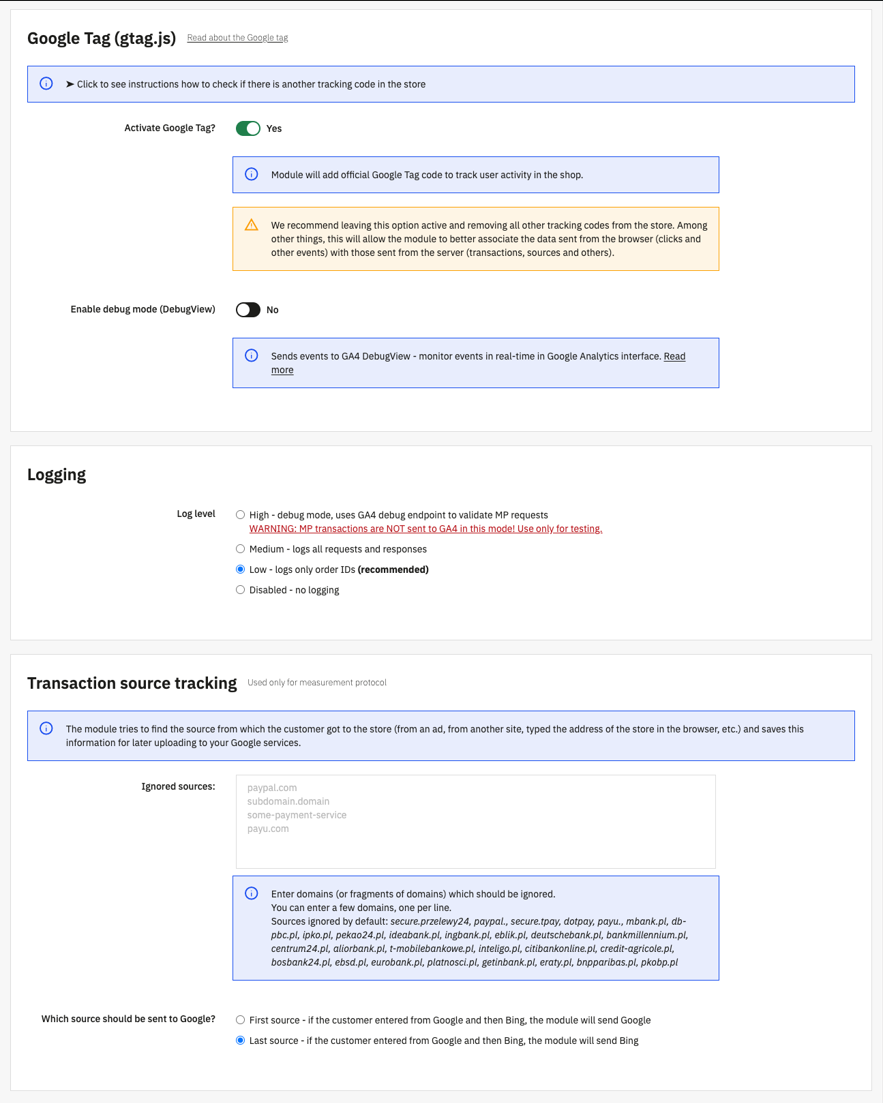
    This is a single tag with which you can use measurement and advertising services, including Google Ads, Analytics, Campaign Manager, Display & Video 360 and Search Ads 360. Instead of managing multiple tags across different Google services, use gtag.js.

    Customization

    We will custom implement the custom events that occur in your store and fix the gaps and errors in the template tags and modules.

    3831081743.thumbnail.png

    • Product list browsing
    • Interacting with a product in the product list
    • Entering a product from the product list
    • Direct entry into a product
    • Viewing product details
    • Adding a product to the shopping cart
    • Removing a product from the shopping cart
    • Browsing the shopping cart
    • Starting an order
    • Order steps
    • Completing shipping information
    • Completing payment information
    • ECommerce data: amounts, currencies, discounts
    • Completing the order
    • Returning the order

    DataLayer is the data layer for tagging and sending events, and GTM is the tag management system that receives the data and passes it on.

    359041551.thumbnail.png
    GA4 - guaranteed to pass on 100% of conversions

    Google Ads, remarketing and Enhanced Conversions

    Better data for campaign optimization and sales recovery

    Ads and remarketing

    The module supports Google Ads and remarketing so you can build more effective campaigns based on real data about users, products and in-store sales.

    Enhanced Conversions

    Support for Enhanced Conversions helps you improve the quality of your ad conversion measurement, which is important when you want to better evaluate the effectiveness of your campaigns and make more accurate budget decisions.

    In practice, this means more precise ad targeting, better remarketing, and a greater chance that sales data will be correctly linked to ad actions.

    802120759.thumbnail.png

    Traffic sources and sales attribution in PrestaShop

    Where customers are really coming from and which inputs are selling

    4264128902.800w.png

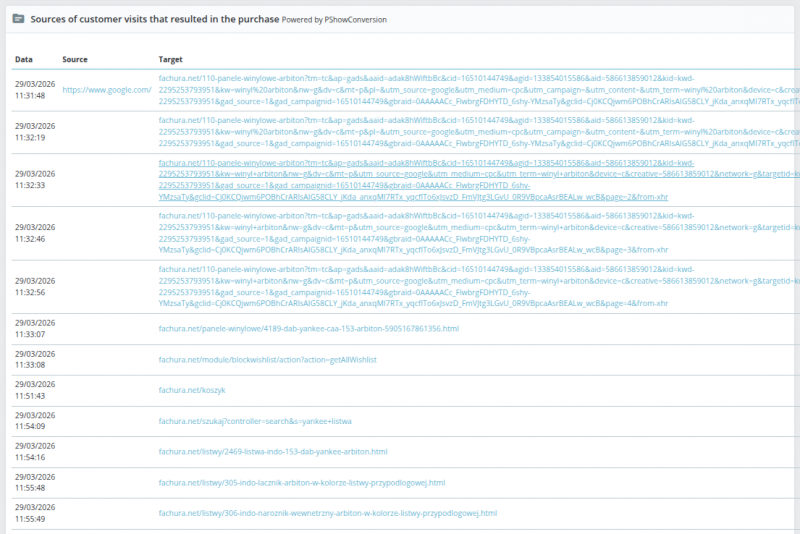
    Examines the sources of inputs and customer traffic in the store

    The module analyzes the sources of customer inputs to the store and helps you better understand which marketing channels realistically lead to sales, and which ones just show up along the way.

    The module supports tracking traffic on the server side as well - this data complements browser-side gaps and blockages.

    Detail the customer's sources and traffic in the Back Office

    You can decide whether the first source of input or the last one should be more important, set the validity time of the source, and exclude inputs that disrupt the analysis, for example, payment pages.

    For example - if a customer leaves your store at the shopping cart or payment stage - this could be an indication that there is a bug in your store that is worth paying attention to.

    Customize the configuration according to your marketing agency's needs

    • If a customer visits your store several times - you can specify which traffic source (first or last) will be sent to Google.
    • Set the time in hours after which the customer's entry source will expire. When a customer visits your store after a long absence a new traffic source will be indicated.
    • Indicate the sources of entry to be omitted from the statistics, such as payment method pages.
    3124392320.thumbnail.png

    Professional license only
    Measurement Protocol advanced event tracking

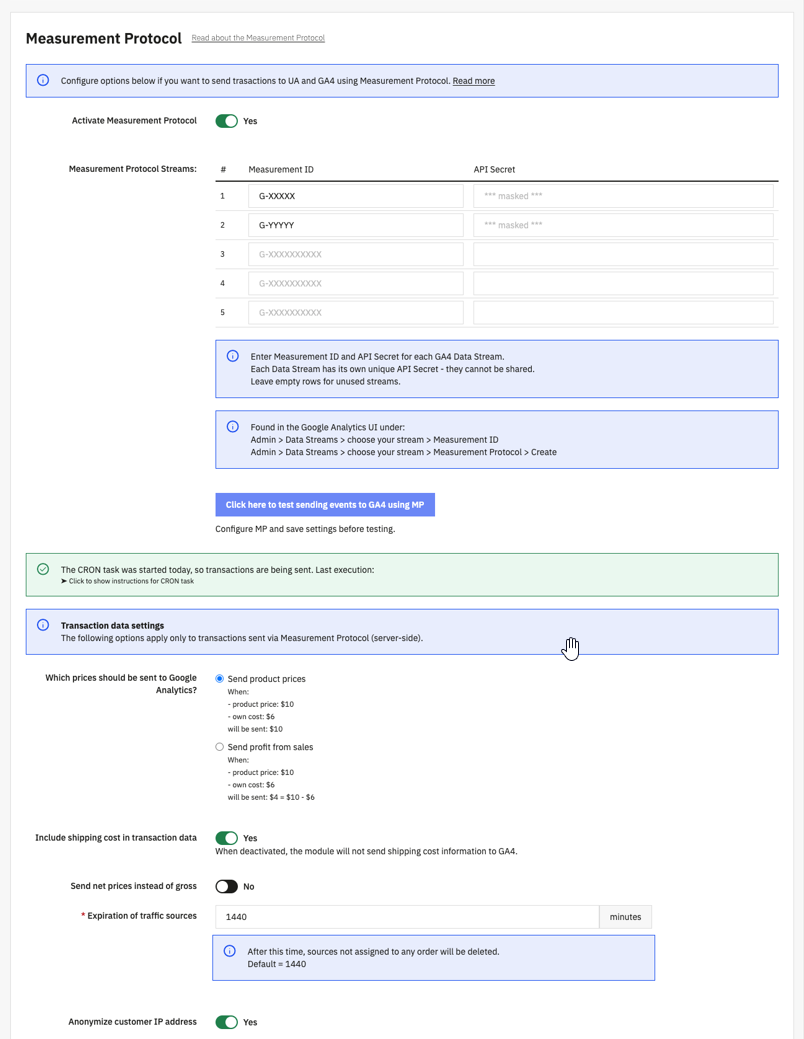
    Measurement Protocol improves event tracking in your store by sending data on the server side. It's a technology that guarantees the transfer of 100% of events and conversions. With this solution, you are guaranteed to pass on every order - even when the customer does not return to the "Thank You Page".

    820800373.thumbnail.png

    Professional license only
    Advanced tracking of the source of store entries

    With our proprietary solutions, you will get better precision in determining the source of customer entry to your store.

    • Specify the sources of store entry that you want the module to ignore - directly in the module configuration, such as payment pages.
    • Specify which source of customer entry - the first or the last - to be passed to Google analytics.
    • The module also tracks input sources at the server level - this is useful if you block tracking from your web browser.
    2447491080.thumbnail.png

    3924901971.thumbnail.jpg

    Measurement Protocol - how not to lose conversions with PrestaShop

    Server-side tracking for more accurate order measurement

    Measurement Protocol allows you to send events and conversions to Google on the server side, so you reduce the risk of losing data in situations where standard browser-based tracking is not enough.

    1

    Pinpoint order statuses

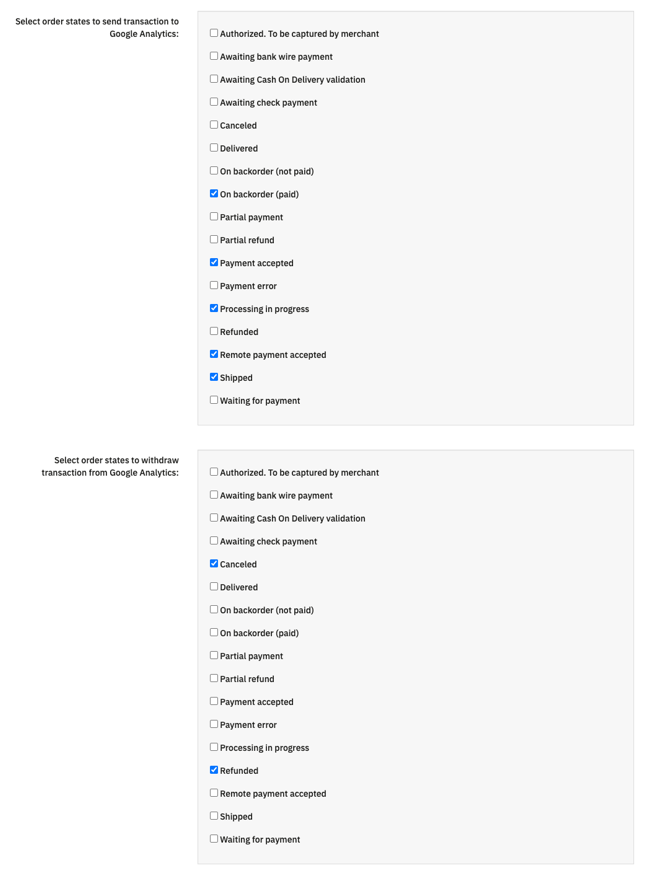
    The module sends events from your store to Google when an order receives the order status you indicate.

    2

    The module will detect changes in order statuses

    The module will detect changes in order statuses and forward all events, including those you mark as conversions.

    3

    The module supports all payment methods

    It does not matter if the "Thank you page" is loaded in the customer's browser.

    Indicate order statuses

    The module can respond to changes in order statuses and forward conversions even if the user does not return to the order confirmation page after payment.

    The module sends orders from the store to Google when the order receives the indicated status.

    The module supports all payment methods

    It doesn't matter if the "Thank you page" is loaded in the customer's browser.

    This is very important for stores that want to measure sales more accurately, work with different payment methods and don't want to lose data through browser limitations or user behavior.

    968150663.thumbnail.png
    The module guarantees 100% precision in transferring conversions from PrestaShop to Google services - indicate order statuses and you're done.

    Sales analytics, currencies and data in Back Office

    Support for currencies and additional costs

    The module allows you to adjust the way you transfer data to GA4 to the real needs of your store: you can analyze turnover or revenue, net or gross values, delivery costs and currency information.

    • Transmit turnover / income.
    • Transmit net / gross values.
    • Exclude / include delivery costs.
    • Transmit currency information.

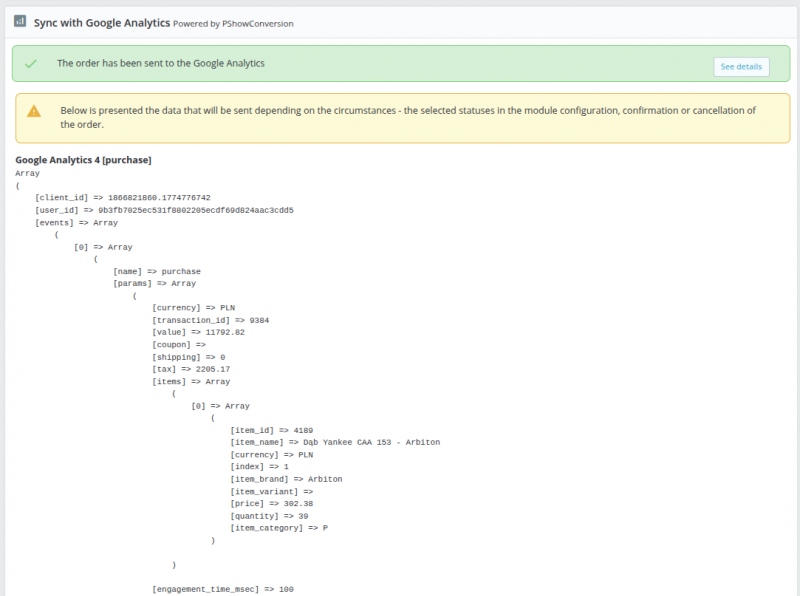
    In addition, important information about the sources of inputs and data transferred to Google is available directly in the Back Office, with orders and abandoned shopping carts.

    • List of customer input sources with indication of the best source.
    • List of data that has been transferred to GA4.
    • Confirmation of receipt of data by GA4.

    This way you don't have to switch between multiple panels to evaluate where the customer came from, what data was sent and whether the integration is working properly.

    Conversion to the main currency of your Google account is handled by Google according to the current exchange rate.

    2316267973.800w.png

    Google Consent Mode v2 in PrestaShop

    Compatible cooperation of analytics with the cookie module

    GCMv2

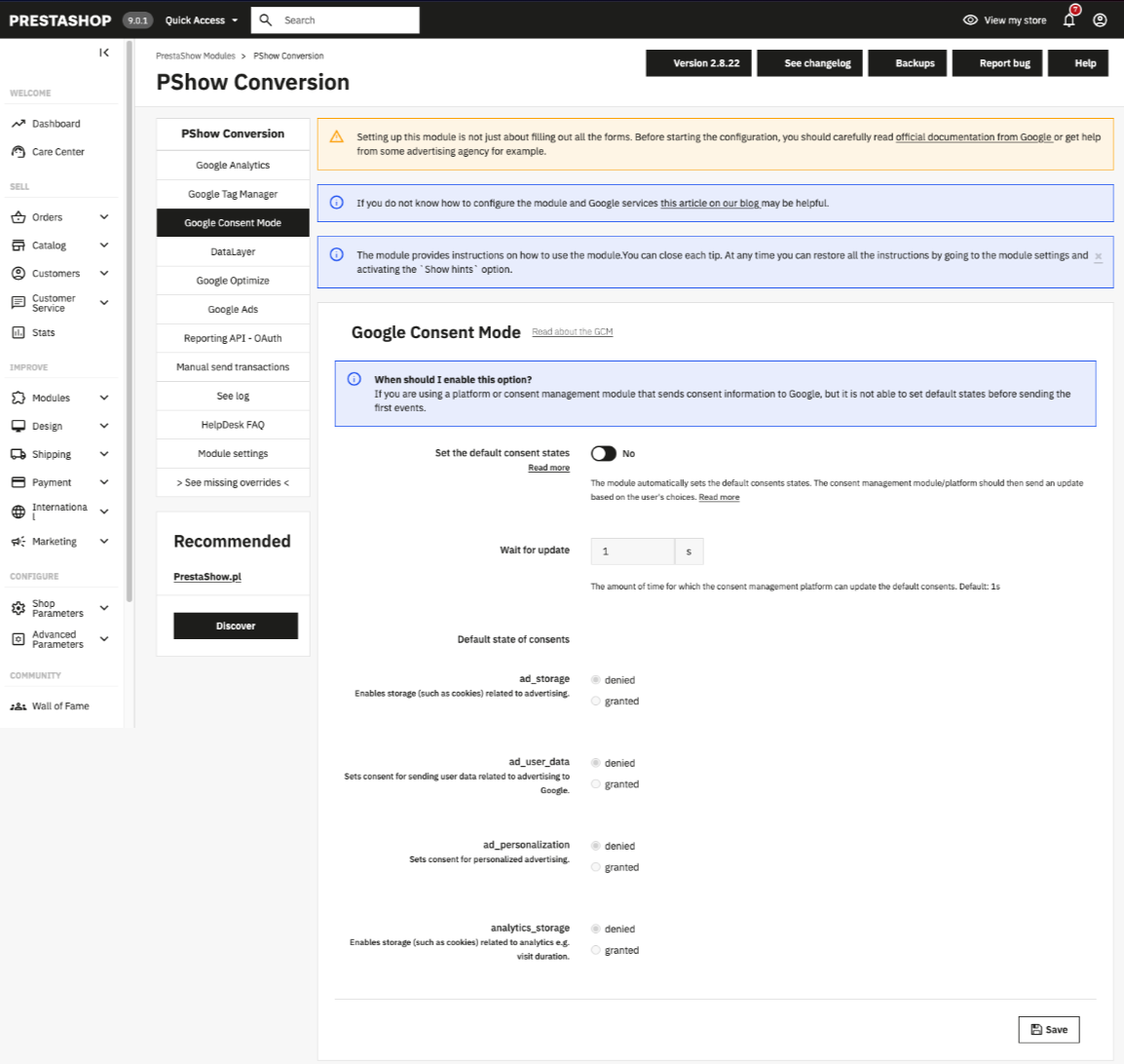
    The module supports Google Consent Mode v2 and allows you to configure the default consents sent to Google even before the user fully consents to cookies.

    This helps keep your deployment more compliant with Google's requirements and organizes the collaboration between analytics, ads and the consent mechanism in your store.

    Useful information and instructions

    If you need more detailed settings or explanations, users can go straight to the module's documentation and FAQ: https: //helpdesk.prestashow.pl...

    Cookies handling in compliance with the law
    PrestaShop Cookies Manager

    In our store you will find a modern module for automatic detection and handling of all types of cookies in PrestaShop - as required by law.

    Cookies Manager works with Google Integrator module.

    PrestaShop Google Consent Mode V2
    In the configuration of the Google Integrator module, you can configure the default consents (on-page Default) sent by the module to GCMv2.

    2529626483.thumbnail.png
    prestashop ga4 debugging
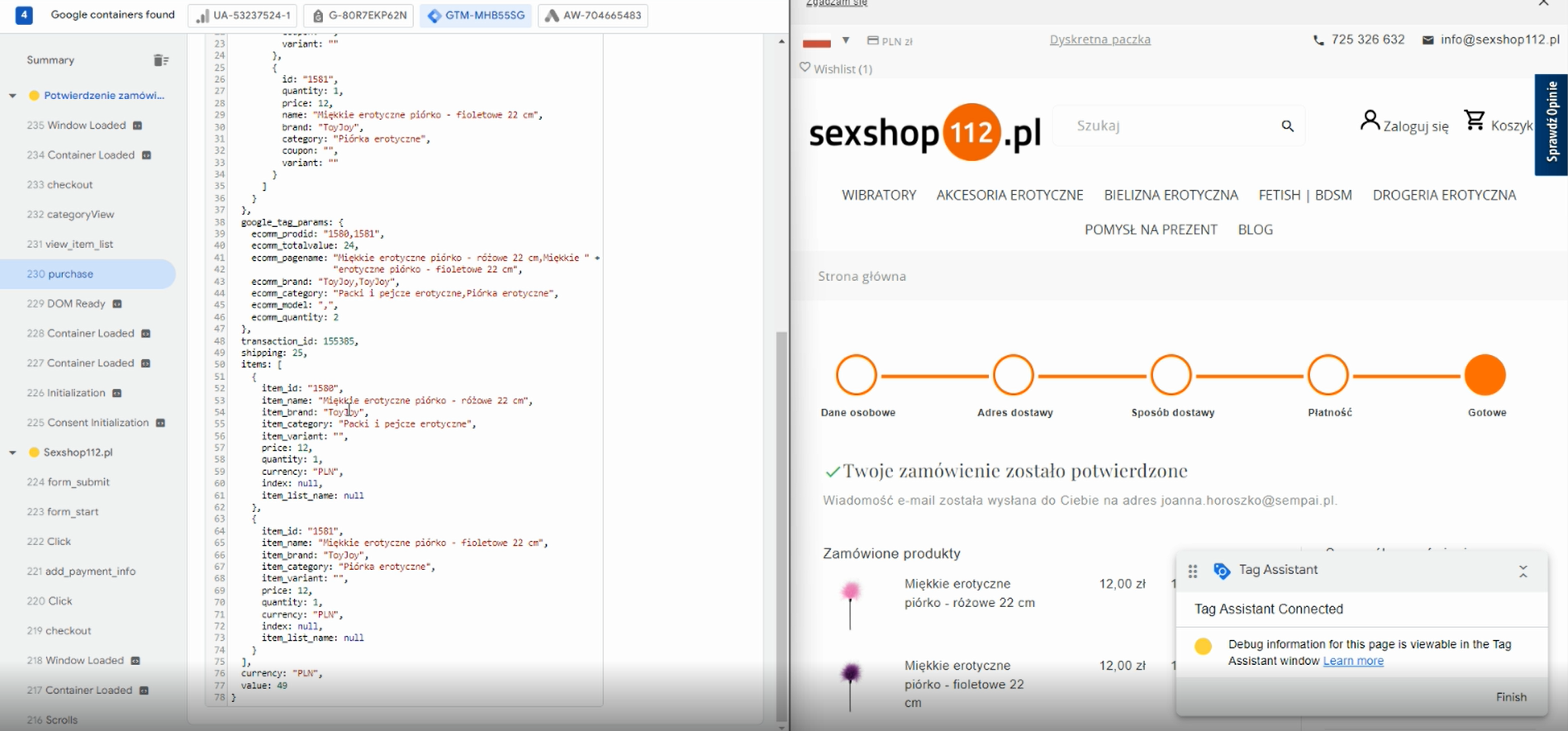
    Advanced debugging mode - detailed information about the integration is available in the browser console.

    Debugging Google integration in PrestaShop

    A mode with which you can easily perform configuration

    The module offers a debugging mode that allows you to observe DataLayer events and check more quickly whether the integration is working properly at the implementation stage.

    This makes it easier to work with a marketing agency, analytics specialist or developer, because errors in event transmission can be caught right away, instead of having to look for them only after the quality of the data drops.

    This makes the configuration of GTM, GA4 and Google Ads more predictable, and the store moves faster from module installation to real-world measurement.

    When would this module be the best choice?

    Configure once and forget

    • PrestaShop Google Integrator will work best when you want to combine GA4, GTM, Google Ads, remarketing, Consent Mode v2 and more advanced sales measurement and traffic tracking in a single module without building the integration from multiple separate components.
    • This is a good solution for stores that want to improve the quality of marketing data, better analyze sales sources, reduce conversion loss, and work more conveniently with an agency or their own eCommerce team.
    • If you need not only a module, but also a full implementation, configuration and performance verification, this section can be completed with a CTA to Google Account Configuration Service.

    Do you need comprehensive implementation assistance?

    If you need a comprehensive implementation service of all Google tools by a specialist, buy a module with Google account installation and configuration services - you can find them in the top section of the page, in the module price box.

    Google account setupservice includes Merchant Center account setup for free - if you use our Feeder module.

    If you have individual needs - please contact us.

    License comparison
    Standard
    VS Professional

    Both licenses include basic integration of GA4, GTM, Google Ads and support for Google Consent Mode v2. The Professional version extends the module with server-side Measurement Protocol and advanced analysis of client traffic sources.

    StandardProfessional
    Track GA4, GTM, Ads, gtag.js and browser-side input sources✅✅
    Google Consent Mode v2 support✅✅
    Advanced Measurement Protocol tracking on the server side❌✅
    Advanced tracking of the source of customer inputs to the store❌✅


    Other module functions and support are the same for standard and professional license.

    Minor additions and enhancements for even better analytics and advertising

    Extra features as standard

    OPC order on one page and in multiple steps

    The module supports and examines order and traffic statistics for One Page Checkout (OPC) orders and in multiple steps. The module supports custom shopping cart modules, including BestKit, Sunnytoo, Knowband, Klarna, Svea, PayPal, Supercheckout and others.

    Order analytics from before installing the module

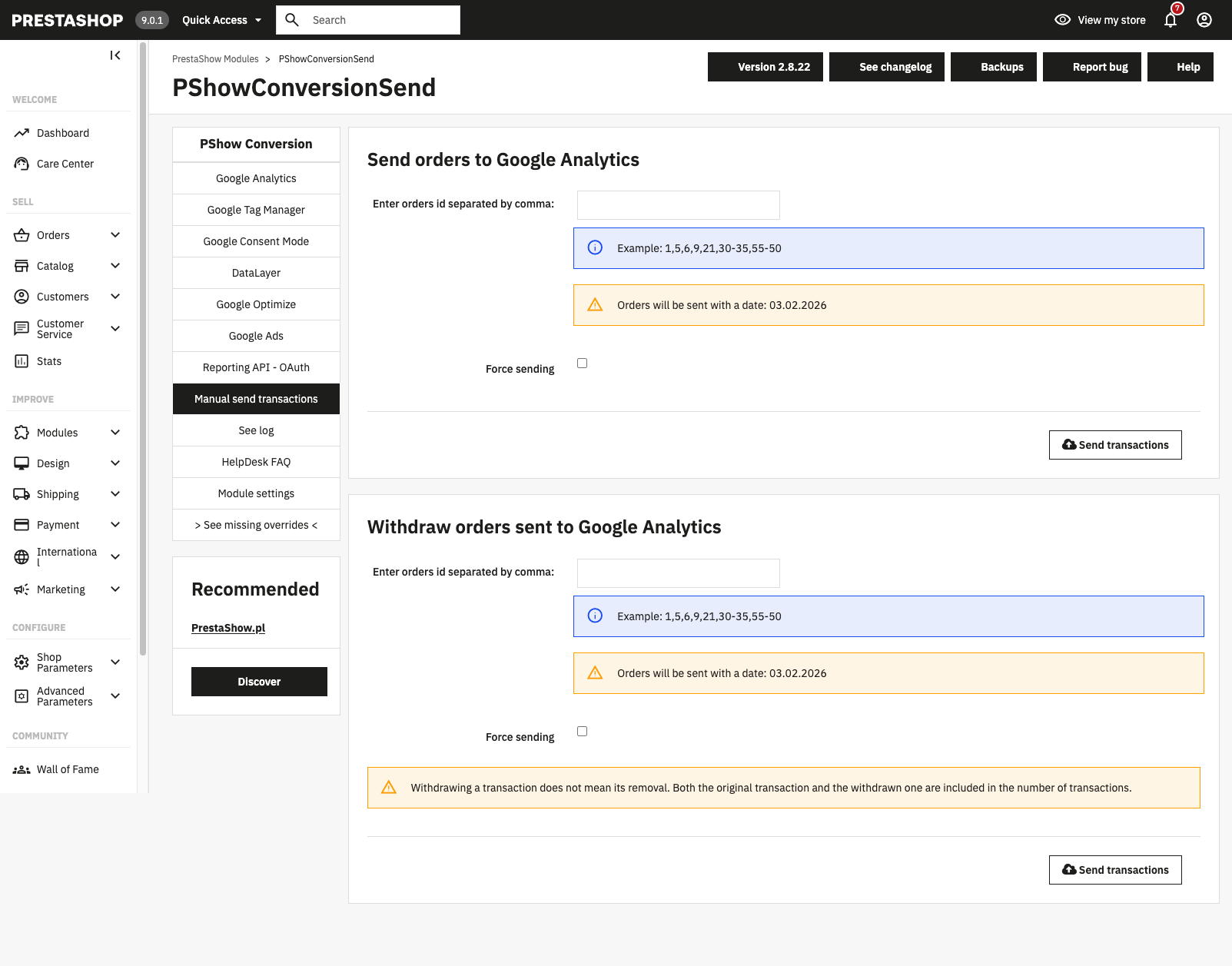
    The module will allow you to send existing orders in the store to your Google Analytics account in bulk. These can be orders created before the installation of the module.

    Analytics of orders from outside PrestaShop

    If the orders in your store are generated by other sources, such as ERP integration, Baselinker, Allegro, etc. - the module will detect them and send information about them to Google. You can also skip them.

    Audit and customized approach?

    Contact us for a quote for a professional audit and a complete Google services implementation service.

    Guarantee
    quality

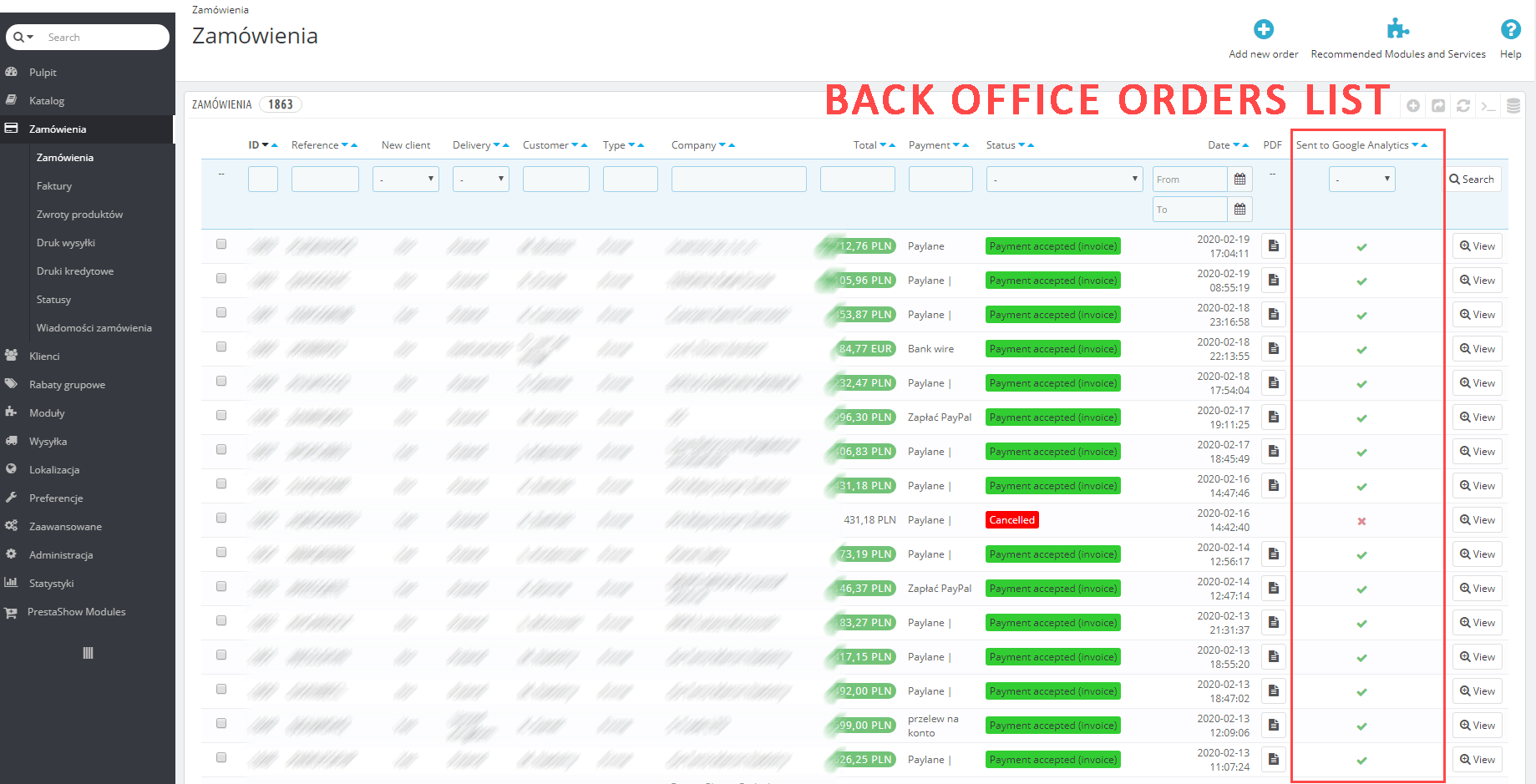
    On the order list, the module adds an interactive "Sent to Google Analytics" button, which is a reliable information based on Google API about whether the order went to Google Analytics. In the order details, you'll find a list with the sources of customer inputs, so you can check where the customers making a purchase in your store are coming from.

    Handling returns and transaction reversals

    The module allows you to manually and automatically (based on any order status) remove order and conversion information from Google Analytics, e.g. in case of a return or cancellation of a sale.

    IP address anonymization in Analytics

    Support for the Personal Data Protection Act (RODO).

    Protection against double sent transactions

    The module controls uploaded orders and will not allow double counting and uploading of this information in Google Analytics statistics.

    Log of performed operations

    The module logs all operations to a log.txt file so you can know the details of all interactions that occur between your customers, store, module and Google Analytics account.

    Multistore support

    PrestaShop Multistore support for this module is optional. With Multistore support, you can set up an independent connection to Google tools for each store separately or together for multiple stores.

    Take advantage of our modules

    In our store you will find modules with which you can integrate your PrestaShop store with other Google services for online stores.

    Google Login

    The ability to log in and register your store with a Google account. The module uses a secure Google API and allows customers to quickly log in with 1-click. This module will speed up the customer's purchase path by up to 80%!

    Google Login

    Google Merchant CenteR & ADS

    With Feeder you will generate XML files necessary to integrate your PrestaShop store with sales portals, price comparison sites and marketplace. In the module you will find ready-made XML integrations and you will be able to create your own.

    Google Merchant Center

    Google My Business

    The module displays reviews and information from your My Company profile and allows you to manage and respond to reviews directly in your store. The answers will also appear in your Google profile.

    Google Business

    Google Integrator - FAQ

    What does the PrestaShop Google Integrator module integrate?

    The module integrates PrestaShop store with Google Analytics 4, Google Tag Manager, Google Ads, remarketing and mechanisms needed to more accurately measure sales and user behavior. Depending on the configuration, it can also support DataLayer, Enhanced Conversions, Consent Mode v2 and Measurement Protocol.

    Does the module work simultaneously with GA4, Google Tag Manager and Google Ads?

    Yes. The module is set up to simultaneously support Google Analytics 4, Google Tag Manager tagging, and Google Ads integration and remarketing. This allows the store to collect data on traffic, eCommerce events and ad conversions in one consistent implementation.

    Do I need Google Tag Manager for the module to work?

    Not always. The module can also work without Google Tag Manager, but GTM gives you more flexibility in tag management and measurement expansion. If you want to develop analytics, ads and additional events more conveniently, using GTM will usually be the best option.

    What is the difference between the Standard and Professional licenses?

    Both licenses include basic integration of the store with Google tools needed for analytics and ads. The Professional license extends the module with more advanced features, such as Measurement Protocol and extensive traffic source determination, giving you more accurate sales measurement and greater control over your data.

    Does the module support Google Consent Mode v2?

    Yes. The module supports Google Consent Mode v2 and can work with in-store cookie consent solutions. This makes it easier to sort out how to submit consent information to Google tools and prepare an implementation that complies with current requirements.

    Does the module help reduce the loss of conversions and events?

    Yes. In a more powerful configuration, the module can support Measurement Protocol and server-side tracking, which helps limit the loss of some order and conversion data. This is especially important for stores that want to more accurately measure the effects of campaigns and limit data turnout.

    Does the module show traffic and sales sources in the PrestaShop dashboard?

    Yes. The module provides detailed data also in the PrestaShop Back Office, so you can check the sources of customer inputs, sales information and data submitted to Google without having to switch between multiple tools.

    Will the module work well for stores selling in multiple countries and currencies?

    Yes. The module is designed to analyze domestic and international sales, so it can support stores operating in multiple markets, currencies and with a more complex sales model. This makes it easier to compare data and evaluate the effectiveness of marketing activities in different countries.

    Is the module difficult to implement and configure?

    The module is designed to make it easy to implement Google analytics and ads in PrestaShop, plus it offers debugging features to help with configuration. If you need a more advanced implementation, you can also refer to the documentation, FAQs and technical support.

    Changelog (v2.8)
    ## 2.8.62 - 2026-11-14

    ### Fixed
    - Traffic sources list again records only visits from external sites and campaign links, not every page viewed inside the shop

    ## 2.8.61 - 2026-11-12

    ### Fixed
    - No more "Cannot redeclare interface Google_Task_Retryable" warning on the storefront when PShow Google Login is enabled in the same shop

    ## 2.8.60 - 2026-11-12

    ### Fixed
    - Cart and checkout events in GA4 now report the correct quantity for each combination when several combinations of the same product are in the cart

    ## 2.8.59 - 2026-11-11

    ### Fixed
    The add_shipping_info event is now sent to Google Analytics when a carrier is chosen in the native One Page Checkout of PrestaShop 9.2

    ## 2.8.58 - 2026-11-06

    ### Fixed
    - Updating a shop whose migration history was recorded out of order no longer resets Consent Mode defaults, product ID formats, the GA4 purchase and GTM delay settings, and no longer logs duplicate column or index errors
    - The obsolete product properties hook is now removed on servers with case-sensitive file systems

    ## 2.8.57 - 2026-11-03

    ### Fixed
    - Consent withdrawn in the cookie banner just before placing the order, an expired consent cookie or a disabled Consent Mode integration no longer let the hashed e-mail and name go to Google; shops without PShow Cookie no longer send the consent as denied

    ## 2.8.56 - 2026-11-03

    ### Fixed
    - Server-side Measurement Protocol hits include the hashed e-mail and name only when the customer granted the ad_user_data consent; the consent state is sent with every hit

    ## 2.8.55 - 2026-10-31

    ### Added
    - Themes can name a product list with data-pshow-list-id and data-pshow-list-name; Google Analytics then reports that list id and name for product impressions and clicks

    ## 2.8.54 - 2026-10-21

    ### Fixed
    - begin_checkout is sent once per checkout instead of on every step of the multi-step checkout
    - Selecting a payment method sends add_payment_info once, also when the cookie banner blocks scripts until consent or the payment step is reloaded

    ## 2.8.53 - 2026-10-15

    ### Added
    - Setting for how many days back (default 7) orders are sent to Google Analytics by Measurement Protocol - older orders that get a send status are no longer reported as new sales

    ## 2.8.52 - 2026-10-04

    ### Fixed
    - On product pages with combinations, view_item sent on page load now reports the combination that is shown (the default one or the one from the link) instead of a random combination with all attribute values
    - Increasing or decreasing the quantity of a product in the cart now reports only the added or removed quantity and value in add_to_cart / remove_from_cart instead of the whole cart line

    ## 2.8.51 - 2026-10-01

    ### Fixed
    - The CRON task URL no longer changes when the shop is moved to another server or directory (existing CRON tasks keep working)

    ## 2.8.50 - 2026-09-29

    ### Added
    - Option "Orders not placed in the shop" in the Measurement Protocol settings: orders from external integrations (marketplaces such as Lengow or BaseLinker, back office, API) are not sent to Google Analytics by default, or can be sent with the marketplace as the source, or as direct traffic

    ### Fixed
    - Purchases of customers who did not accept analytics cookies are no longer lost: the server-side send now reports them, because Google Analytics does not show purchases sent by the browser without consent
    - Purchases without a known source are reported as direct traffic instead of "Unassigned"

    ## 2.8.49 - 2026-09-28

    ### Fixed
    - The analytics consent check no longer repeats every second for the whole visit: it runs while the page loads and again when the visitor changes the cookie consent (visible as repeated "get client_id" commands in Tag Assistant)

    ## 2.8.48 - 2026-09-28

    ### Fixed
    - Server-side purchase and refund events now use the same product ID as the product view and add-to-cart events, including product reference formats (previously the product ID could be sent as "{REF}")

    ## 2.8.47 - 2026-09-24

    ### Fixed
    - Without analytics consent, pages no longer report the address of the ad or campaign entry page instead of their own address
    - Visitors who accept cookies on a later page keep the source of their visit (Google Ads click, UTM campaign, referral site): the entry page is reported once, right after consent
    - Google Analytics identifiers are saved for server-side purchases only with analytics consent, removed when consent is withdrawn, and never used without the Google Analytics cookie
    - Server-side purchases of visitors without analytics consent use a random Google Analytics client identifier instead of one derived from the customer

    ### Added
    - Option "URL passthrough" in the consent settings (off by default): without consent, Google tags keep ad click parameters in links between shop pages

    ## 2.8.46 - 2026-09-24

    ### Fixed
    - Google Ads conversions imported from Google Analytics are attributed to the ad click again: a visit from a Google Ads ad is no longer reported as a manually tagged google / cpc campaign, which Google Ads could not link to the click
    - The traffic source restored for visitors who accept cookies later is no longer added once Google Analytics already tracks the visit, so it cannot replace the real source of a later visit
    - Server-side purchases of visitors identified by Google Analytics no longer send an extra campaign event that competed with the real ad click
    - Visits from Google Ads on iPhone/iPad (gbraid/wbraid) are recognised as google / cpc instead of google / organic
    - The session identifier saved with an order is now read directly from the Google Analytics cookie, so it is current from the first page of a visit
    - On PHP 8 with an empty "ignored sources" list, traffic sources of direct campaign visits (Google Ads, UTM links) are no longer discarded

    ## 2.8.45 - 2026-08-26

    ### Fixed
    - Orders are no longer reported to Google Analytics several times when order or warehouse software updates orders through the PrestaShop API
    - An order is no longer marked as sent when the transaction did not actually reach Google Analytics, so it is retried instead of being lost
    - The same Measurement ID entered in two stream slots no longer sends every transaction twice

    ## 2.8.44 - 2026-07-30

    ### Fixed
    - On PrestaShop 1.6, the "add shipping info" event is now also sent when the shop offers a single carrier and the customer confirms the delivery step without changing the preselected option (previously the event was never sent on 1.6 — the fix released in 2.8.33 covered PrestaShop 1.7+ only)
    - The cart page of a one-page checkout is now reported as "view cart" instead of "begin checkout", so the shopping funnel no longer shows more checkout starts than add-to-carts
    - "Begin checkout" and "view cart" are each reported at most once per page view, so refreshing the page or a checkout block reloading no longer inflates them

    ## 2.8.43 - 2026-07-24

    ### Removed
    - Removed the old, unused Google reporting integration.

    ## 2.8.42 - 2026-07-17

    ### Fixed
    - Orders keep their traffic source when the visitor returns from an external payment page or browses without analytics cookies.
    - Purchase events are no longer counted twice when both browser and server tracking are active.
    - Refunding an order no longer causes its purchase event to be reported again.
    - Przelewy24 return page is no longer recorded as the order's traffic source.

    ### Added
    - Visitors keep one analytics identity across all shop domains (cross-domain linking; works with PrestaShow Domain Control).
    - Tracking runs only on the shop domains listed in the module settings (all shop domains are preconfigured; leave empty to allow every domain).

    ## 2.8.41 - 2026-07-14

    ### Security
    - The getProductDetails endpoint now requires a server-generated shop token sent by the module's own JavaScript.

    ## 2.8.40 - 2026-07-06

    ### Fixed
    - On PrestaShop 1.6, the "add payment info" event now also fires on one-page-checkout themes that show payment methods as clickable tiles instead of links

    ## 2.8.39 - 2026-07-06

    ### Fixed
    - On PrestaShop 1.6, the "begin checkout" event now reports the shop's own currency instead of always sending PLN
    - On PrestaShop 1.6, the "add payment info" event now fires reliably when a payment method is selected during checkout (previously it could be missing), and is no longer counted several times per visit

    ## 2.8.38 - 2026-07-06

    ### Fixed
    - Google Analytics 4 now keeps the real traffic source (Google, campaigns, referrals) even when a visitor browses first and accepts cookies later on an internal page — such sessions are no longer reported as an unknown "(not set)" source


    ## 2.8.37 - 2026-07-01

    ### Fixed
    - GA4 checkout funnel is now tracked correctly on one-page checkouts (e.g. TheCheckout): "begin checkout" and "add shipping info" events now fire (previously missing), and "add payment info" is no longer counted several times per visit

    ## 2.8.36 - 2026-06-30

    ### Fixed
    - Server-side purchase and refund events now report the correct shop address, so orders are no longer counted under an unknown "(not set)" hostname in Google Analytics
    - Orders now keep their real traffic source instead of being reported as "Direct" when the visitor still had an Analytics cookie, improving Google Ads attribution

    ## 2.8.35 - 2026-06-23

    ### Fixed
    - add_shipping_info and add_payment_info events no longer lose their product values during checkout

    ## 2.8.34 - 2026-06-10

    ### Changed
    - Browsers reload the module's tracking scripts right after a module update (cache buster)

    ## 2.8.33 - 2026-06-10

    ### Fixed
    - Ecommerce events keep their values on shops that block direct PHP execution in the modules directory
    - add_shipping_info event is now sent when the shop offers a single carrier and the customer confirms the delivery step without changing the preselected option

    ## 2.8.32 - 2026-06-02

    ### Fixed
    - The problem with warning in order preview

    ## 2.8.31 - 2026-05-29

    ### Fixed
    - Fix cart event quantity
    - Fix checkout event quantity
    - Fix initial cart price fallback

    ## 2.8.30 - 2026-05-28

    ### Fixed
    - URL-encode the `id` parameter in `getProductDetails` AJAX request using `encodeURIComponent` so brackets from JSON-serialised product IDs (e.g. `[[4,0]]`) are percent-encoded; without this, servers with strict URI validation reject the request with HTTP 404

    ## 2.8.29 - 2026-05-27

    ### Fixed
    - Add AJAX error callback to `getProductDetails` so ecommerce events (add_to_cart, begin_checkout, view_item) still fire when product-details request fails - previously a failed request silently dropped the event callback while purchase was unaffected (uses PHP-rendered data)

    ## 2.8.28 - 2026-05-06

    ### Added
    - Per-measurement-ID `client_id` and `session_id` for Measurement Protocol multi-stream setups. When a shop sends MP to several GA4 properties (configured via `pshowconversion_mpStreams`), the module now keeps a separate identity per stream (cookies `pshowgacid_` / `pshowgasid_`) and substitutes the right pair before the per-stream MP send.

    ## 2.8.27 - 2026-05-06

    ### Fixed
    - DataLayer "Send `purchase` event via browser" toggle now actually skips the browser-side gtag dispatch when set to No (previously only the dedup callback was suppressed, which left both gtag and Measurement Protocol firing for the same order).
    - Order-confirmation dedup ping uses `navigator.sendBeacon` with a `fetch` fallback, improving the chance of marking the order as sent before the Measurement Protocol cron picks it up.

    ## 2.8.26 - 2026-04-10

    ### Fixed
    - The problem with warnings in server logs

    ## 2.8.25 - 2026-03-31

    ### Fixed
    - Problem with js shopBaseUrl variable in PrestaShop 1.6

    ## 2.8.24 - 2026-03-23

    ### Fixed
    - The problem with install the module in debug mode

    ## 2.8.23 - 2025-02-03

    ### Added
    - Added two license versions: Lite and Professional.
    - You could upgrade standard license to professional in any time (go to your account at prestashow.com)

    ## 2.8.22 - 2025-02-03

    ### Added
    - Dedicated Measurement ID fields for Measurement Protocol (separate from Google Tag ID)

    ### Improved
    - Enhanced product category data in Measurement Protocol requests
    - Clearer configuration descriptions and labels in admin panel
    - Reorganized settings - Log level moved to separate section

    ## 2.8.21 - 2025-02-02

    ### Added
    - Purchase event logging with full transaction details (method, measurement_id, transaction_id, sent data)
    - Improved log viewer in admin panel with download and view actions

    ### Fixed
    - Purchase event tracking when ad blockers block GA4 requests but not gtag.js
    - client_id format in Measurement Protocol (proper GA4 format)
    - Empty category being sent as empty string instead of being omitted

    ## 2.8.20 - 2025-01-03
    ### Fixed
    - Composer dependecies

    ## 2.8.19 - 2025-12-03
    ### Fixed
    - Shops with physical uri set

    ## 2.8.17 - 2025-10-01
    ### Fixed
    - Fix console error: "Cannot parse target"

    ## 2.8.16 - 2025-09-11
    ### Added
    - Support begin_checkout event for custom theme

    ## 2.8.15 - 2025-09-11
    ### Added
    - Currency field at the event level
    - Event registration on product removal from cart

    ### Improved
    - Data typing consistency (IDs are always strings)
    - Increased product processing limits

    ## v2.8.14 - 2025-08-30
    ### Added
    * Support for multiple GA4 tracking codes (comma-separated)
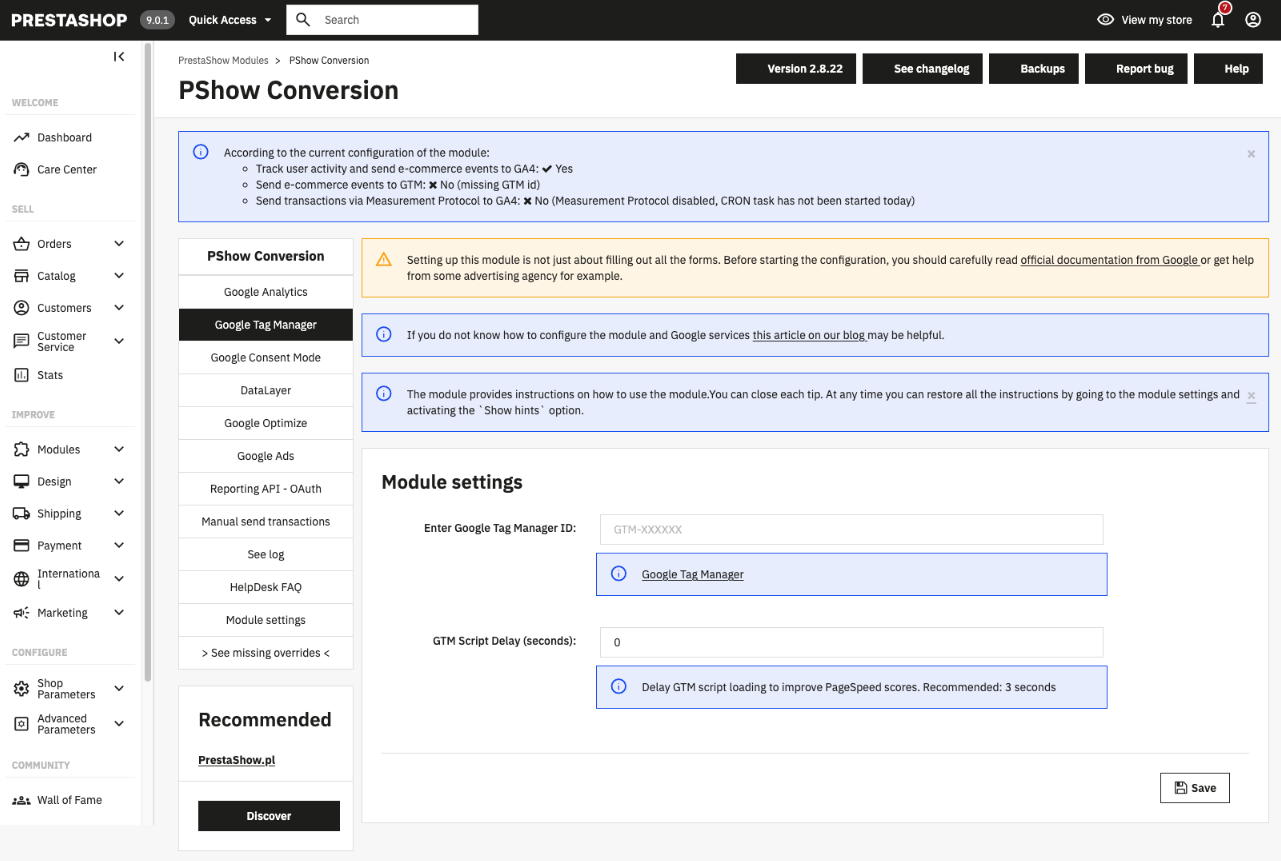
    * GTM Script Delay option to improve PageSpeed scores by delaying Google Tag Manager script loading

    ## v2.8.13 - 2025-07-22
    ### Fixed
    * The problem with undefined variables in JavaScript

    ## v2.8.12 - 2025-07-11
    ### Added
    * Added a tip in the module about dynamic remarketing.

    ## v2.8.11 - 2025-06-20
    ### Fixed
    * JS error about reading properties from undefined

    ## v2.8.10 - 2025-01-14
    ### Fixed
    * Throws DivisionByZeroError error while the order total is 0 (zero)

    ## v2.8.9 - 2024-07-01
    ### Fixed
    * Do not set url_passthrough

    ## v2.8.8 - 2024-06-29
    ### Fixed
    - Deprecation warnings

    ## v2.8.7 - 2024-06-14
    ### Fixed
    - Prevent duplicated transactions

    ## v2.8.6 - 2024-06-11
    ### Fixed
    - Event tracking in Prestashop 1.6

    ## v2.8.5 - 2024-05-09
    ### Fixed
    - Small fixes for using GTM only

    ## v2.8.4 - 2024-04-24
    ### Fixed
    - Small fixes in measurement protocol

    ## v2.8.3 - 2024-04-23
    ### Fixed
    - Improve google_tag_params for remarketing

    ## v2.8.2 - 2024-04-15
    ### Fixed
    - Fix compatibility with przelewy24 module

    ## v2.8.1 - 2024-04-14
    ### Fixed
    - Fix transaction data preview on the order page in the back-office
    ### Added
    - Let decide whether the `purchase` event should be sent to GA4 via dataLayer - when you have an active MP and you see duplicates in GA4, try disabling the sending of transactions via dataLayer.

    ## v2.8.0 - 2024-03-27
    ### Added
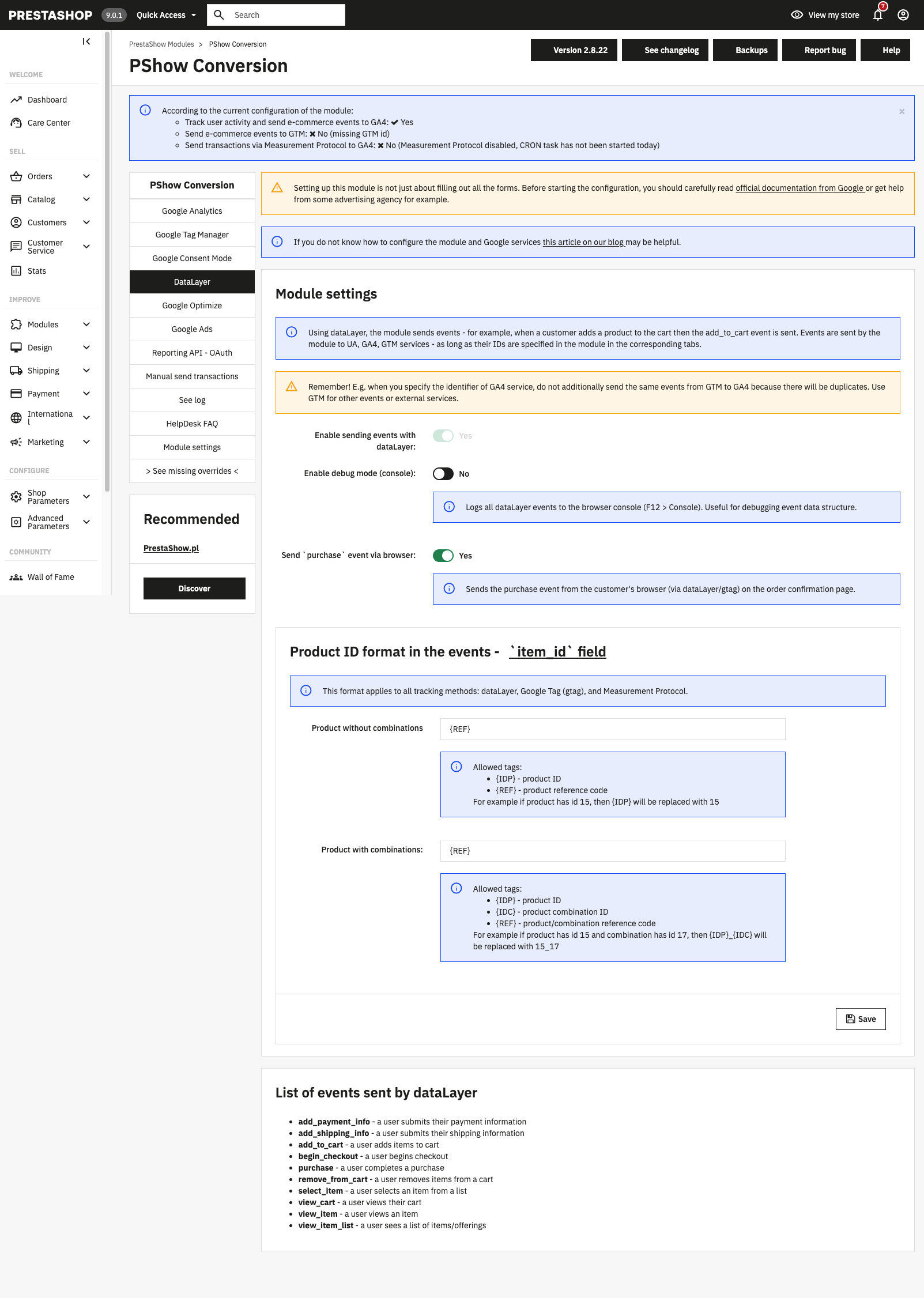
    - Allow configuring `item_id` for dataLayer events - you can combine `product_id` and `product_attribute_id` and `reference` to create a unique identifier for the product

    ## v2.7.2 - 2024-03-18
    ### Added
    - Added `timestamp_micros` parameter to the `purchase` events (using the measurement protocol) to improve linking with user sessions; timestamp_micros = time of the order creation in microseconds (max 72h back)

    ## v2.7.1 - 2024-03-15
    ### Added
    - Show in the order in the back-office the data sent when the order is withdrawn
    ### Fixed
    - Improve user data hashing in events

    ## v2.7.0 - 2024-02-27
    ### Added
    - Set default consent state - read more at https://helpdesk.prestashow.pl/kb/faq.php?id=198&lang=en_US

    ## v2.6.0 - 2024-02-12
    ### Added
    - Send user_data to GA4 using the measurement protocol - email, firstname, lastname
    ### Fixed
    - Improve Measurement Protocol events sending

    ## v2.5.4 - 2024-02-08
    ### Fixed
    - Fix for Prestashop 1.6 - missing func Order::getIdByCartId()

    ## v2.5.3 - 2024-02-07
    ### Added
    - Added small delay before sending purchase to GA4

    ## v2.5.1 - 2024-02-02
    ### Added
    - Support paynow payment module

    ## v2.5.1 - 2024-01-24
    ### Fixed
    - Fix js tracking

    ## v2.5.0 - 2024-01-22
    ### Added
    - Display traffic sources on the cart preview page in the back-office

    ## v2.4.18 - 2024-01-19
    ### Fixed
    - MP fixes

    ## v2.4.17 - 2024-01-09
    ### Fixed
    - Fix currency in 'purchase' event in gtag & dataLayer

    ## v2.4.16 - 2024-01-08
    ### Fixed
    - Fix currency in dataLayer

    ## v2.4.15 - 2023-12-08
    ### Fixed
    - Fix JS ecommerce events on Prestashop 1.6

    ## v2.4.14 - 2023-12-06
    ### Fixed
    - Do not send transactions to GA4 and GAds while Measurement Protocol is enabled to prevent duplicated transactions in GA4
    - Prevent displaying MP request body on the order page in the back-office twice
    - Fix notice on the order page in the back-office

    ## v2.4.13 - 2023-11-21
    ### Fixed
    - Fix - Notice: Undefined index: events

    ## v2.4.12 - 2023-11-20
    ### Fixed
    - Disable sending campaign data to prevent campaign data from being overwritten in user sessions
    - Fix missing data in the event view_item_list on Prestashop 1.6

    ## v2.4.11 - 2023-11-16
    ### Fixed
    - Fix missing view_item event on prestashop 1.6

    ## v2.4.10 - 2023-11-15
    ### Added
    - Campaign data is now sent to GA4 using the measurement protocol (only if the data was found by the module)
    ### Fixed
    - Fixed other small bugs and warnings

    ## v2.4.9 - 2023-11-14
    ### Fixed
    - Improve conversion delivery to Google Ads

    ## v2.4.8 - 2023-11-09
    ### Fixed
    - Send purchases to GA4 and GAds using gtag

    ## v2.4.7 - 2023-11-06
    ### Fixed
    - Improve determination of product variant name in events
    - Improve determination of product categories in events

    ## v2.4.6 - 2023-11-02
    ### Fixed
    - Fix for "refund" event
    - Improve sending of events to google analytics 4 (using gtag)

    ## v2.4.5 - 2023-10-30
    ### Fixed
    - Improve sending of events to google analytics 4 (using gtag)
    - Improve tracking of path to purchase

    ## v2.4.4 - 2023-10-30
    ### Fixed
    - Prevent view_item event duplication

    ## v2.4.3 - 2023-10-25
    ### Fixed
    - Do not send transaction data to UA because it stopped processing new data
    - Improve sending JS dataLayer data
    - Improve google_tag_params data
    - Fix migration - there was missing database column on some shops

    ## v2.4.2 - 2023-10-10
    ### Fixed
    - Small fixes in data used by the measurement protocol

    ## v2.4.1 - 2023-10-10
    ### Added
    - Added ecomm_pagetype to support google ads retail data segment

    ## v2.4.0 - 2023-10-02
    ### Added
    - Restore ability to enter custom transaction sources to be ignored and choose which source (first/last) should be sent to google
    - Experimental method of sending campaign info (introduced in v2.3.1) is from now stable and always active

    ## v2.3.4 - 2023-08-31
    ### Fixed
    - Fix hook actionGetProductPropertiesAfter deprecated since 1.7.8.0 - on prestashop versions 1.7.8 and above, after some time there was a slowdown of the store due to a large number of entries in the store log about an outdated hook

    ## v2.3.3 - 2023-08-30
    ### Fixed
    - Fix 'kernel container not available' error on some versions of Prestashop 1.7

    ## v2.3.2 - 2023-08-28
    ### Added
    - Improve experimental method of sending campaign info (added in v2.3.1)
    - Send hash of customer email to support enhanced conversion tracking for Google Ads

    ## v2.3.1 - 2023-08-16
    ### Added
    - Experimental method of sending campaign info (determined by the module) using gtag - see in "module settings" tab

    ## v2.3.0 - 2023-08-14
    ### Added
    - New option in GA configuration: Ability to exclude shipping cost from transaction data (applies to orders sent via Measurement Protocol to GA4)

    ## v2.2.0 - 2023-08-03
    ### Added
    - Simplify module configuration
    - GTM is no longer required to activate dataLayer and thus receive events in GA4
    - DataLayer is no longer optional and will always be active
    - The module sends events to all services whose IDs are specified in the module configuration (UA, GA4, GTM)
    - Show a message indicating how the module works based on its configuration
    ### Fixed
    - Fixed minor bugs

    ## v2.1.25 - 2023-08-02
    ### Fixed
    - Prevent JS error: PShowConversionJS.shopping_cart is not iterable

    ## v2.1.24 - 2023-07-27
    ### Fixed
    - Fix attribute duplication in item_variant in MP data
    - Remove attributes from item_name in MP data

    ## v2.1.23 - 2023-07-26
    ### Fixed
    - Fix undefined array key 'controller'
    - Fix small error in data typing

    ## v2.1.21 - 2023-06-22
    ### Fixed
    - Fix missing data in JS

    ## v2.1.20 - 2023-06-09
    ### Fixed
    - Fix missing data - warnings appear in debug mode

    ## v2.1.19 - 2023-06-07
    ### Added
    - Add warning about data duplication
    ### Fixed
    - Fix missing client_id in the measurement protocol for GA4

    ## v2.1.18 - 2023-05-18
    ### Added
    - Add session linking to events sent by measurement protocol

    ## v2.1.17 - 2023-05-17
    ### Added
    - Send timestamp with event data using Measurement Protocol

    ## v2.1.16 - 2023-05-16
    ### Fixed
    - Improve sending of client ID with transactions

    ## v2.1.15 - 2023-04-28
    ### Fixed
    - Some versions of Prestashop did not add JS scripts for GTM tracking

    ## v2.1.14 - 2023-04-27
    ### Fixed
    - Fix typo

    ## v2.1.13 - 2023-04-27
    ### Fixed
    - Improved user id linking

    ## v2.1.12 - 2023-04-26
    ### Fixed
    - Improved client id linking - important fix for transactions source attribution

    ## v2.1.11 - 2023-04-26
    ### Fixed
    - Fix CRON info in the module configuration

    ## v2.1.10 - 2023-04-25
    ### Fixed
    - Improved GTM configuration file ready to import for GA4 tracking - from now it contains only one tag with all events
    - Improve module configuration

    ## v2.1.9 - 2023-04-21
    ### Fixed
    - Small fix in JS code

    ## v2.1.8 - 2023-04-15
    ### Added
    - Allow enhanced conversion tracking for Google Ads

    ## v2.1.7 - 2023-04-14
    ### Fixed
    - Fix missing variables in JS dataLayer tracking code [in Prestashop 1.6 only]

    ## v2.1.6 - 2023-04-14
    ### Added
    - Improve support for UTM parameters tracking for Google Analytics 4

    ## v2.1.5 - 2023-04-13
    ### Added
    - Add support for Prestashop 8.0 and PHP 8.1

    ## v2.1.4 - 2023-03-09
    ### Fixed
    - Security patches

    ## v2.1.3 - 2023-03-08
    ### Added
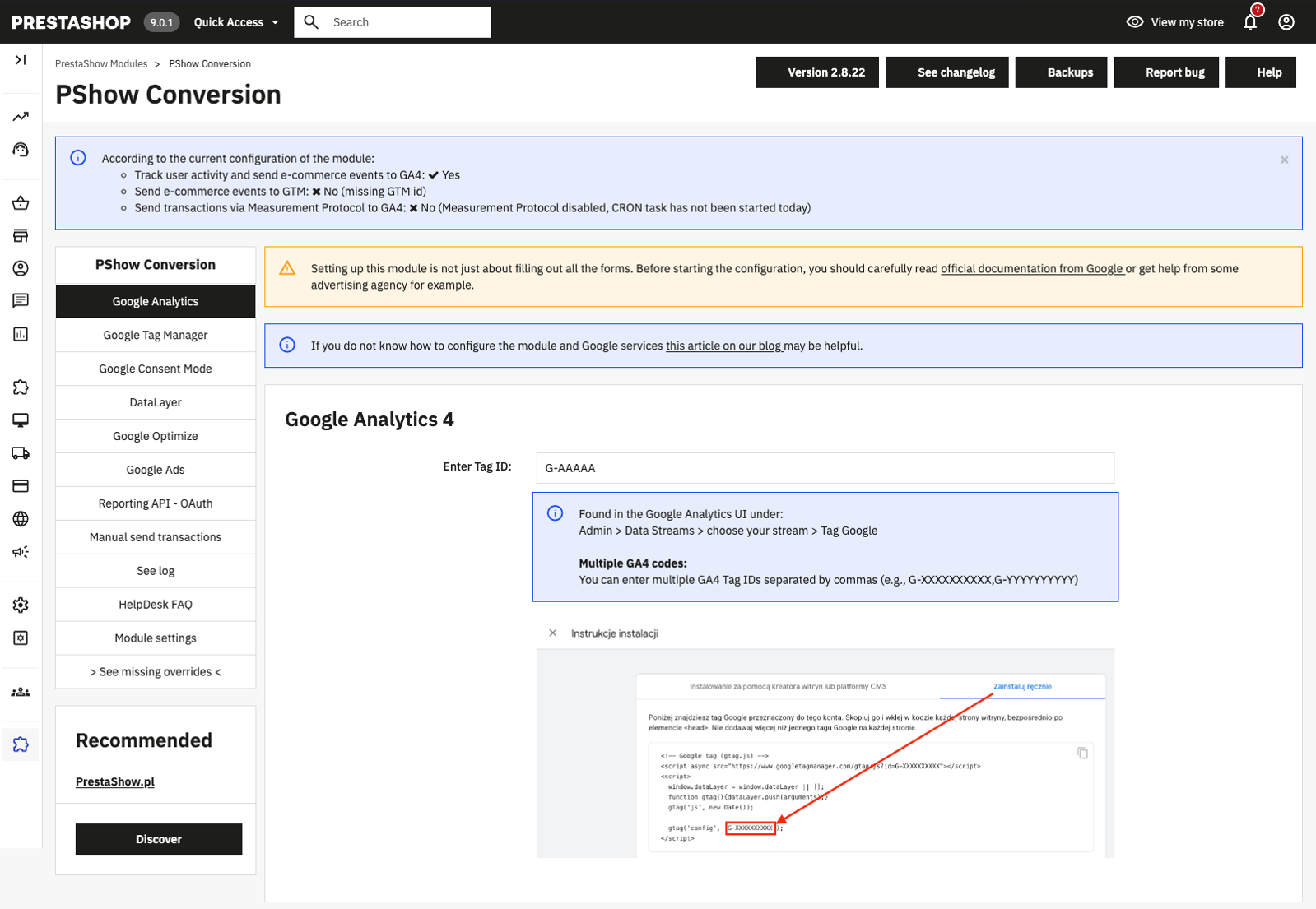
    - Add image with marked GA4 measurement ID to prevent confusion

    ## v2.1.2 - 2023-03-06
    ### Fixed
    - Small dataLayer fixes for prestashop 1.6

    ## v2.1.1 - 2023-02-03
    ### Fixed
    - The problem with file access

    ## v2.1.0 - 2023-01-18
    ### Added
    - Add a GA4-compatible dataLayer data structure

    ## v2.0.3 - 2022-12-08
    ### Fixed
    - Display GA4 data on the order view page in the back-office

    ## v2.0.2 - 2022-12-02
    ### Fixed
    - Small fix to ignore clicking on product link with class `gmlightbox`

    ## v2.0.1 - 2022-11-09
    ### Fixed
    - Allow char `-` in the GA4 secret key

    ## v2.0.0 - 2022-10-21
    Important: Universal Analytics will stop processing data on 2023-07-01. You should migrate to Google Analytics 4 as soon as possible.
    ### Added
    - Send transactions (purchase and refund) to Google Analytics 4 using Measurement Protocol

    ## v1.33.7 - 2022-08-22
    ### Fixed
    - Fix missing guzzle lib on PrestaShop 1.6 and older

    ## v1.33.6 - 2022-07-25
    ### Fixed
    - Fix support for multiple coupon codes added to the order
    - Improve support for 'supercheckout' module

    ## v1.33.5 - 2022-07-13
    ### Fixed
    - Fix issue which cause that module is sending total product prices instead of unit prices to GTM

    ## v1.33.4 - 2022-07-11
    ### Fixed
    - The javascript code blocking removal of products from shopping cart in prestashop 1.7

    ## v1.33.3 - 2022-06-20
    ### Fixed
    - Update and adjust google services api packages
    - Highly optimized total module size

    ## v1.33.2 - 2022-06-19
    ### Fixed
    - Fix missing database tables/columns

    ## v1.33.1 - 2022-06-13
    ### Fixed
    - Automatically move executions of this module in the hook to run before any other modules

    ## v1.33.0 - 2022-05-04
    ### Added
    - Prevent sending URL containing email address to GA (@see https://support.google.com/analytics/answer/6366371#page-url)

    ## v1.32 - 2021-10-22
    - fix problem with price rounding on some PS versions

    ## v1.31 - 2021-09-13
    - improve price rounding

    ## v1.30 - 2021-08-26
    - you can choose that you want to send net or gross prices to google analytics together with the transaction
    - added dataLayer support for the przelewy24 module,
    after making a payment and after clicking "Pay by Przelewy24"
    - added google_tag_params section to dataLayer for retargeting
    (ecomm_prodid, ecomm_totalvalue, ecomm_pagetype, ecomm_pagename,
    ecomm_brand, ecomm_category, ecomm_model, ecomm_quantity)
    - improved dataLayer functionality

    ## v1.29 - 2021-03-31
    - you can enter Google Ads conversion id and conversion label in the module configuration tab: Google Ads

    ## v1.28 - 2020-12-28
    - added possibility to enter tracking code for Google Analytics 4
    https://developers.google.com/analytics/devguides/collection/ga4/basic-tag?technology=gtagjs#set_up_the_basic_page_tag

    ## v1.27 - 2020-12-17
    - fixed an error that caused the order amount not to include the cart rule value
    - improved support for PrestaShop 1.7.7

    ## v1.26 - 2020-12-07
    - fixed bugs related to the transaction data

    ## v1.25 - 2020-10-22
    - possibility to send profit from sales instead of product prices
    - module is sending more information to GTM using dataLayer

    ## v1.24 - 2020-09-14
    - updated google oauth config - approval_prompt
    - error causing lack of information about product sales in Google Analytics has been fixed

    ## v1.23 - 2020-03-02
    - you can disable Global Site Tag, so you can use other
    modules for tracking user activity in the shop
    - disabled GTM event 'purchase' to prevent duplicated transactions

    ## v1.22 - 2019-12-19
    - from now, you can enter custom source & medium while creating the order in the back-office

    ## v1.21 - 2019-10-04
    - fixed missing 'cid' parameter

    ## v1.20 - 2019-09-19
    - Important! You must update your dataLayer configuration!
    Edit tags which uses event actions: `impressions, detail, checkout, checkoutOption, purchase, refund`
    and set: Non-interactive = True
    - added support for OPC module 'supercheckout' for PrestaShop 1.7
    - added configuration file ready to import in tagmanager.google.com
    - fixed bug related to PayU payment module (Jakarta user-agent)

    ## v1.19 - 2019-08-12
    - fixed bugs in the traffic source tracking

    ## v1.18 - 2019-08-06
    - fixed tracking order steps in PrestaShop 1.7

    ## v1.17 - 2019-06-28
    - NEW! introduced integration with Google Reporting API.
    From now the module will check that transactions were sent to and exists in the Google Analytics.
    - fixed bug with currencies
    - fixed bugs

    ## v1.16 - 2019-05-08
    - NEW! allow to configure transaction sources which should be ignored
    - fixed bugs reported by users

    ## v1.15 - 2018-12-12
    - NEW! you can use CRON job to send transactions to GA
    - NEW! the module allows to collect data by dataLayer from Google Tag Manager -
    measuring product impressions, clicks, checkout steps, purchases and many more

    ## v1.14 - 2018-05-28
    - improved tracking of user activity using php measurement protocol
    - improved sending of customer data with transaction to GA
    - allow to anonymize customer ip address
    - official js tracking code is now associated with data sending using measurement protocol

    ## v1.13 - 2018-02-23
    - added Google Tag Manager noscript tag (module reinstallation required)

    ## v1.12 - 2018-02-16
    - NEW! added data which will be sent to GA on the order page in the back-office
    - fixed bug in sending order to GA while first status is add to order

    ## v1.11 - 2018-02-14
    - improved traffic sources

    ## v1.10 - 2018-01-31
    - adwords tracking improved

    ## v1.9 - 2018-01-24
    - improved module configuration
    - improved searching of traffic sources
    - since this version module is fully working with multistore mode
    - NEW! added Google Tag Manager tracking code

    ## v1.8 - 2017-12-18
    - improved tracking

    ## v1.7 - 2017-12-07 - Update your module configuration after update to this version
    - NEW! added support for google optimize
    - NEW! google analytics measurement protocol is used for page tracking (instead of analytics.js)

    ## v1.6 - 2017-11-16
    - improved connection with GA

    ## v1.5 - 2017-11-13
    - improved client tracking

    ## v1.4 - 2017-11-03
    - NEW! option in module configuration: Display tracking code in the store
    - NEW! option in module configuration: Expiration of traffic sources
    - improved getting of traffic sources
    - big changes in traffic sources management

    ## v1.3 - 2017-10-27
    - fixed bug in creating new shopping carts

    ## v1.2 - 2017-09-20
    - fixed client id
    - improved order sending to Google Analytics

    ## v1.1 - 2017-06-07
    - fixed many bugs reported by clients

    ## v1.0 - 2016-09-30
    - initial version
    Komentarze ()
    The reviews posted on our store are not sponsored in any way. We also verify that they were added by customers who have purchased from us or guests. If you want to learn more about this topic please read our Regulations.
    Melle Meijer
    2026-07-30
    Alina S
    2026-07-30
    Ten moduł to petarda! Agencja reklamowa po raz pierwszy nie ma żądnych problemów z danymi, które ten moduł zbiera i przekazuje. Dziękuję! 💯
    prestashow.pl
    2026-06-19
    davide: All answers is YES with professional module version.
    Multistore is supported with multistore addon for module - and module will work with multiple domains configured with prestashop multistore.
    davide
    2026-06-19
    Does the purchase event get sent when the order is paid/validated, even if the customer does not return from Redsys or the payment gateway?

    Does the module store the GA4 client_id before payment and reuse it when validating the order?

    Does it prevent duplicates using transaction_id / id_order?

    Does it allow us to choose which order statuses trigger the purchase event?

    Is it compatible with PrestaShop 1.7.x and multistore, if applicable?
    prestashow.pl
    2025-11-17
    Gorazd, module is compatible with PS 9.1. Please check one more time.
    Gorazd R
    2025-11-05
    I downloaded demo version. It is not compatibile with prestashop 9.0.1. In config.php you are using UndefinedFunction getModulePath so install fails. I fixed that but then overloads do not load properly. Can I get a working demo for PS 9.0.1?
    Robert
    2025-08-20
    💯
    Jose M
    2025-02-18
    I've checked few modules - problems with all of them. This one Google Integrator is working good: all orders was sent to ga4 and ads. Fully recommend and thanks to Prestashow team
    Robert
    2025-02-15
    No conversions loos. Very good module!
    Wojciech
    2025-01-11
    Moduł precyzyjnie zbiera dane i konwersje w usługach Google. Ustawienie bez większych problemów. Polecam.
    prestashow.pl
    2024-09-16
    MM, w najnowszej wersji modułu jest przekazywany hash maila: sha256_email_address: emailHash
    hash’u maila jest wysyłany do DataLayer, gdy klient jest zalogowany :-)
    MM
    2024-09-16
    Potrzebujemy emaila zashashowanego metodą SHA256 w momencie zakupu, najlepiej też gdyby do dataLayer przy kazdym page_view leciał event user_data który zawiera user_id oraz hashmail256. Czy jest to w planach rozwoju? Czy jest to gdzies ukryta opcja ktorej nie potrafimy znaleźć?
    prestashow.pl
    2024-08-07
    Klient, zamówienie zostanie wysłane tylko raz - moduł nie dopuszcza do duplikacji.
    Klient
    2024-08-07
    Czy jeśli w module zaznaczę kilka statusów, które mają być wysyłane do GA np. Przygotowanie w toku, Gotowe do wysyłki, Wysłane
    to zamówienie zostanie wysłane do GA trzy razy? Czy tylko raz?
    Axel
    2024-07-31
    Amazing module!
    Anastazja Rings
    2024-07-16
    Moduł działa prawidłowo. Osoba tworząca reklamy poleciła mi ten moduł i nie zgłasza do niego uwag. Instalacja i konfiguracja została zrealizowana przez support w ciągu 3 dni. Jestem zadowolona :)
    prestashow.pl
    2024-07-16
    Tomasz P - korzystacie z wersji modułu z 2023 roku, która nie obsługiwała nowości w GA4, GTM i Ads.
    Zaktualizujcie moduł do najnowszej wersji - w razie potrzeby służymy pomocą na HelpDesk.
    Tomasz P
    2024-07-13
    Co chwila jakiś problem z tym modułem
    Martin
    2024-06-23
    Anna
    2024-05-08
    Na moduł trafiliśmy, bo mieliśmy problemy z remarketingiem i ciasteczkami. Moduł poleciła nam agencja sem. Korzystaliśmy z wsparcia przy łączeniu plików override, helpdesk zrobił to za darmo i od ręki. Teraz wszystko działa jak należy. Super moduł!
    Holdas
    2024-02-06
    bardzo sprawny moduł i pomoc helpdesk. polecam!
    RS
    2024-01-06
    moduł poprawnie raportuje ruch i konwersje w ga4 i przekazuje statystyki do ads. instrukcja pozwala na samodzielną konfiguracje. bardzo dobry moduł.
    Magdalena
    2023-12-18
    Po pomocy Panów z helpdesk działanie modułu uległo poprawie i statystyki w GA 4 i Ads są prawidłowe. Polecam :)
    prestashow.pl
    2023-12-02
    Paweł, moduł dostał aktualizację, która poprawia integrację z Ads, poprawne zaliczanie konwersji i określanie źródeł konwersji. Zaktualizuj moduł w swoim sklepie. W razie potrzeby skorzystaj z naszej pomocy na HelpDesk.
    Darek
    2023-11-10
    Wtyczka nie przelicza waluty.
    Zakup został dokonany w Euro. parametr currency na poziome zdarzenia jest Euro, natomiast w tablicy Items jest PLN.
    Jak to naprawić?
    prestashow.pl
    2023-11-08
    Darek, najnowsza wersja modułu nie obsługuje już GA UA.
    Zaktualizuj moduł do najnowszej wersji, powinno to rozwiązać Twoje problemy.
    Olga
    2023-11-08
    Good module and nice support
    Darek
    2023-11-08
    Czy jest możliwość wyłączenia eventu purchase UA? Po zakupie w GTM wywołuje się najpierw event purchase z Datalayer pod UA, później dopiero ze specyfikacją pod GA4.

    w DebugView widać 2 wywołania eventu purchase.
    Dodatkowo konwersja purchase nie przekazuje wartości zdarzenia oraz wartości w parametrze łączne przychody
    Kamil
    2023-10-11
    Polecam moduł i usługę konfiguracji konta Google
    Mirek Adamczyk
    2023-08-18
    Rewelacyjny i dokładny moduł, proste wdrożenie, fokumentacja w module na wysokim poziomie. Polecam w 100%
    prestashow.pl
    2023-07-23
    Darek, sprawdź czy korzystasz z najnowszej wersji modułu oraz czy w sklepie nie ma innych integracji z GA4/GTM. Zerknij też do wpisu blogowego, który jest na dole tej strony. Jeśli problem nie ustąpi otwórz zgłoszenie na helpdesk.
    Darek
    2023-07-21
    Mam problem z monitorowaniem transakcji w GA4.
    Zdarzenie purchase odpala się prawidłowo, wartość zdarzenia jest zgodna z wysokością zamówienia., natomiast w kolumnach transakcje, przychody z zakupów są same zera.
    Myślę, że problemem może być kwestia waluty - sklep działa w złotówkach i euro i widzę, że parametr waluty potrafi być różny na poziomie zdarzenia i tablicy items. Jak można to ogarnąć?
    Freyja Jónsson
    2023-07-11
    Very good :-)
    Alina D
    2023-06-30
    Na ostatnią chwilę kupiliśmy moduł z konfiguracją. Otrzymaliśmy szybką realizację i wszystko działa jak należy. Bardzo bardzo polecam! :)
    Włodek
    2023-06-24
    Po bataliach z kilkoma modułami ostatecznie ostalismy na tym , bo mimo, że konfiguracja nie jest zbyt oczywista dla codziennego zjadacza chleba, to finalnie moduł zbiera dane bardzo dobrze. Polecam moduł z usługą konfguracji i instalacją.
    Mikołaj Truszczyński
    2023-06-21
    Witam, widziałem u znajomego chcąc mu pomóc że google analytics 4 nie zbiera danych o zakupie z formy paynow, dlaczego się tak dzieje? Jest to kwestia złej konfiguracji taga czy może czegoś innego?
    Paul E
    2023-06-18
    Helene C
    2023-06-17
    uncommon
    Arkadiusz Białek
    2023-06-14
    Rewelacyjny moduł i konfiguracja GA4. Panowie z Prestashow mają ogromne pojęcie o temacie. POLECAM wszystkim. Nic lepszego nie znajdziecie.
    Andrzej Manujło
    2023-05-25
    Najlepszy moduł, z jakim miałem okazję pracować i to nie tylko dla PrestaShop!
    Gabriel F
    2023-05-22
    Powiązanie statystyk Adsów z źródłami i konwersjami ten moduł robi rewelacyjnie. Bardzo wartościowy zakup.
    Bernard Bain
    2023-05-12
    très bien
    modulosy.pl
    2023-05-08
    Robi to co ma robić, łatwa konfiguracja. Polecam
    Jan B
    2023-05-08
    Nic nowego nie napisze - jak poprzednicy, moduł naprawdę ok :-)
    Gabriel K
    2023-05-07
    Moduł bezkonkurencyjny, wszystko działa jak powinno z multistore.
    Maciej D
    2023-04-16
    Najlepszy moduł do GA4 i Ads na rynku. Panowie na Helpdesk wiedzą co robią z analityką. Sugestie zgłoszone przez moją agencje Sem, dotyczace źródeł wejść, zostały rozwiązane serią aktualizacji (chyba nie tylko my to zgłaszaliśmy). Moduł profesjonalny i aktualnie bezbłędny. Korzysta z wielu ciekawych funkcji Google, 100/100 ????
    Maciek S
    2023-04-05
    Moduł rozwiązał moje wszystkie problemy z lukami w danych w GA4. Polecam z całego serca !
    Jónsson S
    2023-01-23
    Very very accurate, easy to configure. Fully recommend.
    Paweł C
    2023-01-12
    Na dzień dzisiejszy nie mogę ocenić modułu na więcej niż 1.
    Po październikowej aktualizacji moduł przestał poprawnie przesyłać źródła konwersji. Większość klików z google ads przypisywanych jest jako non set. Obecnie z modułem nie da się prowadzić kampanii.
    W dniu 11.11.2023 r. z 27 klików google ads, moduł przypisał tylko 1 w GA4.
    Próbują naprawić aktualizacjami, ale mam wrażenie, że jest coraz gorzej. Napisałem prośbę o zwrot pieniędzy za moduł.
    sklep.metalzbyt.com.pl
    2022-11-16
    Pełna rekomendacja dla modułu PShowConversion. Skorzystaliśmy z modułu wraz z instalacją i konfiguracją konta Google. Po przesiadce z klasycznego kodu, widać ogromną różnicę w zbieranych danych w GA4 i GA UA. Pracujące dla nas agencje SEO i Ads są zadowolone. My również. Polecamy.
    Thomas J
    2022-11-05
    Accurate module that support news from GA4. All orders with traffic sources was trsnsfered from PS 1.7 to Analytics. API confirm data transfer and Ads see it and could run remarketing. Good choice. Thanks.
    Sebastian C
    2022-10-31
    Przerobiłem chyba wszystkie moduły do Analytics. PrestaShow był ostatni, bo nie wierzyłem, że w Polsce może powstać coś tak dobrego:) To jedyny moduł, który przekazuje dane do GA4 bez strat, ma kompletną konfigurację i dokumentację. Bardzo dobry moduł.
    Paweł G
    2022-10-21
    Moduł używamy od 3 lat. Tydzień temu przeszliśmy na GA4 i wszystko działa pięknie i precyzyjnie. To nadal najlepszy moduł do integracji na rynku. Polecam.
    abcplytki.pl
    2022-08-15
    Korzystamy z modułu, zamówiliśmy go z konfiguracją konta Google. Moduł przekazuje do Analytics bezwzględnie wszystkie dane jakie pojawiają się w sklepie, w tym każde zamówienie. Agencja marketingowa jest bardzo zadowolona. Moduł wykorzystuje do reklamy i remarketingu. Moduł jest precyzyjny, lekki i nowoczesny. MUST HAVE dla każdego sklepu PrestaShop. POLECAM.
    Grażyna A
    2022-08-09
    Polecam moduł oraz usługę konfiguracji Google. Agecja SEO, która opiekuje się sklepem otrzymała wszystko co było jej potrzebne.
    Patryk W
    2022-07-31
    PORAŻKA!!! Od momentu przejścia na GA4 same problemy, wiele zdarzeń się nie przesyła do Analyticsa mimo ustawienia zalecanej konfiguracji a do tego zakupy są w 70% przypisywane do źródła (direct) / (none). Kontakt na helpdesku (support) to jedna wielka porażka, na wiele pytań otrzymuje się po kilku dniach oczekiwania jedno zdanie odpowiedzi. WSPARCIE TO ŚCIEMA - niestety. W obecnej chwili czekam już na 10 dni na odpowiedź... Przypominałem się już ale bez skutku. A z powodu "wadliwego" modułu od początku lipca brak wiarygodnych danych w Analytics. Niby pracują nad poprawą ale trwa to wieki i mają klienta gdzieś. Dostałem ostatnio informację że to przez ograniczenie ze strony Google ale jakoś nigdzie o tym nie informują.
    Do tego UWAGA - USUWAJĄ KOMENTARZE bez naszej zgody. Kupiliśmy u nich już kilka nietanich modułów (łącznie wydaliśmy u nich blisko 1956zł tylko na moduły) - w tym jeden do Facebooka w ubiegłym roku. Jak się okazało wysyłał cały czas niekompletne dane. Oczywiście od supportu pomoc była rozłożona w czasie, w ogóle nie przykładali się do tego i na końcu i tak nic nie pomogło nawet jak poprawili. Kupiliśmy moduł od innej firmy (nawet tańszy) i wszystko działa od pół roku jak należy. Wystawiliśmy więc ocenę (komentarz) dla Prestashow na stronie tego modułu facebooka z opisem problemów i działania supportu. Komentarz po kilku miesiącach został usunięty i mam na to dowody.
    Sprawa kolejna - to nie jedyny przypadek. Bliska mi osoba również miała od nich moduł, pojawiły się z nim problemy. Po zgłoszeniu problemów jeszcze tego samego dnia polecili wykupienie wsparcia po zakupie którego od razu pomogą. Po zakupieniu przez 2 tygodnie nie można było się doprosić tego co zostało ustalone i za co zostało zapłacone. Na końcu został wystawiony komentarz po którym dopiero wtedy do "pożaru" wkroczył właściciel firmy i próbował ratować sytuację. Dopiero po komentarzach w kilku miejscach i totalnie sfrustrowanym i oszukanym kliencie... Myślałem że to coś ich nauczyło i że coś się zmieniło. Jak się okazało - KOMPLETNIE NIC.
    Gratuluję - macie kolejnego sfrustrowanego klienta których jest coraz więcej (jestem na wielu grupach Prestashop i o tym wiem).
    Jacob
    2022-07-24
    Module work very well. Only problems during installation due to override but helpdesk assist in a day.
    BASHAR
    2022-07-13
    Witold D
    2022-03-28
    Dobrze działający moduł.
    Arletta
    2022-01-27
    A nie sorry, żeby nie było, GA4 zlicza purchase tylko jak jest płatność przy odbiorze. Cała reszta mu ucieka.
    Arletta
    2022-01-27
    Moduł był świetny jeszcze jak działało UA. Wtedy zero problemów. Chociaż mógłby mieć bardziej rozbudowaną integrację z GADS, bo GADS lepiej sobie radzi jak ma swoje własne dane. Z GA4, no cóż, co aktualizacja to inny problem. Aktualnie zlicza wszystkie zdarzenia i konwersję poza najważniejszą purchase. Tzn. w logach stoi, że wysłana, dane pokazuje poprawne, Tag Assistant też widzi działanie, GA4 w czasie rzeczywistym też, ale w statystykach pustka. Wysyłanie ręczne nie działa, nie wiem czy dlatego że niby ta transakcja jest w GA4, czy coś innego, bo nawet błędu nie mogą normalnie opisac. Nie ma też tych danych w GADS, reszta konwersji oczywiście jest. Ale co z tego jak nie da się optymalizować na najważniejsze działanie. Fajnie, że co chwilę to aktualizują i niby naprawiają te błędy, ale według mnie nie ma co się tym chwalić. Bardziej takie rzucanie aktualizacjami wygląda na pożar, bo wiedzą, że nie działa to tak jak należy, zresztą każda aktualizacja to naprawa właśnie jakiś błędów, a nie nowe funkcje czy inne dane. A Ty jako klient zostajesz z miesiącem czasu po zakupie dostępu do aktualizacji i możesz się modlić, że w końcu to w tym czasie zrobią. Wcześniej nie wysyłała informacji do GADS w ogóle, integracja tylko przez GA4, jeszcze wcześniej nie wysłał nic do GA4 jak GTM nie był ustawiony. Można by zliczać. Sugeruje zrobić krok w tył naprawić co nie działa, wypuścić aktualizacje dla wszystkich i dopiero zacząć usprawniać moduł i samo śledzenie. Lepiej żeby zbierało niepełne dane, ale jednak zbierało niż żeby nie zbierało ich w ogóle.
    prestashow.pl
    2021-11-20
    PPP, dzięki za komentarz. Od tego miesiąca instalacja naszych wszystkich modułów jest darmowa. Nie oznacza to, że modułu nie można zainstalować samodzielnie :-) Dodatkowo płatna pozostaje tylko instalacja ekspresowa. Więcej informacji znajduje się w boxie z ceną modułu.
    PPP
    2021-11-19
    Moduł jest bardzo drogi, ale też i dobry. Co mi się nie podoba? Moduł kosztuje 900 zł, a pobieracie dodatkową opłatę w wysokości ok. 85 zł za połączenie plików override podczas instalacji. Trochę to niesmaczne, zwłaszcza, że niby mamy 3 miesiące darmowej pomocy technicznej ...
    Łukasz
    2021-11-10
    Moduł nagle przestał wysyłać automatycznie konwersje do Google Analytics. Wysyłanie ręczne działa. O co chodzi?
    Sophie FR
    2021-11-02
    Very good module and support! Recommend to all our Prestashop clients.
    prestashow.pl
    2021-07-01
    Yateo, we've fixed HelpDesk, thanks for your comment :-)

    Google integrator support Google Ads. Remember to connect Ads with Analytics with Google Account settings.

    For integration with Facebook Ads check our new module for eCommerce data and conversion tracking with Facebook latest API: https://prestashow.pl/34-.html
    Yateo
    2021-05-31
    Great Module, especially the Analytics API tracking.
    So sade there is no form to open a ticket :
    https://helpdesk.prestashow.pl/open.php
    It is said fill the form, but no form.

    The challenge now is : Will it be an API tracking to Google Ads or Facebook Ads soon available ?
    Paolo Z
    2021-04-30
    Verry good module. Working fine. Conversion working well. 5/5
    Rajmund H
    2021-01-09
    Liczy konwersję, z czym np. Premium Google Analytics nie dawał sobie rady.
    Maciej W
    2020-10-27
    Wdrożenie modułów oraz konfiguracji konta Google w 2 dni. Po tygodniu użytkowania zero uwag. Polecam moduły oraz usługi Prestashow.
    Krystian Pomorski
    2020-10-08
    Wszystko działa dla 12 sklepów w multistore. Wsparcie na bardzo wysokim poziomie. Polecam.
    Anastazja
    2020-09-29
    Szczerze jestem w lekkim szoku. Moduł po zainstalowaniu po prostu działa, wszystkie statystyki mamy w Analytics. POLECAM!!!
    Krzysztof
    2020-09-04
    Przed tym modułem przeszedłem przez dwa inne rozwiązania z Addons... Moduł od PrestaShow bez komplikacji od pierwszej instalacji. Po 2 miesiącach użytkowania polecam - robi to co napisano w opisie. Wspierajmy polskie firmy inwestujące w technologię. U PrestaShow to widać :-)
    Moritz Beer
    2020-03-17
    Awesome
    Katherine
    2020-03-16
    good module and fast support!
    Kasia Świerszcz
    2020-03-13
    Polecają Was, Polecają ten moduł. Sprawdziliśmy i się nie zawiedliśmy :-)
    Arek
    2020-02-21
    Moduł sztos!!!!!!!!!
    Szymon Gwiazdowski
    2020-02-07
    Od roku dostarczmy ten moduł naszym klientom - polecam z ręką na sercu. HelpDesk ma pojęcie o analityce i integracji, rozwiązują rodzące się problemy i potrzeby.
    prestashow.pl
    2020-01-21
    Marcin, tak. Moduł obsługuje kroki w zamówieniach krokowych oraz sekcje w zamówieniu OPC (one page checkout).
    Marcin
    2020-01-21
    Czy ten moduł obsługuje kroki zakupowe?
    Krzysztof Mroczek
    2019-11-29
    Bardzo dobry moduł, nie gubi koszyków źródeł, rzetelne wsparcie ma helpdesku.
    Łukasz Krzymiński
    2019-10-26
    Moduł dobrze działa z dataLayer, co prawda podstawowe eventy, ale działa. Sporo pracy odchodzi :) Ale jaki sens ma cześć dla Google Analytics gdzie podajemy ID. Jeśli nie podam to transakcje nie są przesyłane, ale znów chce korzystać z GTM i podaje ID, tylko jak w obu miejscach mam podane ID to znów dochodzi do duplikacji ID Google Analytics. W efekcie czego na stronie mam dwa ID GA, czego nie powinno się robić, bo będzie dochodzić do fałszowania danych. Jakieś rozwiązanie?
    prestashow.pl
    2019-10-25
    Tomasz, za obsługę remarketingu dynamicznego od niedawna odpowiada kod GA oraz konfiguracja konta Analytcis: https://support.google.com/analytics/answer/2444872?hl=pl
    Nasz moduł załatwia resztę :-).
    Tomasz
    2019-10-23
    Czy ten moduł posiada obsługę remarketingu dynamicznego?
    Göran Fallgran
    2019-08-06
    Good module, simple configuration, conversion counting 100%. Prestashow you got my recommendation!
    Krzysztof Pieklik
    2019-07-19
    Bezkonkurencyjny.
    prestashow.pl
    2019-05-10
    PrestaShop 1.7 - tak, moduł posiada CRON, który bada na bieżąco zamówienia w sklepie. Do GA wysyła zamowienia stworzone w sklelie, w adminie i pochodzące z zewnetrzych integracji.
    PrestaShop 1.7
    2019-05-09
    Czy jeśli do sklepu wpadają zamówienia składane telefonicznie i one wpadają przez integracje z Baselinkerem to czy ten moduł je wyśle do Analityksa?
    Kostek
    2019-04-26
    Moduł nie ma równych. PrestaShow dało cynk, że pracuje nad feedem xml dla GMC. Po jego dodaniu mamy rewelacyjny polski moduł :-) CZEKAMY :-)
    Aneta S.
    2019-03-08
    Moduł naprawdę precyzyjnie wskazuje źródła ruchu w sklepie. Pan Artur pomógł nam z konfiguracją EE po stronie Analyticsa. Można naprawdę dużo wyciągnąć dzieki temu modułowi. Szczerze polecam i pozdrawiam całą ekipę Prestashow :)
    Gaurav Sehgal
    2018-12-20
    Good module. Conversion counting 100% - true. Working with tags and GTM - true.
    Kacper Anton
    2018-11-06
    Moduł bez dwóch zdan przekazuje 100% zakupów do google analitcys. Zródła też pojawiają się częściej niż none. Czekamy na enhanced ecommerce
    Anton
    2018-10-28
    Good module that count ALL transactions in Analitycs! Thanks!
    prestashow.pl
    2018-09-26
    Michał - w module mamy dwie metody śledzenia - PHP i JS.
    Metoda JS wykorzystuje najnowszy kod od Google.
    Michał
    2018-09-05
    Witam,

    czy jeśli chodzi o Google Analytics moduł korzysta z Global site tag (gtag.js), czy ze starego kodu?
    Piotr & Paweł SEO
    2018-08-29
    Z modułu korzystamy w kilku sklepach naszych klientów. Dziękujemy za dodanie badania statusów poprzez CRON! Moduł wykonuje ogromną robotę Good job:)
    Paweł Płotek
    2018-06-07
    Od 2 tygodni Google zliczyło wszystkie koszyki. Dane ze sklepu, w tym źródła wraz z AdWordsami zostały przekazane do GA jak należy. Szczerze polecamy

    Piotr J
    2017-12-28
    Zakupiłem moduł dla Prestashop 1.7 i moge z ręką na sercu polecić. Nie ma innego modułu na rynku, który jak ten działa w 100% i można liczyć na natychmiastowe wsparcie zespołu prestashow!
    Polecam
    Kamil
    2017-08-28
    Moduł nie odpuszcza każdego koszyka, można liczyć konwersje bez omyłki... W końcu. Warto go mieć w sklepie
    Tomasz
    2017-06-20
    Pierwszy moduł, z którym zliczanie konwersji jest bezbłędne. Moduł miał kilka wad, ale regularne aktualizacje łatają je jedna po drugiej.
    Dimitrov
    2017-05-17
    I'm using this module for 3 days and all carts all properly send to Google! Better than others module! Great!

    Leave a comment

    Write a comment By adding an opinion you agree to the processing of your personal data. Read more about our Privacy Policy.

    • Rating:

    Technical requirements

    Technical Requirements

    • PHP 7.1 - 8.x
    • Server extension ionCube Loader
    • PrestaShop Importer only: PHP libxml version > 2.9.3
    • PrestaShop Facebook Integrator only: PHP 7.2 or higher
    • PrestaShop VAT Validator only: PHP SOAP

    More on technical requirements in the knowledge base

    Support & Updates

    Support = Updates + HelpDesk

    You get 90 days (3 months) access to the complete PrestaShow support package.

    Module updates
    Modules will inform you about available updates. Read the changelog and perform a 1-click module update directly from your store.

    HelpDesk panel
    This is the panel where we will provide you with help. On HelpDesk you can report problems, order free module installation and updates, and order modifications and custom programming work.

    Extend support
    After support expires, you can use the module without any restrictions. You can extend your support access at any time you need it.

    Knowledge Base & FAQ

    Free forever

    The knowledge base is available to everyone. You will find module documentation as well as instructions, videos and answers to frequently asked questions.

    License

    Lifetime license for the module

    Full content of the license

    Module management panel user manual

    Additional domains for Multistore

    • All our modules support PrestaShop Multistore.
    • Supporting unlimited domains for PrestaShop Multistore requires purchasing multistore support for the module.

    Modifying the code

    • The module code related to the integration with the store and the design (.tpl, .css, .js) has open source code and you can modify it freely.
    • The module's source code (.php) is encrypted with ionCube, and modifying it will void the warranty.