Customer service and order packaging on your phone 📦










Detailed description
Option visible only to authorized customers
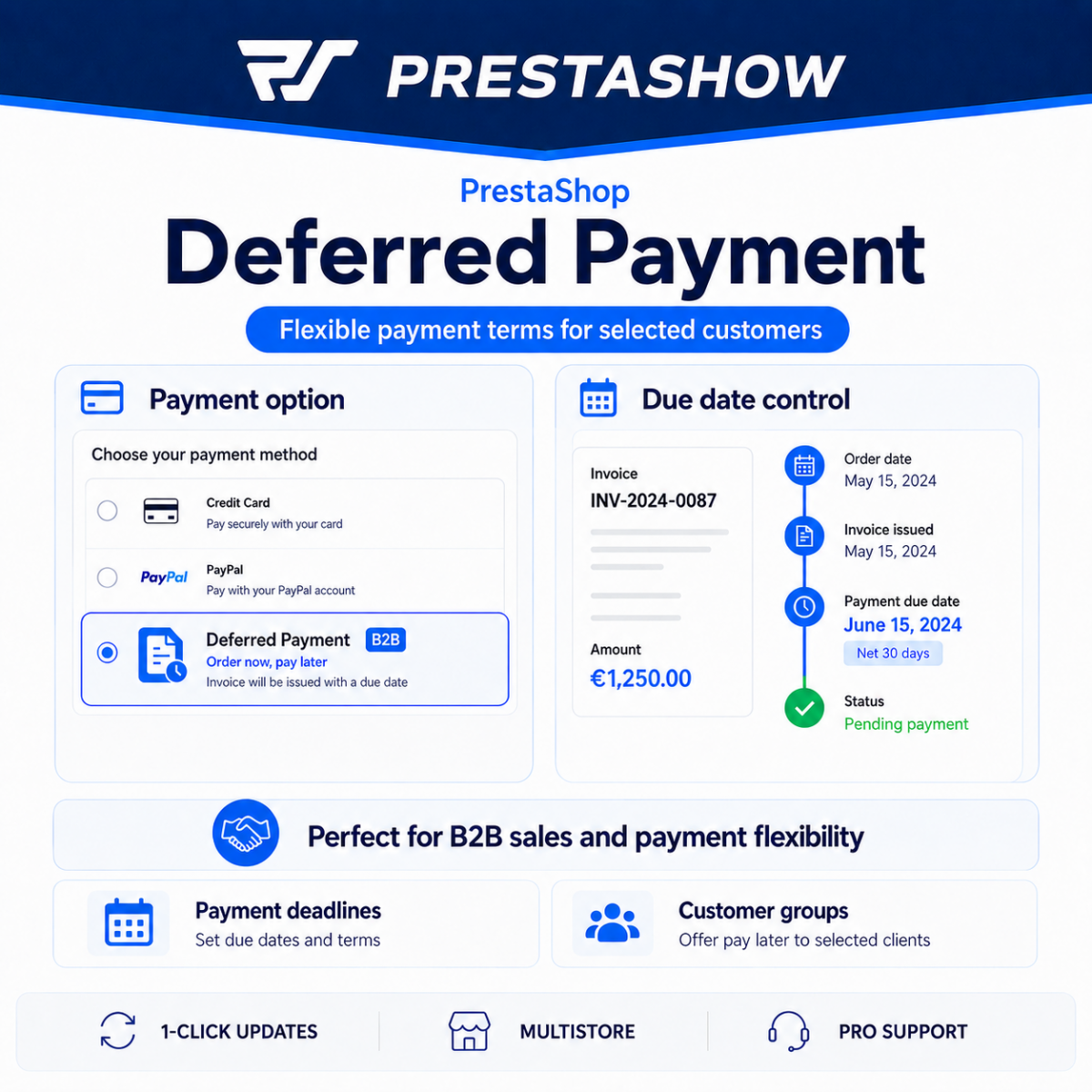
PShow Deferred Payment module adds a deferred payment option to your store for selected B2B customers. Each customer can have a different term - 7, 14, 30 or 60 days. Other buyers do not see this option at all.
Automatic e-mail with deadline and transfer details
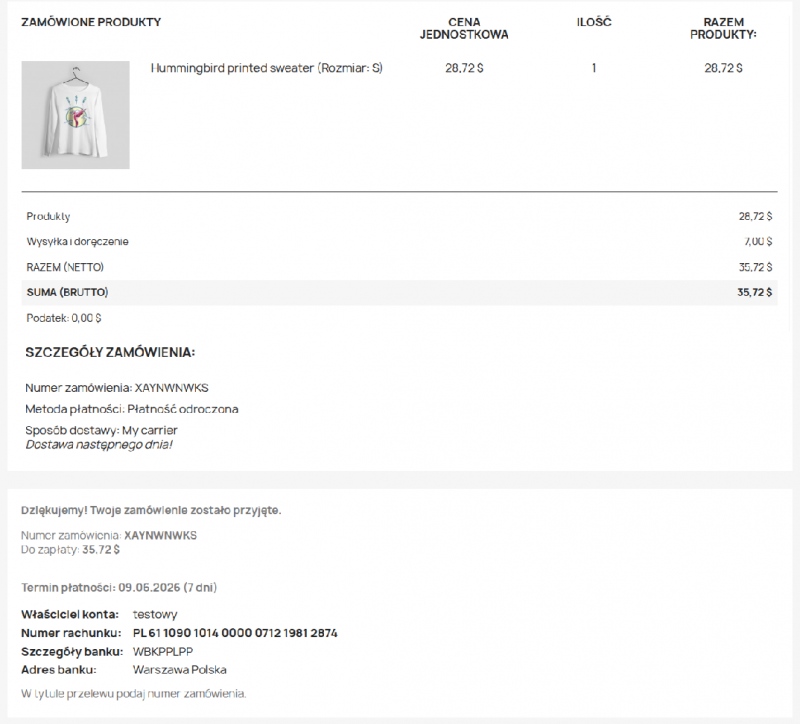
After placing an order, the customer immediately receives an email with the account number, BIC/SWIFT and the exact date of payment. The order confirmation page displays the same information.
Customer management in one place
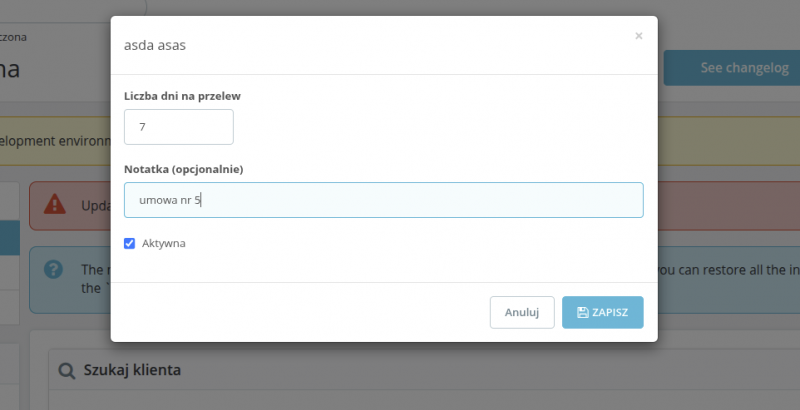
The panel in the Deferred Payment module offers a customer search engine, an editable list of authorized customers and an internal note (e.g., contract number).
Ideal for B2B and wholesalers
Standard practice in wholesale - the customer pays after 14, 30 or 60 days according to the contract. You can set a different date for each contractor.
The deferred payment option is completely invisible to retail customers - it only appears when a customer who has been granted permissions logs in.
Full order processing
Dedicated order status, confirmation page with due date and bank details, and automatic email - all ready immediately after installation.
You configure bank details (IBAN, BIC, owner) once in the module settings and they appear everywhere automatically.
Simple administration
Search for a client, click Add, set the days and save. The whole process takes 20 seconds. The customer list allows you to instantly find and edit each entry.
You can temporarily disable deferred payment for a client without deleting its settings - handy for overdue invoices, for example.
- Admin searches for a customer and assigns him a number of days for transfer (e.g. 30 days).
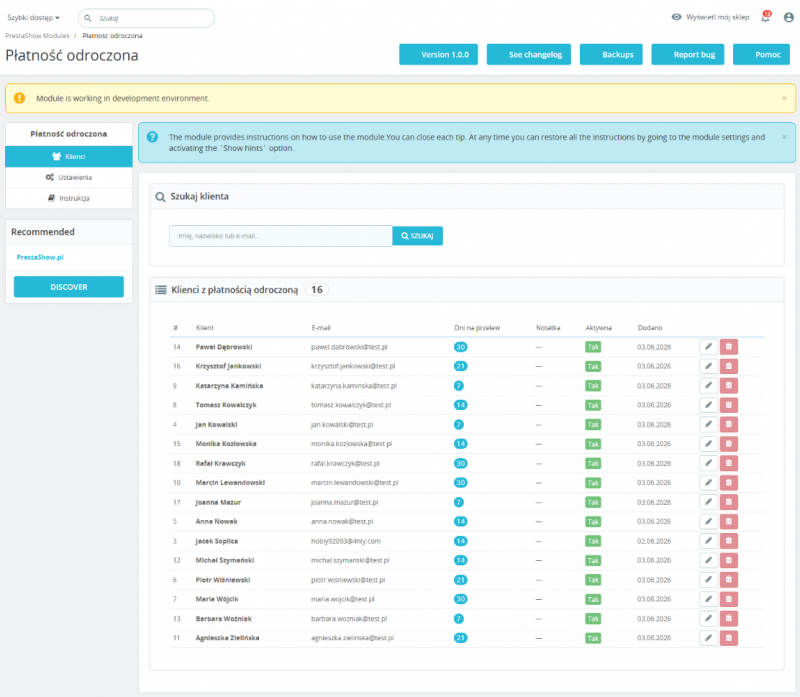
- The logged-in customer sees a new payment option in the shopping cart: "Deferred payment - 30 days for transfer".
- The customer selects this option and places the order - without providing card details.
- The order receives the status "Awaiting deferred payment".
- The customer receives an email with IBAN, BIC and the exact date of payment (date of order + number of days).
- The order confirmation page displays the same data - the customer has everything in one place.
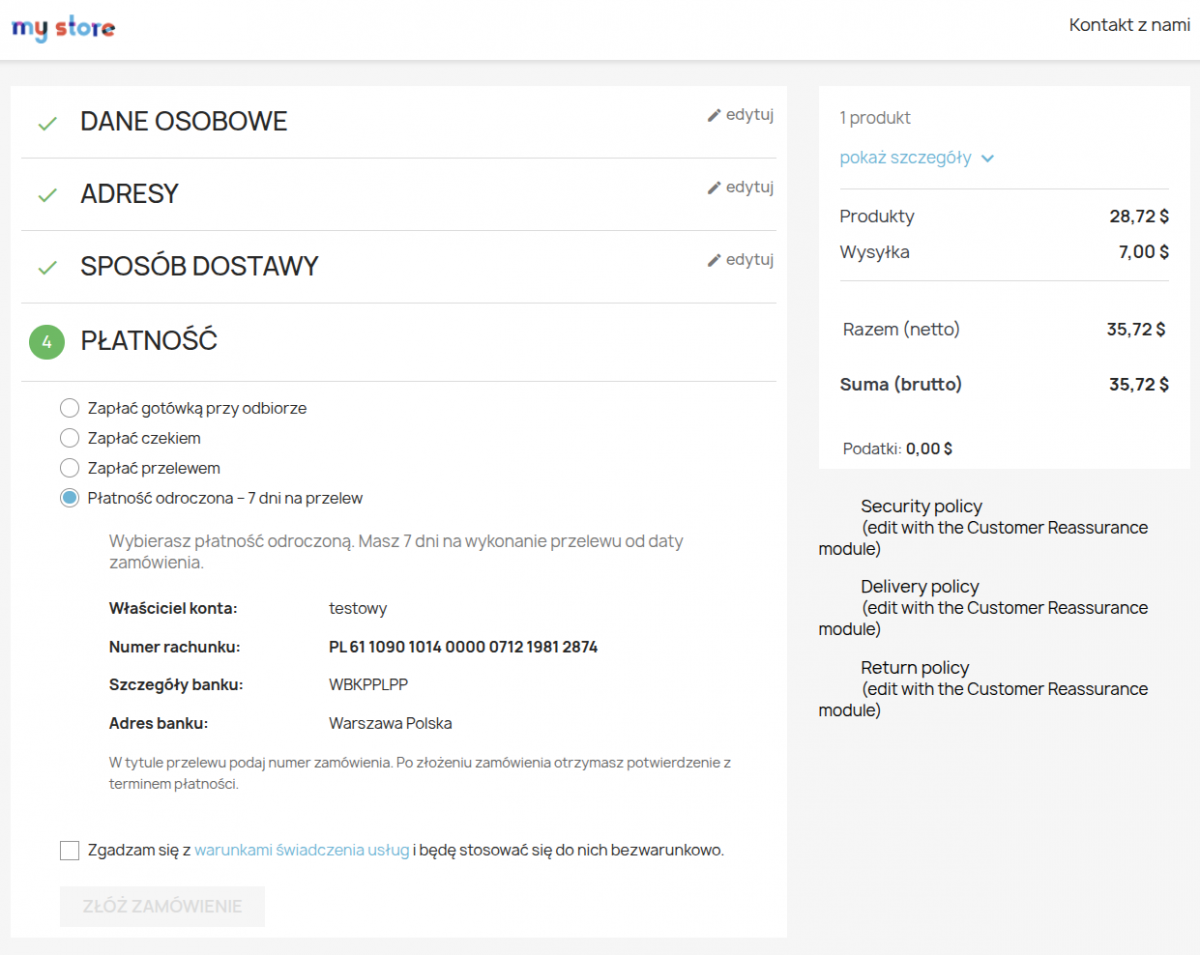
Everything in one place - add, edit and list customers with deferred payment.
- Search engine - search by customer's first name, last name or email.
- Modal with settings - number of days, note and activity status in one window.
- Customer list - full table with date added, note and activity status.
- Enable/disable - temporary lock without deleting settings.
- Internal note - e.g. contract number, invisible to the customer.
- Automatic e-mail sent immediately after placing an order.
- Includes: order number, amount, exact payment date and bank details (IBAN, BIC/SWIFT, owner, bank address).
- The order confirmation page displays the same data - the customer doesn't have to search in the e-mail.
- E-mail templates editable in PrestaShop panel in PL and EN.
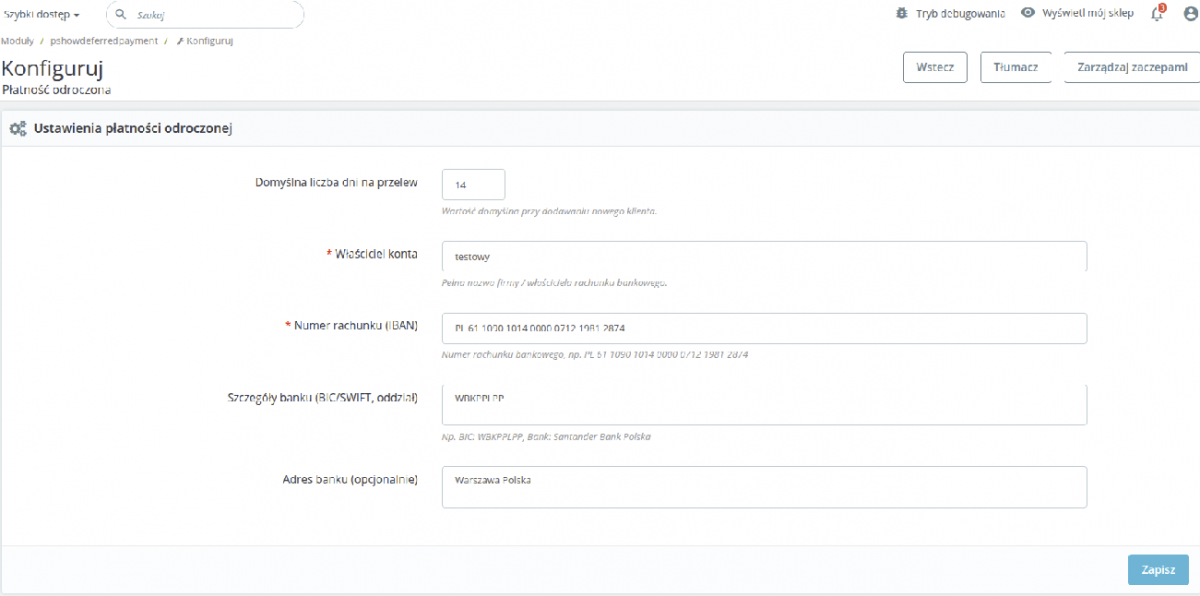
- Account owner - full name of the company or account owner.
- Account number (IBAN) - visible at each step of the payment.
- Bank details - BIC/SWIFT, bank name.
- Bank address - optional field for foreign customers.
- Default number of days - value prompted when adding a new customer.
Facilitations for programmers
- The module uses only standard PrestaShop hooks - works with any theme.
- Separate table 'ps_pshow_deferred_payment' with UNIQUE index on 'id_customer'.
- Editable .tpl files available - you will customize the look to match your store template.
- 28 PHPUnit tests covering database model and hooks logic.
PrestaShop hooks
- paymentOptions - deferred payment option in the shopping cart (only for authorized customers).
- paymentReturn - order confirmation page with due date and bank details.
Summary of module features
- Deferred payment per customer - assign selected customers an individual payment term by bank transfer (1-365 days)
- Individual number of days - each customer can have a different term: 7, 14, 30, 60 days or any other term
- Visibility only for authorized customers - payment option appears in the shopping cart only for customers with assigned deferred payment
- Customer search engine - quick search by name, surname or email directly in admin panel
- List of customers - full list of customers with active or inactive deferred payment
- Enable / disable without deleting - temporarily disable payment for a customer while keeping the settings
- Internal note - field for contract number or other comment, invisible to the customer
- Configurable bank details - account owner, IBAN, BIC/SWIFT, bank address set in the module panel
- E-mail with due date and transfer details - automatice-mail to the customer after placing an order
- Order confirmation page - displays payment term (date + days) and bank details
- Dedicated order status - "Awaiting deferred payment" created automatically upon installation
- Currencies, groups and countries restrictions - managed through standard PrestaShop Payment Preferences
- PL and EN translations - full localization, easy addition of more languages
- Compatibility with PS 1.7, 8.x and 9.x - tested on all supported versions of PrestaShop
- Secure code - pSQL, type casting, no SQL/XSS injections, index.php in all folders
Changelog (0)
## 1.0.3 - 2026-06-08
-----
* add Test
## 1.0.2 - 2026-06-08
-----
* fix error languages
## 1.0.1 - 2026-06-08
-----
* add languages
## 1.0.0 - 2026-06-02
-----
* init modules
-----
* add Test
## 1.0.2 - 2026-06-08
-----
* fix error languages
## 1.0.1 - 2026-06-08
-----
* add languages
## 1.0.0 - 2026-06-02
-----
* init modules
Technical requirements
Technical Requirements
- PHP 7.1 - 8.x
- Server extension ionCube Loader
- PrestaShop Importer only: PHP libxml version > 2.9.3
- PrestaShop Facebook Integrator only: PHP 7.2 or higher
- PrestaShop VAT Validator only: PHP SOAP
Support & Updates
Support = Updates + HelpDesk
You get 90 days (3 months) access to the complete PrestaShow support package.
Module updates
Modules will inform you about available updates. Read the changelog and perform a 1-click module update directly from your store.
HelpDesk panel
This is the panel where we will provide you with help. On HelpDesk you can report problems, order free module installation and updates, and order modifications and custom programming work.
Extend support
After support expires, you can use the module without any restrictions. You can extend your support access at any time you need it.
Knowledge Base & FAQ
Free forever
The knowledge base is available to everyone. You will find module documentation as well as instructions, videos and answers to frequently asked questions.
License
Lifetime license for the module
- You can use the module without limitation in 1 store = 1 domain.
- You can use an additional domain, e.g. for developer copy.
- For a small fee you can change the domain for the module yourself.
Additional domains for Multistore
- All our modules support PrestaShop Multistore.
- Supporting unlimited domains for PrestaShop Multistore requires purchasing multistore support for the module.
Modifying the code
- The module code related to the integration with the store and the design (.tpl, .css, .js) has open source code and you can modify it freely.
- The module's source code (.php) is encrypted with ionCube, and modifying it will void the warranty.
No entries yet.
No customer reviews for the moment.