





Product feed for ChatGPT in PrestaShop - how to prepare your store for AI-commerce with PrestaShow Feeder.
The way customers search for products online is changing. Increasingly, they are no longer typing a single phrase into a search engine, but are asking an AI assistant, "Which gift should I choose?", "Which product will be best for...?", "Compare me some options." Therefore, online stores should prepare their product data so that it is readable not only for Google, Facebook or TikTok, but also for AI systems such as ChatGPT.
That's what a product feed for ChatGPT is for - a structured product data file that can help ChatGPT better and faster understand a store's offerings, prices, availability, variants, images, descriptions and product features. OpenAI describes a product feed as a way to provide a catalog of products to index, understand attributes and present up-to-date shopping information in the ChatGPT shopping experience.
What is a product feed for ChatGPT?
A product feed for ChatGPT is an XML file containing product data in a structured form. It can include, but is not limited to:
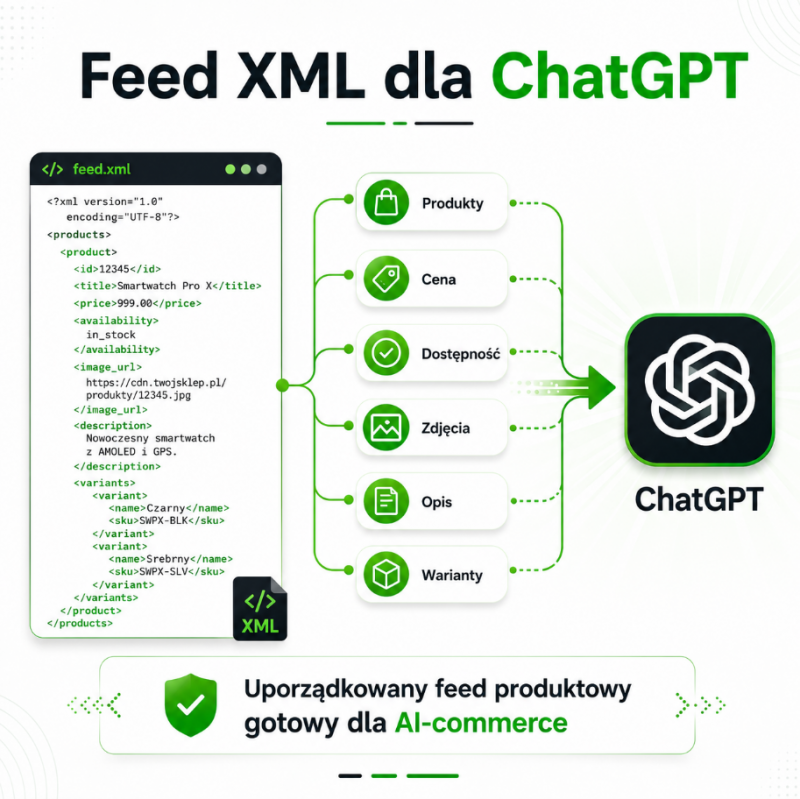
- Product or variant ID,
- product name,
- description,
- product URL,
- main photo and additional photos,
- brand,
- price,
- promotional price,
- availability,
- variants, for example, size or color,
- vendor information,
- return policy,
- sales target countries,
- data on reviews, popularity and related products.
In practice, the feed acts as a "data language" between the online store and the AI system. Instead of relying on the artificial intelligence to interpret the product page on its own, the store provides it with structured information in a format that is easier, lighter and faster to process.
Why is a feed for ChatGPT important for eCommerce?
ChatGPT can support users in discovering products, comparing offers and making purchasing decisions. OpenAI points out that providing a product feed helps stores appear at times when a user is actively searching for a product, comparing options or looking to make a purchase decision.
For a PrestaShop store, this means a new visibility channel. Feed for ChatGPT can help with:
- increase product visibility in AI-commerce,
- better matching products to user intentions,
- presenting current prices and inventory,
- organizing product data under AI recommendations,
- preparing the store for future ChatGPT shopping integrations,
- using product data in other AI channels, comparison sites and automations.
PrestaShow Feeder - a module for generating feeds from PrestaShop
PrestaShow Feeder is a module for PrestaShop that allows you to generate product feeds from your store catalog. The feed can be prepared for various sales channels, ads and integrations, including AI-commerce related scenarios.
In the case of a feed for ChatGPT, the most important thing is not only the generation of the XML file itself, but, above all, the correct mapping of product data. ChatGPT needs clear, up-to-date and complete information: what the product is, who it's for, how much it costs, whether it's available and where the user can buy it.
- 4.8
 Free support BEST125,00 EUR
Example of XML feed structure for ChatGPT
Below is a simplified example of an XML structure you can use as an export of product data from PrestaShop. The specific target structure should always be tailored to the current requirements of the channel, integration partner or OpenAI specifications. This structure is supported by the PrestaShop Feeder module.
<?xml version="1.0" encoding="UTF-8"?> <products> <product> <is_eligible_search>true</is_eligible_search> <is_eligible_checkout>false</is_eligible_checkout> <item_id>PS-12345-BLACK-M</item_id>.
    <group_id>PS-12345</group_id> <title>Women's winter jacket black size M</title> <description> Warm women's winter jacket with waterproof coating, hood and insulation.
      Ideal for everyday use in the autumn-winter season.</description> <url>https://example.com/winter-jacket-women-black-m</url> <brand>Example Brand</brand> <product_category>Womenswear > Winter Jackets</product_category> <condition>new</condition> <image_url>https://example.com/img/kurtka-zimowa-czarna.jpg</image_url> <additional_image_urls> https://example.com/img/kurtka-zimowa-czarna-2.jpg, https://example.com/img/kurtka-zimowa-czarna-3.jpg </additional_image_urls> <price>349.00 PLN</price> <sale_price>299.00 PLN</sale_price> <availability>in_stock</availability> <listing_has_variations>true</listing_has_variations> <variant_dict>{"color": "black", "size":"M"}</variant_dict> <color>black</color> <size>M</size> <seller_name>Example Store</seller_name> <seller_url>https://example.com</seller_url> <return_policy>https://example.com/zwroty</return_policy> <target_countries>PL</target_countries> <store_country>PL</store_country> </product> </products>.
The official OpenAI specification for product feeds includes fields that control product visibility in ChatGPT, such as is_eligible_search and is_eligible_checkout, as well as master data: item_id, title, description, url, brand, image_url, price and availability, among others.
What can the feed for ChatGPT be used for?
The product feed for ChatGPT can be used primarily to prepare the store for sales and visibility in AI channels. This is important for stores that have a wide catalog, many product variants or products that require a good description and context.
The most important applications are:
1. product visibility in ChatGPT
A well-prepared feed helps the AI system understand what products the store offers, what features they have and in what situations they can be recommended to the user.
2. product recommendations AI
If a user asks about "the best jacket for winter up to $300", the product name alone may not be enough. The feed should include a description, category, price, photo, availability, variants and product features so that AI can more accurately match the offer.
3. product comparison
ChatGPT can compare products by price, application, parameters, reviews or availability. The better described the data in the feed, the greater the chance that the product will be interpreted correctly.
4. current prices and inventory
Feed allows you to convey up-to-date information about price, promotion and availability. OpenAI notes that complete and up-to-date data helps improve how products are presented in ChatGPT.
5. preparing your store for Agentic Commerce
A product feed is one of the first steps to integrating with Agentic Commerce solutions, i.e. commerce supported by AI assistants. OpenAI points out that it makes sense to start the integration just with a structured product feed.
Where to put the feed for ChatGPT?
At the time of preparing this post, official onboarding of product feeds in ChatGPT is available to approved partners. OpenAI provides an application form for merchants who want to submit product data and participate in the ChatGPT shopping experience.
Once the integration is accepted, the feed can be submitted according to the selected technical path. Among other things, OpenAI's documentation describes a model for delivering the feed via XML, with a recommendation to regularly upload a full catalog snapshot. In the official file upload path, OpenAI also points to stable file names, UTF-8 encoding and cyclic overwriting with the current file.
In practice, the process is as follows:
- You generate a feed in the PrestaShow Feeder module.
- You verify the completeness of the product data.
- You submit the store to the merchant / ChatGPT shopping program.
- Upon approval, you receive technical instructions on how to provide the data.
- You upload the feed to the designated location, for example, via SFTP or via API.
- You set up automatic refreshing of the data.
It's worth noting that the official OpenAI documentation for the production file upload path currently indicates formats such as parquet, jsonl.gz, csv.gz and tsv.gz. XML can be used as a convenient export format or intermediate format with PrestaShop, but the final format should be tailored to either OpenAI's or the integration partner's current requirements.
How to configure the feed for ChatGPT in PrestaShow Feeder?
Configuration depends on the version of the module and individual store requirements, but the general process can be based on the following steps.
Step 1: Create a new feed
In the PrestaShop admin panel, go to the PrestaShow Feeder module and duplicate the feed configuration:
Feed ChatGPT / AI Commerce
Step 2: Select the products and categories
Determine which products you want to go into the feed. It is best to start with products:
- available in stock,
- with correct images,
- with completed branding,
- with good descriptions,
- with a clear category,
- with correct pricing and URL.
It's not always a good idea to export the entire catalog at once. For the first setup, it's a good idea to start with the best prepared products.
Step 3: Set the language and currency
For a Polish store, this will most often be:
- language: Polish,
- currency: PLN,
- destination country: PL.
If the store sells internationally, it is a good idea to prepare separate feeds for different languages and countries, for example, PL/PLN, EN/EUR or DE/EUR.
Step 4: Map the product fields
The most important mapping should include:
- Product ID or combination →
item_id, - product name →
title, - short or long description →
description, - product address →
url, - manufacturer / brand →
brand, - main image →
image_url, - gross price →
price, - promotional price →
sale_price, - stock →
availability, - category →
product_category, - variants →
variant_dict,color,size,group_id, - return policy URL →
return_policy, - store name →
seller_name.
OpenAI indicates that the feed should contain the data needed for product discovery, price, availability and seller context.
Step 5: Support product variants
In PrestaShop, many products have combinations, for example, size, color, capacity or configuration. For ChatGPT, this is very important because the user often asks specifically:
"Is this sweatshirt available in size L?"
"Are there black shoes in size 42?"
"Which variant has the best price?"
Therefore, variants should have separate IDs, but a common group_id that combines them into one parent product.
Step 6: Set availability
Availability should be mapped to values understood by the target system, for example:
-
in_stock- available, -
out_of_stock- not available, -
pre_order- pre-order, -
backorder- available on order.
Timeliness of availability is critical. AI should not recommend a product that the customer cannot buy.
Step 7: Add data to increase the quality of recommendations
If the store has such data, it is worth adding also:
- GTIN / EAN,
- MPN,
- product ratings,
- number of reviews,
- related products,
- products frequently purchased together,
- Product FAQs,
- information about returns,
- delivery information.
This data helps AI better understand the product and its buying context.
Step 8: Generate feed and set up CRON
After saving the configuration, generate a test feed. Then set up automatic refreshing via CRON, for example, once a day or more often if prices and inventory change dynamically.
OpenAI recommends predictably publishing full catalog snapshots, at least once a day, and a stable file name overwritten on subsequent updates.
How to optimize the feed for AI recommendations?
The feed for ChatGPT should not be just a technical export of products. It should be prepared so that AI can understand the offer just like a good salesperson.
Good product names
Instead of:
Jacket 123 Black M
better:
Women's winter jacket black with hood, size M
The name should include the type of product, the most important feature, color, variant and possibly the purpose.
Descriptions written in natural language
The description should answer the user's questions:
- what the product is used for,
- for whom it is intended,
- what problem it solves,
- how it differs from other products,
- what its most important parameters are.
Categories and attributes
Categories should be logical and complete, for example:
Women's Clothing > Jackets > Winter Jackets.
Attributes should be complete: color, size, material, capacity, weight, compatibility, application.
Stable IDs
Don't change product IDs unnecessarily. Stable ID helps maintain product history and correct updates in subsequent feed versions.
Current prices and inventory
The data in the feed must match the data in the store. If a product has a different price in the feed than on the site, it can cause errors, rejections or loss of user trust.
The most common errors with feeds for ChatGPT
The most common problems are:
- missing required fields,
- empty descriptions,
- outdated prices,
- products without photos,
- incorrect URLs,
- lack of HTTPS,
- incorrect variant mapping,
- overly generic product names,
- export of unavailable products,
- lack of information about return policy,
- inconsistent data between feed and store.
OpenAI's documentation points to missing required fields, out-of-date field names, and incorrectly formatted values, among others, as common problems.
Summary
The product feed for ChatGPT is an important step towards AI-commerce. It allows a PrestaShop store to organize product data and prepare the catalog for use in new channels of product discovery, recommendations and sales supported by artificial intelligence.
PrestaShow Feeder helps generate a feed from the data available in PrestaShop, map the most important product fields and periodically update the file. A well-configured feed is not only a technical integration, but also part of your SEO, SXO and store visibility strategy in AI systems.
In a world where the user is increasingly asking the AI assistant "what to buy?", the advantage will be gained by those stores whose product data is complete, up-to-date and machine-understandable.