


A slow PrestaShop store means lost customers, poorer SEO performance and more difficult order processing. PrestaShop optimization helps improve loading speed, server stability, database performance, code quality, module performance, and results in PageSpeed, Lighthouse, GTmetrix and Google Search Console.
PrestaShop optimization - speed up your store, server and admin panel.
At PrestaShow, we start with an audit of the store, modules and server. Then we prepare a work plan, developer copy and implement fixes without risky experimentation on the running store. The result? A faster, more stable and better-prepared to sell PrestaShop store.
Why does a PrestaShop store run slow?
PrestaShop can slow down for many reasons: outdated PHP version, overloaded database, poorly written modules, heavy template, lack of cache, too large images, weak server, JavaScript errors, overrides or outdated version of the store.
Therefore, effective optimization is not about clicking one option in the panel, but about analyzing the entire store environment.
Optimization influences high scores in performance tests and increases the SEO quality of the store.
Your experience with PrestaShop will improve - you will be using an up-to-date version of the store, which is equipped with a number of improvements - in a secure, fast and orderly server environment.
What does PrestaShop optimization include?
- An audit indicating problems, opportunities and recommendations, along with a quote for the proposed work.
- A 1:1 developer copy of your store, on which we will conduct the work.
- Upgrade of PrestaShop and used modules to the latest versions.
- Upgrading the PHP version.
- Profiling - optimization of the database, store code, modules and template structure.
- A new VPS or dedicated server that will maintain the traffic of 1000 users at a time.
- Optimization of results and errors in Page Speed, Lighthouse, GTMetrix tests.
- Optimization of Google Search Console errors and recommendations.
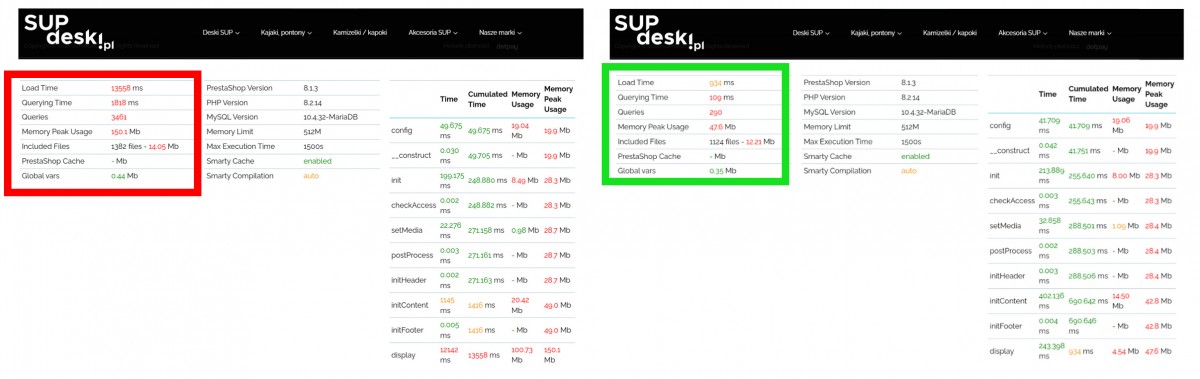
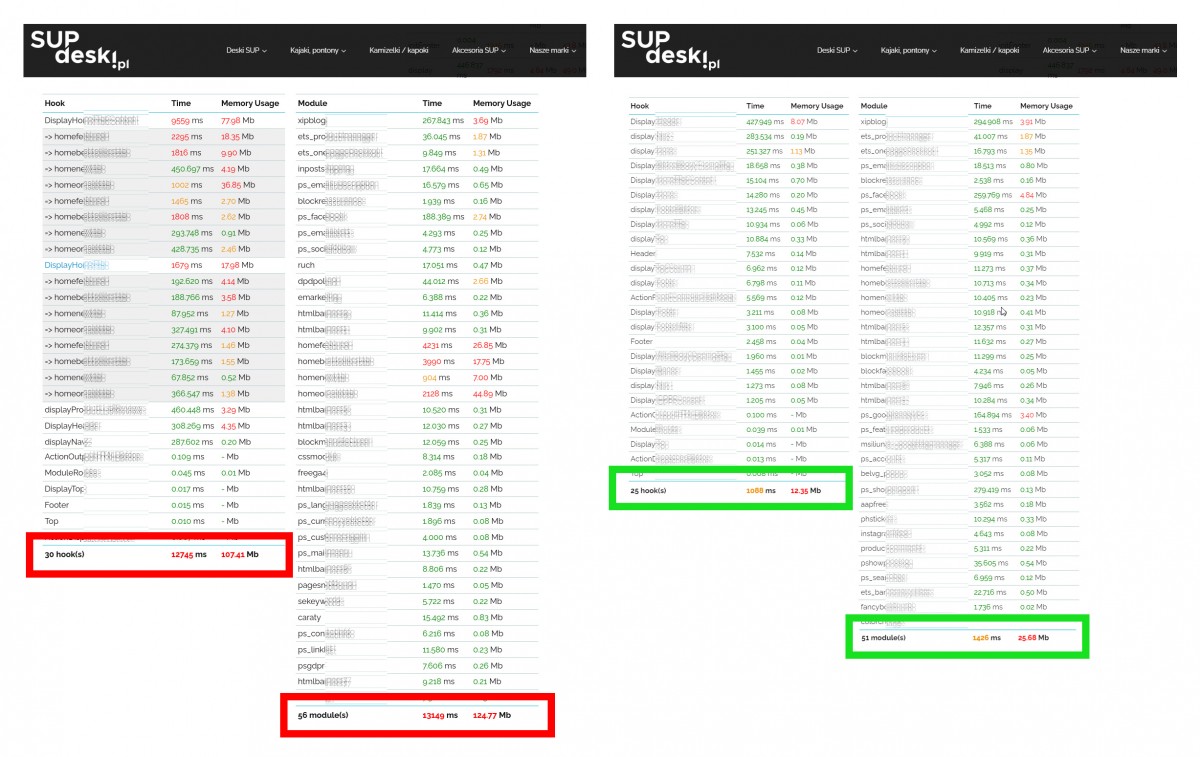
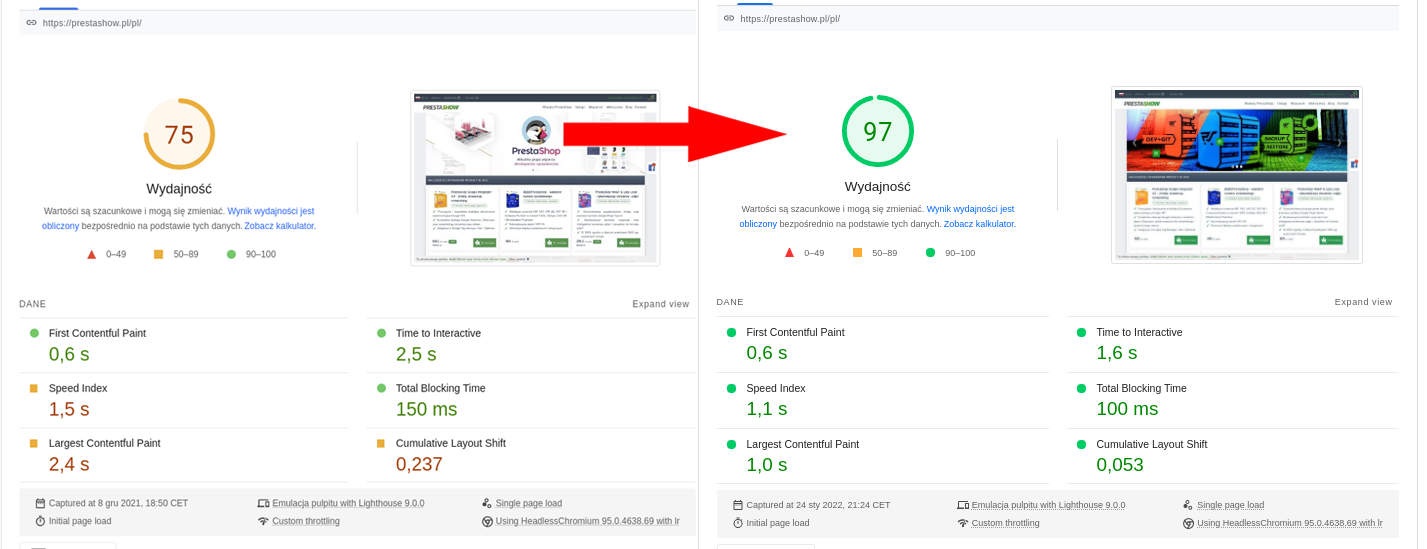
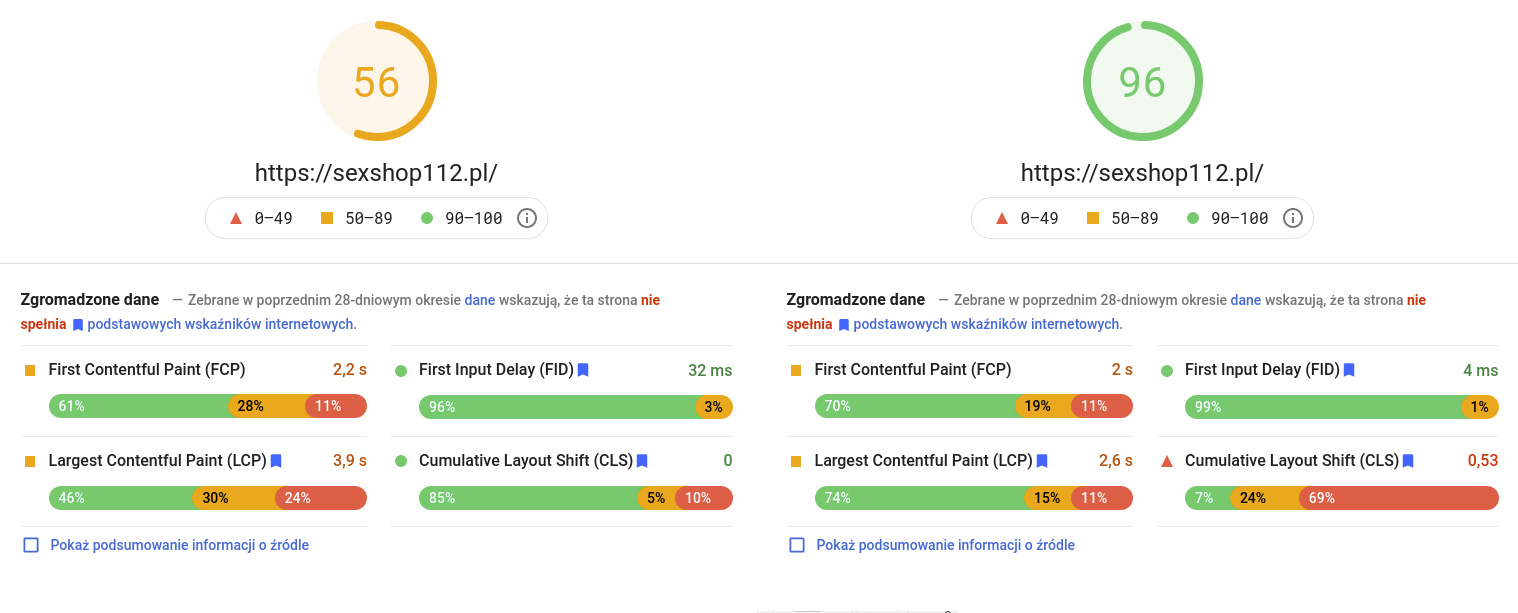
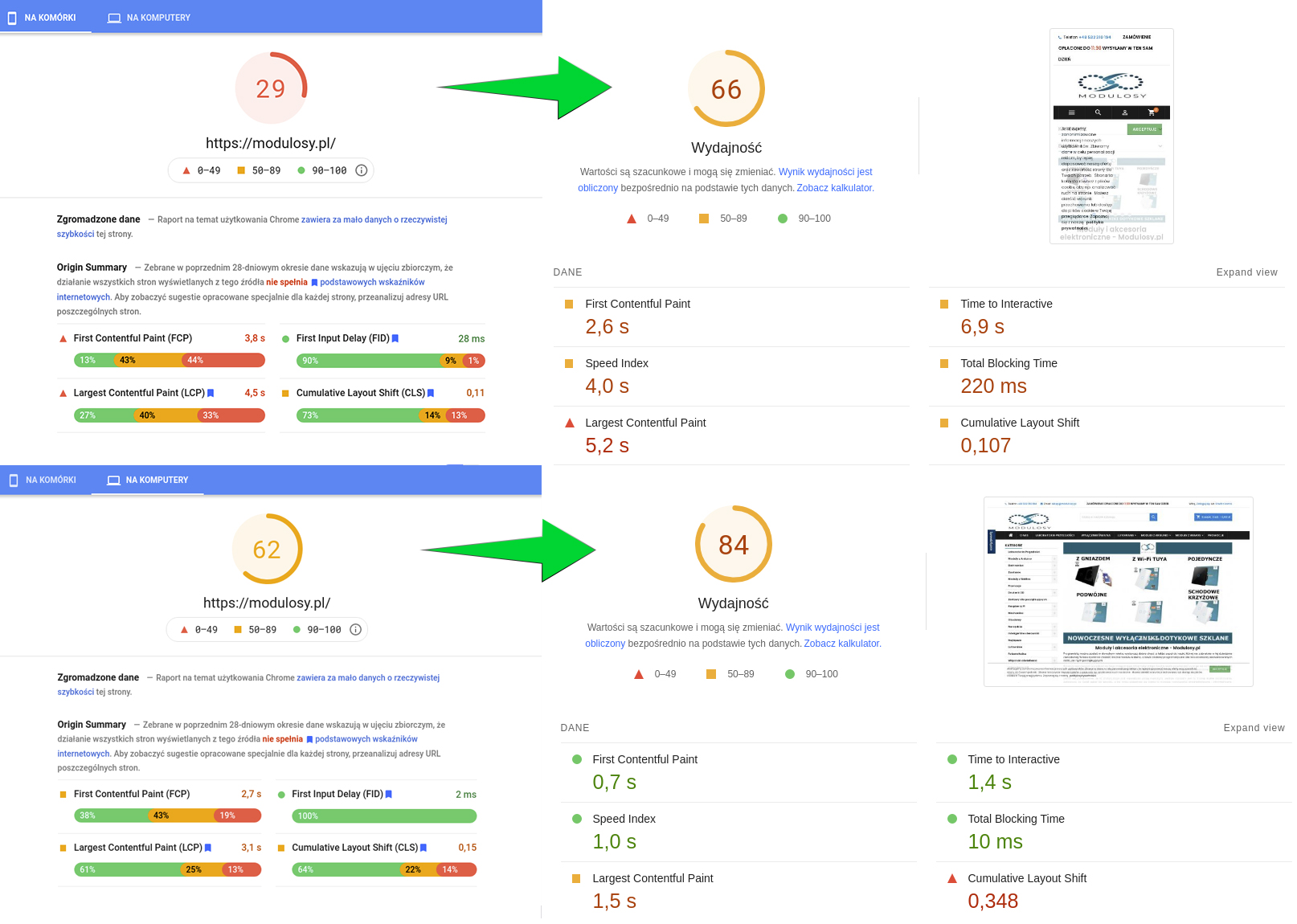
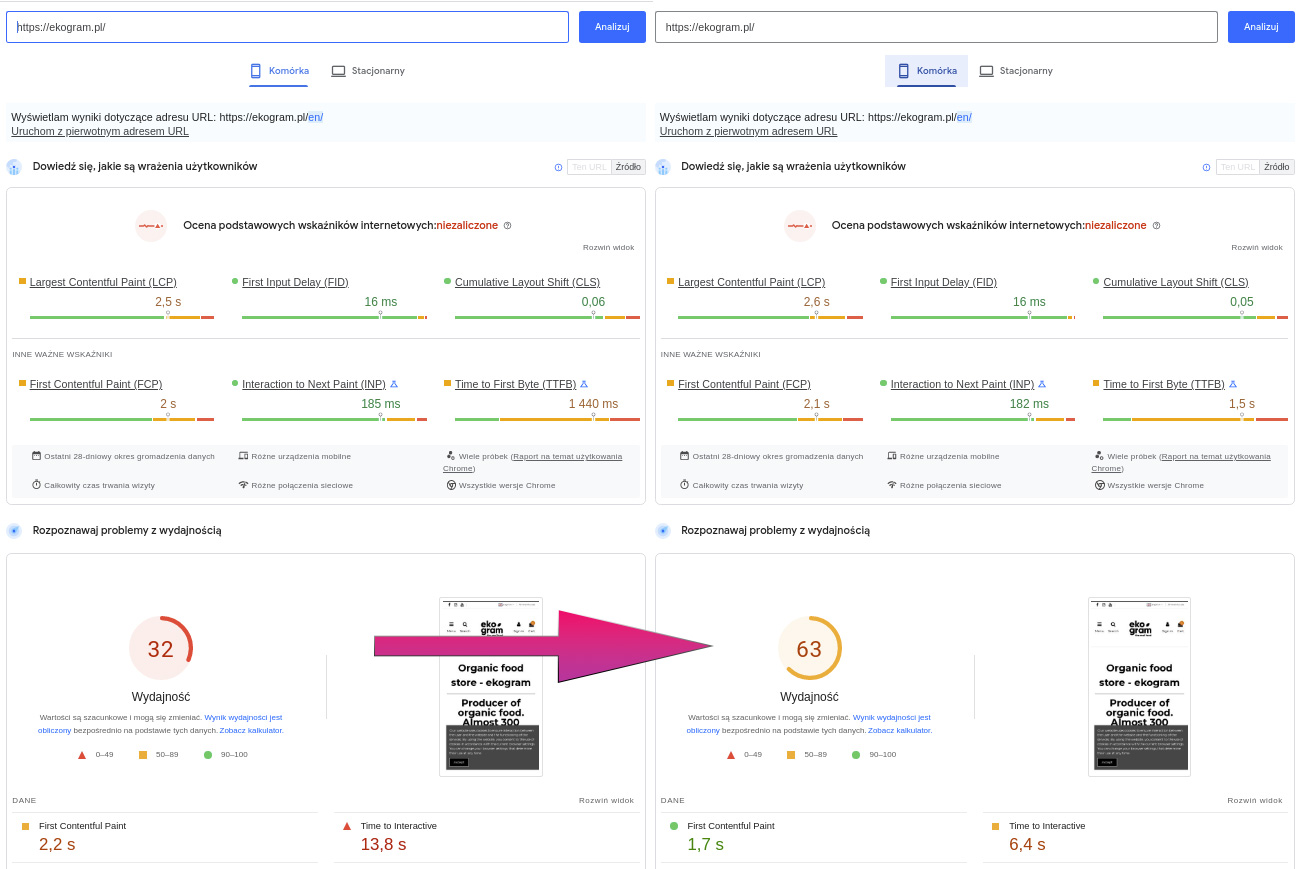
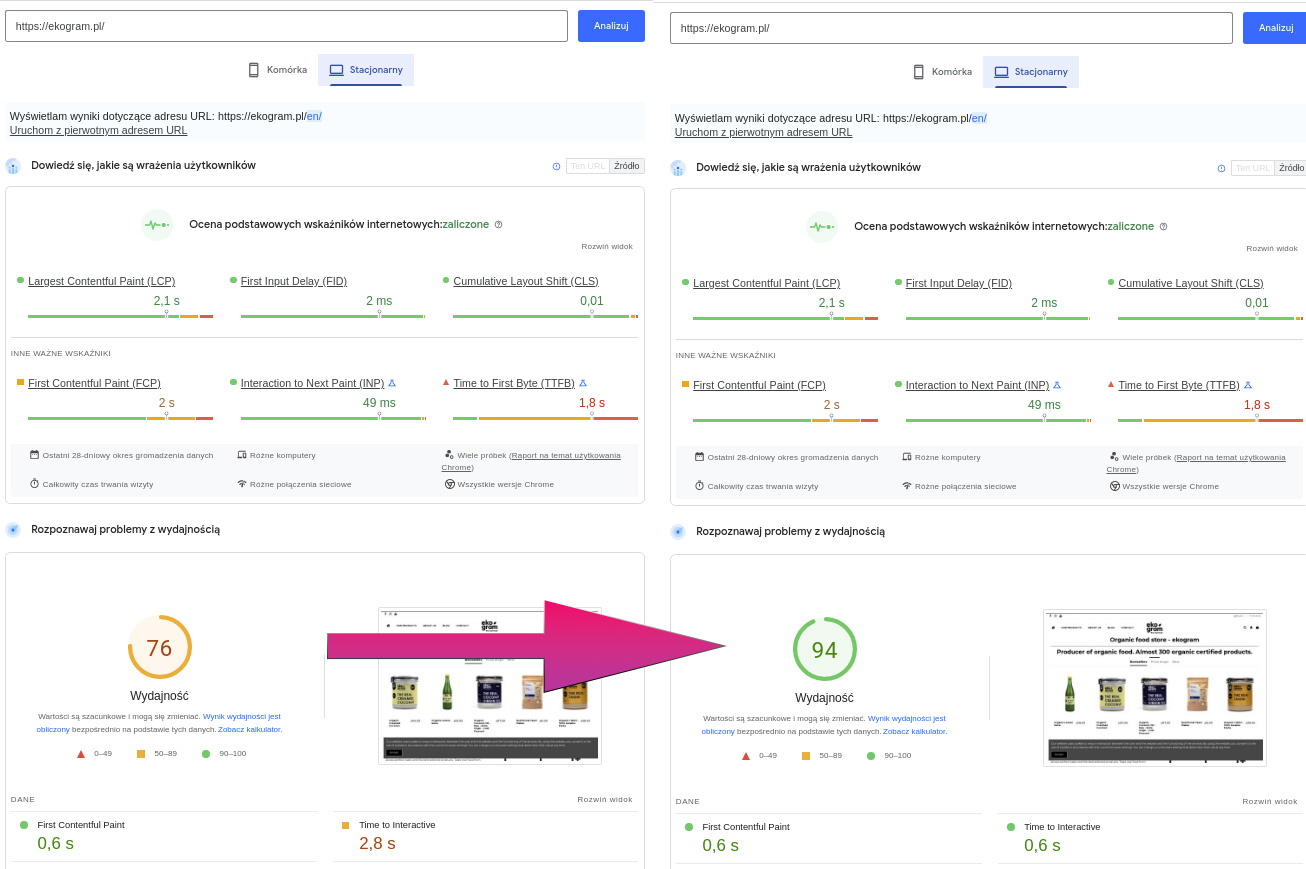
Optimization of PrestaShop 8.1, during which we reduced the loading time of the store from 13s to 0.9s. The screenshots show a comparison of the results BEFORE and AFTER the PrestaShop profiling optimization was performed.
Safe procedure that will not disrupt your store's operation
- We perform a thorough audit of your store, modules and server.
- We prepare the server and run a copy of your store on it.
- We optimize the copy of your store - we implement the recommendations proposed in the audit.
- We test the store and the server and make corrections.
- Repositioning the old store to the new one takes a few hours - this is the only time your store will be out of service.
- You start working on the new store. All data is preserved 1:1.
- You get a 3-month guarantee on the optimization and an offer of ongoing care.
Raise your Google Page Speed score on your own.
We offer you modules with which you can raise your score in performance tests on your own or take care of server performance:
- 5.0
 Free support BEST75,00 EUR
 Free support BEST100,00 EUR
When ordering the complete PrestaShow optimization service, you will receive the above modules for free!
How much does PrestaShop optimization cost?
We do not give one price for each store, because two PrestaShop stores may look similar to the customer, but have a completely different technical situation.
That's why we start optimization with an audit. After it, you know which works are necessary, which are optional, how much they will cost and what their priority is.
The following information is not an offer, because the final price of optimizing the store is affected by many variables such as:
- Current PHP version and PrestaShop version.
- Quality and speed of code, modifications and overrides
- The number of modules used
- Errors, warnings and slowdowns of the store and database
- Configuration and capabilities of the server and database
- Performance and load test results
PrestaShop optimization starts with an audit
Not every optimization requires the same work. One store has a problem with the server, another with the database, a third with modules, and a fourth with a heavy template or checkout errors.
That's why we perform a PrestaShop Audit before implementing changes, which shows what's really slowing down the store and which fixes make the most business sense.
The audit is a road-map for the work on your store.
You'll receive a PDF of the state of your store and server. In the audit, we list problems, opportunities and recommendations, along with a quote for each item.
- 5.0
 New1 230,00 EUR
Safe optimization without working on production
We do not test changes directly on a running store.
We do the work on a 1:1 developer copy so your store can continue to sell and we can safely analyze, tweak and test implementations.
Only after the changes are approved do we port the optimized version of the store.
 615,00 EUR
Updating the store, modules and upgrading the PHP version
Price from: PLN 2,000
We update PrestaShop 1.6x -> 1.6.1.24, PrestaShop 1.7x > 1.7.8.8 or PrestaShop 8.x. We update the modules and server components used. We upgrade the PHP version and solve all the problems encountered in the store and modules.
Profiling and optimization of Google Search Console
Page Speed, Lighthouse, GTMetrix
Price from: 3,500 PLN
Increasing the score in Mobile and Desktop performance tests involves correcting errors related to the appearance and design of the template, JavaScript files and the source code of the store. Optimization also includes modules and database. Correcting errors in Search Console will raise the SEO quality of your store. Your store will appear higher in search results.
New high-performance server for PrestaShop
Achieving high results on FTP servers can be limited. To achieve the highest results you need a powerful VPS or dedicated server with full root access.
We offer the service of preparing and optimizing a new server for your store. Along with the server, we propose to implement an automatic backup system on an external server, as well as a GIT version control system and Plesk panel.
- 5.0
 BEST615,00 EUR
How to order and how long does it take to optimize the store?
All work performed does not interrupt the operation of your store:
- Order PrestaShop Audit service or selected optimization items.
- Open a request on HelpDesk.
- Implementation of the Audit takes up to 15 working days.
- After reviewing the Audit, we can start implementing the recommendations proposed in it.
- Implementation of the Audit recommendations takes from 5 to 20 working days.
What are the effects of PrestaShop optimization?
The process of updating and optimizing PrestaShop is a milestone, the effects of which you will enjoy and profit from for a long time. Below are selected realizations of the optimization of our clients' stores:
Technical effects
- Shorter page load time,
- better PageSpeed and Lighthouse scores,
- improved Core Web Vitals,
- faster admin panel,
- more stable checkout,
- lower server load,
- cleaner database,
- fewer technical errors.
Business effects:
- better customer experience,
- lower risk of shopping cart abandonment,
- better technical SEO,
- greater readiness for advertising campaigns,
- more stable store performance with higher traffic,
- easier further expansion of the store.