Customer service and order packaging on your phone 📦







Detailed description
1 click
instead of manual transcription
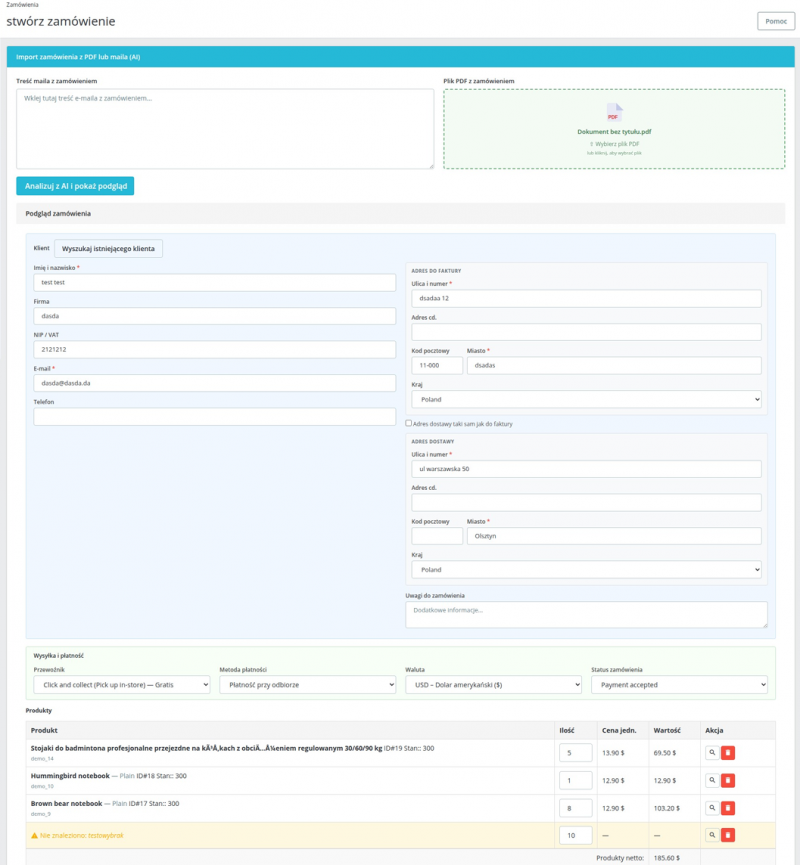
Paste the email content or drag and drop a PDF file. Order Importer will automatically extract all necessary data and then fill out the order creation form in PrestaShop.
Database integration
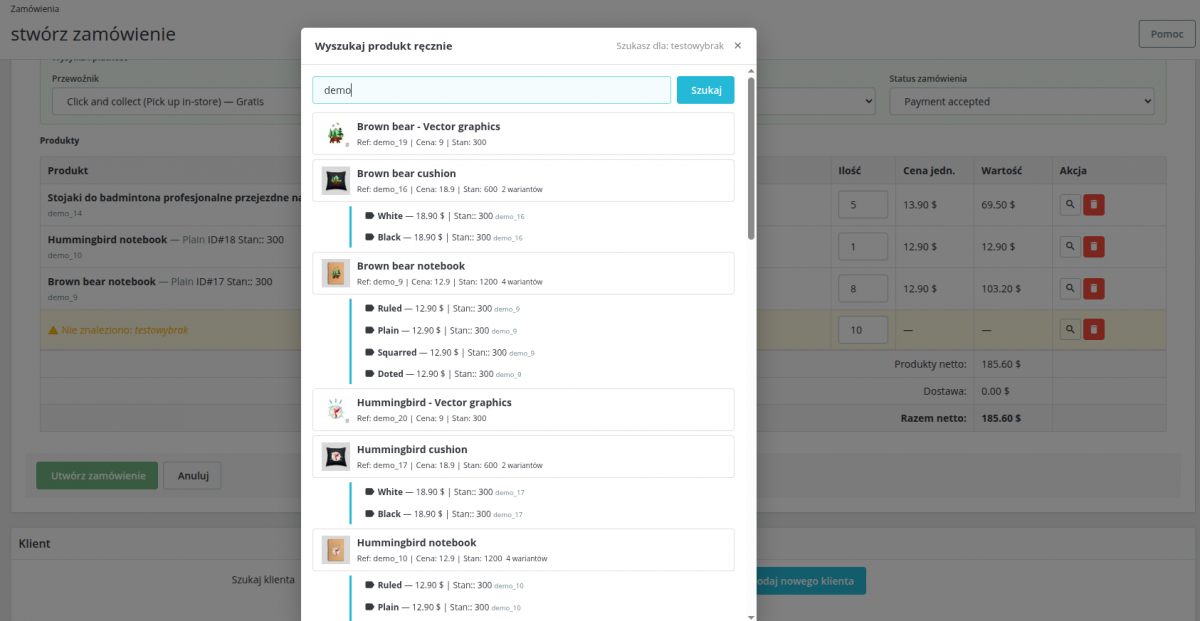
AI searches your product catalog by name, SKU, EAN, and product ID. You can manually find mismatched products using the built-in instant search—without leaving the page.
The entire process in one place
The module appears directly on the new order creation page in the PrestaShop admin panel.
Time savings
Manually entering orders from emails takes minutes, and typos are inevitable. Order Importer does this job in seconds—all it takes is one click.
Ideal for B2B stores, wholesalers, and customer service teams that receive orders via email or phone.
AI
OpenAI’s GPT-4o model handles any email or PDF format—from simple text-based orders to complex pro forma invoices with tables.
Choose GPT-4o for the highest accuracy or GPT-4o-mini for lower costs with less complex documents.
Full Control Before Saving
Before clicking “Create Order,” you’ll see a full preview: customer details, addresses, products with prices, carrier, and summary. You can edit any field.
Form validation highlights incorrect or missing fields before the order is saved to the database.
The module supports two data sources: text pasted into a text field and a PDF file dragged into the upload area.
The AI does not require additional prompts to correctly analyze the data.
- Email – copy and paste the message content; AI will extract data even from unstructured text.
- PDF – drag the file or click the upload area; supports files up to 10 MB.

AI searches your catalog based on four criteria simultaneously—no mapping configuration required.
Unmatched products can be found manually using the built-in search engine.
- Matched – product found, ready to save.
- Requires attention—the product has variations; select from the list (color, etc.).
- Mismatched—click the magnifying glass icon to search for the product manually.
- Unit prices and quantities can be edited before saving.
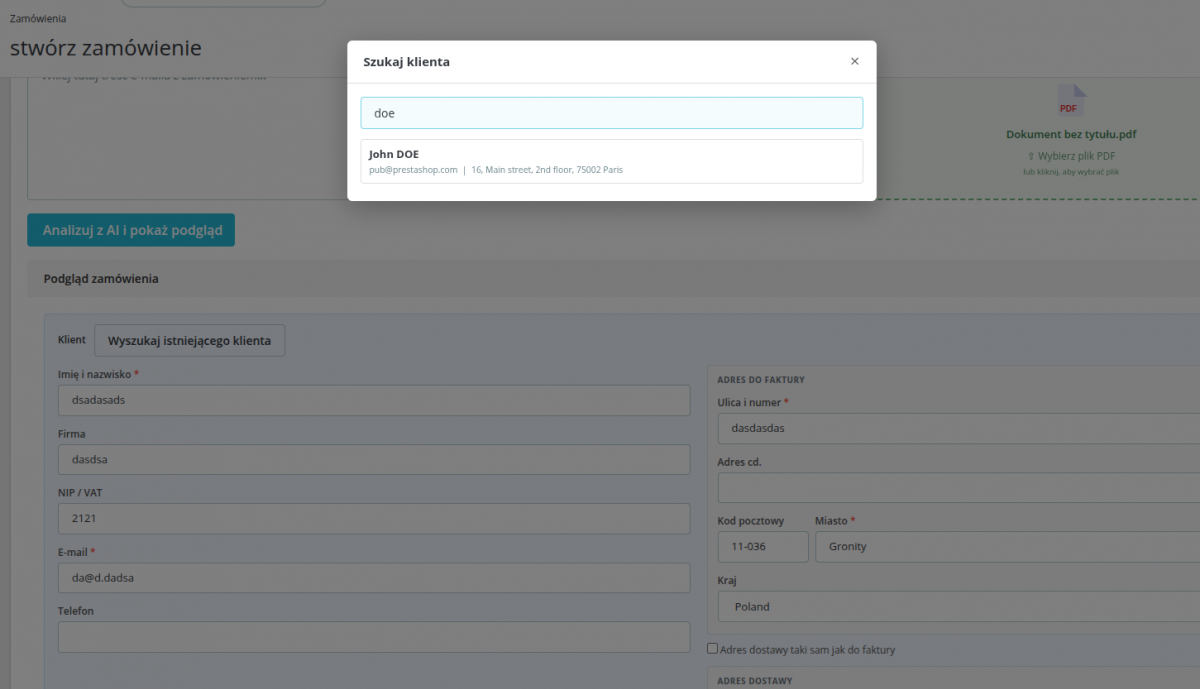
AI automatically fills in customer and address details. You can search for an existing customer using the built-in search tool.
- Customer details: first name, last name, email, phone number, tax ID/VAT number.
- Billing address and shipping address.
- A new customer is created automatically if they do not exist in the database.
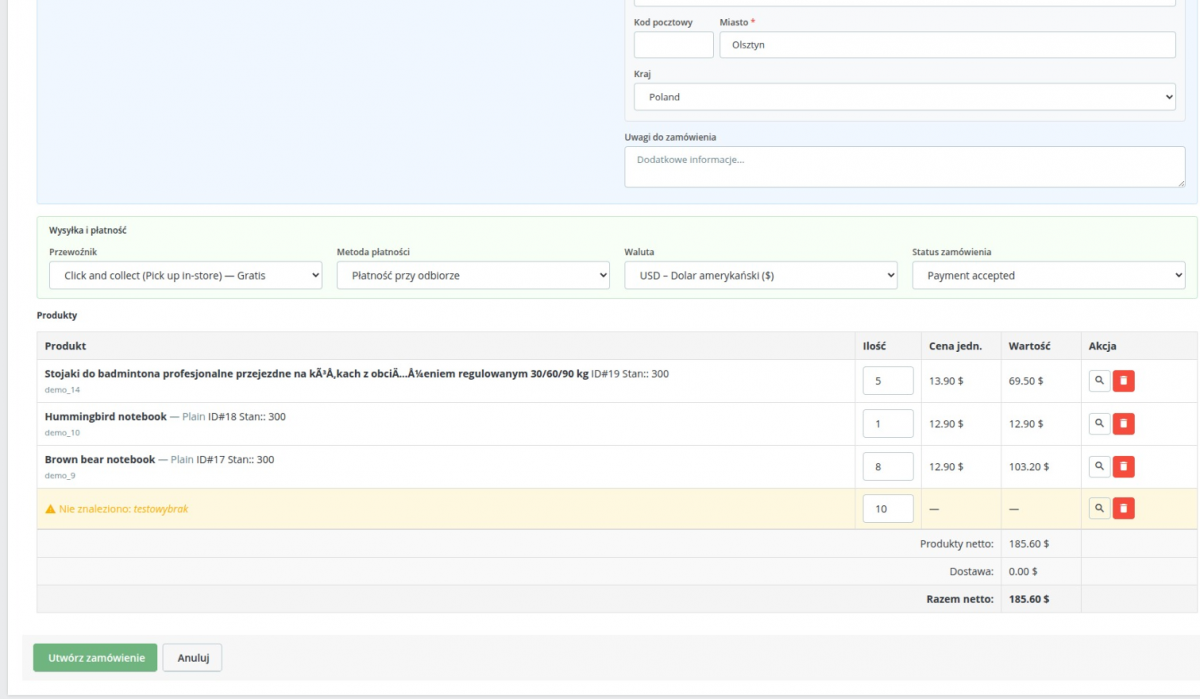
- Currency detection and matching to the active currency in PrestaShop.
- Delivery price calculated in real time (using pricing rules).
- AI detects the preferred carrier and payment method from the order form and maps them to those available in the store.
- Option to manually change each parameter before saving.
Validation before saving
Before clicking “Create Order,” the module checks that all required fields are complete: first and last name, email, address, country, at least one matched product, and selected variants.
Incorrect fields are highlighted in red with a list of information to correct.
Creating a Native PrestaShop Order
Once confirmed, the order is created using native PrestaShop objects (Cart, Customer, Address, Order).
No custom database tables are required—the order looks and functions just like any other order placed by a customer or admin.
B2B stores and wholesalers
Wholesale customers often place orders via email, by phone, or by sending a PDF with an order list.
Order Importer transfers orders to PrestaShop in just a few seconds.
Customer service and call centers
Employees who take orders by phone or email don’t have to manually fill out every field on the form.
They paste the email, review the preview, and click "Create."
Orders and PDF Documents
Upload a PDF containing an order, pro forma invoice, or order form.
AI will extract the data regardless of the table layout or header format.

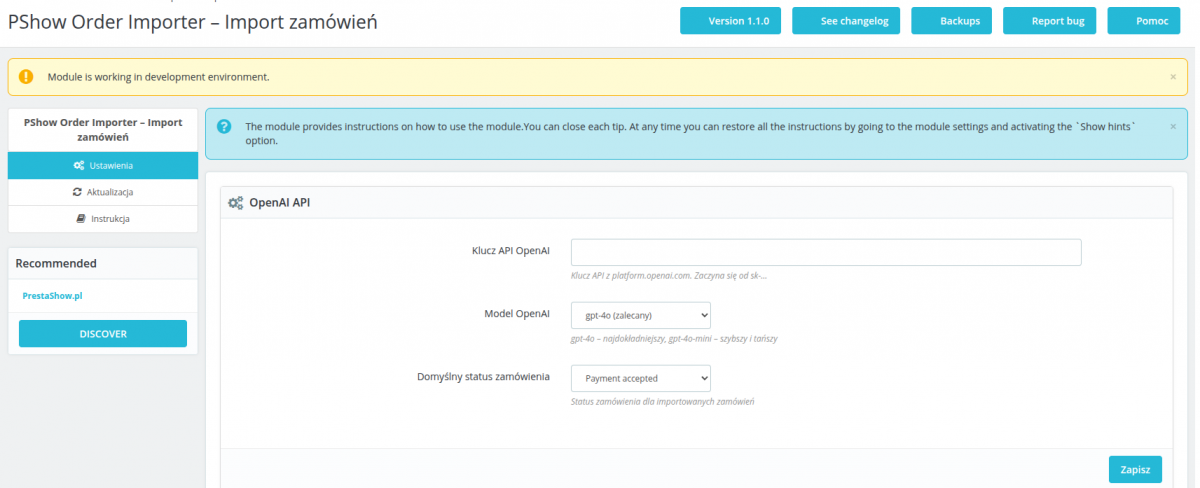
Settings and integration
- OpenAI API key and model selection (GPT-4o / GPT-4o-mini) in the module configuration.
- Default status for the order being created.
- The module uses standard PrestaShop hooks.
- No custom tables—zero conflicts with other modules.
PrestaShop Hooks
- displayAdminOrderCreateExtraButtons – import widget on the order creation page.
- actionAdminControllerSetMedia – loads CSS and JS in the admin panel.
Technical Requirements
- PrestaShop: 1.7.x, 8.x, and 9.x
- PHP: 7.4–8.5
- MySQL / MariaDB: 5.6+ / 10.2+
- OpenAI API: An active account and API key are required
- HTTPS connection: The server must have access to api.openai.com
Changelog (0)
# Changelog – PShow Order Importer
## 1.1.6 – 2026-07-08
- Extracted pure, testable logic out of `OrderCreator`: `resolveQty()`, `resolveOptionId()`, `resolveShippingOverride()`, `resolveAmountPaid()`, `resolvePaymentName()`, `resolveNote()`, `buildAddressData()`, `pickFallbackAddressId()`, `calculateAdjustedTotals()` — no behaviour change, `create()`/`createImportAddress()`/`buildCart()`/`adjustShipping()` now call these instead of inlining the logic
- Added `AdminRequestSupport` service (no PrestaShop controller inheritance) holding `IndexController`'s request-shaping logic (`transformCustomerRow()`, `filterValidProducts()`, `shouldUpdateApiKey()`) so it can be unit tested without a full PrestaShop bootstrap
- Extracted `OpenAiOrderParser::buildPdfDataUri()` so the PDF base64 data URI construction is unit tested directly instead of duplicated in tests
- Rewrote the test suite to exercise this real code: removed tests that silently re-implemented the logic under test (`ic_transform_row`, `ic_filter_products`, `oc_calc_amount_paid`, inline `max(1,(int)$x)`) and tests that pinned `md5()` of a hardcoded string against itself instead of checking real source content
## 1.1.5 – 2026-07-03
- Fixed order notes not being saved — notes were read from `options['note']` instead of `client['notes']`, causing them to always be null; notes are now written to `Order::$note` (internal BO field) after order creation
- Fixed ManualController missing `controller_displayName` — page title showed raw class name "PShowOrderImporterManual" instead of a readable label (PS9)
- Fixed PS9 alert spacing — PS9 admin theme adds `margin-inline: 1.5rem` to `.alert` elements causing visual misalignment; overridden to `0` within module content area
- Improved manual page content CSS — added consistent padding and typography for `.pshow-manual-content`
- Fixed side menu panel element padding in PS9 — direct children of `.panel` without `.panel-body` wrapper now receive correct horizontal padding
## 1.1.4 – 2026-07-03
- PDF files are now sent directly to OpenAI (gpt-4o inline base64) instead of being extracted server-side with `pdftotext` — PDF upload now works on any server regardless of installed system tools
- Removed server-side PDF text extraction: `isShellExecEnabled()`, `findPdfToText()`, `isPdfExtractionAvailable()`, `extractPdfText()` — no more dependency on `poppler-utils` or `shell_exec`
- PDF upload column is now always visible; the warning about missing `pdftotext` and automatic hiding of the upload zone have been removed
## 1.1.3 – 2026-07-01
- Fixed incorrect payment amount recorded in `order_payment` when a shipping override was provided — the free-shipping cart rule excluded shipping from the cart total passed to `validateOrder()`, causing the stored payment amount to be lower than the order total
- Fixed fatal error `Call to undefined method Order::getOrderInvoiceCollection()` — replaced with the correct PS1.7/8/9 method `getInvoicesCollection()`
- Changed `catch (\Exception)` to `catch (\Throwable)` in `ajaxProcessCreateOrder` and `OrderCreator::create()` — PHP `\Error` subtypes (e.g. `\TypeError`) are now returned as JSON instead of HTTP 500
- Added HTTP error handler in JS confirm button — server errors now display inline instead of silently blocking the UI; page scrolls to the error message automatically
- Added mutual exclusion between text input and PDF upload — typing in the text area disables the PDF column; selecting a file disables the text area; added "Remove file" button to restore both inputs
- Added GDPR notice below the parse button informing that order content is sent to OpenAI
- OpenAI API key field changed to password type — stored key is never echoed to HTML; saving with a blank field keeps the existing key
- OpenAI system prompt rewritten to English and extracted to `OpenAiOrderParser::buildSystemPrompt()`
- PDF import capability detection (`isPdfExtractionAvailable()`) exposed to the frontend — PDF column is hidden when `pdftotext` is unavailable
- Updated `.gitlab-ci.yml` include path to canonical `prestashow/ci-cd/module`
## 1.1.2 – 2026-06-30
- Initial release
## 1.1.0 – 2026-06-30
- Initial release
## 1.0.0 – 2026-06-24
- Initial release
## 1.1.6 – 2026-07-08
- Extracted pure, testable logic out of `OrderCreator`: `resolveQty()`, `resolveOptionId()`, `resolveShippingOverride()`, `resolveAmountPaid()`, `resolvePaymentName()`, `resolveNote()`, `buildAddressData()`, `pickFallbackAddressId()`, `calculateAdjustedTotals()` — no behaviour change, `create()`/`createImportAddress()`/`buildCart()`/`adjustShipping()` now call these instead of inlining the logic
- Added `AdminRequestSupport` service (no PrestaShop controller inheritance) holding `IndexController`'s request-shaping logic (`transformCustomerRow()`, `filterValidProducts()`, `shouldUpdateApiKey()`) so it can be unit tested without a full PrestaShop bootstrap
- Extracted `OpenAiOrderParser::buildPdfDataUri()` so the PDF base64 data URI construction is unit tested directly instead of duplicated in tests
- Rewrote the test suite to exercise this real code: removed tests that silently re-implemented the logic under test (`ic_transform_row`, `ic_filter_products`, `oc_calc_amount_paid`, inline `max(1,(int)$x)`) and tests that pinned `md5()` of a hardcoded string against itself instead of checking real source content
## 1.1.5 – 2026-07-03
- Fixed order notes not being saved — notes were read from `options['note']` instead of `client['notes']`, causing them to always be null; notes are now written to `Order::$note` (internal BO field) after order creation
- Fixed ManualController missing `controller_displayName` — page title showed raw class name "PShowOrderImporterManual" instead of a readable label (PS9)
- Fixed PS9 alert spacing — PS9 admin theme adds `margin-inline: 1.5rem` to `.alert` elements causing visual misalignment; overridden to `0` within module content area
- Improved manual page content CSS — added consistent padding and typography for `.pshow-manual-content`
- Fixed side menu panel element padding in PS9 — direct children of `.panel` without `.panel-body` wrapper now receive correct horizontal padding
## 1.1.4 – 2026-07-03
- PDF files are now sent directly to OpenAI (gpt-4o inline base64) instead of being extracted server-side with `pdftotext` — PDF upload now works on any server regardless of installed system tools
- Removed server-side PDF text extraction: `isShellExecEnabled()`, `findPdfToText()`, `isPdfExtractionAvailable()`, `extractPdfText()` — no more dependency on `poppler-utils` or `shell_exec`
- PDF upload column is now always visible; the warning about missing `pdftotext` and automatic hiding of the upload zone have been removed
## 1.1.3 – 2026-07-01
- Fixed incorrect payment amount recorded in `order_payment` when a shipping override was provided — the free-shipping cart rule excluded shipping from the cart total passed to `validateOrder()`, causing the stored payment amount to be lower than the order total
- Fixed fatal error `Call to undefined method Order::getOrderInvoiceCollection()` — replaced with the correct PS1.7/8/9 method `getInvoicesCollection()`
- Changed `catch (\Exception)` to `catch (\Throwable)` in `ajaxProcessCreateOrder` and `OrderCreator::create()` — PHP `\Error` subtypes (e.g. `\TypeError`) are now returned as JSON instead of HTTP 500
- Added HTTP error handler in JS confirm button — server errors now display inline instead of silently blocking the UI; page scrolls to the error message automatically
- Added mutual exclusion between text input and PDF upload — typing in the text area disables the PDF column; selecting a file disables the text area; added "Remove file" button to restore both inputs
- Added GDPR notice below the parse button informing that order content is sent to OpenAI
- OpenAI API key field changed to password type — stored key is never echoed to HTML; saving with a blank field keeps the existing key
- OpenAI system prompt rewritten to English and extracted to `OpenAiOrderParser::buildSystemPrompt()`
- PDF import capability detection (`isPdfExtractionAvailable()`) exposed to the frontend — PDF column is hidden when `pdftotext` is unavailable
- Updated `.gitlab-ci.yml` include path to canonical `prestashow/ci-cd/module`
## 1.1.2 – 2026-06-30
- Initial release
## 1.1.0 – 2026-06-30
- Initial release
## 1.0.0 – 2026-06-24
- Initial release
Technical requirements
Technical Requirements
- PHP 7.1 - 8.x
- Server extension ionCube Loader
- PrestaShop Importer only: PHP libxml version > 2.9.3
- PrestaShop Facebook Integrator only: PHP 7.2 or higher
- PrestaShop VAT Validator only: PHP SOAP
Support & Updates
Support = Updates + HelpDesk
You get 90 days (3 months) access to the complete PrestaShow support package.
Module updates
Modules will inform you about available updates. Read the changelog and perform a 1-click module update directly from your store.
HelpDesk panel
This is the panel where we will provide you with help. On HelpDesk you can report problems, order free module installation and updates, and order modifications and custom programming work.
Extend support
After support expires, you can use the module without any restrictions. You can extend your support access at any time you need it.
Knowledge Base & FAQ
Free forever
The knowledge base is available to everyone. You will find module documentation as well as instructions, videos and answers to frequently asked questions.
License
Lifetime license for the module
- You can use the module without limitation in 1 store = 1 domain.
- You can use an additional domain, e.g. for developer copy.
- For a small fee you can change the domain for the module yourself.
Additional domains for Multistore
- All our modules support PrestaShop Multistore.
- Supporting unlimited domains for PrestaShop Multistore requires purchasing multistore support for the module.
Modifying the code
- The module code related to the integration with the store and the design (.tpl, .css, .js) has open source code and you can modify it freely.
- The module's source code (.php) is encrypted with ionCube, and modifying it will void the warranty.
No entries yet.
No customer reviews for the moment.