Customer service and order packaging on your phone 📦









- Current NBP Exchange Rates in Your PrestaShop Store
- Current NBP exchange rate on orders
- Manual exchange rate—the price visible to the customer
- All exchange rate-related operations in one place
- Background automation — one token, two options
- Security
- Who is PrestaShop NBP for?
- Developer-Friendly Features
- PrestaShop hooks
- Technical Requirements
Detailed description
Exchange rates straight from the NBP—the official feed
By default, PrestaShop retrieves exchange rates from its own external source pegged to the EUR—which is not affiliated with the National Bank of Poland. Our module replaces these with the official, public NBP exchange rate table.
Background automation—URL link and CRON
A single, secure token supports CRON—it works for both shared hosting and servers with SSH access.
Additional, manual exchange rate for product price conversion—a ready-to-use solution for invoices
Regardless of the NBP exchange rate, you can set an additional exchange rate used to convert product prices. This rate is not visible to the customer. Every order in a foreign currency is assigned the actual NBP exchange rate from the date of purchase.
Compliance with the NBP
Exchange rates are retrieved directly from the official, public API at api.nbp.pl —Table A (major currencies, daily) or Table B (other currencies, weekly).
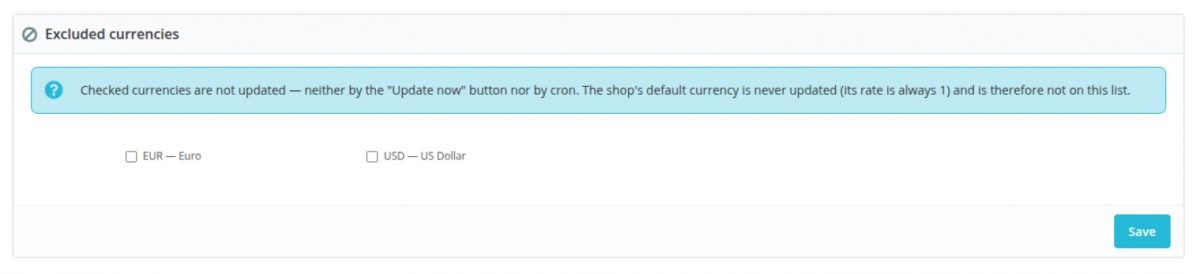
The store’s default currency is never altered—its exchange rate always remains 1, in accordance with PrestaShop requirements.
Control over the exchange rate for price conversion
Set your own fixed exchange rate for any currency—for example, for promotions or testing—with a live conversion preview in your browser.
The NBP reference exchange rate continues to be tracked in the background, regardless of the manually set exchange rate.
Zero manual work on invoices
Every order in a foreign currency is assigned the NBP exchange rate from the date of purchase or the business day preceding the date of purchase.
This is the only feature of its kind among PrestaShop exchange rate modules.
- When an order is placed in a foreign currency, the module retrieves the current exchange rate from a previously downloaded NBP reference rate—the checkout does not connect to the NBP, so an NBP outage does not affect the order placement process.
- The current exchange rate overwrites the `conversion_rate` field in the PrestaShop order, which is used by reports and statistics.
- The amount paid by the customer never changes—the data is locked in at the time the order is created.
- A complete set of data is stored in a separate table: the exchange rate from checkout, the actual NBP exchange rate, the NBP table and date, and the gross/net amounts converted to the store’s default currency.
Sometimes a store wants to show customers prices that differ from those resulting from a non-market exchange rate conversion—for promotional purposes, rounding, or testing.
- You can enter the same exchange rate as the NBP or any other rate.
- Live conversion preview in the browser, even before saving.
- Clearing the field restores automatic conversion from the NBP.
- The NBP reference exchange rate is always visible and updated next to it—regardless of the manually set exchange rate.
- Two exchange rates are included in the order: the NBP rate—for accounting purposes—and the manually set rate—for price calculations.
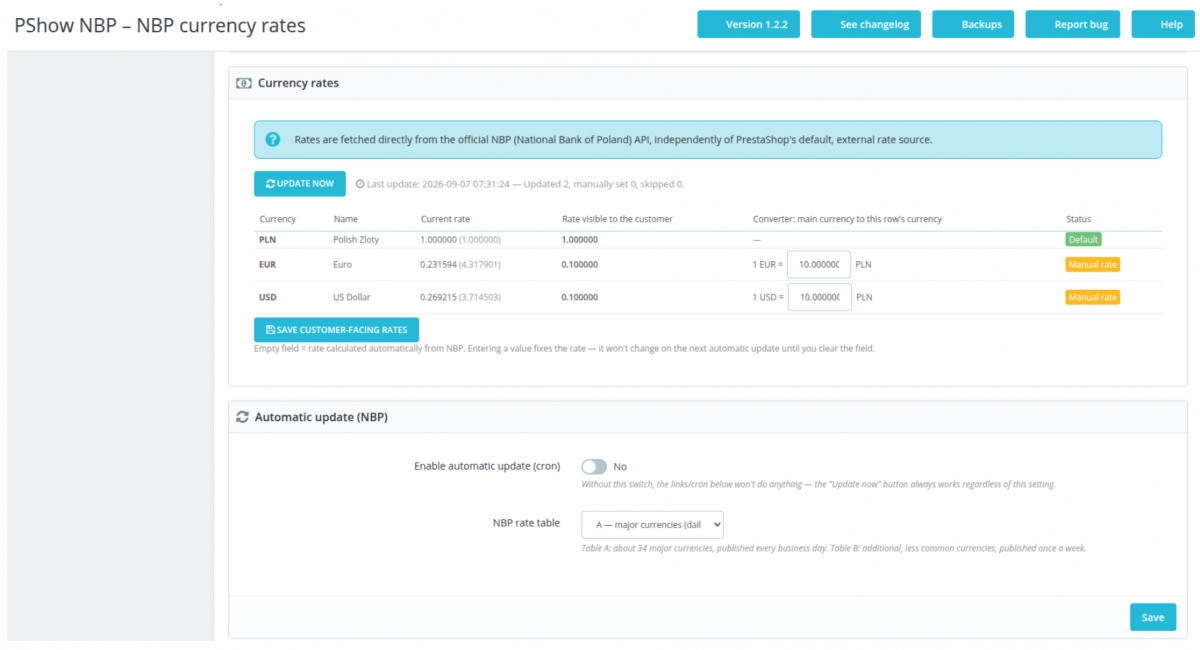
The module panel displays each store currency in a single row: the current NBP exchange rate (reference rate), the manually set exchange rate—visible to the customer—and a clear status.
- Current exchange rate —an independent, constantly updated NBP exchange rate, visible even for currencies with a manually set exchange rate.
- Rate visible to the customer —this is what is actually passed to PrestaShop’s `conversion_rate` and determines prices on the front end.
- Status – Default, Updating, Manual Rate, Excluded, or Inactive.
- The “Update Now” button always works, regardless of background automation.
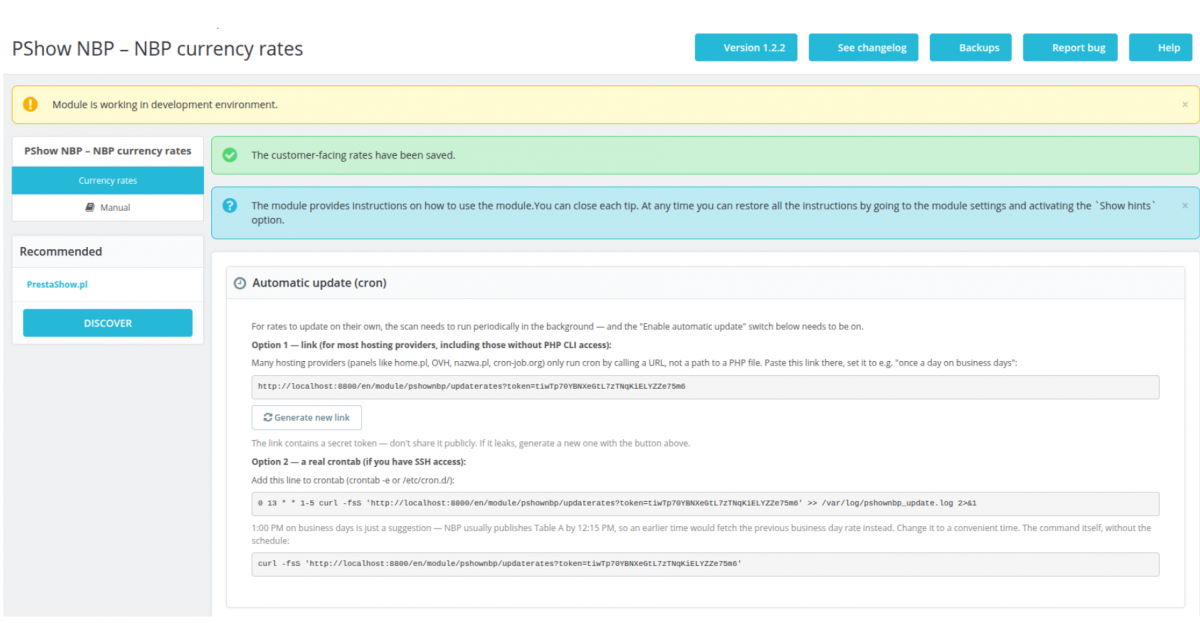
- Option 1 — URL link — for control panels such as home.pl, OVH, nazwa.pl, or cron-job.org, which run cron jobs simply by calling the URL.
- Option 2 — crontab — a ready-to-use command line for servers with SSH access.
- You can revoke the token at any time and generate a new one with a single click.
Random, regeneratable token
The link for automatic updates contains a secret token—without it, the server returns a 403 Forbidden response. The token can be revoked at any time, and a new one can be generated with a single click in the dashboard.
Random, regeneratable token
The link for automatic updates contains a secret token—without it, the server returns a 403 Forbidden error. The token can be revoked at any time, and a new one can be generated with a single click in the dashboard.


One endpoint, no duplicates
Both cron options (URL link and crontab) point to exactly the same, secure location—there is no separate script that could bypass token verification.


Accounting firms and store accounting
Ready-to-use, documented data for invoices in foreign currencies, compliant with the requirement to use NBP exchange rates—no need to manually look up the exchange rate from the order date.

Test and development stores
Full control over the exchange rate displayed to the customer, independent of the actual NBP exchange rate tracked in the background—convenient for testing prices and conversions.
Developer-Friendly Features
- All exchange rate logic is contained in independent services (NbpClient, CurrencyRateUpdater, OrderRealRateApplier)—easy to extend and reuse.
- Dedicated ps_pshownbp_order_rate table (one row per order)—minimal database load, ready to be read by your own invoice generator.
- Covered by PHPUnit unit tests—safe for implementing your own modifications.
PrestaShop hooks
- actionValidateOrder – saves the current NBP exchange rate and invoice data when an order is placed.

Changelog (0)
## 1.2.30 - 2026-09-11
-----
* Fixed: right after installing, reinstalling, or upgrading the module, orders placed in that
short window could keep the checkout rate instead of getting the real NBP rate for invoicing.
New orders placed any time after that already worked correctly — this closes that narrow gap.
## 1.2.29 - 2026-09-11
-----
* Fixed: if your shop's main currency wasn't covered by the selected NBP table (e.g. table B with
a main currency like USD or EUR), none of your other currencies got updated either, even ones
the table did cover. Fixed — the main currency's rate is now fetched automatically when needed.
## 1.2.28 - 2026-09-11
-----
* Fixed: after switching the NBP table, a currency no longer covered by the new table could keep
showing its old rate as if it were still current. It now correctly shows as unmatched instead.
## 1.2.27 - 2026-09-11
-----
* Fixed: on PrestaShop 9, the automatic-update link could be blocked by the server before it even
reached the module, so scheduled updates never actually ran. Fixed.
## 1.2.26 - 2026-09-11
-----
* Fixed: the module was still showing the wrong publisher name in the back-office modules list.
## 1.2.25 - 2026-09-09
-----
* Fixed: in some cases, saving a manual rate or running an update could report success but the
rate wouldn't actually be applied. Rate updates now always take effect reliably.
## 1.2.24 - 2026-09-09
-----
* Security: the module's own test scripts are now restricted to command-line use only, so they
can't be triggered by a direct web request on hosting setups that don't already block that on
their own (e.g. Nginx).
## 1.2.23 - 2026-09-09
-----
* Improved: the suggested automatic-update schedule now runs early every morning (including
weekends) instead of once on business-day afternoons, so orders placed any time of day always
get the correct rate, not one left over from the previous run. Explained in the settings page
and the manual.
## 1.2.22 - 2026-09-09
-----
* Changed: every update (manual or automatic) now uses the exchange rate from the last business
day before today, not today's own rate — required by Polish law for VAT invoicing, and correct
no matter what time of day the update runs. Explained on the settings page and in the manual.
## 1.2.21 - 2026-09-09
-----
* Fixed: on PrestaShop versions older than 1.7.4, syncing rates for more than one shop in a row
could mix up currency rates between shops. Fixed for every supported PrestaShop version, from
1.7.0 onward.
## 1.2.20 - 2026-09-09
-----
* Fixed: the PL/EN tabs on the in-admin manual page could stop switching depending on which
PrestaShop version/theme was rendering the page. They now work the same way everywhere.
## 1.2.19 - 2026-09-09
-----
* Fixed: technical log entries (visible under Advanced Parameters > Logs) were a mix of Polish and
English regardless of the shop's admin language. They're now consistently in English, like other
technical/developer-facing log entries.
## 1.2.18 - 2026-09-09
-----
* Fixed: in the rare case of a database hiccup while recording the invoicing audit trail, the order
could end up with its rate changed but no audit record to show for it. The two are now saved
together — if either fails, neither one does.
## 1.2.17 - 2026-09-09
-----
* New: order pages now show the real NBP rate used for invoicing right next to the rate the
customer actually paid at checkout, plus both totals converted to your shop's default currency —
no more digging through the database to see it.
## 1.2.16 - 2026-09-09
-----
* Fixed: the automatic-update link now works reliably even while the shop is in maintenance mode
or has SSL/multilingual redirects — it no longer depends on the shop's normal page routing.
## 1.2.15 - 2026-09-09
-----
* Improved: "Update now" now shows a clear warning when the selected NBP table doesn't cover any
of the shop's currencies, instead of a misleading "success" message.
## 1.2.14 - 2026-09-09
-----
* Fixed: an unused generic settings page could show a confusing, empty form — it now takes you to the real settings on the "Currency rates" page instead.
## 1.2.13 - 2026-09-09
-----
* Fixed: uninstalling the module now removes all of its data, so reinstalling starts from a completely clean state.
## 1.2.12 - 2026-09-09
-----
* Fixed: module name and description now display correctly in English store back offices.
## 1.2.11 - 2026-09-09
-----
* Fixed: the module's currency rates are no longer overwritten by PrestaShop's built-in currency updater.
## 1.2.10 - 2026-09-09
-----
* Fixed: automatic update status is now correctly reported when the feature is turned off.
## 1.2.9 - 2026-09-09
-----
* Improved: more reliable connection when fetching rates from NBP, with clearer error messages if it fails.
## 1.2.8 - 2026-09-09
-----
* Fixed: order invoicing data could be incorrectly overwritten in rare duplicate-processing cases (e.g. a payment retry).
## 1.2.7 - 2026-09-09
-----
* New: added an "A + B" NBP table option, so currencies from both NBP tables can be tracked at once.
## 1.2.6 - 2026-09-09
-----
* Fixed: excluding a currency now takes effect immediately, without waiting for the next update.
## 1.2.5 - 2026-09-09
-----
* Fixed: clearing a manual rate field now correctly reverts that currency to the NBP rate.
## 1.2.4 - 2026-09-09
-----
* Fixed: invalid manual rates are now rejected with a clear error instead of being silently ignored.
## 1.2.3 - 2026-09-09
-----
* Fixed: manual rates can now be entered using a comma as the decimal separator (e.g. "4,5").
## 1.2.2 - 2026-09-04
-----
* Fixed: excluded currencies are now fully left untouched by the module.
* Fixed: manual rates for other currencies are no longer lost when saving settings.
* Fixed: an issue that could prevent invoicing data from being saved for an order.
* Improved: failed automatic updates are now clearly reported instead of failing silently.
* New: multistore support — one automatic update now refreshes rates for every shop.
## 1.2.1 - 2026-09-04
-----
* Fixed: invoices now show the correct NBP rate date.
* Improved: checkout reliability when recording invoicing data.
* Improved: automatic update schedule now matches NBP's publication time.
## 1.2.0 - 2026-09-02
-----
* New: orders now record the real NBP rate for invoicing/accounting, separate from the rate shown to customers at checkout.
## 1.1.0 - 2026-08-19
-----
* New: set your own customer-facing exchange rate per currency, automatically converted for the storefront.
## 1.0.0 - 2026-08-18
-----
* Initial release — automatic currency rate updates from NBP, manual and automatic (cron) update options, per-currency exclusion list, PL/EN documentation.
-----
* Fixed: right after installing, reinstalling, or upgrading the module, orders placed in that
short window could keep the checkout rate instead of getting the real NBP rate for invoicing.
New orders placed any time after that already worked correctly — this closes that narrow gap.
## 1.2.29 - 2026-09-11
-----
* Fixed: if your shop's main currency wasn't covered by the selected NBP table (e.g. table B with
a main currency like USD or EUR), none of your other currencies got updated either, even ones
the table did cover. Fixed — the main currency's rate is now fetched automatically when needed.
## 1.2.28 - 2026-09-11
-----
* Fixed: after switching the NBP table, a currency no longer covered by the new table could keep
showing its old rate as if it were still current. It now correctly shows as unmatched instead.
## 1.2.27 - 2026-09-11
-----
* Fixed: on PrestaShop 9, the automatic-update link could be blocked by the server before it even
reached the module, so scheduled updates never actually ran. Fixed.
## 1.2.26 - 2026-09-11
-----
* Fixed: the module was still showing the wrong publisher name in the back-office modules list.
## 1.2.25 - 2026-09-09
-----
* Fixed: in some cases, saving a manual rate or running an update could report success but the
rate wouldn't actually be applied. Rate updates now always take effect reliably.
## 1.2.24 - 2026-09-09
-----
* Security: the module's own test scripts are now restricted to command-line use only, so they
can't be triggered by a direct web request on hosting setups that don't already block that on
their own (e.g. Nginx).
## 1.2.23 - 2026-09-09
-----
* Improved: the suggested automatic-update schedule now runs early every morning (including
weekends) instead of once on business-day afternoons, so orders placed any time of day always
get the correct rate, not one left over from the previous run. Explained in the settings page
and the manual.
## 1.2.22 - 2026-09-09
-----
* Changed: every update (manual or automatic) now uses the exchange rate from the last business
day before today, not today's own rate — required by Polish law for VAT invoicing, and correct
no matter what time of day the update runs. Explained on the settings page and in the manual.
## 1.2.21 - 2026-09-09
-----
* Fixed: on PrestaShop versions older than 1.7.4, syncing rates for more than one shop in a row
could mix up currency rates between shops. Fixed for every supported PrestaShop version, from
1.7.0 onward.
## 1.2.20 - 2026-09-09
-----
* Fixed: the PL/EN tabs on the in-admin manual page could stop switching depending on which
PrestaShop version/theme was rendering the page. They now work the same way everywhere.
## 1.2.19 - 2026-09-09
-----
* Fixed: technical log entries (visible under Advanced Parameters > Logs) were a mix of Polish and
English regardless of the shop's admin language. They're now consistently in English, like other
technical/developer-facing log entries.
## 1.2.18 - 2026-09-09
-----
* Fixed: in the rare case of a database hiccup while recording the invoicing audit trail, the order
could end up with its rate changed but no audit record to show for it. The two are now saved
together — if either fails, neither one does.
## 1.2.17 - 2026-09-09
-----
* New: order pages now show the real NBP rate used for invoicing right next to the rate the
customer actually paid at checkout, plus both totals converted to your shop's default currency —
no more digging through the database to see it.
## 1.2.16 - 2026-09-09
-----
* Fixed: the automatic-update link now works reliably even while the shop is in maintenance mode
or has SSL/multilingual redirects — it no longer depends on the shop's normal page routing.
## 1.2.15 - 2026-09-09
-----
* Improved: "Update now" now shows a clear warning when the selected NBP table doesn't cover any
of the shop's currencies, instead of a misleading "success" message.
## 1.2.14 - 2026-09-09
-----
* Fixed: an unused generic settings page could show a confusing, empty form — it now takes you to the real settings on the "Currency rates" page instead.
## 1.2.13 - 2026-09-09
-----
* Fixed: uninstalling the module now removes all of its data, so reinstalling starts from a completely clean state.
## 1.2.12 - 2026-09-09
-----
* Fixed: module name and description now display correctly in English store back offices.
## 1.2.11 - 2026-09-09
-----
* Fixed: the module's currency rates are no longer overwritten by PrestaShop's built-in currency updater.
## 1.2.10 - 2026-09-09
-----
* Fixed: automatic update status is now correctly reported when the feature is turned off.
## 1.2.9 - 2026-09-09
-----
* Improved: more reliable connection when fetching rates from NBP, with clearer error messages if it fails.
## 1.2.8 - 2026-09-09
-----
* Fixed: order invoicing data could be incorrectly overwritten in rare duplicate-processing cases (e.g. a payment retry).
## 1.2.7 - 2026-09-09
-----
* New: added an "A + B" NBP table option, so currencies from both NBP tables can be tracked at once.
## 1.2.6 - 2026-09-09
-----
* Fixed: excluding a currency now takes effect immediately, without waiting for the next update.
## 1.2.5 - 2026-09-09
-----
* Fixed: clearing a manual rate field now correctly reverts that currency to the NBP rate.
## 1.2.4 - 2026-09-09
-----
* Fixed: invalid manual rates are now rejected with a clear error instead of being silently ignored.
## 1.2.3 - 2026-09-09
-----
* Fixed: manual rates can now be entered using a comma as the decimal separator (e.g. "4,5").
## 1.2.2 - 2026-09-04
-----
* Fixed: excluded currencies are now fully left untouched by the module.
* Fixed: manual rates for other currencies are no longer lost when saving settings.
* Fixed: an issue that could prevent invoicing data from being saved for an order.
* Improved: failed automatic updates are now clearly reported instead of failing silently.
* New: multistore support — one automatic update now refreshes rates for every shop.
## 1.2.1 - 2026-09-04
-----
* Fixed: invoices now show the correct NBP rate date.
* Improved: checkout reliability when recording invoicing data.
* Improved: automatic update schedule now matches NBP's publication time.
## 1.2.0 - 2026-09-02
-----
* New: orders now record the real NBP rate for invoicing/accounting, separate from the rate shown to customers at checkout.
## 1.1.0 - 2026-08-19
-----
* New: set your own customer-facing exchange rate per currency, automatically converted for the storefront.
## 1.0.0 - 2026-08-18
-----
* Initial release — automatic currency rate updates from NBP, manual and automatic (cron) update options, per-currency exclusion list, PL/EN documentation.
Komentarze ()
The reviews posted on our store are not sponsored in any way. We also verify that they were added by customers who have purchased from us or guests. If you want to learn more about this topic please read our Regulations.
Moduł robi co do niego należy, ps8
Technical requirements
Technical Requirements
- PHP 7.1 - 8.x
- Server extension ionCube Loader
- PrestaShop Importer only: PHP libxml version > 2.9.3
- PrestaShop Facebook Integrator only: PHP 7.2 or higher
- PrestaShop VAT Validator only: PHP SOAP
Support & Updates
Support = Updates + HelpDesk
You get 90 days (3 months) access to the complete PrestaShow support package.
Module updates
Modules will inform you about available updates. Read the changelog and perform a 1-click module update directly from your store.
HelpDesk panel
This is the panel where we will provide you with help. On HelpDesk you can report problems, order free module installation and updates, and order modifications and custom programming work.
Extend support
After support expires, you can use the module without any restrictions. You can extend your support access at any time you need it.
Knowledge Base & FAQ
Free forever
The knowledge base is available to everyone. You will find module documentation as well as instructions, videos and answers to frequently asked questions.
License
Lifetime license for the module
- You can use the module without limitation in 1 store = 1 domain.
- You can use an additional domain, e.g. for developer copy.
- For a small fee you can change the domain for the module yourself.
Additional domains for Multistore
- All our modules support PrestaShop Multistore.
- Supporting unlimited domains for PrestaShop Multistore requires purchasing multistore support for the module.
Modifying the code
- The module code related to the integration with the store and the design (.tpl, .css, .js) has open source code and you can modify it freely.
- The module's source code (.php) is encrypted with ionCube, and modifying it will void the warranty.
No entries yet.