Customer service and order packaging on your phone 📦





- Automatic Calculation of Markup and Surcharge in PrestaShop
- Prices calculated on the fly—the database remains unchanged
- Markup or margin? The module calculates them correctly
- Pricing rules for a specific product range
- Rule priorities and individual exceptions
- Automatic rounding of final prices
- When should you use dynamic pricing rules?
- Frequently Asked Questions
Detailed description
PrestaShop Margin and Markup is a module for automatically calculating retail prices based on rules for products, categories, manufacturers, suppliers, and customer groups. Prices are recalculated dynamically when displayed in the store, so the values stored in the database remain unchanged.
Select a base price, decide whether you want to apply a margin or a markup, and specify the products covered by the rule. The module will automatically display the correct price to the customer, take into account priorities and individual exceptions, and finally round the result to the selected ending.
Automate Pricing
A single rule can automatically calculate prices for multiple products based on a set margin or markup.
Preserve source prices
The module does not overwrite prices stored in the database. Disabling the rule restores their standard display.
Control exceptions
Set rule priorities and configure individual margins or markups for specific products.
1
Base price
The module retrieves the current net price, gross price, or purchase price stored in PrestaShop.
2
Matching rule
Based on the product range and priority, the appropriate margin or markup is selected.
3
Price for the customer
The result is calculated dynamically and displayed in the store without saving the new price to the database.
Fully Reversible
Change the rule’s value, adjust its priority, or disable it. The module will immediately begin displaying prices according to the new configuration, and the source data will remain unchanged.
Markup —a percentage added to the base price
The markup specifies the percentage by which the base price should be increased.
final price = base + base × markup
Example: base price 100 PLN + markup 20% = 120 PLN.
Margin —percentage of the final price
The margin specifies what percentage of the final price should be the difference from the base value.
final price = base ÷ (1 − margin)
Example: base price 100 PLN ÷ 0.80 with a 20% margin = 125 PLN.
Select the basis for calculation
You can calculate the rule based on the net price, gross price, or purchase price, referred to in PrestaShop as the wholesale price.
Product catalog
- categories,
- manufacturers,
- suppliers.
Precise selection of
- specific products,
- search by name,
- search by part number.
Terms and conditions
- customer groups,
- minimum base price,
- maximum base price.
Leaving a given filter blank does not restrict the rule in this regard. You can create a rule for the entire catalog or very precisely specify the products to which it applies.
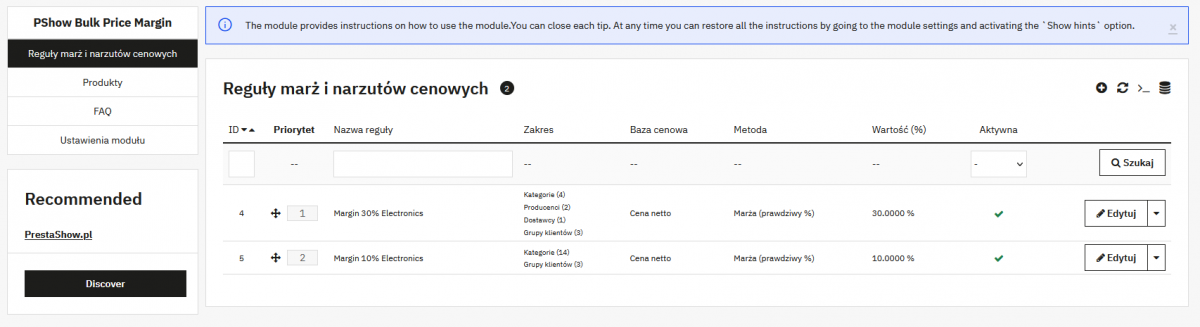
1
Set up rules
Reorder them using “drag-and-drop” to set the correct priority.
2
The first matching rule wins
If a product meets the conditions of multiple rules, the module will apply the first active rule on the list.
3
Exceptions take precedence
A custom value set for a product takes precedence over all global rules.
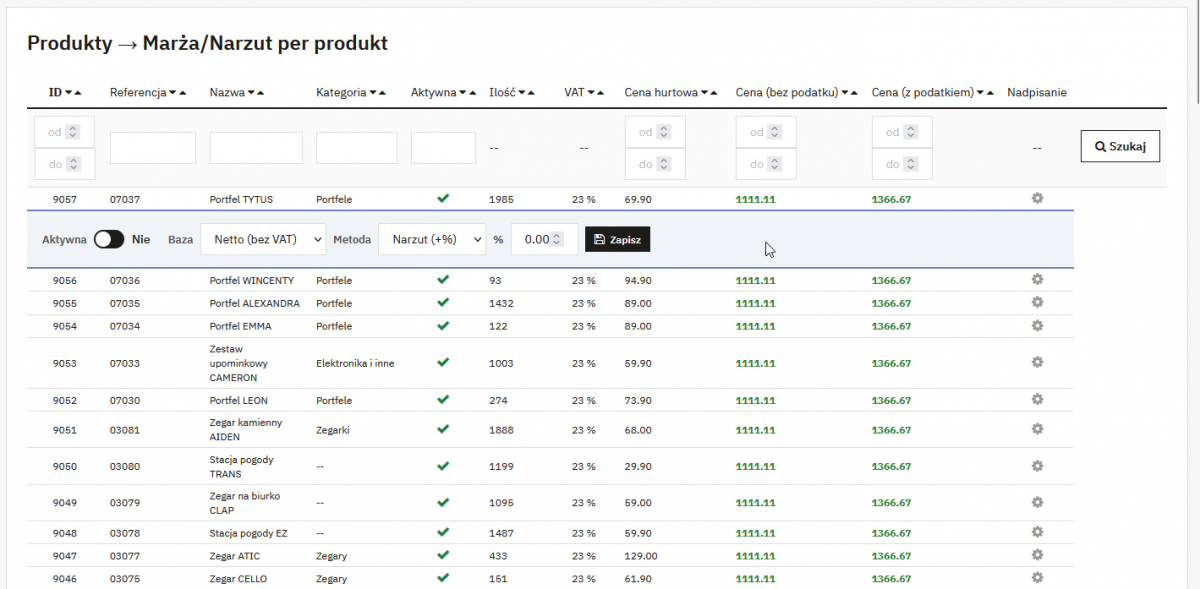
Quick edit without reloading the page
In the product list, expand the selected row, set the method and percentage, and save the change without leaving the catalog view.
The same configuration is available directly in the product edit screen. This allows you to apply global rules to most of the catalog while treating individual products separately.
After calculating the margin or markup, the module can automatically round the price up to the selected decimal place. Rounding works dynamically and does not change the source price stored in the database.
20.10 PLN → 20.99 PLN · 21.00 PLN → 21.99 PLN
Consistent price list presentation
- psychological pricing, e.g., ending in 0.99,
- a uniform price display throughout the store,
- no manual adjustments after a change in the base value.
Prices updated by a wholesale distributor or ERP system
Retain the source price from the integration and dynamically calculate the customer price according to the current rule.
Varying profitability of product groups
Set different percentage values for categories, manufacturers, suppliers, or specific price ranges.
Separate terms for customer groups
Customize how prices are calculated for customer groups configured in your PrestaShop store.
Products Requiring Custom Pricing
Override the global rule only where you need a different margin or markup.
Important for integrations and sales channels
The module does not save the calculated final price in the database. Therefore, an integration, marketplace, or product feed that reads the price directly from the database may receive the price as it appears in the PrestaShop database or back office. If the new price is to be permanently saved and transferred to external systems, choose a module that performs bulk price changes in the database.
Does the module change prices in the database?
No. The final price is calculated dynamically when displayed in the store. The source prices stored in the database remain unchanged.
What is the difference between a margin and a markup?
A markup is added as a percentage to the base price. A margin represents the percentage of the difference between the base price and the final price; therefore, for the same percentage value, it results in a higher final price.
What price should the rule be based on?
The basis for the calculation can be the net price, the gross price, or the purchase price, referred to in PrestaShop as the wholesale price.
What happens if multiple rules match?
The first active rule in the list will be applied. Additionally, individual settings for a specific product always take precedence.
Can you set different rules for customer groups?
Yes. You can restrict each rule to selected customer groups or leave it active for everyone.
Can I disable a rule without losing the prices?
Yes. Since the module does not override base prices, when a rule is disabled, the store reverts to displaying standard prices.
Changelog (v1.0)
## v1.0.0 - 2026-06-08
### Added
* Dynamic price margin and markup rules applied without modifying database prices
* Rule-based scope filtering by category, manufacturer, supplier, customer group, product, and base price range
* Two calculation methods: markup (add value% on top of base price) and margin (value% of final selling price)
* Three base price options: net price, gross price, and wholesale price
* Priority-based rule ordering with drag & drop position management
* Per-product margin/markup override, settable both from the product edit tab and the Products list
* Products list with inline override editing — expand any row to configure and save without leaving the page
* Global price rounding: round all final prices up to a configurable decimal ending
### Added
* Dynamic price margin and markup rules applied without modifying database prices
* Rule-based scope filtering by category, manufacturer, supplier, customer group, product, and base price range
* Two calculation methods: markup (add value% on top of base price) and margin (value% of final selling price)
* Three base price options: net price, gross price, and wholesale price
* Priority-based rule ordering with drag & drop position management
* Per-product margin/markup override, settable both from the product edit tab and the Products list
* Products list with inline override editing — expand any row to configure and save without leaving the page
* Global price rounding: round all final prices up to a configurable decimal ending
Technical requirements
Technical Requirements
- PHP 7.1 - 8.x
- Server extension ionCube Loader
- PrestaShop Importer only: PHP libxml version > 2.9.3
- PrestaShop Facebook Integrator only: PHP 7.2 or higher
- PrestaShop VAT Validator only: PHP SOAP
Support & Updates
Support = Updates + HelpDesk
You get 90 days (3 months) access to the complete PrestaShow support package.
Module updates
Modules will inform you about available updates. Read the changelog and perform a 1-click module update directly from your store.
HelpDesk panel
This is the panel where we will provide you with help. On HelpDesk you can report problems, order free module installation and updates, and order modifications and custom programming work.
Extend support
After support expires, you can use the module without any restrictions. You can extend your support access at any time you need it.
Knowledge Base & FAQ
Free forever
The knowledge base is available to everyone. You will find module documentation as well as instructions, videos and answers to frequently asked questions.
License
Lifetime license for the module
- You can use the module without limitation in 1 store = 1 domain.
- You can use an additional domain, e.g. for developer copy.
- For a small fee you can change the domain for the module yourself.
Additional domains for Multistore
- All our modules support PrestaShop Multistore.
- Supporting unlimited domains for PrestaShop Multistore requires purchasing multistore support for the module.
Modifying the code
- The module code related to the integration with the store and the design (.tpl, .css, .js) has open source code and you can modify it freely.
- The module's source code (.php) is encrypted with ionCube, and modifying it will void the warranty.
No entries yet.
No customer reviews for the moment.