Customer service and order packaging on your phone 📦










Detailed description
1 click
instead of manually retyping
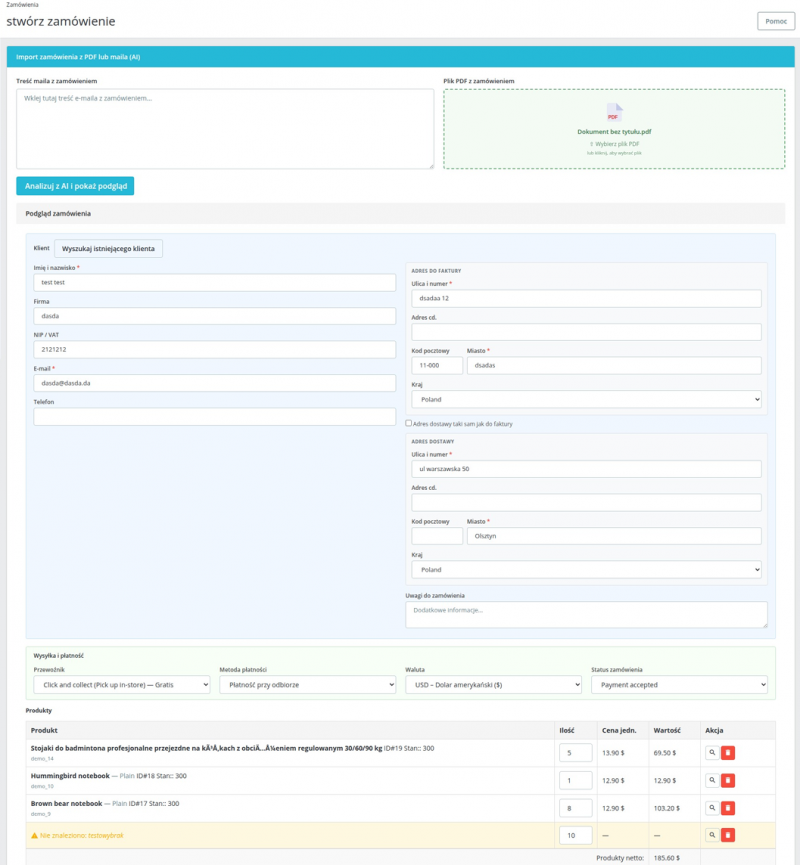
Paste the email content or drag and drop a PDF file— Order Importer will automatically extract all the necessary data and then fill out the order creation form in PrestaShop.
Database integration
AI searches your product catalog by name, SKU, EAN, and product ID. You can manually find any products that don’t match using the built-in instant search—without leaving the page.
The entire process in one place
The module appears directly on the new order creation page in the PrestaShop admin panel.
Time savings
Manually entering orders from emails takes minutes, and typos are inevitable. Order Importer does this work in seconds—all it takes is one click.
Perfect for B2B stores, wholesalers, and customer service teams that receive orders via email or phone.
AI
OpenAI’s GPT-4o model handles any email or PDF format—from simple text orders to complex pro forma invoices with tables.
Choose GPT-4o for the highest accuracy or GPT-4o-mini for lower cost with less complex documents.
Full Control Before Saving
Before clicking “Create Order,” you’ll see a full preview: customer details, addresses, products with prices, carrier, and a summary. You can edit any field.
Form validation highlights incorrect or missing fields before the order is saved to the database.
The module supports two data sources: for example, email content pasted into a text field or a PDF file dragged into the upload area.
The AI does not require additional prompts to correctly analyze the data.
- Email – copy and paste the message content; AI will extract data even from unstructured text.
- PDF – drag the file or click the upload area; supports files up to 10 MB.

AI searches your catalog using four criteria simultaneously—no mapping configuration required.
Unmatched products can be found manually using the built-in search engine.
- Matched – product found, ready to save.
- Requires attention—the product has variations; select from the list (color, etc.).
- Mismatched—click the magnifying glass icon to search for the product manually.
- Unit prices and quantities can be edited before saving.
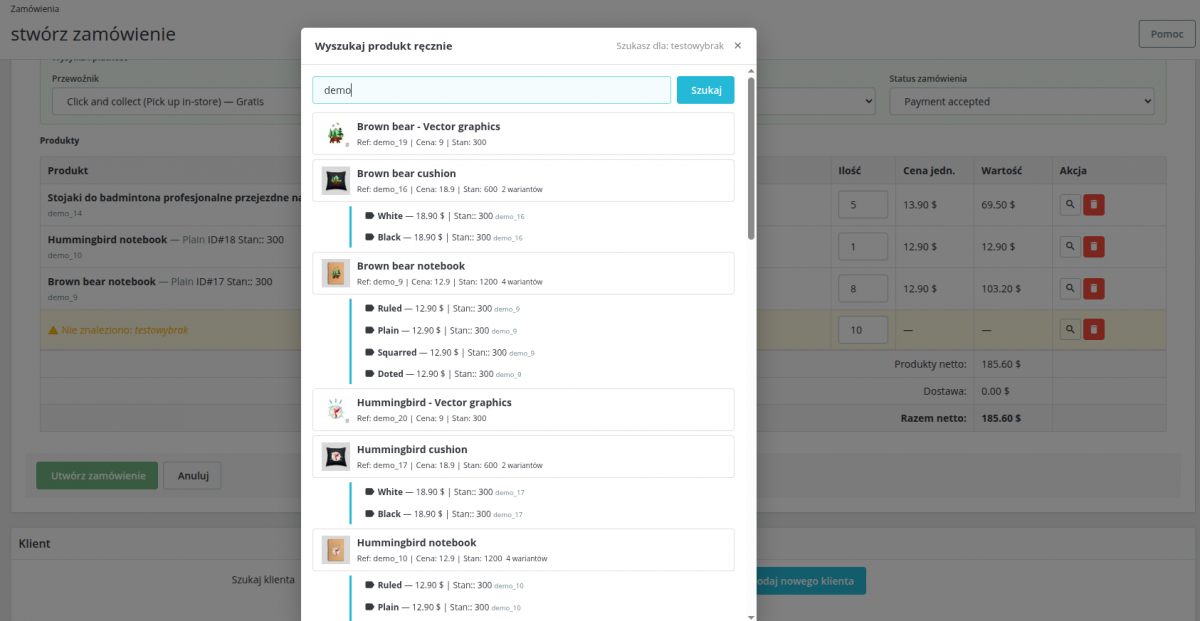
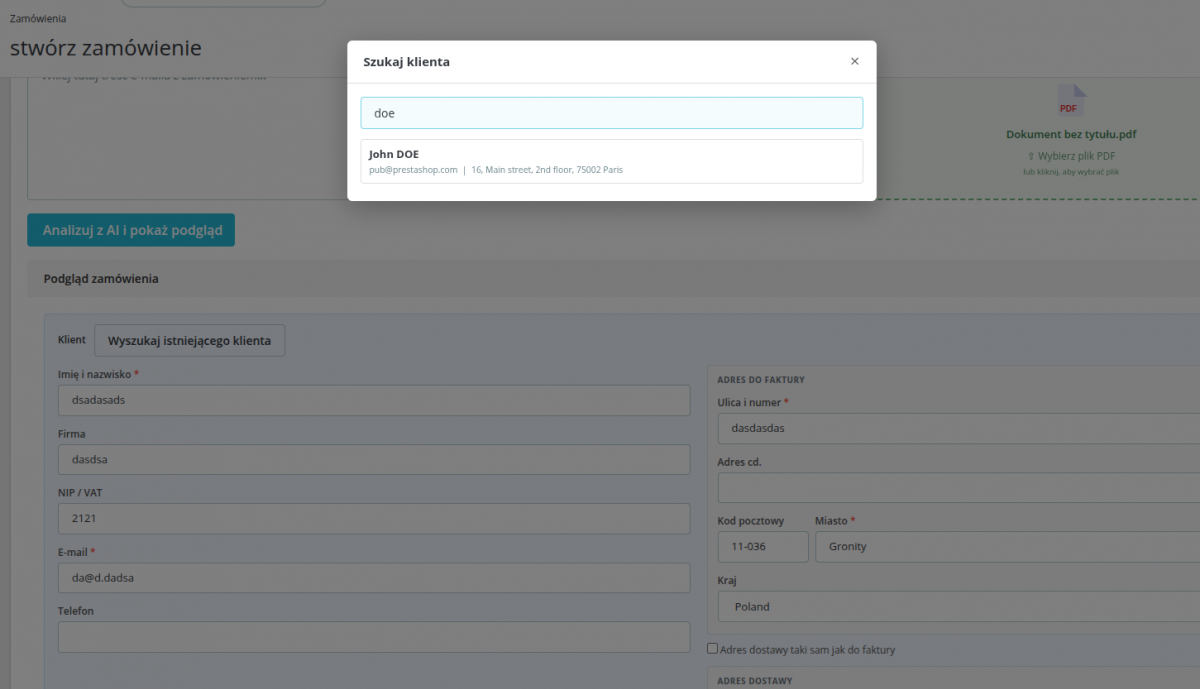
AI automatically fills in customer and address details. You can search for an existing customer using the built-in search tool.
- Customer details: first name, last name, email, phone number, tax ID/VAT number.
- Billing address and shipping address.
- A new customer is created automatically if they do not exist in the database.
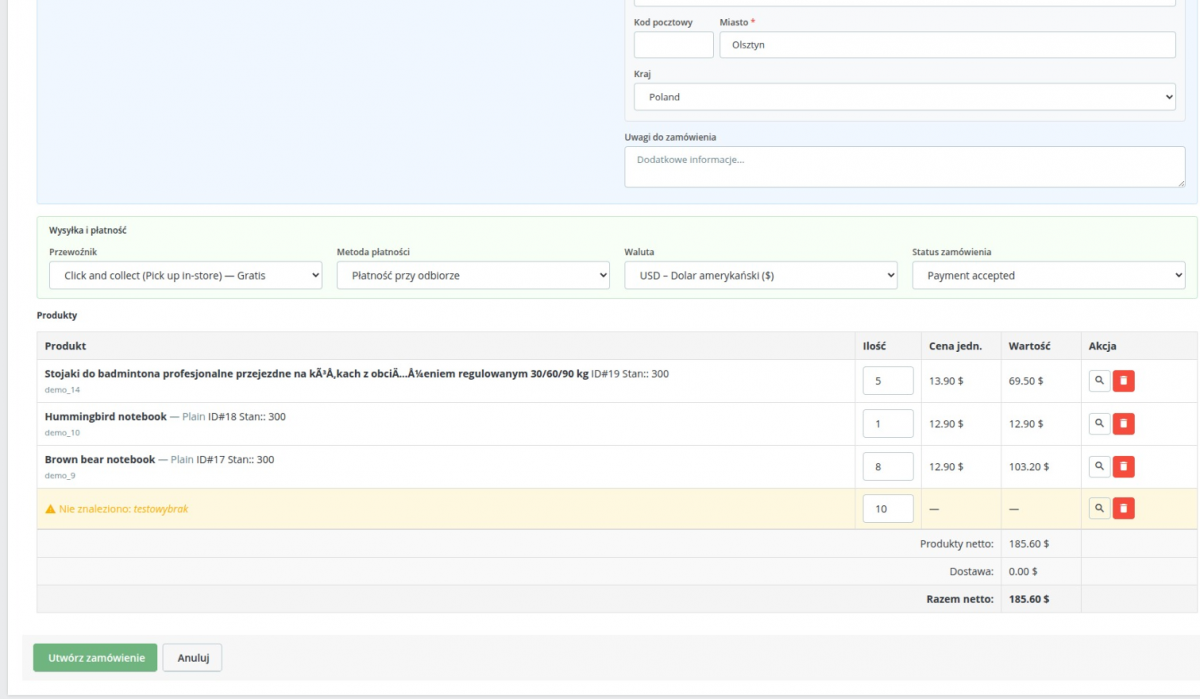
- Currency detection and matching to the active currency in PrestaShop.
- Delivery price calculated in real time (using pricing rules).
- AI detects the preferred carrier and payment method from the order details and maps them to the options available in the store.
- Option to manually change each parameter before saving.
Validation before saving
Before clicking “Create Order,” the module checks that all required fields are complete: first and last name, email, address, country, at least one matched product, and selected variants.
Incorrect fields are highlighted in red with a list of information to correct.
Creating a Native PrestaShop Order
Once confirmed, the order is created using native PrestaShop objects (Cart, Customer, Address, Order).
No custom database tables are required—the order looks and functions just like any other order placed by a customer or admin.
B2B stores and wholesalers
Wholesale customers often place orders via email, by phone, or by sending a PDF with an order list.
Order Importer transfers orders to PrestaShop in just a few seconds.
Customer service and call centers
Employees who take orders by phone or email don’t have to manually fill out every field on the form.
They paste the email, review the preview, and click "Create."
Orders and PDF Documents
Upload a PDF containing an order, pro forma invoice, or order form.
The AI will extract the data regardless of the table layout or header format.

Settings and integration
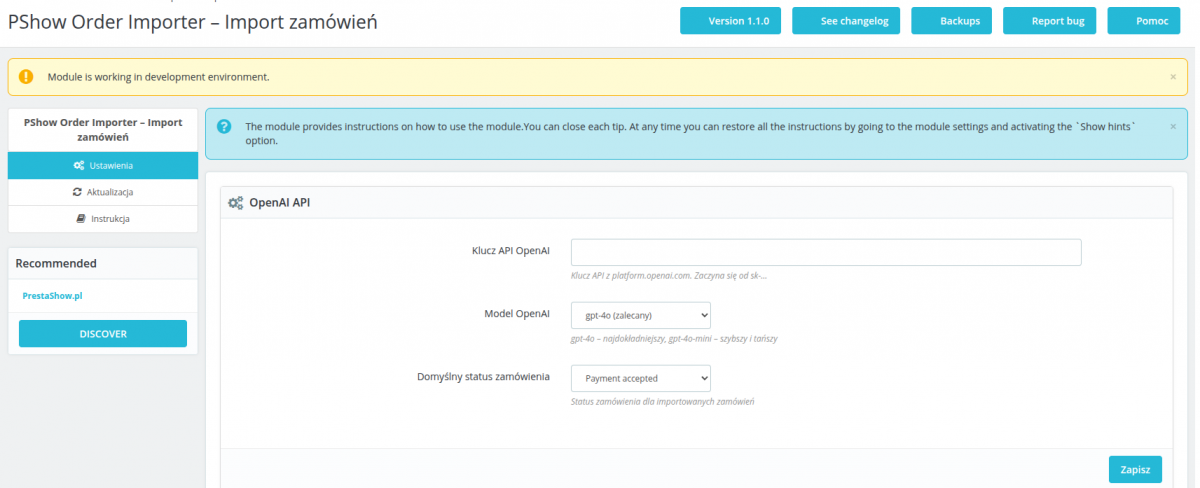
- OpenAI API key and model selection (GPT-4o / GPT-4o-mini) in the module configuration.
- Default status for the order being created.
- The module uses standard PrestaShop hooks.
- No custom tables—zero conflicts with other modules.
PrestaShop Hooks
- displayAdminOrderCreateExtraButtons – import widget on the order creation page.
- actionAdminControllerSetMedia – loads CSS and JS in the admin panel.
Technical Requirements
- PrestaShop: 1.7.x, 8.x, and 9.x
- PHP: 7.4–8.5
- MySQL / MariaDB: 5.6+ / 10.2+
- OpenAI API: An active account and API key are required
- HTTPS connection: The server must have access to api.openai.com
Changelog ()
Charging...
Technical requirements
Technical Requirements
- PHP 7.1 - 8.x
- Server extension ionCube Loader
- PrestaShop Importer only: PHP libxml version > 2.9.3
- PrestaShop Facebook Integrator only: PHP 7.2 or higher
- PrestaShop VAT Validator only: PHP SOAP
Support & Updates
Support = Updates + HelpDesk
You get 90 days (3 months) access to the complete PrestaShow support package.
Module updates
Modules will inform you about available updates. Read the changelog and perform a 1-click module update directly from your store.
HelpDesk panel
This is the panel where we will provide you with help. On HelpDesk you can report problems, order free module installation and updates, and order modifications and custom programming work.
Extend support
After support expires, you can use the module without any restrictions. You can extend your support access at any time you need it.
Knowledge Base & FAQ
Free forever
The knowledge base is available to everyone. You will find module documentation as well as instructions, videos and answers to frequently asked questions.
License
Lifetime license for the module
- You can use the module without limitation in 1 store = 1 domain.
- You can use an additional domain, e.g. for developer copy.
- For a small fee you can change the domain for the module yourself.
Additional domains for Multistore
- All our modules support PrestaShop Multistore.
- Supporting unlimited domains for PrestaShop Multistore requires purchasing multistore support for the module.
Modifying the code
- The module code related to the integration with the store and the design (.tpl, .css, .js) has open source code and you can modify it freely.
- The module's source code (.php) is encrypted with ionCube, and modifying it will void the warranty.
Demo
Demo - test the module
- This module does not have a demo store
No entries yet.
No customer reviews for the moment.