Customer service and order packaging on your phone 📦









Detailed description
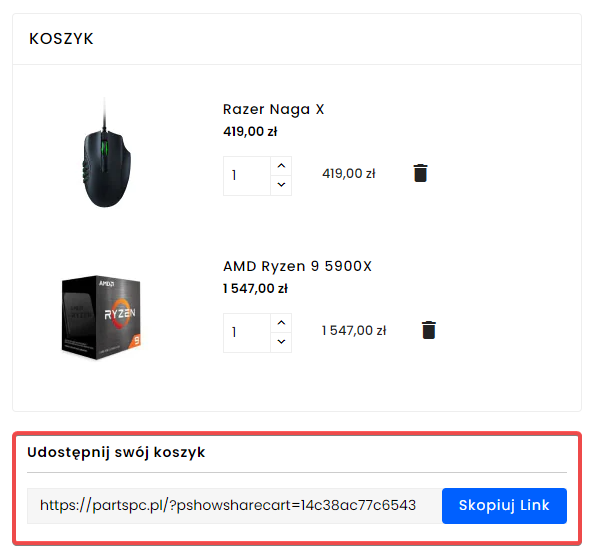
The Share Shopping Cart module in PrestaShop allows customers and store staff to save the contents of the shopping cart and share them with a single link. It's a convenient way to create shopping lists, upload ready-made sets of products and lead to purchases faster.
Customers can create and share their own shopping carts
The module allows a store user to quickly generate a link to the current contents of the shopping cart and forward it. This is a very convenient solution when a customer wants to:
- send someone a ready-made set of products,
- consult shopping with another person,
- save a list of products for later,
- return to a previously prepared shopping cart,
- pass the ready-made shopping list to a co-worker or household member.
🫱 🏼🫲🏽
The customer can share his shopping cart, and the store can use the same function for sales and service.
- The shopping cart sharing function also works well on the store side. The administrator, salesman or service department can prepare a ready-made offer for the customer and send it as a single link.
- Instead of manually listing products or sending multiple separate addresses, simply share a ready-made shopping cart from which the customer can immediately proceed to the order.
- Using shopping cart sharing does not require creating an account and logging in.
- The link to the shopping cart copies itself automatically when you click on the link - no need to select and copy the URL manually.
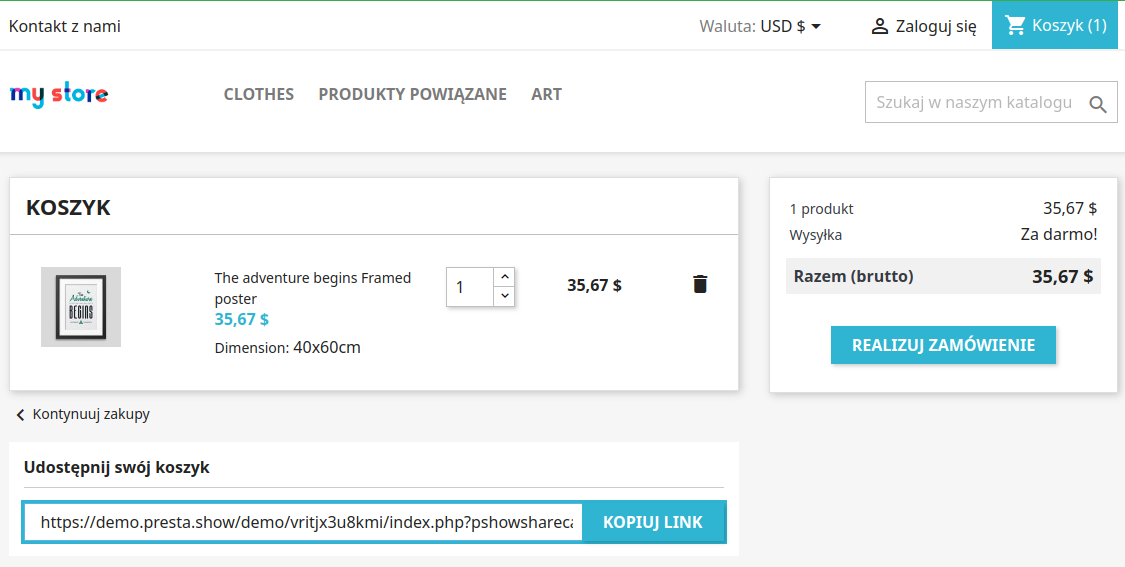
Better shopping experience and shorter path to ordering
Sharing the shopping cart improves the shopping experience, because it allows you to easily transfer finished product sets between users and devices. The customer doesn't have to recreate the entire list manually or search for products again - just follow the link and go to the prepared shopping cart.
Why you should implement this module
This is a module that simultaneously supports the store's UX, customer service and sales.
For the user, it means more convenient shopping and easy sharing of the shopping cart. For the store, it means simpler preparation of offers, a shorter path to purchase and more practical uses of the shopping cart in daily sales.
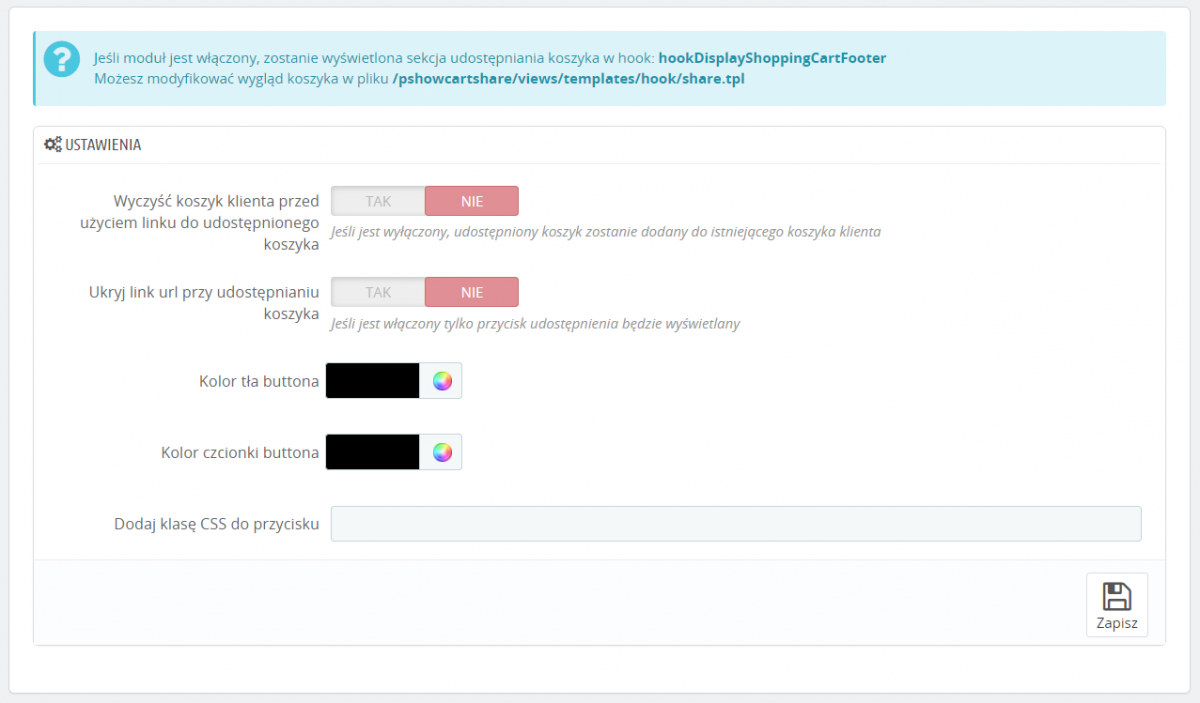
In the module settings you can select and customize the items you want to show:
- Disable the "Copy to clipboard" button and show the full cart link.
- Lifetime of the link (set 0 so the link never expires).
- Colors for the background and fonts.
- Your own class so you can conveniently modify the CSS of the module.
Quick installation
- The module works for visitors and logged-in customers.
- The URL to the shopping cart is generated dynamically and requires no additional action
Does not load the store
- The module efficiently handles saved shopping carts and does not load the database.
- The shopping cart is saved only when the link or button is clicked.
Additional configuration
- The content of the shared shopping cart can be added to the content of the shopping cart that the customer using the link or
- The shared shopping cart can clear the contents of the shopping cart that the customer has.
The customer can conveniently use the functions of both modules at the same time. The Shopping Cart Sharing module works with the PrestaShop Affiliate Program module.
- The sharing link automatically completes with a reflink if the affiliate is logged in.
- The sharing person can receive commissions if an order is created from the shared shopping cart.
- The person using the shared shopping cart will receive an automatic discount on the cart!
Changelog (v1.0)
### v1.0.2 - 2023-09-24
#### Added
* Translations for German, Spanish, French and Italian
### v1.0.1 - 2024-02-12
#### Fixed
* Error dev mode
### v1.0.0 - 2023-10-26
#### Added
* Stable version of module
* Support for PrestaShop 1.7 and 8.x
* Configuration for cart sharing URL
#### Added
* Translations for German, Spanish, French and Italian
### v1.0.1 - 2024-02-12
#### Fixed
* Error dev mode
### v1.0.0 - 2023-10-26
#### Added
* Stable version of module
* Support for PrestaShop 1.7 and 8.x
* Configuration for cart sharing URL
Komentarze ()
The reviews posted on our store are not sponsored in any way. We also verify that they were added by customers who have purchased from us or guests. If you want to learn more about this topic please read our Regulations.
Link generuje się w chwili kliknięcia guzika lub pola z linkiem do udostępnienia koszyka. Link zapisuje się w bazie i może zostać wykorzystany przez nieograniczony liczbę klientów.
Jak długo działa link udostępnionego koszyka? Czy link do koszyka może być wykorzystany przez nieograniczoną liczbę klientów?
Mały ale cudowny moduł, z którym tworzymy gotowe koszyki dla klientów piszących do nas na czacie. Polecam to rozwiązanie PrestaShow!
Awesome solution for sharing products list between users. Installation and using without any problems.
Bardzo fajny moduł, pozwala udostępniać koszyki, bardzo przydatna funkcja dla handlowców którzy dobierają sprzęty, wszystko ogranicza się do udostępnienia 1 linku :)
Technical requirements
Technical Requirements
- PHP 7.1 - 8.x
- Server extension ionCube Loader
- PrestaShop Importer only: PHP libxml version > 2.9.3
- PrestaShop Facebook Integrator only: PHP 7.2 or higher
- PrestaShop VAT Validator only: PHP SOAP
Support & Updates
Support = Updates + HelpDesk
You get 90 days (3 months) access to the complete PrestaShow support package.
Module updates
Modules will inform you about available updates. Read the changelog and perform a 1-click module update directly from your store.
HelpDesk panel
This is the panel where we will provide you with help. On HelpDesk you can report problems, order free module installation and updates, and order modifications and custom programming work.
Extend support
After support expires, you can use the module without any restrictions. You can extend your support access at any time you need it.
Knowledge Base & FAQ
Free forever
The knowledge base is available to everyone. You will find module documentation as well as instructions, videos and answers to frequently asked questions.
License
Lifetime license for the module
- You can use the module without limitation in 1 store = 1 domain.
- You can use an additional domain, e.g. for developer copy.
- For a small fee you can change the domain for the module yourself.
Additional domains for Multistore
- All our modules support PrestaShop Multistore.
- Supporting unlimited domains for PrestaShop Multistore requires purchasing multistore support for the module.
Modifying the code
- The module code related to the integration with the store and the design (.tpl, .css, .js) has open source code and you can modify it freely.
- The module's source code (.php) is encrypted with ionCube, and modifying it will void the warranty.
Demo
Demo - test the module
- This module does not have a demo store
No entries yet.