Customer service and order packaging on your phone 📦







- Contract Cancellations and Returns in PrestaShop
- Two-Click Cancellation
- Partial returns, item by item
- Convenient labeling of return packages
- Compliance with legal requirements
- Customize the module for your business
- Manage returns from a single screen
- From request to return in three steps
- Manual processing vs. returns with the module
- FAQ – Frequently Asked Questions
Detailed description
Implements the requirements of EU Directive 2023/2673
The module implements the legally required mechanism for convenient withdrawal and confirmation on a durable medium (email + PDF), as well as a secure, self-service process for customers and store visitors.
Proven to work in real-world conditions
Everything your store needs to handle returns properly—not just via a contact form: partial returns (including multiple orders in a single request); reasons for each item; return codes; and a complete history of transactions.
Optimized for minimal effort
A clear list of returns with refund amounts, warnings about missed deadlines, and bulk status updates.
New EU regulations on the right of withdrawal 💫
Mandatory throughout the EU
as of June 19, 2026.
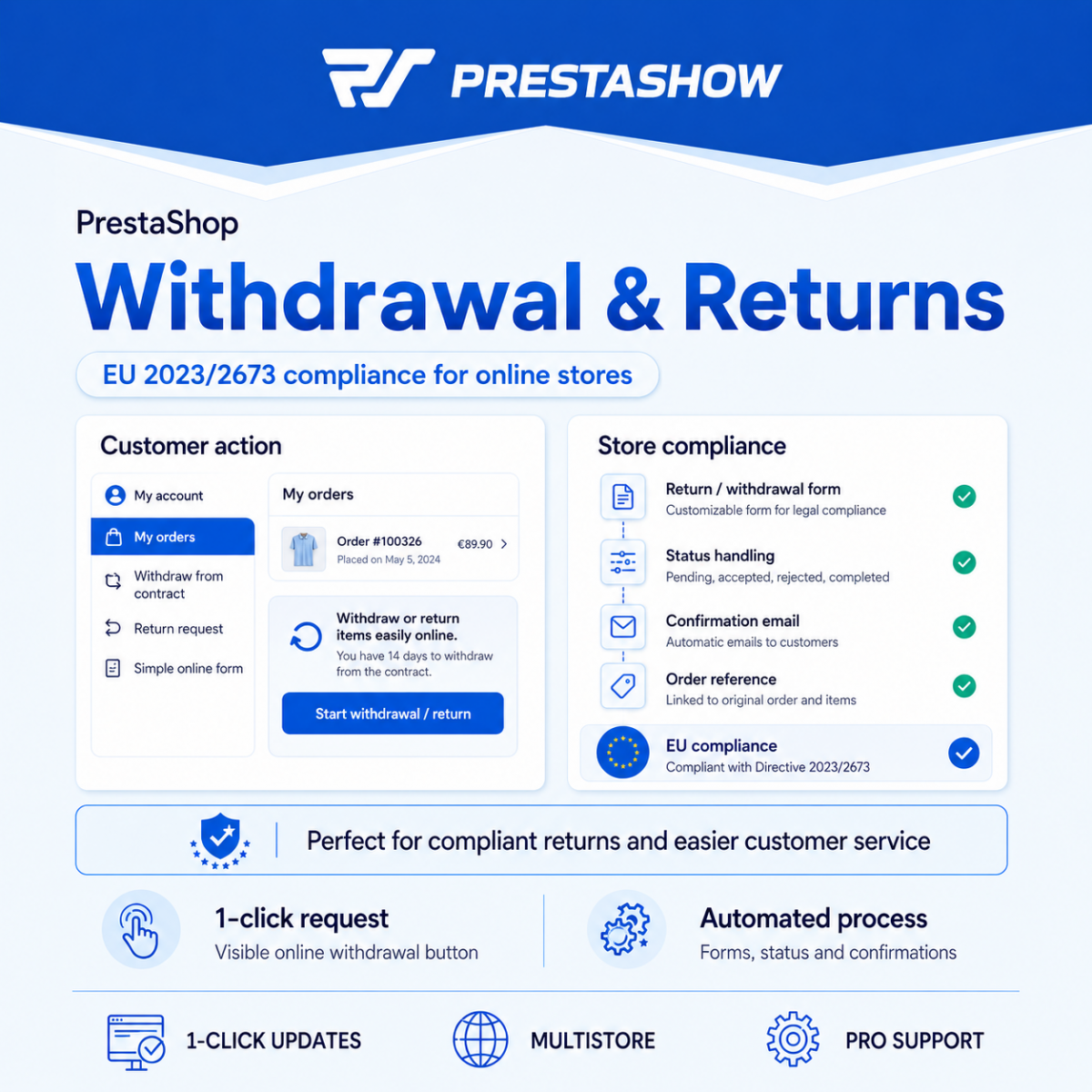
The module introduces a transparent, self-service return process in just two clicks. Logged-in customers and guests can withdraw from a contract online, receive the legally required email with a PDF, and you, as the store administrator, can handle the entire return process—from the request to the refund—from a single screen in the PrestaShop back office.
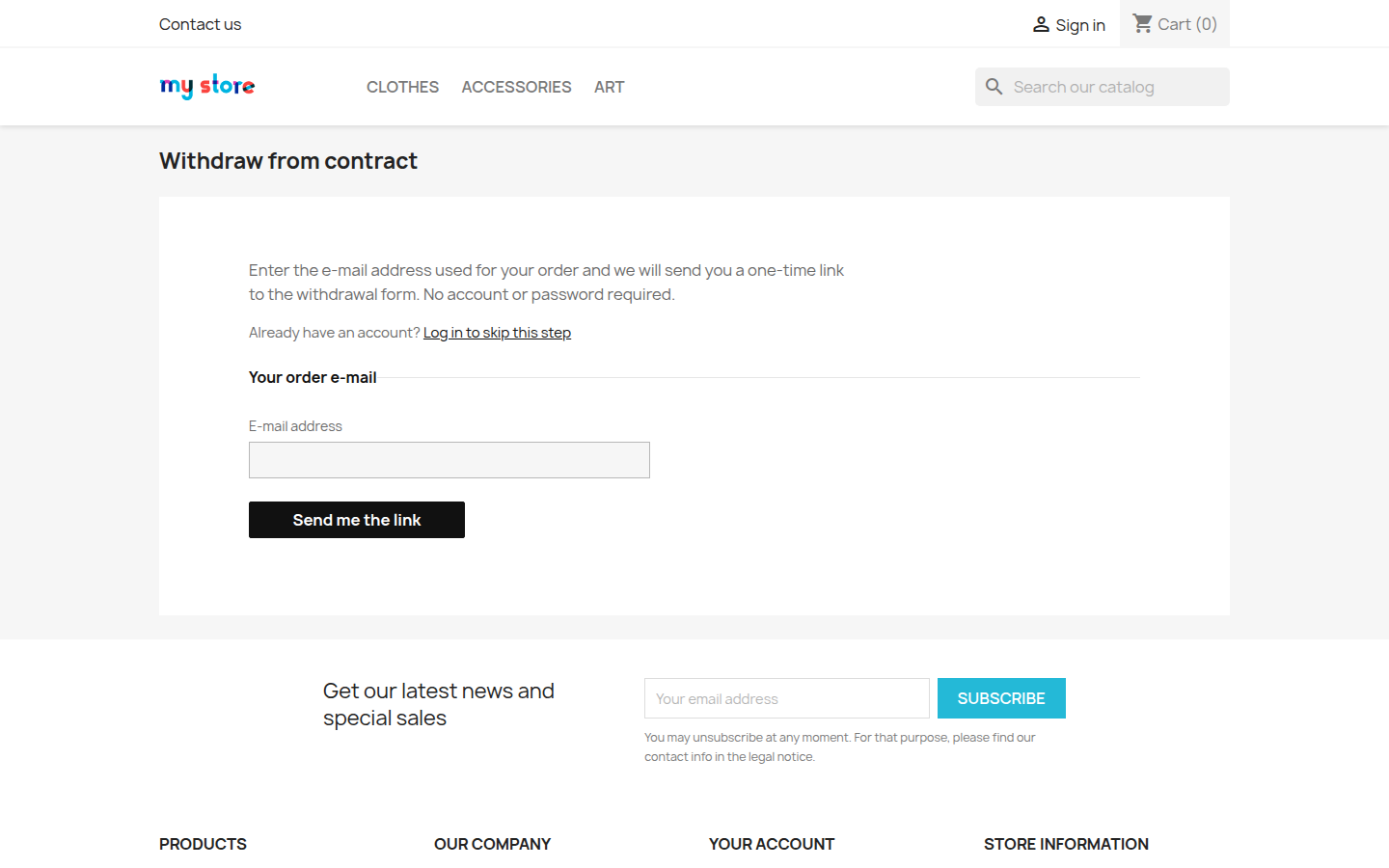
Access to the return process
A clear “Cancel Order” link is located in the store footer, in the customer account, and on every order page.
Two clicks: selection + confirmation.
No pop-ups, no consent requests, no “are you sure?” loops—no attempts to discourage the customer (so-called “dark patterns”), in accordance with the spirit of the directive.
- Logged-in customers can cancel directly from their account.
- Guests enter the email address from their order and receive an email with a link and a 6-digit code—no need to create an account.
- The link and code are one-time use and expire by default after 15 minutes, so even if the link or code is intercepted, it quickly becomes invalid.
- Built-in security measures prevent double submissions and duplicate requests.
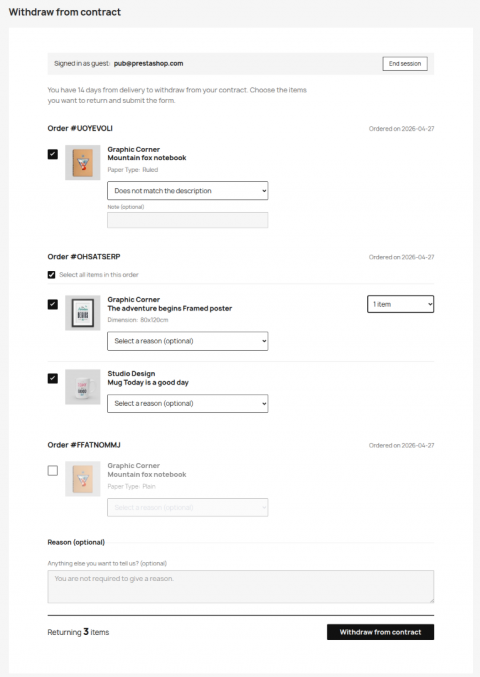
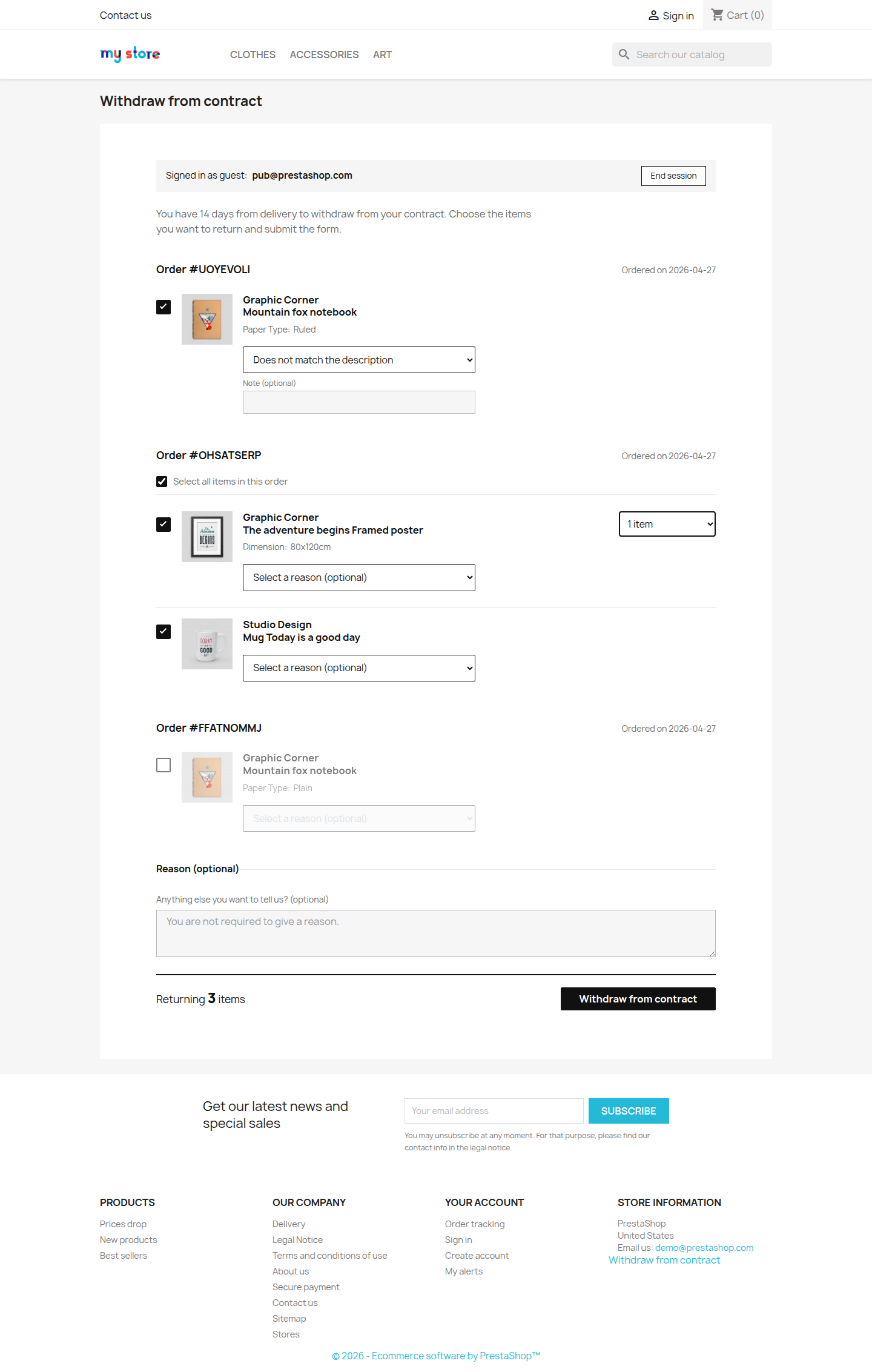
- A customer can return specific products from several different orders in a single return request.
- Each item can have an optional reason, visible in the admin panel and on the PDF.
- The “estimated refund amount,” updated in real time, shows the value before the return request is submitted.
- Items already returned in a completed return request are not offered again.
The customer can see how much they’ll get back
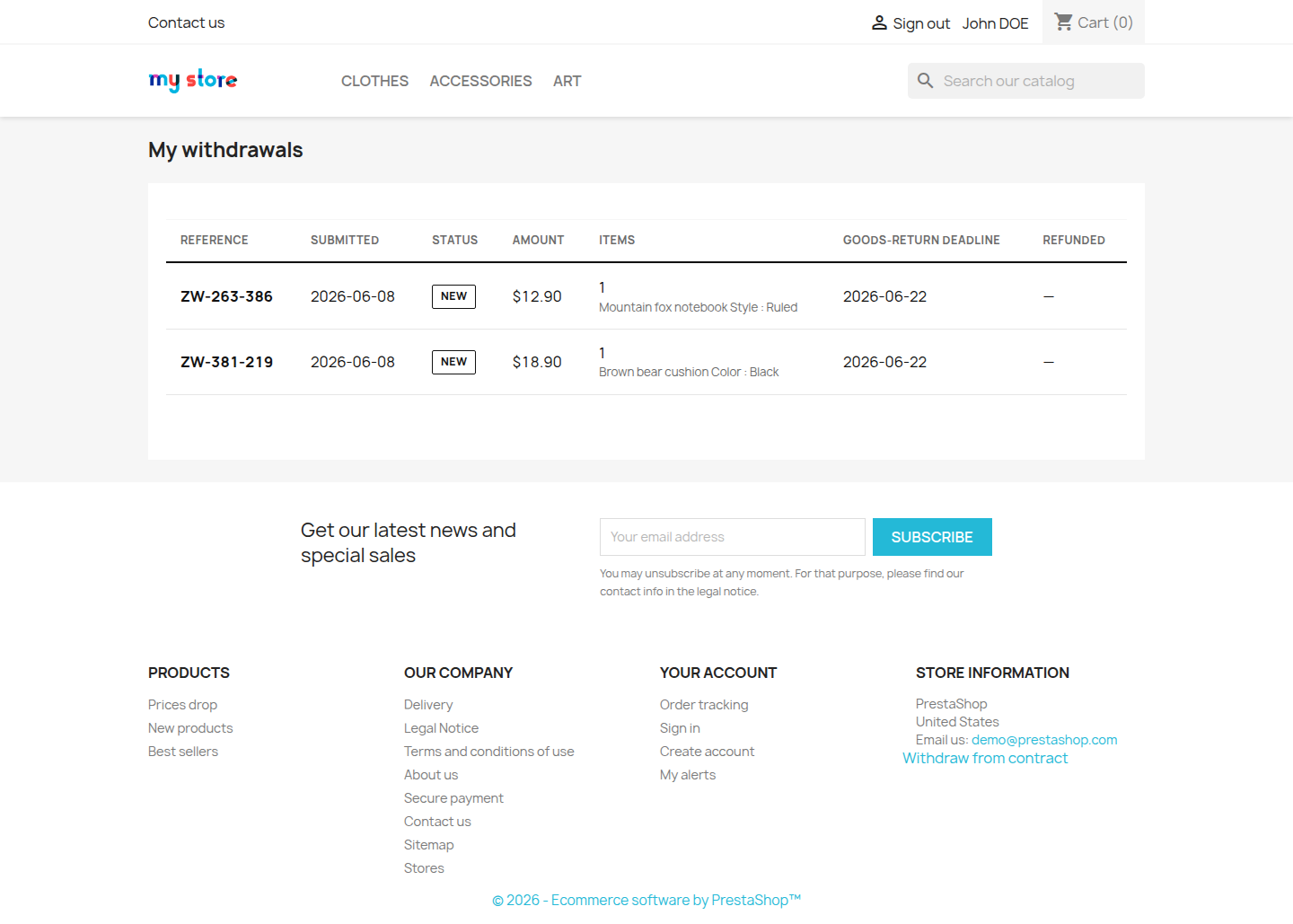
Item prices and the total are displayed in real time on the form, and the exact amount is shown on the confirmation page and in the email. A column showing the refund amount is also available in the “My Returns” history.
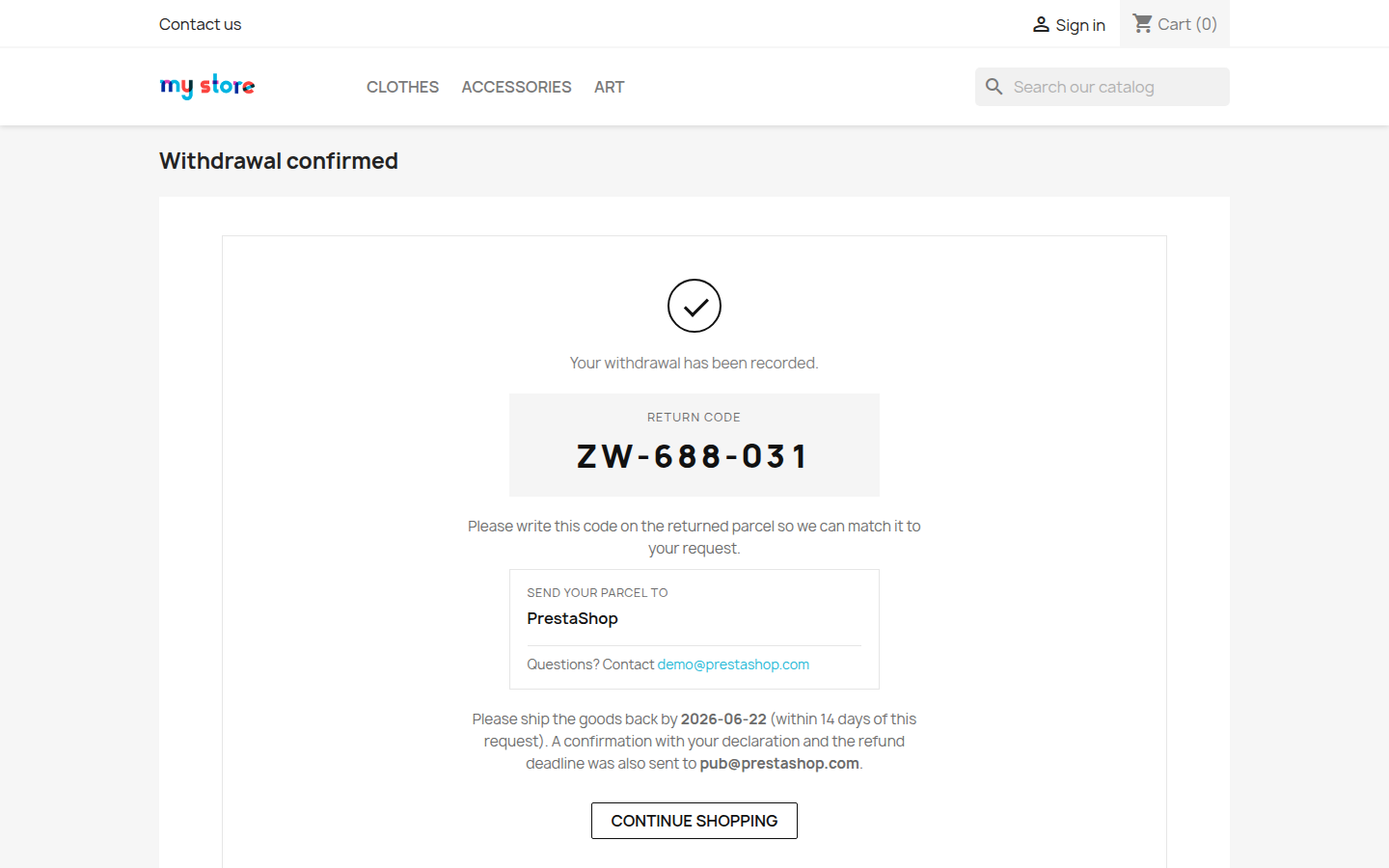
Each return request receives a return code with a customizable prefix, e.g., ZW-123-456— to be written on the package so the shipment can be instantly linked to the return request.
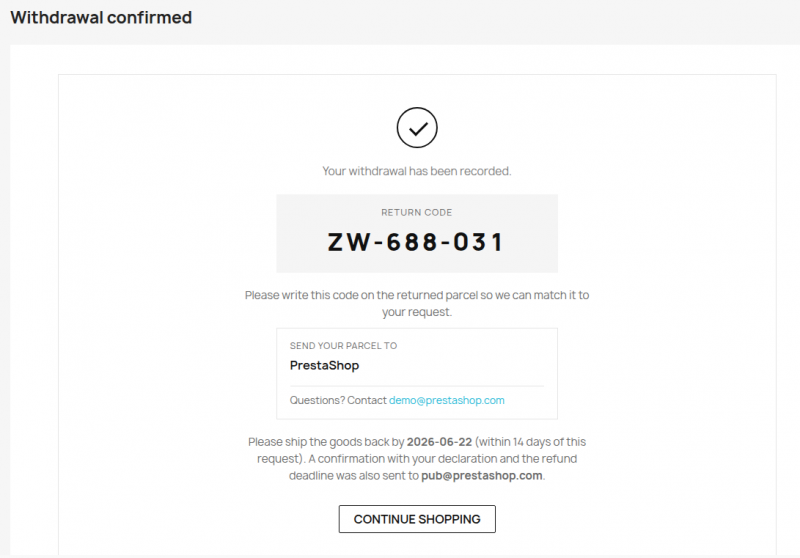

- Durable medium. Each confirmation is sent via email with a PDF attachment, as required by EU Directive 2023/2673 and the Consumer Rights Act—including the text of the declaration, item details, and deadlines.
- A withdrawal form template is generated as a PDF for the customer and for your records.
- Two deadlines, calculated separately: the deadline for returning the goods and the deadline for refunding the payment (e.g., 14 days from the submission of the notice).
- Accessibility. The customer-facing pages comply with WCAG 2.1 AA—contrast, focus borders, and large touch fields.
You can enable email notifications for each new withdrawal and a reminder about an upcoming return deadline.
B2C Sales
- Set the return window—by default, 14 days from delivery, or up to 12 months + 14 days (379 days) if customers were not informed of their right to return.
- Select which order statuses trigger the return window, or accept every order if the store does not have a “delivered” status.
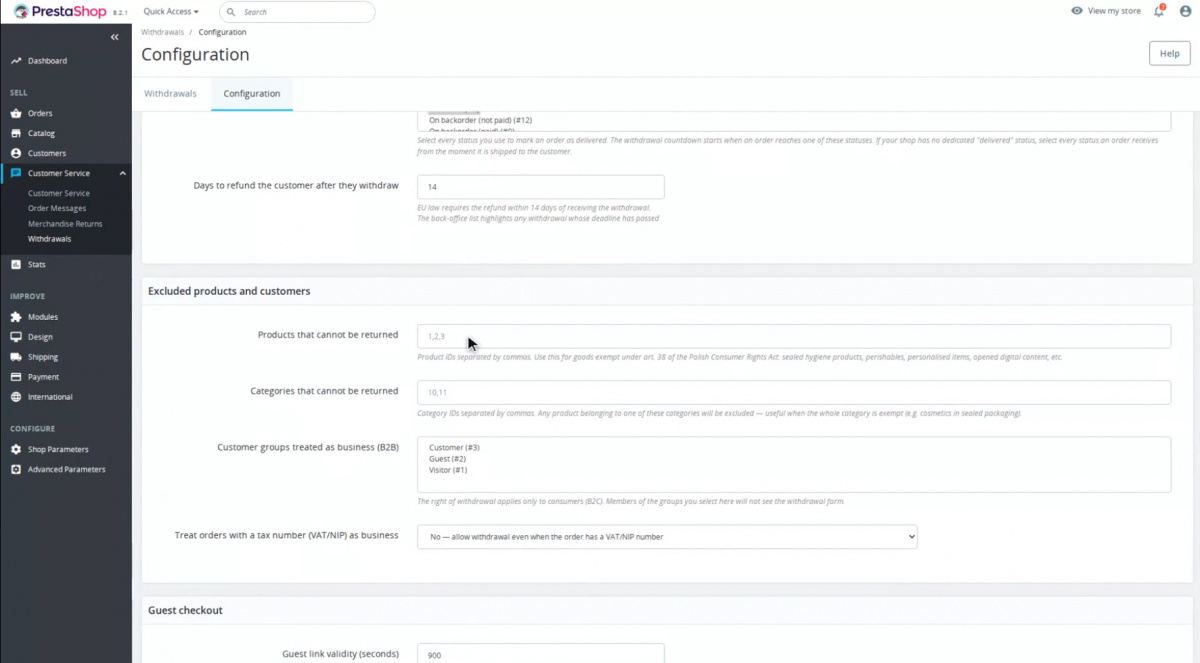
- Exclude specific products or entire categories from the right of withdrawal (hygiene products, personalized products, etc.).
- Hides orders older than the selected number of days from the order form.
B2B Sales
- Treats orders with a tax ID (NIP/VAT) or selected customer groups as B2B and keeps them out of the consumer workflow.
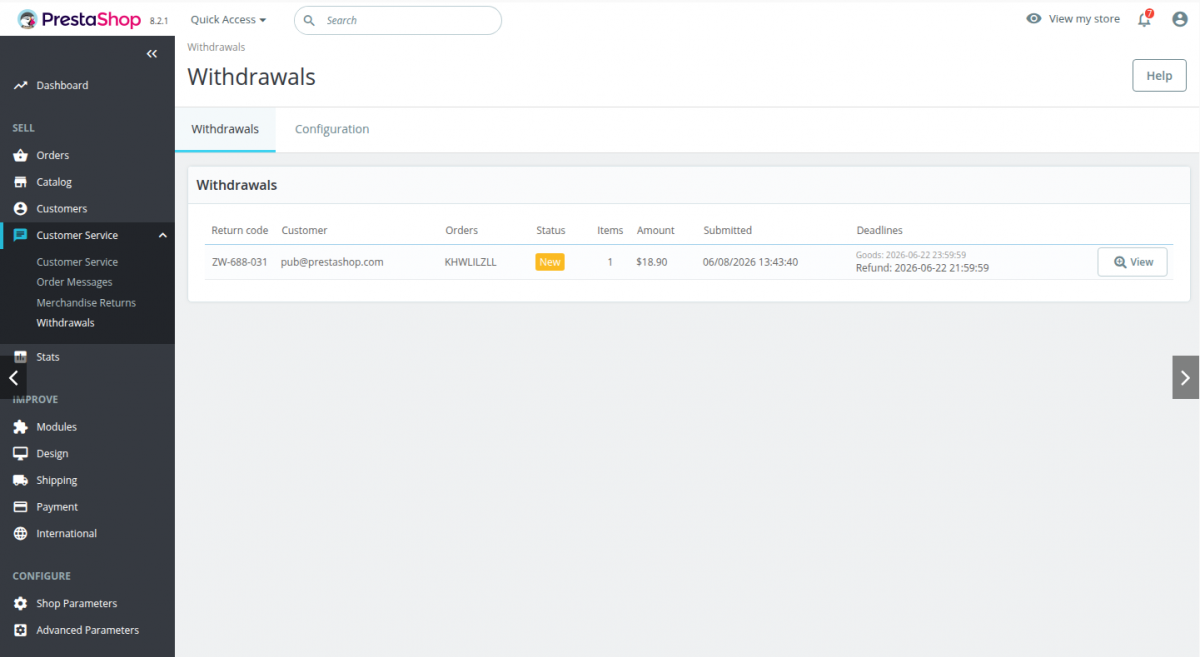
Admin Panel → Customer Service → Contract Cancellations
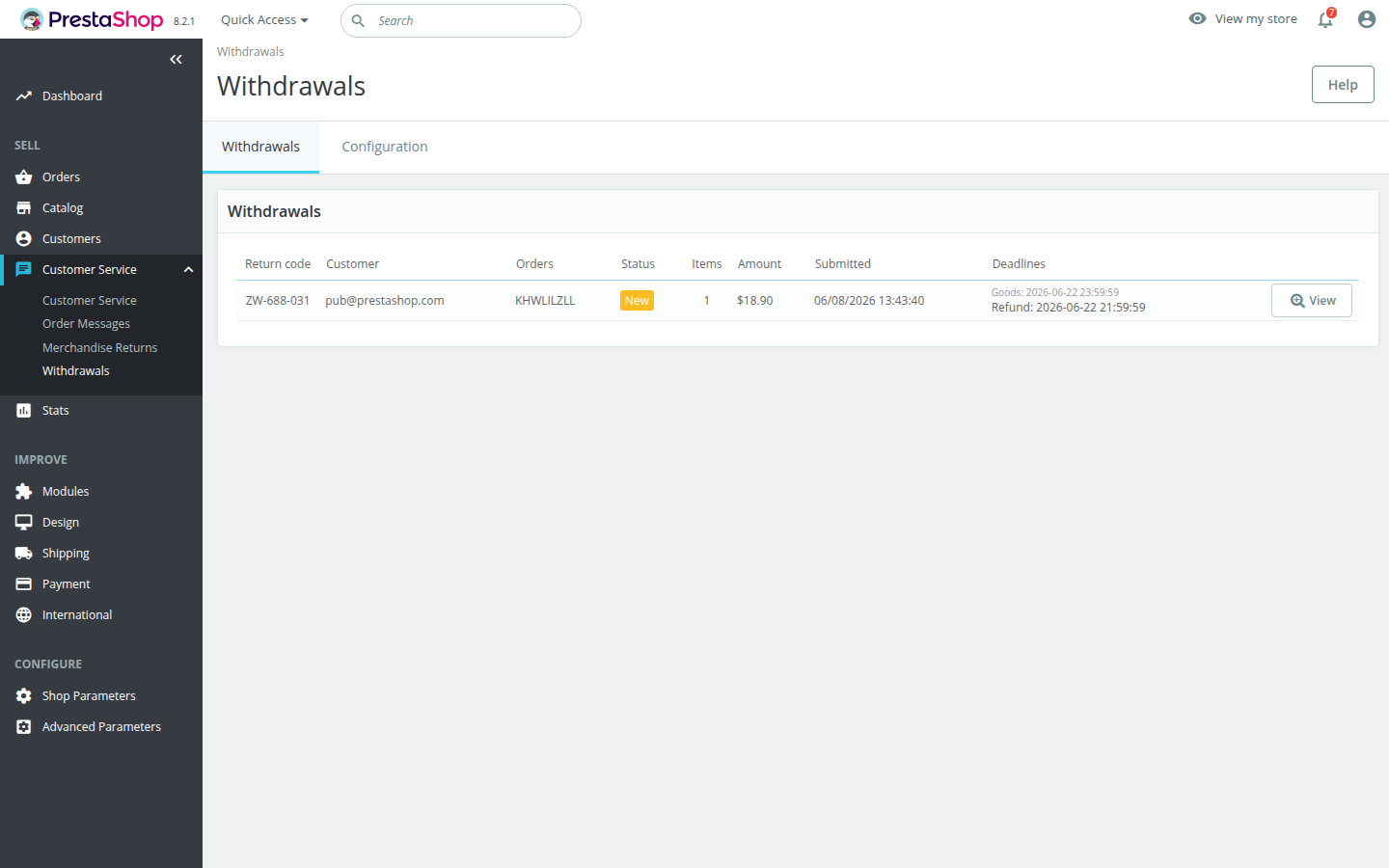
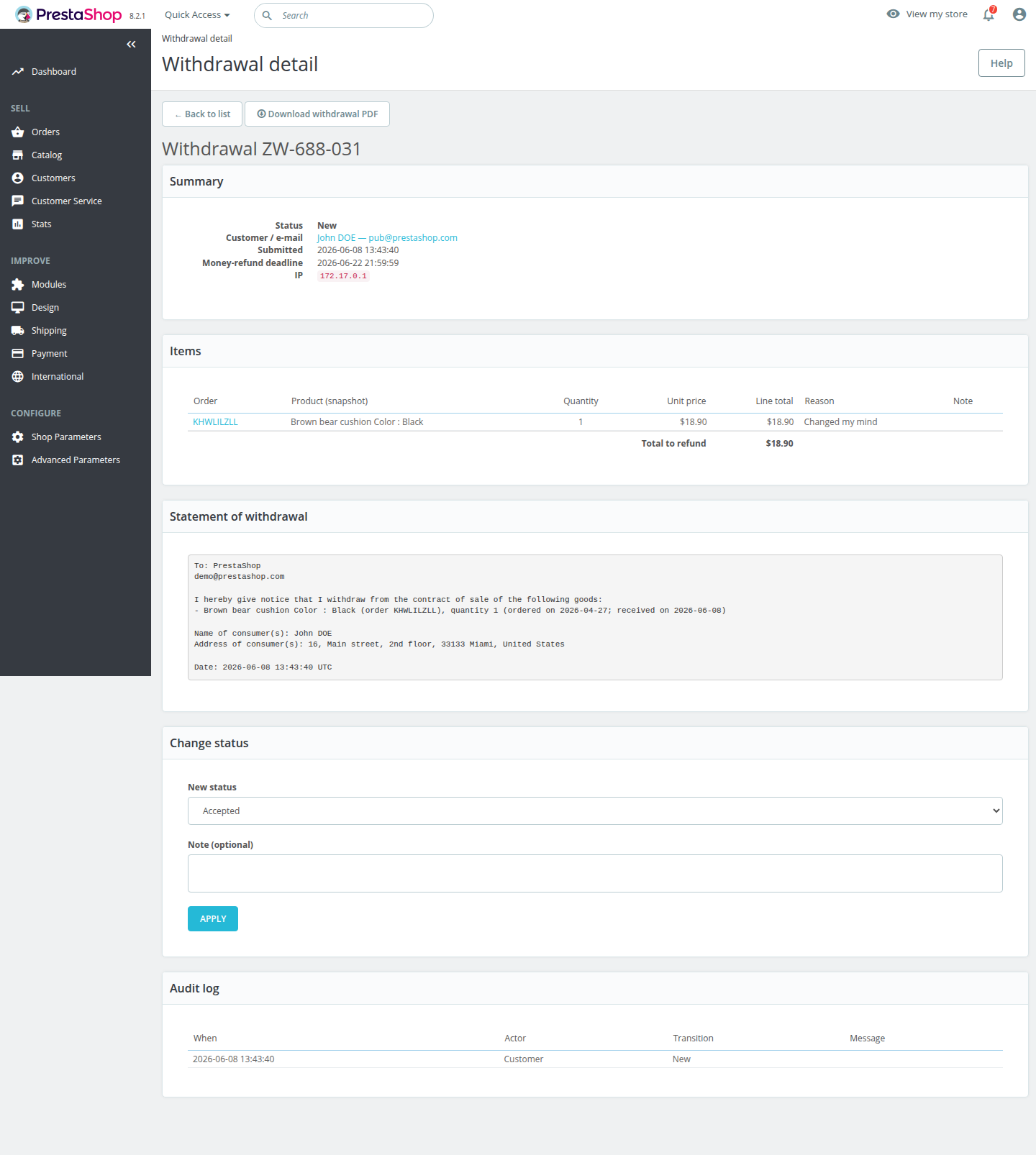
A paginated list of contract cancellations with a status filter and search by ID or email. The details screen shows the full record for each return—items with names and prices, the text of the cancellation notice, a timeline, and status.
- The refund amount is visible in each row; overdue rows are highlighted, and a warning appears at the top.
- Bulk status updates—accepted, goods received, returned, rejected—each aligned with your status workflow.
- Every change is recorded in the change log with the performer (customer / administrator / system), the change, and a timestamp.
- The “Download PDF Withdrawal Form” button provides the same statement that the customer received.
1
The customer submits a request
Whether logged in or as a guest, the customer selects the items and quantities and submits the return request in two clicks.
2
You review it
The request appears in your dashboard along with the refund amount, the reason, and a PDF ready to print or send via email.
3
You process the return
Process the return through the status workflow; the customer is kept informed throughout and receives their refund before the deadline.
| Manual processing | With the module | |
| Channel for submitting a cancellation request | Email / phone, entered manually | Self-service form |
| Refunds for guests without an account | ❌ | ✅ |
| Automatic email + PDF attachment—saved in the sent email history | Manually | ✅ |
| Partial cancellations with reasons, item by item | ❌ | ✅ |
| Products from multiple orders in a single return | ❌ | ✅ |
| Refund amount calculated for you | ❌ | ✅ |
| Overdue alerts and deadline tracking | ❌ | ✅ |
| Bulk status changes with change history | ❌ | ✅ |
| Store, dashboard, PDFs, and emails in 6 languages | ❌ | ✅ |
Ready-to-use module for your store
Technical requirements
- Available in English, Polish, German, French, Spanish, and Italian—the store, admin panel, cancellation PDF, and emails are sent in the customer’s language.
- Compatible with PrestaShop 1.7.6–9.x and PHP 7.1–8.5.
- Supports multistore, multiple languages, and currencies.
- Installs in the Customer Service section, alongside PrestaShop’s native “Product Returns” feature—without overwriting (no override) the PrestaShop core.
Does the module work for guest orders, without a customer account?
Yes. The guest provides the email address used during checkout and receives a one-time link and a 6-digit code. No account or password is required; the link and code are one-time and time-limited, and the return request page never reveals whether the email address exists.
Does the email confirmation serve as a durable medium?
Every withdrawal triggers an email confirmation that serves as the durable medium required by EU Directive 2023/2673 and the Consumer Rights Act, and the model withdrawal form (Annex II) is generated as a PDF for the customer and for your records.
Can a customer return only some of the products from an order?
Yes. Withdrawals are by design partial—the customer selects items and quantities, optionally providing a reason for each line, and can even combine products from multiple orders into a single request. The estimated refund amount is displayed before submission.
What withdrawal period should be set?
The statutory default period is 14 days from delivery. If the store has not informed customers of their right to withdraw—neither in the terms and conditions nor at the time of placing the order—the law extends this period to 379 days (12 months + 14). Enter this value only in this case.
How do I keep business-to-business (B2B) orders out of the consumer return process?
Orders whose billing address includes a NIP/VAT number are treated as B2B and automatically excluded; you can also exclude selected customer groups, products, and categories from the configuration settings.
Which PrestaShop versions and languages are supported?
PrestaShop versions 1.7.6 through 9.x, running on PHP 7.1 or later. The module is available in English, Polish, German, French, Spanish, and Italian—in the store, admin panel, cancellation PDF, and emails.
Changelog (0)
# Changelog
## 1.4.0 — 2026-08-06
- Add: new setting to let customers withdraw from an order that has not been delivered yet, as EU law allows. Off by default.
- Fix: customers whose orders cannot be returned now receive the access link and are told why, instead of getting no e-mail at all.
## 1.3.4 — 2026-08-03
- Add: the withdrawal PDF now also states the date by which the goods must be sent back, matching the confirmation e-mail.
## 1.3.3 — 2026-08-03
- Fix: the withdrawal PDF could not be generated at all — the back-office download failed and the confirmation e-mail was sent without its PDF attachment.
- Fix: withdrawals submitted in Italian now produce an Italian PDF instead of an English one.
- Fix: the back-office menu is now in Italian on Italian shops.
- Fix: the word "order" in the withdrawal statement is now translated instead of always showing in English.
- Fix: the PDF now shows the unit price as a formatted amount with the currency instead of a raw number.
- Fix: the PDF now shows the order number, the shop's local time, and the refund amount, matching the back office and the e-mail.
- Fix: a failed PDF render is now recorded in the shop logs instead of failing silently.
## 1.3.2 — 2026-07-15
- Fix: the withdrawal confirmation e-mail now shows the related order number(s).
## 1.3.1 — 2026-07-09
- Fix: on shops that also run a captcha module, the "Withdraw from contract" button could stay greyed out and impossible to click even after selecting items — customers can now submit the withdrawal form again.
## 1.3.0 — 2026-07-09
- Add: customers can add an optional bank account number / IBAN on the withdrawal form — handy for cash-on-delivery orders, so you can refund them straight away instead of contacting them for the number. It shows on the withdrawal in the back office and in the new-withdrawal e-mail.
## 1.2.10 — 2026-07-09
- Fix: withdrawal dates in the back office and in the customer's "My withdrawals" list are now shown in the shop's timezone, so a request no longer appears a couple of hours before the order it was made for.
## 1.2.9 — 2026-07-06
- Add: pick the non-returnable categories from a category tree with checkboxes instead of typing IDs by hand.
- Add: option to also block returns for products in subcategories of an excluded category — including subcategories added later (off by default, enable it under "Also apply to subcategories").
## 1.2.8 — 2026-07-03
- Fix: the "Withdraw from contract" footer link no longer sends visitors through a temporary redirect — an unrecognised visitor (and every search-engine crawler) opens the request page directly, so shop-wide crawls stop reporting a "302 redirect" on every page.
- Improve: a logged-in customer (or a guest who already confirmed their order e-mail) is taken straight to their withdrawal form from both the footer link and the request page, instead of being asked for their e-mail again.
- Change: the withdrawal pages are marked "noindex" so they stay out of search-engine results (crawlers still follow their links).
## 1.2.7 — 2026-06-25
- Fix: orders containing products sold by fractional quantity (e.g. 0.5 m of fabric) no longer disappear from the withdrawal form — such items can now be returned and are shown with their decimal quantity.
## 1.2.6 — 2026-06-25
- Fix: in a multistore, withdrawals created in a non-default shop are now visible in the back-office list when that shop (or "All shops") is selected — previously the list always showed only the default shop's withdrawals.
## 1.2.5 — 2026-06-17
- New: optional captcha protection for the withdrawal form and the guest e-mail request. Install a captcha module (PShowCaptcha) and configure reCAPTCHA or Turnstile — BCRefunds detects it automatically and protects the forms.
## 1.2.4 — 2026-06-17
- Fix: saving the module configuration and changing a withdrawal's status no longer fail with "Invalid CSRF token" on PrestaShop 9.
## 1.2.3 — 2026-06-09
- New: configurable delivery-cost refund — choose not to refund delivery, refund the actual amount paid, or a fixed amount. The delivery cost is added only when the customer withdraws from the whole order and never exceeds what they paid.
- Fix: the estimated refund (customer e-mail, "My withdrawals" page and back office) now shows the delivery cost where it is due, instead of the goods value only.
## 1.2.2 — 2026-06-09
- Fix: the withdrawal form now shows the actual withdrawal period from the settings instead of always "14 days".
- Fix: refund amounts are now shown in the currency the order was placed in, not always the shop default currency.
- Fix: confirmation e-mails now use a translated subject and reason label in every supported language.
- Fix: back-office messages and the withdrawals list are now fully translated.
- Fix: storefront error messages shown when an order cannot be returned are now translated.
- Fix: remaining untranslated labels in the configuration screen and the module name.
- New: the customer "My withdrawals" page is now paginated.
## 1.2.1 — 2026-06-08
- New: full Italian translation of the storefront, back office, withdrawal PDF and e-mails.
- New: e-mails are now translated into French, German, Spanish and Italian (previously English only).
- Fix: the return confirmation page and guest access screens are now fully translated instead of falling back to English.
- Fix: Spanish now uses the correct legal term for the right of withdrawal ("desistimiento").
## 1.2.0 — 2026-06-04
- Changed: the module is now distributed under a paid commercial license (was AFL-3.0).
- New: redesigned, clearer return screens for customers (desktop and mobile).
- New: customers can pick a reason for each returned item; it appears in the back office and on the withdrawal PDF.
- New: complete French, German and Spanish translations across the storefront, back office and withdrawal PDF.
## 1.1.0 — 2026-06-04
- **Hardening.** The return address is stored and rendered as plain text (HTML stripped) and the return contact e-mail is validated, so neither can inject markup into confirmation e-mails. Minor i18n fix for the estimated-refund item count.
- **Back office: faster returns processing.** The withdrawals list now shows the refund **amount** per row, warns at the top when any refund is **past its deadline and still open**, and supports **bulk status changes** (accept / goods received / refunded / reject) — each respecting the allowed status flow and audit-logged. The detail screen gains a **"Download withdrawal PDF"** button (the same Annex II statement the customer receives).
- **Configurable return address.** A new "Return address" setting lets you tell customers exactly where to ship returned goods (e.g. a warehouse, not your registered office) plus a separate contact e-mail for return questions. Shown on the confirmation page and in the confirmation e-mail. When left empty it falls back to the shop address — and the contact e-mail is no longer mixed into the postal address block.
- **Customers now see the refund amount.** Each item shows its price on the withdrawal form with a live "estimated refund" total, and the exact amount appears on the confirmation page, in the confirmation e-mail and as a new column in the "My withdrawals" history. The e-mail also lists per-item prices.
- **Clearer reasons when an order can't be returned.** Instead of a single generic message, the form/error page now explains why (delivered too long ago, business/B2B order, items excluded, or not yet delivered), and the empty form offers a short explanation.
- **Two deadlines are now distinct everywhere.** The date to send the goods back and the date the shop refunds the money are shown separately on the confirmation page and e-mail.
- **Guard against accidental double-submit** creating duplicate withdrawal requests.
- **Fix: "Select all items" now selects every item.** The per-order "Select all" checkbox only added the first item to the return, so customers who used it silently under-returned (and were refunded for less). It now selects all lines as expected.
- **Fix: an item already returned in a "goods received" withdrawal is no longer offered again.** The withdrawal form could re-list an item whose return was already accepted and received, leading to a confusing late error; availability now accounts for that status.
- **Clearer, better-aligned withdrawal screens.** Labels and product names no longer drift to the right edge (a clash with some themes), so every customer screen reads cleanly — especially on phones.
- **Mobile & accessibility polish.** Tidier layout on small screens (guest banner, order headers and the return code no longer cramp on narrow phones), larger tap targets, visible keyboard-focus outlines and safer colour contrast.
- **Asset cache-busting.** Front-office styles/scripts are versioned so browsers always load the latest after an update.
- **New operational status "G
## 1.4.0 — 2026-08-06
- Add: new setting to let customers withdraw from an order that has not been delivered yet, as EU law allows. Off by default.
- Fix: customers whose orders cannot be returned now receive the access link and are told why, instead of getting no e-mail at all.
## 1.3.4 — 2026-08-03
- Add: the withdrawal PDF now also states the date by which the goods must be sent back, matching the confirmation e-mail.
## 1.3.3 — 2026-08-03
- Fix: the withdrawal PDF could not be generated at all — the back-office download failed and the confirmation e-mail was sent without its PDF attachment.
- Fix: withdrawals submitted in Italian now produce an Italian PDF instead of an English one.
- Fix: the back-office menu is now in Italian on Italian shops.
- Fix: the word "order" in the withdrawal statement is now translated instead of always showing in English.
- Fix: the PDF now shows the unit price as a formatted amount with the currency instead of a raw number.
- Fix: the PDF now shows the order number, the shop's local time, and the refund amount, matching the back office and the e-mail.
- Fix: a failed PDF render is now recorded in the shop logs instead of failing silently.
## 1.3.2 — 2026-07-15
- Fix: the withdrawal confirmation e-mail now shows the related order number(s).
## 1.3.1 — 2026-07-09
- Fix: on shops that also run a captcha module, the "Withdraw from contract" button could stay greyed out and impossible to click even after selecting items — customers can now submit the withdrawal form again.
## 1.3.0 — 2026-07-09
- Add: customers can add an optional bank account number / IBAN on the withdrawal form — handy for cash-on-delivery orders, so you can refund them straight away instead of contacting them for the number. It shows on the withdrawal in the back office and in the new-withdrawal e-mail.
## 1.2.10 — 2026-07-09
- Fix: withdrawal dates in the back office and in the customer's "My withdrawals" list are now shown in the shop's timezone, so a request no longer appears a couple of hours before the order it was made for.
## 1.2.9 — 2026-07-06
- Add: pick the non-returnable categories from a category tree with checkboxes instead of typing IDs by hand.
- Add: option to also block returns for products in subcategories of an excluded category — including subcategories added later (off by default, enable it under "Also apply to subcategories").
## 1.2.8 — 2026-07-03
- Fix: the "Withdraw from contract" footer link no longer sends visitors through a temporary redirect — an unrecognised visitor (and every search-engine crawler) opens the request page directly, so shop-wide crawls stop reporting a "302 redirect" on every page.
- Improve: a logged-in customer (or a guest who already confirmed their order e-mail) is taken straight to their withdrawal form from both the footer link and the request page, instead of being asked for their e-mail again.
- Change: the withdrawal pages are marked "noindex" so they stay out of search-engine results (crawlers still follow their links).
## 1.2.7 — 2026-06-25
- Fix: orders containing products sold by fractional quantity (e.g. 0.5 m of fabric) no longer disappear from the withdrawal form — such items can now be returned and are shown with their decimal quantity.
## 1.2.6 — 2026-06-25
- Fix: in a multistore, withdrawals created in a non-default shop are now visible in the back-office list when that shop (or "All shops") is selected — previously the list always showed only the default shop's withdrawals.
## 1.2.5 — 2026-06-17
- New: optional captcha protection for the withdrawal form and the guest e-mail request. Install a captcha module (PShowCaptcha) and configure reCAPTCHA or Turnstile — BCRefunds detects it automatically and protects the forms.
## 1.2.4 — 2026-06-17
- Fix: saving the module configuration and changing a withdrawal's status no longer fail with "Invalid CSRF token" on PrestaShop 9.
## 1.2.3 — 2026-06-09
- New: configurable delivery-cost refund — choose not to refund delivery, refund the actual amount paid, or a fixed amount. The delivery cost is added only when the customer withdraws from the whole order and never exceeds what they paid.
- Fix: the estimated refund (customer e-mail, "My withdrawals" page and back office) now shows the delivery cost where it is due, instead of the goods value only.
## 1.2.2 — 2026-06-09
- Fix: the withdrawal form now shows the actual withdrawal period from the settings instead of always "14 days".
- Fix: refund amounts are now shown in the currency the order was placed in, not always the shop default currency.
- Fix: confirmation e-mails now use a translated subject and reason label in every supported language.
- Fix: back-office messages and the withdrawals list are now fully translated.
- Fix: storefront error messages shown when an order cannot be returned are now translated.
- Fix: remaining untranslated labels in the configuration screen and the module name.
- New: the customer "My withdrawals" page is now paginated.
## 1.2.1 — 2026-06-08
- New: full Italian translation of the storefront, back office, withdrawal PDF and e-mails.
- New: e-mails are now translated into French, German, Spanish and Italian (previously English only).
- Fix: the return confirmation page and guest access screens are now fully translated instead of falling back to English.
- Fix: Spanish now uses the correct legal term for the right of withdrawal ("desistimiento").
## 1.2.0 — 2026-06-04
- Changed: the module is now distributed under a paid commercial license (was AFL-3.0).
- New: redesigned, clearer return screens for customers (desktop and mobile).
- New: customers can pick a reason for each returned item; it appears in the back office and on the withdrawal PDF.
- New: complete French, German and Spanish translations across the storefront, back office and withdrawal PDF.
## 1.1.0 — 2026-06-04
- **Hardening.** The return address is stored and rendered as plain text (HTML stripped) and the return contact e-mail is validated, so neither can inject markup into confirmation e-mails. Minor i18n fix for the estimated-refund item count.
- **Back office: faster returns processing.** The withdrawals list now shows the refund **amount** per row, warns at the top when any refund is **past its deadline and still open**, and supports **bulk status changes** (accept / goods received / refunded / reject) — each respecting the allowed status flow and audit-logged. The detail screen gains a **"Download withdrawal PDF"** button (the same Annex II statement the customer receives).
- **Configurable return address.** A new "Return address" setting lets you tell customers exactly where to ship returned goods (e.g. a warehouse, not your registered office) plus a separate contact e-mail for return questions. Shown on the confirmation page and in the confirmation e-mail. When left empty it falls back to the shop address — and the contact e-mail is no longer mixed into the postal address block.
- **Customers now see the refund amount.** Each item shows its price on the withdrawal form with a live "estimated refund" total, and the exact amount appears on the confirmation page, in the confirmation e-mail and as a new column in the "My withdrawals" history. The e-mail also lists per-item prices.
- **Clearer reasons when an order can't be returned.** Instead of a single generic message, the form/error page now explains why (delivered too long ago, business/B2B order, items excluded, or not yet delivered), and the empty form offers a short explanation.
- **Two deadlines are now distinct everywhere.** The date to send the goods back and the date the shop refunds the money are shown separately on the confirmation page and e-mail.
- **Guard against accidental double-submit** creating duplicate withdrawal requests.
- **Fix: "Select all items" now selects every item.** The per-order "Select all" checkbox only added the first item to the return, so customers who used it silently under-returned (and were refunded for less). It now selects all lines as expected.
- **Fix: an item already returned in a "goods received" withdrawal is no longer offered again.** The withdrawal form could re-list an item whose return was already accepted and received, leading to a confusing late error; availability now accounts for that status.
- **Clearer, better-aligned withdrawal screens.** Labels and product names no longer drift to the right edge (a clash with some themes), so every customer screen reads cleanly — especially on phones.
- **Mobile & accessibility polish.** Tidier layout on small screens (guest banner, order headers and the return code no longer cramp on narrow phones), larger tap targets, visible keyboard-focus outlines and safer colour contrast.
- **Asset cache-busting.** Front-office styles/scripts are versioned so browsers always load the latest after an update.
- **New operational status "G
Technical requirements
Technical Requirements
- PHP 7.1 - 8.x
- Server extension ionCube Loader
- PrestaShop Importer only: PHP libxml version > 2.9.3
- PrestaShop Facebook Integrator only: PHP 7.2 or higher
- PrestaShop VAT Validator only: PHP SOAP
Support & Updates
Support = Updates + HelpDesk
You get 90 days (3 months) access to the complete PrestaShow support package.
Module updates
Modules will inform you about available updates. Read the changelog and perform a 1-click module update directly from your store.
HelpDesk panel
This is the panel where we will provide you with help. On HelpDesk you can report problems, order free module installation and updates, and order modifications and custom programming work.
Extend support
After support expires, you can use the module without any restrictions. You can extend your support access at any time you need it.
Knowledge Base & FAQ
Free forever
The knowledge base is available to everyone. You will find module documentation as well as instructions, videos and answers to frequently asked questions.
License
Lifetime license for the module
- You can use the module without limitation in 1 store = 1 domain.
- You can use an additional domain, e.g. for developer copy.
- For a small fee you can change the domain for the module yourself.
Additional domains for Multistore
- All our modules support PrestaShop Multistore.
- Supporting unlimited domains for PrestaShop Multistore requires purchasing multistore support for the module.
Modifying the code
- The module code related to the integration with the store and the design (.tpl, .css, .js) has open source code and you can modify it freely.
- The module's source code (.php) is encrypted with ionCube, and modifying it will void the warranty.
No entries yet.
No customer reviews for the moment.