





In e-commerce,“partner programs” and “affiliate programs” most often describe the same mechanism: an external partner recommends a store or specific products, and compensation is based on a predetermined outcome, usually a sale. A partner can be an influencer, brand ambassador, blogger, publisher, salesperson, niche website, price comparison site, or an existing customer.

A simple referral link and referral code
- identifies orders placed using a coupon or referral link,
- gives the customer a predetermined discount,
- can be easily shared in a video or podcast,
- and generates commissions.
VS
A PROFESSIONAL and modern affiliate program
- combines a code with a referral link and attribution rules,
- tracks commission status from order to payout,
- provides reports, documents, communication, and history,
- and automates the entire process.
How should a professional affiliate program work?
A professional affiliate program in an online store should integrate marketing with the financial process.
The affiliate promotes products via an affiliate link, a discount code, or both mechanisms simultaneously. The system attributes sales, calculates commissions according to established rules, waits for settlement conditions to be met, and then guides the affiliate and the administrator through the necessary documents, statuses, and the payout process.
1
Attribution
Reflink, code, customer, and order
2
Commission
Rate, basis, and terms
3
Settlement
Period, Document, and Payment
4
Audit
Report, statuses, and history
This system identifies the partner, assigns an order to them, calculates compensation according to clear rules, takes into account payment status and refunds, displays the same data to both parties, and documents the settlement process from sale through payment. A coupon or referral link is the entry point to the process—not the entire process.
How are influencer commissions settled?
There is no single “correct” model for every store. The settlement method should be based on the purpose of the collaboration, product margins, the creator’s role, and whether you’re expecting reach, content, leads, or direct sales.
| Model | How do you handle settlements? | When does it work? | What must the system support? |
|---|---|---|---|
| Fixed Amount | Per publication, video, series of materials, or specific scope of work | Reach building, product launch, UGC | Contract, content approval, and billing document; sales are a metric, not the basis for payment |
| Barter | A product or service provided to the creator | Tests, reviews, and product collaborations | Value of services and publication guidelines; barter is also a form of commercial collaboration |
| CPS / PPS | A percentage or fixed amount for qualifying sales | Performance marketing and long-term affiliate partnerships | Attribution, commission rules, order statuses, returns, and payouts |
| CPL / CPA | Per lead or other defined action | Longer purchase process, services, and consultative sales | Unambiguous definition of a qualified event and protection against duplicates |
| Hybrid | Fixed fee for content plus a commission on sales | Collaboration with a creator who delivers both reach and conversions | Two independent compensation components and a joint performance report |
| Threshold | An increasing rate once a certain sales volume or number of orders is exceeded | Incentivizing active partners and ambassadors | Thresholds, measurement period, rule versioning, and a clear explanation of how calculations are made |
Which elements from this table does our module implement?
- The PrestaShop Affiliate Program calculates commissions using the CPS model—always as a percentage of the order value.
- The module supports monthly thresholds, progressive rates, individual commissions per category or product, and much more...
- The module works with PrestaShop 1.6–9.x and supports multi-currency and Multistore.
- 4.9
 Free support BEST187,50 EUR
12 Questions to Ask Before Launching an Affiliate Program
Most disputes don’t stem from a calculation error, but from a lack of definition. “10% of sales” doesn’t specify which sales, at what point in time, or after what adjustments.
The formula looks like this:
commission = qualified order value × affiliate rate
Example:
An order has a gross value of 500 PLN, on which the customer receives a 50 PLN discount. If the terms and conditions specify 10% of the gross value after discounts, the base will be 450 PLN, and the commission will be 45 PLN. With a net base, the result will be different. It’s worth remembering that a gross base means the commission is also calculated on top of the VAT, which increases the program’s cost; therefore, the decision to use a net or gross base is a margin-related decision, not just a technical one.
Program Economics
- Net or gross base?
- Value before or after the discount?
- Are shipping and additional fees included in the base?
- Percentage or fixed amount, or perhaps separate rates for products/categories?
- Are there monthly thresholds?
- What is the minimum payout amount?
Qualification and Settlement
- Which order status confirms the commission?
- How many days do we have to wait for a potential refund or order cancellation?
- What happens in the case of a partial return?
- Does the affiliate earn commission on their own purchases and those of existing customers?
- How do we resolve a conflict between a referral link and a code?
- When do we close out the month, and what document triggers the payout?
The Process from Referral to Payment
1. Partner Identification
Each participant receives an individual affiliate code and referral link. The link can lead to the homepage, a category, a product, or a pre-filled shopping cart. The code is particularly important in channels where the user does not click directly on the link.
2. Order Attribution
The system links the referral to the customer and the order according to a predefined attribution model. The duration of the identification and the priority of the code, referral link, and other channels must be determined in advance.
In our module, this order is fixed and always resolved in the same way: first, the partner’s coupon used in the shopping cart; then, the referral link stored in a cookie (?utm_source=pshowreferrers&utm_campaign=CODE), and finally, the permanent assignment of the customer to the partner.
By default, the cookie lasts 24 hours and is configurable, so the “last click” model applies to the cookie itself. Permanent customer attribution works the opposite way, using the “first click” model, and has its own expiration date set for a specific partner.
3. Commission Calculation
The rule may depend on the product, category, manufacturer, specific partner, net or gross value, or the discount granted.
4. Waiting for Confirmation
The commission remains pending until the order is paid for or fulfilled and the specified return period has elapsed. This ensures that the store does not pay out money for sales that ultimately do not go through.
5. Period Closure
A recurring task summarizes the month, applies thresholds, detects missing calculations, and makes eligible commissions available for settlement.
Steps 1–5 are handled by our standard module, which you can install in your PrestaShop store today.
Steps 6–7 constitute a custom settlement mechanism, which we describe later in this post.
6. Request, Document, and Payment
The partner selects an available period, submits a request, and—if the partnership model allows it—attaches an invoice. The administrator verifies the data, sets the status, and specifies the payment date.
7. History and Communication (via Email)
Both parties can view the current settlement status. Status changes, notes, and the payment date are recorded in the history, and emails notify users of events without replacing the dashboard as the primary source of information.
Who wrote this?

PrestaShow is a Polish e-commerce agency. We specialize in PrestaShop—we have 76 of our own modules. We implement and support stores in their development: monitoring, security, optimization, SEO, and UX.
.1200w.png)

We participate in the PrestaShop Expert program—which is a confirmation of our expertise from the creators of the PrestaShop system :-)
Example of a Custom Implementation —
Custom Billing Mechanism
Below, we show actual screenshots of a custom extension of our PrestaShop Affiliate Program module —PShowReferrers. The starting point was our module and its referral mechanism, and the goal was to create a self-service process for a larger number of partners and the store’s finance team.
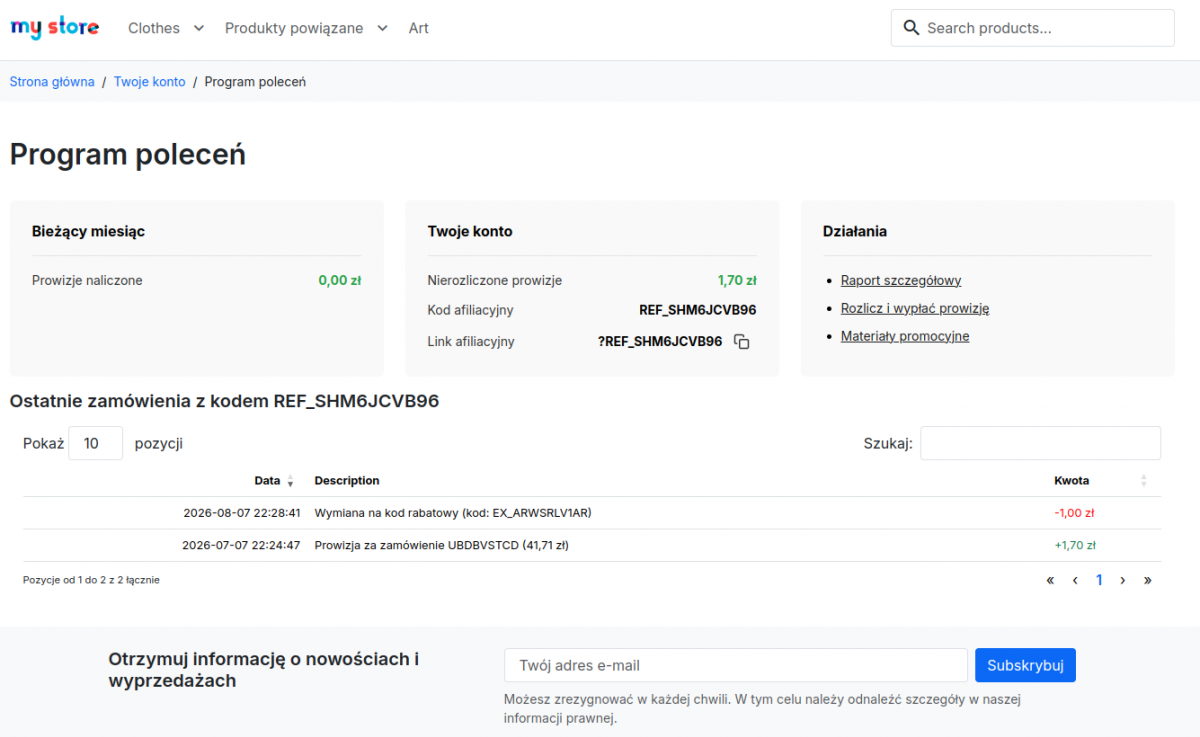
Partner dashboard in the customer account
After logging in, the partner sees their commission balance, the amount pending confirmation, their own affiliate code, and a referral link that can be quickly copied—this is standard for the module. The current month’s tile and the line item for unsettled commissions shown in the screenshot are from the implementation described here.
The dashboard also displays recent account activity, including commission calculations and any conversion of commissions into discount codes. The affiliate doesn’t have to search for an ID in messages or ask customer service about their current balance. This reduces the need for manual communication, but above all, it builds trust: the referrer sees the exact same activity that the store is tracking.
The partner has their code, referral link, balance, recent orders, and key activities all in one place.
- detailed report,
- settlements and commission payments,
- promotional materials.
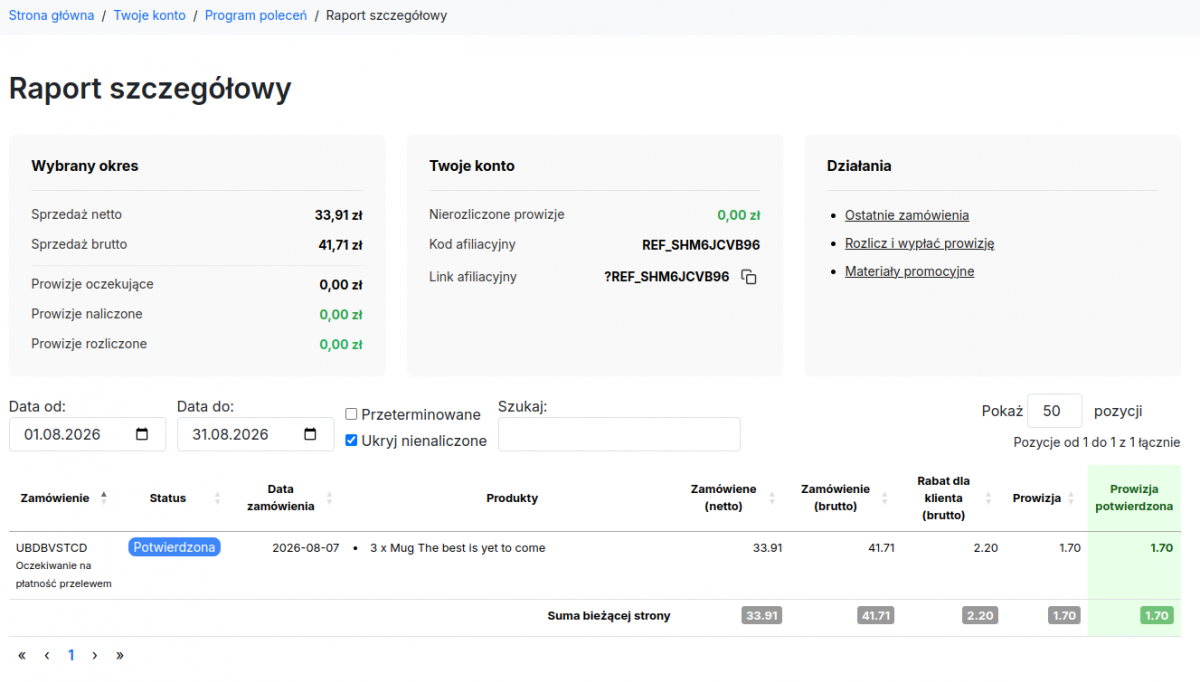
Detailed sales and commission report
The report answers the question, “Exactly what did I earn this amount for?” A partner can select a time period and view net and gross sales, pending, accrued, and settled commissions, a list of orders, status, date, products, customer discounts, commission amounts, and confirmation details.
Filters allow you to include overdue commissions and hide orders for which a commission has not yet been calculated. This is important for monthly calculations: a partner can see sales in advance, but the system clearly distinguishes them from earnings ready for payment.
Order details link the financial result to specific products and commission status.
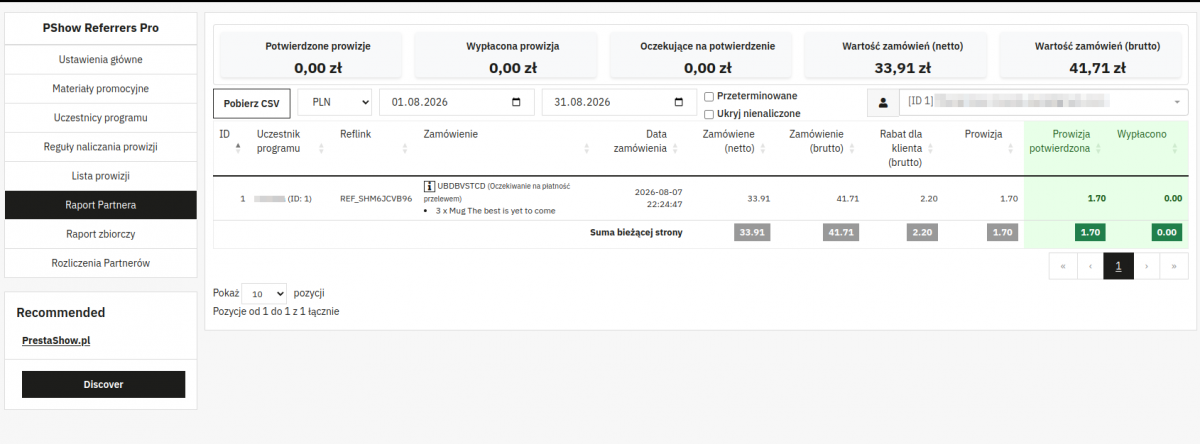
Partner Report for the Administrator
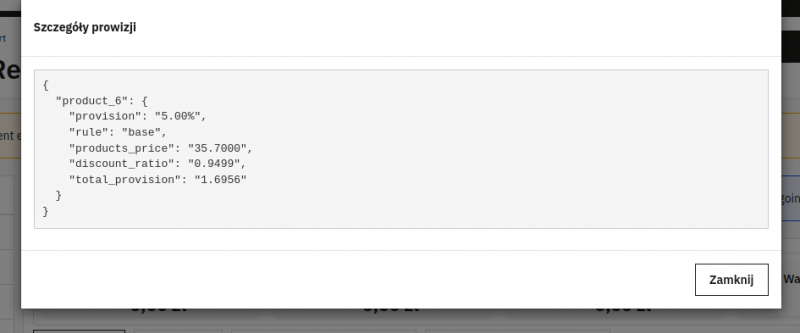
The back office displays confirmed and paid commissions, pending amounts, net and gross order values, and discounts granted to customers. The administrator can filter data by period, currency, and partner, and can also view overdue or uncalculated items and download a CSV file.
The export does not replace the dashboard but facilitates the transfer of data to finance, controlling, or for further analysis. Importantly, the report shows not only the commission amount but also the sales value from which it is derived.
Administrator’s operational report: partner’s results, orders, products, discount, commission, and amount paid.
Summary Report for the Entire Program
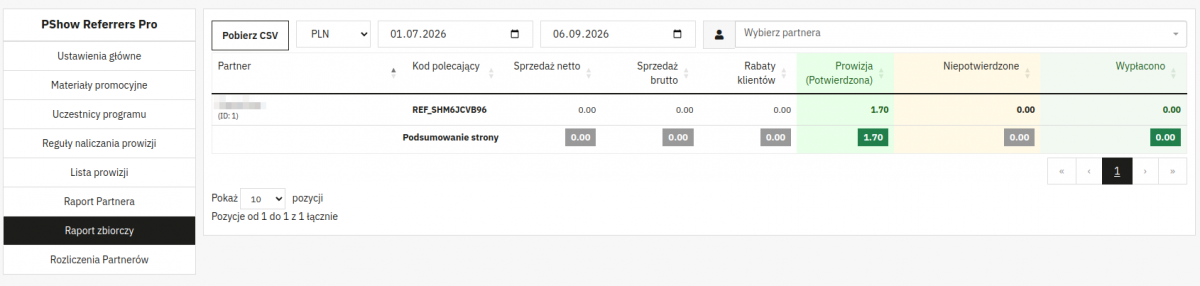
When evaluating the program on a monthly basis, a bird’s-eye view is also necessary. The summary report lists partners, their codes, net and gross sales, customer discounts, as well as confirmed, unconfirmed, and paid commissions.
Thanks to filters for period, currency, and partner, you can use this view for both monthly closings and for analyzing the results of individual partnerships.
The summary report lets you compare partners without having to merge multiple spreadsheets.
Settlement Request and Invoice on the Partner’s Side
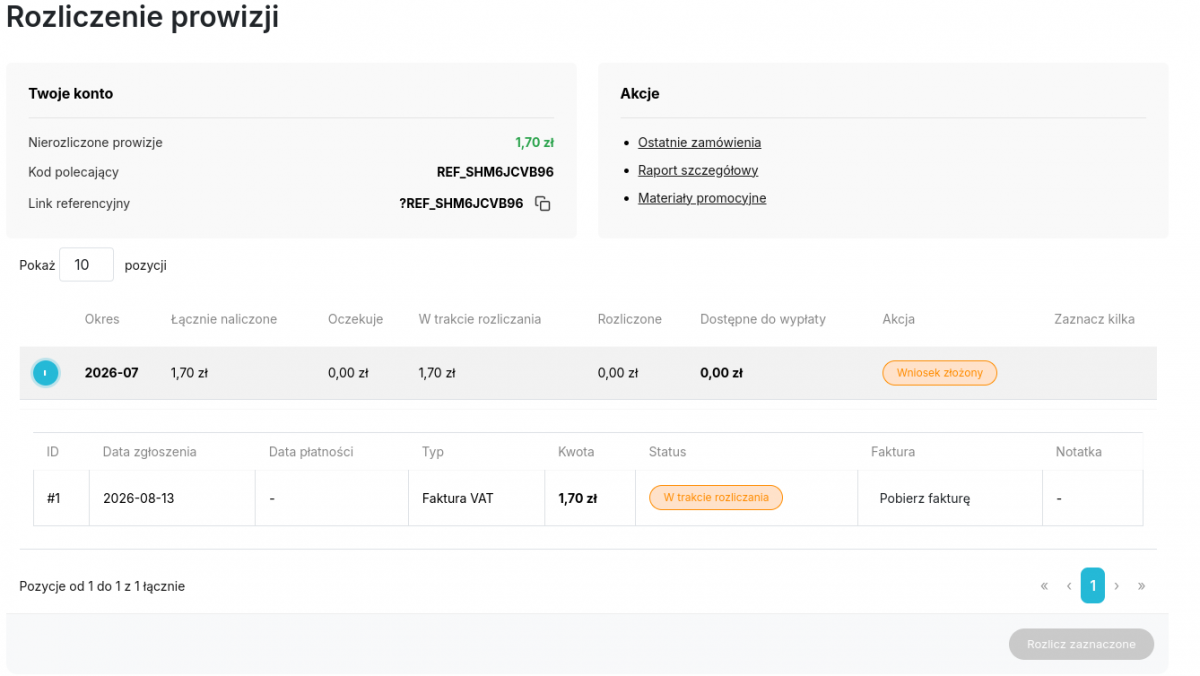
A separate settlement panel shows the following for each period: total accrued commission, pending amount, amount in the process of settlement, settled amount, and amount available for payment. The partner can select available items and submit a request directly in the store.
If a particular model requires an invoice, the partner attaches it to the form and can later download the document from the history. The system blocks the submission of requests for periods that are not yet available according to the set monthly calculation date. This ensures that the closing date does not have to be specified in every correspondence.
The settlement history includes the period, type, amount, status, invoice, submission date, and note.
Settlement Queue in the Back Office
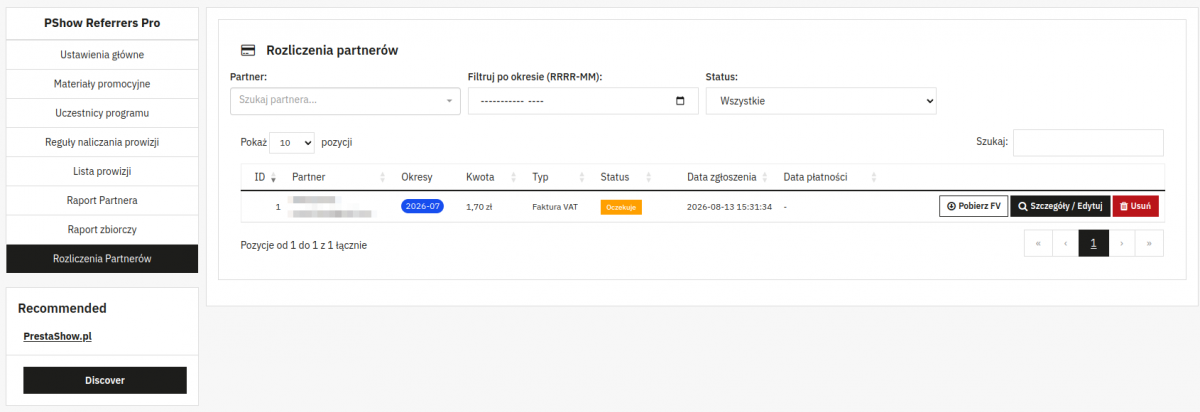
The administrator receives a consolidated list of requests. They can filter them by partner, period, and status. The table displays the settlement ID, partner, covered periods, amount, type, status, submission date, and payment date. This is the work queue. It allows the team to see which settlements are awaiting verification, which are in progress, and which have been paid or rejected.
The administrator can download an invoice, view settlement details, edit the status, or delete an incorrect submission. A more comprehensive operational view is available in the settlement details.
From a single location, you can download an invoice, view details, change the status, or delete an incorrect submission.
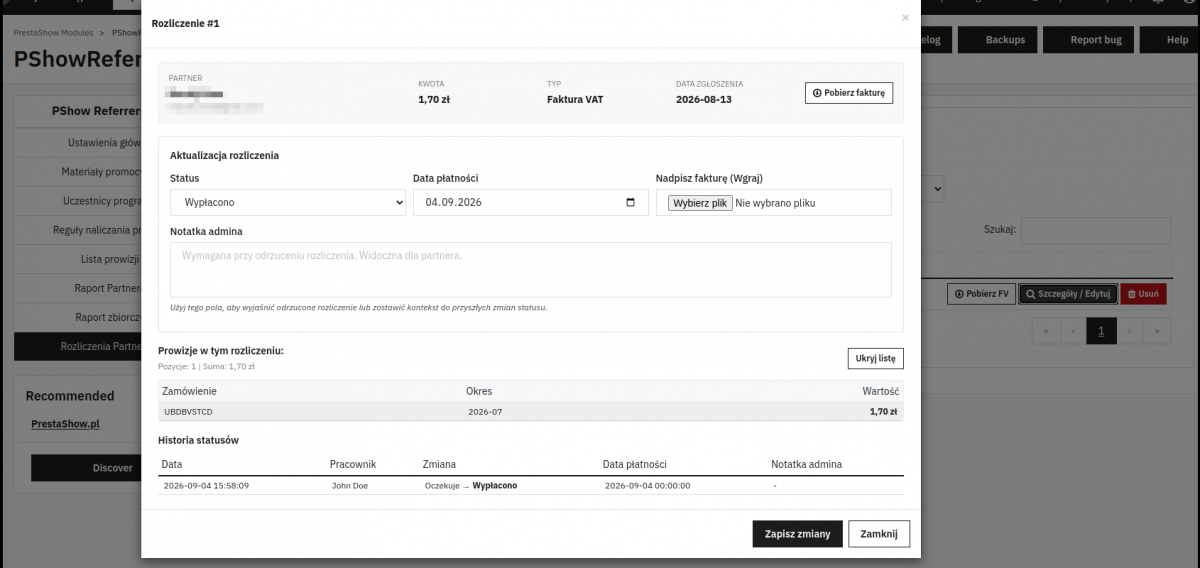
Payment details and full status history
The detailed view combines partner data, the amount, the settlement type, the request date, and the document with the administrator’s actions. You can change the status, specify the payment date, download or overwrite an invoice, add a note, and check the commissions covered by the request.
An administrator’s note may be visible to the partner and, if the request is rejected, explains the reason for the rejection. A rejected settlement should release the commissions it covers back into the pool available for payout. A notification is sent only when the status has actually changed—not every time the form is saved.
The payment itself is handled outside the store. The system does not generate an invoice, does not store bank transfer data, and does not process the transfer. The partner attaches a completed PDF document, and the administrator records the decision, status, and payment date, ensuring that the entire settlement history is in one place; however, the accounting department processes the transfer in its own system.
The history records the time of the change, the employee, the previous and new statuses, the payment date, and a note.
Improved Email Communication
The implementation of settlements is complemented by automatic email notifications related to settlements and commissions. This allows for more regular communication with the partner. An email informs the partner of an important change, while the settlement details and history remain available in their account.
- notification of a settlement request submission,
- notification to the administrator about a new settlement,
- notification to the partner about commission payment,
- notification of a rejected settlement, including the reason,
- monthly commission summaries,
- an email queue managed by CRON,
- the option to disable monthly notifications for a specific partner.
Automations that eliminate repetitive work
The administrator sets the rules, and CRON tasks periodically organize data and perform operations that would be prone to errors if handled manually.
The green column lists tasks available in the ready-made module. The blue column describes the communication layer that we implemented individually.
Calculation and Organization
- calculating commissions based on product, category, manufacturer, or partner rules,
- handling monthly thresholds and progressive rates,
- accounting for order statuses and delays in confirmation,
- flagging overdue commissions,
- updating commission rules—new products will be added to the rule,
- Filling in missing commissions for orders.
Event-based communication
- confirmation of application submission to the partner,
- notification of a new settlement to the administrator,
- notification of payment,
- rejection notification with reason,
- monthly commission summary,
- an email queue sent by CRON.
Refunds, cancellations, and discounts: what the module handles and what the client has implemented individually
In the affiliate program, the following situations may occur: partial refunds, the use of multiple discounts, order changes, payment cancellations, chargebacks, and attempts by an affiliate to use their own referral code. If commissions are progressive, an adjustment may also affect the threshold reached in a given month. The module handles some of these situations by default, while others are intentionally left for individual implementation—we break this down clearly below.
How does the PShowReferrers module work by default?
- A commission is held for a set number of days and is only confirmed after that time; the recurring task marks only commissions that have not yet been confirmed as overdue. This is the main protective mechanism: a safety period before payment.
- The module does not react to changes in order status after a commission has been confirmed, nor to adjustments, partial refunds, or corrective documents. The administrator revokes the commission retroactively in the back office, and the partner’s balance is then adjusted.
- Automatic handling of returns and cancellations, chargeback management, and recalculation of the achieved threshold are part of a custom implementation.
Sales attributed to a partner do not immediately become store revenue
- Every commission should be traceable—by order, products, the rule applied, and status.
- Every payment should be traceable—by period, document, administrator’s decision, and change history.
- Only then can the store scale the number of partners without losing control.
What do you and your partners gain?
For the partner
- constant access to the referral code and link,
- transparent sales, order, and product results,
- a clear breakdown of commissions by status,
- the ability to request a payout without having to manage the process via email,
- history of settlements, payments, invoices, and notes,
- fewer reasons to contact store support.
For the store
- less manual report preparation,
- fewer questions about commission calculations and due dates,
- a streamlined workflow for invoices and payments,
- a history of statuses and administrator actions,
- detailed and summary reports in a single source,
- greater control and readiness to serve new ambassadors.
Accounting and Legal Matters
The method of settlement depends on the partner’s status, the type of collaboration, the contract, and the country; therefore, the system should reflect the procedure agreed upon with the accounting department. In the implementation shown, the partner uploads a completed VAT invoice in PDF format to the request, which the administrator can download and link to the payment.
The program’s terms and conditions may specify, for example, permitted promotional channels, rules for attribution and commission calculation, return processing, payment deadlines, and guidelines for using brand materials. Content containing affiliate links and barter partnerships must be labeled as advertising and must identify the promoted brand—in accordance with the UOKiK’s recommendations regarding influencer marketing. If referral tracking uses cookies or other identifiers, information disclosure requirements, privacy protection, and user consent mechanisms must also be considered as early as the design phase.
What else can be measured besides sales?
Ranking partners by revenue is useful, but it is not sufficient to assess profitability. The partner with the highest sales may also generate the highest discounts, a high number of returns, and orders for low-margin products.
| Metric | What question does it answer? |
|---|---|
| Net and gross sales | What revenue has been attributed to the partner? |
| Confirmed and pending commissions | Which costs are certain, and which remain contingent? |
| Customer discounts | How much of the margin does the program pass on to the buyer? |
| Returns and cancellations | Does the partner generate repeat sales after the purchase? |
| Average order value | Do referrals affect the cart value? |
| Affiliate conversion rate | Does the traffic generated align with the store’s offerings? |
| Margin after discounts and commissions | Does the program generate profitable sales, not just revenue? |
| Time from the end of the period to payment | Is the payment process efficient and predictable for the partner? |
Ready-made module or custom setup?
A ready-made module is a good starting point when the process fits a standard model: the partner has a code and a referral link, the store sets the discount and commission, and the system assigns orders and tracks the balance.
Custom development is necessary when the program requires its own document workflow, non-standard thresholds, roles, integrations, or reports.
We’ve been developingthe PShowReferrers – Affiliate Program module since 2019. The module supports PrestaShop 1.6, 1.7, 8, and 9, as well as six language versions— you can use it to build and develop an affiliate program tailored to your business.
How do we design a custom affiliate program?
Weanalyze your needs and then make recommendations; we don’t just follow the “click—purchase—commission” path. An affiliate program involves money, so its quality is measured by how it handles exceptions.
1
Business Model—Rules and Exceptions
Affiliates, channels, goals, margin, discounts, and compensation model.
2
Test Implementation and Launch
Scenarios for orders, payments, cancellations, returns, and adjustments.
3
Guarantee—Monitoring and Optimization
You receive priority support for issues and the implementation of new requirements.
Frequently Asked Questions
FAQ List - coming soon. We look forward to your questions...
Summary
A professional program requires attribution, quantifiable economics, refund policies, reports accessible to both parties, organized documentation, and a payment process that can be reproduced even after many months.
In the implementation shown here, the partner checks sales, commissions, and settlement status on their own, submits a request, and provides an invoice. The administrator receives detailed and summary reports, a settlement queue, payment dates, notes, and status history. CRON jobs calculate and organize the data, while notifications alert the administrator to the most important changes.