










GA4 · Google Ads · GTM · Consent Mode v2
Stop paying for measurement errors.
Another month of running campaigns based on data you don’t trust? Build a solid foundation for analytics and remarketing. At PrestaShow, we configure your store’s integration with Google Analytics 4 (GA4) and Google Ads, implement modules, correct measurement errors, and evaluate the results.
- 7 business daysfor implementation after agreeing on the scope and receiving access
- 30 days of monitoringto verify data and make implementation adjustments
- 100% refund ifwe fail to resolve an error covered by the guarantee
Your store is making sales. Why do the reports raise questions?
There are paid orders in PrestaShop. Some are missing in GA4, and Google Ads shows yet another number. The agency checks the tags, the developer checks the shopping cart, and you pay for ads and more hours of troubleshooting.
Differences between reports alone do not prove an error. Factors such as how sales are attributed, conversion settings, and data processing time all play a role. Google describes these causes in its documentation on measurement discrepancies. The problem begins when no one can explain where your numbers are coming from.
Duplicates inflate the results. Missing purchases understate campaign effectiveness. Incorrect transaction values make it difficult to assess ROAS. If such signals feed into Google Ads’ automated strategies, you make it harder for the algorithms to work—and for you to decide where to increase your budget.
First, get your metrics in order. Then evaluate your ads and scale what actually works.
Do you recognize any of these issues?
Where PrestaShop Might Be Losing Conversions and Traffic Sources
The purchase depends on payment confirmation
The customer pays and closes the window. Or the bank transfer comes through later. When a purchase is triggered solely by the thank-you page, the transaction may not be tracked in analytics. We check for shipment after the order status changes.
A single purchase is counted multiple times
Code in the template, a module, GTM, server-side tracking, and order updates via ERP can all trigger the same tracking event. We organize event triggers, transaction IDs, and primary and secondary goals in Ads.
Sales are attributed to the payment gateway
The report shows the payment processor, “Direct,” or “(not set).” We examine campaign parameters, session IDs, post-cookie consent, and cross-domain transitions. We also test ad entries on Apple devices.
The banner is there, but consents aren’t triggering the tags
The default consent status is received too late, the user’s choice does not update the tags, or two modules are sending conflicting signals. We check the entire process: before the decision, after acceptance, after refusal, and after a change in choice.
Revenue and the funnel don’t reflect sales
Net is mixed with gross, the currency is incorrect, and returns or shopping cart events are missing on one page. We standardize the definition of purchase value and verify products, the shopping cart, payment, and returns.
Everyone checks their own part
The agency doesn’t have access to the code, the developer isn’t familiar with Ads settings, and the accounts were left with the previous contractor. We organize access rights and documentation. A single team is responsible for the agreed-upon implementation.
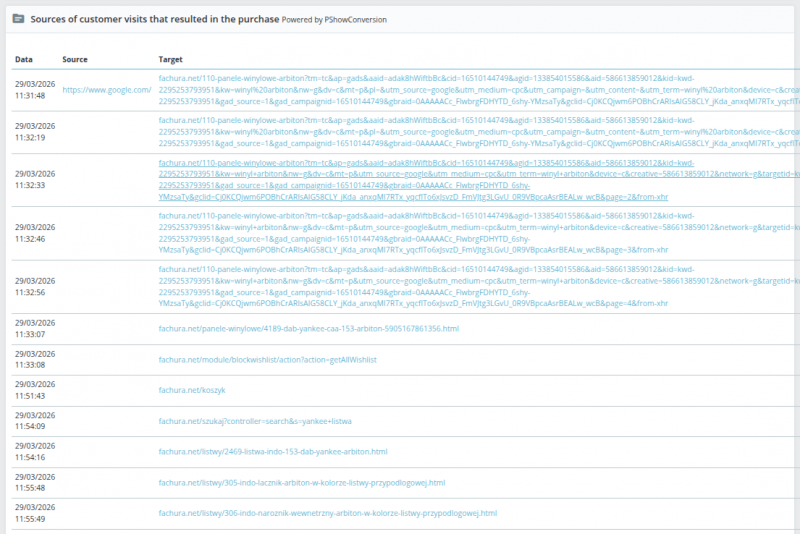
Sources also visible in the store
Check the path to the order, not just the final chart
Google Integrator displays information about traffic sources and the customer journey in the PrestaShop dashboard. This serves as an additional reference point when you’re investigating the cause of an incorrect sales source.
The agency and developer can work on a specific order example. It’s easier to determine what to check and whether a fix was effective.
Two modules. One complete implementation.
Google Integrator handles tracking. Cookies Manager manages consents. The implementation service integrates the modules, the store, and Google accounts into a fully tested system.
Measurement and e-commerce data

Google Integrator
GA4, Google Ads, Google Tag Manager (GTM), dataLayer, and Enhanced Conversions. The Professional license also includes the Measurement Protocol—sending purchase data from the server.
Consents and Consent Mode v2

Cookies Manager
Banner, cookie categories, consent signals for Google, and user decision log. License with no mandatory subscription required for the module to function.
Implementation by the module developers
Let us handle the entire project
Account setup, module installation, tracking adjustments in the store and template, testing, and 30 days of monitoring.
You save time. Your agency gets a well-organized implementation and documentation.
Measurement Protocol in practice
The customer has paid. Measurement doesn’t have to wait for them to return.
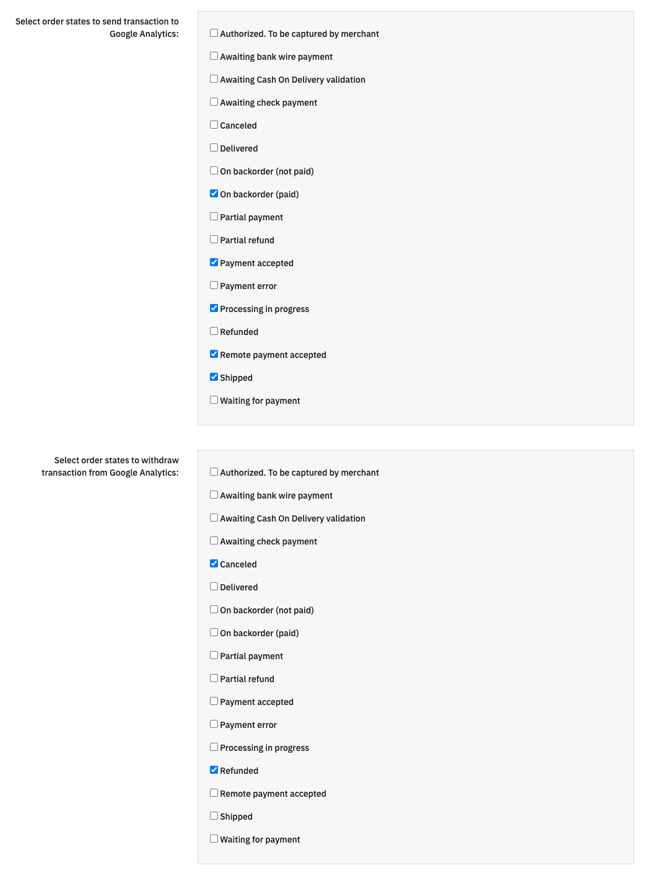
With the Professional license, you can link a purchase shipment to a specified order status. This means it doesn’t depend solely on the code running on the thank-you page.
We agree on when an order constitutes a sale, how to report its value and currency, and how to handle returns in GA4. We also verify that the browser and server aren’t sending duplicate purchase data.
Enhanced Conversions can improve the alignment of conversions with ad interactions thanks to data transmitted in the form of cryptographic hashes. We implement them in accordance with user consents and Google’s requirements.
A purchase, a sales source, and a remarketing recipient are three different things. Simply sending an event from the server does not reconstruct the entire customer session or their consents. Google describes the Measurement Protocol as a supplement to browser-based measurement. That’s why we configure and test the entire flow.
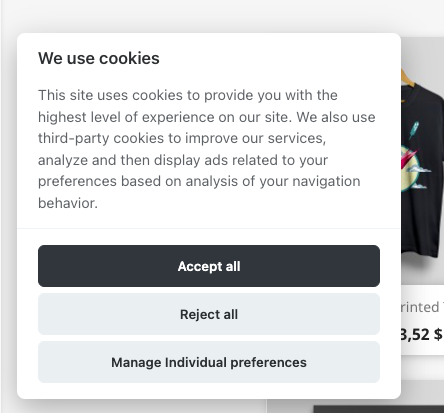
Consent must work in the code, not just on the screen
Consent Mode v2: From Customer Selection to Tag Execution
Cookies Manager allows you to detect and group cookies and transmit customer choices to Google. We verify the order in which consents are set and ensure they are updated after interaction with the banner.
The consent log records decisions on the server side. This helps document the implementation—however, handling consents also requires proper store configuration and documentation.
A correctly configured Consent Mode does not mean that every user will be added to a remarketing list. The availability of audience modeling and the use of audiences also depend on consents, data, and Google’s requirements.
We’ve been developing Google Integrator since 2016
Experience reflected in the changelog
The first release was on September 30, 2016. In the years that followed, the module adapted to changes in Google Analytics alongside the stores. Here are examples of the latest improvements:
- September 24, 2026, versions 2.8.46–2.8.47: fixes for ad recognition on iOS and visit sources when cookie consent is granted retroactively; fixes for handling identifiers and consents.
- August 26, 2026, version 2.8.45: fixes for duplicates when updating orders via the API and resending transactions.
- July 30, 2026, version 2.8.44: fixes for shopping cart and checkout events to prevent overcounting of funnel stages.
These are specific situations that can affect your campaign’s performance. You’re working with a team that develops the integration code and can address the root cause of the issue. Check the Google Integrator public changelog.
Free up time for your store. Let the agency handle the campaigns.
For the store owner
You receive organized metrics, your own account access, and test results. Instead of mediating between contractors, you have a single team responsible for the agreed-upon implementation.
Better data helps you evaluate the profitability of your ads. Profit growth also depends on your offer, margin, and campaign management—effective analytics provide the foundation for these decisions.
For marketing agencies
You receive a data layer, agreed-upon conversion goals, documentation, and technical support on the PrestaShop side. We can work directly with your team or carry out white-label implementations.
Do you also manage websites and portals built on other technologies? Contact us for a customized scope of work. The package and modules described here apply to PrestaShop stores.
7 business days for implementation. 30 days for monitoring.
We start with a free review of your store and template. Before you purchase, we agree on the scope, payment methods, required access permissions, and test scenarios.
- We organize accounts and tags. We configureGA4, Google Ads, GTM, or gtag.js, as well as consents and measurement goals. We review existing code and verify access rights for the store owner and agency.
- We implement and test: We installmodules, improve the integration between the store and the template, and test purchases, returns, traffic sources, and consents. Implementation takes up to 7 business days after the scope and required access permissions have been agreed upon.
- We monitor for 30 days. We verifydata from actual traffic, diagnose discrepancies, and fix implementation errors. We provide a report and documentation for you and your agency.
Any corrections needed to achieve the agreed-upon measurement are included in the price. This also applies to integration with a custom checkout. We identify critical store issues during the pre-purchase verification.
Transparent Cost
How much does a complete implementation cost?
| Item | Gross |
|---|---|
| Service: configuration, adjustments, testing, and monitoring | 3,500 PLN |
| Google Integrator — Professional license | 800 PLN |
| Cookies Manager | 200 PLN |
| Service and both modules | 4,500 PLN |
Do you already have the required licenses? You don’t need to purchase them again. Current versions are required; renewal of access to updates may be billed separately.
Merchant Center and the feed via PrestaShop Feeder are optional extensions. Campaign management, advertising budget, and additional Multistore licenses are not included in the above total.
We’re responsible for our implementation
Proper integration or a 100% refund
If we fail to resolve an error in our implementation reported within the 30-day monitoring period and covered by the agreed-upon tests, we will refund 100% of the actual price paid for the service and the required modules purchased specifically for this project.
Tests include, among other things, purchases without payment reversals, absence of duplicates, transaction values and currencies, returns in GA4, traffic source settings, and the functioning of consents and conversion data transmission.
Conditions: up-to-date modules, access required for work and testing, no unauthorized changes to measurement by third parties, and a report submitted via HelpDesk during the monitoring period. A report submitted on the last day is also covered by the guarantee.
This guarantee applies to implementation errors. It is not a promise of a specific ROAS, identical reports, or a workaround for consent refusals. Previously held licenses are not eligible for this refund.
PrestaShop Integration with Google — Questions Before Implementation
Do you guarantee lossless tracking of every conversion?
We eliminate the technical causes of data loss and duplication in the agreed-upon implementation. We do not equate “zero loss” with tracking every user regardless of consent, browser, or Google policies. Therefore, the guarantee has specific testing criteria.
Will cookie opt-outs be automatically compensated for through modeling?
Not in every store. Google has requirements regarding implementation and data volume. GA4 behavioral modeling is not an automatic guarantee that every missing visit or purchase will be recovered.
Do I need GTM and a new Google account?
Google Integrator can work with GTM or gtag.js. We select the option that best fits the store and the agency’s workflow. We can organize existing accounts; there’s no need to create new ones if they’re properly assigned and accessible.
Will the integration continue to work after changing the template or agency?
Documentation, account ownership, and a well-organized configuration make it easy to take over management. After changing the template, checkout process, payment modules, or consent settings, it’s a good idea to retest. Ongoing support and future updates can be arranged separately.
Start with metrics you can trust
Before you blow through another budget, check the foundation with us
Send us your store’s URL and describe what’s off in your metrics. We’ll verify your starting point for free, agree on the scope, and guide you through the implementation. You focus on growing sales. We’ll handle the technical side of the integration.
Phone: 506 312 999