Customer service and order packaging on your phone 📦












Detailed description
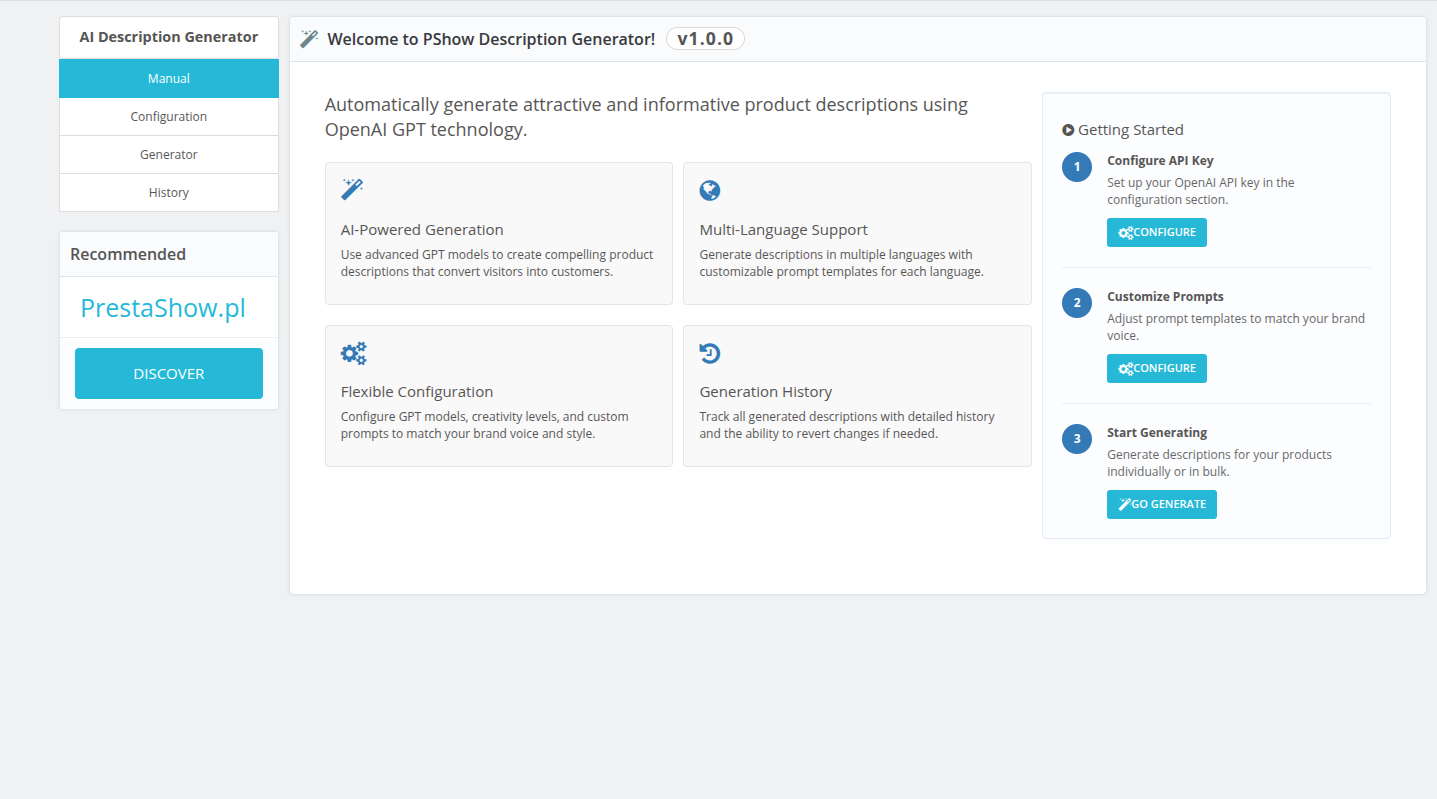
Instant generation of descriptions
The module sees images and data about the products in your store and can search for additional information on the Internet with high precision. It generates clear and accurate product descriptions that speed up the shopping process.
Increased conversion
The module creates content that is optimized for SEO (rich content) and created with sales in mind - getting traffic and conversions.

The module uses OpenAI and Chat GPT technologies
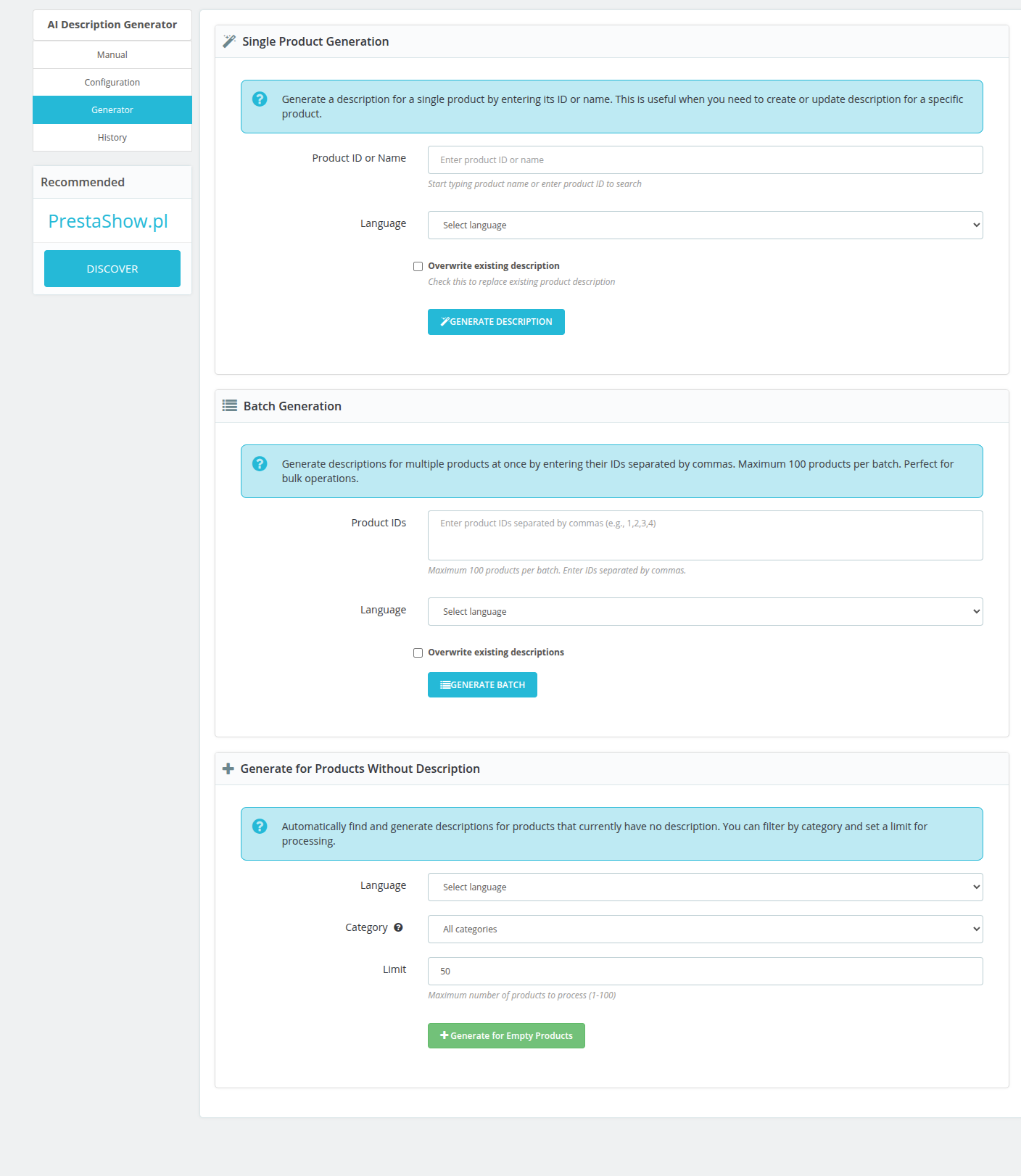
Single generation - indicate product(s) manually
You can point to individual products, which works well for testing or updating prompts.
Full control over the process
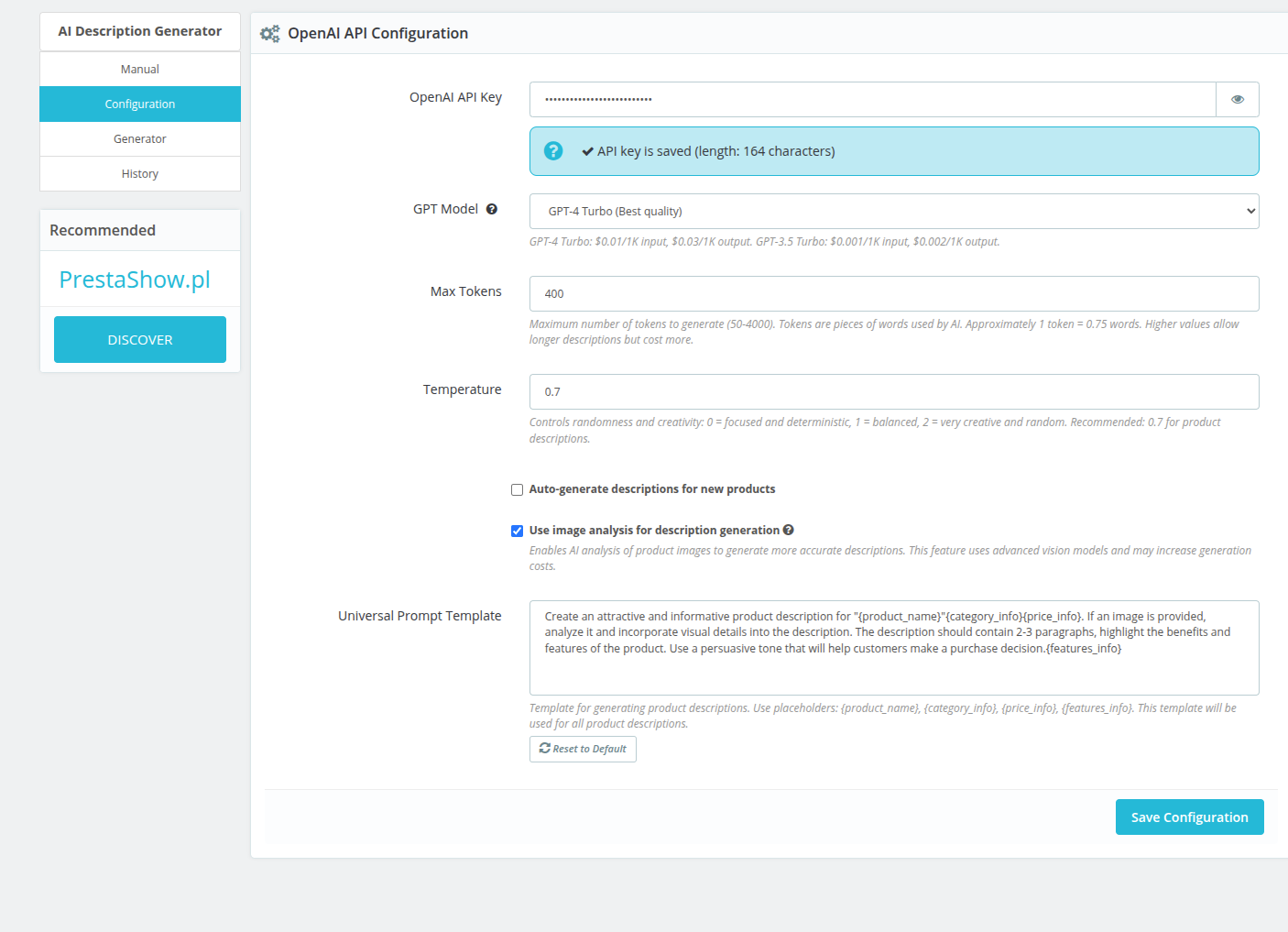
Built-in prompts and {Smart-Tags} editor give you full control over the data the module will use during content creation, as well as the style, look and tone of the generated descriptions.
Product images
The module sees the product photos in your store and can generate a description of what is in the photos - in a natural and sales-oriented way. With limited product data, you can get attractive descriptions to speed up the customer's decision-making process.
Information in the store database
The module can use data directly from your product catalog, such as product name, category, features and attributes. Use {Smart-tags} to personalize your own prompts.
Web search
The module can search for additional product information on the Internet to create a highly complete product description. Just EAN13 code is enough for the module to generate a professional complete product description.

Detection of languages enabled in the store
The module can translate generated descriptions in all languages enabled in the store - you can enable automatic translations in the module configuration. The module generates translations according to the standard PrestaShop translation mechanism.


Full automation
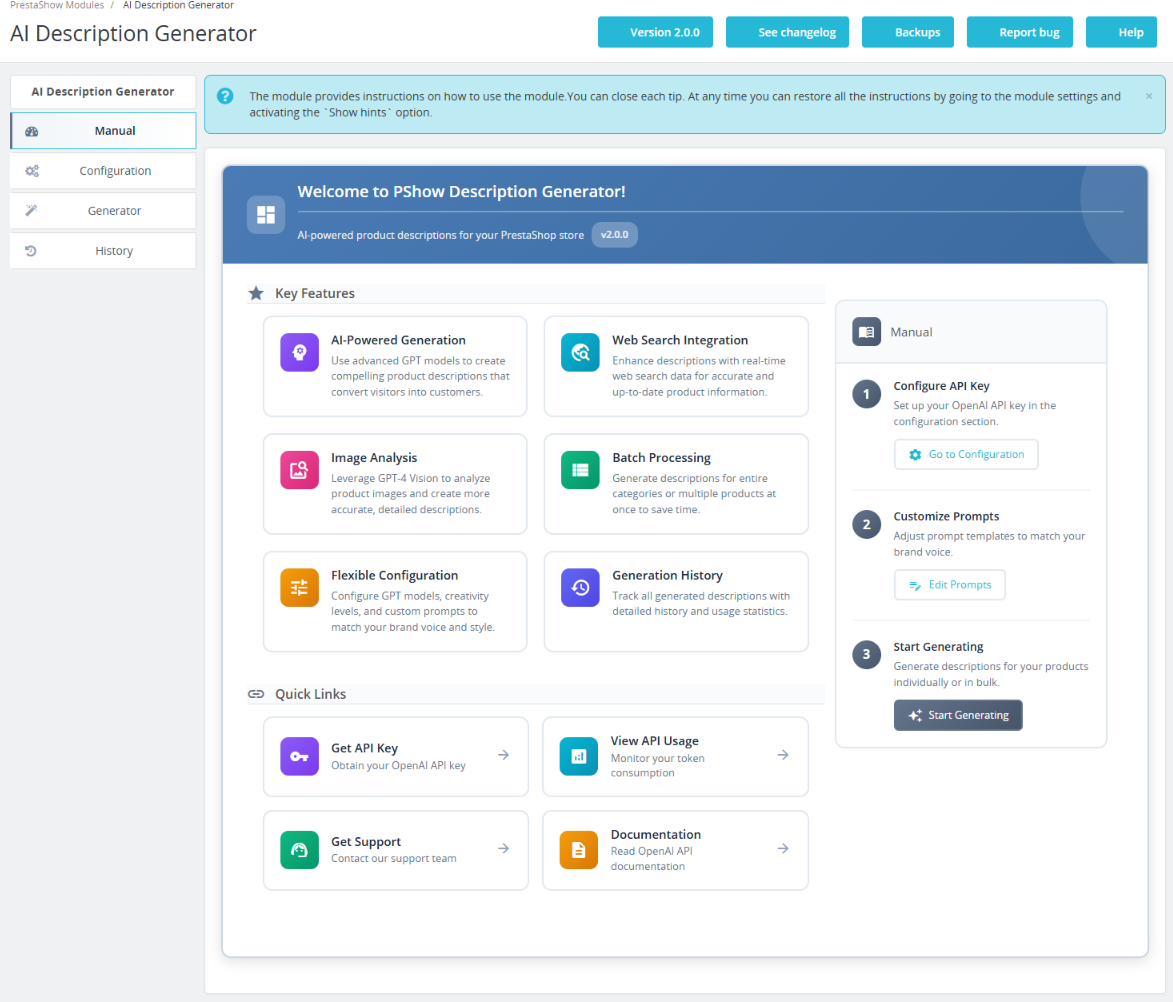
The module's easy configuration makes it easy to generate descriptions from AI even for PrestaShop beginners. You have control over the entire description generation process.
Data security
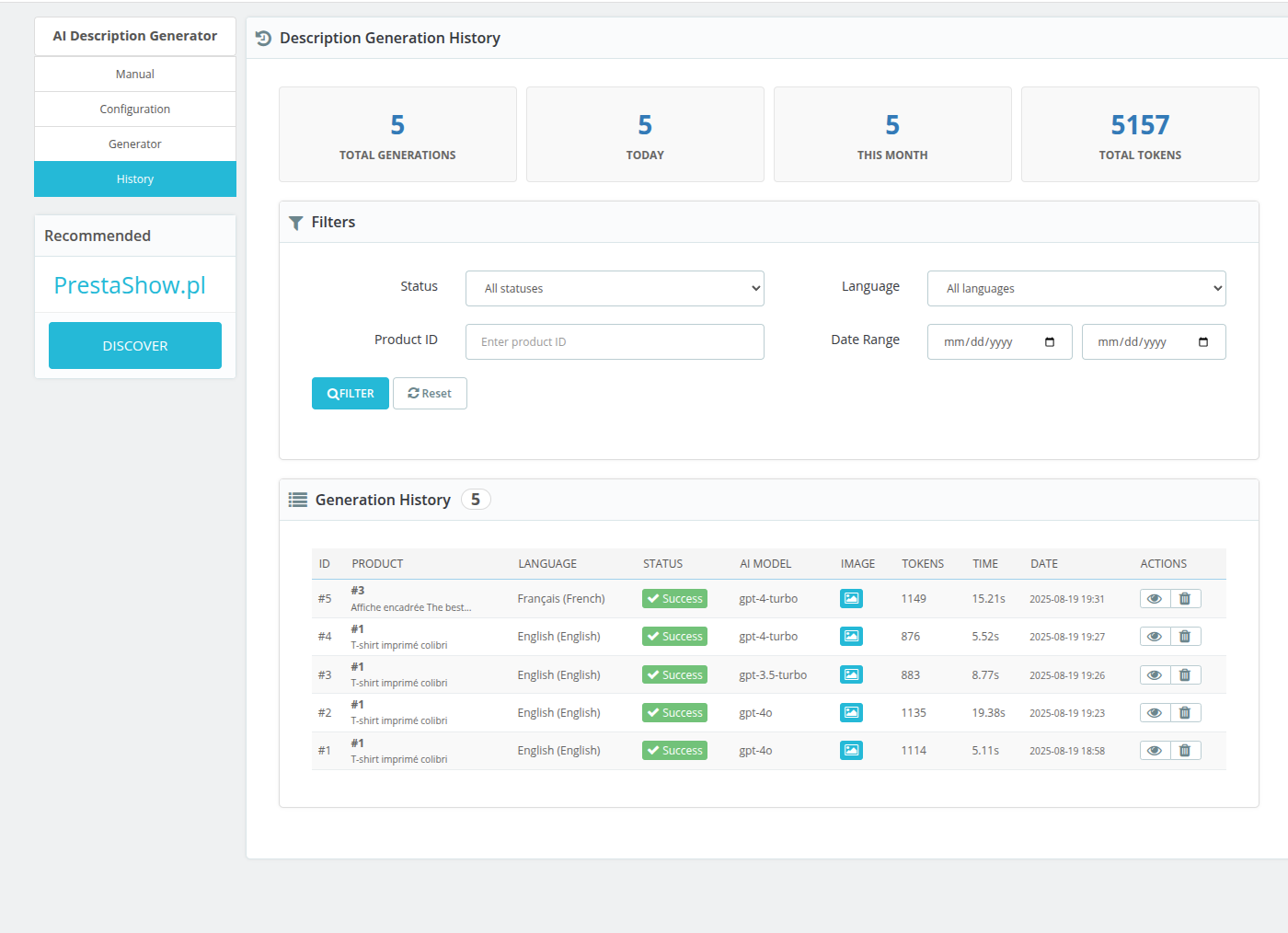
You can enable security of existing descriptions - the module will not overwrite them. Every operation performed by the module is recorded in the history of operations (logs). In the module you will find the history of changes (before and after) and the history of used tokens.
1
Installation
Install the module, enter your ApiKey, and then set the data to be used by the module and specify the default style, tone and prompt.
2
Configuration
Select products. the module analyzes images + product data + looks for additions on the Internet → generates a description.
3
Track changes and statistics
Approve finished descriptions or make corrections. Track statistics and optimize the process.
Detect products without description
The function of identifying products without descriptions allows you to focus your generation efforts where they are needed most - automatically detecting blank fields and indicating them for completion.
Detection of new products
The module is able to catch newly added products that need descriptions - so you can provide your products with full, attractive descriptions on an ongoing basis from the moment they appear in the catalog.
Securing existing descriptions
Is your existing description valuable? No problem - the module includes a mechanism to protect it from being overwritten, allowing you to keep manually polished content while automating the rest.
♥️ 🎉 ✅
Support for emoticons
The module can use emoticons in created descriptions - include them in the prompt configurator.
HTML support
The module can generate descriptions in HTML format - taking into account paragraphs, headings, lists, links and other rich-content components. Content is automatically cleaned of redundant tags, so descriptions remain lightweight and aesthetically pleasing.
History and statistics
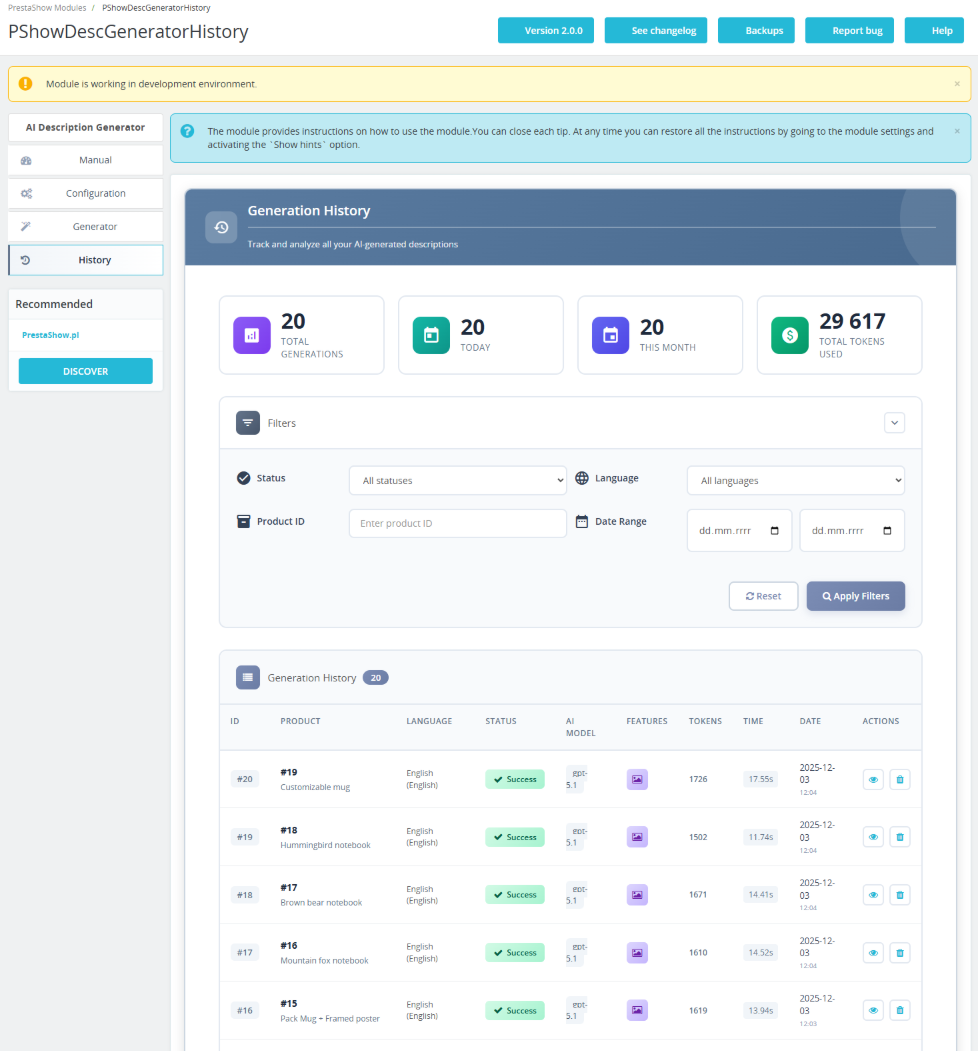
The module records a history of activities: how many descriptions were generated, for which products, when and what the results were. You have insight into the status before and after the change. It's a tool for analysis and optimization of the content process.
Prompt generator
Want to define the style, tone or form of the description? In the module you can define a prompt, such as "write concisely", "add emoticons", "focus on unique product features", "use H1, H2 and H3 headings". - so AI generates content according to your preferences.
🎯
Need additional features?
Buy the module and create a ticket at helpdesk.prestashow.co.uk. We will be happy to expand the module and customize it to your needs!
Collaboration
prestashop importer
Connect your store with wholesalers using the PrestaShop Importer module - a universal XML, CSV and API integration. AI Generator will correct or complete the data that your product supplier does not provide.

Collaboration
PrestaShop Editor PRO
You can conveniently edit the generated description with the help of PrestaShop Editor PRO - complete images, videos, emoticons, tables or comparisons with other products. Create any content layouts you want.

Collaboration
FAQ - POPULAR questions.
FAQ module for PrestaShop allows you to build a section where customers need it - on the product page, category page and elsewhere in the store. It reduces the number of queries. Answers are visible in AI search results.

Collaboration
PrestaShop Logger
All operations of AI Generator and other modules and changes performed in your store are recorded in PrestaShop Logger - easily check the history of changes before and after, if needed. The module provides security when determining the source of changes and potential errors.

Changelog (v2.1)
## 2.1.12 — 2026-08-04
### Fixed
- Fix: the Generator tab no longer crashes with a fatal error on shops running PHP 7.1.
## 2.1.11 — 2026-05-14
### Changed
- Renamed the lower panel on the Generator page from "Category Description Generation" / "Generate AI descriptions for one or multiple Category" to "Bulk Product Description Generation" / "Generate product descriptions in bulk, scoped by category". The previous label suggested the panel generated descriptions for categories themselves; in practice it always queued `Product->description` updates for products belonging to the selected categories (the module has no category-description path at all). Title-only template change — no code/behaviour change.
## 2.1.10 — 2026-05-14
### Fixed
- Pasting a comma-separated list of product IDs into the "Product ID(s) or Name" field on the Generator page no longer triggers the "Specify product ID(s) and language" validation error. The autocomplete field used to drive the hidden submission field only via click/Enter on suggestions, so raw `1,5,12` paste never reached the backend even though the help text advertised it. Now the same field also mirrors pure numeric input straight into the submission field (with a submit-time safety net for the paste-and-click-fast case). Reported on ticket #164695 by a customer trying to queue ~58 products at once.
### Changed
- Help text under the product search field clarified to: "Search by name and click a suggestion to add it, or paste a list of IDs separated by commas (1,5,12)." The previous wording made the autocomplete click sound like the only path.
## 2.1.9 — 2026-05-13
### Added
- Cron HTTP/CLI output now includes `breakdown` (per-outcome counts: success / skipped / retrying / failed) and `first_errors` (up to 3 distinct error messages from this run). Previously `{"success":true,"processed":1}` made a generation that failed-and-retried look identical to a successful run — the only way to see what actually happened was to dig into the `ps_pshow_description_generation_history` table or the History tab. The new fields surface the failure reason inline so customers and support agents can diagnose API/billing/model issues without DB access.
- `retrying` is a new reported outcome category: when a generation fails and `attempts < 3`, `markAsFailed` resets the task to `pending` for the next cron run. Without this label the queue stats would look like the item was never attempted.
## 2.1.8 — 2026-05-13
### Changed
- Cron HTTP endpoint moved to a PrestaShop module front controller (`index.php?fc=module&module=pshowdescgenerator&controller=cron`). The old `/modules/pshowdescgenerator/cron.php?token=...` URL returned 403 on shops whose `/modules/.htaccess` denies direct `*.php` execution (PrestaShop default) — the new URL routes through the PS dispatcher and works on every host. The admin panel now shows the new URL plus the CLI command (CLI is the recommended setup).
- For backwards compatibility, HTTP requests to the legacy `cron.php` URL are 301-redirected to the new front-controller URL. Cron schedulers that follow redirects (cron-job.org, EasyCron, `curl -L`) keep working without reconfiguration; schedulers that do not follow redirects must be reconfigured to the new URL displayed in the admin.
### Refactor (internal)
- `Controller\CronController` split into three single-responsibility classes: `Service\CronTokenService` (token issuance + constant-time validation), `Service\CronRunner` (orchestrates `QueueService::processQueue` with timing + stats), and `Helper\CronUrlHelper` (URL/CLI-path display strings). The "Controller" name was misleading — none of these are HTTP controllers.
# v2.1.7 - 2026-05-12
### Fixed
- Module admin CSS/JS URLs now carry a `?v={version}` cache-buster suffix so HTTP caches (browser + upstream CDNs like Cloudflare) see a new URL on every module update — previously a customer who got a stale admin-generate.js could not pick up the new release without manually purging their cache.
# v2.1.6 - 2026-05-12
### Added
- "Clear pending" button on the Generator page. Wipes pending tasks (and any stuck-processing leftovers) so an over-queued backlog from earlier sessions can be discarded without DB access. Completed and failed history is preserved.
# v2.1.5 - 2026-05-11
### Fixed
- Queue counter now aggregates across the whole queue instead of only the latest batch (previously the auto-generate-on-save hook mints one batch per saved product, so the counter could show "1 pending" while many items were actually queued in older batches)
# v2.1.4 - 2026-05-11
### Fixed
- "Start Now" button now falls back to inline queue processing on hosts where the PHP exec builtin is in disable_functions (previously the request silently succeeded but the queue was never processed)
# v2.1.3 - 2026-03-13
### Fixed
- Material icons on PrestaShop 1.6-1.7
# v2.1.2 - 2026-02-18
### Deleted
- old limits per request
# v2.1.1 - 2026-02-18
### Added
- small fixes and polishing
# v2.1.0 - 2026-02-17
### Added
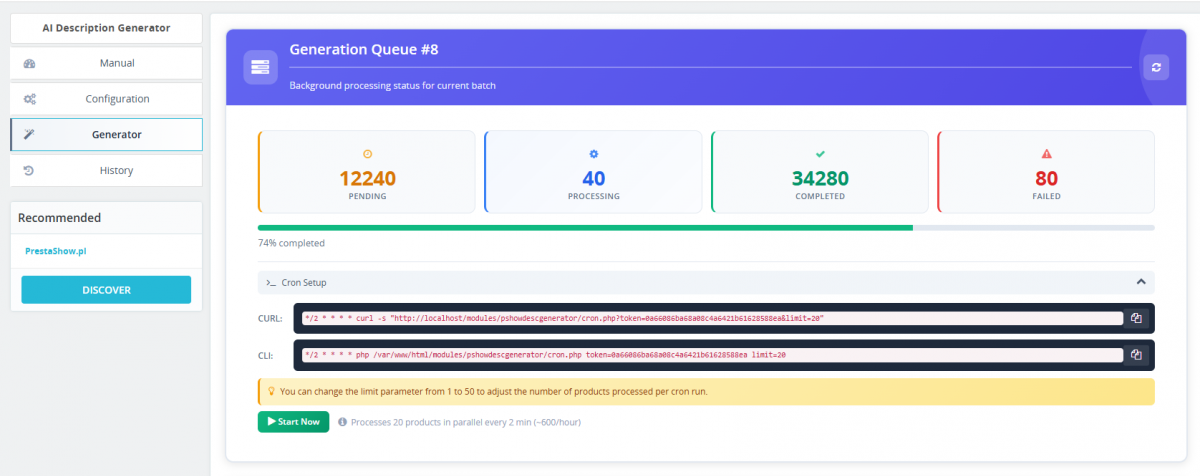
- Background queue processing for batch generation
- Cron support for automated queue processing
- Category-based batch description generation
- Auto-generation on product save (optional)
### Improved
- Faster page loading in admin panel
- Consistent design across all module pages
# v2.0.2 - 2025-12-05
### Changed
- HTTP client implementation to support Symfony HTTP and Guzzle for compatibility PrestaShop versions
# v2.0.1 - 2025-12-02
### Fixed
- Corrected Guzzle dependency version to ensure compatibility with PHP < 7.2.5.
# v2.0.0 - 2025-11-19
### Added
- Integrated web search functionality
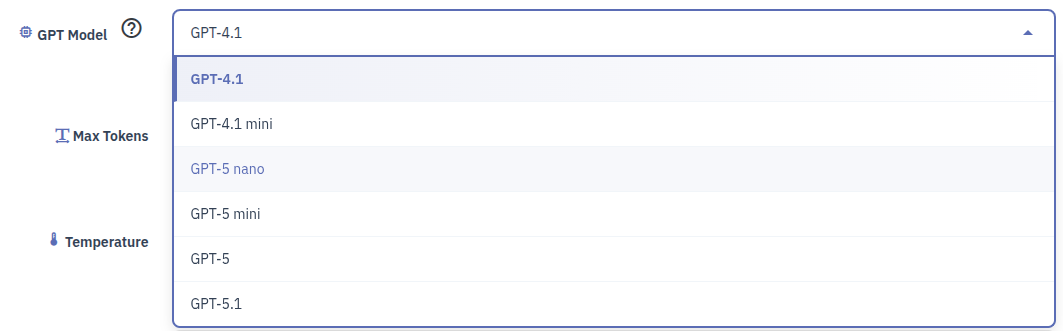
- New OpenAI models support
- System prompt configuration feature
### Changed
- Refactored the entire codebase to use the new OpenAI API `responses` API.
- Fully redesigned the UI for a modern and cleaner appearance
- Improved overall UX across the module
# v1.1.0 - 2025-09-08
### Fixed
- PHP 7.1 Compatibility
# v1.0.0 - 2025-08-05
### Added
- Initial release
- AI-powered product description generation
- Multi-language support
- Generation history tracking
### Fixed
- Fix: the Generator tab no longer crashes with a fatal error on shops running PHP 7.1.
## 2.1.11 — 2026-05-14
### Changed
- Renamed the lower panel on the Generator page from "Category Description Generation" / "Generate AI descriptions for one or multiple Category" to "Bulk Product Description Generation" / "Generate product descriptions in bulk, scoped by category". The previous label suggested the panel generated descriptions for categories themselves; in practice it always queued `Product->description` updates for products belonging to the selected categories (the module has no category-description path at all). Title-only template change — no code/behaviour change.
## 2.1.10 — 2026-05-14
### Fixed
- Pasting a comma-separated list of product IDs into the "Product ID(s) or Name" field on the Generator page no longer triggers the "Specify product ID(s) and language" validation error. The autocomplete field used to drive the hidden submission field only via click/Enter on suggestions, so raw `1,5,12` paste never reached the backend even though the help text advertised it. Now the same field also mirrors pure numeric input straight into the submission field (with a submit-time safety net for the paste-and-click-fast case). Reported on ticket #164695 by a customer trying to queue ~58 products at once.
### Changed
- Help text under the product search field clarified to: "Search by name and click a suggestion to add it, or paste a list of IDs separated by commas (1,5,12)." The previous wording made the autocomplete click sound like the only path.
## 2.1.9 — 2026-05-13
### Added
- Cron HTTP/CLI output now includes `breakdown` (per-outcome counts: success / skipped / retrying / failed) and `first_errors` (up to 3 distinct error messages from this run). Previously `{"success":true,"processed":1}` made a generation that failed-and-retried look identical to a successful run — the only way to see what actually happened was to dig into the `ps_pshow_description_generation_history` table or the History tab. The new fields surface the failure reason inline so customers and support agents can diagnose API/billing/model issues without DB access.
- `retrying` is a new reported outcome category: when a generation fails and `attempts < 3`, `markAsFailed` resets the task to `pending` for the next cron run. Without this label the queue stats would look like the item was never attempted.
## 2.1.8 — 2026-05-13
### Changed
- Cron HTTP endpoint moved to a PrestaShop module front controller (`index.php?fc=module&module=pshowdescgenerator&controller=cron`). The old `/modules/pshowdescgenerator/cron.php?token=...` URL returned 403 on shops whose `/modules/.htaccess` denies direct `*.php` execution (PrestaShop default) — the new URL routes through the PS dispatcher and works on every host. The admin panel now shows the new URL plus the CLI command (CLI is the recommended setup).
- For backwards compatibility, HTTP requests to the legacy `cron.php` URL are 301-redirected to the new front-controller URL. Cron schedulers that follow redirects (cron-job.org, EasyCron, `curl -L`) keep working without reconfiguration; schedulers that do not follow redirects must be reconfigured to the new URL displayed in the admin.
### Refactor (internal)
- `Controller\CronController` split into three single-responsibility classes: `Service\CronTokenService` (token issuance + constant-time validation), `Service\CronRunner` (orchestrates `QueueService::processQueue` with timing + stats), and `Helper\CronUrlHelper` (URL/CLI-path display strings). The "Controller" name was misleading — none of these are HTTP controllers.
# v2.1.7 - 2026-05-12
### Fixed
- Module admin CSS/JS URLs now carry a `?v={version}` cache-buster suffix so HTTP caches (browser + upstream CDNs like Cloudflare) see a new URL on every module update — previously a customer who got a stale admin-generate.js could not pick up the new release without manually purging their cache.
# v2.1.6 - 2026-05-12
### Added
- "Clear pending" button on the Generator page. Wipes pending tasks (and any stuck-processing leftovers) so an over-queued backlog from earlier sessions can be discarded without DB access. Completed and failed history is preserved.
# v2.1.5 - 2026-05-11
### Fixed
- Queue counter now aggregates across the whole queue instead of only the latest batch (previously the auto-generate-on-save hook mints one batch per saved product, so the counter could show "1 pending" while many items were actually queued in older batches)
# v2.1.4 - 2026-05-11
### Fixed
- "Start Now" button now falls back to inline queue processing on hosts where the PHP exec builtin is in disable_functions (previously the request silently succeeded but the queue was never processed)
# v2.1.3 - 2026-03-13
### Fixed
- Material icons on PrestaShop 1.6-1.7
# v2.1.2 - 2026-02-18
### Deleted
- old limits per request
# v2.1.1 - 2026-02-18
### Added
- small fixes and polishing
# v2.1.0 - 2026-02-17
### Added
- Background queue processing for batch generation
- Cron support for automated queue processing
- Category-based batch description generation
- Auto-generation on product save (optional)
### Improved
- Faster page loading in admin panel
- Consistent design across all module pages
# v2.0.2 - 2025-12-05
### Changed
- HTTP client implementation to support Symfony HTTP and Guzzle for compatibility PrestaShop versions
# v2.0.1 - 2025-12-02
### Fixed
- Corrected Guzzle dependency version to ensure compatibility with PHP < 7.2.5.
# v2.0.0 - 2025-11-19
### Added
- Integrated web search functionality
- New OpenAI models support
- System prompt configuration feature
### Changed
- Refactored the entire codebase to use the new OpenAI API `responses` API.
- Fully redesigned the UI for a modern and cleaner appearance
- Improved overall UX across the module
# v1.1.0 - 2025-09-08
### Fixed
- PHP 7.1 Compatibility
# v1.0.0 - 2025-08-05
### Added
- Initial release
- AI-powered product description generation
- Multi-language support
- Generation history tracking
Technical requirements
Technical Requirements
- PHP 7.1 - 8.x
- Server extension ionCube Loader
- PrestaShop Importer only: PHP libxml version > 2.9.3
- PrestaShop Facebook Integrator only: PHP 7.2 or higher
- PrestaShop VAT Validator only: PHP SOAP
Support & Updates
Support = Updates + HelpDesk
You get 90 days (3 months) access to the complete PrestaShow support package.
Module updates
Modules will inform you about available updates. Read the changelog and perform a 1-click module update directly from your store.
HelpDesk panel
This is the panel where we will provide you with help. On HelpDesk you can report problems, order free module installation and updates, and order modifications and custom programming work.
Extend support
After support expires, you can use the module without any restrictions. You can extend your support access at any time you need it.
Knowledge Base & FAQ
Free forever
The knowledge base is available to everyone. You will find module documentation as well as instructions, videos and answers to frequently asked questions.
License
Lifetime license for the module
- You can use the module without limitation in 1 store = 1 domain.
- You can use an additional domain, e.g. for developer copy.
- For a small fee you can change the domain for the module yourself.
Additional domains for Multistore
- All our modules support PrestaShop Multistore.
- Supporting unlimited domains for PrestaShop Multistore requires purchasing multistore support for the module.
Modifying the code
- The module code related to the integration with the store and the design (.tpl, .css, .js) has open source code and you can modify it freely.
- The module's source code (.php) is encrypted with ionCube, and modifying it will void the warranty.
No entries yet.
1. Czytając opis widzę że Państwa moduł generuje automatycznie opisy produktów, ale czy generuje również automatycznie meta tytuł i meta opis pod seo ?
2. Jeśli tak to czy można to roździelić, moduł tylko generuje meta tytuł i meta opis a opisy sam ręcznie obrabiam aby mieć większą kontrolę nad wyglądem i treścią ?
Jesteś kreatywnym i profesjonalnym copywriterem dla sklepu z elektroniką. Twórz atrakcyjne opisy produktów w formacie HTML. Dodawaj odpowiednie emoji, aby tekst był angażujący. Zachowuj jasne, przekonujące i łatwe do czytania zdania. Skupiaj się na kluczowych cechach i zaletach produktu. Opis ma być profesjonalny i zawierać na 100% prawdziwe dane o produkcie.
Pracujemy nad wspólnym szkieletem modułów AI, który wprowadzi do każdego z naszych modułów z AI wybór platform (m.in. OpenAI, Claude, Gemini) oraz możliwość podejmowania działań przez moduł na podstawie danych pochodzących z poza sklepu, w tym z Internetu. Te zmiany planujemy na 4 kwartał tego roku. Odpowiadając na Twoje pytanie: będzie można generować opis AI produktu na podstawie kodu EAN w sklepie i informacji w Internecie.
Dodatkowo chciałbym zapytać w jaki sposób generuje opisy? Czy AI dostaje informacje o indeksie produktu lub np. EAN i na bazie tego potrafi wyszukać informacje w Internecie?