
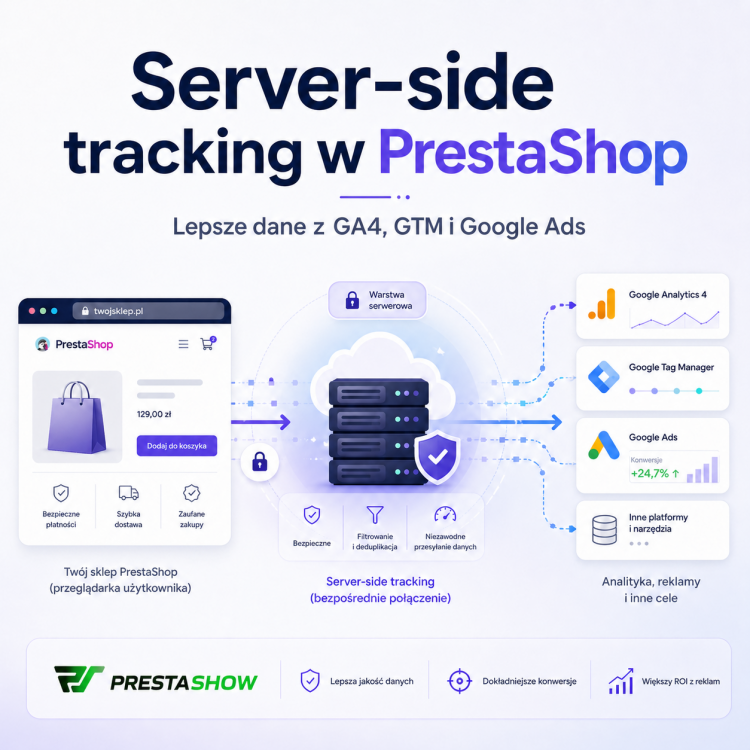
Classic conversion tracking in an online store increasingly fails to show the full picture of sales. Adblocks, cookie restrictions, third-party payments and the lack of a customer's return to the order confirmation page can mean that some of the transactions don't go to GA4 or Google Ads correctly. The solution is server-side tracking, which is the transmission of selected events and conversions on the server side - without relying solely on scripts running in the customer's browser.
PShowBlog

We have prepared each module to participate in rocking your sales. Automate daily activities and perform key integrations yourself. Configure a module and forget - focus on other things. With our modules, you'll start using features previously available only to the biggest in the industry. Create content, engage, automate and analyze. Manage quickly and independently :-)
In PrestaShop 1.6 and 1.7 stores, an XML error appears in the admin panel regarding XML files. Messages such as “Start tag expected, '<' not found” are usually related to a communication issue with the PrestaShop Addons API. In this post, we explain the cause of the error, its symptoms, and an effective solution.
An HTTP 500 error, also known as an "Internal Server Error," is a general message informing the user that there is a problem on the server that prevents the request from being processed. This error indicates that something has gone wrong on the server side, but does not specify exactly what problem has occurred. In this post, you'll learn how to enable PrestaShop's debug mode and troubleshoot the 500 error.
Are you opening up to international sales? You could work on trusting potential customers from foreign countries. That means customizing your site for the new challenges: properly configured currencies, additional languages and domains tailored to the markets where new customers are coming from. How do you tie it all together? PrestaShop Domain Manager comes to the rescue - a new module that will allow you to prepare your store for foreign customers and at the same time... take care of correct SEO.
Pairing your store with product suppliers, i.e. wholesalers, suppliers and manufacturers is crucial to the smooth operation of your business. We offer an agile and unique module for importing data from XML, CSV files and APIs and creating Advanced Warehouse Management in PrestaShop. Activities with products, on the other hand, will be streamlined by Mobile Warehouse Manager. In this post we will show you that working with products and warehouse can be simpler than ever.
Our universal PrestaShop integrator with any vendor, wholesaler, warehouse and CSV and XML catalog is now available for PrestaShop 8.x as well! Don't wait, test the module and buy today! Check the available discount before you buy!
More companies are moving their desktop services and operations online. The Internet allows you to reach a larger audience and automate and take care of your business growth. Supporting the launch of an online store is PrestaShop - a flexible open source modular tool for building online stores that is gaining in popularity!

We target each of our modules and solutions to the most demanding customers. In the demo store, all the solutions we offer can be tried to your heart's content. Visit the demo store before you buy and check out our modular solutions for PrestaShop.
If you were wondering whether lossless conversion counting is possible without missing a single shopping cart, we have good news for you! We present complete solutions to integrate your online store with Google analytics tools.
Anyone selling online should take advantage of the opportunities presented by the use of Enhanced Ecommerce. It offers facilities for better analytics and analysis of customer behavior as they navigate through the online store. Enhanced eCommerce also allows you to study product and order statistics.
Do you want to connect your store with your profile on Instagram? A must! The path to purchase on Instagram is much shorter, so users have less time to think and give up. Customers shop faster, more efficiently and without leaving the platform. How do we tie it all together? Easily and automatically: we used JavaScript in an innovative mechanism to integrate PrestaShop with Instagram!
A taxpayer who sells goods by mail order has the opportunity to take advantage of the exemption from the fiscal cash register. In this post, we present the circumstances, interpretations and positions of the tax authorities on the abandonment of receipts and the possibility of switching to full B2B and B2C invoicing! Check out the conditions to switch to recording sales with convenient and electronic invoices.
A banner pinned to the top of the page, a slider on the homepage, a graphic in the left column - these are formats familiar to any Internet user. In this post we present how to create a banner yourself, step by step, in PrestaShop 1.6, 1.7 and 8x, which will take the place of one of the products in the product list. Such a banner is not intrusive, eliminates monotony when scrolling through the store and has a sizable click-through conversion.
Meet the XML & CSV Importer for PrestaShop. This is a universal data importer with which you can integrate your store with any wholesaler and supplier. In the video, we show you the basic operations with which you will be able to integrate your store with a wholesaler using a product feed XML file. If you want to learn about a solution that can become a pillar of your store - this video is for you.
Dropshipping is a sales model that relies on a supplier to handle shipping. Dropshipping is a solution for beginners and small stores that sell in smaller quantities and for large-volume goods. We have prepared a module that will allow you to make your goods available to recipients, while integrating you with Facebook, Instagram and Google marketplaces and price comparison sites.
Printing receipts and packing them into packages will soon be a memory of the past. Today you can do everything faster, more efficiently and more conveniently. No more manually rewriting statements! If you haven't yet switched to invoicing and thank you receipts, it's high time to do it. And we have the right tool for that, too, which will help you seamlessly transition to the new system. Your PrestaShop store can electronically issue all types of invoices, including adjustments and returns, and transfer them to your accounting program.
63% of shoppers don't return to your store because you didn't take care of the right customer contact. Affiliate and loyalty programs engage participants and remind them of your existence. Shopping becomes a more pleasant experience when the customer feels your involvement. With our modules you will improve your customer communication system. Communicate loyalty points collected, reward with vouchers and gifts, and reward referrals that increase your sales and online visibility.

We audit the correctness and security of the code, interface friendliness, UX and UI, analyze the quality of SEO and the speed of the server and store.
Our proprietary configuration is an optimal, fast and secure solution for VPS, dedicated and Cloud servers at providers such as OVH, Google Cloud, AWS or Digital Ocean. We guarantee a powerful working environment for testing, development, sales and online store management.

PrestaShow developers are long-time, experienced specialists. In our work we use technologies that are proven to work. We undertake the most difficult tasks related to all branches of eCommerce. Our code is clear, secure and lightweight. Ask for a sample or check out our modules.

We design custom, thoughtful and beautiful templates using UX and UI expertise. We also implement the provided graphics from Figma, XD or Sketch software.

If the Products in your store have a wrongly set default category - we have a way for that! The default category to which a product is assigned can be used by external modules, search engines, filters or synchronization systems. If the default category is set incorrectly, unexpected troubles may arise. Check out how to change the default productum category with one query.
With the Google Chrome update (v54), PrestaShop 1.5 and 1.6 are noting problems with saving edits to the product page and other subpages. Store owners complain that product editing succeeds only in 4-6 save attempts. The problem is related to browsers' removal of the ability to make synchronous XMLHttpRequest requests. To eliminate the problem apply one of the proposed solutions.


